ECU NISSAN TEANA 2014 Service Manual
[x] Cancel search | Manufacturer: NISSAN, Model Year: 2014, Model line: TEANA, Model: NISSAN TEANA 2014Pages: 4801, PDF Size: 51.2 MB
Page 3958 of 4801
VEHICLE SECURITY ALARM DOES NOT ACTIVATE
SEC-133
< SYMPTOM DIAGNOSIS >
C
D E
F
G H
I
J
L
M A
B
SEC
N
O P
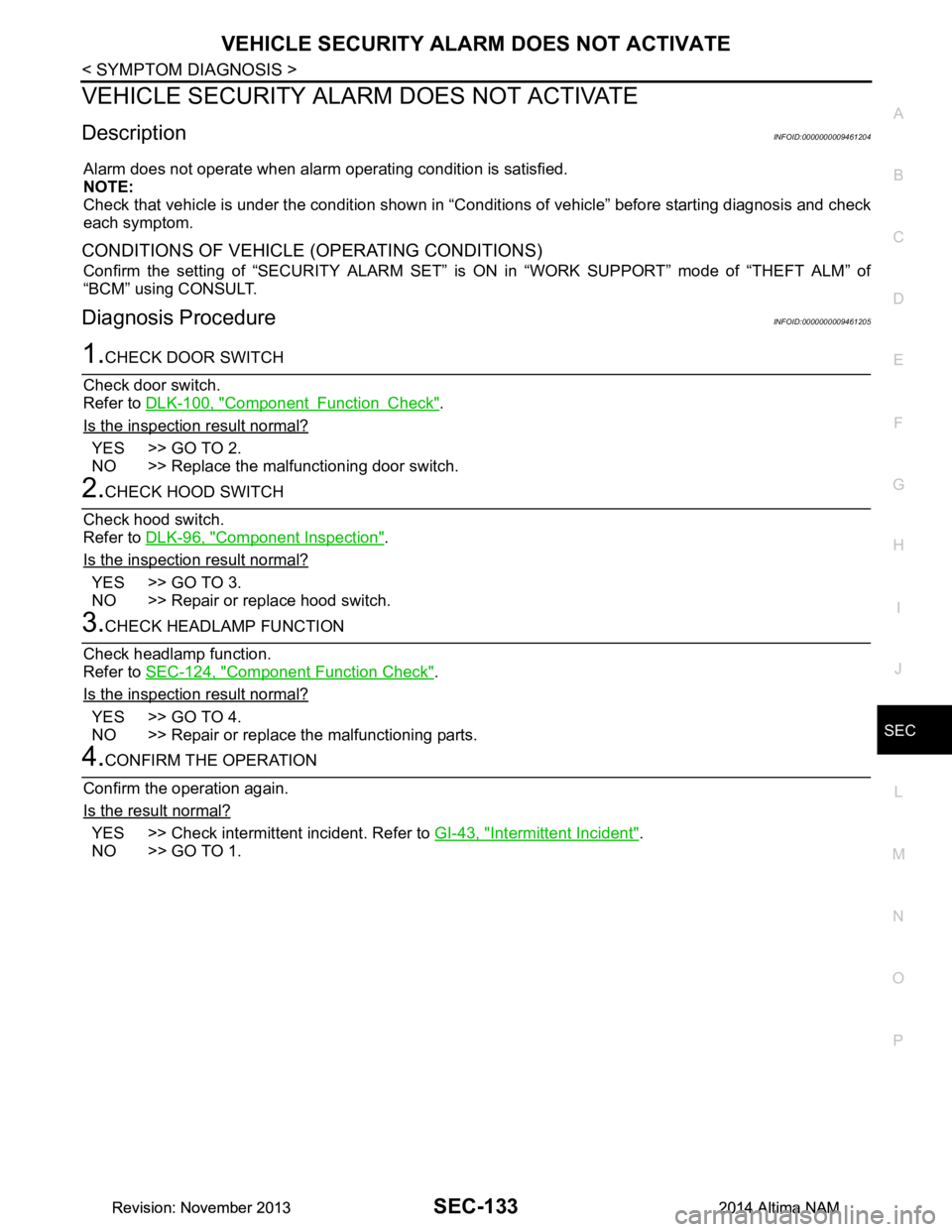
VEHICLE SECURITY ALAR M DOES NOT ACTIVATE
DescriptionINFOID:0000000009461204
Alarm does not operate when alarm operating condition is satisfied.
NOTE:
Check that vehicle is under the condition shown in “C onditions of vehicle” before starting diagnosis and check
each symptom.
CONDITIONS OF VEHICLE (OPERATING CONDITIONS)
Confirm the setting of “SECURITY ALARM SET” is ON in “WORK SUPPORT” mode of “THEFT ALM” of
“BCM” using CONSULT.
Diagnosis ProcedureINFOID:0000000009461205
1.CHECK DOOR SWITCH
Check door switch.
Refer to DLK-100, "Component Function Check"
.
Is the inspection result normal?
YES >> GO TO 2.
NO >> Replace the malfunctioning door switch.
2.CHECK HOOD SWITCH
Check hood switch.
Refer to DLK-96, "Component Inspection"
.
Is the inspection result normal?
YES >> GO TO 3.
NO >> Repair or replace hood switch.
3.CHECK HEADLAMP FUNCTION
Check headlamp function.
Refer to SEC-124, "Component Function Check"
.
Is the inspection result normal?
YES >> GO TO 4.
NO >> Repair or replace the malfunctioning parts.
4.CONFIRM THE OPERATION
Confirm the operation again.
Is the result normal?
YES >> Check intermittent incident. Refer to GI-43, "Intermittent Incident".
NO >> GO TO 1.
Revision: November 20132014 Altima NAMRevision: November 20132014 Altima NAM
Page 3959 of 4801
SEC-134
< SYMPTOM DIAGNOSIS >
PANIC ALARM FUNCTION DOES NOT OPERATE
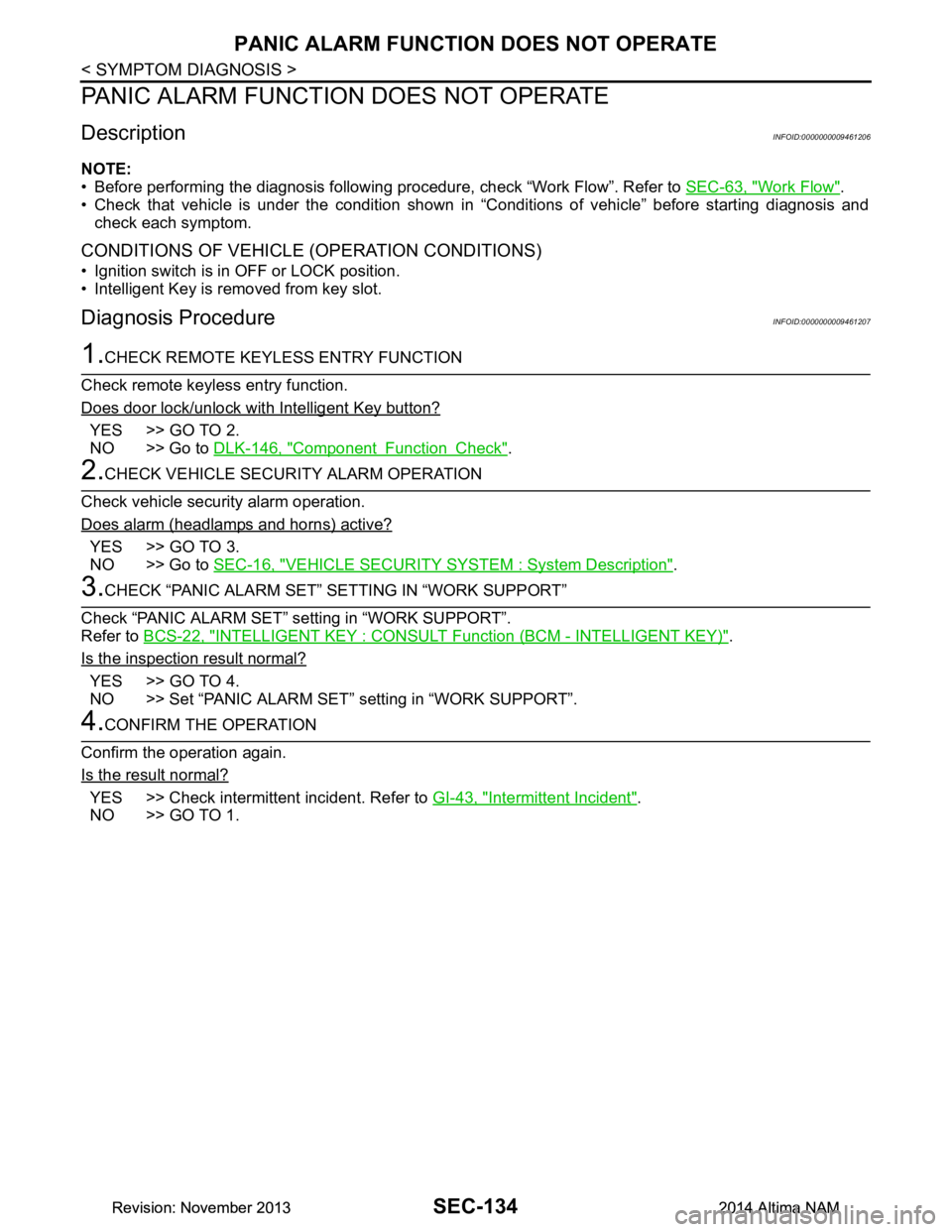
PANIC ALARM FUNCTION DOES NOT OPERATE
DescriptionINFOID:0000000009461206
NOTE:
• Before performing the diagnosis following procedure, check “Work Flow”. Refer to SEC-63, "Work Flow"
.
• Check that vehicle is under the condition shown in “Conditions of vehicle” before starting diagnosis and
check each symptom.
CONDITIONS OF VEHICLE (OPERATION CONDITIONS)
• Ignition switch is in OFF or LOCK position.
• Intelligent Key is removed from key slot.
Diagnosis ProcedureINFOID:0000000009461207
1.CHECK REMOTE KEYL ESS ENTRY FUNCTION
Check remote keyless entry function.
Does door lock/unlock with Intelligent Key button?
YES >> GO TO 2.
NO >> Go to DLK-146, "Component Function Check"
.
2.CHECK VEHICLE SECURITY ALARM OPERATION
Check vehicle security alarm operation.
Does alarm (headlamps and horns) active?
YES >> GO TO 3.
NO >> Go to SEC-16, "VEHICLE SECURITY SYSTEM : System Description"
.
3.CHECK “PANIC ALARM SET” SETTING IN “WORK SUPPORT”
Check “PANIC ALARM SET” setting in “WORK SUPPORT”.
Refer to BCS-22, "INTELLIGENT KEY : CONSULT Function (BCM - INTELLIGENT KEY)"
.
Is the inspection result normal?
YES >> GO TO 4.
NO >> Set “PANIC ALARM SET” setting in “WORK SUPPORT”.
4.CONFIRM THE OPERATION
Confirm the operation again.
Is the result normal?
YES >> Check intermittent incident. Refer to GI-43, "Intermittent Incident".
NO >> GO TO 1.
Revision: November 20132014 Altima NAMRevision: November 20132014 Altima NAM
Page 3964 of 4801

SR-2
< PRECAUTION >
PRECAUTIONS
PRECAUTION
PRECAUTIONS
Precaution for Supplemental Restraint System (SRS) "AIR BAG" and "SEAT BELT
PRE-TENSIONER"
INFOID:0000000009951759
The Supplemental Restraint System such as “A IR BAG” and “SEAT BELT PRE-TENSIONER”, used along
with a front seat belt, helps to reduce the risk or severi ty of injury to the driver and front passenger for certain
types of collision. Information necessary to service the system safely is included in the SR and SB section of
this Service Manual.
WARNING:
• To avoid rendering the SRS inopera tive, which could increase the risk of personal injury or death in
the event of a collision which would result in air bag inflation, all maintenance must be performed by
an authorized NISS AN/INFINITI dealer.
• Improper maintenance, including in correct removal and installation of the SRS, can lead to personal
injury caused by unintent ional activation of the system. For re moval of Spiral Cable and Air Bag
Module, see the SR section.
• Do not use electrical test equipmen t on any circuit related to the SRS unless instructed to in this
Service Manual. SRS wiring harn esses can be identified by yellow and/or orange harnesses or har-
ness connectors.
PRECAUTIONS WHEN USING POWER TOOLS (AIR OR ELECTRIC) AND HAMMERS
WARNING:
• When working near the Airbag Diagnosis Sensor Unit or other Airbag System sensors with the Igni-
tion ON or engine running, DO NOT use air or electri c power tools or strike near the sensor(s) with a
hammer. Heavy vibration could activate the sensor( s) and deploy the air bag(s), possibly causing
serious injury.
• When using air or electric power tools or hammers , always switch the Ignition OFF, disconnect the
battery and wait at least three minutes before performing any service.
ServiceINFOID:0000000009463063
• Do not use electrical test equipment to check SRS ci rcuits unless instructed to in this Service Manual.
• Before servicing the SRS, turn ignition switch OFF, disconnect both battery cables and wait at least three
minutes.
For approximately three minutes after the cables are remo ved, it is still possible for the air bag and seat belt
pre-tensioner to deploy. Therefore, do not work on any SRS connectors or wires until at least three minutes
have passed.
• Diagnosis sensor unit must always be installed with their arrow marks “ ⇐” pointing towards the front of the
vehicle for proper operation. Also chec k diagnosis sensor unit for cracks, deformities or rust before installa-
tion and replace as required.
• The spiral cable must be aligned with the neutral position since its rotations are limited. Do not turn steering
wheel and column after removal of steering gear.
• Handle air bag module carefully. Always place driver and front passenger air bag modules with the pad side facing upward and seat mounted front side air bag m odule standing with the stud bolt side facing down.
• Conduct self-diagnosis to check entire SRS for proper function after replacing any components.
• After air bag inflates, the instrument panel assembly should be replaced if damaged.
• Always replace instrument panel pad following front passenger air bag deployment.
Precaution for WorkINFOID:0000000009463065
• When removing or disassembling each component, be careful not to damage or deform it. If a component may be subject to interference, be sure to protect it with a shop cloth.
• When removing (disengaging) components with a screwdriver or similar tool, be sure to wrap the component with a shop cloth or vinyl tape to protect it.
• Protect the removed parts with a s hop cloth and prevent them from being dropped.
• Replace a deformed or damaged clip.
• If a part is specified as a non-reusable part, always replace it with a new one.
• Be sure to tighten bolts and nuts securely to the specified torque.
• After installation is complete, be sure to check that each part works properly.
Revision: November 20132014 Altima NAM
Page 3975 of 4801
DRIVER AIR BAG MODULESR-13
< REMOVAL AND INSTALLATION >
C
D E
F
G
I
J
K L
M A
B
SR
N
O P
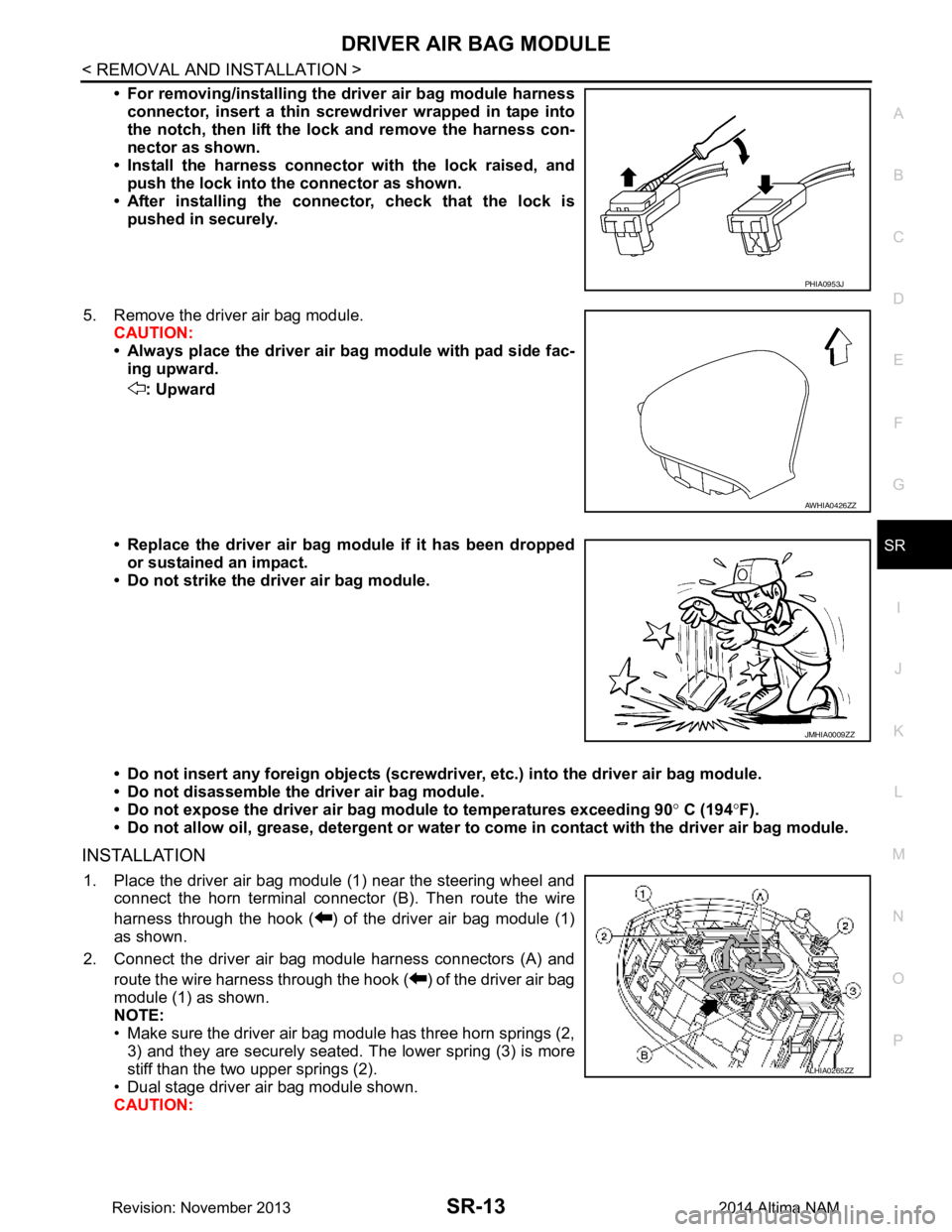
• For removing/installing the driver air bag module harness
connector, insert a thin screwdriver wrapped in tape into
the notch, then lift the lock and remove the harness con-
nector as shown.
• Install the harness connector with the lock raised, and push the lock into the connector as shown.
• After installing the connector, check that the lock is pushed in securely.
5. Remove the driver air bag module. CAUTION:
• Always place the driver air ba g module with pad side fac-
ing upward.
: Upward
• Replace the driver air bag module if it has been dropped or sustained an impact.
• Do not strike the driver air bag module.
• Do not insert any foreign objects (screwdri ver, etc.) into the driver air bag module.
• Do not disassemble the driver air bag module.
• Do not expose the driver air ba g module to temperatures exceeding 90 ° C (194 °F).
• Do not allow oil, grease, detergent or water to come in contact with the driver air bag module.
INSTALLATION
1. Place the driver air bag module (1) near the steering wheel and
connect the horn terminal connec tor (B). Then route the wire
harness through the hook ( ) of the driver air bag module (1)
as shown.
2. Connect the driver air bag module harness connectors (A) and route the wire harness through the hook ( ) of the driver air bag
module (1) as shown.
NOTE:
• Make sure the driver air bag module has three horn springs (2, 3) and they are securely seated. The lower spring (3) is more
stiff than the two upper springs (2).
• Dual stage driver air bag module shown.
CAUTION:
PHIA0953J
AWHIA0426ZZ
JMHIA0009ZZ
ALHIA0265ZZ
Revision: November 20132014 Altima NAM
Page 3976 of 4801
SR-14
< REMOVAL AND INSTALLATION >
DRIVER AIR BAG MODULE
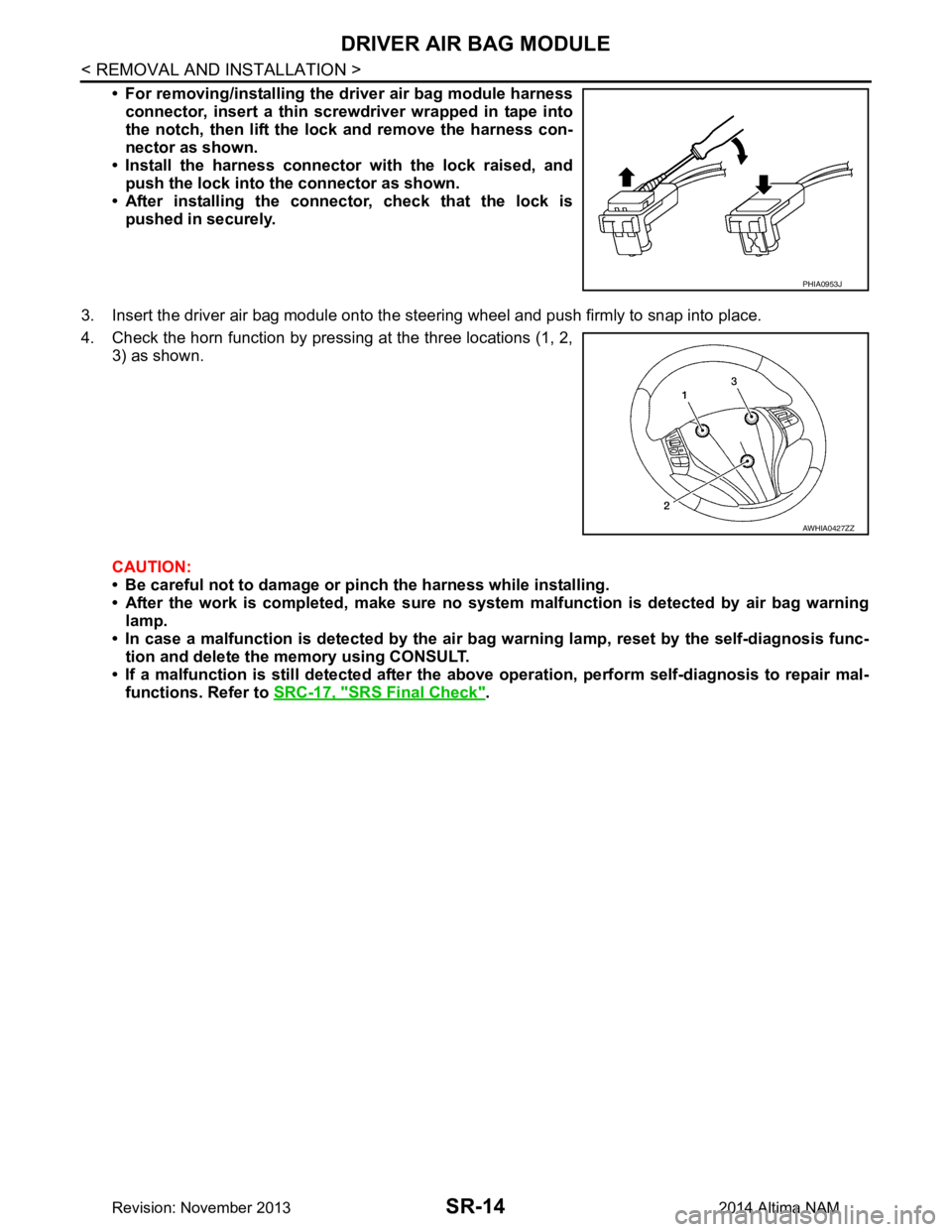
• For removing/installing the driver air bag module harnessconnector, insert a thin screwdriver wrapped in tape into
the notch, then lift the lock and remove the harness con-
nector as shown.
• Install the harness connector with the lock raised, and push the lock into the connector as shown.
• After installing the conn ector, check that the lock is
pushed in securely.
3. Insert the driver air bag module onto the st eering wheel and push firmly to snap into place.
4. Check the horn function by pressing at the three locations (1, 2, 3) as shown.
CAUTION:
• Be careful not to damage or pinch the harness while installing.
• After the work is completed, make sure no syst em malfunction is detected by air bag warning
lamp.
• In case a malfunction is detected by the air bag warning lamp, reset by the self-diagnosis func-
tion and delete the memory using CONSULT.
• If a malfunction is still detected after the abo ve operation, perform self-diagnosis to repair mal-
functions. Refer to SRC-17, "SRS Final Check"
.
PHIA0953J
AWHIA0427ZZ
Revision: November 20132014 Altima NAM
Page 3982 of 4801
SR-20
< REMOVAL AND INSTALLATION >
SIDE CURTAIN AIR BAG MODULE
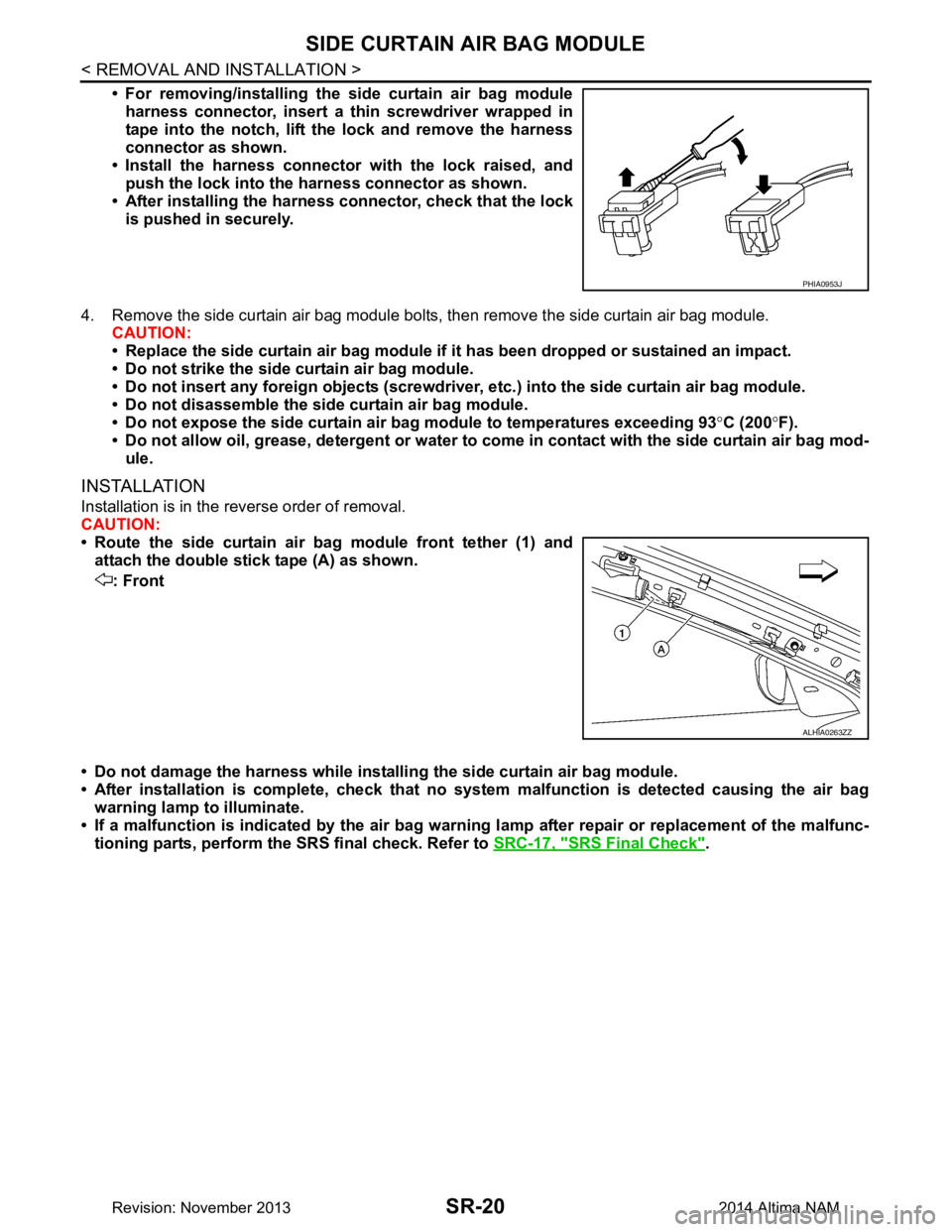
• For removing/installing the side curtain air bag moduleharness connector, insert a thin screwdriver wrapped in
tape into the notch, lift the lock and remove the harness
connector as shown.
• Install the harness connector with the lock raised, and push the lock into the harness connector as shown.
• After installing the harness connector, check that the lock
is pushed in securely.
4. Remove the side curtain air bag module bolts, then remove the side curtain air bag module. CAUTION:
• Replace the side curtain air bag module if it has been dropped or sustained an impact.
• Do not strike the side curtain air bag module.
• Do not insert any foreign objects (screwdriver , etc.) into the side curtain air bag module.
• Do not disassemble the side curtain air bag module.
• Do not expose the side curtain air bag module to temperatures exceeding 93 °C (200 °F).
• Do not allow oil, grease, detergent or water to co me in contact with the side curtain air bag mod-
ule.
INSTALLATION
Installation is in the reverse order of removal.
CAUTION:
• Route the side curtain air bag module front tether (1) and attach the double stick tape (A) as shown.
: Front
• Do not damage the harness while installi ng the side curtain air bag module.
• After installation is complete, check that no syst em malfunction is detected causing the air bag
warning lamp to illuminate.
• If a malfunction is indicated by the air bag warnin g lamp after repair or replacement of the malfunc-
tioning parts, perform the SRS final check. Refer to SRC-17, "SRS Final Check"
.
PHIA0953J
ALHIA0263ZZ
Revision: November 20132014 Altima NAM
Page 3988 of 4801
SR-26
< REMOVAL AND INSTALLATION >
DIAGNOSIS SENSOR UNIT
DIAGNOSIS SENSOR UNIT
Removal and InstallationINFOID:0000000009463080
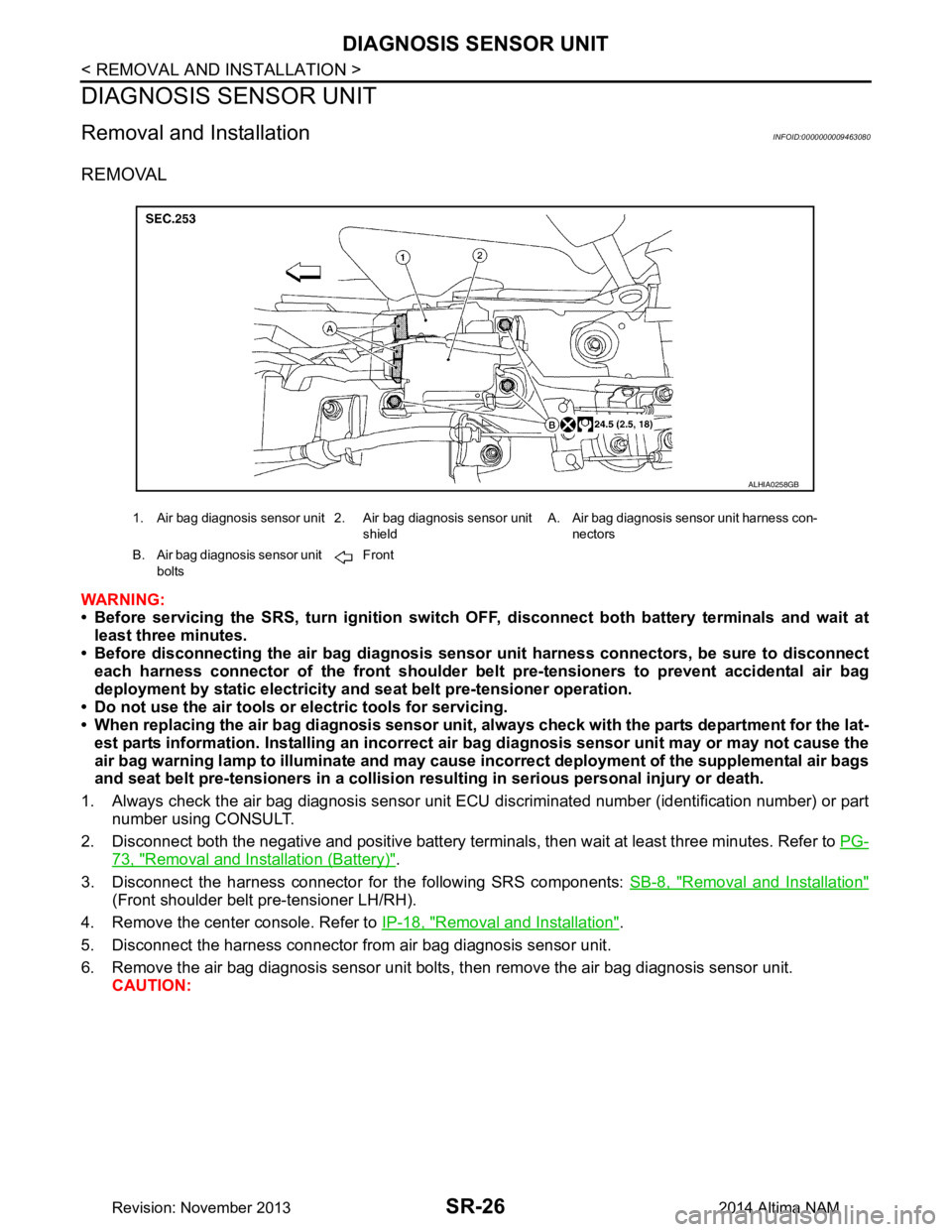
REMOVAL
WARNING:
• Before servicing the SRS, turn ig nition switch OFF, disconnect both battery terminals and wait at
least three minutes.
• Before disconnecting the air bag diagnosis sensor unit harness conn ectors, be sure to disconnect
each harness connector of the front shoulder belt pre-tensioners to prevent accidental air bag
deployment by static electricity and seat belt pre-tensioner operation.
• Do not use the air tools or electric tools for servicing.
• When replacing the air bag diagno sis sensor unit, always check with th e parts department for the lat-
est parts information. Installing an incorrect air bag diagnosis sen sor unit may or may not cause the
air bag warning lamp to illuminate and may cause in correct deployment of the supplemental air bags
and seat belt pre-tensioners in a collision r esulting in serious personal injury or death.
1. Always check the air bag diagnosis sensor unit ECU discriminated number (identification number) or part
number using CONSULT.
2. Disconnect both the negative and positive battery terminal s, then wait at least three minutes. Refer to PG-
73, "Removal and Installation (Battery)".
3. Disconnect the harness connector fo r the following SRS components: SB-8, "Removal and Installation"
(Front shoulder belt pre-tensioner LH/RH).
4. Remove the center console. Refer to IP-18, "Removal and Installation"
.
5. Disconnect the harness connector from air bag diagnosis sensor unit.
6. Remove the air bag diagnosis sensor unit bolts , then remove the air bag diagnosis sensor unit.
CAUTION:
1. Air bag diagnosis sensor unit 2. Air bag diagnosis sensor unit
shieldA. Air bag diagnosis sensor unit harness con-
nectors
B. Air bag diagnosis sensor unit bolts Front
ALHIA0258GB
Revision: November 20132014 Altima NAM
Page 3989 of 4801
DIAGNOSIS SENSOR UNITSR-27
< REMOVAL AND INSTALLATION >
C
D E
F
G
I
J
K L
M A
B
SR
N
O P
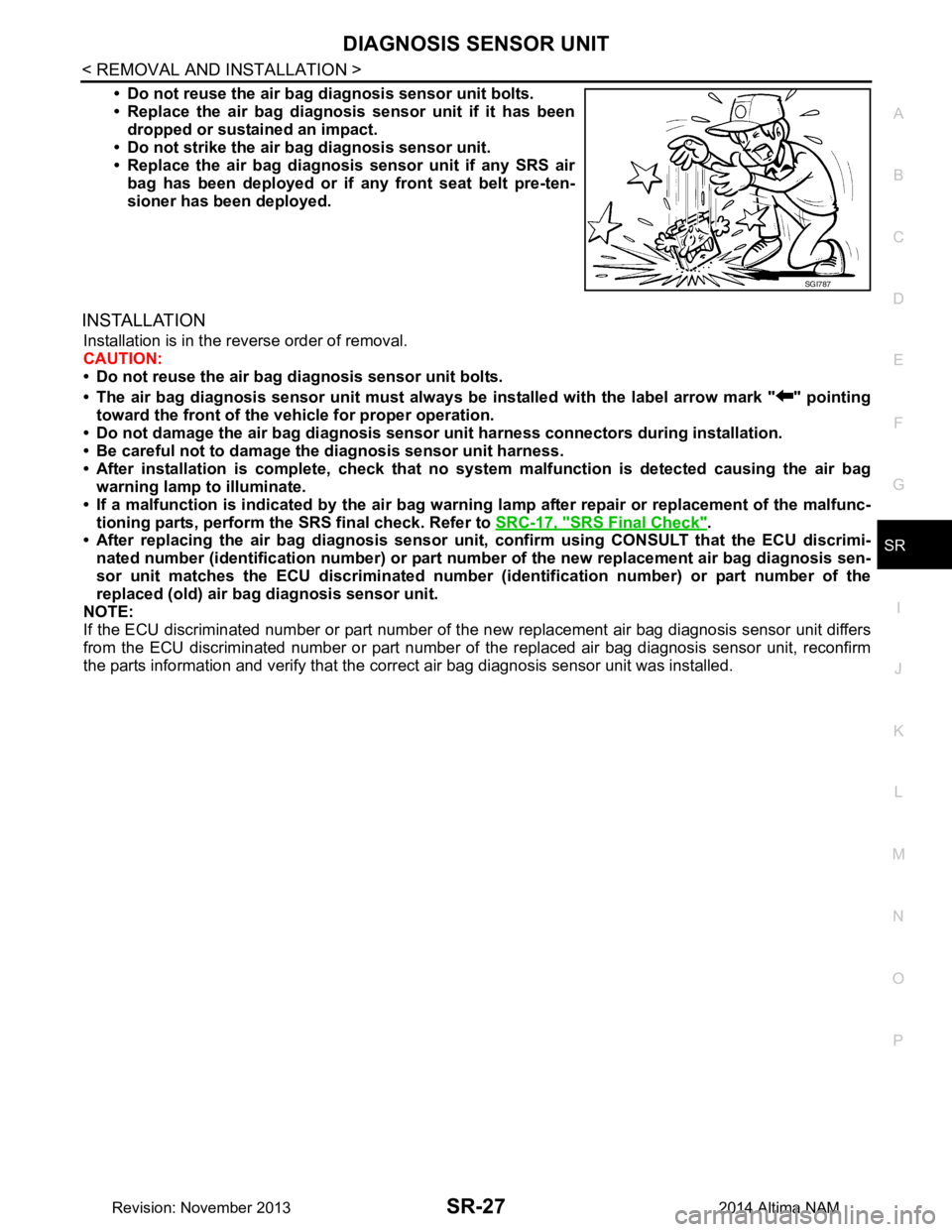
• Do not reuse the air bag di agnosis sensor unit bolts.
• Replace the air bag diagnosis sensor unit if it has been
dropped or sustained an impact.
• Do not strike the air ba g diagnosis sensor unit.
• Replace the air bag diagnosis sensor unit if any SRS air
bag has been deployed or if any front seat belt pre-ten-
sioner has been deployed.
INSTALLATION
Installation is in the reverse order of removal.
CAUTION:
• Do not reuse the air bag diagnosis sensor unit bolts.
• The air bag diagnosis sensor unit must always be installed with the label arrow mark " " pointing
toward the front of the vehicle for proper operation.
• Do not damage the air bag diagnosis sensor unit harness connectors during installation.
• Be careful not to damage the diagnosis sensor unit harness.
• After installation is complete, check that no syst em malfunction is detected causing the air bag
warning lamp to illuminate.
• If a malfunction is indicated by the air bag warnin g lamp after repair or replacement of the malfunc-
tioning parts, perform the SRS final check. Refer to SRC-17, "SRS Final Check"
.
• After replacing the air bag diagnosis sensor un it, confirm using CONSULT that the ECU discrimi-
nated number (identification number) or part nu mber of the new replacement air bag diagnosis sen-
sor unit matches the ECU discrimin ated number (identification number) or part number of the
replaced (old) air bag diagnosis sensor unit.
NOTE:
If the ECU discriminated number or pa rt number of the new replacement air bag diagnosis sensor unit differs
from the ECU discriminated number or part number of the replaced air bag diagnosis sensor unit, reconfirm
the parts information and verify that the corre ct air bag diagnosis sensor unit was installed.
SGI787
Revision: November 20132014 Altima NAM
Page 3994 of 4801

SRC-1
RESTRAINTS
C
D E
F
G
I
J
K L
M
SECTION SRC
A
B
SRC
N
O P
CONTENTS
SRS AIRBAG CONTROL SYSTEM
PRECAUTION ................ ...............................4
PRECAUTIONS .............................................. .....4
Precaution for Supplemental Restraint System
(SRS) "AIR BAG" and "SEAT BELT PRE-TEN-
SIONER" ............................................................. ......
4
Precaution for SRS "AIR BAG" and "SEAT BELT
PRE-TENSIONER" Service ................................ ......
4
SYSTEM DESCRIPTION ..............................5
COMPONENT PARTS ................................... .....5
Component Parts Location .................................. ......5
Component Description .............................................6
Driver Air Bag Module ...............................................7
Front Passenger Air Bag Module ..............................7
Front Side Air Bag Module .................................. ......7
Side Curtain Air Bag Module .....................................7
Front Seat Belt Pre-tensioner ....................................8
Air Bag Diagnosis Sensor Unit ..................................8
Crash Zone Sensor ...................................................8
Front Side Air Bag Satellite Sensor ...........................8
Rear Side Air Bag Satellite Sensor ...........................9
Front Door Satellite Sensor .......................................9
SRS Component Connectors ....................................9
SYSTEM .............................................................11
SRS AIR BAG SYSTEM ............................................11
SRS AIR BAG SYSTEM : Sy stem Diagram ............11
SRS AIR BAG SYSTEM : System Description ... ....11
OCCUPANT CLASSIFICATION SYSTEM ............ ....11
OCCUPANT CLASSIFICATION SYSTEM : Sys-
tem Diagram ........................................................ ....
12
OCCUPANT CLASSIFICATION SYSTEM : Sys-
tem Description ................................................... ....
12
SEAT BELT WARNING LAMP SYSTEM ..................13
SEAT BELT WARNING LAMP SYSTEM : System
Diagram ............................................................... ....
13
SEAT BELT WARNING LAMP SYSTEM : System
Description ........................................................... ....
14
DIAGNOSIS SYSTEM (AIR BAG) ....................15
Diagnosis Description ..............................................15
SRS Operation Check .............................................15
Trouble Diagnosis with CONSULT ..........................16
Trouble Diagnosis without CONSULT .....................17
SRS History Check ..................................................17
SRS Final Check .....................................................17
CONSULT Function (AIR BAG) ...............................17
CONSULT Function (OCCUPANT DETECTION) ....18
ECU DIAGNOSIS INFORMATION ..............19
DIAGNOSIS SENSOR UNIT .............................19
DTC Index ........................................................... ....19
Flash Code Index ....................................................23
WIRING DIAGRAM ......................................26
SRS AIR BAG SYSTEM ...................................26
Wiring Diagram .................................................... ....26
BASIC INSPECTION ...................................40
DIAGNOSIS AND REPAIR WORK FLOW .......40
Work Flow ............................................................ ....40
INSPECTION AND ADJUSTMENT ..................42
ADDITIONAL SERVICE WHEN REPLACING
CONTROL UNIT .................................................... ....
42
ADDITIONAL SERVICE WHEN REPLACING
CONTROL UNIT : Description ............................. ....
42
ADDITIONAL SERVICE WHEN REPLACING
CONTROL UNIT : Special Repair Requirement .. ....
42
ZERO POINT RESET ............................................. ....42
ZERO POINT RESET : Description .........................42
ZERO POINT RESET : Special Repair Require-
ment ..................................................................... ....
42
Revision: November 20132014 Altima NAMRevision: November 20132014 Altima NAM
Page 4001 of 4801
SRC-8
< SYSTEM DESCRIPTION >
COMPONENT PARTS
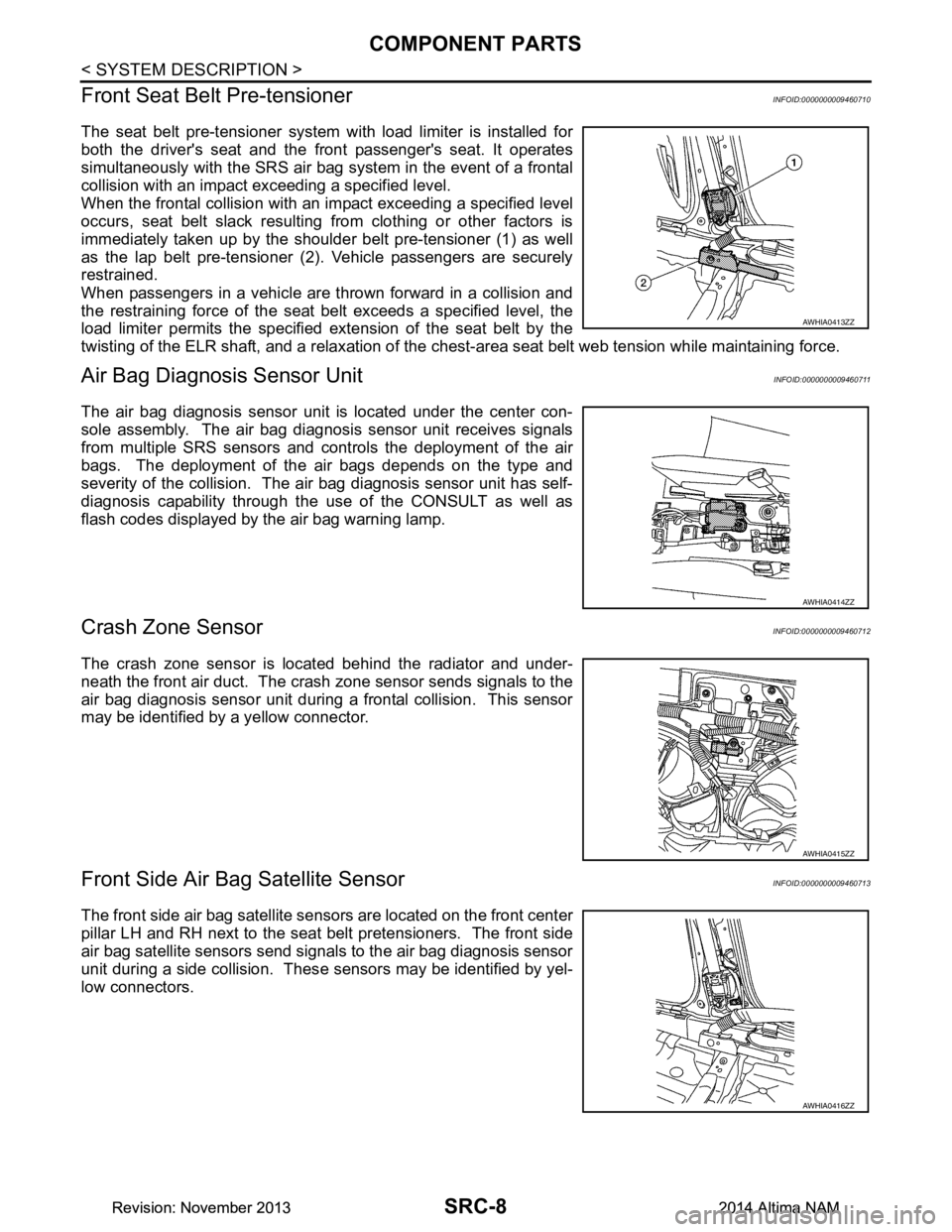
Front Seat Belt Pre-tensioner
INFOID:0000000009460710
The seat belt pre-tensioner system wi th load limiter is installed for
both the driver's seat and the front passenger's seat. It operates
simultaneously with the SRS air bag system in the event of a frontal
collision with an impact exceeding a specified level.
When the frontal collision with an im pact exceeding a specified level
occurs, seat belt slack resulting from clothing or other factors is
immediately taken up by the shoulder belt pre-tensioner (1) as well
as the lap belt pre-tensioner (2). Vehicle passengers are securely
restrained.
When passengers in a vehicle are thrown forward in a collision and
the restraining force of the seat belt exceeds a specified level, the
load limiter permits the specified extension of the seat belt by the
twisting of the ELR shaft, and a relaxation of the ches t-area seat belt web tension while maintaining force.
Air Bag Diagnosis Sensor UnitINFOID:0000000009460711
The air bag diagnosis sensor unit is located under the center con-
sole assembly. The air bag diagnosis sensor unit receives signals
from multiple SRS sensors and cont rols the deployment of the air
bags. The deployment of the air bags depends on the type and
severity of the collision. The air bag diagnosis sensor unit has self-
diagnosis capability through the use of the CONSULT as well as
flash codes displayed by the air bag warning lamp.
Crash Zone SensorINFOID:0000000009460712
The crash zone sensor is located behind the radiator and under-
neath the front air duct. The crash zone sensor sends signals to the
air bag diagnosis sensor unit during a frontal collision. This sensor
may be identified by a yellow connector.
Front Side Air B ag Satellite SensorINFOID:0000000009460713
The front side air bag satellite sensors are located on the front center
pillar LH and RH next to the seat belt pretensioners. The front side
air bag satellite sensors send signals to the air bag diagnosis sensor
unit during a side collision. Thes e sensors may be identified by yel-
low connectors.
AWHIA0413ZZ
AWHIA0414ZZ
AWHIA0415ZZ
AWHIA0416ZZ
Revision: November 20132014 Altima NAMRevision: November 20132014 Altima NAM