Rear light NISSAN TEANA 2014 Workshop Manual
[x] Cancel search | Manufacturer: NISSAN, Model Year: 2014, Model line: TEANA, Model: NISSAN TEANA 2014Pages: 4801, PDF Size: 51.2 MB
Page 2150 of 4801
![NISSAN TEANA 2014 Workshop Manual
EM-152
< REMOVAL AND INSTALLATION >[VQ35DE]
EXHAUST MANIFOLD AND THREE WAY CATALYST
Removal and Installation (LH)
INFOID:0000000009460546
REMOVAL
WARNING:
• Perform the work when the exhaust syst](/img/5/57390/w960_57390-2149.png "NISSAN TEANA 2014 Workshop Manual
EM-152
< REMOVAL AND INSTALLATION >[VQ35DE]
EXHAUST MANIFOLD AND THREE WAY CATALYST
Removal and Installation (LH)
INFOID:0000000009460546
REMOVAL
WARNING:
• Perform the work when the exhaust syst")
EM-152
< REMOVAL AND INSTALLATION >[VQ35DE]
EXHAUST MANIFOLD AND THREE WAY CATALYST
Removal and Installation (LH)
INFOID:0000000009460546
REMOVAL
WARNING:
• Perform the work when the exhaust system has completely cooled down.
• When removing the front and rear engine mounting th rough bolts and nuts, lift the engine up slightly
for safety.
NOTE:
When removing components such as hoses, tubes/lines, etc. , cap or plug openings to prevent fluid from spill-
ing.
1. Remove the air cleaner assembly, and air duct hose and resonator assembly. Refer to EM-144, "Removal
and Installation".
2. Remove the battery and battery tray assembly. Refer to PG-74, "Removal and Installation (Battery Tray)"
.
3. Remove the engine under cover. Refer to EXT-28, "Removal and Installation"
.
4. Remove the radiator assembly. Refer to CO-41, "Removal and Installation"
.
5. Remove the engine cooling fan shroud and motor assembly. Refer to CO-42, "Removal and Installation"
.
6. Remove the front exhaust tube. Refer to EX-10, "Exploded View"
.
7. Remove the LH three way catalyst support brackets.
8. Remove heated oxygen sensor 2 (bank 2), air fuel ratio (A/F) sensor 1 (bank 2).
a. Remove harness connector of each sensor, and di sconnect the harness from the bracket and middle
clamp.
b. Remove both heated oxygen sensor 2 and air fuel ratio (A/F) sensor 1 using Tool.
CAUTION:
• Be careful not to damage heated oxygen sen sors 2 or air fuel ratio (A/F) sensors 1.
• Discard any heated oxygen sensor 2 which has been dropped from a height of more than 0.5 m
(19.7 in) onto a hard surface such as a co ncrete floor; replace with a new sensor.
9. Remove exhaust manifold heat shield (LH) and three way catalyst heat shields (LH) using power tool.
10. Remove the three way catalyst (bank 2) by loosening the bolts first and then removing the nuts and through bolts.
11. Loosen and remove the exhaust manifold nuts in the reverse order as shown.
NOTE:
Number 7 and 8 are not applicable to removal.
12. Remove the exhaust manifold (LH) and gasket.
INSPECTION AFTER REMOVAL
Surface Distortion Tool numbers : KV10114400 (J-38365)
: KV991J0050 (J-44626)
: Engine front
AWBIA1208GB
Revision: November 20132014 Altima NAM
Page 2152 of 4801
![NISSAN TEANA 2014 Workshop Manual
EM-154
< REMOVAL AND INSTALLATION >[VQ35DE]
EXHAUST MANIFOLD AND THREE WAY CATALYST
• Perform the work when the exhaust and co
oling system have completely cooled down.
• When removing the front](/img/5/57390/w960_57390-2151.png "NISSAN TEANA 2014 Workshop Manual
EM-154
< REMOVAL AND INSTALLATION >[VQ35DE]
EXHAUST MANIFOLD AND THREE WAY CATALYST
• Perform the work when the exhaust and co
oling system have completely cooled down.
• When removing the front")
EM-154
< REMOVAL AND INSTALLATION >[VQ35DE]
EXHAUST MANIFOLD AND THREE WAY CATALYST
• Perform the work when the exhaust and co
oling system have completely cooled down.
• When removing the front and rear engine mounting th rough bolts and nuts, lift the engine up slightly
for safety. For engine slingers, refer to EM-220, "Removal and Installation"
.
1. Remove the engine and transaxle assembly. Refer to EM-220, "Removal and Installation"
.
2. Remove the RH three way catalyst supports.
3. Remove rear engine mount bracket. Refer to EM-220, "Removal and Installation"
.
4. Remove heated oxygen sensor 2 (bank 1), air fuel ratio (A/F) sensor 1 (bank 1).
a. Remove harness connector from heated oxygen sensor 2 and air fuel ration (A/F) sensor 1, and discon-
nect the harness from the bracket and middle clamp.
b. Remove both heated oxygen sensors 2 and air fuel ratio (A/F) sensors 1 using Tool.
CAUTION:
• Be careful not to damage heated oxygen sen sors 2 or air fuel ratio (A/F) sensors 1.
• Discard any heated oxygen sensor 2 which has been dropped from a height of more than 0.5 m
(19.7 in) onto a hard surface such as a co ncrete floor; replace with a new sensor.
5. Remove exhaust manifold heat shield (RH) and three way catalyst heat shields (RH) using power tool.
6. Remove the three way catalyst (bank 1) by loosening the bolts first and then removing the nuts and through bolts.
7. Loosen the exhaust manifold nuts in the reverse order as shown and remove the exhaust manifold (RH).
NOTE:
Number 7 and 8 are not applicable to removal.
INSPECTION AFTER REMOVAL
Surface Distortion
• Use a reliable straightedge and feeler gauge to check the flatness of the exhaust manifold mating surfaces.
INSTALLATION
Installation is in the reverse order of removal.
CAUTION:
Do not reuse exhaust manifold gaskets. Tool numbers : KV10114400 (J-38365)
: KV991J0050 (J-44626)
: Engine front
AWBIA1209GB
Limit : 0.3mm (0.012 in)
PBIC1173E
Revision: November 20132014 Altima NAM
Page 2155 of 4801
![NISSAN TEANA 2014 Workshop Manual
OIL PAN AND OIL STRAINEREM-157
< REMOVAL AND INSTALLATION > [VQ35DE]
C
D E
F
G H
I
J
K L
M A
EM
NP
O
a. Insert Tool (A) between the lower oil pan and the upper oil pan.
CAUTION:
• Be careful not](/img/5/57390/w960_57390-2154.png "NISSAN TEANA 2014 Workshop Manual
OIL PAN AND OIL STRAINEREM-157
< REMOVAL AND INSTALLATION > [VQ35DE]
C
D E
F
G H
I
J
K L
M A
EM
NP
O
a. Insert Tool (A) between the lower oil pan and the upper oil pan.
CAUTION:
• Be careful not")
OIL PAN AND OIL STRAINEREM-157
< REMOVAL AND INSTALLATION > [VQ35DE]
C
D E
F
G H
I
J
K L
M A
EM
NP
O
a. Insert Tool (A) between the lower oil pan and the upper oil pan.
CAUTION:
• Be careful not to damage the mating surface.
• Do not insert a screwdriver or similar tool, this will dam-
age the mating surfaces.
b. In areas where the cutter is difficult to use, use a plastic hammer to lightly tap (1) the cutter where the liquid gasket is applied. Use
a plastic hammer to slide (2) the cutter by tapping on the side.
4. If re-installing the original lower oil pan, remove the old liquid gasket from the mating surfaces using a scraper.
• Also remove the old liquid gasket from mating surface of the upper oil pan.
• Remove the old liquid gasket from the bolt holes and threads.
CAUTION:
Do not scratch or damage the mating surf aces when cleaning off the old liquid gasket.
INSPECTION AFTER REMOVAL
Clean oil strainer if any object is attached.
INSTALLATION
1. Apply a continuous bead of liquid gasket to the lower oil pan.
• Use Genuine Silicone RTV Sealant, or equivalent. Refer to GI-
21, "Recommended Chemical Products and Sealants".
• Be sure the liquid gasket is 4.5 - 5.5 mm (0.177 - 0.217 in) wide.
• Installation must be done within 5 minutes after applying liquid gasket.
2. Install the lower oil pan. Tighten the lower oil pan bolts in order as shown.
• Wait at least 30 minutes before refilling the engine with oil.
INSPECTION AFTER INSTALLATION
• Start the engine and check for leaks. Refer to LU-25, "Inspection".
• Inspect the engine oil level. Refer to LU-25, "Inspection"
.
Removal and Installation (Upper Oil Pan)INFOID:0000000009460550
REMOVAL
WARNING:
• Do not remove the oil pan until the exhaust system and cooling syst em have completely cooled off.
• When removing the front and rear engine through bolt s and nuts, lift the engine up slightly for safety.
For engine slingers, refer to EM-220, "Removal and Installation"
.
CAUTION:
When removing the upper oil pan from the engine , first remove the crankshaft position sensor (POS).
Be careful not to damage senso r edges or signal plate teeth.
Tool number : KV10111100 (J-37228)
AWBIA1249GB
SEM159F
AWBIA1357ZZ
Revision: November 20132014 Altima NAM
Page 2188 of 4801
![NISSAN TEANA 2014 Workshop Manual
EM-190
< REMOVAL AND INSTALLATION >[VQ35DE]
REAR TIMING CHAIN CASE
• Before removing the upper oil pan, re
move the crankshaft position sensor (POS).
• Be careful not to damage sensor edges.
•](/img/5/57390/w960_57390-2187.png "NISSAN TEANA 2014 Workshop Manual
EM-190
< REMOVAL AND INSTALLATION >[VQ35DE]
REAR TIMING CHAIN CASE
• Before removing the upper oil pan, re
move the crankshaft position sensor (POS).
• Be careful not to damage sensor edges.
•")
EM-190
< REMOVAL AND INSTALLATION >[VQ35DE]
REAR TIMING CHAIN CASE
• Before removing the upper oil pan, re
move the crankshaft position sensor (POS).
• Be careful not to damage sensor edges.
• Do not spill engine oil or coolant on drive belt.
1. Remove the engine assembly. Refer to EM-220, "Removal and Installation"
.
2. Remove the oil pan lower and upper. Refer to EM-157, "Removal and Installation (Upper Oil Pan)"
.
3. Remove the front timing chain case. Refer to EM-174, "Removal and Installation"
.
4. Remove the primary and secondary timing chains. Refer to EM-182, "Removal and Installation"
.
5. Remove the rear timing chain case. CAUTION:
• Do not remove the plate metal cover for the oil passage.
• After removing the chain case, do not apply any load to
the case that might bend it.
a. Loosen and remove the rear timing chain case bolts in the order as shown.
b. Cut the sealant using Tool (A) and remove the rear timing chain case.
CAUTION:
• Be careful not to damage the mating surface.
• Do not insert a screwdriver or similar tool, this will dam-
age the mating surfaces.
c. In areas where the cutter is difficult to use, use a plastic hammer to lightly tap (1) the cutter where the liquid gasket is applied. Use
a plastic hammer to slide (2) the cutter by tapping on the side.
KBIA1307E
Tool number : KV10111100 (J-37228)
AWBIA0709ZZ
AWBIA1249GB
Revision: November 20132014 Altima NAM
Page 2274 of 4801

EXL-8
< SYSTEM DESCRIPTION >
COMPONENT PARTS
Component Description
INFOID:0000000009463542
1. BCM (view with combination meter re-
moved) 2. Combination switch
(lighting and turn signal switch) 3. IPDM E/R, (Headlamp high relay,
Headlamp low relay, Tail lamp relay
and Front fog lamp relay (if equipped))
4. Fuse, fusible link and relay box (Stop lamp relay) 5. Combination meter 6. Parking brake switch
7. Stop lamp switch 8. Hazard switch 9. Optical sensor
10. Front door switch LH (RH similar) 11. Rear door switch LH
(RH similar) 12. Daytime light relay
(if equipped)
Part Description
BCM Controls the exterior lighting system.
Combination switch
(Lighting & turn signal switch) Refer to
BCS-8, "COMBINATION SWITCH READIN G SYSTEM : System Description"
.
IPDM E/R Controls the integrated relays and supplies voltage to the load according to the request from the BCM
via CAN communication.
Stop lamp switch Transmits power to the stop lamp relay when the brake pedal is pressed to operate stop lamps.
Combination meter Refer to MWI-9, "METER SYSTEM : System Description"
.
Daytime light relay
(if equipped) Sends power to the daytime lamp when operated by the IPDM E/R.
Stop lamp relay Transmits power to the stop lamps when the brake pedal is pressed.
Front door switch LH/RH Transmits the door open signal to the BCM.
Rear door switch LH/RH
Optical sensor Optical sensor converts the outside brightness (lux) to voltage and transmits the optical sensor signal
to BCM to operate the auto light system.
Parking brake switch Transmits the parking brake switch signal to the combination meter to operate the auto light system.
Hazard switch Inputs the hazard switch signal to BCM.
Revision: November 20132014 Altima NAMRevision: November 20132014 Altima NAM
Page 2284 of 4801

EXL-18
< SYSTEM DESCRIPTION >
DIAGNOSIS SYSTEM (BCM)
HEADLAMP
HEADLAMP : CONSULT Function (BCM - HEADLAMP)INFOID:0000000009956425
CAUTION:
After disconnecting the CONSULT vehicle interface (VI) from the data link connector, the ignition must
be cycled OFF → ON (for at least 5 seconds) → OFF. If this step is not performed, the BCM may not go
to ”sleep mode”, potentially causing a di scharged battery and a no-start condition.
DATA MONITOR
ACTIVE TEST
RAP system RETAINED PWR ×
Signal buffer system SIGNAL BUFFER ×
TPMS AIR PRESSURE MONITOR ××××
System Sub System
Direct Diagnostic Mode
Ecu Identification
Self Diagnostic Result
Data Monitor
Active Test
Work support
Configuration
CAN Diag Support Mntr
Monitor Item [Unit] Description
PUSH SW [On/Off] Indicates condition of push-button ignition switch.
ENGINE STATE [STOP/STALL/CRANK/RUN] Indicates engine st atus received from ECM on CAN communication line.
VEH SPEED 1 [km/h] Indicates vehicle speed signal received from ABS on CAN communication line.
TURN SIGNAL R [On/Off]
Indicates condition of combination switch.
TURN SIGNAL L [On/Off]
TAIL LAMP SW [On/Off]
HI BEAM SW [On/Off]
HEAD LAMP SW 1 [On/Off]
HEAD LAMP SW 2 [On/Off]
PASSING SW [On/Off]
AUTO LIGHT SW [On/Off]
FR FOG SW [On/Off]
DOOR SW-DR [On/Off] Indicates condition of front door switch LH.
DOOR SW-AS [On/Off] Indicates condition of front door switch RH.
DOOR SW-RR [On/Off] Indicates condition of rear door switch RH.
DOOR SW-RL [On/Off] Indicates condition of rear door switch LH.
DOOR SW-BK [On/Off] Indicates condition of trunk switch.
OPTI SEN (DTCT) [V] Indicates outside brightness voltage signal from optical sensor.
OPTI SEN (FILT) [V] Indicates outside brightness voltage signal from optical sensor filtered by BCM.
Test Item Description
FR FOG LAMP This test is able to check front fog lamp operation [On/Off].
DAYTIME RUNNING LIGHT This test is able to check daytime running la mp operation [On/Off].
ILL DIM SIGNAL This test is able to check head lamp illumination dimming operation [On/Off].
Revision: November 20132014 Altima NAMRevision: November 20132014 Altima NAM
Page 2286 of 4801

EXL-20
< SYSTEM DESCRIPTION >
DIAGNOSIS SYSTEM (BCM)
COMB SW
COMB SW : CONSULT Function (BCM - COMB SW)INFOID:0000000009956484
CAUTION:
After disconnecting the CONSULT vehicle interface (VI) from the data link connector, the ignition must
be cycled OFF → ON (for at least 5 seconds) → OFF. If this step is not performed, the BCM may not go
to ”sleep mode”, potentially causing a di scharged battery and a no-start condition.
DATA MONITOR
BATTERY SAVER
BATTERY SAVER : CONSULT Function (BCM - BATTERY SAVER)INFOID:0000000009956486
CAUTION:
After disconnecting the CONSULT vehicle interface (VI) from the data link connector, the ignition must
be cycled OFF → ON (for at least 5 seconds) → OFF. If this step is not performed, the BCM may not go
to ”sleep mode”, potentially causing a di scharged battery and a no-start condition.
DATA MONITOR
Monitor Item [Unit] Description
FR WIPER HI [On/Off]
Indicates condition of wiper operation of combination switch.
FR WIPER LOW [On/Off]
FR WASHER SW [On/Off]
FR WIPER INT [On/Off]
INT VOLUME [1 - 7] Indicates condition of intermittent wiper operation of combination switch.
TURN SIGNAL R [On/Off] Indicates condition of right turn signal operation of combination switch.
TURN SIGNAL L [On/Off] Indicates condition of left turn signal operation of combination switch.
TAIL LAMP SW [On/Off] Indicates condition of tail lamp switch operation of combination switch.
HI BEAM SW [On/Off] Indicates condition of Hi beam switch operation of combination switch.
HEAD LAMP SW 1 [On/Off] Indicates condition of head lamp switch 1 operation of combination switch.
HEAD LAMP SW 2 [On/Off] Indicates condition of head lamp switch 2 operation of combination switch.
PASSING SW [On/Off] Indicates condition of pass ing switch operation of combination switch.
AUTO LIGHT SW [On/Off] Indicates condition of auto light switch operation of combination switch.
FR FOG SW [On/Off] Indicates condition of front fog lamp switch operation of combination switch.
Monitor Item [Unit] Description
REQ SW -DR [On/Off] Indicates condition of door request switch LH.
REQ SW -AS [On/Off] Indicates condition of door request switch RH.
PUSH SW [On/Off] Indicates condition push-button ignition switch.
UNLK SEN -DR [On/Off] Indicates condition of door unlock sensor.
DOOR SW-DR [On/Off] Indicates condition of front door switch LH.
DOOR SW-AS [On/Off] Indicates condition of front door switch RH.
DOOR SW-RR [On/Off] Indicates condition of rear door switch RH.
DOOR SW-RL [On/Off] Indicates condition of rear door switch LH.
DOOR SW-BK [On/Off] Indicates condition of trunk switch.
CDL LOCK SW [On/Off] Indicates condition of lock signal from door lock and unlock switch.
CDL UNLOCK SW [On/Off] Indicates condition of unlock signal from door lock and unlock switch.
KEY CYL LK-SW [On/Off] Indicates condition of lo ck signal from door key cylinder switch.
Revision: November 20132014 Altima NAMRevision: November 20132014 Altima NAM
Page 2381 of 4801
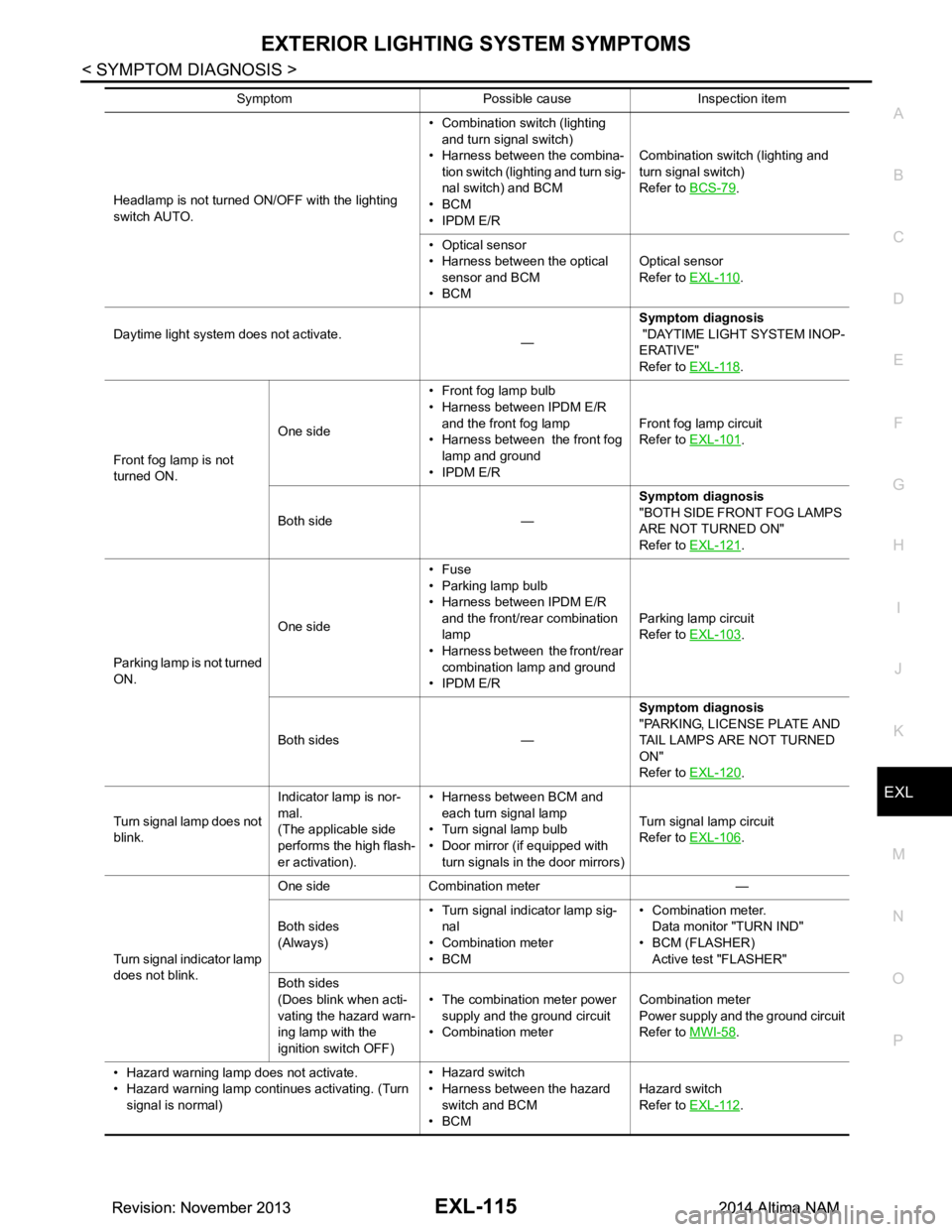
EXTERIOR LIGHTING SYSTEM SYMPTOMSEXL-115
< SYMPTOM DIAGNOSIS >
C
D E
F
G H
I
J
K
M A
B
EXL
N
O P
Headlamp is not turned ON/OFF with the lighting
switch AUTO. • Combination switch (lighting
and turn signal switch)
• Harness between the combina- tion switch (lighting and turn sig-
nal switch) and BCM
•BCM
• IPDM E/R Combination switch (lighting and
turn signal switch)
Refer to BCS-79.
• Optical sensor
• Harness between the optical
sensor and BCM
•BCM Optical sensor
Refer to EXL-110
.
Daytime light system does not activate. —Symptom diagnosis
"DAYTIME LIGHT SYSTEM INOP-
ERATIVE"
Refer to EXL-118
.
Front fog lamp is not
turned ON. One side
• Front fog lamp bulb
• Harness between IPDM E/R
and the front fog lamp
• Harness between the front fog lamp and ground
• IPDM E/R Front fog lamp circuit
Refer to EXL-101
.
Both side — Symptom diagnosis
"BOTH SIDE FRONT FOG LAMPS
ARE NOT TURNED ON"
Refer to EXL-121
.
Parking lamp is not turned
ON. One side•Fuse
• Parking lamp bulb
• Harness between IPDM E/R
and the front/rear combination
lamp
• Harness between the front/rear
combination lamp and ground
• IPDM E/R Parking lamp circuit
Refer to EXL-103
.
Both sides — Symptom diagnosis
"PARKING, LICENSE PLATE AND
TAIL LAMPS ARE NOT TURNED
ON"
Refer to EXL-120
.
Turn signal lamp does not
blink. Indicator lamp is nor-
mal.
(The applicable side
performs the high flash-
er activation). • Harness between BCM and
each turn signal lamp
• Turn signal lamp bulb
• Door mirror (if equipped with
turn signals in the door mirrors) Turn signal lamp circuit
Refer to EXL-106
.
Turn signal indicator lamp
does not blink. One side Combination meter —
Both sides
(Always) • Turn signal indicator lamp sig-
nal
• Combination meter
•BCM • Combination meter.
Data monitor "TURN IND"
• BCM (FLASHER) Active test "FLASHER"
Both sides
(Does blink when acti-
vating the hazard warn-
ing lamp with the
ignition switch OFF) • The combination meter power
supply and the ground circuit
• Combination meter Combination meter
Power supply and the ground circuit
Refer to MWI-58
.
• Hazard warning lamp does not activate.
• Hazard warning lamp continues activating. (Turn signal is normal) • Hazard switch
• Harness between the hazard switch and BCM
•BCM Hazard switch
Refer to EXL-112
.
Symptom Possible cause Inspection item
Revision: November 20132014 Altima NAMRevision: November 20132014 Altima NAM
Page 2390 of 4801
EXL-124
< PERIODIC MAINTENANCE >
FRONT FOG LAMP
FRONT FOG LAMP
Aiming AdjustmentINFOID:0000000009463618
PREPARATION BEFORE ADJUSTING
The fog lamp is a semi-sealed beam type which uses a replaceable halogen bulb. Before performing aiming
adjustment procedure, check the following:
• Ensure all tires are inflated to correct pressure.
• Place vehicle and screen on level surface.
• Ensure there is no load in vehicle other than the driver (or equivalent weight placed in driver's position).
• Coolant and engine oil filled to correct level, and fuel tank full.
• Remove cargo and/or luggage to maintain an unloaded vehicle condition.
• Confirm spare tire, jack and tools are properly stowed.
• Carefully wipe off any dirt from headlamp lens. CAUTION:
Do not use organic solvent (thinner, gasoline etc.)
• Place a driver or equivalent weight of 68.5 kg (150 lb) on the driver seat.
• By hand, bounce the front and rear of the vehicle to settle the suspension and eliminate any static load.
• Place the front tires in the straight ahead position.
• Aim each headlamp individually and ensure other headlamp beam pattern is blocked from screen.
NOTE:
• For headlamp aiming details, refer to regulations in your area.
• By regulation, no means for horizontal aim adjustment is provided from the factory; only vertical aim is
adjustable.
• Use adjusting screw to perform aiming adjustment.
• Perform headlamp aiming if:
- The vehicle front body has been repaired.
- The front combination lamp has been removed or replaced.
- Any outfitting has been installed.
- The vehicle’s standard load condition has been substantially increased.
Aiming Adjustment Procedure
1. Place the screen. NOTE:
• Stop the vehicle facing the wall.
• Place the board on a plain road vertically.
2. Face the vehicle with the screen. Maintain 7.62 m (25.0 ft) between the front fog lamp center and the
screen.
3. Start the engine. Turn the front fog lamp ON. NOTE:
Shut off the headlamp light with the board to prevent from illuminating the adjustment screen.
CAUTION:
Do not cover the lens surface with a tape etc. The lens is made of resin.
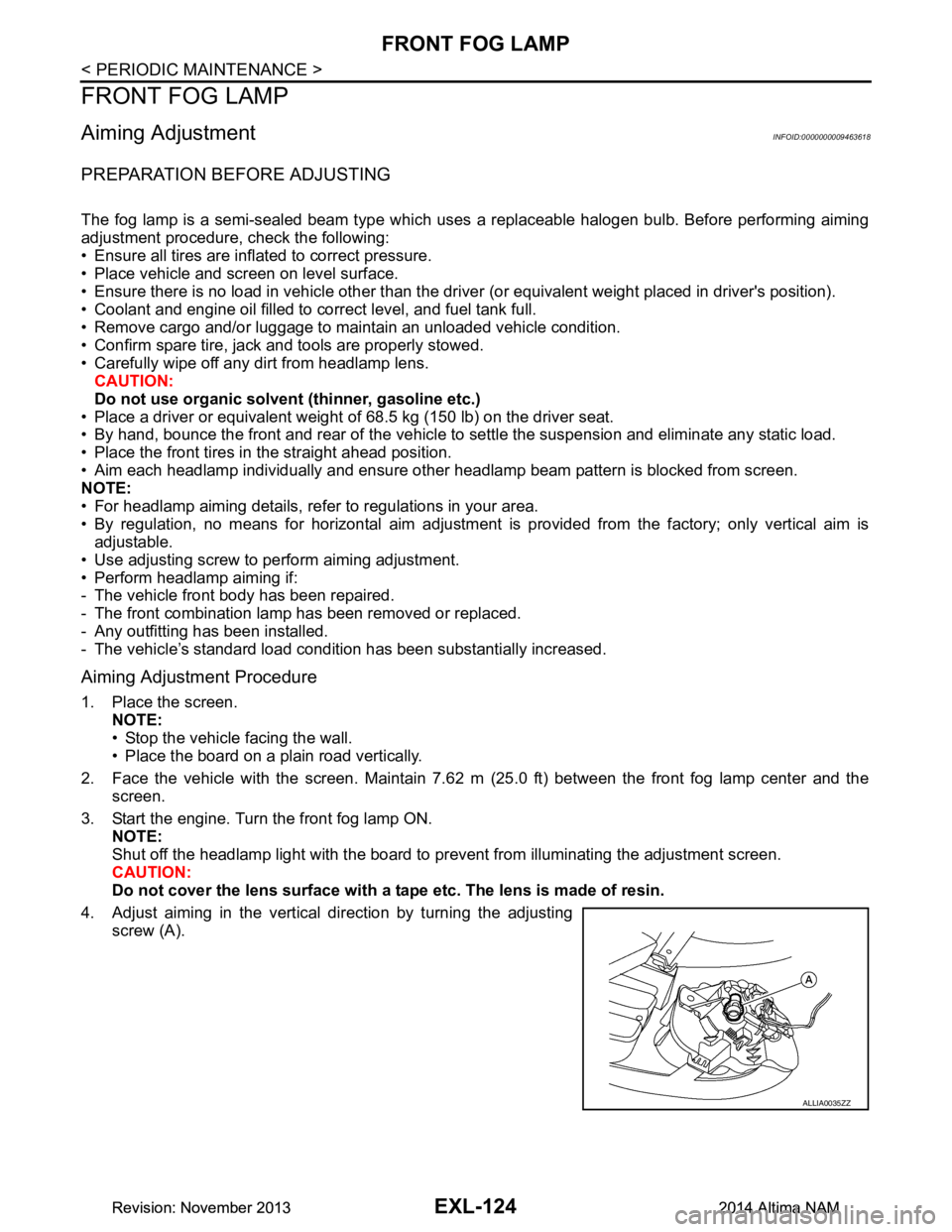
4. Adjust aiming in the vertical direction by turning the adjusting screw (A).
ALLIA0035ZZ
Revision: November 20132014 Altima NAMRevision: November 20132014 Altima NAM
Page 2426 of 4801

EXT-12
< PERIODIC MAINTENANCE >
SQUEAK AND RATTLE TROUBLE DIAGNOSES
INSTRUMENT PANEL
Most incidents are caused by contact and movement between:
1. Cluster lid A and the instrument panel
2. Acrylic lens and combination meter housing
3. Instrument panel to front pillar finisher
4. Instrument panel to windshield
5. Instrument panel pins
6. Wiring harnesses behind the combination meter
7. A/C defroster duct and duct joint
These incidents can usually be located by tapping or moving the components to duplicate the noise or by
pressing on the components while driving to stop the noise. Most of these incidents can be repaired by apply-
ing felt cloth tape or silicone spray (in hard to reach areas). Urethane pads can be used to insulate wiring har-
ness.
CAUTION:
Do not use silicone spray to isolate a squeak or ra ttle. If you saturate the area with silicone, you will
not be able to recheck the repair.
CENTER CONSOLE
Components to pay attention to include:
1. Shift selector assembly cover to finisher
2. A/C control unit and cluster lid C
3. Wiring harnesses behind audio and A/C control unit
The instrument panel repair and isolation pr ocedures also apply to the center console.
DOORS
Pay attention to the:
1. Finisher and inner panel making a slapping noise
2. Inside handle escutcheon to door finisher
3. Wiring harnesses tapping
4. Door striker out of alignment causing a popping noise on starts and stops
Tapping or moving the components or pressing on them wh ile driving to duplicate the conditions can isolate
many of these incidents. You can usually insulate the areas with felt cloth tape or insulator foam blocks from
the NISSAN Squeak and Rattle Kit (J-50397) to repair the noise.
TRUNK
Trunk noises are often caused by a loose jack or loose items put into the trunk by the owner.
In addition look for:
1. Trunk lid bumpers out of adjustment
2. Trunk lid striker out of adjustment
3. The trunk lid torsion bars knocking together
4. A loose license plate or bracket
Most of these incidents can be repaired by adjusting, se curing or insulating the item(s) or component(s) caus-
ing the noise.
SUNROOF/HEADLINING
Noises in the sunroof/headlining area c an often be traced to one of the following:
1. Sunroof lid, rail, linkage or seals making a rattle or light knocking noise
2. Sun visor shaft shaking in the holder
3. Front or rear windshield touching headlining and squeaking
Again, pressing on the components to stop the noise while duplicating the conditions can isolate most of these
incidents. Repairs usually consist of insulating with felt cloth tape.
OVERHEAD CONSOLE (FRONT AND REAR)
Overhead console noises are often caused by the c onsole panel clips not being engaged correctly. Most of
these incidents are repaired by pushing up on the c onsole at the clip locations until the clips engage.
In addition look for:
Revision: November 20132014 Altima NAM