Rear light NISSAN TEANA 2014 Repair Manual
[x] Cancel search | Manufacturer: NISSAN, Model Year: 2014, Model line: TEANA, Model: NISSAN TEANA 2014Pages: 4801, PDF Size: 51.2 MB
Page 2587 of 4801
SQUEAK AND RATTLE TROUBLE DIAGNOSESGW-7
< SYMPTOM DIAGNOSIS >
C
D E
F
G H
I
J
L
M A
B
GW
N
O P
INSTRUMENT PANEL
Most incidents are caused by contact and movement between:
1. Cluster lid A and the instrument panel
2. Acrylic lens and combination meter housing
3. Instrument panel to front pillar finisher
4. Instrument panel to windshield
5. Instrument panel pins
6. Wiring harnesses behind the combination meter
7. A/C defroster duct and duct joint
These incidents can usually be located by tapping or moving the components to duplicate the noise or by
pressing on the components while driving to stop the noi se. Most of these incidents can be repaired by apply-
ing felt cloth tape or silicone spray (in hard to reach areas). Urethane pads can be used to insulate wiring har-
ness.
CAUTION:
Do not use silicone spray to isolate a squeak or ra ttle. If you saturate the area with silicone, you will
not be able to recheck the repair.
CENTER CONSOLE
Components to pay attention to include:
1. Shift selector assembly cover to finisher
2. A/C control unit and cluster lid C
3. Wiring harnesses behind audio and A/C control unit
The instrument panel repair and isolation pr ocedures also apply to the center console.
DOORS
Pay attention to the:
1. Finisher and inner panel making a slapping noise
2. Inside handle escutcheon to door finisher
3. Wiring harnesses tapping
4. Door striker out of alignment causing a popping noise on starts and stops
Tapping or moving the components or pressing on them wh ile driving to duplicate the conditions can isolate
many of these incidents. You can usually insulate the ar eas with felt cloth tape or insulator foam blocks from
the NISSAN Squeak and Rattle Kit (J-50397) to repair the noise.
TRUNK
Trunk noises are often caused by a loose jack or loose items put into the trunk by the owner.
In addition look for:
1. Trunk lid bumpers out of adjustment
2. Trunk lid striker out of adjustment
3. The trunk lid torsion bars knocking together
4. A loose license plate or bracket
Most of these incidents can be repaired by adjusting, se curing or insulating the item(s) or component(s) caus-
ing the noise.
SUNROOF/HEADLINING
Noises in the sunroof/headlining area can often be traced to one of the following:
1. Sunroof lid, rail, linkage or seals making a rattle or light knocking noise
2. Sun visor shaft shaking in the holder
3. Front or rear windshield touching headlining and squeaking
Again, pressing on the components to stop the noise while duplicating the conditions can isolate most of these
incidents. Repairs usually consist of insulating with felt cloth tape.
OVERHEAD CONSOLE (FRONT AND REAR)
Overhead console noises are often caused by the cons ole panel clips not being engaged correctly. Most of
these incidents are repaired by pushing up on the c onsole at the clip locations until the clips engage.
In addition look for:
Revision: November 20132014 Altima NAM
Page 2599 of 4801
REAR DOOR GLASSGW-19
< REMOVAL AND INSTALLATION >
C
D E
F
G H
I
J
L
M A
B
GW
N
O P
REAR DOOR GLASS
Removal and InstallationINFOID:0000000009463668
REMOVAL
1. Remove the rear door finisher. Refer to INT-18, "Removal and Installation".
2. Remove the vapor barrier. CAUTION:
Use care to not damage or tear vapor barrier during removal.
3. Remove the rear door window inside seal.
4. Remove the rear door window run rubber.
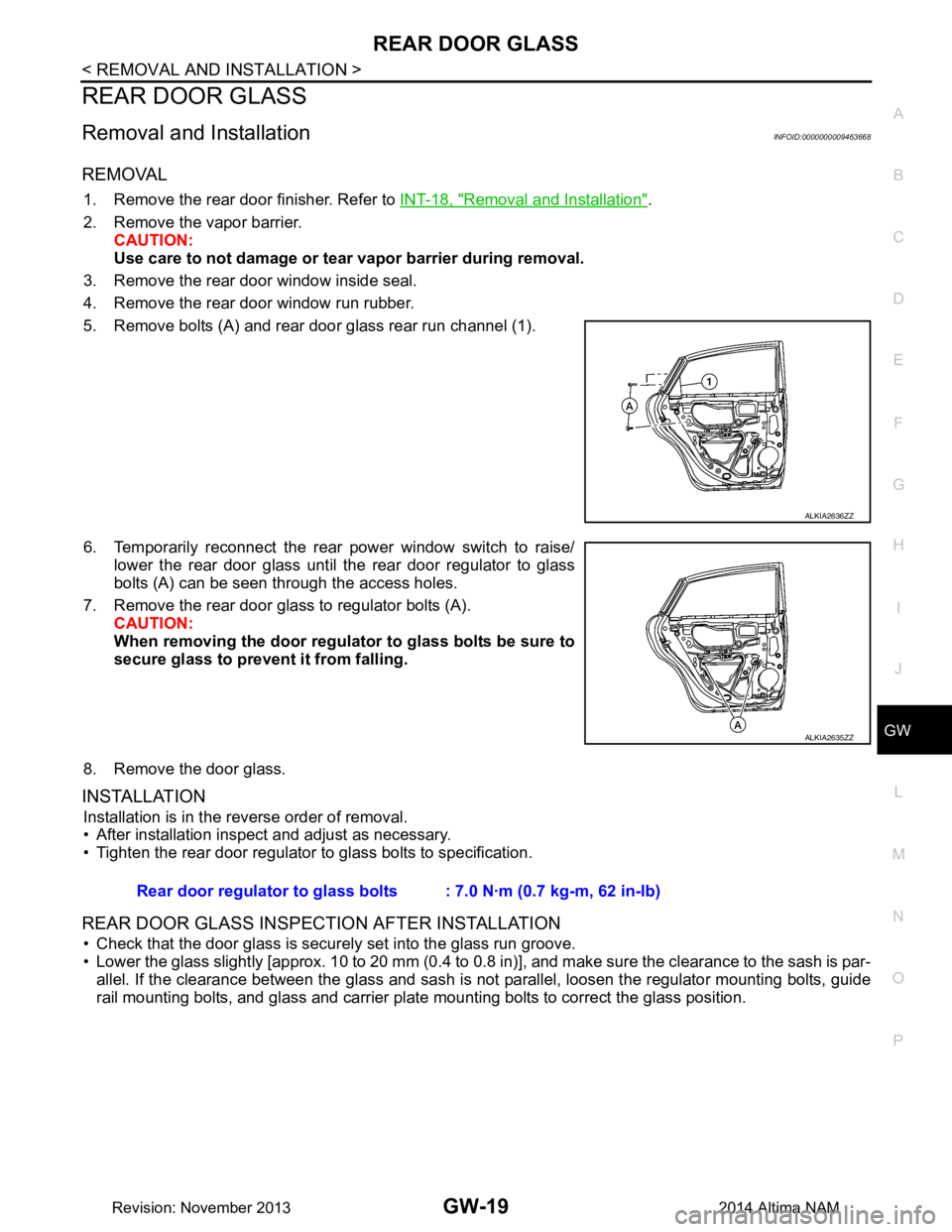
5. Remove bolts (A) and rear door glass rear run channel (1).
6. Temporarily reconnect the rear power window switch to raise/ lower the rear door glass until the rear door regulator to glass
bolts (A) can be seen through the access holes.
7. Remove the rear door glass to regulator bolts (A). CAUTION:
When removing the door regula tor to glass bolts be sure to
secure glass to prevent it from falling.
8. Remove the door glass.
INSTALLATION
Installation is in the reverse order of removal.
• After installation inspect and adjust as necessary.
• Tighten the rear door regulator to glass bolts to specification.
REAR DOOR GLASS INSPECTION AFTER INSTALLATION
• Check that the door glass is securely set into the glass run groove.
• Lower the glass slightly [approx. 10 to 20 mm (0.4 to 0.8 in)], and make sure the clearance to the sash is par-
allel. If the clearance between the glass and sash is not parallel, loosen the regulator mounting bolts, guide
rail mounting bolts, and glass and carrier plate mounting bolts to correct the glass position.
ALKIA2636ZZ
ALKIA2635ZZ
Rear door regulator to glass bolts : 7.0 N·m (0.7 kg-m, 62 in-lb)
Revision: November 20132014 Altima NAM
Page 2777 of 4801
![NISSAN TEANA 2014 Repair Manual
HAC-128
< ECU DIAGNOSIS INFORMATION >[MANUAL AIR CONDITIONER]
FRONT AIR CONTROL
ECU DIAGNOSIS INFORMATION
FRONT AIR CONTROL
Reference ValueINFOID:0000000009463206
VALUES ON THE DIAGNOSIS TOOL
Display](/img/5/57390/w960_57390-2776.png "NISSAN TEANA 2014 Repair Manual
HAC-128
< ECU DIAGNOSIS INFORMATION >[MANUAL AIR CONDITIONER]
FRONT AIR CONTROL
ECU DIAGNOSIS INFORMATION
FRONT AIR CONTROL
Reference ValueINFOID:0000000009463206
VALUES ON THE DIAGNOSIS TOOL
Display")
HAC-128
< ECU DIAGNOSIS INFORMATION >[MANUAL AIR CONDITIONER]
FRONT AIR CONTROL
ECU DIAGNOSIS INFORMATION
FRONT AIR CONTROL
Reference ValueINFOID:0000000009463206
VALUES ON THE DIAGNOSIS TOOL
Display Item List
TERMINAL LAYOUT
PHYSICAL VALUES
Monitor item name “operation or unit” Contents
HEATER FAN SW “ON/OFF” Displays “O N/OFF” status as judged from blower fan motor switch signal.
AIR COND SW “ON/OFF” Displays “ON/OFF” status as judged from air conditioner switch signal.
ABIIA0520ZZ
Te r m i n a l No. Wire
color ItemIgnition
switch Condition Voltage (V)
(Approx.)
1 SB Power supply for battery — — 12
2 G Power supply for IGN ON — 12
4 P Rear defrost feedback ON Defroster
switch ON 12
OFF 0
5 R Illumination (+) ON Lighting
switch OFF 0
1st position 12
6 GR Illumination (-) — — 0
7 L Compressor ON signal ON Compressor ON 0
OFF 9 - 12
8 Y Blower ON signal ON Fan ON 0
OFF 5
9 B Ground — — 0
10 Y Rear defrost ON signal ON Defroster
switch ON 0
OFF 5
11 P Blower motor feedback ON Fan speed Low 7.0.- 10.0
12 G LIN signal ON — 5.5
13 W VACTR ON — 12
14 B ACTR Ground — — 0
16 BR PD cut ON Compressor ON 4.6
Revision: November 20132014 Altima NAMRevision: November 20132014 Altima NAM
Page 2826 of 4801
COMPONENT PARTSINL-5
< SYSTEM DESCRIPTION >
C
D E
F
G H
I
J
K
M A
B
INL
N
O P
SYSTEM DESCRIPTION
COMPONENT PARTS
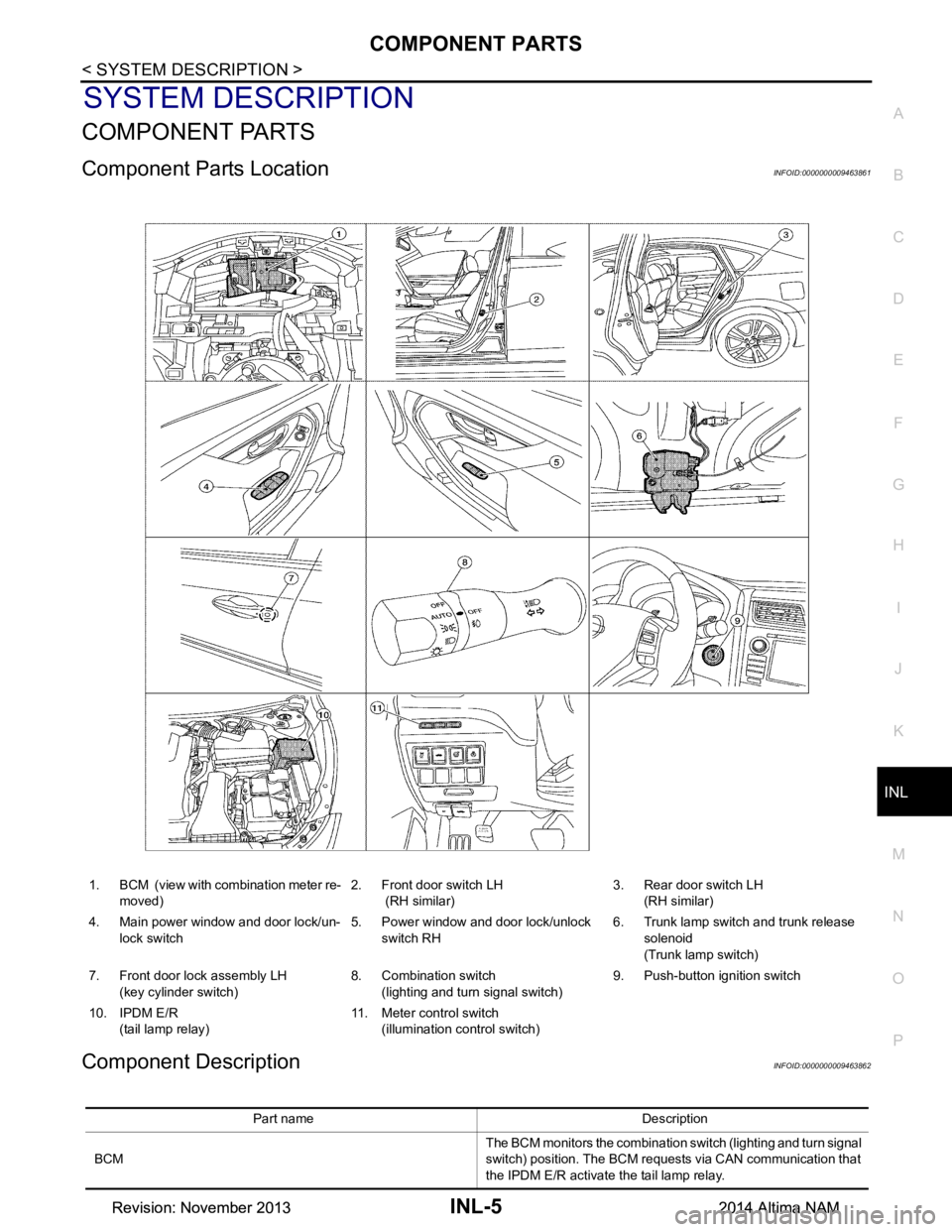
Component Parts LocationINFOID:0000000009463861
Component DescriptionINFOID:0000000009463862
1. BCM (view with combination meter re- moved) 2. Front door switch LH
(RH similar) 3. Rear door switch LH
(RH similar)
4. Main power window and door lock/un- lock switch 5. Power window and door lock/unlock
switch RH 6. Trunk lamp switch and trunk release
solenoid
(Trunk lamp switch)
7. Front door lock assembly LH (key cylinder switch) 8. Combination switch
(lighting and turn signal switch) 9. Push-button ignition switch
10. IPDM E/R (tail lamp relay) 11. Meter control switch
(illumination control switch)
Part name Description
BCM The BCM monitors the combination switch (lighting and turn signal
switch) position. The BCM requests via CAN communication that
the IPDM E/R activate the tail lamp relay.
Revision: November 20132014 Altima NAMRevision: November 20132014 Altima NAM
Page 2828 of 4801
INTERIOR ROOM LAMP CONTROL SYSTEMINL-7
< SYSTEM DESCRIPTION >
C
D E
F
G H
I
J
K
M A
B
INL
N
O P
INTERIOR ROOM LAMP CONTROL SYSTEM
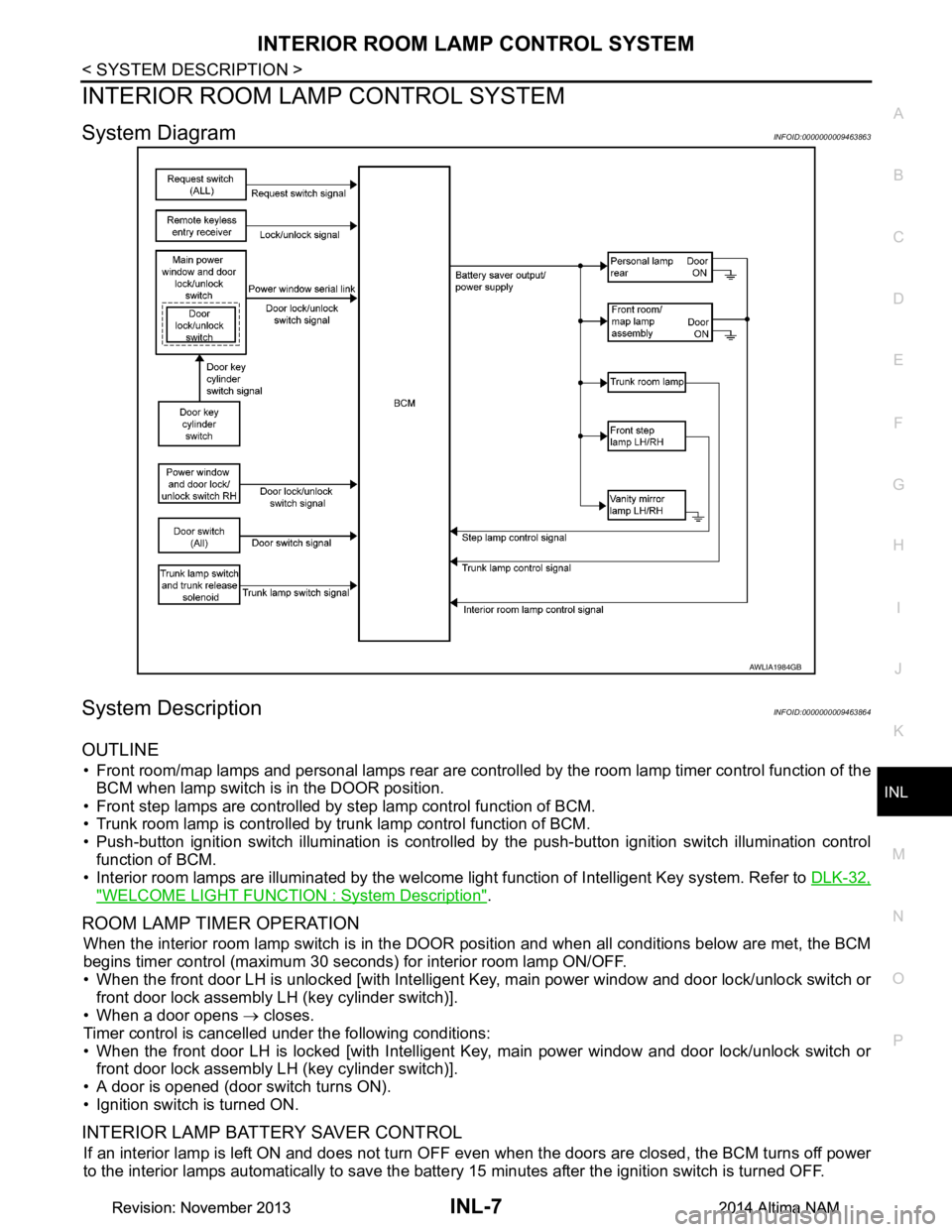
System DiagramINFOID:0000000009463863
System DescriptionINFOID:0000000009463864
OUTLINE
• Front room/map lamps and personal lamps rear are controll ed by the room lamp timer control function of the
BCM when lamp switch is in the DOOR position.
• Front step lamps are controlled by step lamp control function of BCM.
• Trunk room lamp is controlled by trunk lamp control function of BCM.
• Push-button ignition switch illumination is controlled by the push-button ignition switch illumination control
function of BCM.
• Interior room lamps are illuminated by the welcome light function of Intelligent Key system. Refer to DLK-32,
"WELCOME LIGHT FUNCTION : System Description".
ROOM LAMP TIMER OPERATION
When the interior room lamp switch is in the DOOR position and when all conditions below are met, the BCM
begins timer control (maximum 30 seconds ) for interior room lamp ON/OFF.
• When the front door LH is unlocked [with Intelligent Key, main power window and door lock/unlock switch or
front door lock assembly LH (key cylinder switch)].
• When a door opens → closes.
Timer control is cancelled under the following conditions:
• When the front door LH is locked [with Intelligent Key, main power window and door lock/unlock switch or front door lock assembly LH (key cylinder switch)].
• A door is opened (door switch turns ON).
• Ignition switch is turned ON.
INTERIOR LAMP BATTERY SAVER CONTROL
If an interior lamp is left ON and does not turn OF F even when the doors are closed, the BCM turns off power
to the interior lamps automatically to save the batte ry 15 minutes after the ignition switch is turned OFF.
AWLIA1984GB
Revision: November 20132014 Altima NAMRevision: November 20132014 Altima NAM
Page 2834 of 4801
DIAGNOSIS SYSTEM (BCM)INL-13
< SYSTEM DESCRIPTION >
C
D E
F
G H
I
J
K
M A
B
INL
N
O P
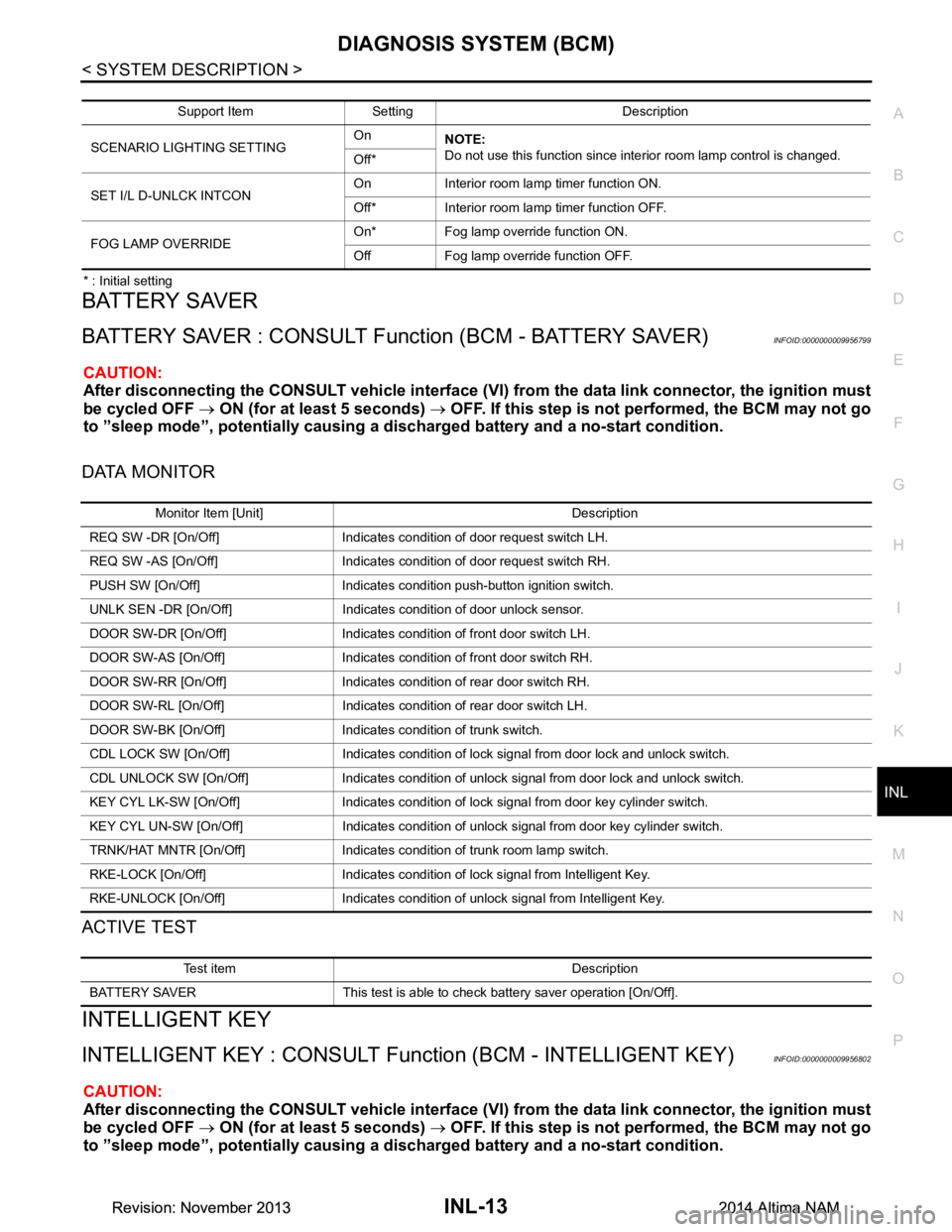
* : Initial setting
BATTERY SAVER
BATTERY SAVER : CONSULT Function (BCM - BATTERY SAVER)INFOID:0000000009956799
CAUTION:
After disconnecting the CONSULT vehicle interface (VI) from the data link connector, the ignition must
be cycled OFF → ON (for at least 5 seconds) → OFF. If this step is not performed, the BCM may not go
to ”sleep mode”, potentiall y causing a discharged battery and a no-start condition.
DATA MONITOR
ACTIVE TEST
INTELLIGENT KEY
INTELLIGENT KEY : CONSULT Func tion (BCM - INTELLIGENT KEY)INFOID:0000000009956802
CAUTION:
After disconnecting the CONSULT vehicle interface (VI) from the data link connector, the ignition must
be cycled OFF → ON (for at least 5 seconds) → OFF. If this step is not performed, the BCM may not go
to ”sleep mode”, potentiall y causing a discharged battery and a no-start condition.
Support Item Setting Description
SCENARIO LIGHTING SETTING On
NOTE:
Do not use this function since interior room lamp control is changed.
Off*
SET I/L D-UNLCK INTCON On Interior room lamp timer function ON.
Off* Interior room lamp timer function OFF.
FOG LAMP OVERRIDE On* Fog lamp override function ON.
Off Fog lamp override function OFF.
Monitor Item [Unit] Description
REQ SW -DR [On/Off] Indicates condition of door request switch LH.
REQ SW -AS [On/Off] Indicates condition of door request switch RH.
PUSH SW [On/Off] Indicates condition push-button ignition switch.
UNLK SEN -DR [On/Off] Indicates condition of door unlock sensor.
DOOR SW-DR [On/Off] Indicates condition of front door switch LH.
DOOR SW-AS [On/Off] Indicates condition of front door switch RH.
DOOR SW-RR [On/Off] Indicates condition of rear door switch RH.
DOOR SW-RL [On/Off] Indicates condition of rear door switch LH.
DOOR SW-BK [On/Off] Indicates condition of trunk switch.
CDL LOCK SW [On/Off] Indicates condition of lock signal from door lock and unlock switch.
CDL UNLOCK SW [On/Off] Indicates condition of unlock signal from door lock and unlock switch.
KEY CYL LK-SW [On/Off] Indicates condition of lo ck signal from door key cylinder switch.
KEY CYL UN-SW [On/Off] Indicates condition of unl ock signal from door key cylinder switch.
TRNK/HAT MNTR [On/Off] Indicates condition of trunk room lamp switch.
RKE-LOCK [On/Off] Indicates condition of lock signal from Intelligent Key.
RKE-UNLOCK [On/Off] Indicates condition of unlock signal from Intelligent Key.
Test item Description
BATTERY SAVER This test is able to check battery saver operation [On/Off].
Revision: November 20132014 Altima NAMRevision: November 20132014 Altima NAM
Page 2883 of 4801
INL-62
< SYMPTOM DIAGNOSIS >
INTERIOR LIGHTING SYSTEM SYMPTOMS
SYMPTOM DIAGNOSIS
INTERIOR LIGHTING SYSTEM SYMPTOMS
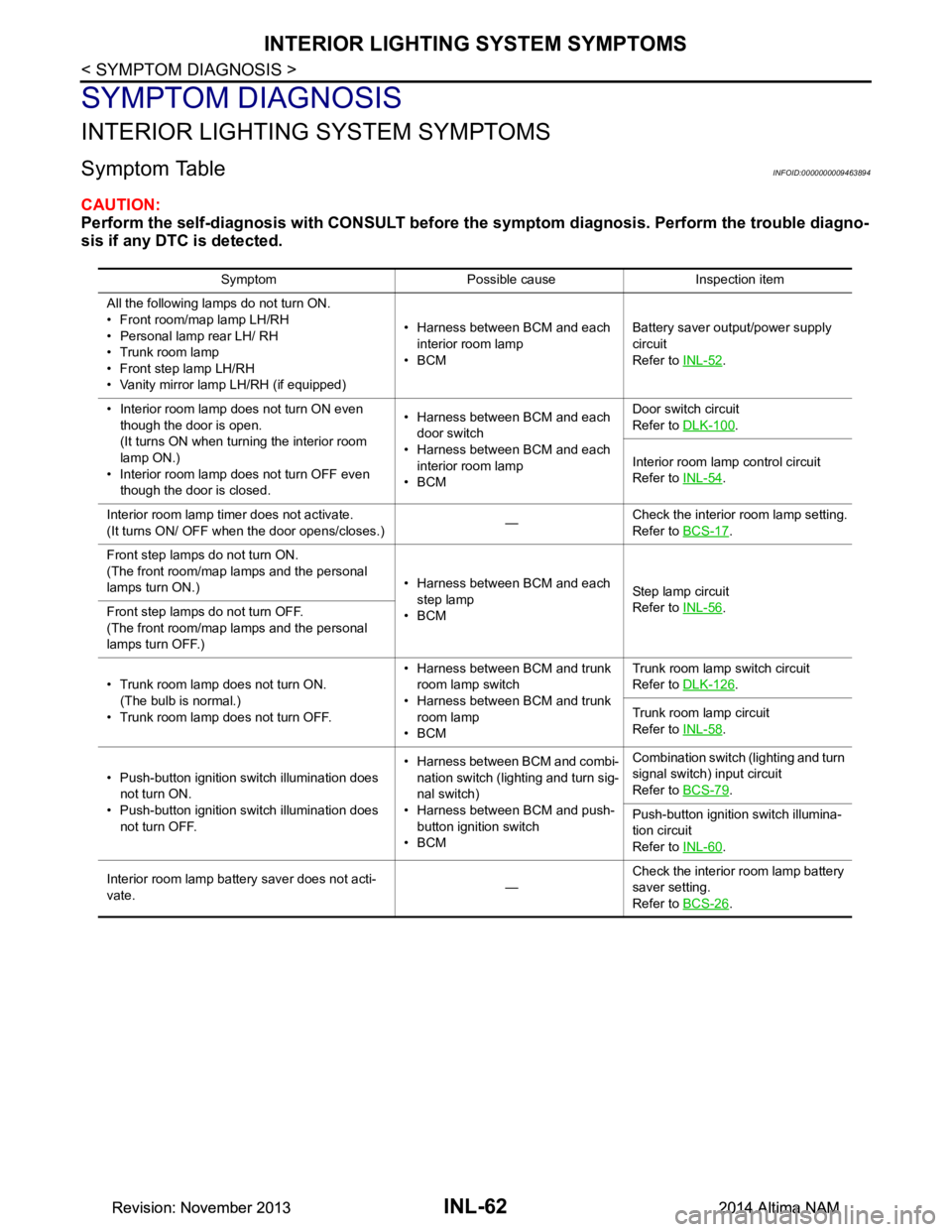
Symptom TableINFOID:0000000009463894
CAUTION:
Perform the self-diagnosis with CONSULT before th e symptom diagnosis. Perform the trouble diagno-
sis if any DTC is detected.
Symptom Possible cause Inspection item
All the following lamps do not turn ON.
• Front room/map lamp LH/RH
• Personal lamp rear LH/ RH
• Trunk room lamp
• Front step lamp LH/RH
• Vanity mirror lamp LH/RH (if equipped) • Harness between BCM and each
interior room lamp
•BCM Battery saver output/power supply
circuit
Refer to INL-52
.
• Interior room lamp does not turn ON even though the door is open.
(It turns ON when turn ing the interior room
lamp ON.)
• Interior room lamp does not turn OFF even though the door is closed. • Harness between BCM and each
door switch
• Harness between BCM and each interior room lamp
•BCM Door switch circuit
Refer to DLK-100
.
Interior room lamp control circuit
Refer to INL-54
.
Interior room lamp timer does not activate.
(It turns ON/ OFF when the door opens/closes.) —Check the interior room lamp setting.
Refer to BCS-17
.
Front step lamps do not turn ON.
(The front room/map lamps and the personal
lamps turn ON.) • Harness between BCM and each
step lamp
•BCM St ep la mp ci rcu it
Refer to INL-56
.
Front step lamps do not turn OFF.
(The front room/map lamps and the personal
lamps turn OFF.)
• Trunk room lamp does not turn ON. (The bulb is normal.)
• Trunk room lamp does not turn OFF. • Harness between BCM and trunk
room lamp switch
• Harness between BCM and trunk room lamp
•BCM Trunk room lamp switch circuit
Refer to DLK-126
.
Trunk room lamp circuit
Refer to INL-58
.
• Push-button ignition switch illumination does not turn ON.
• Push-button ignition switch illumination does not turn OFF. • Harness between BCM and combi-
nation switch (lighting and turn sig-
nal switch)
• Harness between BCM and push- button ignition switch
•BCM Combination switch (lighting and turn
signal switch) input circuit
Refer to BCS-79
.
Push-button ignition switch illumina-
tion circuit
Refer to INL-60
.
Interior room lamp battery saver does not acti-
vate. —Check the interior room lamp battery
saver setting.
Refer to BCS-26
.
Revision: November 20132014 Altima NAMRevision: November 20132014 Altima NAM
Page 2902 of 4801
SQUEAK AND RATTLE TROUBLE DIAGNOSESINT-11
< SYMPTOM DIAGNOSIS >
C
D E
F
G H
I
K L
M A
B
INT
N
O P
INSTRUMENT PANEL
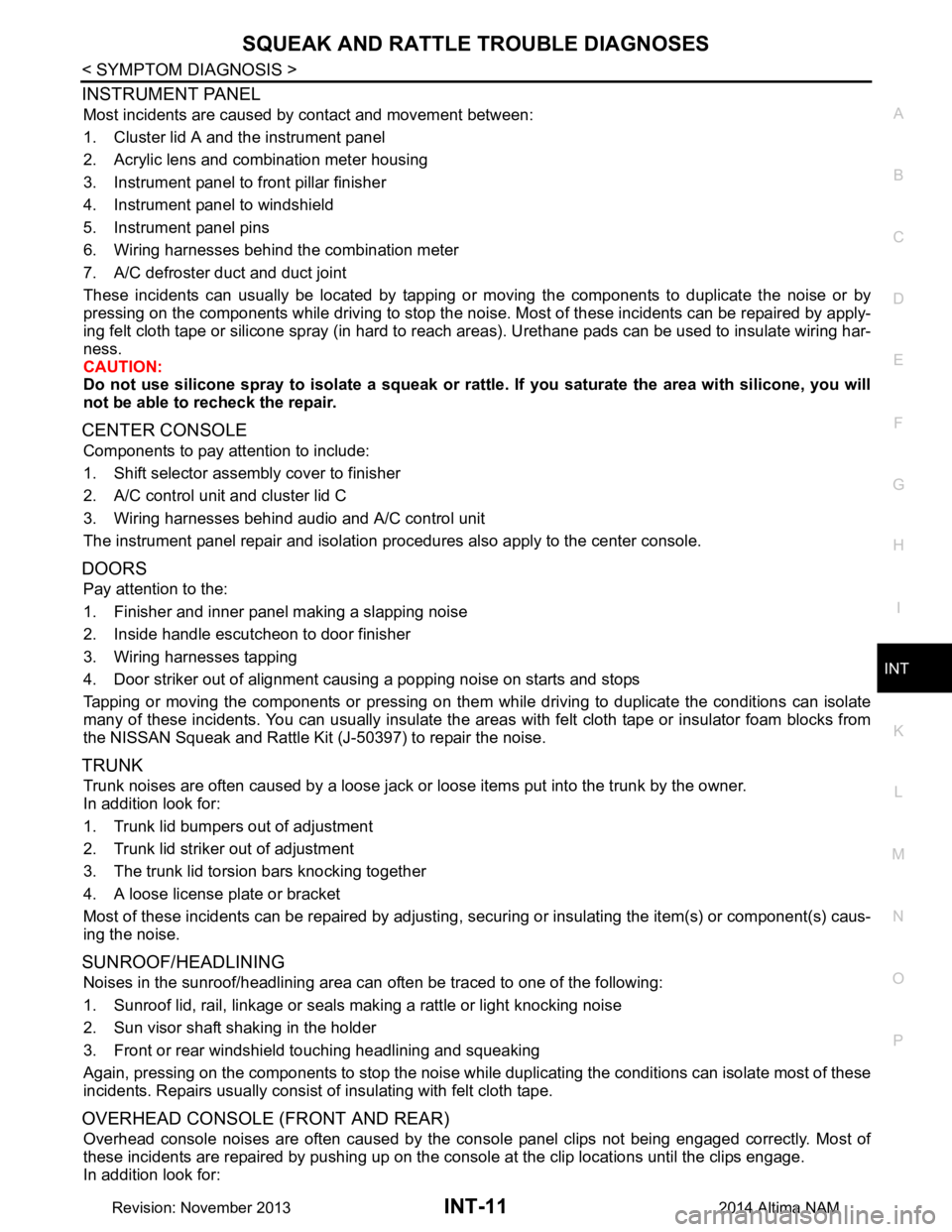
Most incidents are caused by contact and movement between:
1. Cluster lid A and the instrument panel
2. Acrylic lens and combination meter housing
3. Instrument panel to front pillar finisher
4. Instrument panel to windshield
5. Instrument panel pins
6. Wiring harnesses behind the combination meter
7. A/C defroster duct and duct joint
These incidents can usually be located by tapping or moving the components to duplicate the noise or by
pressing on the components while driving to stop the noi se. Most of these incidents can be repaired by apply-
ing felt cloth tape or silicone spray (in hard to reach areas). Urethane pads can be used to insulate wiring har-
ness.
CAUTION:
Do not use silicone spray to isolate a squeak or ra ttle. If you saturate the area with silicone, you will
not be able to recheck the repair.
CENTER CONSOLE
Components to pay attention to include:
1. Shift selector assembly cover to finisher
2. A/C control unit and cluster lid C
3. Wiring harnesses behind audio and A/C control unit
The instrument panel repair and isolation pr ocedures also apply to the center console.
DOORS
Pay attention to the:
1. Finisher and inner panel making a slapping noise
2. Inside handle escutcheon to door finisher
3. Wiring harnesses tapping
4. Door striker out of alignment causing a popping noise on starts and stops
Tapping or moving the components or pressing on them wh ile driving to duplicate the conditions can isolate
many of these incidents. You can usually insulate the ar eas with felt cloth tape or insulator foam blocks from
the NISSAN Squeak and Rattle Kit (J-50397) to repair the noise.
TRUNK
Trunk noises are often caused by a loose jack or loose items put into the trunk by the owner.
In addition look for:
1. Trunk lid bumpers out of adjustment
2. Trunk lid striker out of adjustment
3. The trunk lid torsion bars knocking together
4. A loose license plate or bracket
Most of these incidents can be repaired by adjusting, se curing or insulating the item(s) or component(s) caus-
ing the noise.
SUNROOF/HEADLINING
Noises in the sunroof/headlining area can often be traced to one of the following:
1. Sunroof lid, rail, linkage or seals making a rattle or light knocking noise
2. Sun visor shaft shaking in the holder
3. Front or rear windshield touching headlining and squeaking
Again, pressing on the components to stop the noise while duplicating the conditions can isolate most of these
incidents. Repairs usually consist of insulating with felt cloth tape.
OVERHEAD CONSOLE (FRONT AND REAR)
Overhead console noises are often caused by the cons ole panel clips not being engaged correctly. Most of
these incidents are repaired by pushing up on the c onsole at the clip locations until the clips engage.
In addition look for:
Revision: November 20132014 Altima NAM
Page 2936 of 4801

IP-10
< SYMPTOM DIAGNOSIS >
SQUEAK AND RATTLE TROUBLE DIAGNOSES
INSTRUMENT PANEL
Most incidents are caused by contact and movement between:
1. Cluster lid A and the instrument panel
2. Acrylic lens and combination meter housing
3. Instrument panel to front pillar finisher
4. Instrument panel to windshield
5. Instrument panel pins
6. Wiring harnesses behind the combination meter
7. A/C defroster duct and duct joint
These incidents can usually be located by tapping or moving the components to duplicate the noise or by
pressing on the components while driving to stop the noise. Most of these incidents can be repaired by apply-
ing felt cloth tape or silicone spray (in hard to reach areas). Urethane pads can be used to insulate wiring har-
ness.
CAUTION:
Do not use silicone spray to isolate a squeak or ra ttle. If you saturate the area with silicone, you will
not be able to recheck the repair.
CENTER CONSOLE
Components to pay attention to include:
1. Shift selector assembly cover to finisher
2. A/C control unit and cluster lid C
3. Wiring harnesses behind audio and A/C control unit
The instrument panel repair and isolation pr ocedures also apply to the center console.
DOORS
Pay attention to the:
1. Finisher and inner panel making a slapping noise
2. Inside handle escutcheon to door finisher
3. Wiring harnesses tapping
4. Door striker out of alignment causing a popping noise on starts and stops
Tapping or moving the components or pressing on them wh ile driving to duplicate the conditions can isolate
many of these incidents. You can usually insulate the areas with felt cloth tape or insulator foam blocks from
the NISSAN Squeak and Rattle Kit (J-50397) to repair the noise.
TRUNK
Trunk noises are often caused by a loose jack or loose items put into the trunk by the owner.
In addition look for:
1. Trunk lid bumpers out of adjustment
2. Trunk lid striker out of adjustment
3. The trunk lid torsion bars knocking together
4. A loose license plate or bracket
Most of these incidents can be repaired by adjusting, se curing or insulating the item(s) or component(s) caus-
ing the noise.
SUNROOF/HEADLINING
Noises in the sunroof/headlining area c an often be traced to one of the following:
1. Sunroof lid, rail, linkage or seals making a rattle or light knocking noise
2. Sun visor shaft shaking in the holder
3. Front or rear windshield touching headlining and squeaking
Again, pressing on the components to stop the noise while duplicating the conditions can isolate most of these
incidents. Repairs usually consist of insulating with felt cloth tape.
OVERHEAD CONSOLE (FRONT AND REAR)
Overhead console noises are often caused by the c onsole panel clips not being engaged correctly. Most of
these incidents are repaired by pushing up on the c onsole at the clip locations until the clips engage.
In addition look for:
Revision: November 20132014 Altima NAM
Page 2983 of 4801
![NISSAN TEANA 2014 Repair Manual
LAN-34
< SYSTEM DESCRIPTION >[CAN]
SYSTEM
Paddle shift down signal*2
RT
Paddle shift up signal
*2RT
Manual mode signal
*2RT
Market information signal T R R
Not manual mode signal
*2RT
Overdrive cont](/img/5/57390/w960_57390-2982.png "NISSAN TEANA 2014 Repair Manual
LAN-34
< SYSTEM DESCRIPTION >[CAN]
SYSTEM
Paddle shift down signal*2
RT
Paddle shift up signal
*2RT
Manual mode signal
*2RT
Market information signal T R R
Not manual mode signal
*2RT
Overdrive cont")
LAN-34
< SYSTEM DESCRIPTION >[CAN]
SYSTEM
Paddle shift down signal*2
RT
Paddle shift up signal
*2RT
Manual mode signal
*2RT
Market information signal T R R
Not manual mode signal
*2RT
Overdrive control switch signal
*1RT
Parking brake switch signal T R R R
Seat belt buckle switch signal T R
Vehicle speed signal RRRR T R R R
RRRRRR TR
Steering angle sensor signal R T R R
Buzzer output signal RT
RT
Meter display signal R T
A/C switch signal R T
*3T*4
Ambient sensor signal*3RT
Blower fan motor switch signal R T
*3T*4
ABS operation signal R T
ABS warning lamp signal R T
Brake warning lamp signal R T
SLIP indicator lamp signal R T
TCS operation signal R T
VDC OFF indicator lamp signal R T
VDC operation signal R T
Yaw rate signal RT
Day time running light request signal R R R T
Door switch signal R R R R T
Front fog light request signal R R R R T
Front wiper request signal R R T
High beam request signal R R R R T
Horn reminder signal R T
Ignition switch ON signal R T
Key warning signal R T
Low beam request signal R R R R T
Meter TPMS display signal R T
Position light request signal R R R R T
Rear window defogger switch signal R R T
Sleep wake up signal R R T
Starter control relay signal R T
Theft warning horn request signal R T
Tire pressure data signal R R T Signal name
ECM
EPS
IPDM-E TCM
M&A
STRG AV
AV M
HVAC ABS
BCM
Revision: November 20132014 Altima NAMRevision: November 20132014 Altima NAM