clock NISSAN TEANA 2014 Workshop Manual
[x] Cancel search | Manufacturer: NISSAN, Model Year: 2014, Model line: TEANA, Model: NISSAN TEANA 2014Pages: 4801, PDF Size: 51.2 MB
Page 2767 of 4801
![NISSAN TEANA 2014 Workshop Manual
HAC-118
< SYSTEM DESCRIPTION >[MANUAL AIR CONDITIONER]
SYSTEM
Control by ECM- Cooling fan control
Refer to EC-60, "COOLING FAN CONTROL : System Description (with manual air conditioner)"
(QR25DE)](/img/5/57390/w960_57390-2766.png "NISSAN TEANA 2014 Workshop Manual
HAC-118
< SYSTEM DESCRIPTION >[MANUAL AIR CONDITIONER]
SYSTEM
Control by ECM- Cooling fan control
Refer to EC-60, \"COOLING FAN CONTROL : System Description (with manual air conditioner)\"
(QR25DE)")
HAC-118
< SYSTEM DESCRIPTION >[MANUAL AIR CONDITIONER]
SYSTEM
Control by ECM- Cooling fan control
Refer to EC-60, "COOLING FAN CONTROL : System Description (with manual air conditioner)"
(QR25DE)
or EC-575, "COOLING FAN CONTROL : System Description"
(VQ35DE).
- Air conditioning cut control Refer to EC-57, "AIR CONDITIONING CUT CONTROL : Sy stem Description (with manual air conditioner)"
(QR25DE) or EC-573, "AIR CONDITIONING CUT CONTROL : System Description" (VQ35DE).
Control by IPDM E/R
- Relay control
Refer to PCS-6, "RELAY CONTROL SYSTEM : System Description"
.
- Cooling fan control
Refer to EC-60, "COOLING FAN CONTROL : System Description (with manual air conditioner)"
(QR25DE)
or EC-575, "COOLING FAN CONTROL : System Description"
(VQ35DE).
Air Flow ControlINFOID:0000000009463196
DESCRIPTION
• Front air control changes duty ratio of front blower mo tor control signal to control air flow continuously. When
air flow is increased, duty ratio of front blower mo tor control signal gradually increases to prevent a sudden
increase in air flow.
• In addition to manual control, air flow control is composed of fan speed control at door motor operation.
FAN SPEED CONTROL AT DOOR MOTOR OPERATION
When mode door motor is activated while air flow is more than the specified value, front air control temporarily
reduces fan speed so that mode door moves smoothly.
Air Inlet ControlINFOID:0000000009463197
The intake door position is automatically controlled in MAX A/C and DEF modes. The intake door is controlled
by customer input in the other modes.
Air Outlet ControlINFOID:0000000009463198
Air outlet control is controlled by customer input. When t he A/C is turned off by turning the blower control dial
fully counterclockwise, the front air control retains the current selections and returns to these selections the
next time the blower control dial is turned to any fan position.
NOTE:
If ambient temperature is excessively low, D/F is se lected to prevent windshield fogging when air outlet is set
to FOOT.
Compressor ControlINFOID:0000000009463199
DESCRIPTION
In order for the IPDM E/R to complete a compress or ON request, the following conditions must be met:
1. The BCM detects a Fan ON signal from the front air control. The front air control grounds the fan ON sig-
nal monitored by the BCM when the blower speed dial is in any of the fan speed positions.
2. The BCM detects an A/C ON signal from the front air control. The front air control grounds the A/C ON sig-
nal monitored by the BCM when:
- The A/C switch is pressed. The A/C switch LED ill uminates and the front air control grounds the A/C ON
signal monitored by the BCM. Any mode c ontrol button except D/F may be selected.
- The A/C switch is OFF, and the MAX A/C button is pr essed. The A/C switch LED will automatically illumi-
nate and the front air control grounds the A/C ON signal monitored by the BCM.
- The A/C switch is OFF, and the mode button for either D/F or DEF is selected. The front air control
grounds the A/C ON signal monitored by the BCM, but it does not illuminate the A/C switch LED
NOTE:
If the compressor was engaged by pressing the D/F or DE F mode buttons, and the time spent in either mode
exceeds 1 minute, then the compressor stays reques ted, even when modes other than D/F or DEF are
selected, until either:
1. The ignition switch is turned OFF.
Revision: November 20132014 Altima NAMRevision: November 20132014 Altima NAM
Page 2768 of 4801
![NISSAN TEANA 2014 Workshop Manual
SYSTEM
HAC-119
< SYSTEM DESCRIPTION > [MANUAL AIR CONDITIONER]
C
D E
F
G H
J
K L
M A
B
HAC
N
O P
2. The blower speed dial is turned completely counterclockwise to the OFF position.
3. The A/C swit](/img/5/57390/w960_57390-2767.png "NISSAN TEANA 2014 Workshop Manual
SYSTEM
HAC-119
< SYSTEM DESCRIPTION > [MANUAL AIR CONDITIONER]
C
D E
F
G H
J
K L
M A
B
HAC
N
O P
2. The blower speed dial is turned completely counterclockwise to the OFF position.
3. The A/C swit")
SYSTEM
HAC-119
< SYSTEM DESCRIPTION > [MANUAL AIR CONDITIONER]
C
D E
F
G H
J
K L
M A
B
HAC
N
O P
2. The blower speed dial is turned completely counterclockwise to the OFF position.
3. The A/C switch is manually turned OFF.
In other words, the compressor ON request cannot be turned off in D/F or DEF modes.
REFRIGERANT PRESSURE PROTECTION
The refrigerant system is protected against excessively high- or low-pressures by the refrigerant pressure sen-
sor, located on the liquid tank on the condenser. The refr igerant pressure sensor detects the pressure inside
the refrigerant line and sends a voltage signal to the EC M. If the system pressure rises above or falls below
the following values, the ECM requests the IPDM E/ R to de-energize the A/C relay and disengage the com-
pressor.
• 3.12 MPa (31.82 kg/cm
2, 452.4 psi) or more (When the engine speed is less than 1,500 rpm)
• 2.74 MPa (27.95 kg/cm
2, 397.3 psi) or more (When the engine speed is 1,500 rpm or more)
• 0.14 MPa (1.43 kg/cm
2, 20.3 psi) or less
PRESSURE RELIEF VALVE
The refrigerant system is also protected by a pressure relief valve, located in the rear head of the compressor.
When the pressure of refrigerant in the system incr eases to an abnormal level [more than 2,990 kPa (30.5 kg/
cm
2, 433.6 psi)], the release port on the pressure relief valve automatically opens and releases refrigerant into
the atmosphere.
COMPRESSOR OIL CIRCULATION CONTROL
When the engine starts while the engine coolant temperature is 56 °C (133 °F) or less, ECM activates the com-
pressor for approximately 6 seconds and circulates the compressor lubricant once.
OPERATING RATE CONTROL
When the set temperature is other than fully cold or the air outlet is “VENT”, “B/L” or “FOOT”, the front air con-
trol controls the compressor activation depending on ambient temperature.
Door ControlINFOID:0000000009463200
DOOR MOTOR CONTROL
• A Local Control Unit (LCU) is built into each door motor and detects the door position by using a Position
Balanced Resistor (PBR).
• Each door motor LCU has a unique address. The front air control communicates with the door motor LCUs by using each door’s unique communication address. The front air control sends requested door position
commands to each door motor LCU via a Local Interconnect Network (LIN) communication line. Each door
motor’s LCU receives the command and sends back a door position feedback signal.
• Each LCU controls each door to the appropriate posit ion depending on the control signal from the front air
control. When the door movement is complete, the LCU transmits a signal to the front air control indicating
that the door movement is complete.
SWITCHES AND THEIR CONTROL FUNCTION
ALIIA0607GB
Revision: November 20132014 Altima NAMRevision: November 20132014 Altima NAM
Page 2772 of 4801
![NISSAN TEANA 2014 Workshop Manual
OPERATIONHAC-123
< SYSTEM DESCRIPTION > [MANUAL AIR CONDITIONER]
C
D E
F
G H
J
K L
M A
B
HAC
N
O P
MAX A/C switch Switches the MAX A/C and compressor control switch indicators between ON
⇔ OFF w](/img/5/57390/w960_57390-2771.png "NISSAN TEANA 2014 Workshop Manual
OPERATIONHAC-123
< SYSTEM DESCRIPTION > [MANUAL AIR CONDITIONER]
C
D E
F
G H
J
K L
M A
B
HAC
N
O P
MAX A/C switch Switches the MAX A/C and compressor control switch indicators between ON
⇔ OFF w")
OPERATIONHAC-123
< SYSTEM DESCRIPTION > [MANUAL AIR CONDITIONER]
C
D E
F
G H
J
K L
M A
B
HAC
N
O P
MAX A/C switch Switches the MAX A/C and compressor control switch indicators between ON
⇔ OFF with each press
while front blower fan is activated.
• When MAX A/C mode is turned ON, the air conditioning system changes to the following state.
- Air inlet: Recirculation air intake
- Air outlet: Manual setting
- Blower fan: Manual setting.
- Compressor: ON
• When MAX A/C mode is turned OFF, the air conditioning system state returns to the previous state
before MAX A/C mode is selected. But, the following state is changed:
- Air inlet: Fresh air intake
- Compressor: ON
NOTE:
When front blower fan is OFF, the compressor control cannot be activated.
MODE switches Selects air outlet from VENT, B/L, FOOT, and D/F.
NOTE:
When the air conditioning system is OFF, the air outlet can still be selected.
REC switch • Air inlet is selected to fresh air intake (REC) by pressing this switch.
- REC indicator: ON
NOTE:
• When the air conditioning system is OFF, the air inlet can still be selected.
• When D/F mode or DEF is selected, the REC button is disabled.
Temperature control dial • Selects desired temperature between full cold and full hot.
- Clockwise rotation: Temperature increases.
- Counterclockwise rotation: Temperature decreases.
Revision: November 20132014 Altima NAMRevision: November 20132014 Altima NAM
Page 2789 of 4801
![NISSAN TEANA 2014 Workshop Manual
HAC-140
< BASIC INSPECTION >[MANUAL AIR CONDITIONER]
OPERATION INSPECTION
OPERATION INSPECTION
Work ProcedureINFOID:0000000009463210
DESCRIPTION
The purpose of the operational check is to che
ck that](/img/5/57390/w960_57390-2788.png "NISSAN TEANA 2014 Workshop Manual
HAC-140
< BASIC INSPECTION >[MANUAL AIR CONDITIONER]
OPERATION INSPECTION
OPERATION INSPECTION
Work ProcedureINFOID:0000000009463210
DESCRIPTION
The purpose of the operational check is to che
ck that")
HAC-140
< BASIC INSPECTION >[MANUAL AIR CONDITIONER]
OPERATION INSPECTION
OPERATION INSPECTION
Work ProcedureINFOID:0000000009463210
DESCRIPTION
The purpose of the operational check is to che
ck that the individual system operates normally.
OPERATION INSPECTION
1.CHECK BLOWER
1. Rotate the blower control dial clockwise one detent. Blower should operate on low speed.
2. Rotate the blower control dial one detent at a time, and continue checking blower speed until all speeds
are checked.
3. Leave blower on maximum speed.
Is the test result normal?
YES >> GO TO 2.
NO >> Refer to HAC-148, "Diagnosis Procedure"
.
2.CHECK A/C SWITCH LED
1. Press A/C switch.
2. A/C switch indicator should turn ON.
Is the test result normal?
YES >> GO TO 3.
NO >> Refer to HAC-152, "Diagnosis Procedure"
.
3.CHECK A/C SWITCH
Confirm that the compressor clutch engages (sound or visual inspection).
Is the test result normal?
YES >> GO TO 4.
NO >> Refer to HAC-151, "Diagnosis Procedure"
.
4.CHECK FRONT AIR CONTROL MODE LEDS
1. Press D/F ( ), FOOT ( ), B/L , and VENT , MAX A/C, and DEF ( ).
2. Each button indicator should illuminate.
Is the test result normal?
YES >> GO TO 5.
NO >> Refer to HAC-152, "Diagnosis Procedure"
.
5.CHECK DISCHARGE AIR
1. Press D/F ( ), FOOT ( ), B/L , and VENT and DEF ( ).
2. Confirm that discharge air comes out accordi ng to the air distribution table. Refer to HAC-119, "Door Con-
trol".
Is the test result normal?
YES >> GO TO 6.
NO >> Refer to HAC-154, "Symptom Table"
.
6.CHECK REC LED
1. Press DEF ( ) and make sure LED is off.
2. Make sure VENT ( ) or B/L ( ) is selected.
3. Press REC ( ) switch one time. REC indicator should illuminate. Check condition : Engine running
at normal operating temperature.
Check condition : Blower cont rol dial in OFF position.
Check condition : REC o ff (LED extinguished).
Check condition : VENT select ed (LED illuminated).
Check condition : DEF off (LED extinguished).
Revision: November 20132014 Altima NAMRevision: November 20132014 Altima NAM
Page 2790 of 4801
![NISSAN TEANA 2014 Workshop Manual
OPERATION INSPECTIONHAC-141
< BASIC INSPECTION > [MANUAL AIR CONDITIONER]
C
D E
F
G H
J
K L
M A
B
HAC
N
O P
4. Press REC ( ) switch one more time. REC indicator should go off.
Is the test result n](/img/5/57390/w960_57390-2789.png "NISSAN TEANA 2014 Workshop Manual
OPERATION INSPECTIONHAC-141
< BASIC INSPECTION > [MANUAL AIR CONDITIONER]
C
D E
F
G H
J
K L
M A
B
HAC
N
O P
4. Press REC ( ) switch one more time. REC indicator should go off.
Is the test result n")
OPERATION INSPECTIONHAC-141
< BASIC INSPECTION > [MANUAL AIR CONDITIONER]
C
D E
F
G H
J
K L
M A
B
HAC
N
O P
4. Press REC ( ) switch one more time. REC indicator should go off.
Is the test result normal?
YES >> GO TO 7.
NO >> Refer to HAC-152, "Diagnosis Procedure"
.
7.CHECK INTAKE DOOR OPERATION
1. Press REC ( ) switch one time. REC indicator should illuminate.
2. Listen to the sound of the air coming out of the vent.
3. Press REC ( ) switch one more time. REC indicator should go off.
4. There should be an audible change to the sound of the air flowing out of the vent.
Is the test result normal?
YES >> GO TO 8.
NO >> Refer to HAC-146, "Diagnosis Procedure"
.
8.CHECK TEMPERATURE DECREASE
1. Press A/C switch.
2. Rotate temperature control dial counterclockwise until maximum cold.
3. Check for cold air at selected discharge air outlets.
Is the test result normal?
YES >> GO TO 9.
NO >> Refer to HAC-155, "Component Function Check"
.
9.CHECK TEMPERATURE INCREASE
1. Rotate temperature control dial clockwise until maximum hot.
2. Check for hot air at appropriate discharge air outlets.
Is the test result normal?
YES >> Inspection End.
NO >> Refer to HAC-157, "Component Function Check"
.
Revision: November 20132014 Altima NAMRevision: November 20132014 Altima NAM
Page 2801 of 4801
![NISSAN TEANA 2014 Workshop Manual
HAC-152
< DTC/CIRCUIT DIAGNOSIS >[MANUAL AIR CONDITIONER]
POWER SUPPLY AND GROUND CIRCUIT FOR FRONT AIR CONTROL
POWER SUPPLY AND GROUND CIRC
UIT FOR FRONT AIR CONTROL
DescriptionINFOID:00000000094632](/img/5/57390/w960_57390-2800.png "NISSAN TEANA 2014 Workshop Manual
HAC-152
< DTC/CIRCUIT DIAGNOSIS >[MANUAL AIR CONDITIONER]
POWER SUPPLY AND GROUND CIRCUIT FOR FRONT AIR CONTROL
POWER SUPPLY AND GROUND CIRC
UIT FOR FRONT AIR CONTROL
DescriptionINFOID:00000000094632")
HAC-152
< DTC/CIRCUIT DIAGNOSIS >[MANUAL AIR CONDITIONER]
POWER SUPPLY AND GROUND CIRCUIT FOR FRONT AIR CONTROL
POWER SUPPLY AND GROUND CIRC
UIT FOR FRONT AIR CONTROL
DescriptionINFOID:0000000009463219
COMPONENT DESCRIPTION
Front air control.
The front air control has a built-in microcomputer that processes inform ation sent from various sensors
needed for air conditioner operation. The air mix door motor, the mode door motor, the intake door motor, the
blower motor and the A/C compressor are then controlled.
Component Function CheckINFOID:0000000009463220
1.CHECK OPERATION
1. Turn the blower motor dial clockwise and verify t he blower speed increases and that one of the LEDs illu-
minates on the mode switch.
2. Press the mode switches and verify that the modes change, the LEDs illuminate, and that air flows from
the various vents.
3. Turn the temperature control dial and verify the temperature changes at the selected vents.
4. Press the DEF and REC buttons and verify air flow changes.
Does it operate normally?
YES >> Inspection End.
NO >> Perform trouble diagnosis for the front air control system. Refer to HAC-152, "Diagnosis Proce-
dure".
Diagnosis ProcedureINFOID:0000000009463221
Regarding Wiring Diagram information, refer to HAC-130, "Wiring Diagram".
1.CHECK FRONT AIR CONTROL POWER SUPPLY
1. Turn ignition switch OFF.
2. Disconnect the front air control connector.
3. Turn ignition switch ON.
4. Check voltage between front air control har ness connector M37 terminals 1, 2 and ground.
Is the inspection result normal?
YES >> GO TO 3.
NO >> GO TO 2.
2.CHECK FUSE
Check fuses [Nos. 14 and 30, located in the fuse block (J/B)].
NOTE:
Refer to PG-70, "Terminal Arrangement"
.
Is the inspection result normal?
YES >> Check harness for open circuit. Repair or replace if necessary.
NO >> Check harness for short circuit. Repair or replace if necessary.
3.CHECK FRONT AIR CONTROL GROUND CIRCUIT
(+) (−)Voltage
Front air control —Ignition switch position
Connector Terminal OFF ACC ON
M37 1
Ground Battery
voltage Battery
voltage Battery
voltage
2 Approx. 0V Approx. 0V Battery
voltage
Revision: November 20132014 Altima NAMRevision: November 20132014 Altima NAM
Page 2804 of 4801
![NISSAN TEANA 2014 Workshop Manual
INSUFFICIENT COOLINGHAC-155
< SYMPTOM DIAGNOSIS > [MANUAL AIR CONDITIONER]
C
D E
F
G H
J
K L
M A
B
HAC
N
O P
INSUFFICIENT COOLING
Component Function CheckINFOID:0000000009463223
SYMPTOM: Insufficie](/img/5/57390/w960_57390-2803.png "NISSAN TEANA 2014 Workshop Manual
INSUFFICIENT COOLINGHAC-155
< SYMPTOM DIAGNOSIS > [MANUAL AIR CONDITIONER]
C
D E
F
G H
J
K L
M A
B
HAC
N
O P
INSUFFICIENT COOLING
Component Function CheckINFOID:0000000009463223
SYMPTOM: Insufficie")
INSUFFICIENT COOLINGHAC-155
< SYMPTOM DIAGNOSIS > [MANUAL AIR CONDITIONER]
C
D E
F
G H
J
K L
M A
B
HAC
N
O P
INSUFFICIENT COOLING
Component Function CheckINFOID:0000000009463223
SYMPTOM: Insufficient cooling
INSPECTION FLOW
1. CONFIRM SYMPTOM BY PERFORMING OP ERATION CHECK - TEMPERATURE DECREASE
1. Press the A/C switch.
2. Turn temperature control dial counterclockwise to maximum cold.
3. Check for cold air at discharge air outlets.
Can a symptom be duplicated?
YES >> GO TO 3
NO >> GO TO 2
2. CHECK FOR ANY SYMPTOMS
Perform a complete operational check and check for any symptoms. Refer to HAC-140, "Work Procedure"
.
Does another symptom exist?
YES >> Refer to HAC-154, "Symptom Table".
NO >> System OK.
3. CHECK FOR SERVICE BULLETINS
Check for any service bulletins.
>> GO TO 4
4. CHECK DRIVE BELTS
Check A/C compressor belt tension. Refer to EM-19, "Checking Drive Belts"
(QR25DE) or EM-134, "Checking
Drive Belts" (VQ35DE).
Is the inspection result normal?
YES >> GO TO 5
NO >> Adjust or replace compressor belt. Refer to EM-19, "Tension Adjustment"
(QR25DE) or EM-134,
"Tension Adjustment" (VQ35DE).
5. CHECK AIR MIX DOOR MOTOR OPERATION
Check and verify air mix door mechanism for smooth operation.
Does air mix door operate correctly?
YES >> GO TO 6
NO >> Check air mix door motor circuit. Refer to HAC-144, "Diagnosis Procedure"
.
6. CHECK COOLING FAN MOTOR OPERATION
Check and verify cooling f an motor for smooth operation.
Does cooling fan motor operation correctly?
YES >> GO TO 7
NO >> Check cooling fan motor. Refer to EC-499, "Component Function Check"
(QR25DE) or EC-953,
"Component Function Check" (VQ35DE).
7. CHECK RECOVERY/RECYCLING EQUIPMENT BEFORE USAGE
Check recovery/recycling equipment befor e connecting to vehicle. Verify there is no pressure in the recovery/
recycling equipment by checking the gauges. If pressure exists, recover refrigerant from equipment lines.
>> GO TO 8
8. CHECK REFRIGERANT PURITY
1. Connect recovery/recycling equipment to vehicle.
2. Confirm refrigerant purity in supply tank us ing recovery/recycling and refrigerant identifier.
Is the inspection result normal?
Revision: November 20132014 Altima NAMRevision: November 20132014 Altima NAM
Page 2806 of 4801
![NISSAN TEANA 2014 Workshop Manual
INSUFFICIENT HEATINGHAC-157
< SYMPTOM DIAGNOSIS > [MANUAL AIR CONDITIONER]
C
D E
F
G H
J
K L
M A
B
HAC
N
O P
INSUFFICIENT HEATING
Component Function CheckINFOID:0000000009463224
SYMPTOM: Insufficie](/img/5/57390/w960_57390-2805.png "NISSAN TEANA 2014 Workshop Manual
INSUFFICIENT HEATINGHAC-157
< SYMPTOM DIAGNOSIS > [MANUAL AIR CONDITIONER]
C
D E
F
G H
J
K L
M A
B
HAC
N
O P
INSUFFICIENT HEATING
Component Function CheckINFOID:0000000009463224
SYMPTOM: Insufficie")
INSUFFICIENT HEATINGHAC-157
< SYMPTOM DIAGNOSIS > [MANUAL AIR CONDITIONER]
C
D E
F
G H
J
K L
M A
B
HAC
N
O P
INSUFFICIENT HEATING
Component Function CheckINFOID:0000000009463224
SYMPTOM: Insufficient heating
INSPECTION FLOW
1. CONFIRM SYMPTOM BY PERFORMING OP ERATION CHECK - TEMPERATURE INCREASE
1. Turn temperature control dial clockwise to maximum heat.
2. Check for hot air at discharge air outlets.
Can a symptom be duplicated?
YES >> GO TO 3
NO >> GO TO 2
2. CHECK FOR ANY SYMPTOMS
Perform a complete operational check and check for any symptoms. Refer to HAC-140, "Work Procedure"
.
Does another symptom exist?
YES >> Refer to HAC-154, "Symptom Table".
NO >> System OK.
3. CHECK FOR SERVICE BULLETINS
Check for any service bulletins.
>> GO TO 4
4. CHECK ENGINE COOLING SYSTEM
1. Check for proper engine coolant level. Refer to CO-11, "System Inspection"
(QR25DE) or CO-35, "System
Inspection" (VQ35DE).
2. Check hoses for leaks or kinks.
3. Check radiator cap. Refer to CO-11, "System Inspection"
(QR25DE) or CO-35, "System Inspection"
(VQ35DE).
4. Check for air in cooling system.
>> GO TO 5
5. CHECK AIR MIX DOOR MOTOR OPERATION
Check and verify air mix door mechanism for smooth operation.
Does air mix door operate correctly?
YES >> GO TO 6
NO >> Check the air mix door motor circuit. Refer to HAC-144, "Diagnosis Procedure"
.
6. CHECK AIR DUCTS
Check for disconnected or leaking air ducts.
Is the inspection result normal?
YES >> GO TO 7
NO >> Repair all disconnected or leaking air ducts.
7. CHECK HEATER HOSE TEMPERATURES
1. Start engine and warm it up to normal operating temperature.
2. Touch both the inlet and outlet heater hoses. The inlet hose should be hot and the outlet hose should be
warm.
Is the inspection result normal?
YES >> GO TO 8
NO >> Both hoses warm: GO TO 9
8. CHECK ENGINE COOLANT SYSTEM
Revision: November 20132014 Altima NAMRevision: November 20132014 Altima NAM
Page 2886 of 4801
GLOVE BOX LAMPINL-65
< REMOVAL AND INSTALLATION >
C
D E
F
G H
I
J
K
M A
B
INL
N
O P
GLOVE BOX LAMP
Removal and InstallationINFOID:0000000009463899
WARNING:
Do not touch bulb while it is lit or right after being turned OFF. Burning may result.
CAUTION:
Do not touch glass surface of the bulb with bare hands or allow oil or grease to get on it to prevent
damage to bulb.
REMOVAL
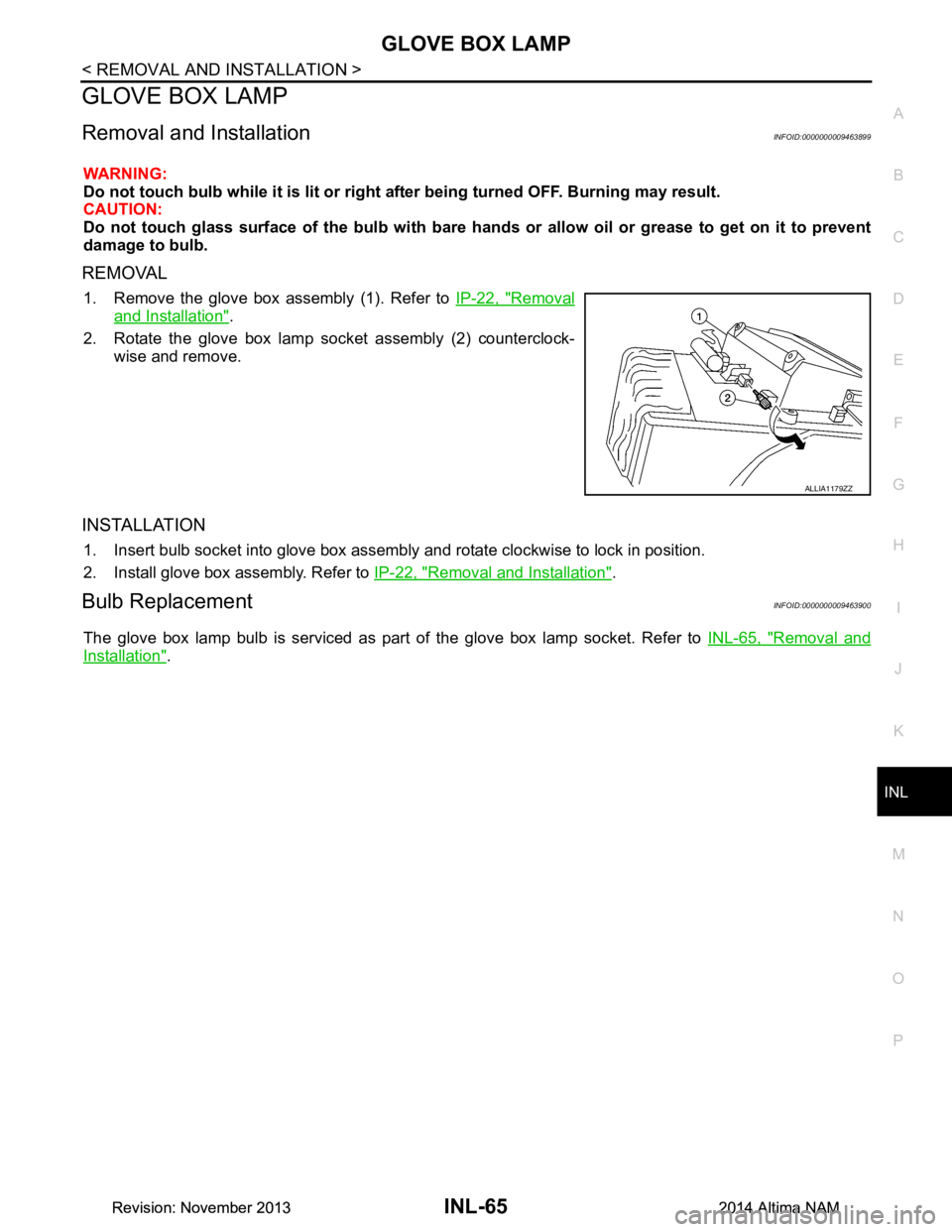
1. Remove the glove box assembly (1). Refer to IP-22, "Removal
and Installation".
2. Rotate the glove box lamp socket assembly (2) counterclock- wise and remove.
INSTALLATION
1. Insert bulb socket into glove box assembly and rotate clockwise to lock in position.
2. Install glove box assembly. Refer to IP-22, "Removal and Installation"
.
Bulb ReplacementINFOID:0000000009463900
The glove box lamp bulb is serviced as part of the glove box lamp socket. Refer to INL-65, "Removal and
Installation".
ALLIA1179ZZ
Revision: November 20132014 Altima NAMRevision: November 20132014 Altima NAM
Page 2900 of 4801
SQUEAK AND RATTLE TROUBLE DIAGNOSESINT-9
< SYMPTOM DIAGNOSIS >
C
D E
F
G H
I
K L
M A
B
INT
N
O P
SYMPTOM DIAGNOSIS
SQUEAK AND RATTLE TROUBLE DIAGNOSES
Work FlowINFOID:0000000009889897
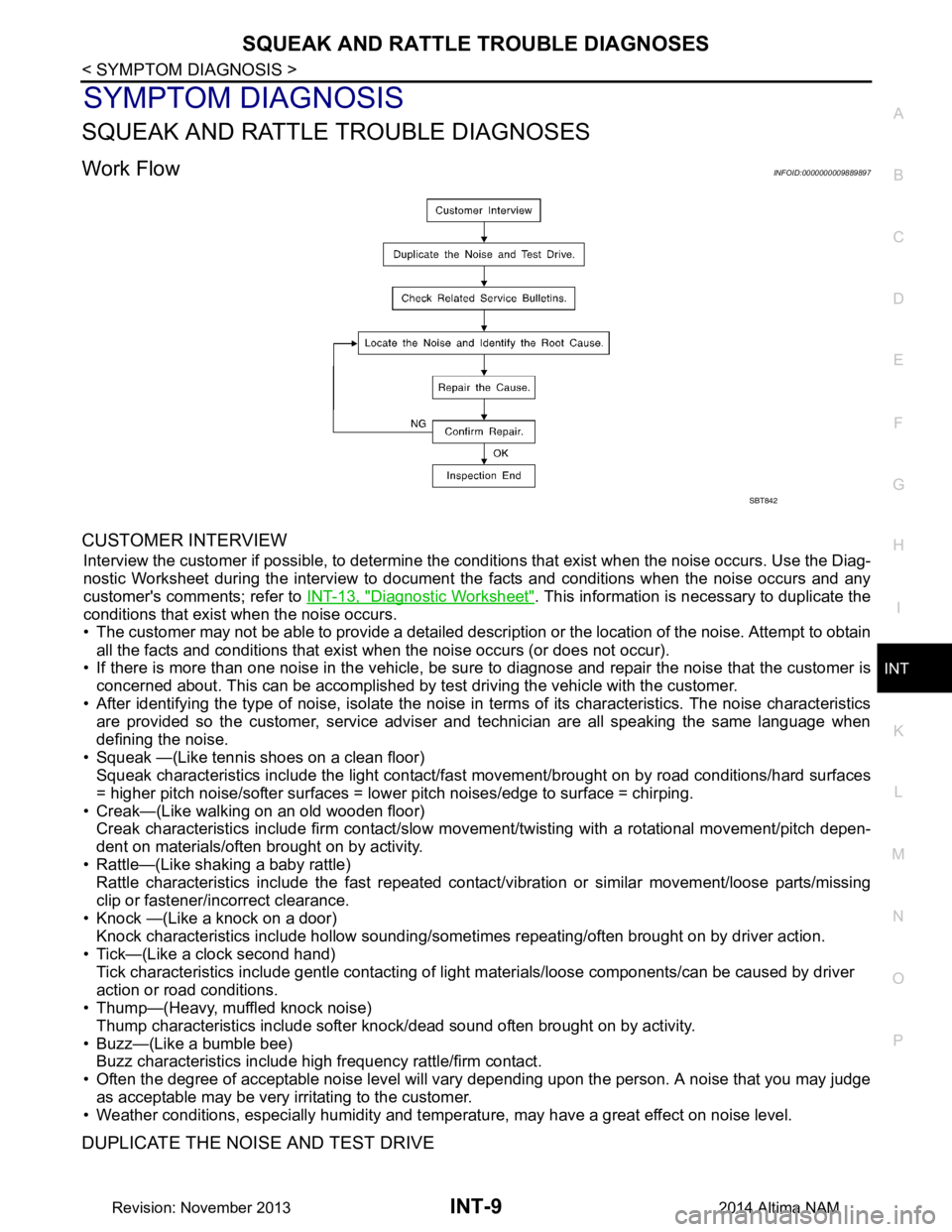
CUSTOMER INTERVIEW
Interview the customer if possible, to determine the c onditions that exist when the noise occurs. Use the Diag-
nostic Worksheet during the interv iew to document the facts and conditions when the noise occurs and any
customer's comments; refer to INT-13, "Diagnostic Worksheet"
. This information is necessary to duplicate the
conditions that exist when the noise occurs.
• The customer may not be able to provide a detailed descr iption or the location of the noise. Attempt to obtain
all the facts and conditions that exist when the noise occurs (or does not occur).
• If there is more than one noise in the vehicle, be sure to diagnose and repair the noise that the customer is
concerned about. This can be accomplished by test driving the vehicle with the customer.
• After identifying the type of noise, isolate the noise in terms of its characteristics. The noise characteristics
are provided so the customer, service adviser and technician are all speaking the same language when
defining the noise.
• Squeak —(Like tennis shoes on a clean floor) Squeak characteristics include the light contact/fast movement/brought on by road conditions/hard surfaces
= higher pitch noise/softer surfaces = lower pitch noises/edge to surface = chirping.
• Creak—(Like walking on an old wooden floor) Creak characteristics include firm contact/slow mo vement/twisting with a rotational movement/pitch depen-
dent on materials/often brought on by activity.
• Rattle—(Like shaking a baby rattle) Rattle characteristics include the fast repeated contac t/vibration or similar movement/loose parts/missing
clip or fastener/incorrect clearance.
• Knock —(Like a knock on a door) Knock characteristics include hollow sounding/someti mes repeating/often brought on by driver action.
• Tick—(Like a clock second hand) Tick characteristics include gentle contacting of li ght materials/loose components/can be caused by driver
action or road conditions.
• Thump—(Heavy, muffled knock noise)
Thump characteristics include softer k nock/dead sound often brought on by activity.
• Buzz—(Like a bumble bee) Buzz characteristics include high frequency rattle/firm contact.
• Often the degree of acceptable noise level will vary depending upon the person. A noise that you may judge
as acceptable may be very irritating to the customer.
• Weather conditions, especially humidity and temperature, may have a great effect on noise level.
DUPLICATE THE NOISE AND TEST DRIVE
SBT842
Revision: November 20132014 Altima NAM