Condition NISSAN TERRANO 2002 Service Repair Manual
[x] Cancel search | Manufacturer: NISSAN, Model Year: 2002, Model line: TERRANO, Model: NISSAN TERRANO 2002Pages: 1767, PDF Size: 41.51 MB
Page 977 of 1767
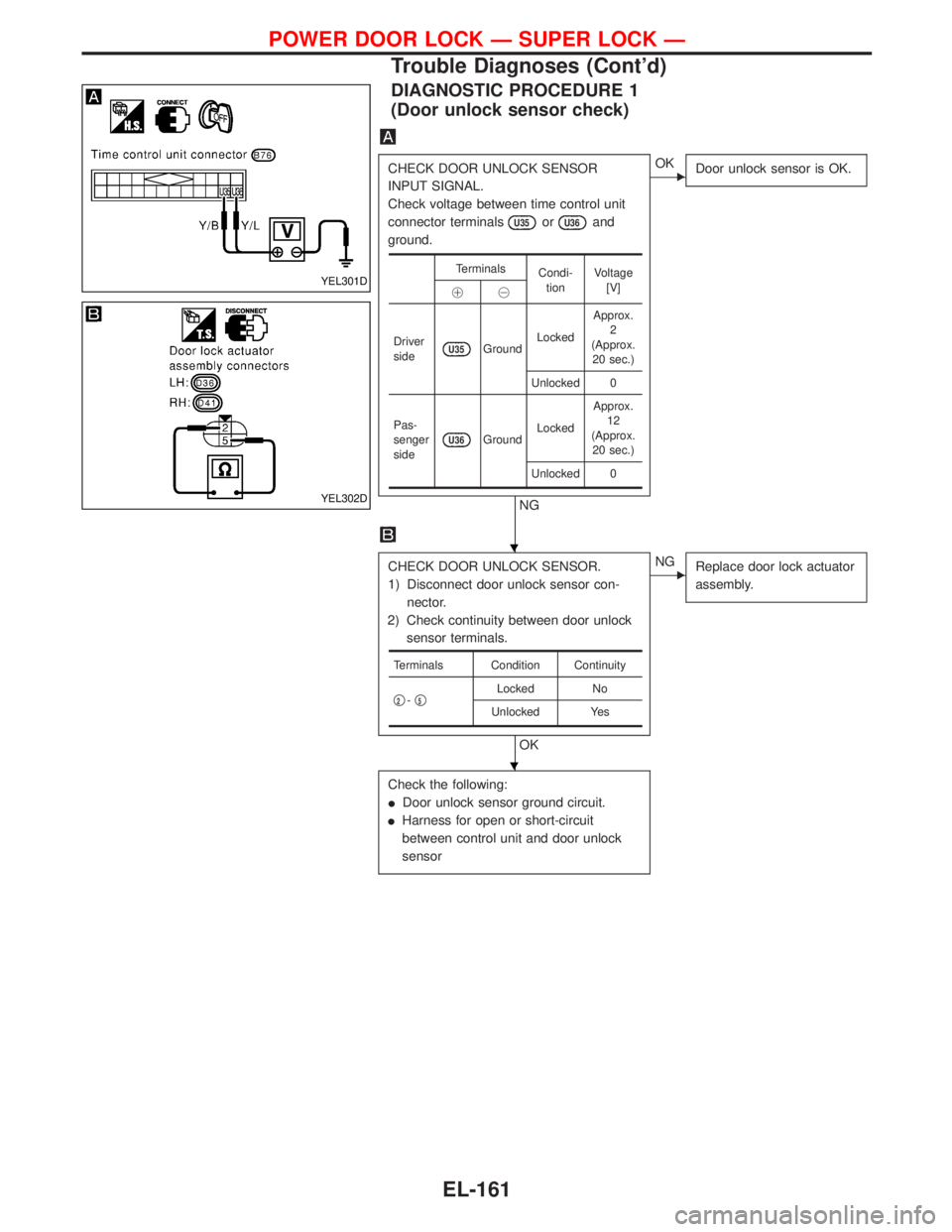
DIAGNOSTIC PROCEDURE 1
(Door unlock sensor check)
CHECK DOOR UNLOCK SENSOR
INPUT SIGNAL.
Check voltage between time control unit
connector terminals
U35orU36and
ground.
NG
EOK
Door unlock sensor is OK.
CHECK DOOR UNLOCK SENSOR.
1) Disconnect door unlock sensor con-
nector.
2) Check continuity between door unlock
sensor terminals.
OK
ENG
Replace door lock actuator
assembly.
Check the following:
IDoor unlock sensor ground circuit.
IHarness for open or short-circuit
between control unit and door unlock
sensor
Terminals
Condi-
tionVoltage
[V]
!@
Driver
side
U35GroundLockedApprox.
2
(Approx.
20 sec.)
Unlocked 0
Pas-
senger
side
U36GroundLockedApprox.
12
(Approx.
20 sec.)
Unlocked 0
Terminals Condition Continuity
q
2-q5Locked No
Unlocked Yes
YEL301D
YEL302D
H
H
POWER DOOR LOCK Ð SUPER LOCK Ð
Trouble Diagnoses (Cont'd)
EL-161
Page 979 of 1767
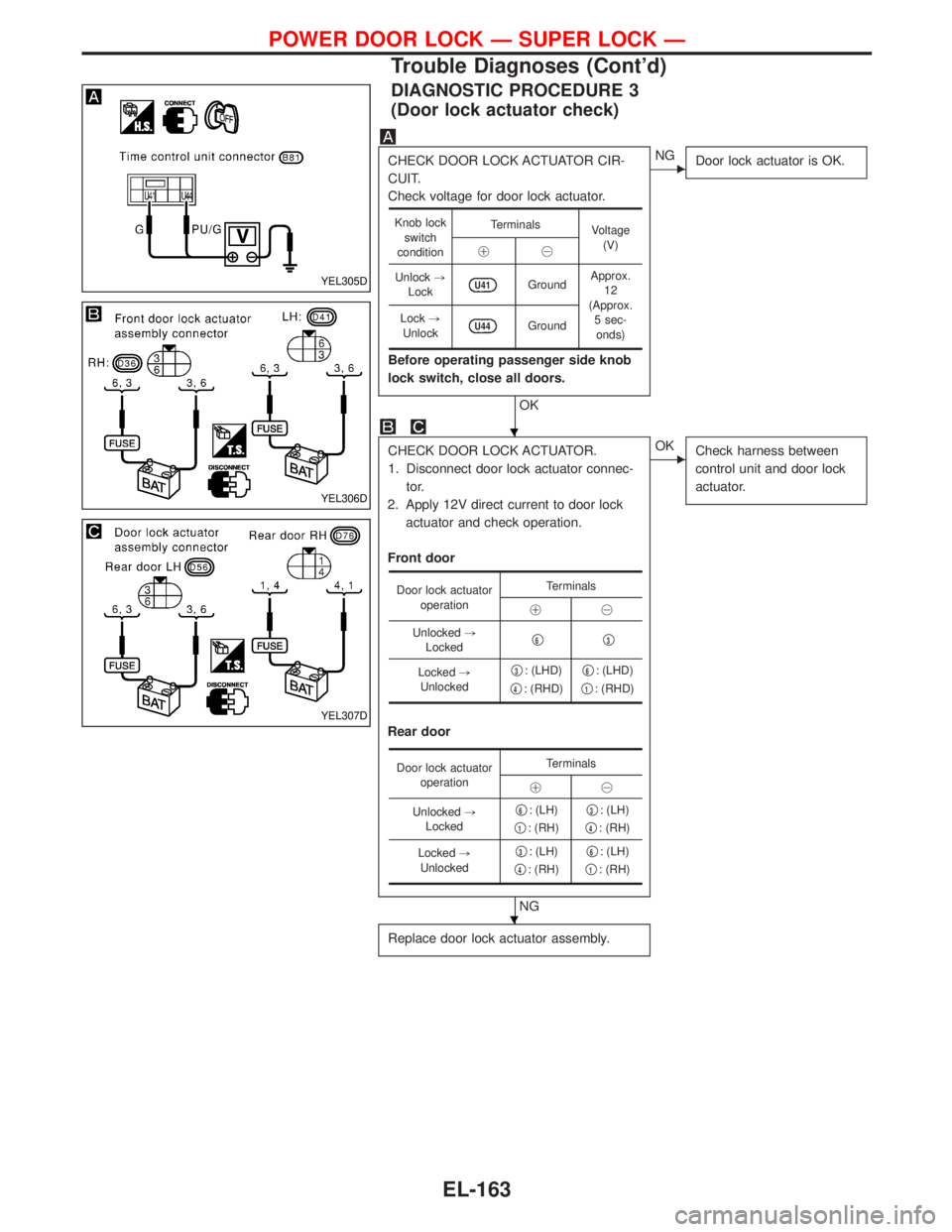
DIAGNOSTIC PROCEDURE 3
(Door lock actuator check)
CHECK DOOR LOCK ACTUATOR CIR-
CUIT.
Check voltage for door lock actuator.
Before operating passenger side knob
lock switch, close all doors.
OK
ENG
Door lock actuator is OK.
CHECK DOOR LOCK ACTUATOR.
1. Disconnect door lock actuator connec-
tor.
2. Apply 12V direct current to door lock
actuator and check operation.
Front door
Rear door
NG
EOK
Check harness between
control unit and door lock
actuator.
Replace door lock actuator assembly.
Knob lock
switch
conditionTerminals
Voltage
(V)
!@
Unlock,
Lock
U41GroundApprox.
12
(Approx.
5 sec-
onds) Lock,
Unlock
U44Ground
Door lock actuator
operationTerminals
!@
Unlocked,
Lockedq
6q3
Locked,
Unlockedq3: (LHD)
q
4: (RHD)q
6: (LHD)
q
1: (RHD)
Door lock actuator
operationTerminals
!@
Unlocked,
Lockedq
6: (LH)
q
1: (RH)q
3: (LH)
q
4: (RH)
Locked,
Unlockedq
3: (LH)
q
4: (RH)q
6: (LH)
q
1: (RH)
YEL305D
YEL306D
YEL307D
H
H
POWER DOOR LOCK Ð SUPER LOCK Ð
Trouble Diagnoses (Cont'd)
EL-163
Page 980 of 1767
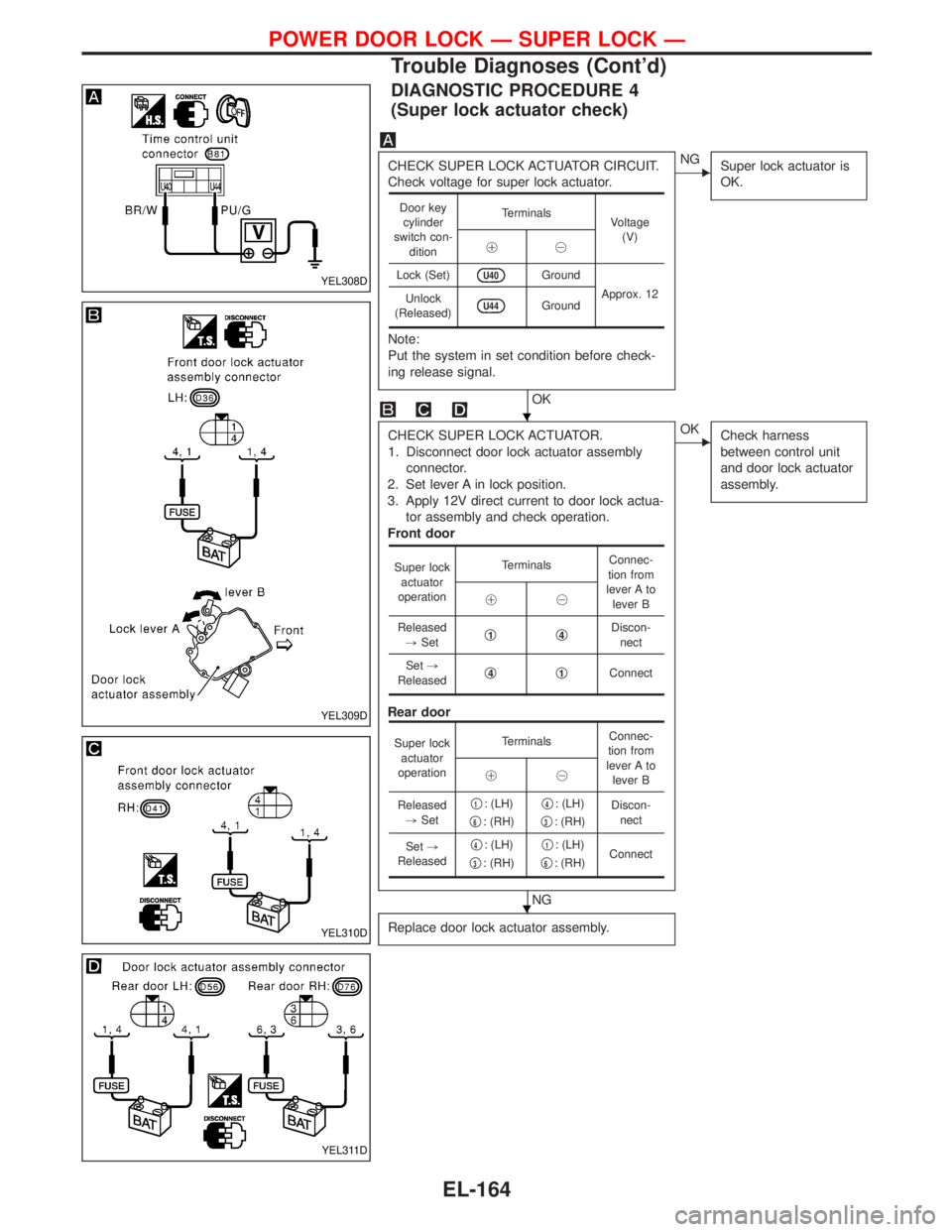
DIAGNOSTIC PROCEDURE 4
(Super lock actuator check)
CHECK SUPER LOCK ACTUATOR CIRCUIT.
Check voltage for super lock actuator.
Note:
Put the system in set condition before check-
ing release signal.
OK
ENG
Super lock actuator is
OK.
CHECK SUPER LOCK ACTUATOR.
1. Disconnect door lock actuator assembly
connector.
2. Set lever A in lock position.
3. Apply 12V direct current to door lock actua-
tor assembly and check operation.
Front door
Rear door
NG
EOK
Check harness
between control unit
and door lock actuator
assembly.
Replace door lock actuator assembly.
Door key
cylinder
switch con-
ditionTerminals
Voltage
(V)
!@
Lock (Set)
U40Ground
Approx. 12
Unlock
(Released)
U44Ground
Super lock
actuator
operationTerminalsConnec-
tion from
lever A to
lever B !@
Released
,Setq
1q4Discon-
nect
Set,
Releasedq
4q1Connect
Super lock
actuator
operationTerminalsConnec-
tion from
lever A to
lever B !@
Released
,Setq
1: (LH)
q
6: (RH)q
4: (LH)
q
3: (RH)Discon-
nect
Set,
Releasedq
4: (LH)
q
3: (RH)q
1: (LH)
q
6: (RH)Connect
YEL308D
YEL309D
YEL310D
YEL311D
H
H
POWER DOOR LOCK Ð SUPER LOCK Ð
Trouble Diagnoses (Cont'd)
EL-164
Page 981 of 1767
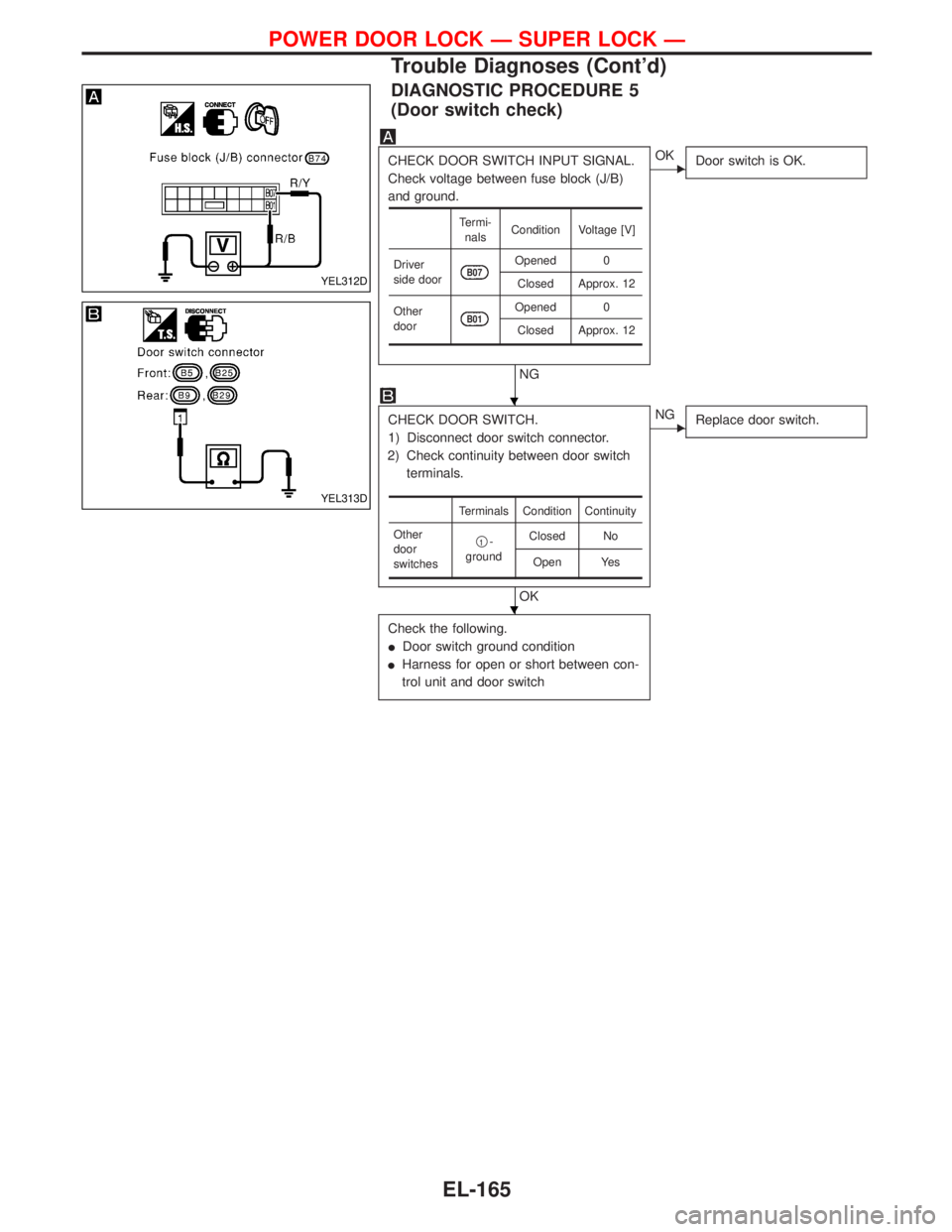
DIAGNOSTIC PROCEDURE 5
(Door switch check)
CHECK DOOR SWITCH INPUT SIGNAL.
Check voltage between fuse block (J/B)
and ground.
NG
EOK
Door switch is OK.
CHECK DOOR SWITCH.
1) Disconnect door switch connector.
2) Check continuity between door switch
terminals.
OK
ENG
Replace door switch.
Check the following.
IDoor switch ground condition
IHarness for open or short between con-
trol unit and door switch
Termi-
nalsCondition Voltage [V]
Driver
side door
B07Opened 0
Closed Approx. 12
Other
door
B01Opened 0
Closed Approx. 12
Terminals Condition Continuity
Other
door
switchesq
1-
groundClosed No
Open Yes
YEL312D
YEL313D
H
H
POWER DOOR LOCK Ð SUPER LOCK Ð
Trouble Diagnoses (Cont'd)
EL-165
Page 982 of 1767
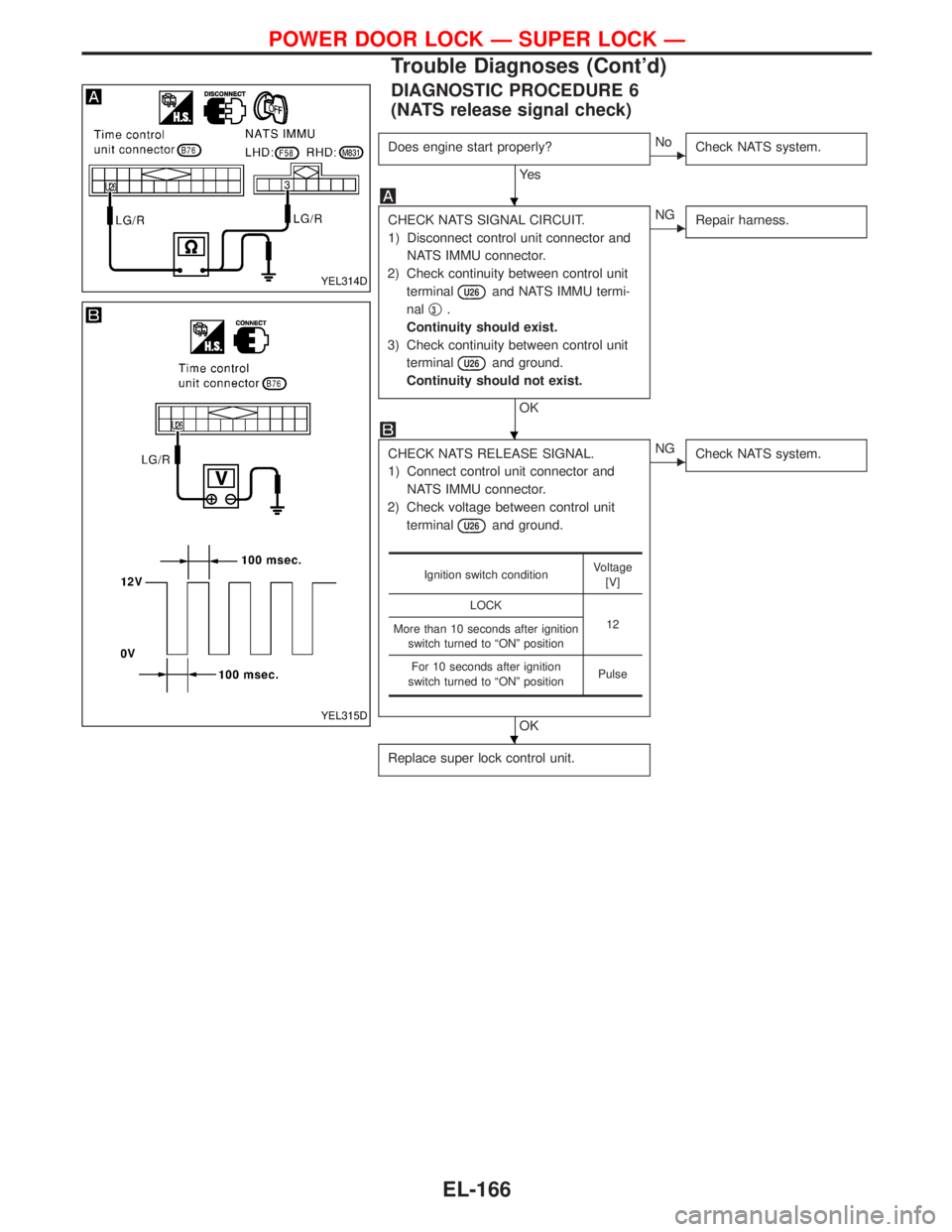
DIAGNOSTIC PROCEDURE 6
(NATS release signal check)
Does engine start properly?
Ye s
ENo
Check NATS system.
CHECK NATS SIGNAL CIRCUIT.
1) Disconnect control unit connector and
NATS IMMU connector.
2) Check continuity between control unit
terminal
U26and NATS IMMU termi-
nalq
3.
Continuity should exist.
3) Check continuity between control unit
terminal
U26and ground.
Continuity should not exist.
OK
ENG
Repair harness.
CHECK NATS RELEASE SIGNAL.
1) Connect control unit connector and
NATS IMMU connector.
2) Check voltage between control unit
terminal
U26and ground.
OK
ENG
Check NATS system.
Replace super lock control unit.
Ignition switch conditionVoltage
[V]
LOCK
12
More than 10 seconds after ignition
switch turned to ªONº position
For 10 seconds after ignition
switch turned to ªONº positionPulse
YEL314D
YEL315D
H
H
H
POWER DOOR LOCK Ð SUPER LOCK Ð
Trouble Diagnoses (Cont'd)
EL-166
Page 983 of 1767
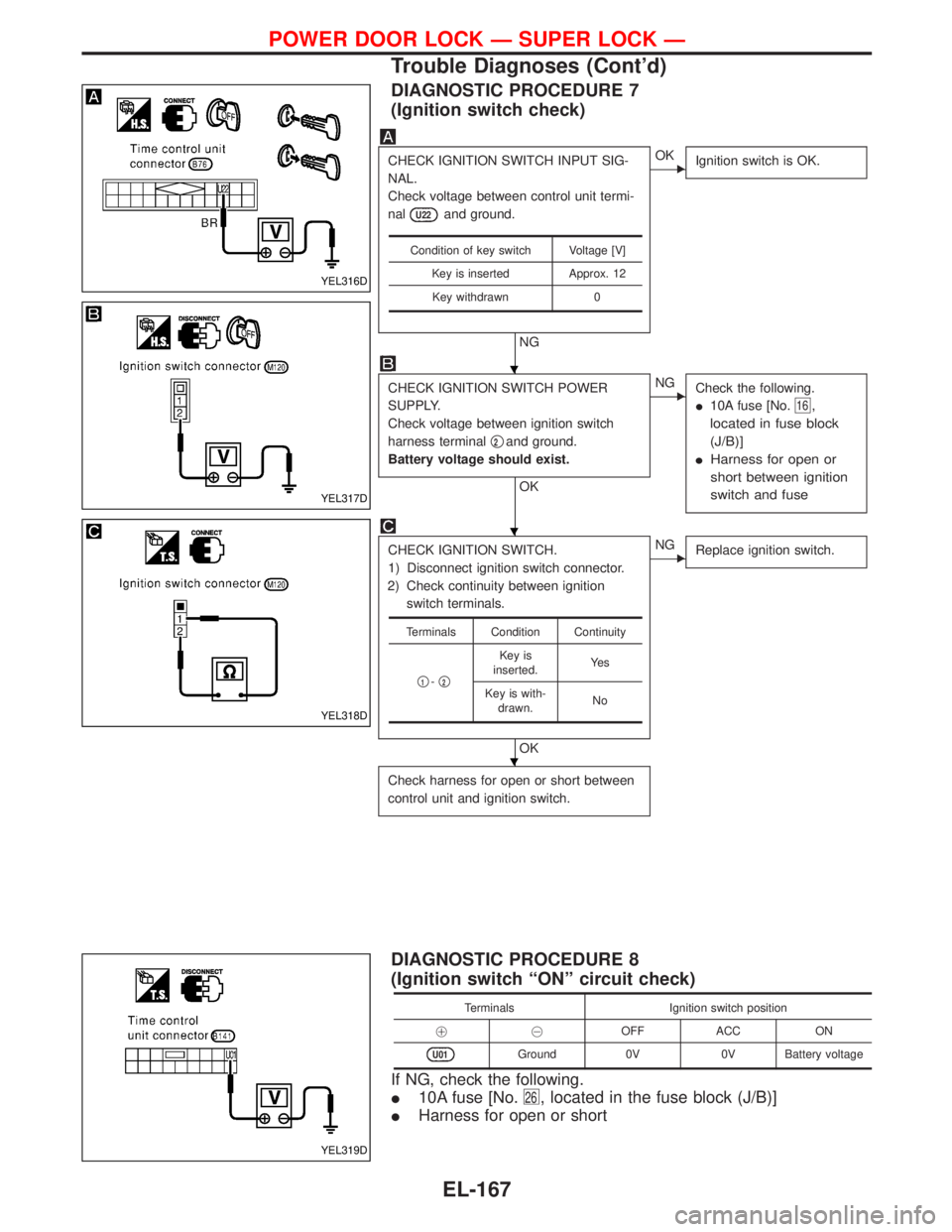
DIAGNOSTIC PROCEDURE 7
(Ignition switch check)
CHECK IGNITION SWITCH INPUT SIG-
NAL.
Check voltage between control unit termi-
nal
U22and ground.
NG
EOK
Ignition switch is OK.
CHECK IGNITION SWITCH POWER
SUPPLY.
Check voltage between ignition switch
harness terminalq
2and ground.
Battery voltage should exist.
OK
ENG
Check the following.
I10A fuse [No.
16,
located in fuse block
(J/B)]
IHarness for open or
short between ignition
switch and fuse
CHECK IGNITION SWITCH.
1) Disconnect ignition switch connector.
2) Check continuity between ignition
switch terminals.
OK
ENG
Replace ignition switch.
Check harness for open or short between
control unit and ignition switch.
Condition of key switch Voltage [V]
Key is inserted Approx. 12
Key withdrawn 0
Terminals Condition Continuity
q
1-q2
Key is
inserted.Ye s
Key is with-
drawn.No
DIAGNOSTIC PROCEDURE 8
(Ignition switch ªONº circuit check)
Terminals Ignition switch position
!@OFF ACC ON
U01Ground 0V 0V Battery voltage
If NG, check the following.
I10A fuse [No.
26, located in the fuse block (J/B)]
IHarness for open or short
YEL316D
YEL317D
YEL318D
YEL319D
H
H
H
POWER DOOR LOCK Ð SUPER LOCK Ð
Trouble Diagnoses (Cont'd)
EL-167
Page 994 of 1767
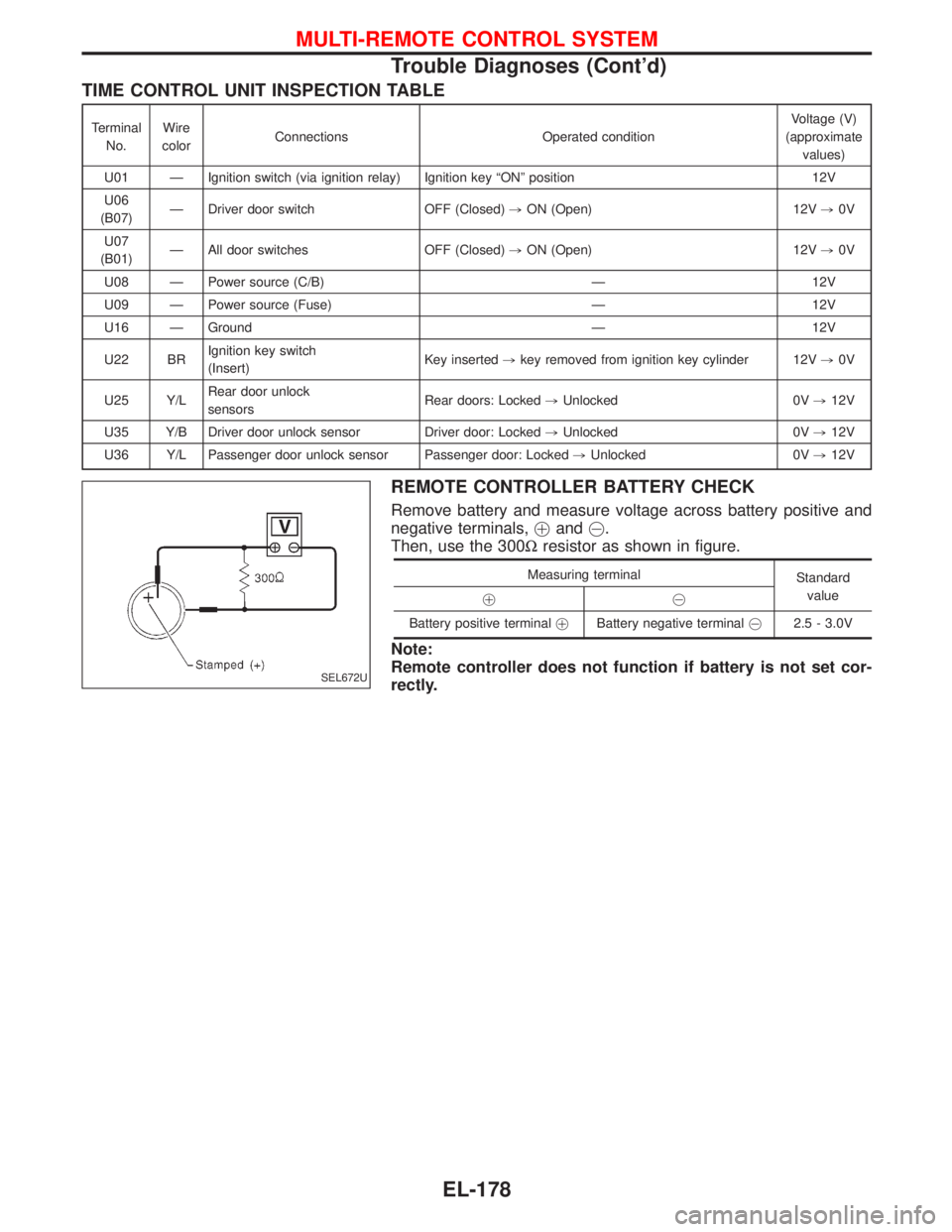
TIME CONTROL UNIT INSPECTION TABLE
Terminal
No.Wire
colorConnections Operated conditionVoltage (V)
(approximate
values)
U01 Ð Ignition switch (via ignition relay) Ignition key ªONº position 12V
U06
(B07)Ð Driver door switch OFF (Closed),ON (Open) 12V,0V
U07
(B01)Ð All door switches OFF (Closed),ON (Open) 12V,0V
U08 Ð Power source (C/B) Ð 12V
U09 Ð Power source (Fuse) Ð 12V
U16 Ð Ground Ð 12V
U22 BRIgnition key switch
(Insert)Key inserted,key removed from ignition key cylinder 12V,0V
U25 Y/LRear door unlock
sensorsRear doors: Locked,Unlocked 0V,12V
U35 Y/B Driver door unlock sensor Driver door: Locked,Unlocked 0V,12V
U36 Y/L Passenger door unlock sensor Passenger door: Locked,Unlocked 0V,12V
REMOTE CONTROLLER BATTERY CHECK
Remove battery and measure voltage across battery positive and
negative terminals,!and@.
Then, use the 300Wresistor as shown in figure.
Measuring terminal
Standard
value
!@
Battery positive terminal!Battery negative [email protected] - 3.0V
Note:
Remote controller does not function if battery is not set cor-
rectly.
SEL672U
MULTI-REMOTE CONTROL SYSTEM
Trouble Diagnoses (Cont'd)
EL-178
Page 995 of 1767
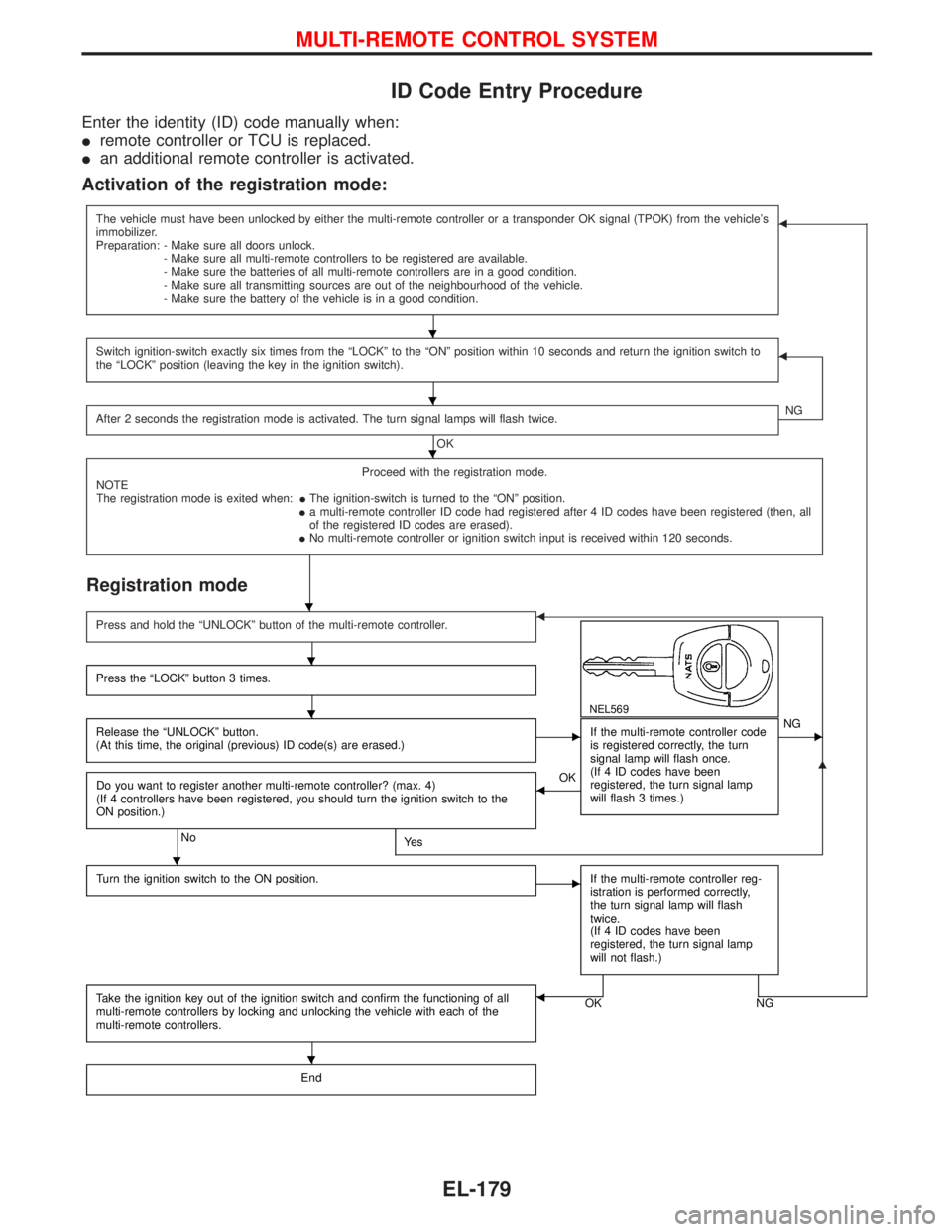
ID Code Entry Procedure
Enter the identity (ID) code manually when:
Iremote controller or TCU is replaced.
Ian additional remote controller is activated.
Activation of the registration mode:
The vehicle must have been unlocked by either the multi-remote controller or a transponder OK signal (TPOK) from the vehicle's
immobilizer.
Preparation: - Make sure all doors unlock.
- Make sure all multi-remote controllers to be registered are available.
- Make sure the batteries of all multi-remote controllers are in a good condition.
- Make sure all transmitting sources are out of the neighbourhood of the vehicle.
- Make sure the battery of the vehicle is in a good condition.F
Switch ignition-switch exactly six times from the ªLOCKº to the ªONº position within 10 seconds and return the ignition switch to
the ªLOCKº position (leaving the key in the ignition switch).F
After 2 seconds the registration mode is activated. The turn signal lamps will flash twice.
OKNG
Proceed with the registration mode.
NOTE
The registration mode is exited when:IThe ignition-switch is turned to the ªONº position.
Ia multi-remote controller ID code had registered after 4 ID codes have been registered (then, all
of the registered ID codes are erased).
INo multi-remote controller or ignition switch input is received within 120 seconds.
Registration mode
G
Press and hold the ªUNLOCKº button of the multi-remote controller.F
NEL569
Press the ªLOCKº button 3 times.
Release the ªUNLOCKº button.
(At this time, the original (previous) ID code(s) are erased.)EIf the multi-remote controller code
is registered correctly, the turn
signal lamp will flash once.
(If 4 ID codes have been
registered, the turn signal lamp
will flash 3 times.)ENG
Do you want to register another multi-remote controller? (max. 4)
(If 4 controllers have been registered, you should turn the ignition switch to the
ON position.)
NoYe s
FOK
Turn the ignition switch to the ON position.
EIf the multi-remote controller reg-
istration is performed correctly,
the turn signal lamp will flash
twice.
(If 4 ID codes have been
registered, the turn signal lamp
will not flash.)
Take the ignition key out of the ignition switch and confirm the functioning of all
multi-remote controllers by locking and unlocking the vehicle with each of the
multi-remote controllers.OK NGF
End
H
H
H
H
H
H
H
H
MULTI-REMOTE CONTROL SYSTEM
EL-179
Page 1002 of 1767
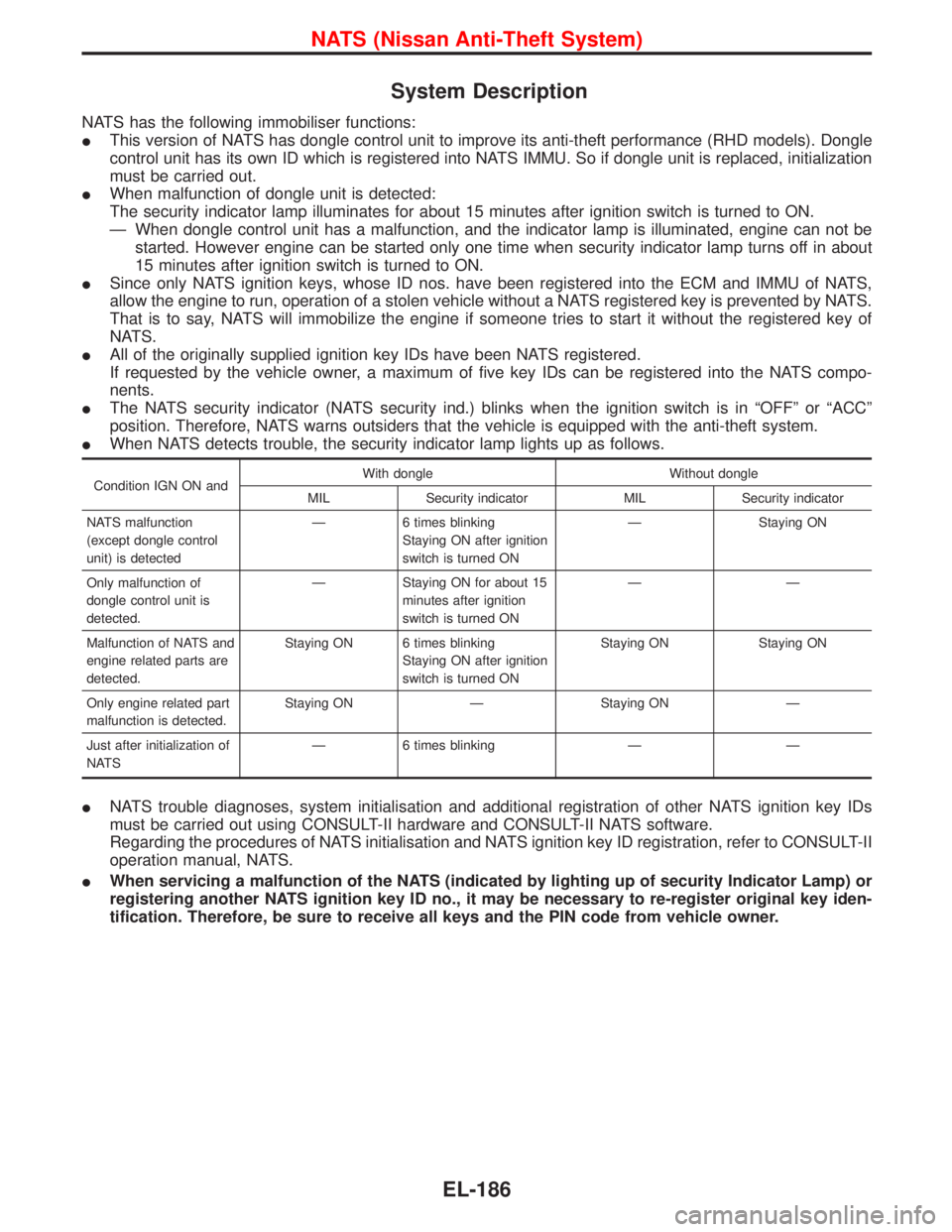
System Description
NATS has the following immobiliser functions:
IThis version of NATS has dongle control unit to improve its anti-theft performance (RHD models). Dongle
control unit has its own ID which is registered into NATS IMMU. So if dongle unit is replaced, initialization
must be carried out.
IWhen malfunction of dongle unit is detected:
The security indicator lamp illuminates for about 15 minutes after ignition switch is turned to ON.
Ð When dongle control unit has a malfunction, and the indicator lamp is illuminated, engine can not be
started. However engine can be started only one time when security indicator lamp turns off in about
15 minutes after ignition switch is turned to ON.
ISince only NATS ignition keys, whose ID nos. have been registered into the ECM and IMMU of NATS,
allow the engine to run, operation of a stolen vehicle without a NATS registered key is prevented by NATS.
That is to say, NATS will immobilize the engine if someone tries to start it without the registered key of
NATS.
IAll of the originally supplied ignition key IDs have been NATS registered.
If requested by the vehicle owner, a maximum of five key IDs can be registered into the NATS compo-
nents.
IThe NATS security indicator (NATS security ind.) blinks when the ignition switch is in ªOFFº or ªACCº
position. Therefore, NATS warns outsiders that the vehicle is equipped with the anti-theft system.
IWhen NATS detects trouble, the security indicator lamp lights up as follows.
Condition IGN ON andWith dongle Without dongle
MIL Security indicator MIL Security indicator
NATS malfunction
(except dongle control
unit) is detectedÐ 6 times blinking
Staying ON after ignition
switch is turned ONÐ Staying ON
Only malfunction of
dongle control unit is
detected.Ð Staying ON for about 15
minutes after ignition
switch is turned ONÐÐ
Malfunction of NATS and
engine related parts are
detected.Staying ON 6 times blinking
Staying ON after ignition
switch is turned ONStaying ON Staying ON
Only engine related part
malfunction is detected.Staying ON Ð Staying ON Ð
Just after initialization of
NATSÐ 6 times blinking Ð Ð
INATS trouble diagnoses, system initialisation and additional registration of other NATS ignition key IDs
must be carried out using CONSULT-II hardware and CONSULT-II NATS software.
Regarding the procedures of NATS initialisation and NATS ignition key ID registration, refer to CONSULT-II
operation manual, NATS.
IWhen servicing a malfunction of the NATS (indicated by lighting up of security Indicator Lamp) or
registering another NATS ignition key ID no., it may be necessary to re-register original key iden-
tification. Therefore, be sure to receive all keys and the PIN code from vehicle owner.
NATS (Nissan Anti-Theft System)
EL-186
Page 1010 of 1767
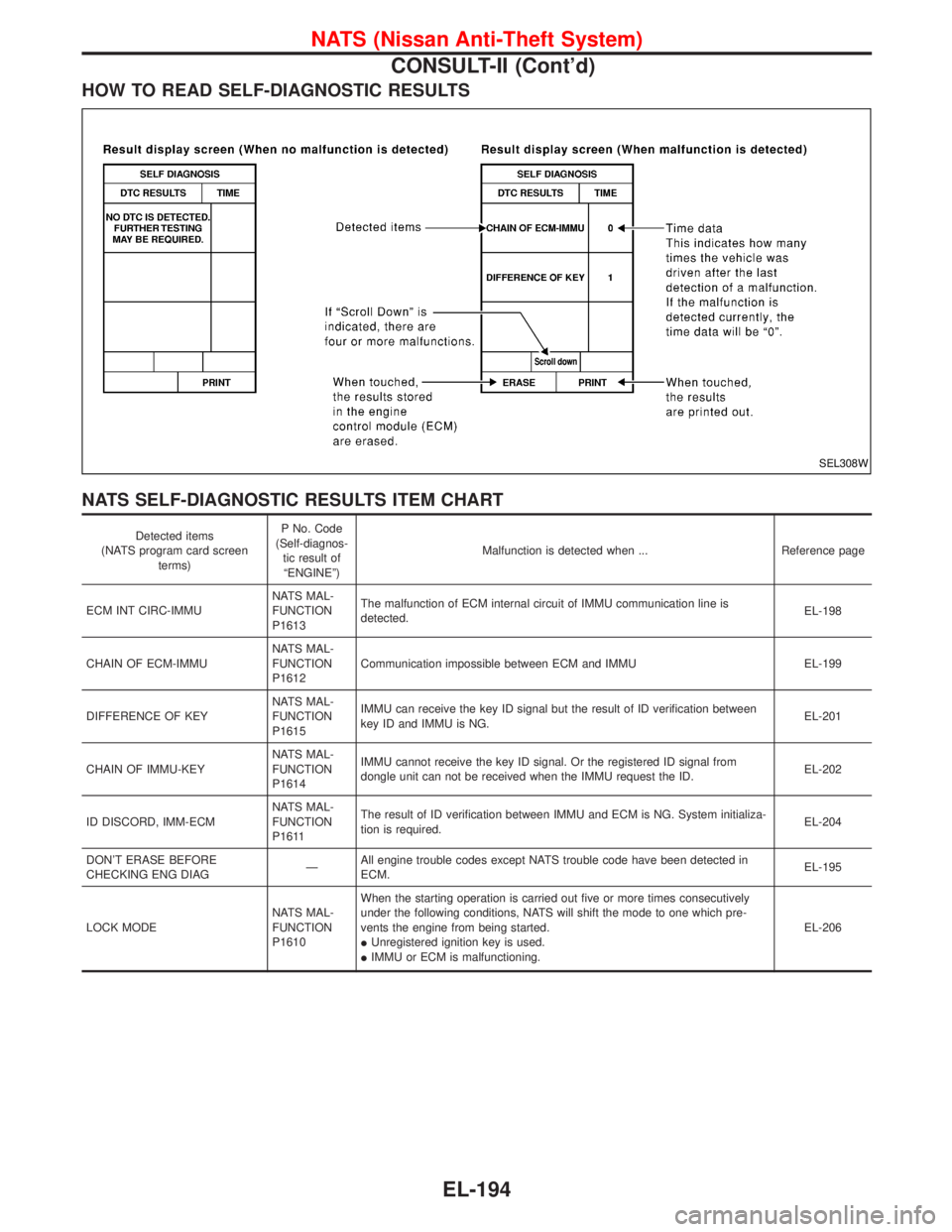
HOW TO READ SELF-DIAGNOSTIC RESULTS
NATS SELF-DIAGNOSTIC RESULTS ITEM CHART
Detected items
(NATS program card screen
terms)P No. Code
(Self-diagnos-
tic result of
ªENGINEº)Malfunction is detected when ... Reference page
ECM INT CIRC-IMMUNATS MAL-
FUNCTION
P1613The malfunction of ECM internal circuit of IMMU communication line is
detected.EL-198
CHAIN OF ECM-IMMUNATS MAL-
FUNCTION
P1612Communication impossible between ECM and IMMU EL-199
DIFFERENCE OF KEYNATS MAL-
FUNCTION
P1615IMMU can receive the key ID signal but the result of ID verification between
key ID and IMMU is NG.EL-201
CHAIN OF IMMU-KEYNATS MAL-
FUNCTION
P1614IMMU cannot receive the key ID signal. Or the registered ID signal from
dongle unit can not be received when the IMMU request the ID.EL-202
ID DISCORD, IMM-ECMNATS MAL-
FUNCTION
P1611The result of ID verification between IMMU and ECM is NG. System initializa-
tion is required.EL-204
DON'T ERASE BEFORE
CHECKING ENG DIAGÐAll engine trouble codes except NATS trouble code have been detected in
ECM.EL-195
LOCK MODENATS MAL-
FUNCTION
P1610When the starting operation is carried out five or more times consecutively
under the following conditions, NATS will shift the mode to one which pre-
vents the engine from being started.
IUnregistered ignition key is used.
IIMMU or ECM is malfunctioning.EL-206
SEL308W
NATS (Nissan Anti-Theft System)
CONSULT-II (Cont'd)
EL-194