light system NISSAN TIIDA 2007 Service Repair Manual
[x] Cancel search | Manufacturer: NISSAN, Model Year: 2007, Model line: TIIDA, Model: NISSAN TIIDA 2007Pages: 5883, PDF Size: 78.95 MB
Page 3351 of 5883
![NISSAN TIIDA 2007 Service Repair Manual HAC-18
< COMPONENT DIAGNOSIS >[MANUAL AIR CONDITIONER]
INTAKE DOOR
INTAKE DOOR
Intake Door Diagnostic ProcedureINFOID:0000000001547065
SYMPTOM:
Intake door does not change.
INSPECTION FLOW
1.CONFIRM](/img/5/57395/w960_57395-3350.png "NISSAN TIIDA 2007 Service Repair Manual HAC-18
< COMPONENT DIAGNOSIS >[MANUAL AIR CONDITIONER]
INTAKE DOOR
INTAKE DOOR
Intake Door Diagnostic ProcedureINFOID:0000000001547065
SYMPTOM:
Intake door does not change.
INSPECTION FLOW
1.CONFIRM")
HAC-18
< COMPONENT DIAGNOSIS >[MANUAL AIR CONDITIONER]
INTAKE DOOR
INTAKE DOOR
Intake Door Diagnostic ProcedureINFOID:0000000001547065
SYMPTOM:
Intake door does not change.
INSPECTION FLOW
1.CONFIRM SYMPTOM BY PERFORMING OPERATIONAL CHECK - REC ( )
1. Slide the intake door lever to the REC ( ) position.
2. Turn the blower motor to maximum speed.
3. Slide the intake door lever to the FRE position.
4. Listen for intake door position change (you should hear blower sound change slightly).
Can a symptom be duplicated?
YES >> GO TO 3.
NO >> GO TO 2.
2.PERFORM COMPLETE OPERATIONAL CHECK
Perform a complete operational check and check for any symptoms. Refer to HAC-6, "
Operational Check" .
Can a symptom be duplicated?
YES >> Refer to HAC-5, "How to Perform Trouble Diagnosis For Quick and Accurate Repair" .
NO >> System OK.
3.CHECK FOR SERVICE BULLETINS
Check for any service bulletins.
>> GO TO 4.
4.CHECK INTAKE DOOR CONTROL LINKAGE
Check intake door control linkage mechanism for smooth operation.
OK or NG
OK >> If the symptom still exists, perform a complete operational check. Refer to HAC-6, "Operational
Check" . If other symptoms exist, refer to HAC-5, "How to Perform Trouble Diagnosis For Quick
and Accurate Repair" .
NG >> Repair or adjust control linkage. Refer to XXXX INTAKE DOOR CABLE ADJUSTMENT .
Page 3412 of 5883
![NISSAN TIIDA 2007 Service Repair Manual INSUFFICIENT COOLING
HAC-79
< SYMPTOM DIAGNOSIS >[MANUAL AIR CONDITIONER]
C
D
E
F
G
H
J
K
L
MA
B
HAC
N
O
P Low-pressure Side Sometimes Becomes Negative
Low-pressure Side Becomes Negative
Gauge indicat](/img/5/57395/w960_57395-3411.png "NISSAN TIIDA 2007 Service Repair Manual INSUFFICIENT COOLING
HAC-79
< SYMPTOM DIAGNOSIS >[MANUAL AIR CONDITIONER]
C
D
E
F
G
H
J
K
L
MA
B
HAC
N
O
P Low-pressure Side Sometimes Becomes Negative
Low-pressure Side Becomes Negative
Gauge indicat")
INSUFFICIENT COOLING
HAC-79
< SYMPTOM DIAGNOSIS >[MANUAL AIR CONDITIONER]
C
D
E
F
G
H
J
K
L
MA
B
HAC
N
O
P Low-pressure Side Sometimes Becomes Negative
Low-pressure Side Becomes Negative
Gauge indication Refrigerant cycle Probable cause Corrective action
Both high- and low-pressure
sides are too low. There is a big temperature dif-
ference between liquid tank
outlet and inlet. Outlet tem-
perature is extremely low.
Liquid tank inlet and expan-
sion valve are frosted.Liquid tank inside is slightly
clogged. Replace liquid tank.
Check oil for contamination.
Temperature of expansion
valve inlet is extremely low as
compared with areas near liq-
uid tank.
Expansion valve inlet may be
frosted.
Temperature difference oc-
curs somewhere in high-pres-
sure side.High-pressure pipe located be-
tween liquid tank and expansion
valve is clogged. Check and repair malfunc-
tioning parts.
Check oil for contamination.
Expansion valve and liquid tank
are warm or only cool when
touched.Low refrigerant charge.
↓
Leaking fittings or componentsCheck refrigerant for leaks.
Refer to XXXX CHECKING OF
REFRIG LEAKS .
There is a big temperature dif-
ference between expansion
valve inlet and outlet while the
valve itself is frosted.Expansion valve closes a little
compared with the specification.
↓
1. Improper expansion valve
adjustment.
2. Malfunctioning expansion
valve.
3. Outlet and inlet may be
clogged. Remove foreign particles by
using compressed air.
Replace expansion valve.
Check oil for contamination.
An area of the low-pressure pipe
is colder than areas near the
evaporator outlet.Low-pressure pipe is clogged or
crushed. Check and repair malfunc-
tioning parts.
Check oil for contamination.
Air flow volume is not enough or
is too low.Evaporator is frozen. Check thermo control amp.
Refer to XXXX MAG
CLUTCH CIR..
Replace compressor.
Repair evaporator fins.
Replace evaporator.
Refer to XXXX BLOWER
MOTOR CIR. .
AC353A
Gauge indication Refrigerant cycle Probable cause Corrective action
Low-pressure side sometimes be-
comes negative. Air conditioning system does
not function and does not cy-
clically cool the compart-
ment air.
The system constantly func-
tions for a certain period of
time after compressor is
stopped and restarted.Refrigerant does not discharge
cyclically.
↓
Moisture is frozen at expan-
sion valve outlet and inlet.
↓
Water is mixed with refrigerant. Drain water from refrigerant
or replace refrigerant.
Replace liquid tank.
AC354A
Page 3420 of 5883
![NISSAN TIIDA 2007 Service Repair Manual INSPECTION AND ADJUSTMENT
HAC-87
< BASIC INSPECTION >[AUTO AIR CONDITIONER (W/O NAVI)]
C
D
E
F
G
H
J
K
L
MA
B
HAC
N
O
P
INSPECTION AND ADJUSTMENT
Operational CheckINFOID:0000000001547386
The purpose o](/img/5/57395/w960_57395-3419.png "NISSAN TIIDA 2007 Service Repair Manual INSPECTION AND ADJUSTMENT
HAC-87
< BASIC INSPECTION >[AUTO AIR CONDITIONER (W/O NAVI)]
C
D
E
F
G
H
J
K
L
MA
B
HAC
N
O
P
INSPECTION AND ADJUSTMENT
Operational CheckINFOID:0000000001547386
The purpose o")
INSPECTION AND ADJUSTMENT
HAC-87
< BASIC INSPECTION >[AUTO AIR CONDITIONER (W/O NAVI)]
C
D
E
F
G
H
J
K
L
MA
B
HAC
N
O
P
INSPECTION AND ADJUSTMENT
Operational CheckINFOID:0000000001547386
The purpose of the operational check is to confirm that the system operates properly.
CHECKING MEMORY FUNCTION
1. Press temperature control switch (UP: ) until 32°C is displayed.
2. Press OFF switch.
3. Turn the ignition switch OFF.
4. Turn the ignition switch ON.
5. Press the AUTO switch.
6. Confirm that the set temperature remains at previous temperature.
7. Press OFF switch.
If NG, go to trouble diagnosis procedure for HAC-198, "
Memory Function Check".
If OK, continue the check.
CHECKING BLOWER
1. Press blower motor switch (UP: ). Blower should operate on low speed. The fan symbol should have one
blade lit.
2. Press blower motor switch (UP: ), and continue checking blower speed and fan symbol until all speeds
are checked.
3. Leave blower on max. speed.
If NG, go to trouble diagnosis procedure for HAC-120, "
Front Blower Motor Diagnosis Procedure".
If OK, continue the check.
CHECKING DISCHARGE AIR
1. Press MODE switch and DEF switch.
2. Each position indicator should change shape.
3. Confirm that discharge air comes out according to the air distribution table. Refer to HAC-94, "
Discharge
Air Flow".
Intake door position is checked in the next step.
If NG, go to trouble diagnosis procedure for HAC-109, "
Mode Door Motor Diagnosis Procedure".
If OK, continue the check.
NOTE:
Confirm that the compressor clutch is engaged (sound or visual inspection) and intake door position is at
FRESH when the DEF is selected.
CHECKING RECIRCULATION
1. Press recirculation (REC) switch one time. Recirculation LED should illuminate.
2. Press fresh (FRE) switch one time. Fresh LED should illuminate.
3. Listen for intake door position change (you should hear blower sound change slightly).
If NG, go to trouble diagnosis procedure for HAC-116, "
Intake Door Motor Diagnosis Procedure".
If OK, continue the check.
CHECKING TEMPERATURE INCREASE
1. Press temperature control switch (UP: ) until 32°C is displayed.
2. Check for hot air at discharge air outlets.
If NG, go to trouble diagnosis procedure for HAC-193, "
Component Function Check".
If OK, continue the check.
CHECKING TEMPERATURE DECREASE
1. Press temperature control switch (DOWN: ) until 18°C is displayed. Conditions : Engine running at usual operating temperature
Page 3469 of 5883
![NISSAN TIIDA 2007 Service Repair Manual HAC-136
< COMPONENT DIAGNOSIS >[AUTO AIR CONDITIONER (W/O NAVI)]
SUNLOAD SENSOR
SUNLOAD SENSOR
System DescriptionINFOID:0000000001547443
COMPONENT DESCRIPTION
Sunload Sensor
The sunload sensor (1) is](/img/5/57395/w960_57395-3468.png "NISSAN TIIDA 2007 Service Repair Manual HAC-136
< COMPONENT DIAGNOSIS >[AUTO AIR CONDITIONER (W/O NAVI)]
SUNLOAD SENSOR
SUNLOAD SENSOR
System DescriptionINFOID:0000000001547443
COMPONENT DESCRIPTION
Sunload Sensor
The sunload sensor (1) is")
HAC-136
< COMPONENT DIAGNOSIS >[AUTO AIR CONDITIONER (W/O NAVI)]
SUNLOAD SENSOR
SUNLOAD SENSOR
System DescriptionINFOID:0000000001547443
COMPONENT DESCRIPTION
Sunload Sensor
The sunload sensor (1) is located on the instrument upper mask. It
detects sunload entering through windshield by means of a photo
diode. The sensor converts the sunload into a current value which is
then input into the front air control.
SUNLOAD INPUT PROCESS
The front air control also includes a processing circuit which averages the variations in detected sunload over
a period of time. This prevents drastic swings in the ATC system operation due to small or quick variations in
detected sunload.
For example, consider driving along a road bordered by an occasional group of large trees. The sunload
detected by the sunload sensor will vary whenever the trees obstruct the sunlight. The processing circuit aver-
ages the detected sunload over a period of time, so that the (insignificant) effect of the trees momentarily
obstructing the sunlight does not cause any change in the ATC system operation. On the other hand, shortly
after entering a long tunnel, the system will recognize the change in sunload, and the system will react accord-
ingly.
Sunload Sensor Diagnosis ProcedureINFOID:0000000001547442
DIAGNOSTIC PROCEDURE FOR SUNLOAD SENSOR
SYMPTOM: Sunload sensor circuit is open or shorted. (25 or AUTO25
is indicated on front air control as a result of performing self-diagno-
sis STEP-2.)
1.CHECK VOLTAGE BETWEEN SUNLOAD SENSOR AND GROUND
1. Turn ignition switch OFF.
2. Disconnect sunload sensor connector M94.
3. Turn ignition switch ON.
4. Check voltage between sunload sensor harness connector M94
terminal 1 and ground.
Is the inspection result normal?
SJIA0819E
AWIIA0312GB
Te r m i n a l s
Voltag e
(Approx.) (+) (−)
Connector Terminal
Ground
Sunload sensor: M94 1 5V
SJIA0821E
Page 3535 of 5883
![NISSAN TIIDA 2007 Service Repair Manual HAC-202
< BASIC INSPECTION >[AUTO AIR CONDITIONER (W/NAVI)]
INSPECTION AND ADJUSTMENT
INSPECTION AND ADJUSTMENT
Operational CheckINFOID:0000000001547306
The purpose of the operational check is to conf](/img/5/57395/w960_57395-3534.png "NISSAN TIIDA 2007 Service Repair Manual HAC-202
< BASIC INSPECTION >[AUTO AIR CONDITIONER (W/NAVI)]
INSPECTION AND ADJUSTMENT
INSPECTION AND ADJUSTMENT
Operational CheckINFOID:0000000001547306
The purpose of the operational check is to conf")
HAC-202
< BASIC INSPECTION >[AUTO AIR CONDITIONER (W/NAVI)]
INSPECTION AND ADJUSTMENT
INSPECTION AND ADJUSTMENT
Operational CheckINFOID:0000000001547306
The purpose of the operational check is to confirm that the system operates properly.
CHECKING BLOWER
1. Turn blower control dial to 1st speed. Blower should operate on low speed.
2. Turn blower control dial to 2nd speed, and continue checking blower motor until all speed are checked.
3. Leave blower on max. speed.
If NG, go to trouble diagnosis procedure for HAC-234, "
Front Blower Motor Diagnosis Procedure".
If OK, continue the check.
CHECKING DISCHARGE AIR
1. Turn mode control dial to each position.
2. Confirm that discharge air comes out according to the air distribution table. Refer to HAC-208, "
Discharge
Air Flow".
Intake door position is checked in the next step.
If NG, go to trouble diagnosis procedure for HAC-222, "
Mode Door Motor Diagnosis Procedure".
If OK, continue the check.
NOTE:
Confirm that the compressor clutch is engaged (sound or visual inspection) and intake door position is at
FRESH when the DEF is selected.
CHECKING INTAKE DOOR
1. Press intake switch. Recirculation indicator should illuminate.
2. Press intake switch again. Fresh indicator should illuminate.
3. Listen for intake door position change (you should hear blower sound change slightly).
If NG, go to trouble diagnosis procedure for HAC-230, "
Intake Door Motor Diagnosis Procedure".
If OK, continue the check.
CHECKING TEMPERATURE DECREASE
1. Turn temperature control dial counterclockwise until 18°C (64°F).
2. Check for cold air at discharge air outlets.
If NG, go to trouble diagnosis procedure for HAC-299, "
Component Function Check".
If OK, continue the check.
CHECKING TEMPERATURE INCREASE
1. Turn temperature control dial clockwise until 32°C (90°F).
2. Check for hot air at discharge air outlets.
If NG, go to trouble diagnosis procedure for HAC-307, "
Component Function Check".
If OK, continue the check.
CHECKING A/C SWITCH
1. Turn blower control dial to ON.
2. Press A/C switch.
3. A/C switch indicator will turn ON.
Confirm that the compressor clutch engages (sound or visual inspection).
If NG, go to trouble diagnosis procedure for HAC-239, "
Magnet Clutch Diagnosis Procedure".
If OK, continue the check.
CHECKING AUTO MODE
1. Set mode control dial and blower control dial to AUTO position.
2. Press A/C switch.Conditions : Engine running at usual operating temperature
Page 3562 of 5883
![NISSAN TIIDA 2007 Service Repair Manual INTAKE DOOR MOTOR
HAC-229
< COMPONENT DIAGNOSIS >[AUTO AIR CONDITIONER (W/NAVI)]
C
D
E
F
G
H
J
K
L
MA
B
HAC
N
O
P
The intake door motor is attached to the A/C unit assembly. It rotates
so that air is](/img/5/57395/w960_57395-3561.png "NISSAN TIIDA 2007 Service Repair Manual INTAKE DOOR MOTOR
HAC-229
< COMPONENT DIAGNOSIS >[AUTO AIR CONDITIONER (W/NAVI)]
C
D
E
F
G
H
J
K
L
MA
B
HAC
N
O
P
The intake door motor is attached to the A/C unit assembly. It rotates
so that air is")
INTAKE DOOR MOTOR
HAC-229
< COMPONENT DIAGNOSIS >[AUTO AIR CONDITIONER (W/NAVI)]
C
D
E
F
G
H
J
K
L
MA
B
HAC
N
O
P
The intake door motor is attached to the A/C unit assembly. It rotates
so that air is drawn from inlets set by the front air control Motor rota-
tion is conveyed to a lever which activates the intake door.
Intake Door Motor Component Function CheckINFOID:0000000001547334
INSPECTION FLOW
1.CONFIRM SYMPTOM BY PERFORMING OPERATIONAL CHECK - REC ( )
1. Turn mode control dial to vent mode( ).
2. Press REC ( ) switch. The REC ( )indicator should illuminate.
3. Press REC ( ) switch again. The REC ( ) indicator should go out.
4. Listen for intake door position change (you should hear blower sound change slightly).
Can a symptom be duplicated?
YES >> GO TO 3.
NO >> GO TO 2.
2.PERFORM COMPLETE OPERATIONAL CHECK
Perform a complete operational check and check for any symptoms. Refer to HAC-202, "
Operational Check".
Can a symptom be duplicated?
YES >> Refer to HAC-201, "How to Perform Trouble Diagnosis For Quick And Accurate Repair".
NO >> System OK.
3.CHECK FOR SERVICE BULLETINS
Check for any service bulletins.
>> GO TO 4.
4.PERFORM SELF-DIAGNOSIS.
Set in Self-diagnostic mode. Refer to HAC-213, "
Front Air Control Self-Diagnosis".
Are any self-diagnosis codes present?
YES >> Repair as necessary.
NO >> GO TO 5.
5. CHECK AMBIENT SENSOR CIRCUIT
Perform diagnostic procedure for the ambient sensor circuit. Refer to HAC-244, "
Ambient Sensor Diagnosis
Procedure".
YES or NO
YES >> GO TO 7
NO >> Repair as necessary.
6. CHECK IN-VEHICLE SENSOR CIRCUIT
Perform diagnostic procedure for the in-vehicle sensor circuit. Refer to XXXX IN-VEHICLE SENS DIAG.
YES or NO
YES >> GO TO 8
NO >> Repair as necessary.
7. CHECK SUNLOAD SENSOR CIRCUIT
SJIA0814E
Page 3583 of 5883
![NISSAN TIIDA 2007 Service Repair Manual HAC-250
< COMPONENT DIAGNOSIS >[AUTO AIR CONDITIONER (W/NAVI)]
SUNLOAD SENSOR
SUNLOAD SENSOR
Component DescriptionINFOID:0000000001547363
COMPONENT DESCRIPTION
Sunload Sensor
The sunload sensor (1) is](/img/5/57395/w960_57395-3582.png "NISSAN TIIDA 2007 Service Repair Manual HAC-250
< COMPONENT DIAGNOSIS >[AUTO AIR CONDITIONER (W/NAVI)]
SUNLOAD SENSOR
SUNLOAD SENSOR
Component DescriptionINFOID:0000000001547363
COMPONENT DESCRIPTION
Sunload Sensor
The sunload sensor (1) is")
HAC-250
< COMPONENT DIAGNOSIS >[AUTO AIR CONDITIONER (W/NAVI)]
SUNLOAD SENSOR
SUNLOAD SENSOR
Component DescriptionINFOID:0000000001547363
COMPONENT DESCRIPTION
Sunload Sensor
The sunload sensor (1) is located on the instrument upper mask. It
detects sunload entering through windshield by means of a photo
diode. The sensor converts the sunload into a current value which is
then input into the front air control.
SUNLOAD INPUT PROCESS
The front air control also includes a processing circuit which averages the variations in detected sunload over
a period of time. This prevents drastic swings in the ATC system operation due to small or quick variations in
detected sunload.
For example, consider driving along a road bordered by an occasional group of large trees. The sunload
detected by the sunload sensor will vary whenever the trees obstruct the sunlight. The processing circuit aver-
ages the detected sunload over a period of time, so that the (insignificant) effect of the trees momentarily
obstructing the sunlight does not cause any change in the ATC system operation. On the other hand, shortly
after entering a long tunnel, the system will recognize the change in sunload, and the system will react accord-
ingly.
Sunload Sensor Diagnosis ProcedureINFOID:0000000001547364
DIAGNOSTIC PROCEDURE FOR SUNLOAD SENSOR
SYMPTOM: Sunload sensor circuit is open or shorted.
LEDs of intake switch (FRE, REC) does not illuminate as a result of
performing self-diagnosis STEP-2.
1.CHECK VOLTAGE BETWEEN SUNLOAD SENSOR AND GROUND
1. Turn ignition switch OFF.
2. Disconnect sunload sensor connector.
3. Turn ignition switch ON.
4. Check voltage between sunload sensor harness connector M94
terminal 1 and ground.
Is the inspection result normal
SJIA0819E
AWIIA0347GB
Te r m i n a l s
Voltag e
(Approx.) (+) (−)
Connector Terminal
Ground
Sunload sensor: M94 1 5V
SJIA0821E
Page 3652 of 5883

INL-1
DRIVER CONTROLS
C
D
E
F
G
H
I
J
K
M
SECTION INL
A
B
INL
N
O
P
CONTENTS
INTERIOR LIGHTING SYSTEM
BASIC INSPECTION ....................................2
DIAGNOSIS AND REPAIR WORKFLOW ..........2
Work Flow .................................................................2
FUNCTION DIAGNOSIS ...............................5
INTERIOR ROOM LAMP CONTROL SYSTEM
.....
5
System Diagram ........................................................5
System Description ...................................................5
Component Parts Location ........................................6
Component Description ............................................6
ILLUMINATION CONTROL SYSTEM .................8
System Diagram ........................................................8
System Description ...................................................8
Component Parts Location ........................................8
Component Description .............................................9
DIAGNOSIS SYSTEM (BCM) ............................10
COMMON ITEM .........................................................10
COMMON ITEM : CONSULT-III Function (BCM -
COMMON ITEM) .....................................................
10
INT LAMP ..................................................................10
INT LAMP : CONSULT-III Function (BCM - INT
LAMP) .....................................................................
10
BATTERY SAVER .....................................................12
BATTERY SAVER : CONSULT-III Function (BCM
- BATTERY SAVER) ...............................................
12
COMPONENT DIAGNOSIS .........................14
POWER SUPPLY AND GROUND CIRCUIT ......14
BCM ...........................................................................14
BCM : Diagnosis Procedure ....................................14
INTERIOR ROOM LAMP POWER SUPPLY
CIRCUIT ............................................................
15
Description ...............................................................15
Component Function Check ....................................15
Diagnosis Procedure ...............................................15
INTERIOR ROOM LAMP CONTROL SYSTEM
...
17
Wiring Diagram - INTERIOR ROOM LAMP - ..........17
ILLUMINATION .................................................20
Wiring Diagram - ILLUMINATION - .........................20
ECU DIAGNOSIS .........................................22
BCM (BODY CONTROL MODULE) .................22
Description ...............................................................22
SYMPTOM DIAGNOSIS ..............................23
INTERIOR LIGHTING SYSTEM SYMPTOMS ...23
Symptom Table .......................................................23
PRECAUTION ..............................................24
PRECAUTIONS .................................................24
Supplemental Restraint System (SRS) "AIR BAG"
and "SEAT BELT PRE-TENSIONER" .....................
24
General precautions for service operations .............24
ON-VEHICLE REPAIR .................................25
INTERIOR ROOM LAMP ..................................25
Removal and Installation .........................................25
SERVICE DATA AND SPECIFICATIONS
(SDS) ............................................................
28
SERVICE DATA AND SPECIFICATIONS
(SDS) .................................................................
28
Bulb Specifications ..................................................28
Page 3659 of 5883
INL-8
< FUNCTION DIAGNOSIS >
ILLUMINATION CONTROL SYSTEM
ILLUMINATION CONTROL SYSTEM
System DiagramINFOID:0000000001730918
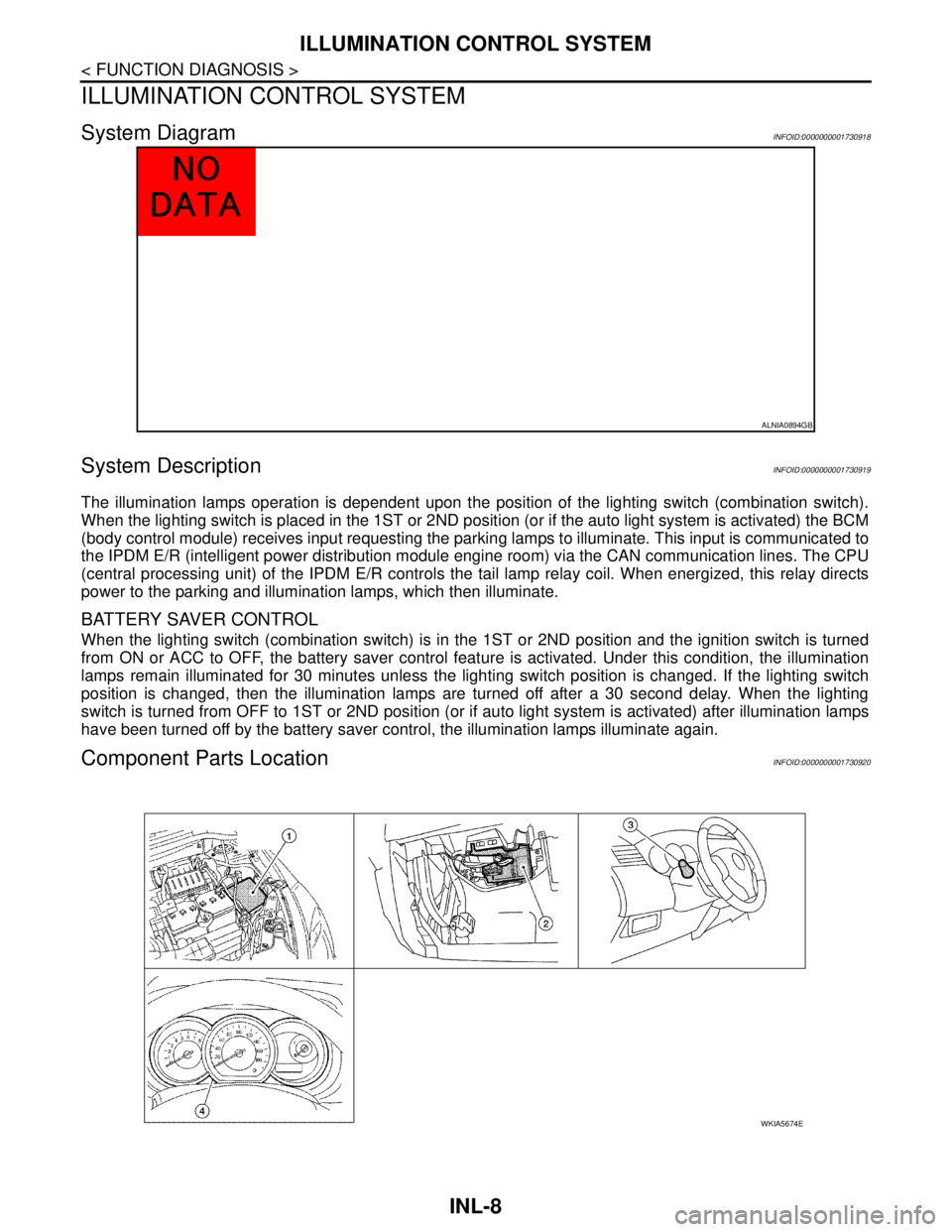
System DescriptionINFOID:0000000001730919
The illumination lamps operation is dependent upon the position of the lighting switch (combination switch).
When the lighting switch is placed in the 1ST or 2ND position (or if the auto light system is activated) the BCM
(body control module) receives input requesting the parking lamps to illuminate. This input is communicated to
the IPDM E/R (intelligent power distribution module engine room) via the CAN communication lines. The CPU
(central processing unit) of the IPDM E/R controls the tail lamp relay coil. When energized, this relay directs
power to the parking and illumination lamps, which then illuminate.
BATTERY SAVER CONTROL
When the lighting switch (combination switch) is in the 1ST or 2ND position and the ignition switch is turned
from ON or ACC to OFF, the battery saver control feature is activated. Under this condition, the illumination
lamps remain illuminated for 30 minutes unless the lighting switch position is changed. If the lighting switch
position is changed, then the illumination lamps are turned off after a 30 second delay. When the lighting
switch is turned from OFF to 1ST or 2ND position (or if auto light system is activated) after illumination lamps
have been turned off by the battery saver control, the illumination lamps illuminate again.
Component Parts LocationINFOID:0000000001730920
ALNIA0894GB
WKIA5674E
Page 3660 of 5883

ILLUMINATION CONTROL SYSTEM
INL-9
< FUNCTION DIAGNOSIS >
C
D
E
F
G
H
I
J
K
MA
B
INL
N
O
P
Component DescriptionINFOID:0000000001730921
1. IPDM E/R E46, E47, E48 2. BCM M18, M19, M20 (view with glove
box removed)3. Combination switch M28
4. Combination meter
Part name Description
BCMThe BCM monitors the lighting switch position with the combina-
tion switch reading function. The BCM requests, via CAN com-
munication, that the IPDM E/R activate the tail lamp relay.
IPDM E/RThe IPDM E/R activates the tail lamp relay based on inputs re-
ceived from the BCM via the CAN communication network.
Combination switchThe combination switch provides input to the BCM about the light-
ing switch position.