Ext NISSAN TIIDA 2007 Service User Guide
[x] Cancel search | Manufacturer: NISSAN, Model Year: 2007, Model line: TIIDA, Model: NISSAN TIIDA 2007Pages: 5883, PDF Size: 78.95 MB
Page 138 of 5883
BCS
INSPECTION AND ADJUSTMENT
BCS-3
< BASIC INSPECTION >
C
D
E
F
G
H
I
J
K
L B A
O
P N
BASIC INSPECTION
INSPECTION AND ADJUSTMENT
ADDITIONAL SERVICE WHEN REPLACING CONTROL UNIT
ADDITIONAL SERVICE WHEN REPLACING CONTROL UNIT : Description
INFOID:0000000001451449
When replacing BCM, save or print current vehicle specification with CONSULT-III configuration before
replacement.
Configuration has three functions as follows
• READ CONFIGURATION is the function to read (extract) vehicle configuration of current BCM.
WRITE CONFIGURATION - Manual selection is the function to select and write vehicle configuration on
BCM manually.
WRITE CONFIGURATION - Config file is the function to write vehicle configuration with the data extracted
from current BCM.
CAUTION:
• When replacing BCM, you must perform WRITE CONFIGURATION with CONSULT-III.
Complete the procedure of WRITE CONFIGURATION in order.
If you set incorrect WRITE CONFIGURATION, incidents will occur.
Configuration is different for each vehicle model. Confirm configuration of each vehicle model.
ADDITIONAL SERVICE WHEN REPLACING CONTROL UNIT : Special Repair Re-
quirement
INFOID:0000000001451450
1. SAVING VEHICLE SPECIFICATION
Perform “READ CONFIGURATION” with CONSULT-III to save or print current vehicle specification.
>> GO TO 2
2. REPLACE BCM
Replace BCM. Refer to BCS-57, "
Removal and Installation of BCM".
>> GO TO 3
3. WRITING VEHICLE SPECIFICATION
Perform “WRITE CONFIGURATION - Config file” or “WRITE CONFIGURATION - Manual selection” with
CONSULT-III to write vehicle specification. Refer to BCS-4, "
CONFIGURATION : Special Repair Require-
ment".
>> GO TO 4
4. INITIALIZE BCM (NATS)
Perform BCM initialization. (NATS)
>> WORK END
CONFIGURATION
CONFIGURATION : DescriptionINFOID:0000000001451451
Vehicle specification needs to be written with CONSULT-III because it is not written after replacing BCM.
Configuration has three functions as follows
READ CONFIGURATION is the function to read (extract) vehicle configuration of current BCM.
WRITE CONFIGURATION - Manual selection is the function to select and write vehicle configuration on
BCM manually.
WRITE CONFIGURATION - Config file is the function to write vehicle configuration with the data extracted
from current BCM.
CAUTION:
Page 150 of 5883
BCS
POWER CONSUMPTION CONTROL SYSTEM
BCS-15
< FUNCTION DIAGNOSIS >
C
D
E
F
G
H
I
J
K
L B A
O
P N
Sleep condition
Wake-up operation
BCM transmits sleep wake up signal (wake up) to each unit when any condition listed below is established,
and then goes into normal mode from low power consumption mode.
Each unit starts transmissions with CAN communication by receiving sleep wake up signals. Each unit trans-
mits wake up signals to BCM with CAN communication to convey the start of CAN communication.
Wake-up condition
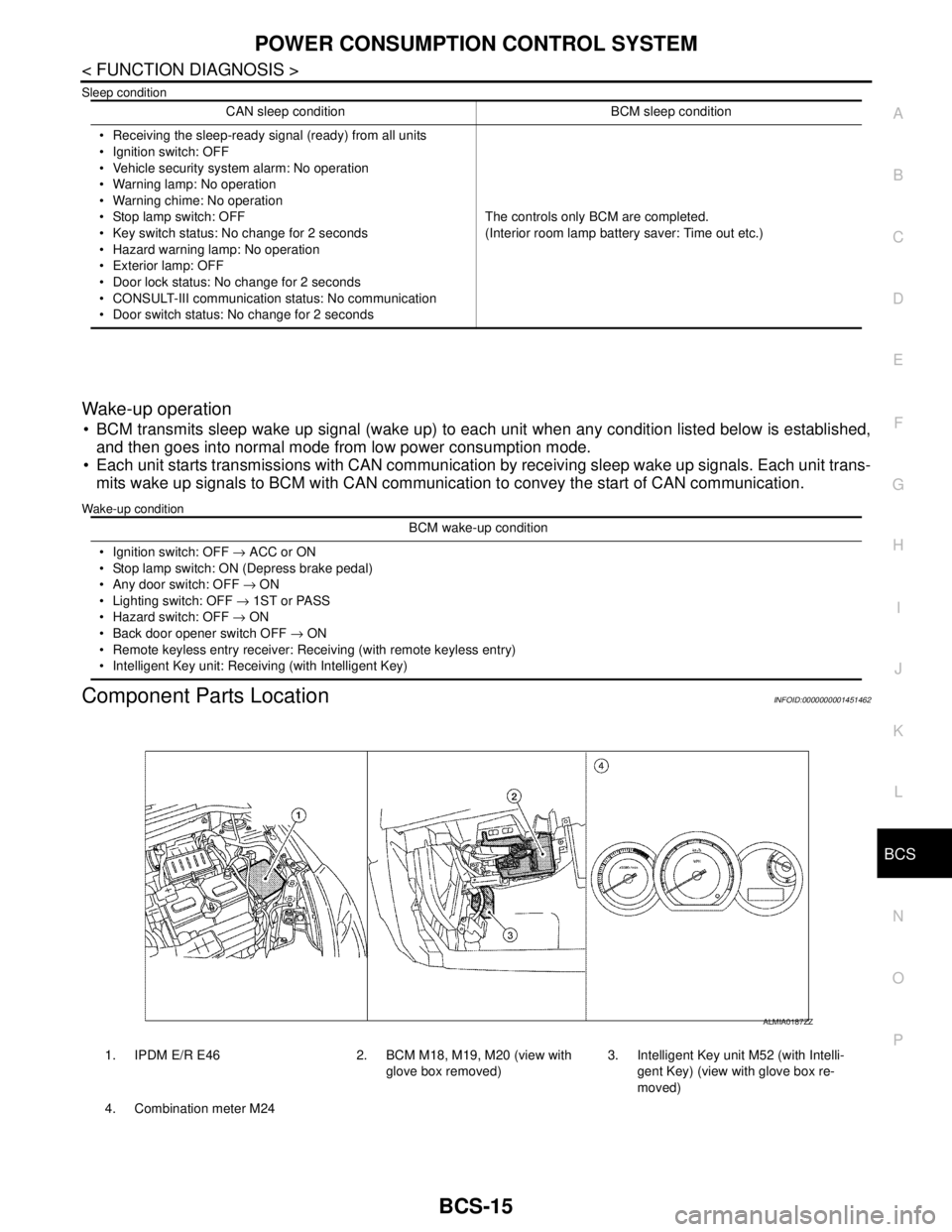
Component Parts LocationINFOID:0000000001451462
CAN sleep condition BCM sleep condition
Receiving the sleep-ready signal (ready) from all units
Ignition switch: OFF
Vehicle security system alarm: No operation
Warning lamp: No operation
Warning chime: No operation
Stop lamp switch: OFF
Key switch status: No change for 2 seconds
Hazard warning lamp: No operation
Exterior lamp: OFF
Door lock status: No change for 2 seconds
CONSULT-III communication status: No communication
Door switch status: No change for 2 secondsThe controls only BCM are completed.
(Interior room lamp battery saver: Time out etc.)
BCM wake-up condition
Ignition switch: OFF → ACC or ON
Stop lamp switch: ON (Depress brake pedal)
Any door switch: OFF → ON
Lighting switch: OFF → 1ST or PASS
Hazard switch: OFF → ON
Back door opener switch OFF → ON
Remote keyless entry receiver: Receiving (with remote keyless entry)
Intelligent Key unit: Receiving (with Intelligent Key)
1. IPDM E/R E46 2. BCM M18, M19, M20 (view with
glove box removed)3. Intelligent Key unit M52 (with Intelli-
gent Key) (view with glove box re-
moved)
4. Combination meter M24
ALMIA0187ZZ
Page 151 of 5883

BCS-16
< FUNCTION DIAGNOSIS >
DIAGNOSIS SYSTEM (BCM)
DIAGNOSIS SYSTEM (BCM)
COMMON ITEM
COMMON ITEM : CONSULT-III Function (BCM - COMMON ITEM)INFOID:0000000001451463
APPLICATION ITEM
CONSULT-III performs the following functions via CAN communication with BCM.
SYSTEM APPLICATION
BCM can perform the following functions for each system.
NOTE:
It can perform the diagnosis modes except the following for all sub system selection items.
1: With remote keyless entry system
2: With Intelligent Key
BCM
Diagnosis mode Function Description
WORK SUPPORT Changes the setting for each system function.
SELF-DIAG RESULTS Displays the diagnosis results judged by BCM. Refer to BCS-54, "
DTCIndex".
CAN DIAG SUPPORT MNTR Monitors the reception status of CAN communication viewed from BCM.
DATA MONITOR The BCM input/output signals are displayed.
ACTIVE TEST The signals used to activate each device are forcibly supplied from BCM.
ECU IDENTIFICATION The BCM part number is displayed.
CONFIGURATION Enables to read and save the vehicle specification.
Enables to write the vehicle specification when replacing BCM.
System Sub system selection itemDiagnosis mode
WORK SUPPORT DATA MONITOR ACTIVE TEST
BCM BCM×
Door lock DOOR LOCK×××
Rear window defogger REAR DEFOGGER××
Warning chime BUZZER××
Interior room lamp timer INT LAMP×××
Remote keyless entry system
1MULTI REMOTE ENT×××
Exterior lamp HEAD LAMP×××
Wiper and washer WIPER×××
Turn signal and hazard warning lamps FLASHER××
Air conditioner AIR CONDITONER×
Intelligent Key system
2INTELLIGENT KEY×
Combination switch COMB SW×
Immobilizer IMMU××
Interior room lamp battery saver BATTERY SAVER×××
Trunk open (sedan)/Back door open
(hatch back)DOOR LOCK××
Vehicle security system THEFT ALM×××
Signal buffer system SIGNAL BUFFER××
PTC heater system PTC HEATER××
Page 218 of 5883
BR-26
< ON-VEHICLE REPAIR >
FRONT DISC BRAKE
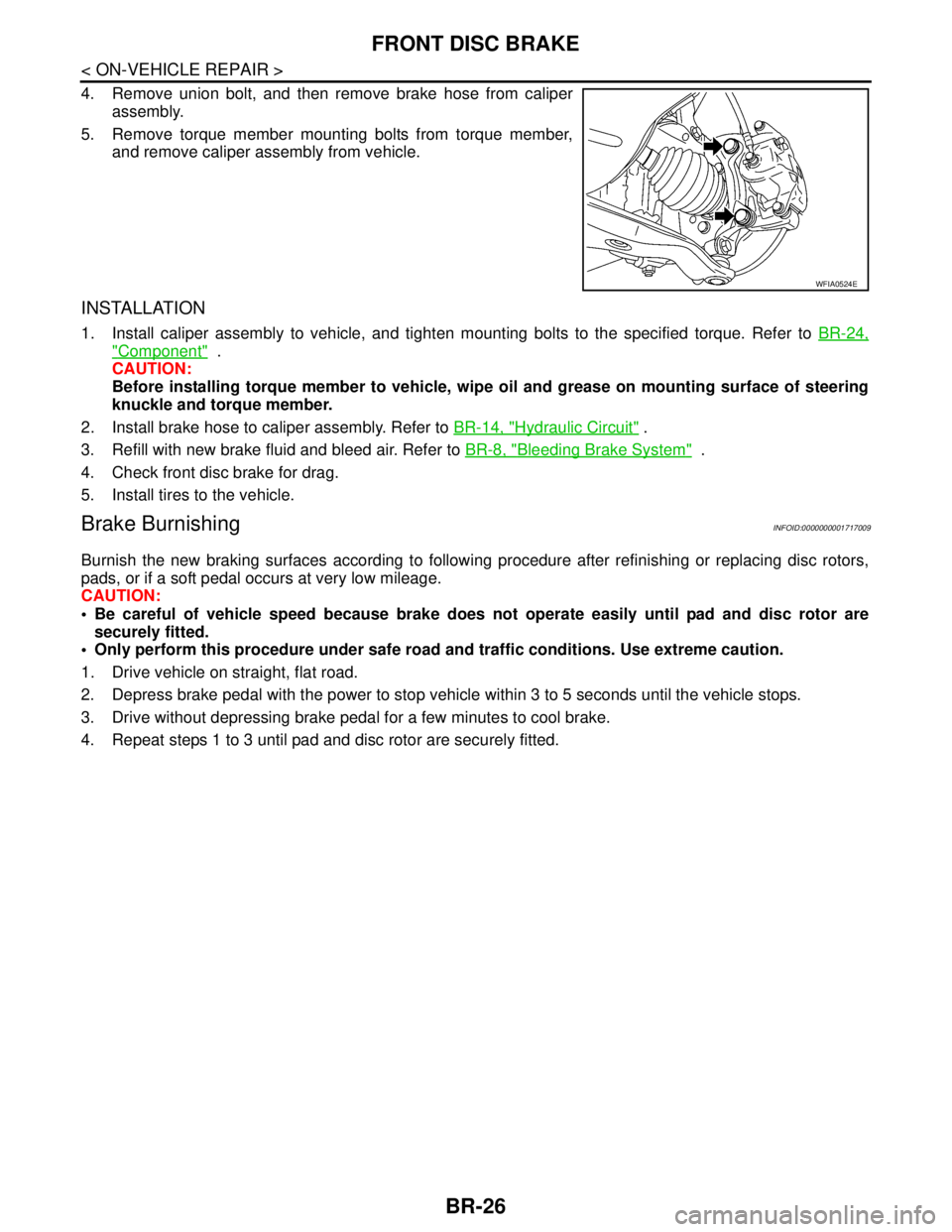
4. Remove union bolt, and then remove brake hose from caliper
assembly.
5. Remove torque member mounting bolts from torque member,
and remove caliper assembly from vehicle.
INSTALLATION
1. Install caliper assembly to vehicle, and tighten mounting bolts to the specified torque. Refer to BR-24,
"Component" .
CAUTION:
Before installing torque member to vehicle, wipe oil and grease on mounting surface of steering
knuckle and torque member.
2. Install brake hose to caliper assembly. Refer to BR-14, "
Hydraulic Circuit" .
3. Refill with new brake fluid and bleed air. Refer to BR-8, "
Bleeding Brake System" .
4. Check front disc brake for drag.
5. Install tires to the vehicle.
Brake BurnishingINFOID:0000000001717009
Burnish the new braking surfaces according to following procedure after refinishing or replacing disc rotors,
pads, or if a soft pedal occurs at very low mileage.
CAUTION:
Be careful of vehicle speed because brake does not operate easily until pad and disc rotor are
securely fitted.
Only perform this procedure under safe road and traffic conditions. Use extreme caution.
1. Drive vehicle on straight, flat road.
2. Depress brake pedal with the power to stop vehicle within 3 to 5 seconds until the vehicle stops.
3. Drive without depressing brake pedal for a few minutes to cool brake.
4. Repeat steps 1 to 3 until pad and disc rotor are securely fitted.
WFIA0524E
Page 221 of 5883
REAR DISC BRAKE
BR-29
< ON-VEHICLE REPAIR >
C
D
E
G
H
I
J
K
L
MA
B
BR
N
O
P
3. Drain brake fluid. Refer to BR-8, "Bleeding Brake System".
4. Remove connecting bolt and torque member bolts using power tool, and remove cylinder body.
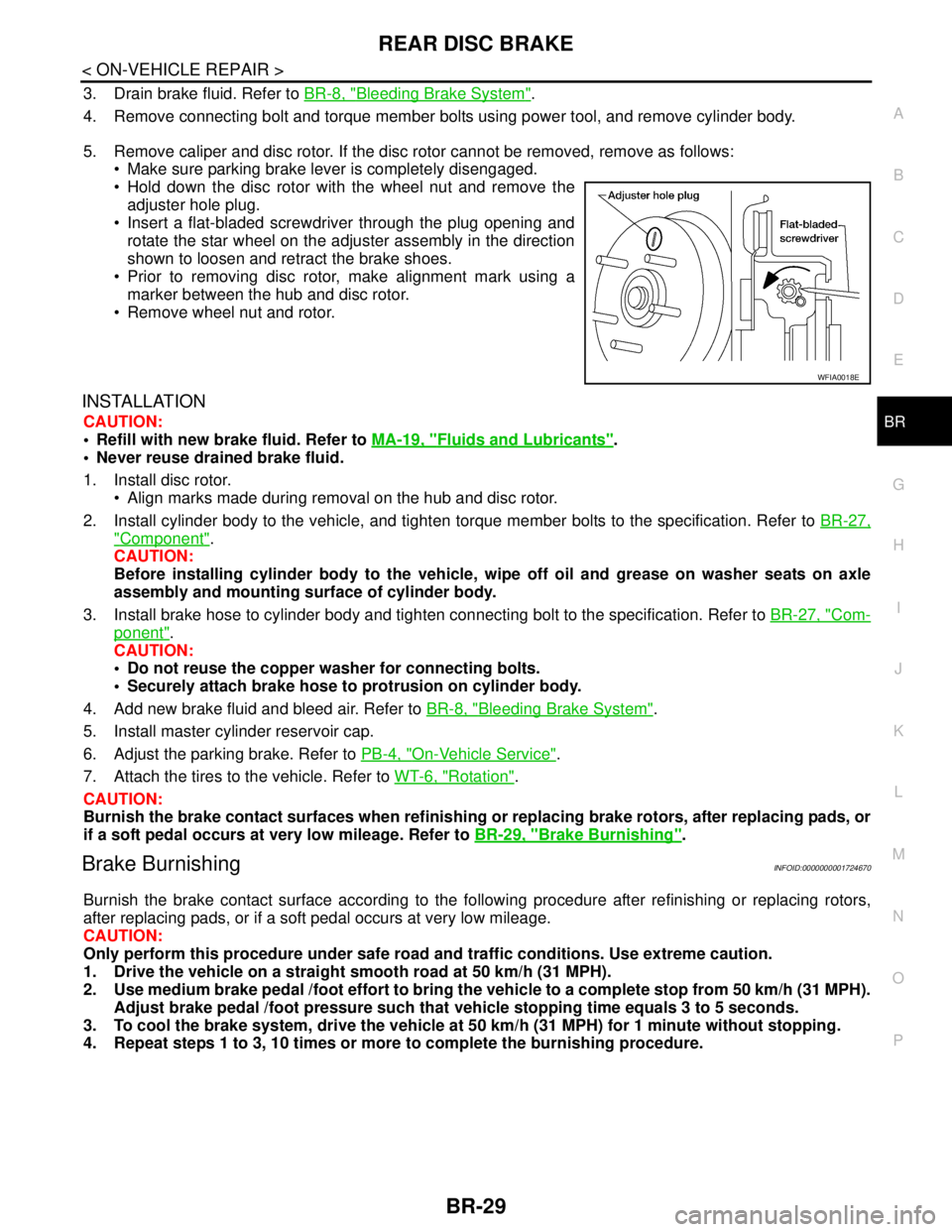
5. Remove caliper and disc rotor. If the disc rotor cannot be removed, remove as follows:
Make sure parking brake lever is completely disengaged.
Hold down the disc rotor with the wheel nut and remove the
adjuster hole plug.
Insert a flat-bladed screwdriver through the plug opening and
rotate the star wheel on the adjuster assembly in the direction
shown to loosen and retract the brake shoes.
Prior to removing disc rotor, make alignment mark using a
marker between the hub and disc rotor.
Remove wheel nut and rotor.
INSTALLATION
CAUTION:
Refill with new brake fluid. Refer to MA-19, "
Fluids and Lubricants".
Never reuse drained brake fluid.
1. Install disc rotor.
Align marks made during removal on the hub and disc rotor.
2. Install cylinder body to the vehicle, and tighten torque member bolts to the specification. Refer to BR-27,
"Component".
CAUTION:
Before installing cylinder body to the vehicle, wipe off oil and grease on washer seats on axle
assembly and mounting surface of cylinder body.
3. Install brake hose to cylinder body and tighten connecting bolt to the specification. Refer to BR-27, "
Com-
ponent".
CAUTION:
Do not reuse the copper washer for connecting bolts.
Securely attach brake hose to protrusion on cylinder body.
4. Add new brake fluid and bleed air. Refer to BR-8, "
Bleeding Brake System".
5. Install master cylinder reservoir cap.
6. Adjust the parking brake. Refer to PB-4, "
On-Vehicle Service".
7. Attach the tires to the vehicle. Refer to WT-6, "
Rotation".
CAUTION:
Burnish the brake contact surfaces when refinishing or replacing brake rotors, after replacing pads, or
if a soft pedal occurs at very low mileage. Refer to BR-29, "
Brake Burnishing".
Brake BurnishingINFOID:0000000001724670
Burnish the brake contact surface according to the following procedure after refinishing or replacing rotors,
after replacing pads, or if a soft pedal occurs at very low mileage.
CAUTION:
Only perform this procedure under safe road and traffic conditions. Use extreme caution.
1. Drive the vehicle on a straight smooth road at 50 km/h (31 MPH).
2. Use medium brake pedal /foot effort to bring the vehicle to a complete stop from 50 km/h (31 MPH).
Adjust brake pedal /foot pressure such that vehicle stopping time equals 3 to 5 seconds.
3. To cool the brake system, drive the vehicle at 50 km/h (31 MPH) for 1 minute without stopping.
4. Repeat steps 1 to 3, 10 times or more to complete the burnishing procedure.
WFIA0018E
Page 312 of 5883
![NISSAN TIIDA 2007 Service User Guide NORMAL OPERATING CONDITION
BRC-79
< SYMPTOM DIAGNOSIS >[ABS]
C
D
E
G
H
I
J
K
L
MA
B
BRC
N
O
P
NORMAL OPERATING CONDITION
DescriptionINFOID:0000000001731350
Symptom Result
Slight vibrations are felt on](/img/5/57395/w960_57395-311.png "NISSAN TIIDA 2007 Service User Guide NORMAL OPERATING CONDITION
BRC-79
< SYMPTOM DIAGNOSIS >[ABS]
C
D
E
G
H
I
J
K
L
MA
B
BRC
N
O
P
NORMAL OPERATING CONDITION
DescriptionINFOID:0000000001731350
Symptom Result
Slight vibrations are felt on")
NORMAL OPERATING CONDITION
BRC-79
< SYMPTOM DIAGNOSIS >[ABS]
C
D
E
G
H
I
J
K
L
MA
B
BRC
N
O
P
NORMAL OPERATING CONDITION
DescriptionINFOID:0000000001731350
Symptom Result
Slight vibrations are felt on the brake pedal and the operation noises occur, when VDC, TCS or ABS is acti-
vated.
This is a normal condi-
tion due to the VDC,
TCS or ABS activation. Stopping distance is longer than that of vehicles without ABS when the vehicle drives on rough, gravel, or
snow-covered (fresh, deep snow) roads.
The brake pedal moves and generates noises, when TCS or VDC is activated due to rapid acceleration or
sharp turn.
The brake pedal vibrates and motor operation noises occur from the engine room, after the engine starts and
just after the vehicle starts.This is normal, and it is
caused by the ABS op-
eration check.
Depending on the road conditions, the driver may experience a sluggish feel. This is normal, because
TCS places the highest
priority on the optimum
traction (stability). TCS may activate momentarily if wheel speed changes when driving over location where friction coefficient
varies, when downshifting, or when fully depressing accelerator pedal.
The ABS warning lamp, VDC OFF indicator lamp and SLIP indicator lamp may turn ON when the vehicle is
subject to strong shaking or large vibration, such as when the vehicle is rotating on a turntable or located on
a ship while the engine is running. In this case, restart the
engine on a normal
road. If the normal con-
dition is restored, there
is no malfunction. At
that time, erase the self-
diagnosis memory. VDC may not operate normally or the ABS warning lamp, VDC OFF indicator lamp, and SLIP indicator lamp
may illuminate, when running on a special road that is extremely slanted (e.g. bank in a circuit course).
A malfunction may occur in the yaw rate/side/decel G sensor system, when the vehicle turns sharply, such
as during a spin turn, axle turn, or drift driving, while the VDC function is off (VDC OFF indicator lamp illumi-
nated).
The vehicle speed will not increase even though the accelerator pedal is depressed, when inspecting the
speedometer on a 2-wheel chassis dynamometer. Normal (Deactivate the
VDC/TCS function be-
fore performing an in-
spection on a chassis
dynamometer.)
VDC OFF indicator lamp and SLIP indicator lamp may simultaneously turn on when low tire pressure warn-
ing lamp turns on.This is not a VDC sys-
tem error but results
from characteristic
change of tire.
Page 411 of 5883
![NISSAN TIIDA 2007 Service User Guide BRC-178
< SYMPTOM DIAGNOSIS >[ESP/TCS/ABS]
NORMAL OPERATING CONDITION
NORMAL OPERATING CONDITION
DescriptionINFOID:0000000001731207
Symptom Result
Slight vibrations are felt on the brake pedal and the](/img/5/57395/w960_57395-410.png "NISSAN TIIDA 2007 Service User Guide BRC-178
< SYMPTOM DIAGNOSIS >[ESP/TCS/ABS]
NORMAL OPERATING CONDITION
NORMAL OPERATING CONDITION
DescriptionINFOID:0000000001731207
Symptom Result
Slight vibrations are felt on the brake pedal and the")
BRC-178
< SYMPTOM DIAGNOSIS >[ESP/TCS/ABS]
NORMAL OPERATING CONDITION
NORMAL OPERATING CONDITION
DescriptionINFOID:0000000001731207
Symptom Result
Slight vibrations are felt on the brake pedal and the operation noises occur, when VDC, TCS or ABS is acti-
vated.
This is a normal condi-
tion due to the VDC,
TCS or ABS activation. Stopping distance is longer than that of vehicles without ABS when the vehicle drives on rough, gravel, or
snow-covered (fresh, deep snow) roads.
The brake pedal moves and generates noises, when TCS or VDC is activated due to rapid acceleration or
sharp turn.
The brake pedal vibrates and motor operation noises occur from the engine room, after the engine starts and
just after the vehicle starts.This is normal, and it is
caused by the ABS op-
eration check.
Depending on the road conditions, the driver may experience a sluggish feel. This is normal, because
TCS places the highest
priority on the optimum
traction (stability). TCS may activate momentarily if wheel speed changes when driving over location where friction coefficient
varies, when downshifting, or when fully depressing accelerator pedal.
The ABS warning lamp, VDC OFF indicator lamp and SLIP indicator lamp may turn ON when the vehicle is
subject to strong shaking or large vibration, such as when the vehicle is rotating on a turntable or located on
a ship while the engine is running. In this case, restart the
engine on a normal
road. If the normal con-
dition is restored, there
is no malfunction. At
that time, erase the self-
diagnosis memory. VDC may not operate normally or the ABS warning lamp, VDC OFF indicator lamp, and SLIP indicator lamp
may illuminate, when running on a special road that is extremely slanted (e.g. bank in a circuit course).
A malfunction may occur in the yaw rate/side/decel G sensor system, when the vehicle turns sharply, such
as during a spin turn, axle turn, or drift driving, while the VDC function is off (VDC OFF indicator lamp illumi-
nated).
The vehicle speed will not increase even though the accelerator pedal is depressed, when inspecting the
speedometer on a 2-wheel chassis dynamometer. Normal (Deactivate the
VDC/TCS function be-
fore performing an in-
spection on a chassis
dynamometer.)
VDC OFF indicator lamp and SLIP indicator lamp may simultaneously turn on when low tire pressure warn-
ing lamp turns on.This is not a VDC sys-
tem error but results
from characteristic
change of tire.
Page 413 of 5883
![NISSAN TIIDA 2007 Service User Guide BRC-180
< PRECAUTION >[ESP/TCS/ABS]
PRECAUTIONS
If the following components are replaced with non-genuine components or converted, ESP OFF indicator
lamp and SLIP indicator lamp may turn on or the E](/img/5/57395/w960_57395-412.png "NISSAN TIIDA 2007 Service User Guide BRC-180
< PRECAUTION >[ESP/TCS/ABS]
PRECAUTIONS
If the following components are replaced with non-genuine components or converted, ESP OFF indicator
lamp and SLIP indicator lamp may turn on or the E")
BRC-180
< PRECAUTION >[ESP/TCS/ABS]
PRECAUTIONS
If the following components are replaced with non-genuine components or converted, ESP OFF indicator
lamp and SLIP indicator lamp may turn on or the ESP system may not operate properly. Components
related to suspension (Shock Absorber, Strut, Spring, Bush, etc.), Tires, wheels (exclude specified size),
components related to brake (Pad, Rotor, Caliper, etc.), components related to engine (Muffler, ECM, etc.),
components related to body reinforcement (Roll bar, Tower bar, etc.).
Driving in the condition of breakage or excessive wear of suspension, tires or components related to the
brakes may cause ESP OFF indicator lamp and SLIP indicator lamp turn on, and the ESP system may not
operate properly.
When the TCS or ESP is activated by sudden acceleration or sudden turn, some noise may occur. The noise
is a result of the normal operation of the TCS and ESP.
When driving on roads which have extreme slopes (such as mountainous roads) or high banks (such as
sharp carves on a freeway), the ESP may not operate normally, or ESP warning lamp and SLIP indicator
lamp may turn on. However, this is not a malfunction, if normal operation can be resumed after restarting
engine.
Sudden turns (such as spin turns, acceleration turns), drifting, etc. When ESP function is OFF (ESP SW ON)
may cause the G -sensor system indicate a malfunction. However, this is not a malfunction, if normal opera-
tion can be resumed after restarting engine.
Diagnosis PrecautionINFOID:0000000001691414
CAN SYSTEM
Do not apply voltage of 7.0 V or higher to terminal to be measured.
Maximum open terminal voltage of tester in use shall be 7.0 V or lower.
Before checking harnesses, turn ignition switch OFF and disconnect battery negative cable.
Precaution for Harness RepairINFOID:0000000001691415
CAN SYSTEM
Area to be repaired shall be soldered, and wrapped with a tape [be
sure that fraying of twisted wire shall be within 110 mm (4.33 in)].
Do not make a bypass connection to repaired area. (If it is done,
branch part will be removed and characteristics of twisted wire will
be lost.)
PKIA0306E
PKIA0307E
Page 488 of 5883
![NISSAN TIIDA 2007 Service User Guide OVERHEATING CAUSE ANALYSIS
CO-7
< SYMPTOM DIAGNOSIS >[HR16DE]
C
D
E
F
G
H
I
J
K
L
MA
CO
N
P O
Except cool-
ing system
parts mal-
function— Overload on engineAbusive drivingHigh engine rpm under no](/img/5/57395/w960_57395-487.png "NISSAN TIIDA 2007 Service User Guide OVERHEATING CAUSE ANALYSIS
CO-7
< SYMPTOM DIAGNOSIS >[HR16DE]
C
D
E
F
G
H
I
J
K
L
MA
CO
N
P O
Except cool-
ing system
parts mal-
function— Overload on engineAbusive drivingHigh engine rpm under no")
OVERHEATING CAUSE ANALYSIS
CO-7
< SYMPTOM DIAGNOSIS >[HR16DE]
C
D
E
F
G
H
I
J
K
L
MA
CO
N
P O
Except cool-
ing system
parts mal-
function— Overload on engineAbusive drivingHigh engine rpm under no
load
Driving in low gear for ex-
tended time
Driving at extremely high
speed
Power train system mal-
function
— Installed improper size
wheels and tires
Dragging brakes
Improper ignition timing
Blocked or restricted air
flowBlocked bumper —
— Blocked radiator grilleInstalled car brassiere
Mud contamination or paper
clogging
Blocked radiator —
Blocked condenser
Blocked air flow
Installed large fog lamp Symptom Check items
Page 490 of 5883
![NISSAN TIIDA 2007 Service User Guide PRECAUTIONS
CO-9
< PRECAUTION >[HR16DE]
C
D
E
F
G
H
I
J
K
L
MA
CO
N
P O
CAUTION:
Be careful not to damage the mating surfaces.
Tap Tool to insert it (1), and then slide it by tapping on the side (2)](/img/5/57395/w960_57395-489.png "NISSAN TIIDA 2007 Service User Guide PRECAUTIONS
CO-9
< PRECAUTION >[HR16DE]
C
D
E
F
G
H
I
J
K
L
MA
CO
N
P O
CAUTION:
Be careful not to damage the mating surfaces.
Tap Tool to insert it (1), and then slide it by tapping on the side (2)")
PRECAUTIONS
CO-9
< PRECAUTION >[HR16DE]
C
D
E
F
G
H
I
J
K
L
MA
CO
N
P O
CAUTION:
Be careful not to damage the mating surfaces.
Tap Tool to insert it (1), and then slide it by tapping on the side (2)
as shown.
In areas where Tool is difficult to use, use plastic hammer to lightly
tap the parts, to remove it.
CAUTION:
If for some unavoidable reason suitable tool such as screw-
driver is used, be careful not to damage the mating surfaces.
LIQUID GASKET APPLICATION PROCEDURE
1. Remove old liquid gasket adhering to the liquid gasket applica-
tion surface and the mating surface, using scraper.
Remove liquid gasket completely from the groove of the liquid
gasket application surface, bolts, and bolt holes.
2. Thoroughly clean the mating surfaces and remove adhering
moisture, grease and foreign materials.
3. Attach liquid gasket tube to Tool.
Use Genuine RTV Silicone Sealant or equivalent. Refer to GI-27, "
Recommended Chemical Prod-
ucts and Sealants".
4. Apply liquid gasket without breaks to the specified location with the specified dimensions.
If there is a groove for the liquid gasket application, apply liquid gasket to the groove.
As for the bolt holes, normally apply liquid gasket inside the
holes. Occasionally, it should be applied outside the holes.
Make sure to read the text of service manual.
Within five minutes of liquid gasket application, install the mat-
ing component.
If liquid gasket protrudes, wipe it off immediately.
Do not retighten nuts or bolts after the installation.
After 30 minutes or more have passed from the installation, fill
engine oil and engine coolant.
CAUTION:
If there are specific instructions in this manual, observe them. Tool number : KV10111100 (J-37228)
WBIA0566E
Tool number : WS39930000 ( — )
PBIC0003E
WBIA0567E
SEM159F