meter NISSAN TIIDA 2007 Service Owner's Guide
[x] Cancel search | Manufacturer: NISSAN, Model Year: 2007, Model line: TIIDA, Model: NISSAN TIIDA 2007Pages: 5883, PDF Size: 78.95 MB
Page 157 of 5883

BCS-22
< FUNCTION DIAGNOSIS >
DIAGNOSIS SYSTEM (BCM)
1: Factory setting
2: If equipped
DATA MONITOR
ACTIVE TEST
FLASHER
FLASHER : CONSULT-III Function (BCM - FLASHER)INFOID:0000000001451472
WORK SUPPORT
DATA MONITOR
Monitor Item
[Unit]Description
IGN ON SW [ON/OFF] Ignition switch ON status judged from ignition power supply.
FR WIPER HI [ON/OFF]
Each switch status that BCM judges from the combination switch reading function. FR WIPER LOW [ON/OFF]
FR WIPER INT [ON/OFF]
FR WASHER SW [ON/OFF]
INT VOLUME [1 - 7] Each switch status that BCM judges from the combination switch reading function.
FR WIPER STOP [ON/OFF]Front wiper motor (stop position) status received from IPDM E/R with CAN communica-
tion.
VEHICLE SPEED [km/h]The value of the vehicle speed signal received from combination meter with CAN com-
munication.
H/L SW POS [ON/OFF]
RR WIPER ON [ON/OFF]
Each switch status that BCM judges from the combination switch reading function. RR WIPER INT [ON/OFF]
RR WASHER SW [ON/OFF]
RR WIPER STOP [ON/OFF] Rear wiper motor (stop position) status input from the rear wiper motor.
REVERSE SW CAN [ON/OFF] Transmission reverse position moitored via CAN.
Test Item Operation Description
HEADLAMP WASH-
ERONTransmits the headlamp washer request signal to IPDM E/R with CAN communication to
operate the headlamp washer operation.
FR WIPERHITransmits the front wiper request signal (HI) to IPDM E/R with CAN communication to op-
erate the front wiper HI operation.
LOTransmits the front wiper request signal (LO) to IPDM E/R with CAN communication to
operate the front wiper LO operation.
INTTransmits the front wiper request signal (INT) to IPDM E/R with CAN communication to
operate the front wiper INT operation.
OFF Stops transmitting the front wiper request signal to stop the front wiper operation.
RR WIPERON Outputs the voltage to operate the rear wiper motor.
OFF Stops the voltage to stop.
Work Item Description
HAZARD LAMP SETOperation MODE1 MODE2 MODE3
MODE4
Keyfob operation Lock Unlock Lock Unlock Lock Unlock Lock Unlock
Hazard lamp flash - - - Twice Once - Once Twice
Page 161 of 5883

BCS-26
< FUNCTION DIAGNOSIS >
DIAGNOSIS SYSTEM (BCM)
*: Each lamp switch is in ON position.
THEFT ALM
THEFT ALM : CONSULT-III Function (BCM - THEFT ALM)INFOID:0000000001451479
WORK SUPPORT
SIGNAL BUFFER
SIGNAL BUFFER : CONSULT-III Function (BCM - SIGNAL BUFFER)INFOID:0000000001451480
DATA MONITOR
ACTIVE TEST
PTC HEATER
PTC HEATER : CONSULT-III Function (BCM - PTC HEATER)INFOID:0000000001451481
DATA MONITOR
ACTIVE TEST
Work Item Description
SECURITY ALARM SETVehicle security function mode can be changed in this mode.
ON: Vehicle security function is ON.
OFF: Vehicle security function is OFF.
Monitor Item
[Unit]Description
OIL PRESS SW [ON/OFF] Displays the status of oil pressure switch received from IPDM E/R via CAN communication.
Test Item Operation Description
OIL PRESSURE SWOFF OFF
ONBCM transmits the oil pressure switch signal to the combination meter via CAN communica-
tion, which illuminates the oil pressure warning lamp in the combination meter.
Monitor Item
[Unit]Description
ELEC PWR CUT
[OFF/FREEZ/INHBT]Indicate [OFF/FREEZ/INHBT] condition of the PTC heater states.
FA N O N S I G
[On/Off]Displays [FAN (ON)/FAN (OFF)] status as judged from blower fan motor signal.
ENGINE STATUS
[STOP/STAL/RUN/CRA]Indicate [STOP/STALL/RUN/CRA] condition of the engine states.
ENG COOLNT T
[°C]The engine coolant temperature (determined by the signal voltage of the engine coolant tem-
perature sensor) is displayed.
BATTERY VOLT
[V]The power supply voltage of BCM is displayed.
ENGINE RPM
[rpm]Indicates the engine speed computed from the signal of the crankshaft position sensor.
OUTSIDE TEMP
[°C]The outside air temperature (determined by the signal voltage of the OAT sensor) is displayed.
Page 163 of 5883
BCS-28
< COMPONENT DIAGNOSIS >
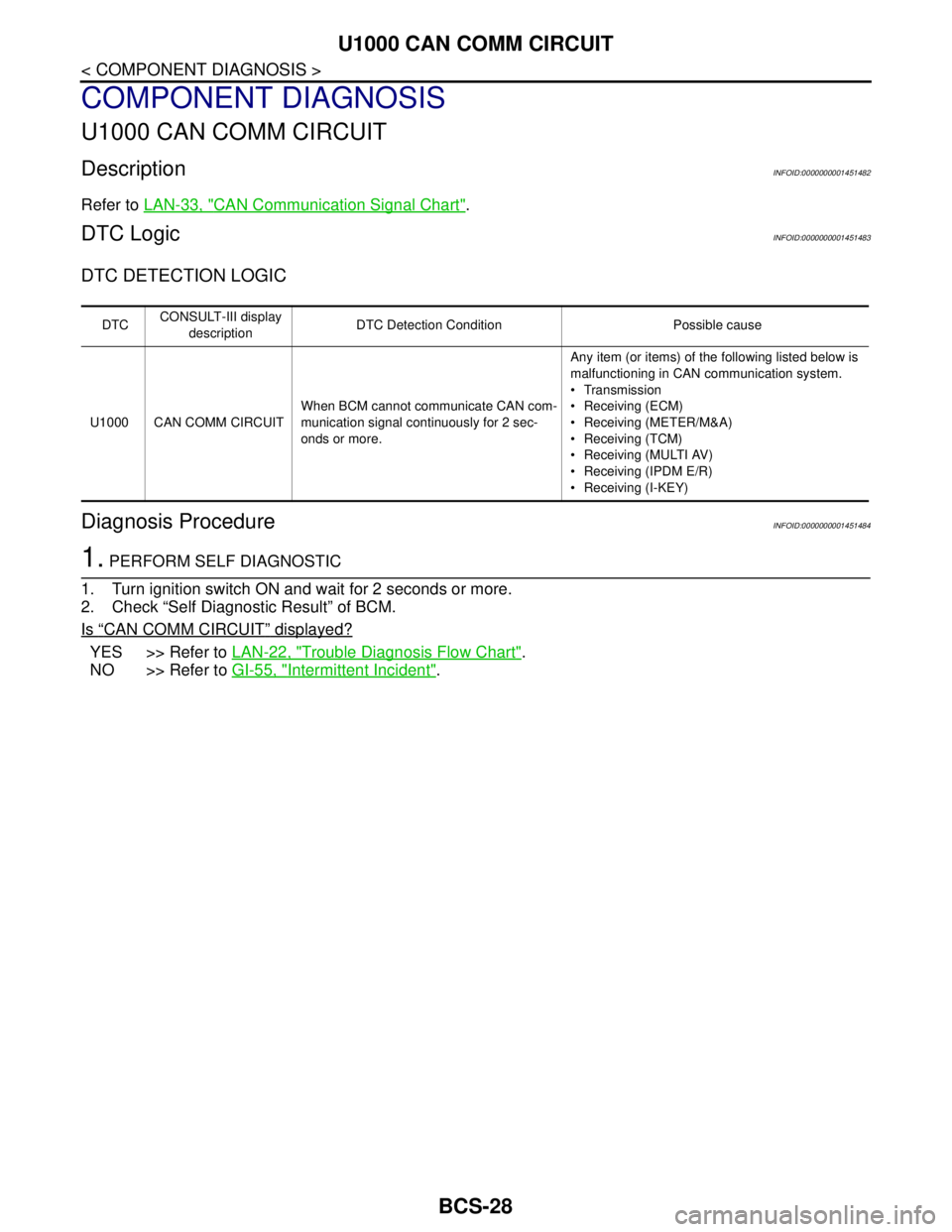
U1000 CAN COMM CIRCUIT
COMPONENT DIAGNOSIS
U1000 CAN COMM CIRCUIT
DescriptionINFOID:0000000001451482
Refer to LAN-33, "CAN Communication Signal Chart".
DTC LogicINFOID:0000000001451483
DTC DETECTION LOGIC
Diagnosis ProcedureINFOID:0000000001451484
1. PERFORM SELF DIAGNOSTIC
1. Turn ignition switch ON and wait for 2 seconds or more.
2. Check “Self Diagnostic Result” of BCM.
Is
“CAN COMM CIRCUIT” displayed?
YES >> Refer to LAN-22, "Trouble Diagnosis Flow Chart".
NO >> Refer to GI-55, "
Intermittent Incident".
DTCCONSULT-III display
descriptionDTC Detection Condition Possible cause
U1000 CAN COMM CIRCUITWhen BCM cannot communicate CAN com-
munication signal continuously for 2 sec-
onds or more.Any item (or items) of the following listed below is
malfunctioning in CAN communication system.
Transmission
Receiving (ECM)
Receiving (METER/M&A)
Receiving (TCM)
Receiving (MULTI AV)
Receiving (IPDM E/R)
Receiving (I-KEY)
Page 172 of 5883

BCS
BCM (BODY CONTROL MODULE)
BCS-37
< ECU DIAGNOSIS >
C
D
E
F
G
H
I
J
K
L B A
O
P N
I-KEY UNLOCK1UNLOCK button of Intelligent Key is not pressed OFF
UNLOCK button of Intelligent Key is pressed ON
KEY SW
2Mechanical key is removed from key cylinder OFF
Mechanical key is inserted to key cylinder ON
KEYLESS LOCK
2LOCK button of key fob is not pressed OFF
LOCK button of key fob is pressed ON
KEYLESS UNLOCK
2UNLOCK button of key fob is not pressed OFF
UNLOCK button of key fob is pressed ON
LIT-SEN FAILLight & rain sensor is in normal condition OK
Light & rain sensor is with internal error NOTOK
OIL PRESS SW Ignition switch OFF or ACC
Engine runningOFF
Ignition switch ON ON
OUT SIDE TEMP
NOTE:
Diesel engine modelsIgnition switch ONApproximately the same as outside
air temperature
PASSING SWOther than lighting switch PASS OFF
Lighting switch PASS ON
PUSH SW
1Return to ignition switch to LOCK position OFF
Press ignition switch ON
REAR DEF SWRear window defogger switch OFF OFF
Rear window defogger switch ON ON
RKE LOCK AND
UNLOCK
2NOTE:
The item is indicated, but not monitoredOFF
ON
RR FOG SWRear fog lamp switch OFF OFF
Rear fog lamp switch ON ON
RR WASHER SW
3Rear washer switch OFF OFF
Rear washer switch ON ON
RR WIPER INT
3Rear wiper switch OFF OFF
Rear wiper switch INT ON
RR WIPER ON
3 Rear wiper switch OFF OFF
Rear wiper switch ON ON
RR WIPER STOP
3Rear wiper stop position OFF
Other than rear wiper stop position ON
TAIL LAMP SWLighting switch OFF OFF
Lighting switch 1ST ON
TRNK OPNR SWWhen back door opener switch is not pressed OFF
When back door opener switch is pressed ON
TURN SIGNAL LTurn signal switch OFF OFF
Turn signal switch LH ON
TURN SIGNAL RTurn signal switch OFF OFF
Turn signal switch RH ON
UNLOCK WITH DRNOTE:
The item is indicated, but not monitoredOFF
ON
VEHICLE SPEED While driving Equivalent to speedometer reading Monitor Item Condition Value/Status
Page 196 of 5883
BR-4
< PREPARATION >
PREPARATION
PREPARATION
PREPARATION
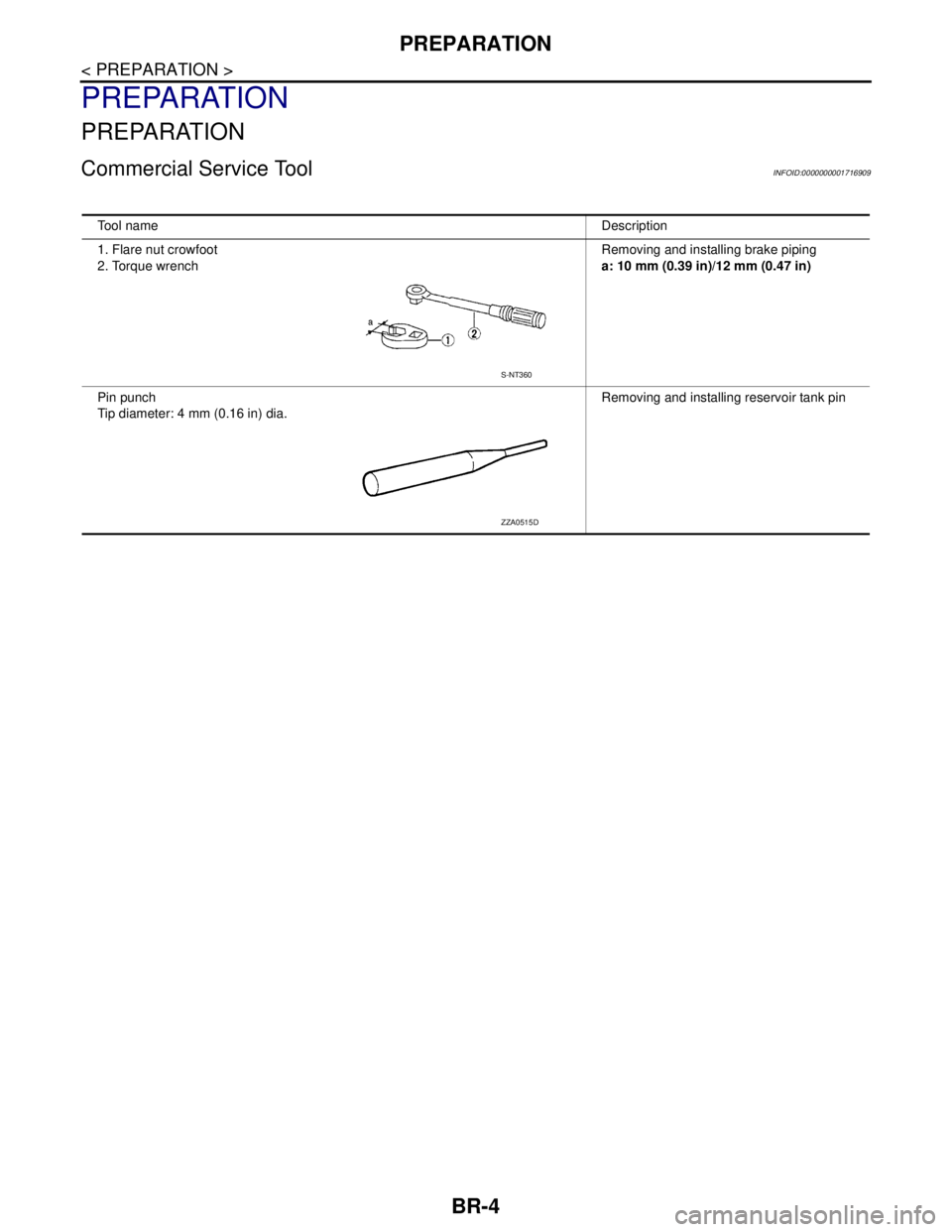
Commercial Service ToolINFOID:0000000001716909
Tool nameDescription
1. Flare nut crowfoot
2. Torque wrenchRemoving and installing brake piping
a: 10 mm (0.39 in)/12 mm (0.47 in)
Pin punch
Tip diameter: 4 mm (0.16 in) dia. Removing and installing reservoir tank pin
S-NT360
ZZA0515D
Page 223 of 5883
![NISSAN TIIDA 2007 Service Owners Guide BRAKE MASTER CYLINDER
BR-31
< DISASSEMBLY AND ASSEMBLY >
C
D
E
G
H
I
J
K
L
MA
B
BR
N
O
P
2. Using a pin-punch [commercial service tool: diameter approx. 4
mm (0.16 in)], remove pin from reservoir tank](/img/5/57395/w960_57395-222.png "NISSAN TIIDA 2007 Service Owners Guide BRAKE MASTER CYLINDER
BR-31
< DISASSEMBLY AND ASSEMBLY >
C
D
E
G
H
I
J
K
L
MA
B
BR
N
O
P
2. Using a pin-punch [commercial service tool: diameter approx. 4
mm (0.16 in)], remove pin from reservoir tank")
BRAKE MASTER CYLINDER
BR-31
< DISASSEMBLY AND ASSEMBLY >
C
D
E
G
H
I
J
K
L
MA
B
BR
N
O
P
2. Using a pin-punch [commercial service tool: diameter approx. 4
mm (0.16 in)], remove pin from reservoir tank.
3. Remove master cylinder assembly from vise.
4. Remove reservoir tank and grommet from cylinder body.
5. While pushing primary piston, remove piston stopper through
secondary tank boss hole in the cylinder body.
6. Remove snap ring with pushing primary piston.
CAUTION:
Be careful not to pop out piston.
7. Holding rod of primary piston, remove primary piston assembly,
plate and guide assembly by pulling straight to prevent piston
cup from being caught by the inner wall of cylinder.
8. Remove plate and guide assembly from primary piston.
CAUTION:
Be careful not to damage rod from the inner wall of plate.
9. Tap flange using a soft block such as wood, and carefully pull
secondary piston assembly straight out to prevent cylinder inner
wall from being damaged.
INSPECTION AFTER DISASSEMBLY
Cylinder Body
Check the inner wall of cylinder for damage, wear, corrosion, and pin holes. Replace cylinder body if neces-
sary.
ASSEMBLY
CAUTION:
Never use mineral oils such as kerosene or gasoline during the cleaning and assembly processes.
Make sure that there is no foreign material such as dirt and dust on the inner wall of cylinder, piston,
and piston cup. Be careful not to damage parts with a service tool when assembling.
Do not drop parts. If a part is dropped, do not use it.
WFIA0515E
WFIA0516E
BRA0561DWFIA0517E
WFIA0518E
Page 224 of 5883
BR-32
< DISASSEMBLY AND ASSEMBLY >
BRAKE MASTER CYLINDER
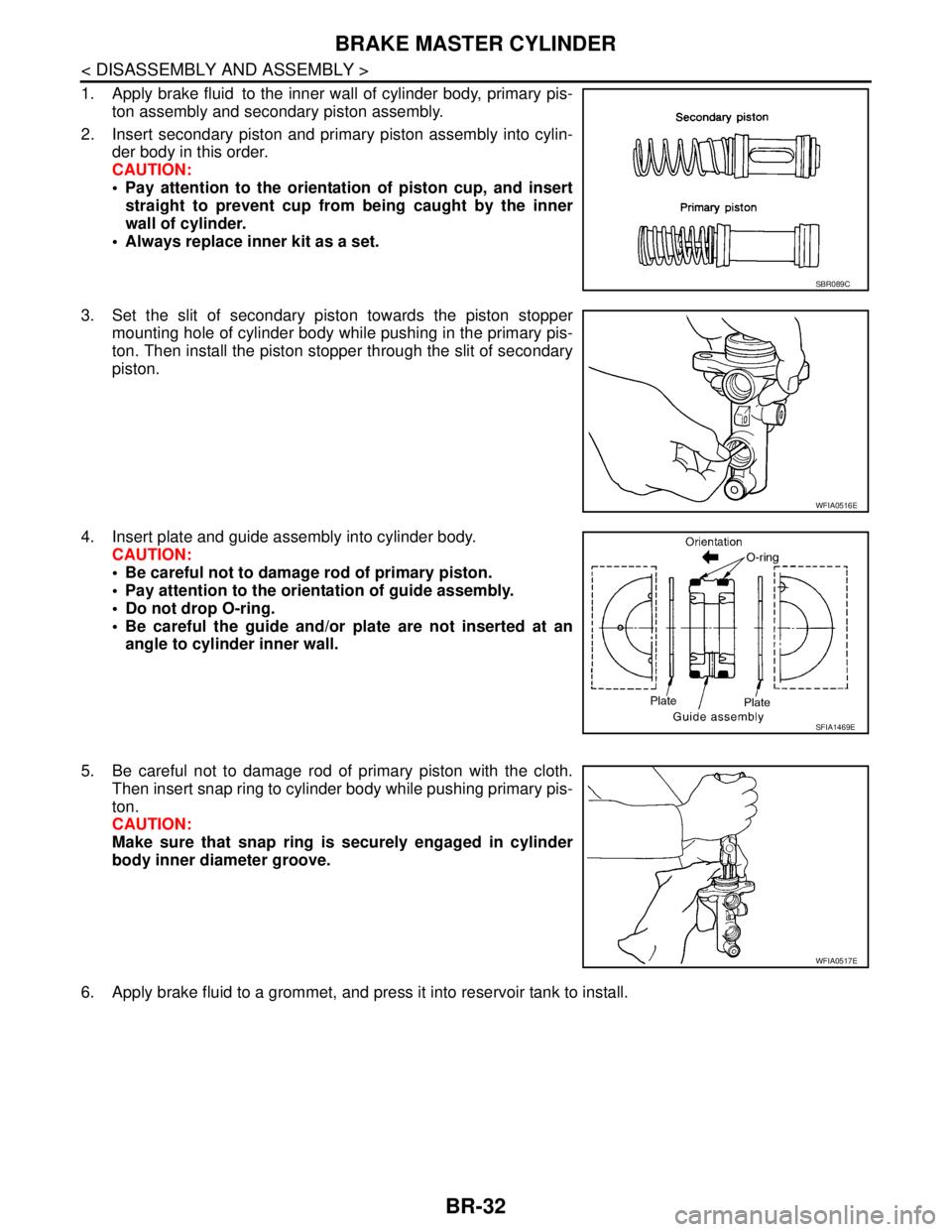
1. Apply brake fluid to the inner wall of cylinder body, primary pis-
ton assembly and secondary piston assembly.
2. Insert secondary piston and primary piston assembly into cylin-
der body in this order.
CAUTION:
Pay attention to the orientation of piston cup, and insert
straight to prevent cup from being caught by the inner
wall of cylinder.
Always replace inner kit as a set.
3. Set the slit of secondary piston towards the piston stopper
mounting hole of cylinder body while pushing in the primary pis-
ton. Then install the piston stopper through the slit of secondary
piston.
4. Insert plate and guide assembly into cylinder body.
CAUTION:
Be careful not to damage rod of primary piston.
Pay attention to the orientation of guide assembly.
Do not drop O-ring.
Be careful the guide and/or plate are not inserted at an
angle to cylinder inner wall.
5. Be careful not to damage rod of primary piston with the cloth.
Then insert snap ring to cylinder body while pushing primary pis-
ton.
CAUTION:
Make sure that snap ring is securely engaged in cylinder
body inner diameter groove.
6. Apply brake fluid to a grommet, and press it into reservoir tank to install.
SBR089C
WFIA0516E
SFIA1469E
WFIA0517E
Page 225 of 5883
BRAKE MASTER CYLINDER
BR-33
< DISASSEMBLY AND ASSEMBLY >
C
D
E
G
H
I
J
K
L
MA
B
BR
N
O
P
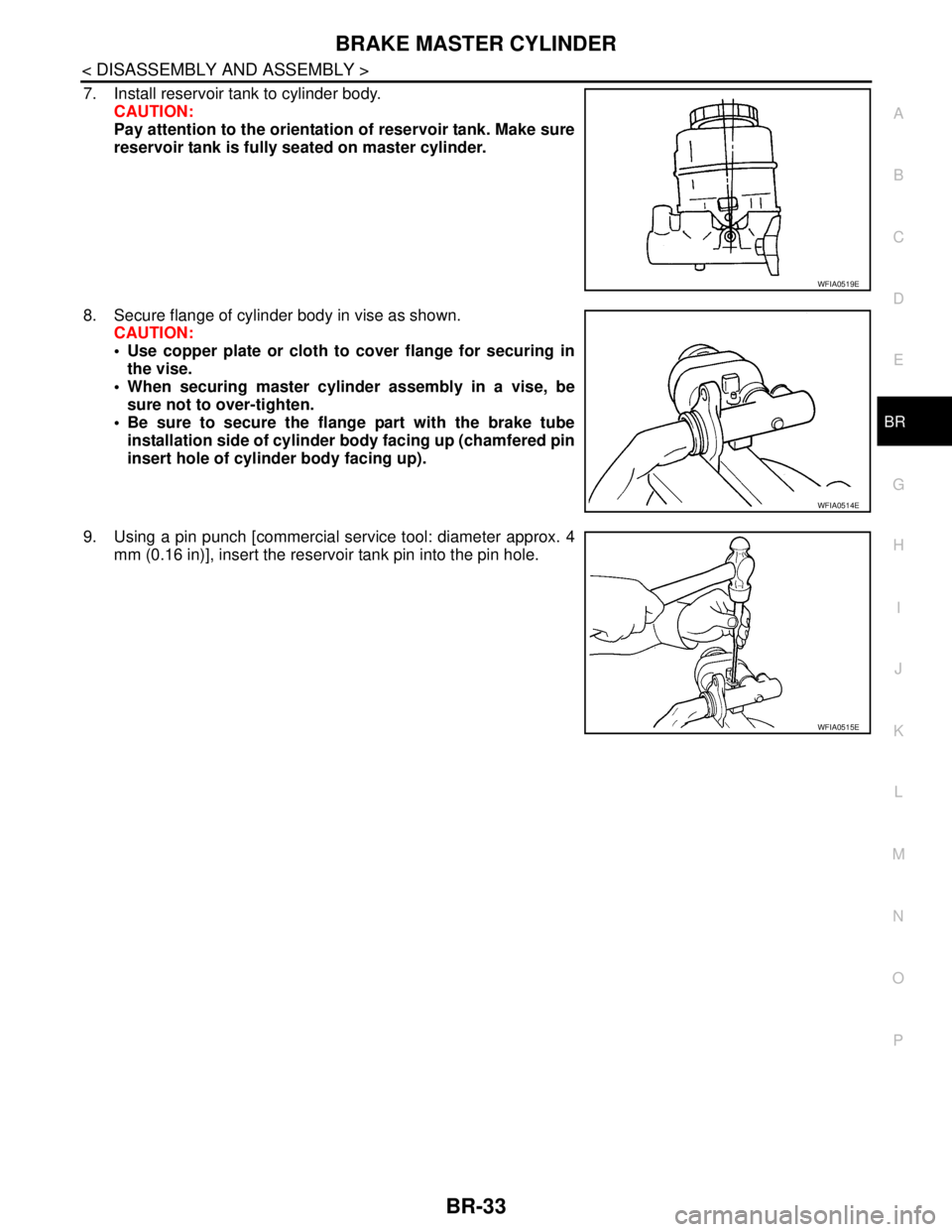
7. Install reservoir tank to cylinder body.
CAUTION:
Pay attention to the orientation of reservoir tank. Make sure
reservoir tank is fully seated on master cylinder.
8. Secure flange of cylinder body in vise as shown.
CAUTION:
Use copper plate or cloth to cover flange for securing in
the vise.
When securing master cylinder assembly in a vise, be
sure not to over-tighten.
Be sure to secure the flange part with the brake tube
installation side of cylinder body facing up (chamfered pin
insert hole of cylinder body facing up).
9. Using a pin punch [commercial service tool: diameter approx. 4
mm (0.16 in)], insert the reservoir tank pin into the pin hole.
WFIA0519E
WFIA0514E
WFIA0515E
Page 228 of 5883
BR-36
< DISASSEMBLY AND ASSEMBLY >
FRONT DISC BRAKE
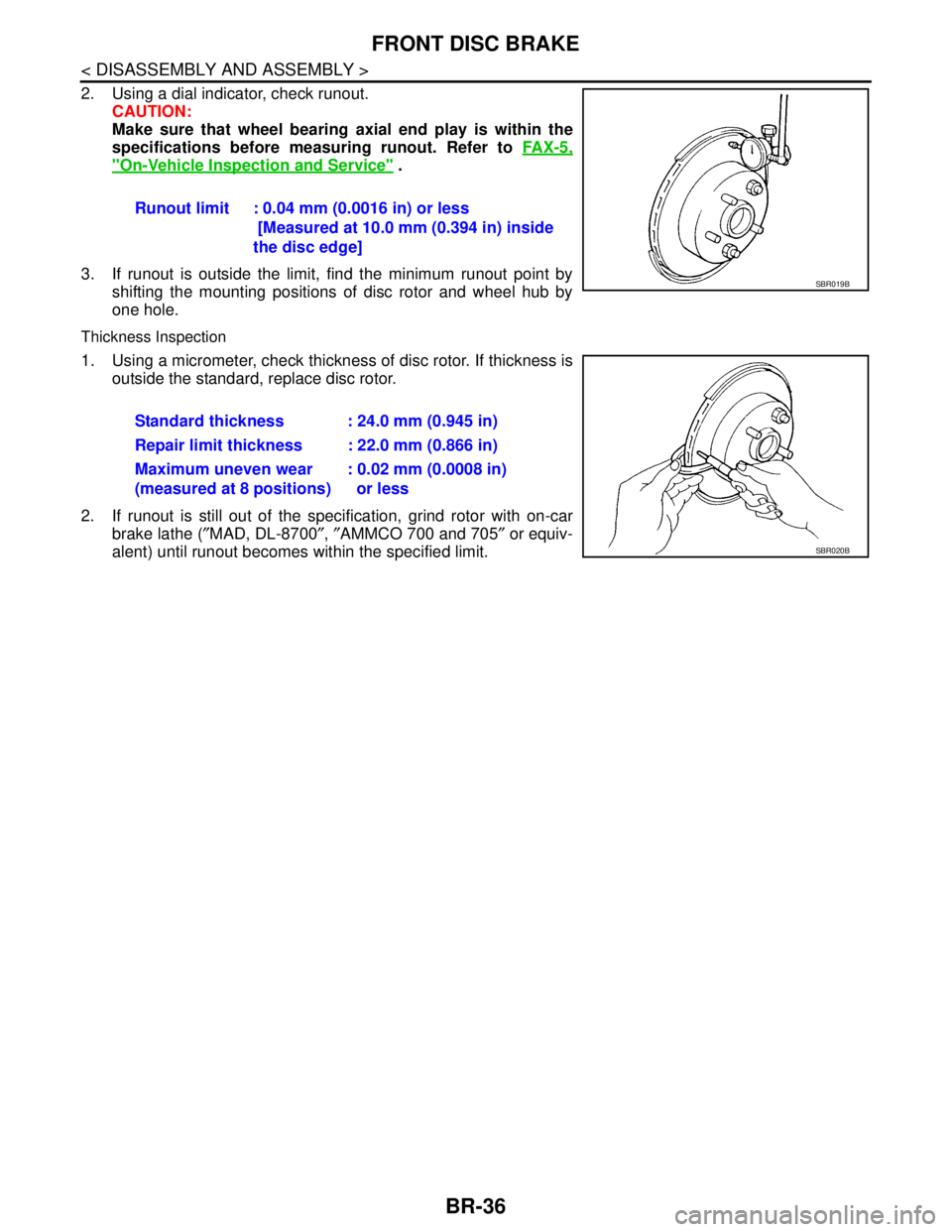
2. Using a dial indicator, check runout.
CAUTION:
Make sure that wheel bearing axial end play is within the
specifications before measuring runout. Refer to FA X - 5 ,
"On-Vehicle Inspection and Service" .
3. If runout is outside the limit, find the minimum runout point by
shifting the mounting positions of disc rotor and wheel hub by
one hole.
Thickness Inspection
1. Using a micrometer, check thickness of disc rotor. If thickness is
outside the standard, replace disc rotor.
2. If runout is still out of the specification, grind rotor with on-car
brake lathe (″MAD, DL-8700″, ″AMMCO 700 and 705″ or equiv-
alent) until runout becomes within the specified limit.Runout limit : 0.04 mm (0.0016 in) or less
[Measured at 10.0 mm (0.394 in) inside
the disc edge]
SBR019B
Standard thickness : 24.0 mm (0.945 in)
Repair limit thickness : 22.0 mm (0.866 in)
Maximum uneven wear
(measured at 8 positions): 0.02 mm (0.0008 in)
or less
SBR020B
Page 231 of 5883
REAR DISC BRAKE
BR-39
< DISASSEMBLY AND ASSEMBLY >
C
D
E
G
H
I
J
K
L
MA
B
BR
N
O
P
5. Attach the sliding pin bolt and sliding pin boot to the torque member.
6. Apply PBC (Poly Butyl Cuprysil) grease or silicone-based grease to the rear of the pad and to both sides
of the shim, and attach the inner shim and shim cover to the inner pad, and the outer shim and outer shim
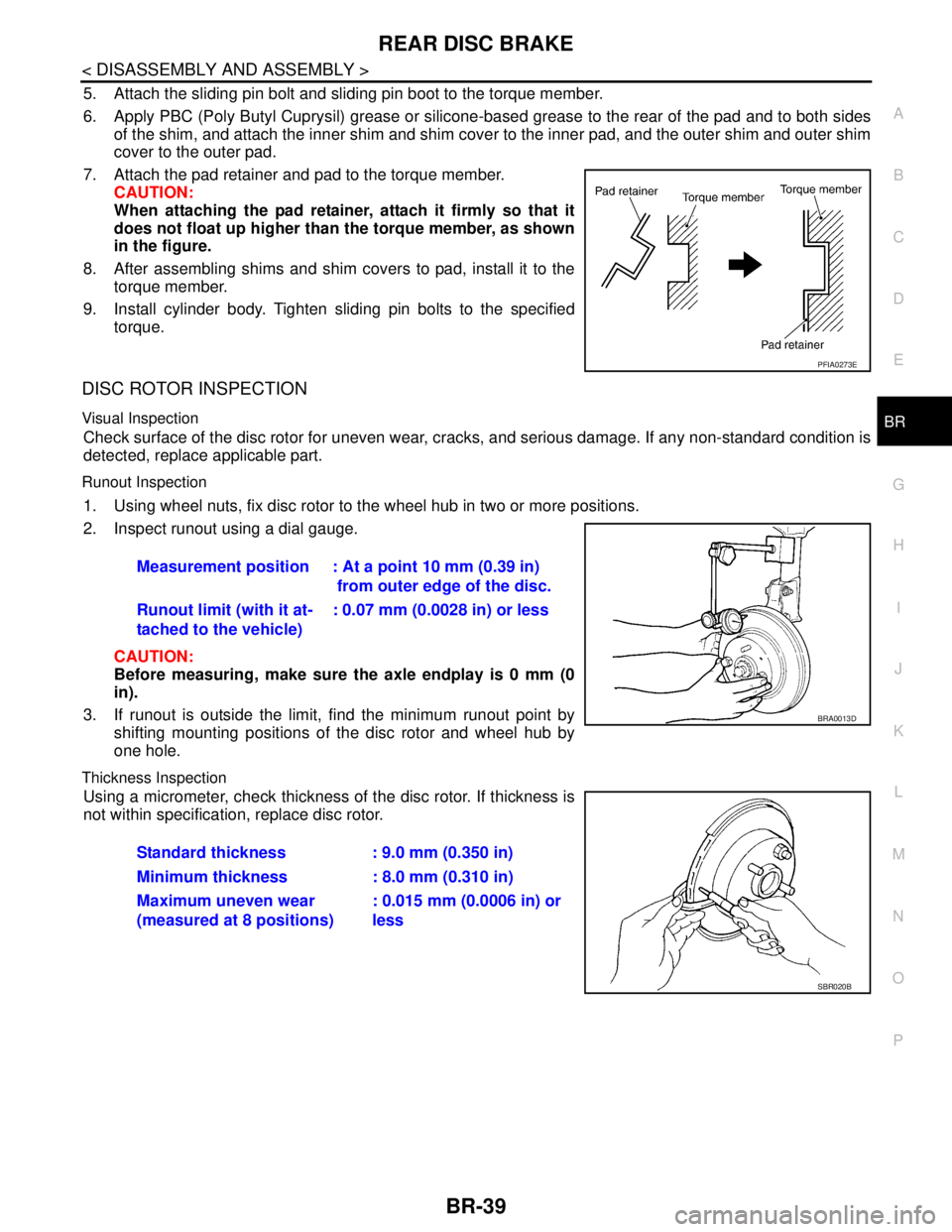
cover to the outer pad.
7. Attach the pad retainer and pad to the torque member.
CAUTION:
When attaching the pad retainer, attach it firmly so that it
does not float up higher than the torque member, as shown
in the figure.
8. After assembling shims and shim covers to pad, install it to the
torque member.
9. Install cylinder body. Tighten sliding pin bolts to the specified
torque.
DISC ROTOR INSPECTION
Visual Inspection
Check surface of the disc rotor for uneven wear, cracks, and serious damage. If any non-standard condition is
detected, replace applicable part.
Runout Inspection
1. Using wheel nuts, fix disc rotor to the wheel hub in two or more positions.
2. Inspect runout using a dial gauge.
CAUTION:
Before measuring, make sure the axle endplay is 0 mm (0
in).
3. If runout is outside the limit, find the minimum runout point by
shifting mounting positions of the disc rotor and wheel hub by
one hole.
Thickness Inspection
Using a micrometer, check thickness of the disc rotor. If thickness is
not within specification, replace disc rotor.
PFIA0273E
Measurement position : At a point 10 mm (0.39 in)
from outer edge of the disc.
Runout limit (with it at-
tached to the vehicle): 0.07 mm (0.0028 in) or less
BRA0013D
Standard thickness : 9.0 mm (0.350 in)
Minimum thickness : 8.0 mm (0.310 in)
Maximum uneven wear
(measured at 8 positions): 0.015 mm (0.0006 in) or
less
SBR020B