ECO NISSAN TIIDA 2007 Service Repair Manual
[x] Cancel search | Manufacturer: NISSAN, Model Year: 2007, Model line: TIIDA, Model: NISSAN TIIDA 2007Pages: 5883, PDF Size: 78.95 MB
Page 1 of 5883
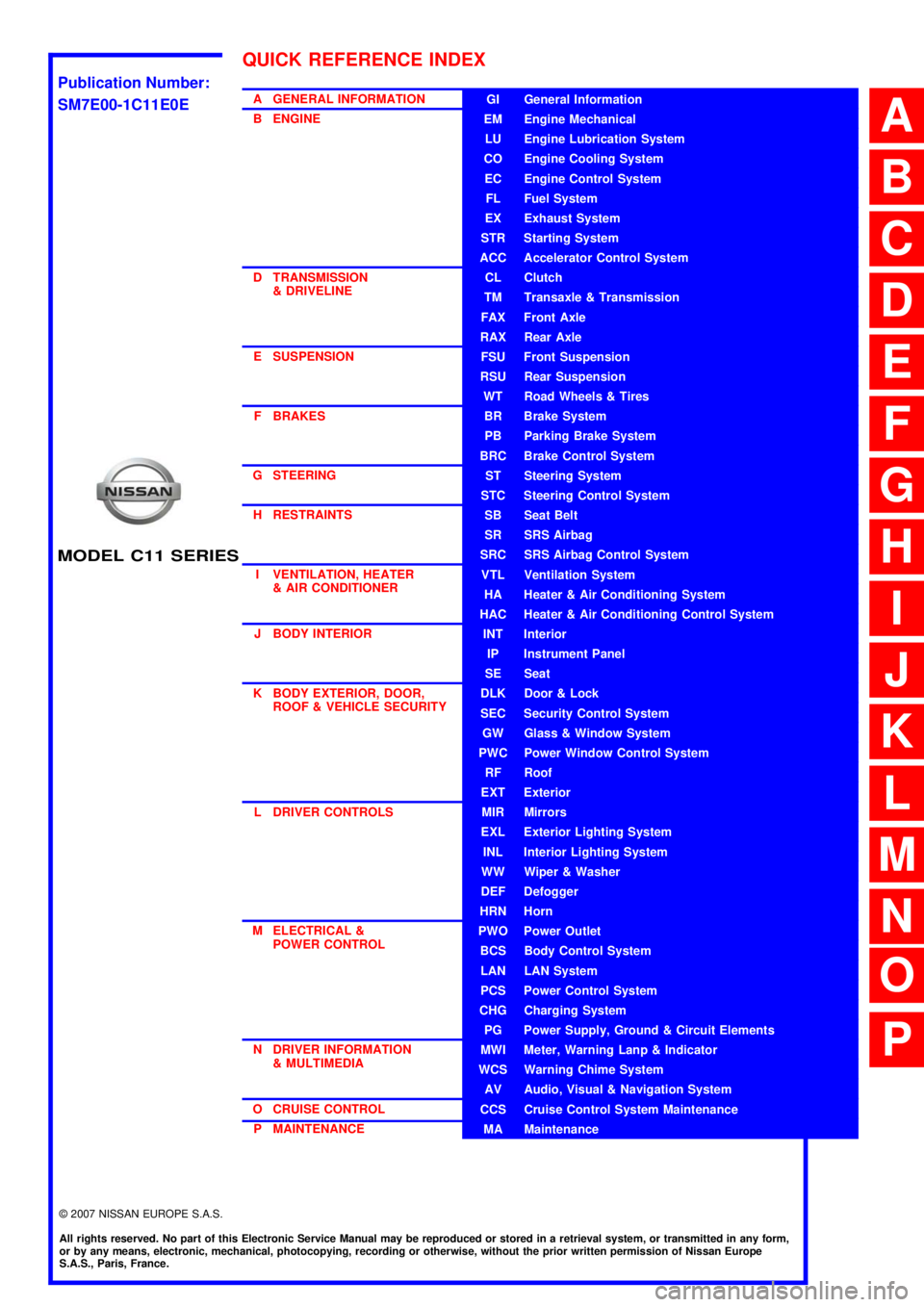
MODEL C11 SERIES
2007 NISSAN EUROPE S.A.S.
All rights reserved. No part of this Electronic Service Manual may be reproduced or stored in a retrieval system, or transmitted in any form,
or by any means, electronic, mechanical, photocopying, recording or otherwise, without the prior written permission of Nissan Europe
S.A.S., Paris, France.
A GENERAL INFORMATION
B ENGINE
D TRANSMISSION& DRIVELINE
E SUSPENSION F BRAKES
G STEERING H RESTRAINTS
I VENTILATION, HEATER & AIR CONDITIONER
J BODY INTERIOR
K BODY EXTERIOR, DOOR, ROOF & VEHICLE SECURITY
L DRIVER CONTROLS
M ELECTRICAL & POWER CONTROL
N DRIVER INFORMATION & MULTIMEDIA
O CRUISE CONTROL P MAINTENANCEGI General Information
EM Engine Mechanical
LU Engine Lubrication System
CO Engine Cooling System
EC Engine Control System
FL Fuel System
EX Exhaust System
STR Starting System
ACC Accelerator Control System
CL Clutch
TM Transaxle & Transmission
FAX Front Axle
RAX Rear Axle
FSU Front Suspension
RSU Rear Suspension
WT Road Wheels & Tires
BR Brake System
PB Parking Brake System
BRC Brake Control System
ST Steering System
STC Steering Control System
SB Seat Belt
SR SRS Airbag
SRC SRS Airbag Control System
VTL Ventilation System
HA Heater & Air Conditioning System
HAC Heater & Air Conditioning Control System
INT Interior
IP Instrument Panel
SE Seat
DLK Door & Lock
SEC Security Control System
GW Glass & Window System
PWC Power Window Control System
RF Roof
EXT Exterior
MIR Mirrors
EXL Exterior Lighting System
INL Interior Lighting System
WW Wiper & Washer
DEF Defogger
HRN Horn
PWO Power Outlet
BCS Body Control System
LAN LAN System
PCS Power Control System
CHG Charging System
PG Power Supply, Ground & Circuit Elements
MWI Meter, Warning Lanp & Indicator
WCS Warning Chime System
AV Audio, Visual & Navigation System
CCS Cruise Control System Maintenance
MA Maintenance
QUICK REFERENCE INDEX
A
B
C
D
E
F
G
H
I
J
K
L
M
N
O
P
M
Publication Number:
SM7E00-1C11E0E
Page 2 of 5883

FOREWORD
This manual contains maintenance and repair procedures for the NISSAN
TIIDA, model C11 series.
In order to assure your safety and the efficient functioning of the vehicle,
this manual should be read thoroughly. It is especially important that the
PRECAUTIONS in the GI section be completely understood before starting
any repair task.
All information in this manual is based on the latest product information
at the time of publication. The right is reserved to make changes in speci-
fications and methods at any time without notice.
IMPORTANT SAFETY NOTICE
The proper performance of service is essential for both the safety of the
technician and the efficient functioning of the vehicle.
The service methods in this Service Manual are described in such a man-
ner that the service may be performed safely and accurately.
Service varies with the procedures used, the skills of the technician and the
tools and parts available. Accordingly, anyone using service procedures,
tools or parts which are not specifically recommended by NISSAN must
first be completely satisfied that neither personal safety nor the vehicle's
safety will be jeopardized by the service method selected.
NISSAN EUROPE S.A.S.
Service Engineering SectionParis, France
Page 12 of 5883
![NISSAN TIIDA 2007 Service Repair Manual AV
AUDIO SYSTEM
AV-7
< FUNCTION DIAGNOSIS >[AUDIO WITHOUT NAVIGATION]
C
D
E
F
G
H
I
J
K
L
MB A
O
P Description
The link with the NATS IMMU implies that the AV control unit can basically only be operat](/img/5/57395/w960_57395-11.png "NISSAN TIIDA 2007 Service Repair Manual AV
AUDIO SYSTEM
AV-7
< FUNCTION DIAGNOSIS >[AUDIO WITHOUT NAVIGATION]
C
D
E
F
G
H
I
J
K
L
MB A
O
P Description
The link with the NATS IMMU implies that the AV control unit can basically only be operat")
AV
AUDIO SYSTEM
AV-7
< FUNCTION DIAGNOSIS >[AUDIO WITHOUT NAVIGATION]
C
D
E
F
G
H
I
J
K
L
MB A
O
P Description
The link with the NATS IMMU implies that the AV control unit can basically only be operated if connected to the
matching NATS IMMU to which the AV control unit was initially fitted on the production line.
Since radio operation is impossible after the link with the NATS is disrupted, theft of the AV control unit is basi-
cally useless since special equipment is required to reset the AV control unit.
Initialization Process for AV control units That Are Linked to the NATS IMMU
New AV control units will be delivered to the factories in the “NEW” state, i.e. ready to be linked with the vehi-
cle's NATS. When the AV control unit in “NEW” state is first switched on at the factory, it will start up communi-
cation with the vehicle's immobilizer control unit (IMMU) and send a code (the “AV control unit Code”) to the
IMMU. The IMMU will then store this code, which is unique to each AV control unit, in its (permanent) memory.
Upon receipt of the code by the IMMU, the NATS will confirm correct receipt of the AV control unit code to the
AV control unit. Hereafter, the AV control unit will operate as normal.
During the initialization process, “NEW” is displayed on the AV control unit display. Normally though, communi-
cation between AV control unit and IMMU takes such a short time (300 ms) that the AV control unit seems to
switch on directly without showing “NEW” on its display.
Normal Operation
Each time the AV control unit is switched on afterwards, the AV control unit code will be verified between the
AV control unit and the NATS before the AV control unit becomes operational. During the code verification pro-
cess, “WAIT” is shown on the AV control unit display. Again, the communication takes such a short time (300
ms) that the AV control unit seems to switch on directly without showing “WAIT” on its display.
When The Radio Is Locked
In case of the AV control unit being linked with the vehicle's NATS (immobilizer system), disconnection of the
link between the AV control unit and the IMMU will cause the AV control unit to switch into the lock
(“SECURE”) mode in which the AV control unit is fully inoperative. Hence, repair of the AV control unit is basi-
cally impossible, unless the AV control unit is reset to the “NEW” state for which special decoding equipment is
required.
Clarion has provided their authorized service representatives with so called “decoder boxes” which can bring
the AV control unit back to the “NEW” state, enabling the AV control unit to be switched on after which repair
can be performed. Subsequently, when the repaired AV control unit is delivered to the final user again, it will
be in the “NEW” state to enable re-linking the AV control unit to the vehicle's immobilizer system. As a result of
the above, repair of the AV control unit can only be done by an authorized Clarion representative (when the
owner of the vehicle requests repair and can show personal identification).
Service Procedure
Item Service procedure Description
Battery disconnection No additional action required. –
Radio needs repair Repair needs to be done by authorized rep-
resentative of radio manufacturer since ra-
dio cannot be operated unless it is reset to
NEW state, using special decoding equip-
ment.–
Replacement of radio by new part No additional action required. Radio is delivered in “NEW” state.
Transferring radio to another vehicle/re-
placement of radio by an old partRadio needs to be reset to NEW state by
authorized representative of radio manu-
facturer.–
Replacement of IMMU Radio needs to be reset to NEW state by
authorized representative of Clarion.After switching on the radio, it will display
“SECURE” after 1 minute.
No communication from IMMU to radio 1. Check NATS system if NATS is mal-
functioning.
2. Reset radio to “NEW” state by autho-
rized representative of Clarion after
NATS is repaired.The radio will display “SECURE” after 1
minute after switching on the radio. Further
use of radio is impossible until communica-
tion is established again, or after radio is re-
set by authorized representative of Clarion.
When initialized between ECM and IMMU. Radio needs to be reset to “NEW” status by
authorized representative of Clarion.It will display “SECURE” after 1 minute after
switching on the radio.
Page 14 of 5883
![NISSAN TIIDA 2007 Service Repair Manual AV
POWER SUPPLY AND GROUND CIRCUIT
AV-9
< COMPONENT DIAGNOSIS >[AUDIO WITHOUT NAVIGATION]
C
D
E
F
G
H
I
J
K
L
MB A
O
P
COMPONENT DIAGNOSIS
POWER SUPPLY AND GROUND CIRCUIT
AV CONTROL UNIT
AV CONTROL UN](/img/5/57395/w960_57395-13.png "NISSAN TIIDA 2007 Service Repair Manual AV
POWER SUPPLY AND GROUND CIRCUIT
AV-9
< COMPONENT DIAGNOSIS >[AUDIO WITHOUT NAVIGATION]
C
D
E
F
G
H
I
J
K
L
MB A
O
P
COMPONENT DIAGNOSIS
POWER SUPPLY AND GROUND CIRCUIT
AV CONTROL UNIT
AV CONTROL UN")
AV
POWER SUPPLY AND GROUND CIRCUIT
AV-9
< COMPONENT DIAGNOSIS >[AUDIO WITHOUT NAVIGATION]
C
D
E
F
G
H
I
J
K
L
MB A
O
P
COMPONENT DIAGNOSIS
POWER SUPPLY AND GROUND CIRCUIT
AV CONTROL UNIT
AV CONTROL UNIT : Diagnosis ProcedureINFOID:0000000001728609
1.CHECK FUSE
Check for blown fuses.
Is inspection result OK?
YES >> GO TO 2
NO >> Be sure to eliminate cause of malfunction before installing new fuse.
2.CHECK POWER SUPPLY CIRCUIT
Check voltage between AV control unit harness connector and ground.
Is inspection result OK?
YES >> GO TO 3
NO >> Check harness between AV control unit and fuse.
3.CHECK GROUND CIRCUIT
1. Turn ignition switch OFF.
2. Disconnect AV control unit connector.
3. Check continuity between AV control unit harness connector and ground.
Is inspection result OK?
YES >> INSPECTION END.
NO >> Repair harness or connector.
MICROPHONE
MICROPHONE : Diagnosis ProcedureINFOID:0000000001728770
1.CHECK POWER SUPPLY CIRCUIT (MICROPHONE SIDE)
1. Turn ignition switch ON.
Check voltage between microphone harness connector R15 terminal
4 and ground.
Is approximately 5V present?
YES >> GO TO 4
NO >> GO TO 2
Power source Fuse No.
Battery 27
Ignition switch ACC or ON 6
Signal name Connector No. Terminal No. Ignition switch position Value (Approx.)
Battery power supply M43 19 OFF 12V
ACC power supply M43 7 ACC 12V
Signal name Connector No. Terminal No. Ignition switch position Continuity
Ground M44 21 OFF Continuity should exist.
Signal nameConnector
No.Te r m i n a l N o .Ignition
switch posi-
tionValue (Ap-
prox.)
MIC power R15 4 ON 5V
WKIA5796E
Page 15 of 5883
![NISSAN TIIDA 2007 Service Repair Manual AV-10
< COMPONENT DIAGNOSIS >[AUDIO WITHOUT NAVIGATION]
POWER SUPPLY AND GROUND CIRCUIT
2.CHECK POWER SUPPLY CIRCUIT (CONTINUITY)
1. Turn ignition switch OFF.
2. Disconnect microphone and AV control u](/img/5/57395/w960_57395-14.png "NISSAN TIIDA 2007 Service Repair Manual AV-10
< COMPONENT DIAGNOSIS >[AUDIO WITHOUT NAVIGATION]
POWER SUPPLY AND GROUND CIRCUIT
2.CHECK POWER SUPPLY CIRCUIT (CONTINUITY)
1. Turn ignition switch OFF.
2. Disconnect microphone and AV control u")
AV-10
< COMPONENT DIAGNOSIS >[AUDIO WITHOUT NAVIGATION]
POWER SUPPLY AND GROUND CIRCUIT
2.CHECK POWER SUPPLY CIRCUIT (CONTINUITY)
1. Turn ignition switch OFF.
2. Disconnect microphone and AV control unit harness connectors.
3. Check continuity between microphone harness connector R15
(A) terminal 4 and AV control unit harness connector M44 (B)
terminal 29.
4. Check continuity between microphone harness connector R15
(A) terminal 4 and ground.
Are the continuity test results as specified?
YES >> GO TO 3
NO >> Repair harness or connector.
3.CHECK POWER SUPPLY CIRCUIT (AV CONTROL UNIT SIDE)
1. Connect AV control unit harness connector.
2. Turn ignition switch to ACC.
3. Check voltage between AV control unit harness connector M44
terminal 29 and ground.
Is approximately 5V present?
YES >> Inspection End.
NO >> Replace AV control unit. Refer to XX-XX, "*****"
4.CHECK GROUND CIRCUIT
1. Turn ignition switch OFF.
2. Disconnect microphone harness connector R15 and AV control unit harness connector M44.
3. Check continuity between microphone harness connector R15 (A) terminal 2 and AV control unit harness
connector M44 (B) terminal 28.
Does continuity exist?
YES >> Inspection End.
NO >> Repair harness or connector.
AB
Continuity
Connector Terminal Connector Terminal
R15 4 M44 29 Yes
A
—Continuity
Connector Terminal
R15 4 Ground No
ALNIA0320GB
Signal nameConnector
No.Te r m i n a l
No.Ignition switch
positionValue (Approx.)
MIC power M44 29 ACC 5V
ALNIA0321GB
AB
Continuity
Connector Terminal Connector Terminal
R15 2 M44 28 Yes
Page 24 of 5883
![NISSAN TIIDA 2007 Service Repair Manual AV
MULTI AV SYSTEM SYMPTOMS
AV-19
< SYMPTOM DIAGNOSIS >[AUDIO WITHOUT NAVIGATION]
C
D
E
F
G
H
I
J
K
L
MB A
O
P
SYMPTOM DIAGNOSIS
MULTI AV SYSTEM SYMPTOMS
Symptom TableINFOID:0000000001728624
RELATED T](/img/5/57395/w960_57395-23.png "NISSAN TIIDA 2007 Service Repair Manual AV
MULTI AV SYSTEM SYMPTOMS
AV-19
< SYMPTOM DIAGNOSIS >[AUDIO WITHOUT NAVIGATION]
C
D
E
F
G
H
I
J
K
L
MB A
O
P
SYMPTOM DIAGNOSIS
MULTI AV SYSTEM SYMPTOMS
Symptom TableINFOID:0000000001728624
RELATED T")
AV
MULTI AV SYSTEM SYMPTOMS
AV-19
< SYMPTOM DIAGNOSIS >[AUDIO WITHOUT NAVIGATION]
C
D
E
F
G
H
I
J
K
L
MB A
O
P
SYMPTOM DIAGNOSIS
MULTI AV SYSTEM SYMPTOMS
Symptom TableINFOID:0000000001728624
RELATED TO AUDIO
RELATED TO HANDS FREE PHONE
Check that the cellular phone is corresponding type (Bluetooth® enabled) when the hands free related mal-
function vehicle is in service before performing a diagnosis.
There is a case that malfunction occurs due to the version change of the phone type, etc. even though it is a
corresponding type. Therefore, confirm it by changing the cellular phone to another corresponding type
phone, and check that it operates normally. It is necessary to distinguish whether the cause is the vehicle or
cellular phone. Check to ensure the customers phone is supported by checking the phone compatibility for
the hands free system.
Trouble diagnosis chart by symptom
RELATED TO STEERING SWITCH
Symptom Check items Possible malfunction location / Action to take
Audio sound is not heard.No sound from all speakers Audio unit (XX-XX, "*****"
)
Sound is not heard only from the specif-
ic places (Front RH, rear RH, front LH
and rear LH).Sound signal circuit of suspect system
Symptoms Check items Possible malfunction location / Action to take
Does not recognize cellular
phone connection. Repeat the registration of cellular phone. Audio unit (XX-XX, "*****"
)
Hands free phone cannot be
established. Hands free phone operation can be
made, but the communication cannot
be established.
Hands free phone operation can be
performed, however, voice between
each other cannot be heard during the
conversation.Audio unit (XX-XX, "*****"
)
The other party's voice cannot
be heard by hands free phone.No sound from all speakers Audio unit (XX-XX, "*****"
)
Sound is not heard only from the specific
places (Front RH or front LH).Sound signal circuit (TEL voice)
Originating sound is not heard
by the other party with hands
free phone communication.Sound operation function is normal. Audio unit (XX-XX, "*****"
)
Sound operation function does not work. Microphone signal circuit (XX-XX, "*****"
)
Symptoms Possible malfunction location / Action to take
All steering switches are not operated. Steering switch signal ground circuit (XX-XX, "*****"
)
Only specified switch cannot be operated. Steering switch (XX-XX, "*****"
)
“MENU UP”, “VOL UP” and “SOURCE” switches are not op-
erated.Steering switch signal A circuit (XX-XX, "*****"
)
“ ”, “MENU DOWN” and “VOL DOWN” switches are not
operated.Steering switch signal B circuit (XX-XX, "*****"
)
Page 25 of 5883
![NISSAN TIIDA 2007 Service Repair Manual AV-20
< SYMPTOM DIAGNOSIS >[AUDIO WITHOUT NAVIGATION]
NORMAL OPERATING CONDITION
NORMAL OPERATING CONDITION
DescriptionINFOID:0000000001728625
RELATED TO AUDIO
The majority of the audio malfunctions](/img/5/57395/w960_57395-24.png "NISSAN TIIDA 2007 Service Repair Manual AV-20
< SYMPTOM DIAGNOSIS >[AUDIO WITHOUT NAVIGATION]
NORMAL OPERATING CONDITION
NORMAL OPERATING CONDITION
DescriptionINFOID:0000000001728625
RELATED TO AUDIO
The majority of the audio malfunctions")
AV-20
< SYMPTOM DIAGNOSIS >[AUDIO WITHOUT NAVIGATION]
NORMAL OPERATING CONDITION
NORMAL OPERATING CONDITION
DescriptionINFOID:0000000001728625
RELATED TO AUDIO
The majority of the audio malfunctions are the result of outside causes (bad CD, electromagnetic interfer-
ence, etc.). Check the symptoms below to diagnose the malfunction.
The vehicle itself can be a source of noise if noise prevention parts or electrical equipment is malfunctioning.
Check that noise is caused and/or changed by engine speed, ignition switch turned to each position, and
operation of each piece of electrical equipment. Then determine the cause.
NOTE:
CD-R is not guaranteed to play because they can contain compressed audio (MP3, WMA) or could be incor-
rectly mastered by the customer on a computer.
Check that the CDs carry the Compact Disc Logo. If not, the disc is not mastered to the red book Compact
Disc Standard and may not play.
Noise resulting from variations in field strength, such as fading noise and multi-path noise, or external noise from trains and other
sources, is not a malfunction.
NOTE:
Fading noise: This noise occurs because of variations in the field strength in a narrow range due to mountains or buildings blocking
the signal.
Multi-path noise: This noise results from a time difference between the broadcast waves directly from the station arriving at the
antenna and the waves reflected by mountains or buildings.
RELATED TO TELEPHONE
Symptoms Cause and Counter measure
Cannot playCheck that the CD was inserted correctly.
Check that the CD is scratched or dirty.
Check that there is condensation inside the player, and if there is, wait until the condensation is
gone (about 1 hour) before using the player.
The player will play correctly after it returns to the normal temperature if there is a temperature
increase error.
Only the music CD files (CD-DA data) will be played if there is a mixture of music CD files (CD-
DA data) and MP3/WMA files on a CD.
Files with extensions other than “.MP3”, “.WMA”, “.mp3”, or “.wma” cannot be played.
Check that the finalization process, such as session close and disc close, is done for the disc.
Check that the CD is protected by copyright.
Poor sound quality Check that the CD is scratched or dirty.
It takes a relatively long time before
the music starts playing.If there are many folder or file levels on the MP3/WMA CD, or if it is a multisession disc, some
time may be required before the music starts playing.
The songs do not play back in the
desired order.The playback order is the order in which the files were written by the software, so the files might
not play in the desired order.
Symptom Possible cause Possible solution
The system does not recognize the
command.
The system recognizes the com-
mand incorrectly.The interior of the vehicle is too noisy.Close the windows or have other occupants
be quiet.
The volume of the voice is too low. Speak louder.
Pronunciation is unclear. Speak clearly.
Voice recognition mode is not yet ready to speak.Push the release “ ” on the steering
switch, and speak a command after the
tone sounds.
5 seconds or more have passed after pushed and
released “ ” on the steering switch.Make sure to speak a command within
5seconds after push and release “ ” on
the steering switch.
Page 37 of 5883
![NISSAN TIIDA 2007 Service Repair Manual AV-32
< FUNCTION DIAGNOSIS >[AUDIO WITH NAVIGATION]
MULTI AV SYSTEM
FUNCTION DIAGNOSIS
MULTI AV SYSTEM
System DiagramINFOID:0000000001728627
System DescriptionINFOID:0000000001728628
Multi AV system m](/img/5/57395/w960_57395-36.png "NISSAN TIIDA 2007 Service Repair Manual AV-32
< FUNCTION DIAGNOSIS >[AUDIO WITH NAVIGATION]
MULTI AV SYSTEM
FUNCTION DIAGNOSIS
MULTI AV SYSTEM
System DiagramINFOID:0000000001728627
System DescriptionINFOID:0000000001728628
Multi AV system m")
AV-32
< FUNCTION DIAGNOSIS >[AUDIO WITH NAVIGATION]
MULTI AV SYSTEM
FUNCTION DIAGNOSIS
MULTI AV SYSTEM
System DiagramINFOID:0000000001728627
System DescriptionINFOID:0000000001728628
Multi AV system means that the following systems are integrated.
Two AV communication lines (H, L) connect between units that configure MULTI AV system. NAVI control
unit controls by sending/receiving data one by one with each unit (slave unit) that configures them com-
pletely as a master unit.
Two AV communication lines (H, L) adopt a twisted pair line that is resistant to noise.
NAVI control unit is connected by CAN communication, and it receives data signal from ECM, combination
meter. It computes and displays fuel economy information value with the obtained information. Sending/
receiving of data signal is performed by BCM. Also, it sends the required signal of vehicle setting and
receives the response signal.
ALNIA0882GB
System name System explanation
NAVIGATION SYSTEMAV- 3 5 , "
System Description"
AUDIO SYSTEMXX-XX, "*****"
VEHICLE INFORMATION SYSTEM Status of audio, fuel economy, maintenance and navigation is
displayed.
NAVI control unit displays the fuel consumption status and trip
computer status while receiving data signal through CAN com-
munication from ECM, combination meter and BCM.
HANDS-FREE PHONE SYSTEM Refer to the following “HANDS-FREE PHONE SYSTEM”.
Page 39 of 5883
![NISSAN TIIDA 2007 Service Repair Manual AV-34
< FUNCTION DIAGNOSIS >[AUDIO WITH NAVIGATION]
MULTI AV SYSTEM
Component Description
INFOID:0000000001728630
4. Front door speaker
Driver side D12
Passenger side D1125. Rear door speaker
LH D207](/img/5/57395/w960_57395-38.png "NISSAN TIIDA 2007 Service Repair Manual AV-34
< FUNCTION DIAGNOSIS >[AUDIO WITH NAVIGATION]
MULTI AV SYSTEM
Component Description
INFOID:0000000001728630
4. Front door speaker
Driver side D12
Passenger side D1125. Rear door speaker
LH D207")
AV-34
< FUNCTION DIAGNOSIS >[AUDIO WITH NAVIGATION]
MULTI AV SYSTEM
Component Description
INFOID:0000000001728630
4. Front door speaker
Driver side D12
Passenger side D1125. Rear door speaker
LH D207
RH D3076. Front tweeter
LH M109
RH M47
7. Steering wheel audio control switch-
es M1028. Microphone R15
Part name Description
NAVI CONTROL UNIT Map data can be read from the Map DVD-ROM by installing Map DVD-ROM.
It is the master unit of the MULTI AV system, and it is connected to each con-
trol unit by means of communication. It operates each system according to
communication signals from the NAVI control unit.
The NAVI control unit includes the audio, hands-free phone, navigation, and
vehicle information functions.
It is connected to ECM and combination meter via CAN communication to ob-
tain necessary information for the vehicle information function.
It inputs the illumination signals that are required for the display dimming con-
trol.
It inputs the signals for driving status recognition (vehicle speed, reverse and
parking brake).
MAP DVD-ROM A collection of Map data.
DISPLAY UNIT Display image is controlled by the serial communication from NAVI control
unit.
RGB image signal is input from NAVI control unit (RGB, RGB area and RGB
synchronizing). Camera image signal is input from camera control unit.
Synchronize signal (HP, VP) is output to NAVI control unit.
AV CONTROL UNIT Operational switch of MULTI AV system is integrated.
NAVI control unit and AV communication are connected with AV control unit.
Operating signals of the switch are sent to the NAVI control unit.
FRONT DOOR SPEAKER Outputs sound signal from AV control unit.
Outputs high, mid and low range sounds.
REAR DOOR SPEAKER Outputs sound signal from AV control unit.
Outputs high, mid and low range sounds.
FRONT TWEETER Outputs sound signal from AV control unit.
Outputs high range sound.
STEERING WHEEL AUDIO CONTROL SWITCH Operations for audio, hands-free phone, voice recognition and navigation,
etc. are possible.
Steering switch signal (operation signal) is output to AV control unit.
MICROPHONE Used for hands-free phone operation and voice recognition.
Mic. signal is sent to NAVI control unit.
Power (Mic. VCC) is supplied from NAVI control unit.
GPS ANTENNA GPS signal is received and sent to NAVI control unit.
RADIO ANTENNA Radio signal received by antenna is sent to AV control unit.
Page 40 of 5883
![NISSAN TIIDA 2007 Service Repair Manual AV
NAVIGATION SYSTEM
AV-35
< FUNCTION DIAGNOSIS >[AUDIO WITH NAVIGATION]
C
D
E
F
G
H
I
J
K
L
MB A
O
P
NAVIGATION SYSTEM
System DiagramINFOID:0000000001728631
System DescriptionINFOID:0000000001728632](/img/5/57395/w960_57395-39.png "NISSAN TIIDA 2007 Service Repair Manual AV
NAVIGATION SYSTEM
AV-35
< FUNCTION DIAGNOSIS >[AUDIO WITH NAVIGATION]
C
D
E
F
G
H
I
J
K
L
MB A
O
P
NAVIGATION SYSTEM
System DiagramINFOID:0000000001728631
System DescriptionINFOID:0000000001728632")
AV
NAVIGATION SYSTEM
AV-35
< FUNCTION DIAGNOSIS >[AUDIO WITH NAVIGATION]
C
D
E
F
G
H
I
J
K
L
MB A
O
P
NAVIGATION SYSTEM
System DiagramINFOID:0000000001728631
System DescriptionINFOID:0000000001728632
NAVIGATION SYSTEM
Location Detection Principle
The navigation system periodically calculates the vehicle's current
position according to the following three signals:
Travel distance of the vehicle as determined by the vehicle speed
sensor
Turning angle of the vehicle as determined by the gyroscope
(angular velocity sensor)
Direction of vehicle travel as determined by the GPS antenna
(GPS information)
The current position of the vehicle is then identified by comparing the
calculated vehicle position with map data read from the map DVD-
ROM, which is stored in the DVD-ROM drive (map-matching), and
indicated on the screen as a vehicle mark. More accurate data is
judged and used by comparing vehicle position detection results found by the GPS with the result by map-
matching.
The current vehicle position will be calculated by detecting the dis-
tance the vehicle moved from the previous calculation point and its
direction.
Travel distance
Travel distance calculations are based on the vehicle speed sen-
sor input signal. Therefore, the calculation may become incorrect
as the tires wear down. To prevent this, an automatic distance cor-
rection function has been adopted.
Travel direction
Change in the travel direction of the vehicle is calculated by a gyro-
scope (angular velocity sensor) and a GPS antenna (GPS informa-
tion). They have both advantages and disadvantages.
JPNIA0157GB
SKIB1058E
SEL684V