ECO NISSAN TIIDA 2007 Service Service Manual
[x] Cancel search | Manufacturer: NISSAN, Model Year: 2007, Model line: TIIDA, Model: NISSAN TIIDA 2007Pages: 5883, PDF Size: 78.95 MB
Page 113 of 5883
![NISSAN TIIDA 2007 Service Service Manual AV-108
< SYMPTOM DIAGNOSIS >[AUDIO WITH NAVIGATION]
MULTI AV SYSTEM SYMPTOMS
SYMPTOM DIAGNOSIS
MULTI AV SYSTEM SYMPTOMS
Symptom TableINFOID:0000000001728767
RELATED TO NAVIGATION
NOTE:
Combined part o](/img/5/57395/w960_57395-112.png "NISSAN TIIDA 2007 Service Service Manual AV-108
< SYMPTOM DIAGNOSIS >[AUDIO WITH NAVIGATION]
MULTI AV SYSTEM SYMPTOMS
SYMPTOM DIAGNOSIS
MULTI AV SYSTEM SYMPTOMS
Symptom TableINFOID:0000000001728767
RELATED TO NAVIGATION
NOTE:
Combined part o")
AV-108
< SYMPTOM DIAGNOSIS >[AUDIO WITH NAVIGATION]
MULTI AV SYSTEM SYMPTOMS
SYMPTOM DIAGNOSIS
MULTI AV SYSTEM SYMPTOMS
Symptom TableINFOID:0000000001728767
RELATED TO NAVIGATION
NOTE:
Combined part of AV switch and audio unit.
RELATED TO REAR VIEW MONITOR
Symptoms Check items Possible malfunction location/Action to take
AV switch cannot be operated.
(All switches cannot be operated.)“MULTI AV” is displayed on “SELECT
SYSTEM” screen of CONSULT-III.Perform the self-diagnosis using CONSULT-III.
(AV- 4 8 , "
CONSULT - III Function (MULTI AV)")
“MULTI AV” is not displayed on “SE-
LECT SYSTEM” screen of CON-
SULT-III. NAVI control unit power supply and ground circuit
(AV- 8 0 , "
NAVI CONTROL UNIT : Diagnosis Proce-
dure")
Perform CAN diagnosis when “Please wait” is indi-
cated on the screen for approximately 120 seconds
after ignition switch ON.
AV switch cannot be operated.
(Only specified switch cannot be
operated.)CONSULT-III self-diagnosis detects
a malfunction.Perform the self-diagnosis using CONSULT-III.
(AV- 4 8 , "
CONSULT - III Function (MULTI AV)")
CONSULT-III self-diagnosis does not
detect a malfunction.Audio unit (XX-XX, "*****"
)
Map screen is not displayed.
(RGB image other than map is
normal.)–Perform the self-diagnosis using CONSULT-III.
(AV- 4 8 , "
CONSULT - III Function (MULTI AV)")
Fuel economy information display
is malfunctioning.–NAVI control unit power supply and ground circuit (Igni-
tion signal) (AV- 8 0 , "
NAVI CONTROL UNIT : Diagnosis
Procedure")
Voice guidance is not heard. – Voice guidance signal circuit
Traffic information (RDS-TMC) is
not received.Radio broadcasts are received. Audio unit (XX-XX, "*****"
)
Radio broadcasts are not received. Radio antenna (XX-XX, "*****"
)
Antenna feeder (XX-XX, "*****"
)
Symptoms Check items Possible malfunction location/Action to take
Warning message under the dis-
play is not displayed at rear view
monitor image.– Horizontal synchronizing (HP) signal circuit (AV- 8 7 ,
"Diagnosis Procedure")
Vertical synchronizing (VP) signal circuit (AV- 8 8 , "
Di-
agnosis Procedure")
RGB area (YS) signal circuit (AV- 8 6 , "
Diagnosis Pro-
cedure")
Camera image is not shown.
(Only warning message under the
display is displayed.)“REAR VIEW CAMERA” is displayed
on “SELECT SYSTEM” screen of
CONSULT-III. Camera image signal circuit (positive circuit)
(Between camera control unit and display unit)
(XX-XX, "*****"
)
Camera ON signal circuit (XX-XX, "*****"
)
Camera image signal circuit
(Between rear view camera and camera control unit)
(XX-XX, "*****"
)
“REAR VIEW CAMERA” is not dis-
played on “SELECT SYSTEM”
screen of CONSULT-III.Camera control unit power supply and ground circuit
(XX-XX, "*****"
)
Camera image is rolling. –Camera image signal circuit (negative circuit)
(Between camera control unit and display unit)
(XX-XX, "*****"
)
Page 115 of 5883
![NISSAN TIIDA 2007 Service Service Manual AV-110
< SYMPTOM DIAGNOSIS >[AUDIO WITH NAVIGATION]
MULTI AV SYSTEM SYMPTOMS
Check that the cellular phone is corresponding type (Bluetooth® enabled) when the hands free related mal-
function vehic](/img/5/57395/w960_57395-114.png "NISSAN TIIDA 2007 Service Service Manual AV-110
< SYMPTOM DIAGNOSIS >[AUDIO WITH NAVIGATION]
MULTI AV SYSTEM SYMPTOMS
Check that the cellular phone is corresponding type (Bluetooth® enabled) when the hands free related mal-
function vehic")
AV-110
< SYMPTOM DIAGNOSIS >[AUDIO WITH NAVIGATION]
MULTI AV SYSTEM SYMPTOMS
Check that the cellular phone is corresponding type (Bluetooth® enabled) when the hands free related mal-
function vehicle is in service before performing a diagnosis.
There is a case that malfunction occurs due to the version change of the phone type, etc. even though it is a
corresponding type. Therefore, confirm it by changing the cellular phone to another corresponding type
phone, and check that it operates normally. It is necessary to distinguish whether the cause is the vehicle or
cellular phone. Check to ensure the customers phone is supported by checking the phone compatibility for
the hands free system.
Trouble diagnosis chart by symptom
RELATED TO STEERING WHEEL SWITCH
Symptoms Check items Possible malfunction location/Action to take
Does not recognize cellular
phone connection.Repeat the registration of cellular phone. NAVI control unit (XX-XX, "*****"
)
Hands free phone cannot be
established. Hands free phone operation can be
made, but the communication cannot
be established.
Hands free phone operation can be
performed, however, voice between
each other cannot be heard during the
conversation.NAVI control unit (XX-XX, "*****"
)
The other party's voice cannot
be heard by hands free phone.Check the “microphone speaker ”in In-
spection & Adjustment Mode if sound is
heard.NAVI control unit (AV- 4 8 , "
CONSULT - III Function
(MULTI AV)")
Check the “microphone speaker ”in In-
spection & Adjustment Mode if sound is
not heard.TEL voice signal circuit
Originating sound is not heard
by the other party with hands
free phone communication.Sound operation function is normal. NAVI control unit (XX-XX, "*****"
)
Sound operation function does not work.Microphone signal circuit (AV- 9 1 , "
Diagnosis Proce-
dure")
Symptoms Possible malfunction location/Action to take
All steering switches are not operated. Steering switch signal ground circuit (XX-XX, "*****"
)
Only specified switch cannot be operated. Steering switch (XX-XX, "*****"
)
“ENTER”, “MENU UP”, “MENU DOWN” and “SOURCE”
switches are not operated.Steering switch signal A circuit (XX-XX, "*****"
)
“BACK”, “ ”, “VOL UP” and “VOL DOWN” switches are
not operated.Steering switch signal B circuit (XX-XX, "*****"
)
Page 116 of 5883
![NISSAN TIIDA 2007 Service Service Manual AV
NORMAL OPERATING CONDITION
AV-111
< SYMPTOM DIAGNOSIS >[AUDIO WITH NAVIGATION]
C
D
E
F
G
H
I
J
K
L
MB A
O
P
NORMAL OPERATING CONDITION
DescriptionINFOID:0000000001728768
BASIC OPERATION
NOTE:
Locat](/img/5/57395/w960_57395-115.png "NISSAN TIIDA 2007 Service Service Manual AV
NORMAL OPERATING CONDITION
AV-111
< SYMPTOM DIAGNOSIS >[AUDIO WITH NAVIGATION]
C
D
E
F
G
H
I
J
K
L
MB A
O
P
NORMAL OPERATING CONDITION
DescriptionINFOID:0000000001728768
BASIC OPERATION
NOTE:
Locat")
AV
NORMAL OPERATING CONDITION
AV-111
< SYMPTOM DIAGNOSIS >[AUDIO WITH NAVIGATION]
C
D
E
F
G
H
I
J
K
L
MB A
O
P
NORMAL OPERATING CONDITION
DescriptionINFOID:0000000001728768
BASIC OPERATION
NOTE:
Locations stored in the Address Book and other memory functions may be lost if the vehicle's battery is disconnected or becomes dis-
charged. Service the vehicle's battery as necessary and re-enter the information in the Address Book If this occurs.
VEHICLE ICON
Symptoms Possible cause Possible solution
No image is displayed.The brightness is at the lowest setting. Adjust the brightness of the display.
The display is turned off.
Push and hold to turn on the display.
No voice guidance is available.
The volume is too high or too low.The volume is not set correctly, or it is turned off. Adjust the volume of voice guidance.
Volume guidance is not provided for narrow streets
(roads displayed in gray).This is not a malfunction.
No map is displayed on the screen.The map DVD-ROM is not inserted, or it is inserted
upside down.Insert the map DVD-ROM correctly.
A screen other than map screen is displayed. Push “MAP”.
The screen is too dim.
The movement is slow.The temperature in the interior of the vehicle is low.Wait until the interior of the vehicle has
warmed up.
Some pixels in the display are dark-
er or brighter than others.This condition is an inherent characteristic of liquid
crystal displays.This is not a malfunction.
Some menu items cannot be se-
lected.Some menu items become unavailable while the ve-
hicle is driven.Park the vehicle in a safe location, and
then operate the navigation system.
Symptoms Possible cause Possible solution
Names of roads and locations differ
between Plan view and Birdview™.This is because the quantity of the displayed informa-
tion is reduced so that the screen does not become
too crowded. There is also a chance that names of
the roads or locations may be displayed multiple
times, and the names appearing on the screen may
be different because of a processing procedure.This is not a malfunction.
The vehicle icon is not displayed in
the correct position.The vehicle was transported after the ignition switch
was turned off, for example, by a ferry or car trans-
porter.Drive the vehicle for a while on a road
where GPS can be received.
The position and direction of the vehicle may be in-
correct depending on the driving environments and
the levels of positioning accuracy of the navigation
system.This is not a malfunction. Drive the vehicle
for a while to automatically correct the po-
sition and direction of the vehicle icon.
When the vehicle is traveling on a
new road, the vehicle icon is locat-
ed on another road nearby.Because the new road is not stored in the map data,
the system automatically places the vehicle ion on
the nearest road available. Updated road information will be included
in the next version of the map DVD-ROM.
The screen does not switch to the
night screen even after turning on
the headlights. The daytime screen was set the last time the head-
lights were turned on.Set the screen to the night screen mode
using when turning on the headlights.
The map does not scroll even when
the vehicle is moving.The current location map screen is not displayed. Push “MAP”.
The vehicle icon is not displayed. The current location map screen is not displayed. Push “MAP”.
Page 118 of 5883
![NISSAN TIIDA 2007 Service Service Manual AV
NORMAL OPERATING CONDITION
AV-113
< SYMPTOM DIAGNOSIS >[AUDIO WITH NAVIGATION]
C
D
E
F
G
H
I
J
K
L
MB A
O
P
VOICE GUIDANCE
VOICE RECOGNITION
REAR VIEW MONITOR
The part of the route already
passed](/img/5/57395/w960_57395-117.png "NISSAN TIIDA 2007 Service Service Manual AV
NORMAL OPERATING CONDITION
AV-113
< SYMPTOM DIAGNOSIS >[AUDIO WITH NAVIGATION]
C
D
E
F
G
H
I
J
K
L
MB A
O
P
VOICE GUIDANCE
VOICE RECOGNITION
REAR VIEW MONITOR
The part of the route already
passed")
AV
NORMAL OPERATING CONDITION
AV-113
< SYMPTOM DIAGNOSIS >[AUDIO WITH NAVIGATION]
C
D
E
F
G
H
I
J
K
L
MB A
O
P
VOICE GUIDANCE
VOICE RECOGNITION
REAR VIEW MONITOR
The part of the route already
passed is deleted.A route is managed by sections between waypoints.
The section between the starting point and the way-
point is deleted if you passed the first waypoint. (It
may not be deleted depending on the area.)This is not a malfunction.
An indirect route is suggested.The system may suggest an indirect route if there
are restrictions (such as one way streets) on roads
close to the starting point or destination.Adjust the location of the starting point or
destination.
The system may suggest an indirect route because
route calculation does not take into consideration
some areas such as narrow streets (gray roads).Reset the destination to a main or ordinary
road, and recalculate the route.
The landmark information does not
correspond to the actual informa-
tion.This may be caused by insufficient or incorrect data
on the DVD-ROM.This is not a malfunction.
The suggested route does not ex-
actly connect to the starting point,
waypoints, or destination.There is no data for route calculation closer to these
locations.Set the starting point, waypoints and desti-
nation on main road, and perform route cal-
culation. Symptoms Possible cause Possible solution
Symptoms Possible cause Possible solution
The voice guidance is not available.Voice guidance is only available at certain intersec-
tions. In some cases, voice guidance is not avail-
able even when the vehicle should make a turn.This is not a malfunction.
The vehicle has deviated from the suggested route.Go back to the suggested route or request
route calculation again.
Voice guidance is set to off. Turn on the voice guidance.
Route guidance is set to off. Turn on the voice guidance.
The guidance content does not cor-
respond to the actual condition.The content of the voice guidance may vary, de-
pending on the types of intersections at which turns
are made.Follow all traffic rules and regulations.
Symptom Possible cause Possible solution
The system does not recognize the
command.
The system recognizes the com-
mand incorrectly.The interior of the vehicle is too noisy.Close the windows or have other occupants
be quiet.
The volume of the voice is too low. Speak louder.
Pronunciation is unclear. Speak clearly.
Voice recognition mode is not yet ready to speak.Push the release “ ” on the steering
switch, and speak a command after the
tone sounds.
5 seconds or more have passed after pushed and
released “ ” on the steering switch.Make sure to speak a command within 5
seconds after push and release “ ” on
the steering switch.
Only a limited range of voice commands is usable
for each screen.Use a correct voice command appropriate
for the current screen.
Symptoms Possible cause Possible solution
Rear view monitor image is not dis-
playedShift lever (M/T models) or selector lever (CVT
models) is not in R position.Shift lever (M/T models) or selector lever
(CVT models) is in R position.
Page 123 of 5883
![NISSAN TIIDA 2007 Service Service Manual AV-118
< SYMPTOM DIAGNOSIS >[AUDIO WITH NAVIGATION]
NORMAL OPERATING CONDITION
THE CURRENT POSITION MARK JUMPS.
In the following cases, the current location mark may appear to jump as a result of auto](/img/5/57395/w960_57395-122.png "NISSAN TIIDA 2007 Service Service Manual AV-118
< SYMPTOM DIAGNOSIS >[AUDIO WITH NAVIGATION]
NORMAL OPERATING CONDITION
THE CURRENT POSITION MARK JUMPS.
In the following cases, the current location mark may appear to jump as a result of auto")
AV-118
< SYMPTOM DIAGNOSIS >[AUDIO WITH NAVIGATION]
NORMAL OPERATING CONDITION
THE CURRENT POSITION MARK JUMPS.
In the following cases, the current location mark may appear to jump as a result of automatic correction of the
current location.
When map matching has been done
- The current location mark may seem to jump if current location and the current location mark are different
when map matching is done. At this time, the location may be “corrected” to the incorrect road or to a loca-
tion which is not on a road.
When GPS location correction has been done
- The current location mark may seem to jump if current location and the current location mark are different
when location is corrected using GPS measurements. At this time, the location may be “corrected” to a loca-
tion which is not on a road.
THE CURRENT LOCATION MARK IS IN A RIVER OR THE SEA.
The navigation system moves the current location mark with no distinction between land and rivers or sea. It
may appear that the vehicle is driving in a river or the sea if the location mark is somehow out of place.
CURRENT LOCATION MARK ROTATES WITHOUT OPERATION
The rotating condition is recorded as the stop condition if the ignition switch is turned ON with the turntable
rotating. Therefore, the current location mark might rotate when actually stopping.
WHEN DRIVING ON THE SAME ROAD, SOMETIMES THE CURRENT LOCATION MARK IS IN THE
CORRECT PLACE AND SOMETIMES IT IS IN THE INCORRECT PLACE.
The conditions of the GPS antenna (GPS data) and gyroscope (angular speed sensor) change gradually.
Depending on the road traveled and operation of the steering wheel, the location detection results will be dif-
ferent. Therefore, even on a road on which the location has never been incorrect, conditions may cause the
vehicle mark to deviate.
LOCATION CORRECTION BY MAP MATCHING IS SLOW.
The map matching function needs to refer to the data of the surrounding area. It is necessary to drive some
distance for the function to work.
Because of the way map matching operates, when there are many roads running in similar directions in the
surrounding area a matching determination may be impossible. The location will remain uncorrected until
some special feature is found.
ALTHOUGH THE GPS RECEIVING DISPLAY IS GREEN, THE VEHICLE MARK DOES NOT RE-
TURN TO THE CORRECT LOCATION.
GPS accuracy has a malfunction range of about 10 m (30 ft). In some cases the current location mark may
not be on the correct street, even when GPS location correction is done.
The navigation system compares the results of GPS location detection with the results from map-matching
location detection. The one that is determined to have higher accuracy is used.
Position correction by GPS is not available while the vehicle is stopped.
THE NAME OF THE CURRENT PLACE IS NOT DISPLAYED.
The current place name might not be displayed when there is no name of place information in the map screen.
THE DISPLAY IS DIFFERENT BETWEEN BIRDVIEW® AND (FLAT) MAP DISPLAY.
The following is different at Birdview®.
The current place name displays names that are primarily in the direction of vehicle travel.
The amount of time before the vehicle travel or turn angle is updated on the screen is longer than for the
(flat) map display.
The conditions for display of place names, roads, and other data are different for nearby areas and for more
distant areas.
Some trimming of the character data is done to prevent the display from becoming too complex. In some
cases and in some locations, the display contents may differ.
The same place name, street name, etc. may be displayed multiple times.
Page 144 of 5883
BCS
COMBINATION SWITCH READING SYSTEM
BCS-9
< FUNCTION DIAGNOSIS >
C
D
E
F
G
H
I
J
K
L B A
O
P N
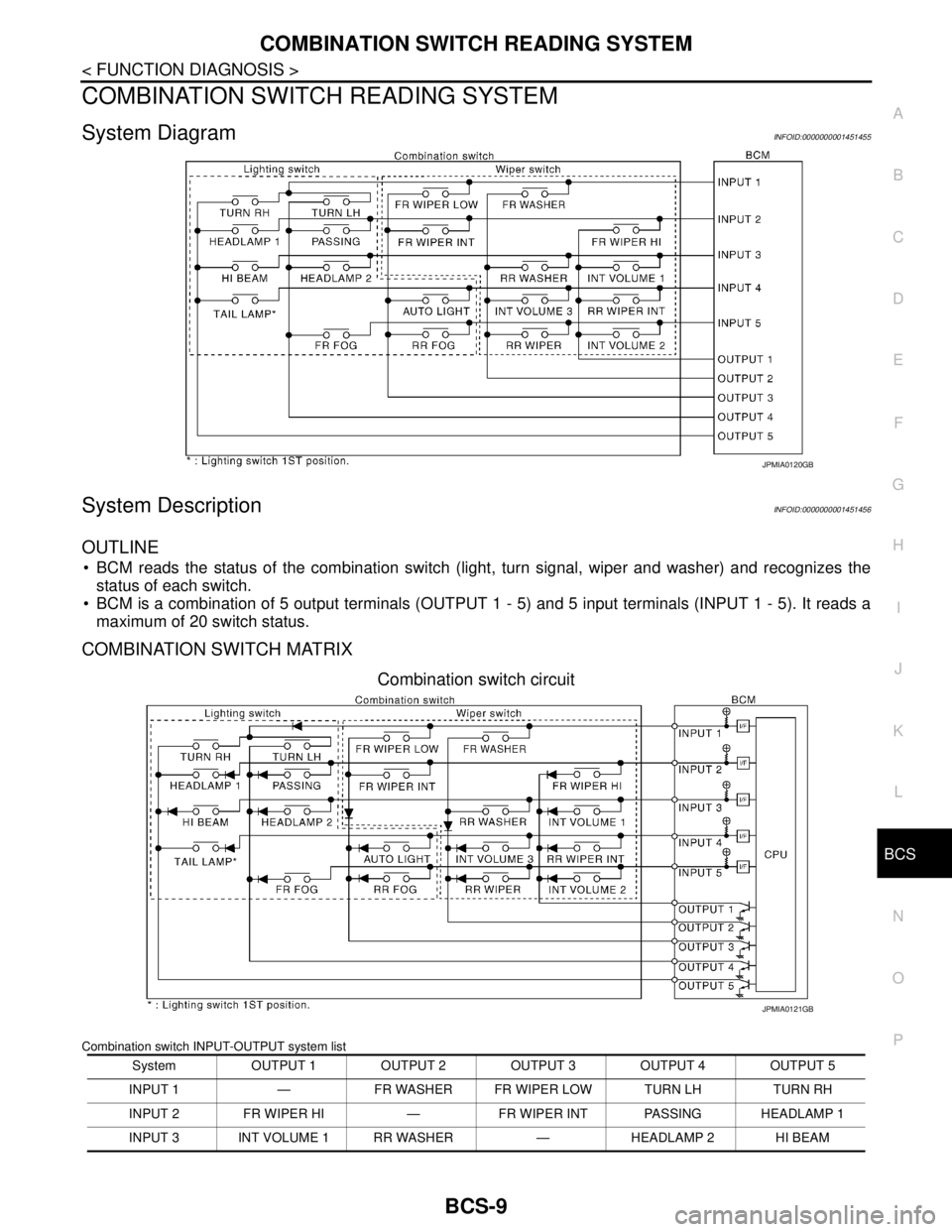
COMBINATION SWITCH READING SYSTEM
System DiagramINFOID:0000000001451455
System DescriptionINFOID:0000000001451456
OUTLINE
BCM reads the status of the combination switch (light, turn signal, wiper and washer) and recognizes the
status of each switch.
BCM is a combination of 5 output terminals (OUTPUT 1 - 5) and 5 input terminals (INPUT 1 - 5). It reads a
maximum of 20 switch status.
COMBINATION SWITCH MATRIX
Combination switch circuit
Combination switch INPUT-OUTPUT system list
JPMIA0120GB
System OUTPUT 1 OUTPUT 2 OUTPUT 3 OUTPUT 4 OUTPUT 5
INPUT 1 — FR WASHER FR WIPER LOW TURN LH TURN RH
INPUT 2 FR WIPER HI — FR WIPER INT PASSING HEADLAMP 1
INPUT 3 INT VOLUME 1 RR WASHER — HEADLAMP 2 HI BEAM
JPMIA0121GB
Page 150 of 5883
BCS
POWER CONSUMPTION CONTROL SYSTEM
BCS-15
< FUNCTION DIAGNOSIS >
C
D
E
F
G
H
I
J
K
L B A
O
P N
Sleep condition
Wake-up operation
BCM transmits sleep wake up signal (wake up) to each unit when any condition listed below is established,
and then goes into normal mode from low power consumption mode.
Each unit starts transmissions with CAN communication by receiving sleep wake up signals. Each unit trans-
mits wake up signals to BCM with CAN communication to convey the start of CAN communication.
Wake-up condition
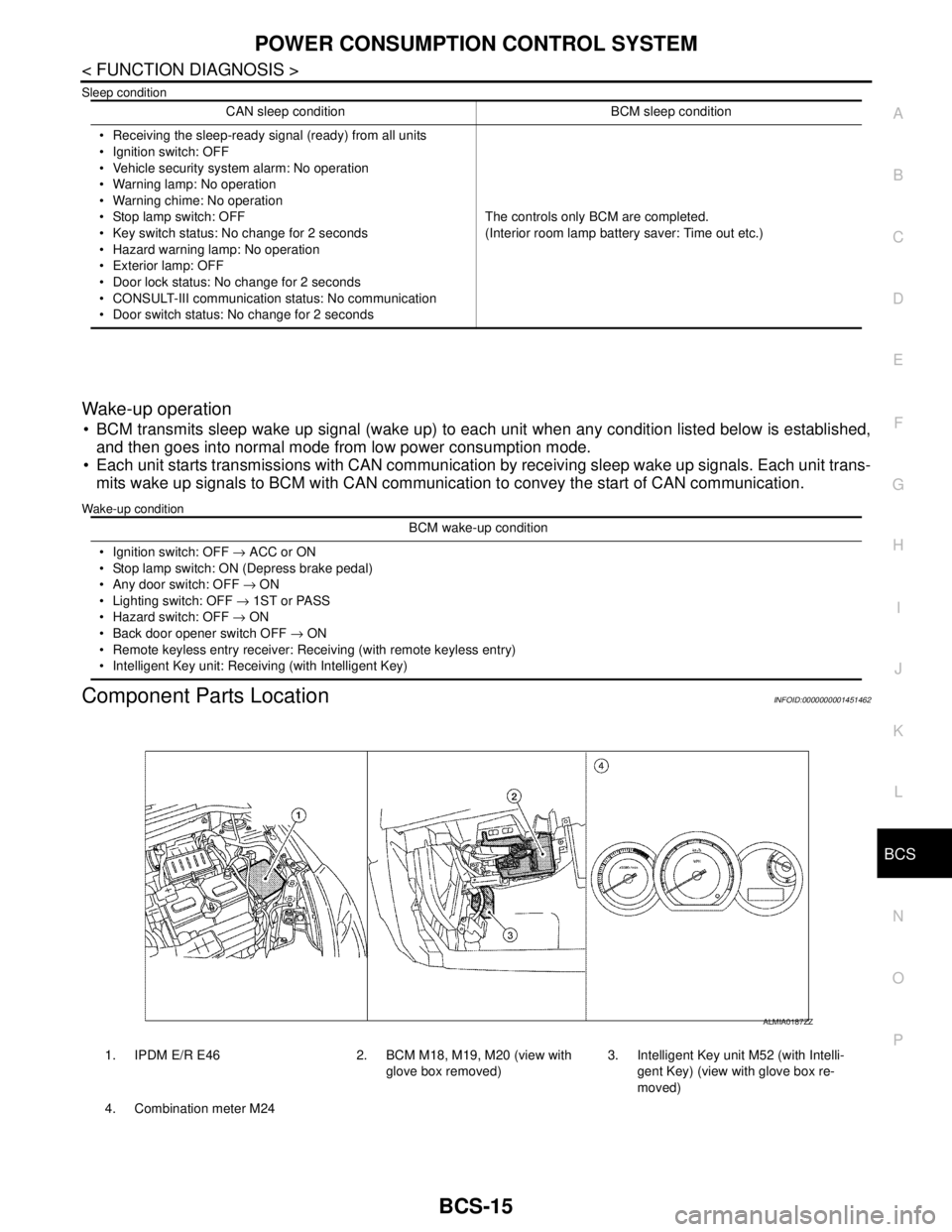
Component Parts LocationINFOID:0000000001451462
CAN sleep condition BCM sleep condition
Receiving the sleep-ready signal (ready) from all units
Ignition switch: OFF
Vehicle security system alarm: No operation
Warning lamp: No operation
Warning chime: No operation
Stop lamp switch: OFF
Key switch status: No change for 2 seconds
Hazard warning lamp: No operation
Exterior lamp: OFF
Door lock status: No change for 2 seconds
CONSULT-III communication status: No communication
Door switch status: No change for 2 secondsThe controls only BCM are completed.
(Interior room lamp battery saver: Time out etc.)
BCM wake-up condition
Ignition switch: OFF → ACC or ON
Stop lamp switch: ON (Depress brake pedal)
Any door switch: OFF → ON
Lighting switch: OFF → 1ST or PASS
Hazard switch: OFF → ON
Back door opener switch OFF → ON
Remote keyless entry receiver: Receiving (with remote keyless entry)
Intelligent Key unit: Receiving (with Intelligent Key)
1. IPDM E/R E46 2. BCM M18, M19, M20 (view with
glove box removed)3. Intelligent Key unit M52 (with Intelli-
gent Key) (view with glove box re-
moved)
4. Combination meter M24
ALMIA0187ZZ
Page 163 of 5883
BCS-28
< COMPONENT DIAGNOSIS >
U1000 CAN COMM CIRCUIT
COMPONENT DIAGNOSIS
U1000 CAN COMM CIRCUIT
DescriptionINFOID:0000000001451482
Refer to LAN-33, "CAN Communication Signal Chart".
DTC LogicINFOID:0000000001451483
DTC DETECTION LOGIC
Diagnosis ProcedureINFOID:0000000001451484
1. PERFORM SELF DIAGNOSTIC
1. Turn ignition switch ON and wait for 2 seconds or more.
2. Check “Self Diagnostic Result” of BCM.
Is
“CAN COMM CIRCUIT” displayed?
YES >> Refer to LAN-22, "Trouble Diagnosis Flow Chart".
NO >> Refer to GI-55, "
Intermittent Incident".
DTCCONSULT-III display
descriptionDTC Detection Condition Possible cause
U1000 CAN COMM CIRCUITWhen BCM cannot communicate CAN com-
munication signal continuously for 2 sec-
onds or more.Any item (or items) of the following listed below is
malfunctioning in CAN communication system.
Transmission
Receiving (ECM)
Receiving (METER/M&A)
Receiving (TCM)
Receiving (MULTI AV)
Receiving (IPDM E/R)
Receiving (I-KEY)
Page 182 of 5883
BCS
BCM (BODY CONTROL MODULE)
BCS-47
< ECU DIAGNOSIS >
C
D
E
F
G
H
I
J
K
L B A
O
P N
324
(LG)GroundDoor lock status indi-
catorOutputDoor lock status
indicatorON Battery voltage
OFF 0V
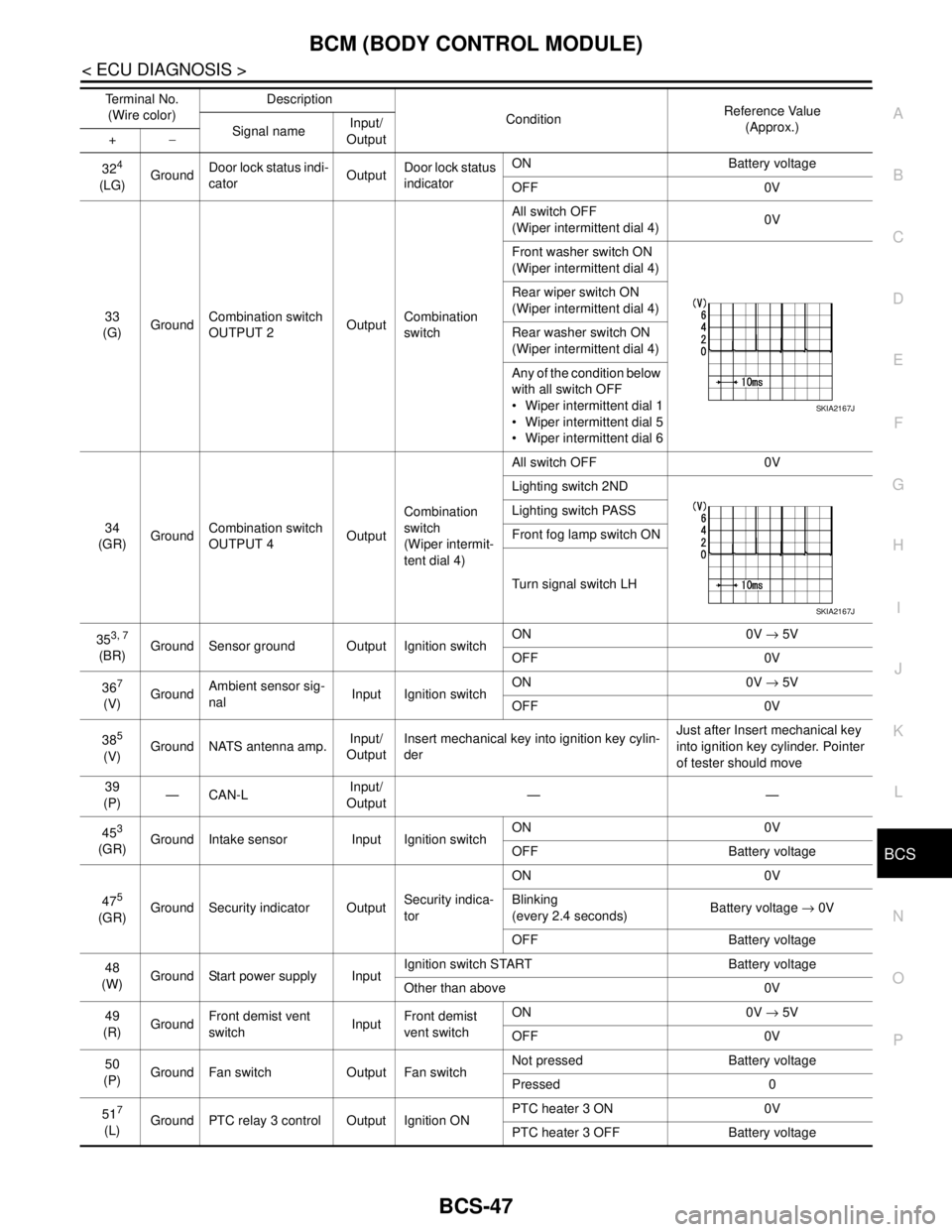
33
(G)GroundCombination switch
OUTPUT 2OutputCombination
switchAll switch OFF
(Wiper intermittent dial 4)0V
Front washer switch ON
(Wiper intermittent dial 4)
Rear wiper switch ON
(Wiper intermittent dial 4)
Rear washer switch ON
(Wiper intermittent dial 4)
Any of the condition below
with all switch OFF
Wiper intermittent dial 1
Wiper intermittent dial 5
Wiper intermittent dial 6
34
(GR)GroundCombination switch
OUTPUT 4OutputCombination
switch
(Wiper intermit-
tent dial 4)All switch OFF 0V
Lighting switch 2ND
Lighting switch PASS
Front fog lamp switch ON
Turn signal switch LH
35
3, 7
(BR)Ground Sensor ground Output Ignition switchON 0V → 5V
OFF 0V
36
7
(V)GroundAmbient sensor sig-
nalInput Ignition switchON 0V → 5V
OFF 0V
38
5
(V)Ground NATS antenna amp.Input/
OutputInsert mechanical key into ignition key cylin-
derJust after Insert mechanical key
into ignition key cylinder. Pointer
of tester should move
39
(P)—CAN-LInput/
Output——
45
3
(GR)Ground Intake sensor Input Ignition switchON 0V
OFF Battery voltage
47
5
(GR)Ground Security indicator OutputSecurity indica-
torON 0V
Blinking
(every 2.4 seconds)Battery voltage → 0V
OFF Battery voltage
48
(W)Ground Start power supply InputIgnition switch START Battery voltage
Other than above 0V
49
(R)GroundFront demist vent
switchInputFront demist
vent switchON 0V → 5V
OFF 0V
50
(P)Ground Fan switch Output Fan switchNot pressed Battery voltage
Pressed 0
51
7
(L)Ground PTC relay 3 control Output Ignition ONPTC heater 3 ON 0V
PTC heater 3 OFF Battery voltage Terminal No.
(Wire color)Description
ConditionReference Value
(Approx.)
Signal nameInput/
Output +−
SKIA2167J
SKIA2167J
Page 195 of 5883
PRECAUTIONS
BR-3
< PRECAUTION >
C
D
E
G
H
I
J
K
L
MA
B
BR
N
O
P
PRECAUTION
PRECAUTIONS
Precaution for Supplemental Restraint System (SRS) "AIR BAG" and "SEAT BELT
PRE-TENSIONER"
INFOID:0000000001716907
The Supplemental Restraint System such as “AIR BAG” and “SEAT BELT PRE-TENSIONER”, used along
with a front seat belt, helps to reduce the risk or severity of injury to the driver and front passenger for certain
types of collision. This system includes seat belt switch inputs and dual stage front air bag modules. The SRS
system uses the seat belt switches to determine the front air bag deployment, and may only deploy one front
air bag, depending on the severity of a collision and whether the front occupants are belted or unbelted.
Information necessary to service the system safely is included in the SR and SB section of this Service Man-
ual.
WARNING:
• To avoid rendering the SRS inoperative, which could increase the risk of personal injury or death in
the event of a collision which would result in air bag inflation, all maintenance must be performed by
an authorized NISSAN/INFINITI dealer.
Improper maintenance, including incorrect removal and installation of the SRS, can lead to personal
injury caused by unintentional activation of the system. For removal of Spiral Cable and Air Bag
Module, see the SR section.
Do not use electrical test equipment on any circuit related to the SRS unless instructed to in this
Service Manual. SRS wiring harnesses can be identified by yellow and/or orange harnesses or har-
ness connectors.
Precaution for Brake SystemINFOID:0000000001716908
Refill using recommended brake fluid. Refer to MA-19, "Fluids and Lubricants".
Never reuse drained brake fluid.
Be careful not to splash brake fluid on painted surface of body. If brake fluid is splashed on painted surfaces
of body immediately wipe it off with cloth and then wash it away with water.
To clean or wash all parts of master cylinder, disc brake caliper and wheel cylinder, use new brake fluid.
Never use mineral oils such as gasoline or kerosene. They will ruin rubber parts of the hydraulic system.
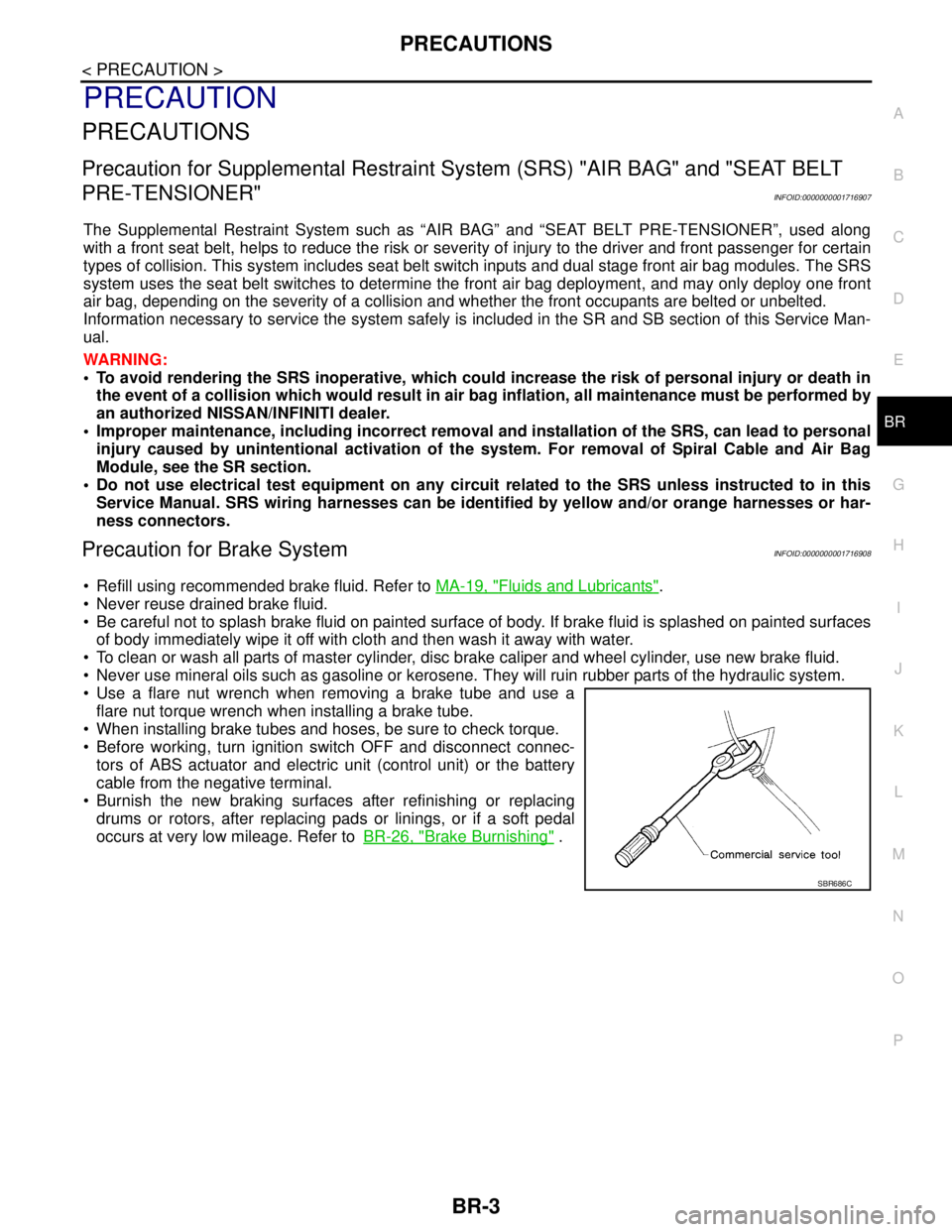
Use a flare nut wrench when removing a brake tube and use a
flare nut torque wrench when installing a brake tube.
When installing brake tubes and hoses, be sure to check torque.
Before working, turn ignition switch OFF and disconnect connec-
tors of ABS actuator and electric unit (control unit) or the battery
cable from the negative terminal.
Burnish the new braking surfaces after refinishing or replacing
drums or rotors, after replacing pads or linings, or if a soft pedal
occurs at very low mileage. Refer toBR-26, "
Brake Burnishing" .
SBR686C