button NISSAN TIIDA 2007 Service Repair Manual
[x] Cancel search | Manufacturer: NISSAN, Model Year: 2007, Model line: TIIDA, Model: NISSAN TIIDA 2007Pages: 5883, PDF Size: 78.95 MB
Page 16 of 5883
![NISSAN TIIDA 2007 Service Repair Manual AV
STEERING SWITCH
AV-11
< COMPONENT DIAGNOSIS >[AUDIO WITHOUT NAVIGATION]
C
D
E
F
G
H
I
J
K
L
MB A
O
P
STEERING SWITCH
DescriptionINFOID:0000000001728773
When one of the steering wheel AV control swi](/img/5/57395/w960_57395-15.png "NISSAN TIIDA 2007 Service Repair Manual AV
STEERING SWITCH
AV-11
< COMPONENT DIAGNOSIS >[AUDIO WITHOUT NAVIGATION]
C
D
E
F
G
H
I
J
K
L
MB A
O
P
STEERING SWITCH
DescriptionINFOID:0000000001728773
When one of the steering wheel AV control swi")
AV
STEERING SWITCH
AV-11
< COMPONENT DIAGNOSIS >[AUDIO WITHOUT NAVIGATION]
C
D
E
F
G
H
I
J
K
L
MB A
O
P
STEERING SWITCH
DescriptionINFOID:0000000001728773
When one of the steering wheel AV control switches is pushed, the resistance in the steering wheel AV control
switch circuit changes depending on which button is pushed.
Diagnosis ProcedureINFOID:0000000001728774
1.CHECK STEERING WHEEL AUDIO CONTROL SWITCH RESISTANCE
1. Disconnect steering wheel audio control switch connector M102.
2. Check resistance between steering switch connector terminals.
Do the steering wheel audio control switches check OK?
YES >> GO TO 2
NO >> Replace steering wheel audio control switch. Refer to XX-XX, "*****"
.
2.CHECK HARNESS
1. Turn ignition switch OFF.
2. Disconnect AV control unit connector M43 and spiral cable con-
nector M30.
3. Check continuity between AV control unit harness connector
M43 (A) and spiral cable harness connector M30 (B).
4. Check continuity between AV control unit connector M43 (A) and ground.
Are the continuity results as specified?
YES >> GO TO 3
NO >> Repair harness.
3.SPIRAL CABLE CHECK
Terminal Signal name ConditionResistance
(Ω)
(Approx.)
16 17Seek (down)
Depress switch.165
Volume (down) Depress VOL down switch. 487
Power Depress PWR switch. 0
20 17Seek (up)
Depress switch.165
Volume (up) Depress VOL up switch. 487
Mode Depress MODE switch. 0
WKIA4457E
AB
Continuity
Connector Terminal Connector Terminal
M436
M3024
Ye s 15 31
16 32
A
—Continuity
Connector Terminal
M436
Ground No 15
16
ALNIA0332GB
Page 45 of 5883
![NISSAN TIIDA 2007 Service Repair Manual AV-40
< FUNCTION DIAGNOSIS >[AUDIO WITH NAVIGATION]
DIAGNOSIS SYSTEM (NAVI CONTROL UNIT)
3. Turn the volume control dial clockwise or counterclockwise for
40 clicks or more while pushing the “SETTIN](/img/5/57395/w960_57395-44.png "NISSAN TIIDA 2007 Service Repair Manual AV-40
< FUNCTION DIAGNOSIS >[AUDIO WITH NAVIGATION]
DIAGNOSIS SYSTEM (NAVI CONTROL UNIT)
3. Turn the volume control dial clockwise or counterclockwise for
40 clicks or more while pushing the “SETTIN")
AV-40
< FUNCTION DIAGNOSIS >[AUDIO WITH NAVIGATION]
DIAGNOSIS SYSTEM (NAVI CONTROL UNIT)
3. Turn the volume control dial clockwise or counterclockwise for
40 clicks or more while pushing the “SETTING” button. (A short
beep will be heard when the self-diagnosis mode is started.)
Shifting from current screen to previous screen is performed
by pushing “BACK” button.
4. The trouble diagnosis initial screen is displayed, and then the
items of “Self Diagnosis” and “Confirmation / Adjustment” can be
selected.
Self-diagnosis mode
1. Start the self-diagnosis function. Then select “Self Diagnosis”.
- Self-diagnosis subdivision screen is displayed, and the self-
diagnosis mode starts.
- The bar graph visible on the center of the self-diagnosis subdivi-
sion screen indicates progress of the trouble diagnosis.
2. Diagnosis results are displayed after the self-diagnosis is com-
pleted. The unit names and the connection lines are color-coded
according to the diagnostic results.
NOTE:
Only the control unit (NAVI control unit) is displayed in red.
- The screen switch colors are determined according to the following order of priority: red > yellow > gray if
multiple errors occur at the same time for a single unit.
JPNIA0173GB
SKIB3961E
SKIB3657E
Diagnosis results Unit Connection
line
Normal Green Green
Connection malfunction Gray Yellow
DVD drive undiagnosed Gray Green
DVD-ROM and DVD-ROM
drive malfunctionYellow Green
Unit malfunction
NoteRed Green
ALNIA0883GB
Page 94 of 5883
![NISSAN TIIDA 2007 Service Repair Manual AV
STEERING SWITCH
AV-89
< COMPONENT DIAGNOSIS >[AUDIO WITH NAVIGATION]
C
D
E
F
G
H
I
J
K
L
MB A
O
P
STEERING SWITCH
DescriptionINFOID:0000000001728775
When one of the steering wheel AV control switch](/img/5/57395/w960_57395-93.png "NISSAN TIIDA 2007 Service Repair Manual AV
STEERING SWITCH
AV-89
< COMPONENT DIAGNOSIS >[AUDIO WITH NAVIGATION]
C
D
E
F
G
H
I
J
K
L
MB A
O
P
STEERING SWITCH
DescriptionINFOID:0000000001728775
When one of the steering wheel AV control switch")
AV
STEERING SWITCH
AV-89
< COMPONENT DIAGNOSIS >[AUDIO WITH NAVIGATION]
C
D
E
F
G
H
I
J
K
L
MB A
O
P
STEERING SWITCH
DescriptionINFOID:0000000001728775
When one of the steering wheel AV control switches is pushed, the resistance in the steering wheel AV control
switch circuit changes depending on which button is pushed.
Diagnosis ProcedureINFOID:0000000001728776
1.CHECK STEERING WHEEL AUDIO CONTROL SWITCH RESISTANCE
1. Disconnect steering wheel audio control switch connector M102.
2. Check resistance between steering switch connector terminals.
Do the steering wheel audio control switches check OK?
YES >> GO TO 2
NO >> Replace steering wheel audio control switch. Refer to XX-XX, "*****"
.
2.CHECK HARNESS
1. Turn ignition switch OFF.
2. Disconnect AV control unit connector M42 and spiral cable con-
nector M30.
3. Check continuity between AV control unit harness connector
M42 (A) and spiral cable harness connector M30 (B).
4. Check continuity between AV control unit connector M42 (A) and ground.
Are the continuity results as specified?
YES >> GO TO 3
NO >> Repair harness.
3.SPIRAL CABLE CHECK
Terminal Signal name ConditionResistance
(Ω)
(Approx.)
16 17Seek (down)
Depress switch.165
Volume (down) Depress VOL down switch. 487
Power Depress PWR switch. 0
20 17Seek (up)
Depress switch.165
Volume (up) Depress VOL up switch. 487
Mode Depress MODE switch. 0
WKIA4457E
AB
Continuity
Connector Terminal Connector Terminal
M426
M3024
Ye s 15 31
16 32
A
—Continuity
Connector Terminal
M426
Ground No 15
16
ALNIA0332GB
Page 171 of 5883

BCS-36
< ECU DIAGNOSIS >
BCM (BODY CONTROL MODULE)
ENGINE RPM
NOTE:
Diesel engine models
onlyEngine runningApproximately the same as tachom-
eter reading
ENGINE RUNEngine stopped OFF
Engine running ON
ENGINE STATUS
NOTE:
Diesel engine models
onlyEngine stopped STOP
While the engine stalls STALL
Engine running RUN
At engine cranking CRA
FA N O N S I GFan switch OFF OFF
Fan switch ON ON
FR FOG SWFront fog lamp switch OFF OFF
Front fog lamp switch ON ON
FR WASHER SWFront washer switch OFF OFF
Front washer switch ON ON
FR WIPER LOWFront wiper switch OFF OFF
Front wiper switch LO ON
FR WIPER HIFront wiper switch OFF OFF
Front wiper switch HI ON
FR WIPER INTFront wiper switch OFF OFF
Front wiper switch INT ON
FR WIPER STOPAny position other than front wiper stop position OFF
Front wiper stop position ON
HAZARD SWWhen hazard switch is not pressed OFF
When hazard switch is pressed ON
LIGHT SW 1STLighting switch OFF OFF
Lighting switch 1st ON
H/L SW POSHeadlamp switch OFF OFF
Headlamp switch 1st ON
HI BEAM SWHigh beam switch OFF OFF
High beam switch HI ON
HOOD SWClose the hood
NOTE:
Vehicles without theft warning system are OFF-fixedOFF
Open the hood ON
H/L WASH SWNOTE:
The item is indicated, but not monitoredOFF
IGN ON SWIgnition switch OFF or ACC OFF
Ignition switch ON ON
IGN SW CANIgnition switch OFF or ACC OFF
Ignition switch ON ON
INT VOLUME Wiper intermittent dial is in a dial position 1 - 7 1 - 7
I-KEY LOCK
1LOCK button of Intelligent Key is not pressed OFF
LOCK button of Intelligent Key is pressed ON Monitor Item Condition Value/Status
Page 172 of 5883

BCS
BCM (BODY CONTROL MODULE)
BCS-37
< ECU DIAGNOSIS >
C
D
E
F
G
H
I
J
K
L B A
O
P N
I-KEY UNLOCK1UNLOCK button of Intelligent Key is not pressed OFF
UNLOCK button of Intelligent Key is pressed ON
KEY SW
2Mechanical key is removed from key cylinder OFF
Mechanical key is inserted to key cylinder ON
KEYLESS LOCK
2LOCK button of key fob is not pressed OFF
LOCK button of key fob is pressed ON
KEYLESS UNLOCK
2UNLOCK button of key fob is not pressed OFF
UNLOCK button of key fob is pressed ON
LIT-SEN FAILLight & rain sensor is in normal condition OK
Light & rain sensor is with internal error NOTOK
OIL PRESS SW Ignition switch OFF or ACC
Engine runningOFF
Ignition switch ON ON
OUT SIDE TEMP
NOTE:
Diesel engine modelsIgnition switch ONApproximately the same as outside
air temperature
PASSING SWOther than lighting switch PASS OFF
Lighting switch PASS ON
PUSH SW
1Return to ignition switch to LOCK position OFF
Press ignition switch ON
REAR DEF SWRear window defogger switch OFF OFF
Rear window defogger switch ON ON
RKE LOCK AND
UNLOCK
2NOTE:
The item is indicated, but not monitoredOFF
ON
RR FOG SWRear fog lamp switch OFF OFF
Rear fog lamp switch ON ON
RR WASHER SW
3Rear washer switch OFF OFF
Rear washer switch ON ON
RR WIPER INT
3Rear wiper switch OFF OFF
Rear wiper switch INT ON
RR WIPER ON
3 Rear wiper switch OFF OFF
Rear wiper switch ON ON
RR WIPER STOP
3Rear wiper stop position OFF
Other than rear wiper stop position ON
TAIL LAMP SWLighting switch OFF OFF
Lighting switch 1ST ON
TRNK OPNR SWWhen back door opener switch is not pressed OFF
When back door opener switch is pressed ON
TURN SIGNAL LTurn signal switch OFF OFF
Turn signal switch LH ON
TURN SIGNAL RTurn signal switch OFF OFF
Turn signal switch RH ON
UNLOCK WITH DRNOTE:
The item is indicated, but not monitoredOFF
ON
VEHICLE SPEED While driving Equivalent to speedometer reading Monitor Item Condition Value/Status
Page 184 of 5883

BCS
BCM (BODY CONTROL MODULE)
BCS-49
< ECU DIAGNOSIS >
C
D
E
F
G
H
I
J
K
L B A
O
P N
1: Hatchback
2: Sedan
3: Manual A/C
4: Superlock
5: Remote keyless entry
6: Intelligent Key
7: LHD diesel69
(G)Ground Rear fog lamp OutputLighting switch
1ST and front
fog lamp switch
ONRear fog lamp switch OFF 0V
Rear fog lamp switch ON Battery voltage
70
(B)Ground Ground — — 0V
71
1
(V)Ground Rear wiper motor OutputRear wiper switch OFF 0V
Rear wiper switch ON Battery voltage
72
(LG)GroundBattery power sup-
plyInput — Battery voltage
73
(R)GroundInterior room lamp
power supplyOutputAfter passing the interior room lamp battery
saver operation time0V
Any other time after passing the interior room
lamp battery saver operation timeBattery voltage
74
(Y)GroundBattery power sup-
plyInput — Battery voltage
75
4
(V)Ground Super lock OutputWhen lock button of keyfob or Intelligent Key
is not pressed 0V
When lock button of keyfob or Intelligent Key
is pressed Battery voltage
76
(G)Ground Driver door unlock OutputDoor lock/un-
lock switchPressed to the unlock side Battery voltage
Pressed to the lock side 0V
77
(SB)Ground Door lock (All) OutputDoor lock/un-
lock switchPressed to the unlock side 0V
Pressed to the lock side Battery voltage
78
(L)GroundPower window pow-
er supplyOutput Ignition switchOFF or ACC 0V
ON Battery voltage
79
(Y)GroundBattery power sup-
plyInput — Battery voltage Terminal No.
(Wire color)Description
ConditionReference Value
(Approx.)
Signal nameInput/
Output +−
Page 557 of 5883
DEF-6
< FUNCTION DIAGNOSIS >
REAR WINDOW DEFOGGER SYSTEM
FUNCTION DIAGNOSIS
REAR WINDOW DEFOGGER SYSTEM
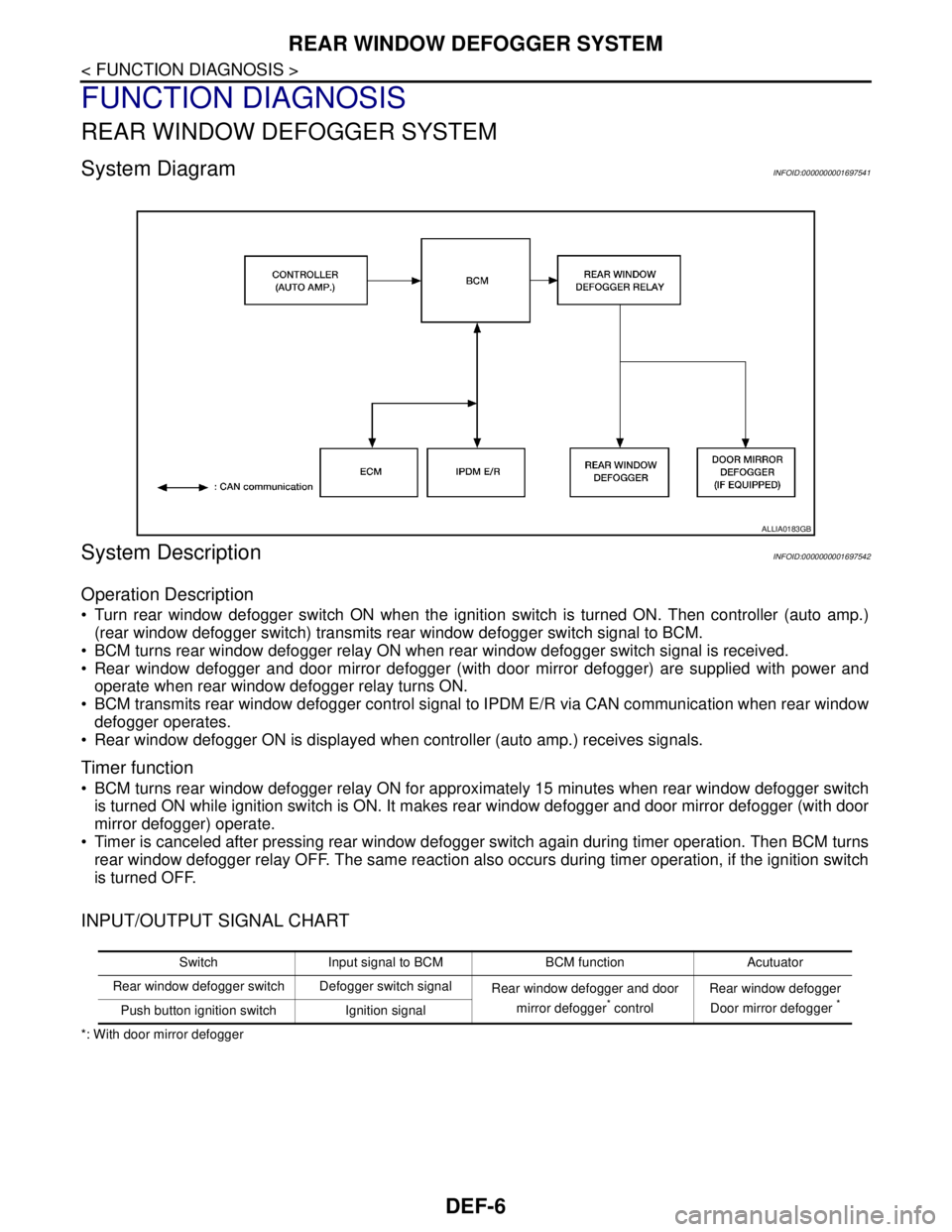
System DiagramINFOID:0000000001697541
System DescriptionINFOID:0000000001697542
Operation Description
Turn rear window defogger switch ON when the ignition switch is turned ON. Then controller (auto amp.)
(rear window defogger switch) transmits rear window defogger switch signal to BCM.
BCM turns rear window defogger relay ON when rear window defogger switch signal is received.
Rear window defogger and door mirror defogger (with door mirror defogger) are supplied with power and
operate when rear window defogger relay turns ON.
BCM transmits rear window defogger control signal to IPDM E/R via CAN communication when rear window
defogger operates.
Rear window defogger ON is displayed when controller (auto amp.) receives signals.
Timer function
BCM turns rear window defogger relay ON for approximately 15 minutes when rear window defogger switch
is turned ON while ignition switch is ON. It makes rear window defogger and door mirror defogger (with door
mirror defogger) operate.
Timer is canceled after pressing rear window defogger switch again during timer operation. Then BCM turns
rear window defogger relay OFF. The same reaction also occurs during timer operation, if the ignition switch
is turned OFF.
INPUT/OUTPUT SIGNAL CHART
*: With door mirror defogger
ALLIA0183GB
Switch Input signal to BCM BCM function Acutuator
Rear window defogger switch Defogger switch signal
Rear window defogger and door
mirror defogger
* controlRear window defogger
Door mirror defogger *Push button ignition switch Ignition signal
Page 612 of 5883
![NISSAN TIIDA 2007 Service Repair Manual DOOR LOCK FUNCTION
DLK-23
< FUNCTION DIAGNOSIS >[WITH I-KEY, WITHOUT SUPER LOCK]
C
D
E
F
G
H
I
J
L
MA
B
DLK
N
O
P
DOOR LOCK AND UNLOCK SWITCH : Component DescriptionINFOID:0000000001396465
INTELLIGENT](/img/5/57395/w960_57395-611.png "NISSAN TIIDA 2007 Service Repair Manual DOOR LOCK FUNCTION
DLK-23
< FUNCTION DIAGNOSIS >[WITH I-KEY, WITHOUT SUPER LOCK]
C
D
E
F
G
H
I
J
L
MA
B
DLK
N
O
P
DOOR LOCK AND UNLOCK SWITCH : Component DescriptionINFOID:0000000001396465
INTELLIGENT")
DOOR LOCK FUNCTION
DLK-23
< FUNCTION DIAGNOSIS >[WITH I-KEY, WITHOUT SUPER LOCK]
C
D
E
F
G
H
I
J
L
MA
B
DLK
N
O
P
DOOR LOCK AND UNLOCK SWITCH : Component DescriptionINFOID:0000000001396465
INTELLIGENT KEY
INTELLIGENT KEY : System DiagramINFOID:0000000001396466
INTELLIGENT KEY OPERATION
INTELLIGENT KEY : System DescriptionINFOID:0000000001396467
INTELLIGENT KEY OPERATION
The Intelligent Key has the same functions as the remote keyless entry system. In addition to other safety fea-
tures, it can be used to lock and unlock all doors including the back door (hatchback) or the trunk (sedan).
This function can be set to OFF with CONSULT-III. For the setting information, refer to DLK-53, "
CONSULT-III
Function (INTELLIGENT KEY)".
OPERATION CONDITION
OPERATION AREA
To ensure that the Intelligent Key works effectively, use within a 100 cm range of each door, however the oper-
able range may differ according to surroundings.
DOOR LOCK AND UNLOCK CONTROL
When door lock and unlock button of the Intelligent Key are pressed, lock signal or unlock signal is transmitted
from Intelligent Key to Intelligent Key unit.
When Intelligent Key unit receives the door lock and unlock signal, it operates door lock actuator.
Item Function
BCM Controls the door lock function.
Door switch Detects door state (open or close).
Door lock and unlock switchTransmits door lock/unlock signal to BCM. Door lock/unlock switch indicator is built-in door
lock and unlock switch.
Door lock actuator Receives door lock/unlock signal from BCM and locks/unlocks each door.
ALKIA0711GB
Remote controller operation Operation condition
Lock All doors are closed
Key switch is OFF (key is removed from ignition key cylinder)
Ignition knob switch is OFF (Ignition switch is not pressed)
Unlock Key switch is OFF (key is removed from ignition key cylinder)
Ignition knob switch is OFF (Ignition switch is not pressed)
Page 613 of 5883
![NISSAN TIIDA 2007 Service Repair Manual DLK-24
< FUNCTION DIAGNOSIS >[WITH I-KEY, WITHOUT SUPER LOCK]
DOOR LOCK FUNCTION
ANTI-HIJACK MODE
When door lock is unlocked, pressing LOCK buttons on Intelligent Key once will lock all doors. When do](/img/5/57395/w960_57395-612.png "NISSAN TIIDA 2007 Service Repair Manual DLK-24
< FUNCTION DIAGNOSIS >[WITH I-KEY, WITHOUT SUPER LOCK]
DOOR LOCK FUNCTION
ANTI-HIJACK MODE
When door lock is unlocked, pressing LOCK buttons on Intelligent Key once will lock all doors. When do")
DLK-24
< FUNCTION DIAGNOSIS >[WITH I-KEY, WITHOUT SUPER LOCK]
DOOR LOCK FUNCTION
ANTI-HIJACK MODE
When door lock is unlocked, pressing LOCK buttons on Intelligent Key once will lock all doors. When door lock
is locked, pressing UNLOCK button on Intelligent Key once will unlock driver door. Pressing UNLOCK button
on Intelligent Key a second time within 5 seconds from the first time will unlock all doors and back door (hatch-
back) can be opened with back door opener switch or trunk (sedan) can be opened with trunk lid opener
switch.
CONVENIENCE MODE
When door lock is unlocked, pressing LOCK buttons on Intelligent Key once will lock all doors. When door lock
is locked, pressing UNLOCK button on Intelligent Key once will unlock all doors and back door (hatchback)
can be opened with back door opener switch or trunk (sedan) can be opened with trunk lid opener switch.
NOTE:
Anti-hijack mode can be set to ON or OFF with CONSULT-III. Once OFF, the convenience mode will be active.
For setting information with CONSULT-III, refer to DLK-53, "
CONSULT-III Function (INTELLIGENT KEY)". For
setting information without CONSULT-III, refer to Owner's Manual.
Page 616 of 5883
![NISSAN TIIDA 2007 Service Repair Manual DOOR LOCK FUNCTION
DLK-27
< FUNCTION DIAGNOSIS >[WITH I-KEY, WITHOUT SUPER LOCK]
C
D
E
F
G
H
I
J
L
MA
B
DLK
N
O
P
INTELLIGENT KEY : Component DescriptionINFOID:0000000001396469
DOOR REQUEST SWITCH
DOO](/img/5/57395/w960_57395-615.png "NISSAN TIIDA 2007 Service Repair Manual DOOR LOCK FUNCTION
DLK-27
< FUNCTION DIAGNOSIS >[WITH I-KEY, WITHOUT SUPER LOCK]
C
D
E
F
G
H
I
J
L
MA
B
DLK
N
O
P
INTELLIGENT KEY : Component DescriptionINFOID:0000000001396469
DOOR REQUEST SWITCH
DOO")
DOOR LOCK FUNCTION
DLK-27
< FUNCTION DIAGNOSIS >[WITH I-KEY, WITHOUT SUPER LOCK]
C
D
E
F
G
H
I
J
L
MA
B
DLK
N
O
P
INTELLIGENT KEY : Component DescriptionINFOID:0000000001396469
DOOR REQUEST SWITCH
DOOR REQUEST SWITCH : System DiagramINFOID:0000000001396470
DOOR REQUEST SWITCH OPERATION
DOOR REQUEST SWITCH : System DescriptionINFOID:0000000001396471
DOOR REQUEST SWITCH OPERATION
Only when pressing the request switch, it is possible to lock and unlock the door by carrying the Intelligent
Key. The Intelligent Key system is a system that makes it possible to lock and unlock the door by carrying the
Intelligent Key, which operates based on the results of electronic ID verification using two-way communica-
tions between the Intelligent Key and the vehicle (Intelligent Key unit).
This function can be set to OFF with CONSULT-III. For the setting information, refer to DLK-53, "
CONSULT-III
Function (INTELLIGENT KEY)".
CAUTION:
The driver should always carry the Intelligent Key
OPERATION CONDITION
Item Function
Intelligent Key unit Controls the door lock/unlock operation with BCM.
BCM Controls the door lock/unlock operation with Intelligent Key unit.
Door switch Detects door state (open or closed).
Key switch Detects that mechanical key is inserted into ignition key cylinder.
Ignition knob switch Detects ignition knob state (push or release).
Outside key antenna Detects that Intelligent Key is in detection area of outside key antenna.
Intelligent Key Transmits key ID to Intelligent Key unit when lock/unlock button is pressed.
Door lock actuator Receives lock/unlock signal from BCM and locks and unlocks each door.
ALKIA0712GB