automatic NISSAN TIIDA 2010 Service Service Manual
[x] Cancel search | Manufacturer: NISSAN, Model Year: 2010, Model line: TIIDA, Model: NISSAN TIIDA 2010Pages: 3745, PDF Size: 73.67 MB
Page 1787 of 3745
![NISSAN TIIDA 2010 Service Service Manual EC-522
< SERVICE INFORMATION >[MR18DE]
AUTOMATIC SPEED CONTROL DEVICE (ASCD)
AUTOMATIC SPEED CONTROL DEVICE (ASCD)
System DescriptionINFOID:0000000005532386
INPUT/OUTPUT SIGNAL CHART
*: This signal is](/img/5/57397/w960_57397-1786.png "NISSAN TIIDA 2010 Service Service Manual EC-522
< SERVICE INFORMATION >[MR18DE]
AUTOMATIC SPEED CONTROL DEVICE (ASCD)
AUTOMATIC SPEED CONTROL DEVICE (ASCD)
System DescriptionINFOID:0000000005532386
INPUT/OUTPUT SIGNAL CHART
*: This signal is")
EC-522
< SERVICE INFORMATION >[MR18DE]
AUTOMATIC SPEED CONTROL DEVICE (ASCD)
AUTOMATIC SPEED CONTROL DEVICE (ASCD)
System DescriptionINFOID:0000000005532386
INPUT/OUTPUT SIGNAL CHART
*: This signal is sent to the ECM through CAN communication line.
BASIC ASCD SYSTEM
Refer to Owner's Manual for ASCD operating instructions.
Automatic Speed Control Device (ASCD) allows a driver to keep vehicle at predetermined constant speed
without depressing accelerator pedal. Driver can set
vehicle speed in advance between approximately 40 km/
h (25 MPH) and 144 km/h (89 MPH).
ECM controls throttle angle of electric thro ttle control actuator to regulate engine speed.
Operation status of ASCD is indicated by CRUISE indi cator and SET indicator in combination meter. If any
malfunction occurs in ASCD system, it automatically deactivates control.
NOTE:
Always drive vehicle in safe manner according to traffic conditions and obey all traffic laws.
SET OPERATION
Press MAIN switch. (The CRUISE indicator in combination meter illuminates.)
When vehicle speed reaches a desired speed between approximately 40 km/h (25 MPH) and 144 km/h (89
MPH), press SET/COAST switch. (Then SET indi cator in combination meter illuminates.)
ACCELERATE OPERATION
If the RESUME/ACCELERATE switch is depressed during cruise control driving, increase the vehicle speed
until the switch is released or vehicle speed reaches maximum speed controlled by the system.
And then ASCD will keep the new set speed.
CANCEL OPERATION
When any of following conditions exist, cruise operation will be canceled.
• CANCEL switch is pressed
• More than two switches at ASCD steering switch are pressed at the same time (Set speed will be cleared)
• Brake pedal is depressed
• Clutch pedal is depressed or gear position is changed to the neutral position (M/T models)
• Selector lever is changed to N, P, R position (A/T and CVT models)
• Vehicle speed decreased to 13 km/h (8 MPH) lower than the set speed
When the ECM detects any of the following conditions, the ECM will cancel the cruise operation and inform
the driver by blinking indicator lamp.
• Engine coolant temperature is slightly higher than the normal operating temperature, CRUISE lamp may
blink slowly.
When the engine coolant temperature decreases to the normal operating temperature, CRUISE lamp will
stop blinking and the cruise operation will be able to work by pressing SET/COAST switch or RESUME/
ACCELERATE switch.
• Malfunction for some self-diagnoses regarding ASCD control: SET lamp will blink quickly.
If MAIN switch is turned to OFF during ASCD is activated, all of ASCD operations will be canceled and vehicle
speed memory will be erased.
COAST OPERATION
Sensor Input signal to ECM ECM functionActuator
ASCD brake switch Brake pedal operation
ASCD vehicle speed controlElectric throttle control
actuator
Stop lamp switch
Brake pedal operation
ASCD clutch switch (M/T models) Clutch pedal operation
ASCD steering switch ASCD steering switch operation
Park/neutral position (PNP) signal Gear position
ABS actuator and electric unit (con-
trol unit) Vehicle speed*
Combination meter
TCM Powertrain revolution*
Revision: January 20102010 Versa
Page 1788 of 3745
![NISSAN TIIDA 2010 Service Service Manual AUTOMATIC SPEED CONTROL DEVICE (ASCD)EC-523
< SERVICE INFORMATION > [MR18DE]
C
D
E
F
G H
I
J
K L
M A
EC
NP
O
When the SET/COAST switch is depressed during cruise
control driving, decrease vehicle set](/img/5/57397/w960_57397-1787.png "NISSAN TIIDA 2010 Service Service Manual AUTOMATIC SPEED CONTROL DEVICE (ASCD)EC-523
< SERVICE INFORMATION > [MR18DE]
C
D
E
F
G H
I
J
K L
M A
EC
NP
O
When the SET/COAST switch is depressed during cruise
control driving, decrease vehicle set")
AUTOMATIC SPEED CONTROL DEVICE (ASCD)EC-523
< SERVICE INFORMATION > [MR18DE]
C
D
E
F
G H
I
J
K L
M A
EC
NP
O
When the SET/COAST switch is depressed during cruise
control driving, decrease vehicle set speed until the
switch is released. And then ASCD will keep the new set speed.
RESUME OPERATION
When the RESUME/ACCELERATE swit ch is depressed after cancel operation other than depressing MAIN
switch is performed, vehicle speed will return to last set speed. To resume vehicle set speed, vehicle condition
must meet following conditions.
• Brake pedal is released.
• Clutch pedal is released (M/T models)
• Selector lever is in other than P and N positions (A/T and CVT models)
• Vehicle speed is greater than 40 km/h (25 MPH) and less than 144 km/h (89 MPH)
Component DescriptionINFOID:0000000005532387
ASCD STEERING SWITCH
Refer to EC-925.
ASCD BRAKE SWITCH
Refer to EC-931 and EC-996.
ASCD CLUTCH SWITCH
Refer to EC-931 and EC-996.
STOP LAMP SWITCH
Refer to EC-931, EC-944and EC-996.
ELECTRIC THROTTLE CONTROL ACTUATOR
Refer to EC-948, EC-952, EC-958and EC-963.
ASCD INDICATOR
Refer to EC-1004.
Revision: January 20102010 Versa
Page 1797 of 3745
![NISSAN TIIDA 2010 Service Service Manual EC-532
< SERVICE INFORMATION >[MR18DE]
ON BOARD REFUELING VAPOR RECOVERY (ORVR)
ON BOARD REFUELING VAPOR RECOVERY (ORVR)
System DescriptionINFOID:0000000005532393
From the beginning of refueling, the](/img/5/57397/w960_57397-1796.png "NISSAN TIIDA 2010 Service Service Manual EC-532
< SERVICE INFORMATION >[MR18DE]
ON BOARD REFUELING VAPOR RECOVERY (ORVR)
ON BOARD REFUELING VAPOR RECOVERY (ORVR)
System DescriptionINFOID:0000000005532393
From the beginning of refueling, the")
EC-532
< SERVICE INFORMATION >[MR18DE]
ON BOARD REFUELING VAPOR RECOVERY (ORVR)
ON BOARD REFUELING VAPOR RECOVERY (ORVR)
System DescriptionINFOID:0000000005532393
From the beginning of refueling, the air and vapor insi
de the fuel tank go through refueling EVAP vapor cut
valve and EVAP/ORVR line to the EVAP canister. The vapor is absorbed by the EVAP canister and the air is
released to the atmosphere.
When the refueling has reached the full level of the fuel tank, the refueling EVAP vapor cut valve is closed and
refueling is stopped because of auto shut-off. The vapor which was absorbed by the EVAP canister is purged
during driving.
WARNING:
When conducting inspections below, be sure to observe the following:
• Put a “CAUTION: FLAMMABLE” sign in workshop.
• Do not smoke while servicing fuel system. Keep open flames and sparks away from work area.
• Be sure to furnish the workshop with a CO
2 fire extinguisher.
CAUTION:
• Before removing fuel line parts, carry out the following procedures:
- Put drained fuel in an explosion-pr oof container and put lid on securely.
- Release fuel pressure from fuel line. Refer to EC-582, "
Fuel Pressure Check".
- Disconnect negative battery cable.
• Always replace O-ring when the fu el gauge retainer is removed.
• Do not kink or twist hose and tube when they are installed.
• Do not tighten hose and clamps excessively to avoid damaging hoses.
• After installation, run engine and check for fuel leaks at connection.
• Do not attempt to top off the fuel tank afte r the fuel pump nozzle shuts off automatically.
Continued refueling may cause fuel overflow, r esulting in fuel spray and possibly a fire.
Diagnosis ProcedureINFOID:0000000005532394
SYMPTOM: FUEL ODOR FROM EVAP CANISTER IS STRONG.
1.CHECK EVAP CANISTER
1. Remove EVAP canister with EVAP canister vent control valve and EVAP control system pressure sensor attached.
2. Weigh the EVAP canister with EVAP canister vent control valve and EVAP control system pressure sensor
attached.
The weight should be l ess than 1.9 kg (4.2 lb).
OK or NG
OK >> GO TO 2.
NG >> GO TO 3.
2.CHECK IF EVAP CANISTER SATURATED WITH WATER
PBIB1387E
Revision: January 20102010 Versa
Page 1812 of 3745
![NISSAN TIIDA 2010 Service Service Manual ON BOARD DIAGNOSTIC (OBD) SYSTEMEC-547
< SERVICE INFORMATION > [MR18DE]
C
D
E
F
G H
I
J
K L
M A
EC
NP
O
SYSTEM READINESS TEST (SRT) CODE
System Readiness Test (SRT) code is specified in Service $01 of](/img/5/57397/w960_57397-1811.png "NISSAN TIIDA 2010 Service Service Manual ON BOARD DIAGNOSTIC (OBD) SYSTEMEC-547
< SERVICE INFORMATION > [MR18DE]
C
D
E
F
G H
I
J
K L
M A
EC
NP
O
SYSTEM READINESS TEST (SRT) CODE
System Readiness Test (SRT) code is specified in Service $01 of")
ON BOARD DIAGNOSTIC (OBD) SYSTEMEC-547
< SERVICE INFORMATION > [MR18DE]
C
D
E
F
G H
I
J
K L
M A
EC
NP
O
SYSTEM READINESS TEST (SRT) CODE
System Readiness Test (SRT) code is specified in Service $01 of SAE J1979/ISO 15031-5.
As part of an enhanced emissions test for Inspection & Ma
intenance (I/M), certain states require the status of
SRT be used to indicate whether the ECM has comple ted self-diagnosis of major emission systems and com-
ponents. Completion must be verified in order for the emissions inspection to proceed.
If a vehicle is rejected for a State emissions inspection due to one or more SRT items indicating “INCMP”, use
the information in this Service Manual to set the SRT to “CMPLT”.
In most cases the ECM will automatically complete its self-diagnosis cycle during normal usage, and the SRT
status will indicate “CMPLT” for each application system. Once set as “CMPLT”, the SRT status remains
“CMPLT” until the self-diagnosis memory is erased.
Occasionally, certain portions of the self-diagnostic test may not be completed as a result of the customer's
normal driving pattern; the SRT will indicate “INCMP” for these items.
NOTE:
The SRT will also indicate “INCMP” if the self-diagnosis memory is erased for any reason or if the ECM mem-
ory power supply is interrupted for several hours.
If, during the state emissions inspection, the SRT indicates “CMPLT” for all test items, the inspector will con-
tinue with the emissions test. However, if the SRT i ndicates “INCMP” for one or more of the SRT items the
vehicle is returned to the customer untested.
NOTE:
If permanent DTC is stored or MIL illuminates during the state emissions inspection, the vehicle is also
returned to the customer untested even though the SRT indicates “CMPLT” for all test items. Therefore, it is
important to check SRT (“CMPLT ”), DTC (No DTCs) and permanent DT C (No permanent DTCs) before the
inspection.
SRT Item
The table below shows required self-diagnostic items to set the SRT to “CMPLT”.
*: If completion of several SRTs is required, perform driving patterns (DTC confirmation procedure), one by one based on the pr iority for
models with CONSULT-III.
SRT Set Timing
SRT is set as “CMPLT” after self-diagnosis has been performed one or more times. Completion of SRT is
done regardless of whether the result is OK or NG. T he set timing is different between OK and NG results and
is shown in the table below.
SRT item
(CONSULT-III indica- tion) Perfor-
mance
Priority* Required self-diagnostic items to set the SRT to “CMPLT” Corresponding DTC No.
CATALYST 2 Three way catalyst function P0420
EVAP SYSTEM 2 EVAP control system purge flow monitoring P0441
1 EVAP control system P0442
2 EVAP control system P0456
HO2S 2 Air fuel ratio (A/F) sensor 1 —
Heated oxygen sensor 2 P0137
Heated oxygen sensor 2 P0138
Heated oxygen sensor 2 P0139
EGR/VVT SYSTEM 3 Intake value timing control function P0011
Self-diagnosis resultExample
Diagnosis Ignition cycle
← ON → OFF ← ON → OFF ← ON → OFF ← ON →
Revision: January 20102010 Versa
Page 1882 of 3745
![NISSAN TIIDA 2010 Service Service Manual TROUBLE DIAGNOSISEC-617
< SERVICE INFORMATION > [MR18DE]
C
D
E
F
G H
I
J
K L
M A
EC
NP
O
NOTE:
Any monitored item that does not match the vehicle being diagnosed is deleted from the display automatica](/img/5/57397/w960_57397-1881.png "NISSAN TIIDA 2010 Service Service Manual TROUBLE DIAGNOSISEC-617
< SERVICE INFORMATION > [MR18DE]
C
D
E
F
G H
I
J
K L
M A
EC
NP
O
NOTE:
Any monitored item that does not match the vehicle being diagnosed is deleted from the display automatica")
TROUBLE DIAGNOSISEC-617
< SERVICE INFORMATION > [MR18DE]
C
D
E
F
G H
I
J
K L
M A
EC
NP
O
NOTE:
Any monitored item that does not match the vehicle being diagnosed is deleted from the display automatically.
ACTIVE TEST MODE
Test Item
HO2 S2 DIAG2 (B1)
[INCMP/CMPLT]
• Indicates DTC P0139 self-diagnosis (slow response) condi-
tion.
INCMP: Self-diagnosis is incomplete.
CMPLT: Self-diagnosis is complete.
A/F SEN1
DIAG1(B1)
[INCMP/CMPLT] • Indicates DTC P015A or P015B self-diagnosis condition.
INCMP: Self-diagnosis is incomplete.
CMPLT: Self-diagnosis is complete.
A/F SEN1
DIAG2(B1)
[INCMP/CMPLT] • Indicates DTC P014C or P014D self-diagnosis condition.
INCMP: Self-diagnosis is incomplete.
CMPLT: Self-diagnosis is complete.
A/F SEN1
DIAG3(B1)
[ABSNT/PRSNT] • Indicates DTC P014C, P014D, P015A or P015B self-diagno-
sis condition.
ABSNT: The vehicle condition is not within the diagnosis
range.
PRSNT: The vehicle condition is within the diagnosis range.
Monitored item [Unit]
Description Remarks
Test itemCondition JudgmentCheck item (Remedy)
FUEL INJEC-
TION • Engine: Return to the original
trouble condition
• Change the amount of fuel injec- tion using CONSULT-III. If trouble symptom disappears, see
CHECK ITEM.
• Harness and connectors
• Fuel injector
• Air fuel ratio (A/F) sensor 1
IGNITION TIM-
ING • Engine: Return to the original
trouble condition
• Timing light: Set
• Retard the ignition timing using CONSULT-III. If trouble symptom disappears, see
CHECK ITEM.
• Perform Idle Air Volume Learning.
POWER BAL-
ANCE • Engine: After warming up, idle the
engine.
• A/C switch OFF
• Shift lever: P or N (A/T, CVT), Neutral (M/T)
• Cut off each fuel injector signal one at a time using CONSULT-III. Engine runs rough or dies.
• Harness and connectors
• Compression
• Fuel injector
• Power transistor
•Spark plug
• Ignition coil
COOLING FAN* • Ignition switch: ON
• Turn the cooling fan “LOW”, “HI”
and “OFF” with CONSULT-III. Cooling fan moves and stops.
• Harness and connectors
• Cooling fan relay
• Cooling fan motor
ENG COOLANT
TEMP • Engine: Return to the original
trouble condition
• Change the engine coolant tem-
perature using CONSULT-III. If trouble symptom disappears, see
CHECK ITEM. • Harness and connectors
• Engine coolant temperature sen-
sor
• Fuel injector
FUEL PUMP RE-
LAY • Ignition switch: ON
(Engine stopped)
• Turn the fuel pump relay ON and
OFF using CONSULT-III and lis-
ten to operating sound. Fuel pump relay makes the operat-
ing sound.
• Harness and connectors
• Fuel pump relay
PURG VOL
CONT/V • Engine: After warming up, run en-
gine at 1,500 rpm.
• Change the EVAP canister purge volume control solenoid valve
opening percent using CON-
SULT-III. Engine speed changes according to
the opening percent.
• Harness and connectors
• EVAP canister purge volume con-
trol solenoid valve
FUEL/T TEMP
SEN • Change the fuel tank temperature using CONSULT-III.
Revision: January 20102010 Versa
Page 2491 of 3745
![NISSAN TIIDA 2010 Service Service Manual EM-132
< SERVICE INFORMATION >[MR18DE]
DRIVE BELTS
DRIVE BELTS
ComponentINFOID:0000000005398110
Checking Drive BeltsINFOID:0000000005398111
WARNING:
Be sure to perform this step
when the engine is st](/img/5/57397/w960_57397-2490.png "NISSAN TIIDA 2010 Service Service Manual EM-132
< SERVICE INFORMATION >[MR18DE]
DRIVE BELTS
DRIVE BELTS
ComponentINFOID:0000000005398110
Checking Drive BeltsINFOID:0000000005398111
WARNING:
Be sure to perform this step
when the engine is st")
EM-132
< SERVICE INFORMATION >[MR18DE]
DRIVE BELTS
DRIVE BELTS
ComponentINFOID:0000000005398110
Checking Drive BeltsINFOID:0000000005398111
WARNING:
Be sure to perform this step
when the engine is stopped.
NOTE:
On vehicles not equipped with A/C, there is an idler pulley in the position for the drive belt routing.
• Make sure that the indicator (notch on fixed side) of drive belt auto-tensioner is within the possible use
range.
NOTE:
• Check the drive belt auto-tensioner indication when the engine is cold.
• When new drive belt is installed, the indicator (notch on fixed side) should be within the range.
• Visually check entire drive belt for wear, damage or cracks.
• If the indicator (notch on fixed side) is out of t he possible use range or belt is damaged, replace drive belt.
Tension AdjustmentINFOID:0000000005398112
Belt tension is not necessary, as it is automatically adjusted by drive belt auto-tensioner.
Removal and InstallationINFOID:0000000005398113
REMOVAL
1. Remove fender protector (RH). Refer to EI-24, "Removal and Installation".
2. Hold the hexagonal part (A) of drive belt auto-tensioner (1) with a wrench securely. Then move the wrench handle in the direc-
tion of arrow (loosening direction of tensioner).
WARNING:
Never place hand in a location where pinching may occur if
the holding tool acci dentally comes off.
CAUTION:
Do not loosen the auto-tensione r pulley bolt. (Do not turn it
counterclockwise.) If turned counterclockwise, the com-
plete auto-tensioner must be replaced as a unit, including
pulley.
3. Insert a rod such as short-length screwdriver approximately 6 mm (0.24 in) in diameter into the hole (B) of t he retaining boss to fix drive belt auto-tensioner.
• Leave tensioner pulley arm locked until belt is installed again.
4. Remove drive belt.
INSTALLATION
1. Generator 2. Drive belt auto–tensioner 3. Crankshaft pulley
4. A/C compressor (models with A/C)
Idler pulley (models without A/C) 5. Water pump
6. Drive belt
A. Possible use range B. Range when new drive belt is installed C. Indicator
PBIC3137J
PBIC3936E
Revision: January 20102010 Versa
Page 2615 of 3745
FAX-10
< SERVICE INFORMATION >
FRONT DRIVE SHAFT
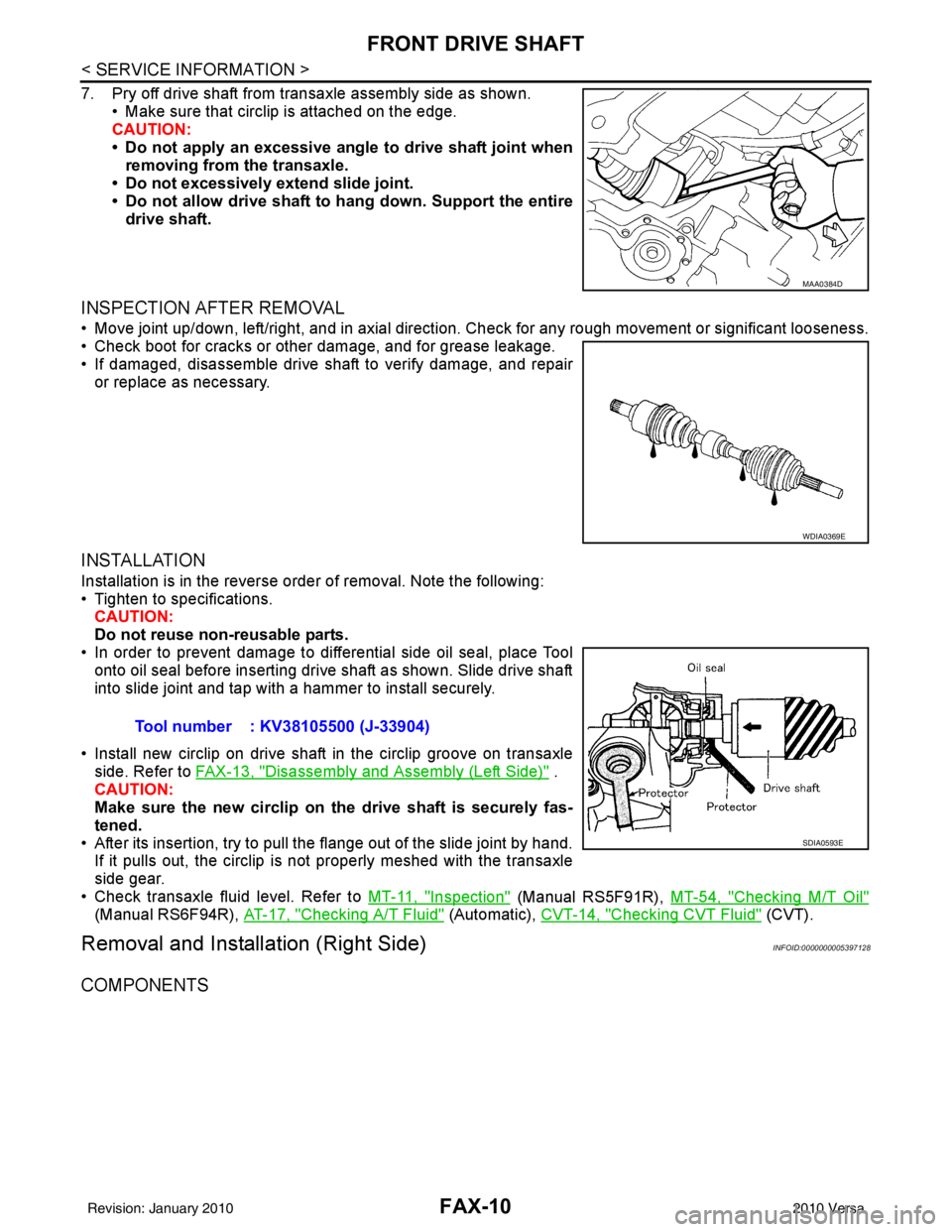
7. Pry off drive shaft from transaxle assembly side as shown.• Make sure that circlip is attached on the edge.
CAUTION:
• Do not apply an excessive angle to drive shaft joint when
removing from the transaxle.
• Do not excessively extend slide joint.
• Do not allow drive shaft to hang down. Support the entire
drive shaft.
INSPECTION AFTER REMOVAL
• Move joint up/down, left/right, and in axial direction. Check for any rough movement or significant looseness.
• Check boot for cracks or other damage, and for grease leakage.
• If damaged, disassemble drive shaft to verify damage, and repair or replace as necessary.
INSTALLATION
Installation is in the reverse order of removal. Note the following:
• Tighten to specifications.CAUTION:
Do not reuse non-reusable parts.
• In order to prevent damage to differential side oil seal, place Tool
onto oil seal before inserting drive shaft as shown. Slide drive shaft
into slide joint and tap with a hammer to install securely.
• Install new circlip on drive shaft in the circlip groove on transaxle side. Refer to FAX-13, "
Disassembly and Assembly (Left Side)" .
CAUTION:
Make sure the new circlip on the drive shaft is securely fas-
tened.
• After its insertion, try to pull the flange out of the slide joint by hand. If it pulls out, the circlip is not properly meshed with the transaxle
side gear.
• Check transaxle fluid level. Refer to MT-11, "
Inspection" (Manual RS5F91R), MT-54, "Checking M/T Oil"
(Manual RS6F94R), AT-17, "Checking A/T Fluid" (Automatic), CVT-14, "Checking CVT Fluid" (CVT).
Removal and Installation (Right Side)INFOID:0000000005397128
COMPONENTS
MAA0384D
WDIA0369E
Tool number : KV38105500 (J-33904)
SDIA0593E
Revision: January 20102010 Versa
Page 2617 of 3745
FAX-12
< SERVICE INFORMATION >
FRONT DRIVE SHAFT
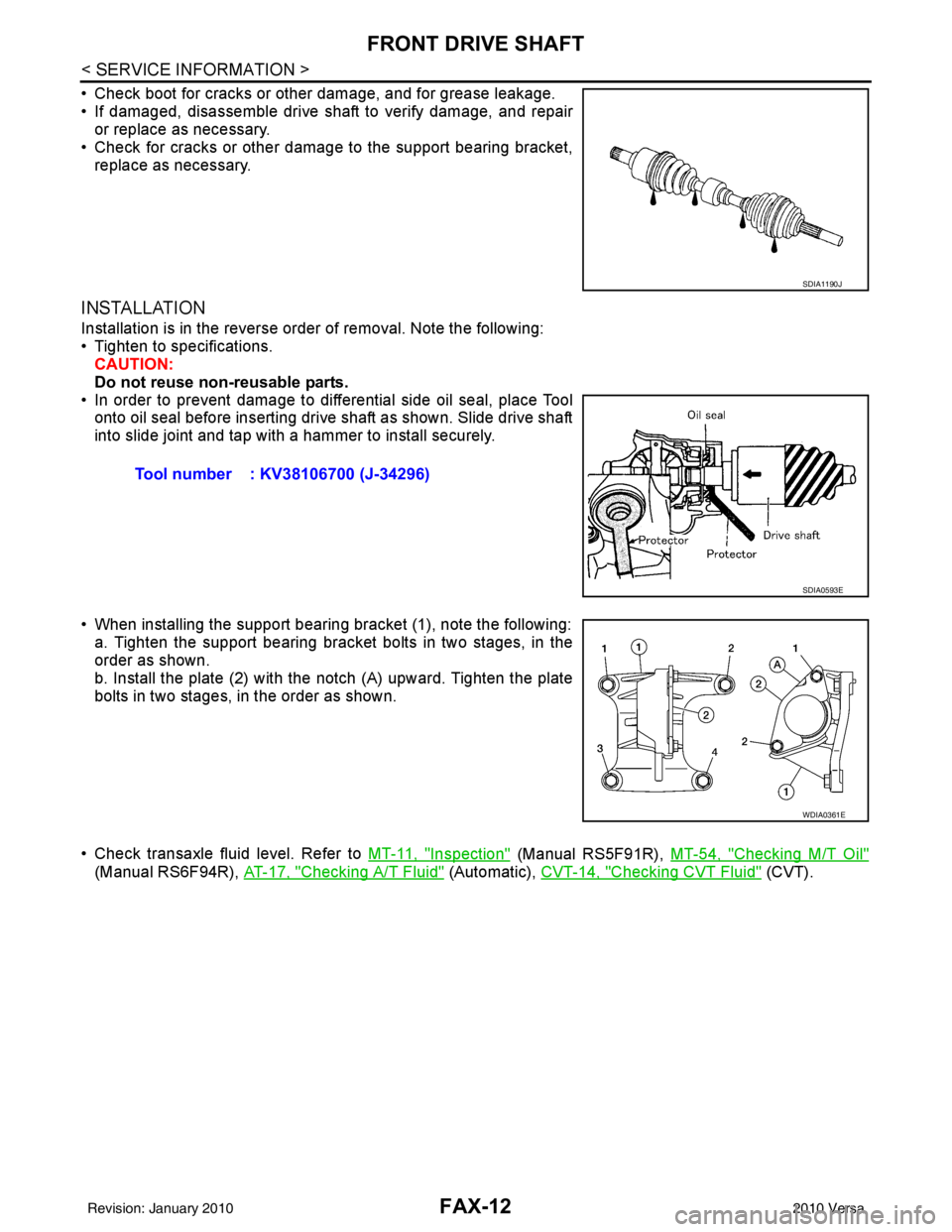
• Check boot for cracks or other damage, and for grease leakage.
• If damaged, disassemble drive shaft to verify damage, and repairor replace as necessary.
• Check for cracks or other damage to the support bearing bracket, replace as necessary.
INSTALLATION
Installation is in the reverse order of removal. Note the following:
• Tighten to specifications.CAUTION:
Do not reuse non-reusable parts.
• In order to prevent damage to differential side oil seal, place Tool onto oil seal before inserting drive shaft as shown. Slide drive shaft
into slide joint and tap with a hammer to install securely.
• When installing the support bearing bracket (1), note the following: a. Tighten the support bearing bracket bolts in two stages, in the
order as shown.
b. Install the plate (2) with the notch (A) upward. Tighten the plate
bolts in two stages, in the order as shown.
• Check transaxle fluid level. Refer to MT-11, "
Inspection" (Manual RS5F91R), MT-54, "Checking M/T Oil"
(Manual RS6F94R), AT-17, "Checking A/T Fluid" (Automatic), CVT-14, "Checking CVT Fluid" (CVT).
SDIA1190J
Tool number : KV38106700 (J-34296)
SDIA0593E
WDIA0361E
Revision: January 20102010 Versa
Page 2669 of 3745
PRECAUTIONSGI-3
< SERVICE INFORMATION >
C
DE
F
G H
I
J
K L
M B
GI
N
O P
2. Use the Intelligent Key or mechanical key to turn the ignition switch to the ″ACC ″ position. At this time, the
steering lock will be released.
3. Disconnect both battery cables. The steering lock will remain released and the steering wheel can be
rotated.
4. Perform the necessary repair operation.
5. When the repair work is completed, return the ignition switch to the ″LOCK ″ position before connecting
the battery cables. (At this time, the steering lock mechanism will engage.)
6. Perform a self-diagnosis check of al l control units using CONSULT-III.
General PrecautionINFOID:0000000005399835
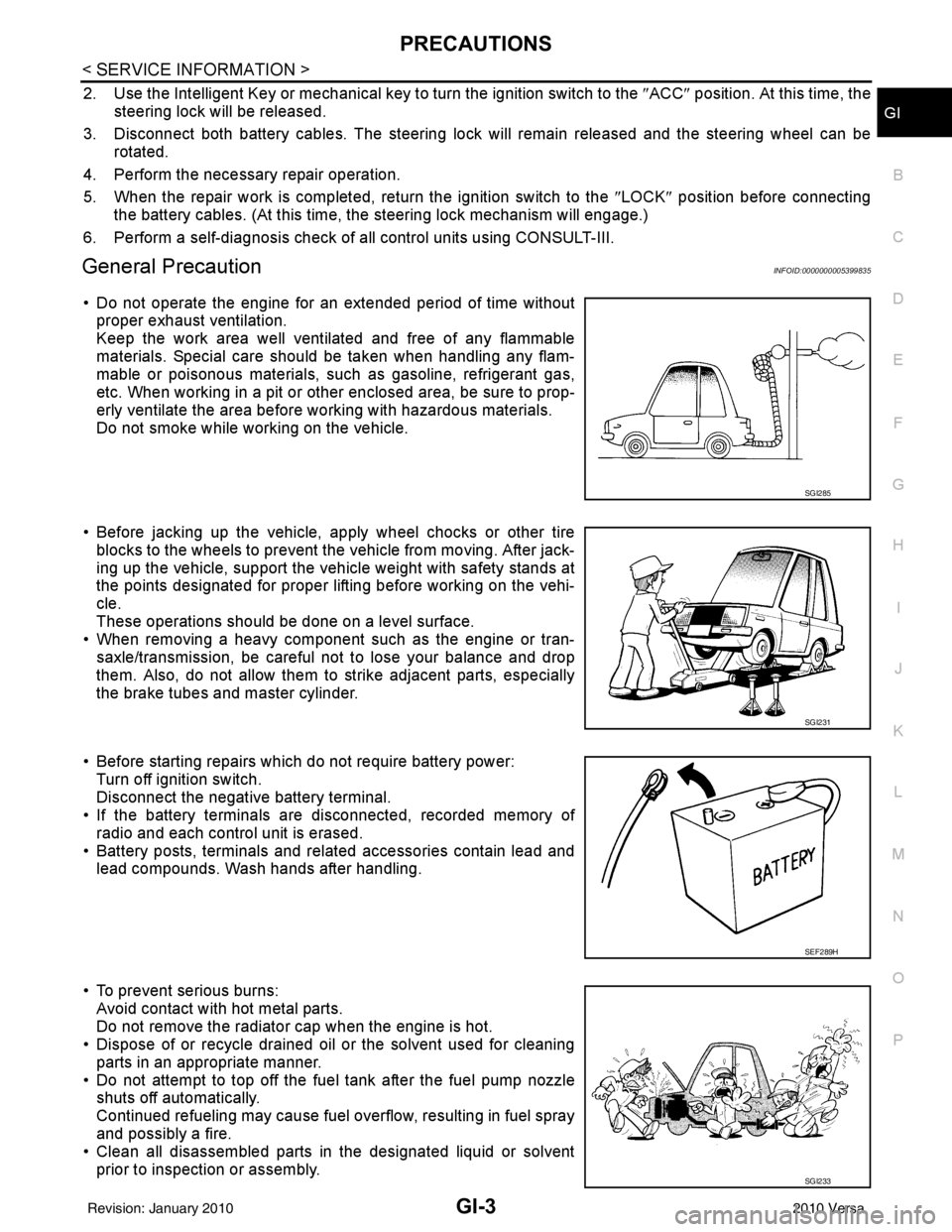
• Do not operate the engine for an extended period of time without
proper exhaust ventilation.
Keep the work area well ventilated and free of any flammable
materials. Special care should be taken when handling any flam-
mable or poisonous materials, such as gasoline, refrigerant gas,
etc. When working in a pit or ot her enclosed area, be sure to prop-
erly ventilate the area before working with hazardous materials.
Do not smoke while working on the vehicle.
• Before jacking up the vehicle, apply wheel chocks or other tire blocks to the wheels to prevent t he vehicle from moving. After jack-
ing up the vehicle, support the vehicle weight with safety stands at
the points designated for proper lifting before working on the vehi-
cle.
These operations should be done on a level surface.
• When removing a heavy component such as the engine or tran-
saxle/transmission, be careful not to lose your balance and drop
them. Also, do not allow them to strike adjacent parts, especially
the brake tubes and master cylinder.
• Before starting repairs which do not require battery power: Turn off ignition switch.
Disconnect the negative battery terminal.
• If the battery terminals are disconnected, recorded memory of
radio and each control unit is erased.
• Battery posts, terminals and related accessories contain lead and lead compounds. Wash hands after handling.
• To prevent serious burns: Avoid contact with hot metal parts.
Do not remove the radiator cap when the engine is hot.
• Dispose of or recycle drained oil or the solvent used for cleaning
parts in an appropriate manner.
• Do not attempt to top off the fuel tank after the fuel pump nozzle shuts off automatically.
Continued refueling may cause fuel overflow, resulting in fuel spray
and possibly a fire.
• Clean all disassembled parts in the designated liquid or solvent
prior to inspection or assembly.
SGI285
SGI231
SEF289H
SGI233
Revision: January 20102010 Versa
Page 2673 of 3745
HOW TO USE THIS MANUALGI-7
< SERVICE INFORMATION >
C
DE
F
G H
I
J
K L
M B
GI
N
O PHOW TO USE THIS MANUAL
DescriptionINFOID:0000000005399842
This volume explains “Removal, Disassembly, Inst allation, Inspection and Adjustment” and “Trouble Diag-
noses”.
Te r m sINFOID:0000000005399843
• The captions WARNING and CAUTION warn you of steps that must be followed to prevent personal injury
and/or damage to some part of the vehicle.
WARNING indicates the possibility of personal injury if instructions are not followed.
CAUTION indicates the possibility of component damage if instructions are not followed.
BOLD TYPED STATEMENTS except WARNING and CAUTION give you helpful information.
Standard value:Tolerance at inspection and adjustment.
Limit value:The maximum or minimum limit value t hat should not be exceeded at inspection and adjustment.
UnitsINFOID:0000000005399844
• The UNITS given in this manual are primarily expressed as the SI UNIT (International System of Unit), and
alternatively expressed in the metric system and in the yard/pound system.
Also with regard to tightening torque of bolts and nuts, there are descriptions both about range and about the
standard tightening torque.
“Example”
Range
Standard
ContentsINFOID:0000000005399845
• A QUICK REFERENCE INDEX , a black tab (e.g. ) is provided on the first page. You can quickly find the
first page of each section by matching it to the section's black tab.
• THE CONTENTS are listed on the first page of each section.
• THE TITLE is indicated on the upper portion of each page and shows the part or system.
• THE PAGE NUMBER of each section consists of two or three letters which designate the particular section
and a number (e.g. “BR-5”).
• THE SMALL ILLUSTRATIONS show the important steps such as ins pection, use of special tools, knacks of
work and hidden or tricky steps which are not shown in the previous large illustrations.
Assembly, inspection and adjustment procedures for the complicated units such as the automatic transaxle
or transmission, etc. are presented in a step-by-step format where necessary. Outer Socket Lock Nut : 59 - 78 N·m (6.0 - 8.0 kg-m, 43 - 58 ft-lb)
Drive Shaft Installation Bolt : 44.3 N·m (4.5 kg-m, 33 ft-lb)
Revision: January 20102010 Versa