Front NISSAN TIIDA 2010 Service Repair Manual
[x] Cancel search | Manufacturer: NISSAN, Model Year: 2010, Model line: TIIDA, Model: NISSAN TIIDA 2010Pages: 3745, PDF Size: 73.67 MB
Page 2751 of 3745
GW-34
< SERVICE INFORMATION >
POWER WINDOW SYSTEM
NG >> Replace main power window and door lock/unlock switch. Refer to EI-34, "Removal and Installa-
tion" .
2.CHECK POWER WINDOW MOTOR CIRCUIT
1. Turn ignition switch OFF.
2. Disconnect main power window and door lock/unlock switch and front power window motor LH.
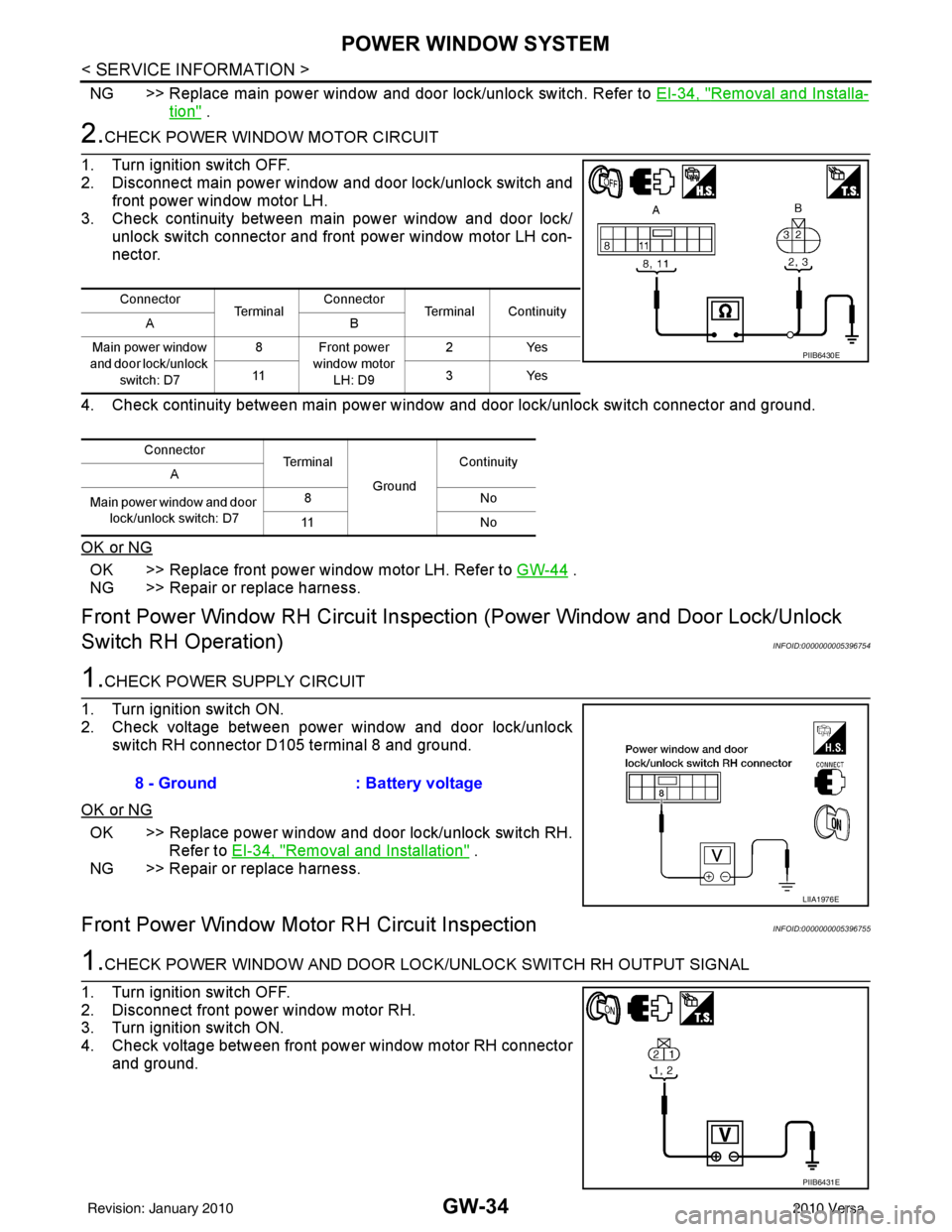
3. Check continuity between main power window and door lock/ unlock switch connector and front power window motor LH con-
nector.
4. Check continuity between main power window and door lock/unlock switch connector and ground.
OK or NG
OK >> Replace front power window motor LH. Refer to GW-44 .
NG >> Repair or replace harness.
Front Power Window RH Circuit Inspecti on (Power Window and Door Lock/Unlock
Switch RH Operation)
INFOID:0000000005396754
1.CHECK POWER SUPPLY CIRCUIT
1. Turn ignition switch ON.
2. Check voltage between power window and door lock/unlock switch RH connector D105 terminal 8 and ground.
OK or NG
OK >> Replace power window and door lock/unlock switch RH. Refer to EI-34, "
Removal and Installation" .
NG >> Repair or replace harness.
Front Power Window Moto r RH Circuit InspectionINFOID:0000000005396755
1.CHECK POWER WINDOW AND DOOR LOCK /UNLOCK SWITCH RH OUTPUT SIGNAL
1. Turn ignition switch OFF.
2. Disconnect front power window motor RH.
3. Turn ignition switch ON.
4. Check voltage between front power window motor RH connector and ground.
Connector Te r m i n a lConnector
Terminal Continuity
AB
Main power window
and door lock/unlock switch: D7 8 Front power
window motor LH: D9 2Y
es
11 3Ye s
Connector Terminal
GroundContinuity
A
Main power window and door lock/unlock switch: D7 8N
o
11 N o
PIIB6430E
8 - Ground: Battery voltage
LIIA1976E
PIIB6431E
Revision: January 20102010 Versa
Page 2752 of 3745
POWER WINDOW SYSTEMGW-35
< SERVICE INFORMATION >
C
DE
F
G H
J
K L
M A
B
GW
N
O P
OK or NG
OK >> Replace front power window motor RH. Refer to GW-44 .
NG >> GO TO 2.
2.CHECK FRONT POWER WINDOW MOTOR RH CIRCUIT
1. Turn ignition switch OFF.
2. Disconnect power window and door lock/unlock switch RH.
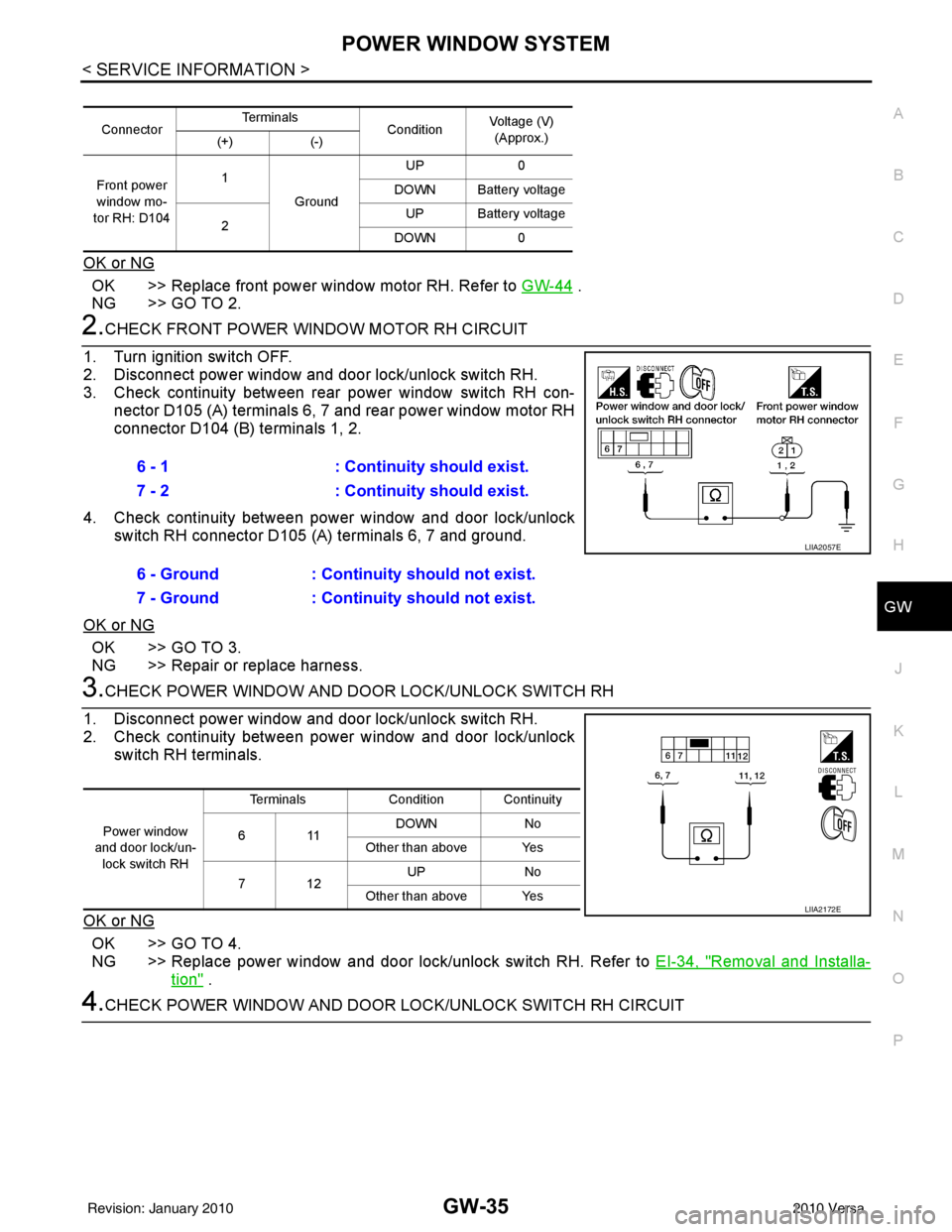
3. Check continuity between rear power window switch RH con- nector D105 (A) terminals 6, 7 and rear power window motor RH
connector D104 (B) terminals 1, 2.
4. Check continuity between power window and door lock/unlock switch RH connector D105 (A) terminals 6, 7 and ground.
OK or NG
OK >> GO TO 3.
NG >> Repair or replace harness.
3.CHECK POWER WINDOW AND DOOR LOCK/UNLOCK SWITCH RH
1. Disconnect power window and door lock/unlock switch RH.
2. Check continuity between power window and door lock/unlock switch RH terminals.
OK or NG
OK >> GO TO 4.
NG >> Replace power window and door lock/unlock switch RH. Refer to EI-34, "
Removal and Installa-
tion" .
4.CHECK POWER WINDOW AND DOOR LOCK/UNLOCK SWITCH RH CIRCUIT
ConnectorTe r m i n a l s
ConditionVoltage (V)
(Approx.)
(+) (-)
Front power
window mo-
tor RH: D104 1
Ground UP
0
DOWN Battery voltage
2 UP Battery voltage
DOWN 0
6 - 1 : Continuity should exist.
7 - 2 : Continuity should exist.
6 - Ground : Continuity should not exist.
7 - Ground : Continuity should not exist.
LIIA2057E
Power window
and door lock/un- lock switch RH Terminals
Condition Continuity
611 DOWN
No
Other than above Yes
712 UP
No
Other than above Yes
LIIA2172E
Revision: January 20102010 Versa
Page 2753 of 3745
GW-36
< SERVICE INFORMATION >
POWER WINDOW SYSTEM
1. Disconnect main power window and door lock/unlock switch.
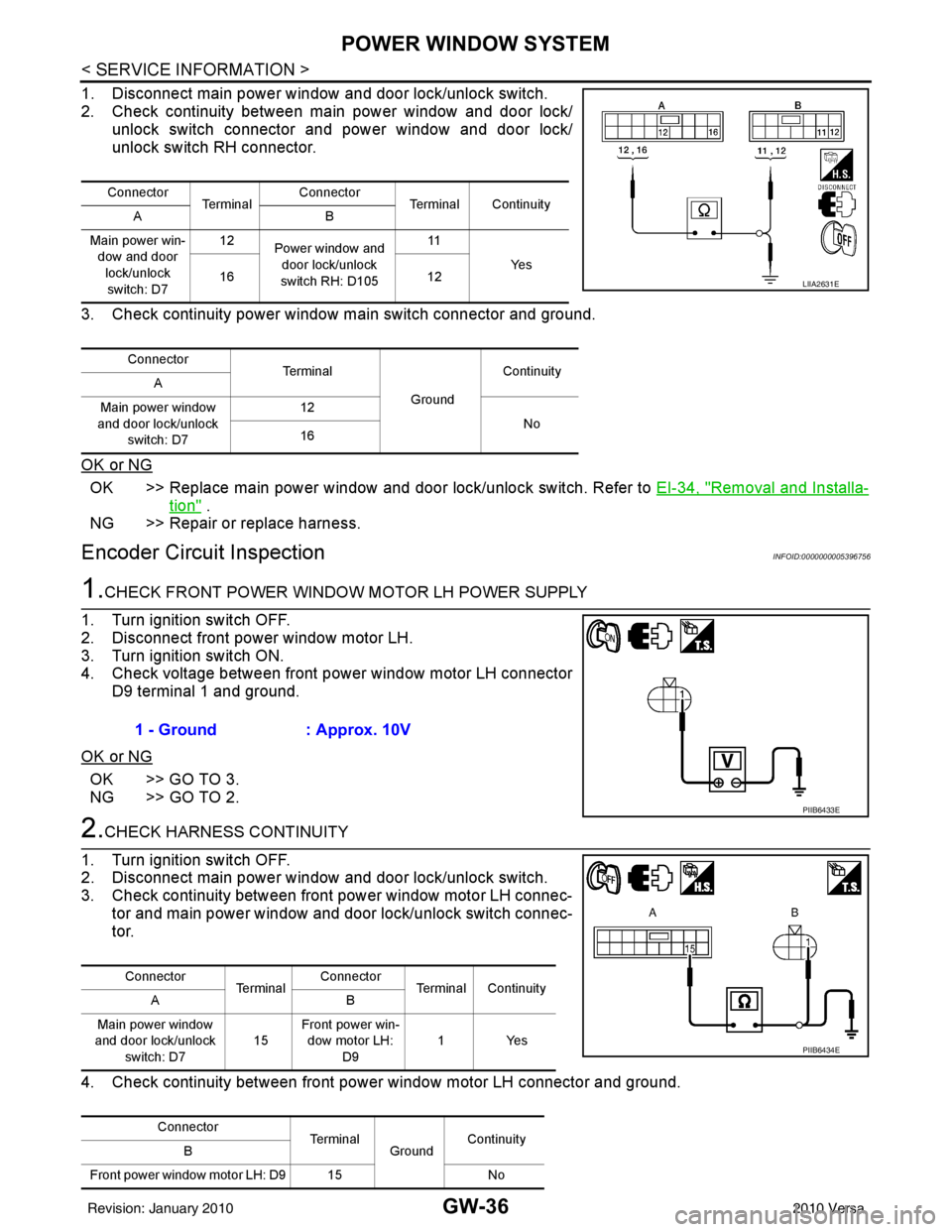
2. Check continuity between main power window and door lock/ unlock switch connector and power window and door lock/
unlock switch RH connector.
3. Check continuity power window main switch connector and ground.
OK or NG
OK >> Replace main power window and door lock/unlock switch. Refer to EI-34, "Removal and Installa-
tion" .
NG >> Repair or replace harness.
Encoder Circuit InspectionINFOID:0000000005396756
1.CHECK FRONT POWER WINDOW MOTOR LH POWER SUPPLY
1. Turn ignition switch OFF.
2. Disconnect front power window motor LH.
3. Turn ignition switch ON.
4. Check voltage between front power window motor LH connector D9 terminal 1 and ground.
OK or NG
OK >> GO TO 3.
NG >> GO TO 2.
2.CHECK HARNESS CONTINUITY
1. Turn ignition switch OFF.
2. Disconnect main power window and door lock/unlock switch.
3. Check continuity between front power window motor LH connec-
tor and main power window and door lock/unlock switch connec-
tor.
4. Check continuity between front power window motor LH connector and ground.
Connector Te r m i n a l Connector
Terminal Continuity
AB
Main power win- dow and door
lock/unlock switch: D7 12
Power window and
door lock/unlock
switch RH: D105 11
Ye s
16 12
Connector Te r m i n a l
GroundContinuity
A
Main power window
and door lock/unlock switch: D7 12
No
16
LIIA2631E
1 - Ground : Approx. 10V
PIIB6433E
Connector
Te r m i n a lConnector
Terminal Continuity
AB
Main power window
and door lock/unlock switch: D7 15Front power win-
dow motor LH: D9 1Yes
Connector TerminalGroundContinuity
B
Front power window motor LH: D9 15 No
PIIB6434E
Revision: January 20102010 Versa
Page 2754 of 3745
POWER WINDOW SYSTEMGW-37
< SERVICE INFORMATION >
C
DE
F
G H
J
K L
M A
B
GW
N
O P
OK or NG
OK >> Replace main power window and door lock/unlock switch. Refer to EI-34, "Removal and Installa-
tion" .
NG >> Repair or replace harness.
3.CHECK ENCODER GROUND
1. Turn ignition switch OFF.
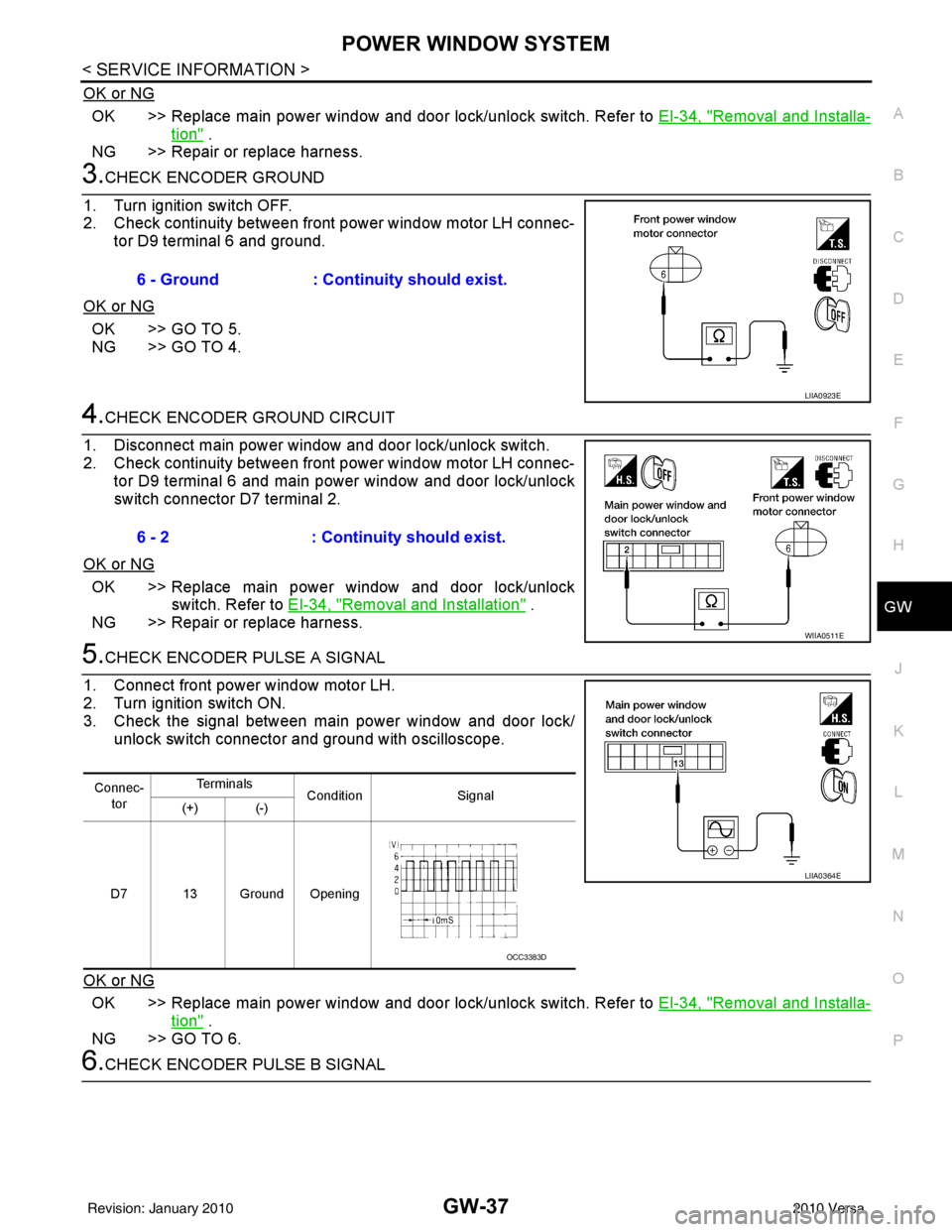
2. Check continuity between front power window motor LH connec- tor D9 terminal 6 and ground.
OK or NG
OK >> GO TO 5.
NG >> GO TO 4.
4.CHECK ENCODER GROUND CIRCUIT
1. Disconnect main power window and door lock/unlock switch.
2. Check continuity between front power window motor LH connec- tor D9 terminal 6 and main power window and door lock/unlock
switch connector D7 terminal 2.
OK or NG
OK >> Replace main power window and door lock/unlock switch. Refer to EI-34, "
Removal and Installation" .
NG >> Repair or replace harness.
5.CHECK ENCODER PULSE A SIGNAL
1. Connect front power window motor LH.
2. Turn ignition switch ON.
3. Check the signal between main power window and door lock/ unlock switch connector and ground with oscilloscope.
OK or NG
OK >> Replace main power window and door lock/unlock switch. Refer to EI-34, "Removal and Installa-
tion" .
NG >> GO TO 6.
6.CHECK ENCODER PULSE B SIGNAL 6 - Ground
: Continuity should exist.
LIIA0923E
6 - 2: Continuity should exist.
WIIA0511E
Connec-
tor Te r m i n a l s
Condition Signal
(+) (-)
D7 13 Ground Opening
LIIA0364E
OCC3383D
Revision: January 20102010 Versa
Page 2755 of 3745
GW-38
< SERVICE INFORMATION >
POWER WINDOW SYSTEM
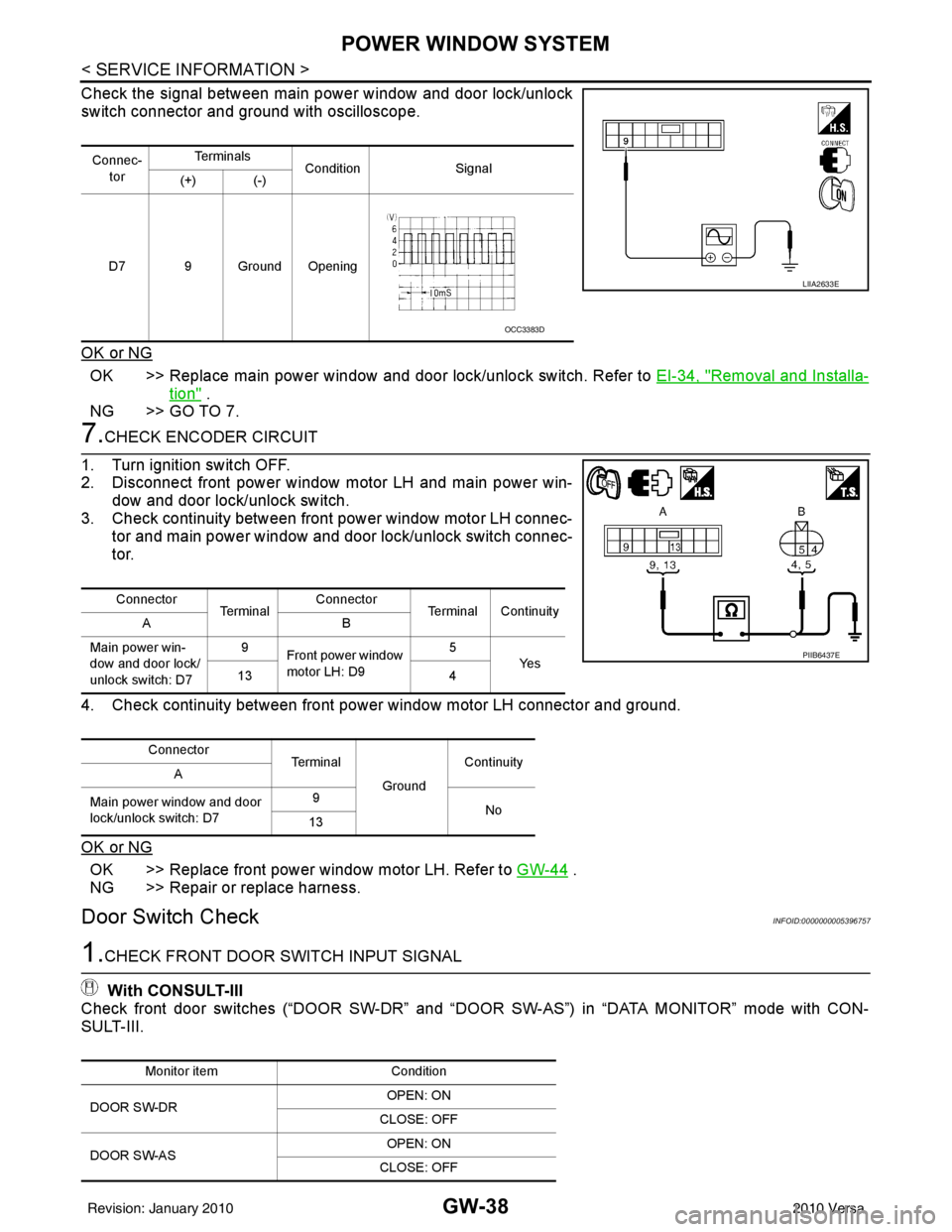
Check the signal between main power window and door lock/unlock
switch connector and ground with oscilloscope.
OK or NG
OK >> Replace main power window and door lock/unlock switch. Refer to EI-34, "Removal and Installa-
tion" .
NG >> GO TO 7.
7.CHECK ENCODER CIRCUIT
1. Turn ignition switch OFF.
2. Disconnect front power window motor LH and main power win- dow and door lock/unlock switch.
3. Check continuity between front power window motor LH connec-
tor and main power window and door lock/unlock switch connec-
tor.
4. Check continuity between front power window motor LH connector and ground.
OK or NG
OK >> Replace front power window motor LH. Refer to GW-44 .
NG >> Repair or replace harness.
Door Switch CheckINFOID:0000000005396757
1.CHECK FRONT DOOR SWITCH INPUT SIGNAL
With CONSULT-III
Check front door switches (“DOOR SW-DR” and “D OOR SW-AS”) in “DATA MONITOR” mode with CON-
SULT-III.
Connec-
tor Te r m i n a l s
Condition Signal
(+) (-)
D7 9 Ground Opening
LIIA2633E
OCC3383D
Connector Te r m i n a lConnector
Terminal Continuity
AB
Main power win-
dow and door lock/
unlock switch: D7 9
Front power window
motor LH: D9 5
Ye s
13 4
Connector Te r m i n a l
GroundContinuity
A
Main power window and door
lock/unlock switch: D7 9
No
13
PIIB6437E
Monitor item Condition
DOOR SW-DR OPEN: ON
CLOSE: OFF
DOOR SW-AS OPEN: ON
CLOSE: OFF
Revision: January 20102010 Versa
Page 2756 of 3745
POWER WINDOW SYSTEMGW-39
< SERVICE INFORMATION >
C
DE
F
G H
J
K L
M A
B
GW
N
O P
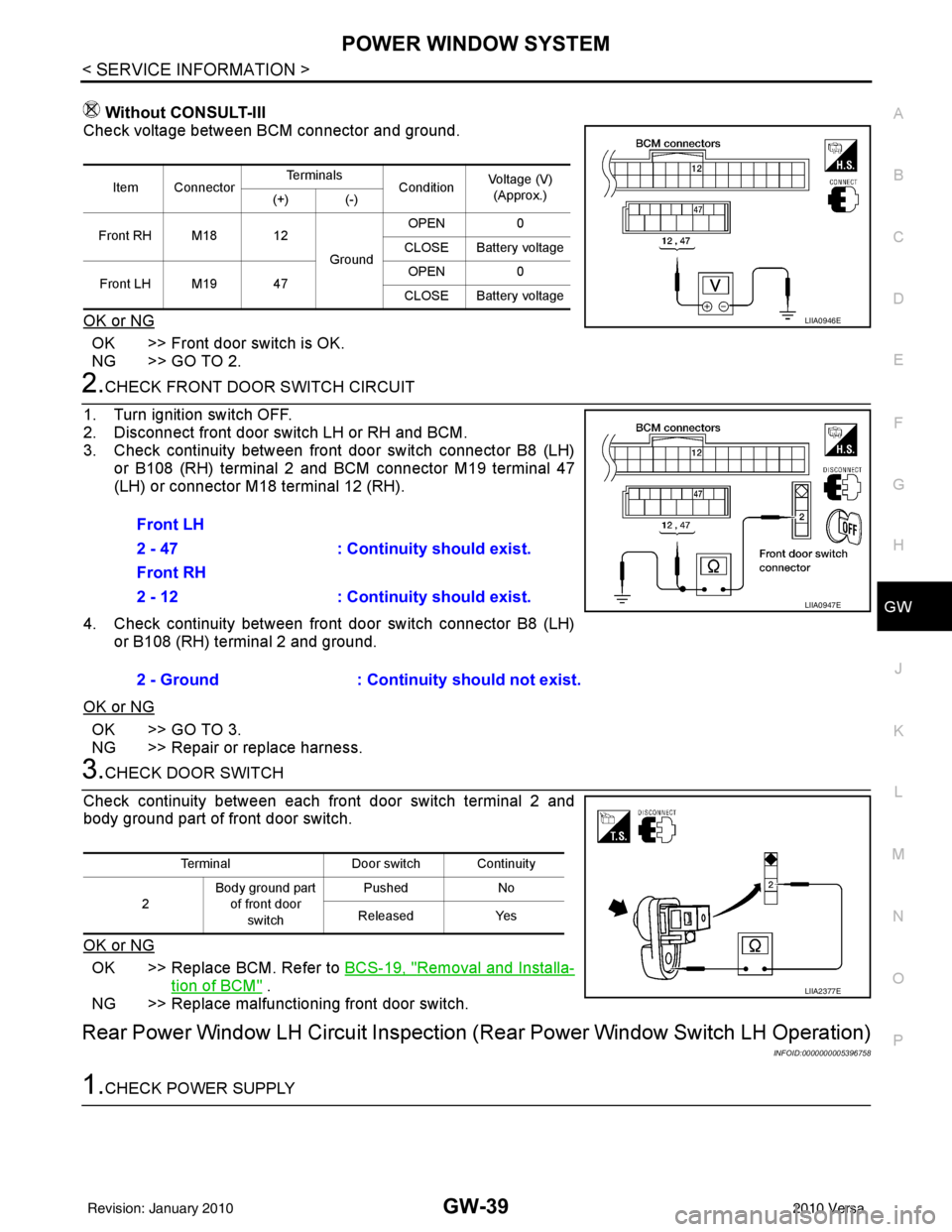
Without CONSULT-III
Check voltage between BCM connector and ground.
OK or NG
OK >> Front door switch is OK.
NG >> GO TO 2.
2.CHECK FRONT DOOR SWITCH CIRCUIT
1. Turn ignition switch OFF.
2. Disconnect front door switch LH or RH and BCM.
3. Check continuity between front door switch connector B8 (LH) or B108 (RH) terminal 2 and BCM connector M19 terminal 47
(LH) or connector M18 terminal 12 (RH).
4. Check continuity between front door switch connector B8 (LH) or B108 (RH) terminal 2 and ground.
OK or NG
OK >> GO TO 3.
NG >> Repair or replace harness.
3.CHECK DOOR SWITCH
Check continuity between each front door switch terminal 2 and
body ground part of front door switch.
OK or NG
OK >> Replace BCM. Refer to BCS-19, "Removal and Installa-
tion of BCM" .
NG >> Replace malfunctioning front door switch.
Rear Power Window LH Circuit Inspection (Rear Power Window Switch LH Operation)
INFOID:0000000005396758
1.CHECK POWER SUPPLY
Item ConnectorTe r m i n a l s
ConditionVoltage (V)
(Approx.)
(+) (-)
Front RH M18 12 GroundOPEN
0
CLOSE Battery voltage
Front LH M19 47 OPEN
0
CLOSE Battery voltage
LIIA0946E
Front LH
2 - 47 : Continuity should exist.
Front RH
2 - 12 : Continuity should exist.
2 - Ground : Continuity should not exist.
LIIA0947E
TerminalDoor switch Continuity
2 Body ground part
of front door
switch Pushed
No
Released Yes
LIIA2377E
Revision: January 20102010 Versa
Page 2761 of 3745
GW-44
< SERVICE INFORMATION >
FRONT DOOR GLASS AND REGULATOR
FRONT DOOR GLASS AND REGULATOR
Removal and InstallationINFOID:0000000005396762
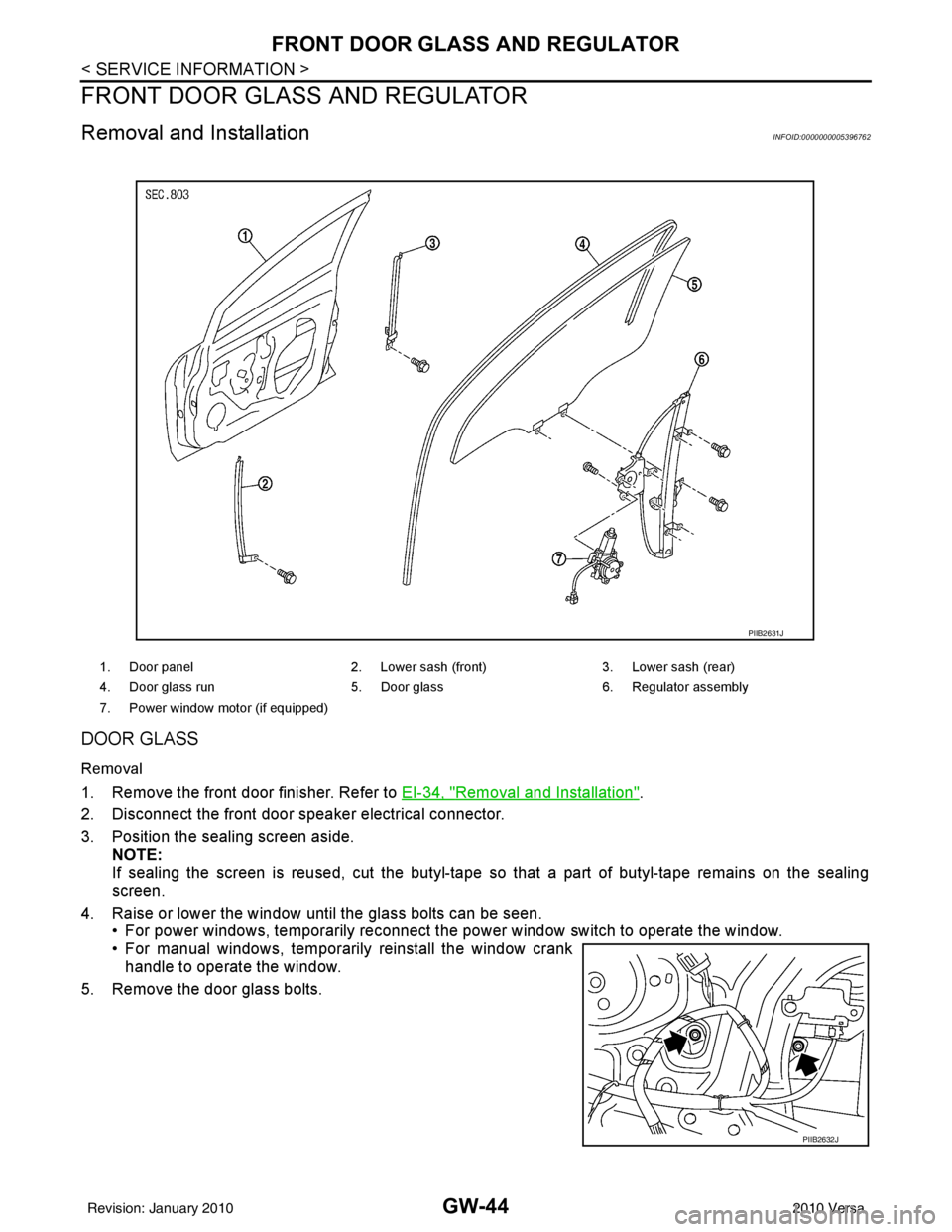
DOOR GLASS
Removal
1. Remove the front door finisher. Refer to EI-34, "Removal and Installation".
2. Disconnect the front door speaker electrical connector.
3. Position the sealing screen aside. NOTE:
If sealing the screen is reused, cut the butyl-tape so that a part of butyl-tape remains on the sealing
screen.
4. Raise or lower the window until the glass bolts can be seen. • For power windows, temporarily reconnect the power window switch to operate the window.
• For manual windows, temporarily reinstall the window crank
handle to operate the window.
5. Remove the door glass bolts.
1. Door panel 2. Lower sash (front) 3. Lower sash (rear)
4. Door glass run 5. Door glass6. Regulator assembly
7. Power window motor (if equipped)
PIIB2631J
PIIB2632J
Revision: January 20102010 Versa
Page 2762 of 3745
FRONT DOOR GLASS AND REGULATORGW-45
< SERVICE INFORMATION >
C
DE
F
G H
J
K L
M A
B
GW
N
O P
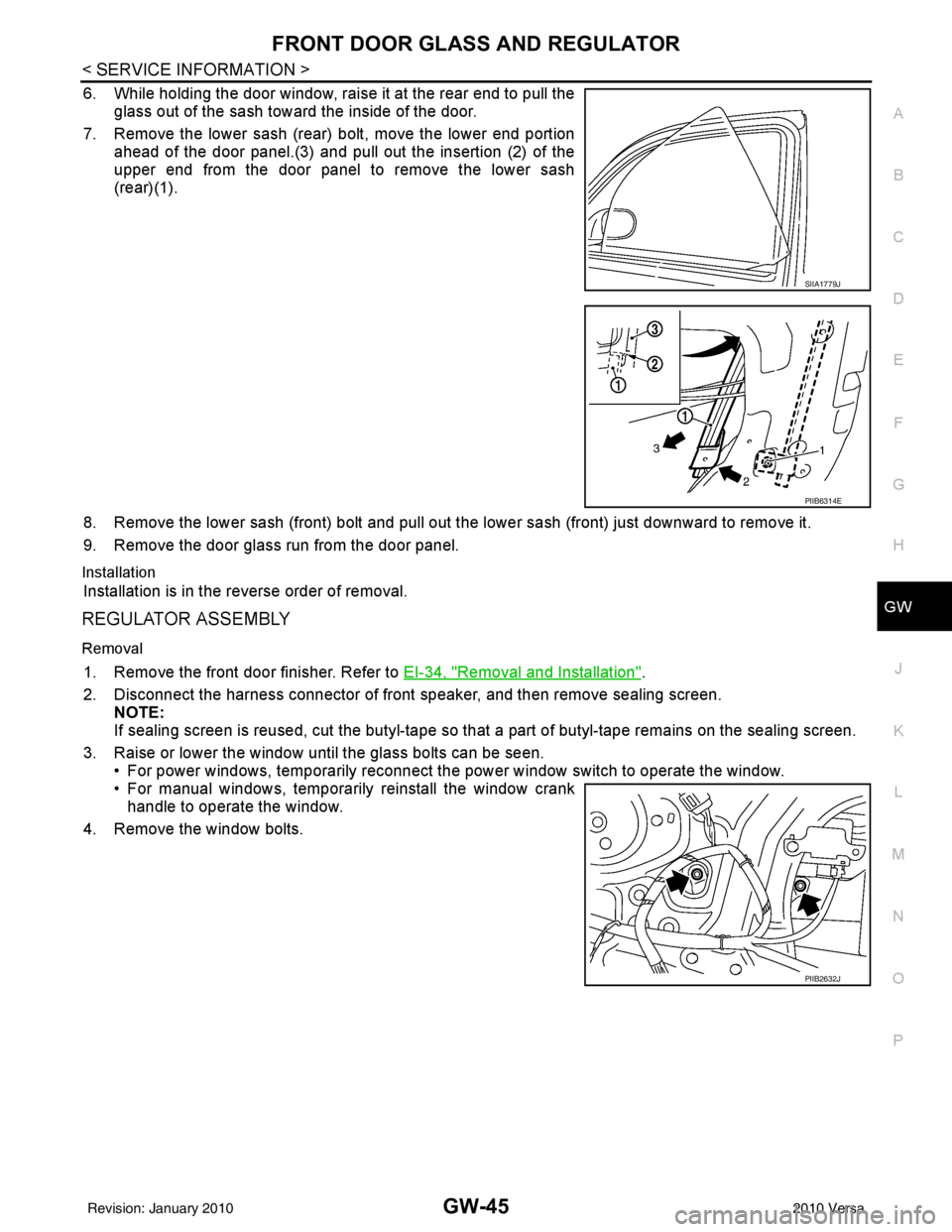
6. While holding the door window, raise it at the rear end to pull the glass out of the sash toward the inside of the door.
7. Remove the lower sash (rear) bolt, move the lower end portion ahead of the door panel.(3) and pull out the insertion (2) of the
upper end from the door panel to remove the lower sash
(rear)(1).
8. Remove the lower sash (front) bolt and pull out the lower sash (front) just downward to remove it.
9. Remove the door glass run from the door panel.
Installation
Installation is in the reverse order of removal.
REGULATOR ASSEMBLY
Removal
1. Remove the front door finisher. Refer to EI-34, "Removal and Installation".
2. Disconnect the harness connector of front speaker, and then remove sealing screen. NOTE:
If sealing screen is reused, cut the butyl-tape so that a part of butyl-tape remains on the sealing screen.
3. Raise or lower the window until the glass bolts can be seen. • For power windows, temporarily reconnect t he power window switch to operate the window.
• For manual windows, temporarily reinstall the window crank handle to operate the window.
4. Remove the window bolts.
SIIA1779J
PIIB6314E
PIIB2632J
Revision: January 20102010 Versa
Page 2763 of 3745
GW-46
< SERVICE INFORMATION >
FRONT DOOR GLASS AND REGULATOR
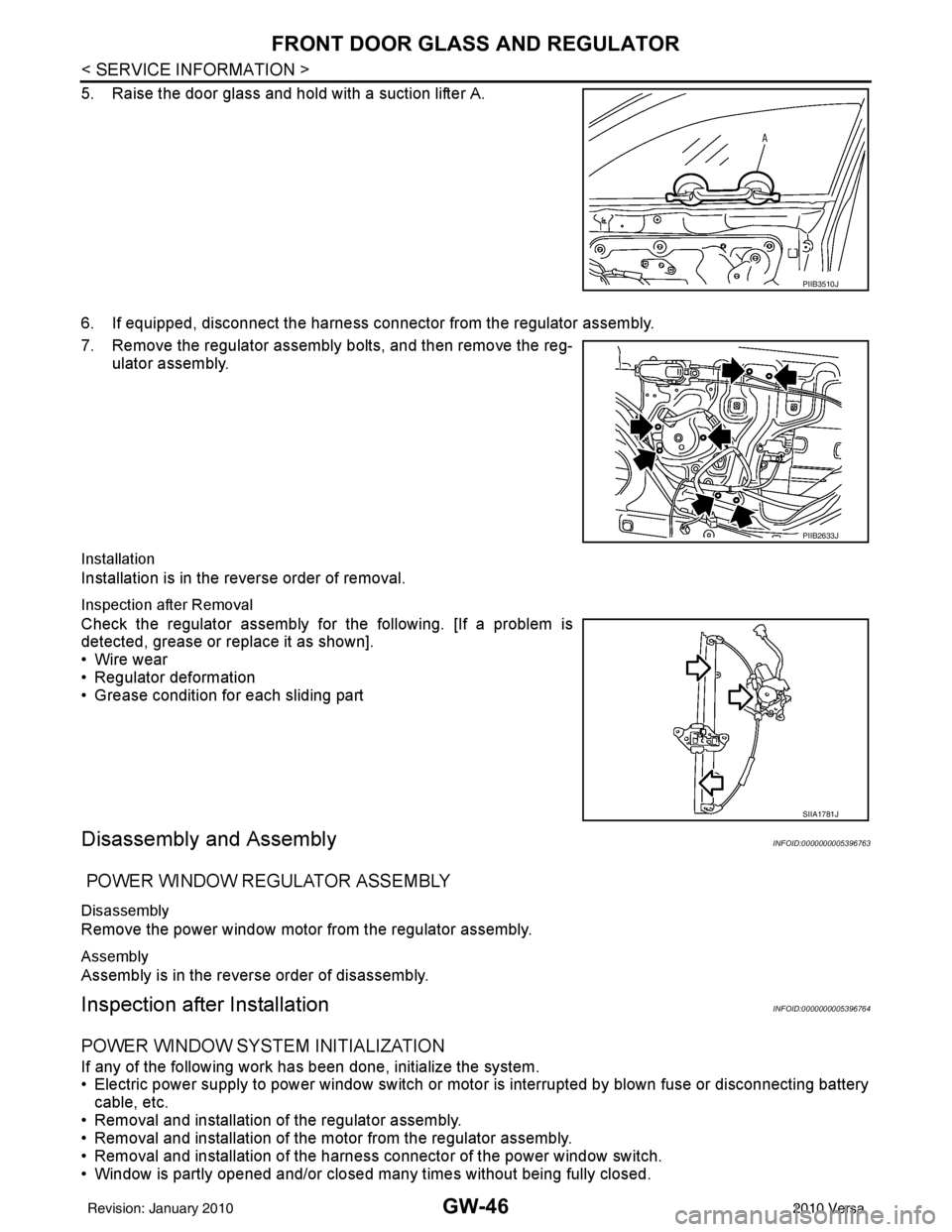
5. Raise the door glass and hold with a suction lifter A.
6. If equipped, disconnect the harness connector from the regulator assembly.
7. Remove the regulator assembly bolts, and then remove the reg-ulator assembly.
Installation
Installation is in the reverse order of removal.
Inspection after Removal
Check the regulator assembly fo r the following. [If a problem is
detected, grease or replace it as shown].
• Wire wear
• Regulator deformation
• Grease condition for each sliding part
Disassembly and AssemblyINFOID:0000000005396763
POWER WINDOW REGULATOR ASSEMBLY
Disassembly
Remove the power window motor from the regulator assembly.
Assembly
Assembly is in the reverse order of disassembly.
Inspection after InstallationINFOID:0000000005396764
POWER WINDOW SYSTEM INITIALIZATION
If any of the following work has been done, initialize the system.
• Electric power supply to power window switch or moto r is interrupted by blown fuse or disconnecting battery
cable, etc.
• Removal and installation of the regulator assembly.
• Removal and installation of the motor from the regulator assembly.
• Removal and installation of the harness connector of the power window switch.
• Window is partly opened and/or closed many times without being fully closed.
PIIB3510J
PIIB2633J
SIIA1781J
Revision: January 20102010 Versa
Page 2764 of 3745

FRONT DOOR GLASS AND REGULATORGW-47
< SERVICE INFORMATION >
C
DE
F
G H
J
K L
M A
B
GW
N
O P
• Removal and installation of the door glass.
• Removal and installation of the door glass run.
Initialization
After installing each component to the vehicle, follow the steps below.
1. Close all doors.
2. Turn ignition switch ON.
3. Open the window to its full down position by operating the power window switch.
4. Move the power window switch in the up direction (auto close position) and hold. Keep holding the switch
even when window is completely closed, for at least 4 seconds.
5. Confirm the window is now operating correctly.
INSPECT THE FUNCTION OF THE ANTI-PINCH SYSTEM
1. Fully open the door glass.
2. Place a wooden piece (wooden hammer handle, etc.) near the fully closed position.
3. Carry out fully closing operation with auto up switch.
• Check that the glass reverses without pinching the w ooden piece, is lowered approx.150 mm (5.91 in) or for
2 seconds and then stops.
• The glass should not be raised with power window main switch while it is reversing or lowering.
CAUTION:
• Use care to avoid being pinched during the inspection. Do not u se a hand, etc. in place of the
wooden piece durin g the inspection.
• Check that auto up function is normal before inspection, following the system initialization.
FITTING INSPECTION
• Make sure the glass is securely fit into the glass run groove.
• Lower the glass slightly [approx. 10 to 20 mm (0.39 to 0.79 in)] and make sure the clearance to the sash is
parallel. If the clearance between the glass and sash is not parallel, loosen the regulator bolts, guide rail
bolts, and the glass and guide rail bolts to correct the glass position.
• Make sure the system is normal with raising and lowering the glass.
Revision: January 20102010 Versa