Set time NISSAN TIIDA 2011 Service Owners Manual
[x] Cancel search | Manufacturer: NISSAN, Model Year: 2011, Model line: TIIDA, Model: NISSAN TIIDA 2011Pages: 3787, PDF Size: 78.35 MB
Page 3732 of 3787
WT-14
< SERVICE INFORMATION >
TROUBLE DIAGNOSES
6. Inflate all tires to proper pressure. Refer to WT-28, "Tire" .
Transmitter Wake Up OperationINFOID:0000000005931106
NOTE:
This procedure must be done after replacement of a low tire pressure warning transmitter or BCM.
New replacement transmitters are provided "asleep" and must first be "woken up" using Transmitter
Activation Tool J-45295 before ID registration can be performed.
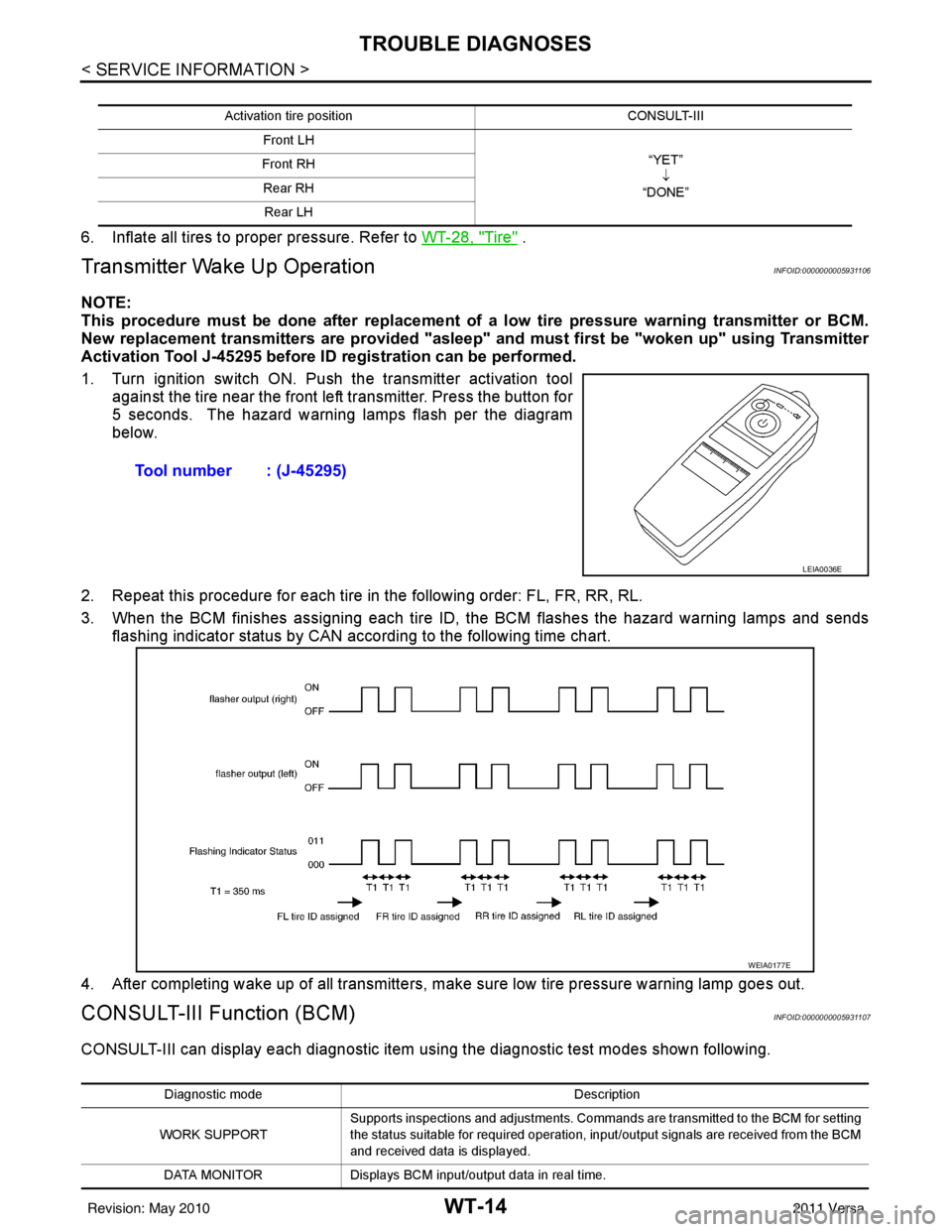
1. Turn ignition switch ON. Push the transmitter activation tool against the tire near the front left transmitter. Press the button for
5 seconds. The hazard warning lamps flash per the diagram
below.
2. Repeat this procedure for each tire in the following order: FL, FR, RR, RL.
3. When the BCM finishes assigning each tire ID, the BCM flashes the hazard warning lamps and sends flashing indicator status by CAN according to the following time chart.
4. After completing wake up of all transmitters, make sure low tire pressure warning lamp goes out.
CONSULT-III Function (BCM)INFOID:0000000005931107
CONSULT-III can display each diagnostic item us ing the diagnostic test modes shown following.
Activation tire position CONSULT-III
Front LH “YET”↓
“DONE”
Front RH
Rear RHRear LH
Tool number : (J-45295)
LEIA0036E
WEIA0177E
Diagnostic mode Description
WORK SUPPORT Supports inspections and adjustments. Commands are transmitted to the BCM for setting
the status suitable for required operation, input/output signals are received from the BCM
and received data is displayed.
DATA MONITOR Displays BCM input/output data in real time.
Revision: May 2010 2011 Versa
Page 3758 of 3787
WW-12
< SERVICE INFORMATION >
FRONT WIPER AND WASHER SYSTEM
Terminal and Reference Value for BCM
INFOID:0000000005929211
Refer to BCS-12, "Terminal and Reference Value for BCM" .
Terminal and Reference Value for IPDM E/RINFOID:0000000005929212
Refer to PG-25, "Terminal and Reference Value for IPDM E/R" .
How to Proceed with Trouble DiagnosisINFOID:0000000005929213
1. Confirm symptoms and customer complaint.
2. Understand operation description and function description. Refer to WW-5, "
System Description" .
3. Perform preliminary check. Refer to WW-12, "
Preliminary Check" .
4. Check symptom and repair or replace malfunctioning parts.
5. Does front wiper and washer operate normally ? If YES, GO TO 6. If NO, GO TO 4.
6. Inspection End.
Preliminary CheckINFOID:0000000005929214
CHECK POWER SUPPLY AND GROUND CIRCUIT FOR BCM
Refer to BCS-16, "BCM Power Supply and Ground Circuit Inspection"
CONSULT-III Function (BCM)INFOID:0000000005929215
CONSULT-III can display each diagnostic item using the diagnostic test modes shown following.
WORK SUPPORT
Display Item List
DATA MONITOR
Display Item List
BCM diagnosis position Diagnosis mode Description
WIPER WORK SUPPORT Changes the setting for each function.
DATA MONITOR Displays BCM input data in real time. ACTIVE TEST Device operation can be checked by applying a drive signal to device.
BCM SELF DIAGNOSTIC RESULT BCM performs
self-diagnosis of CAN communication.
CAN DIAG SUPPORT MNTR The result of transmit/receive diagnosis of CAN communication can be read.
Item Description CONSULT-III Factory setting
WIPER SPEED SETTING Vehicle speed sensing type wiper control mode can be changed in this mode. ON
—
OFF ×
ALL SIGNALS Monitors all the signals.
SELECTION FROM MENU Selects items and monitor them.
Monitor item Contents
IGN ON SW “ON/OFF”Displays “ignition switch ON (ON)/Other OFF or ACC (OFF)” status as judged from ignition
switch signal.
IGN SW CAN “ON/OFF”Displays “ignition switch ON (ON)/Other OFF or ACC (OFF)” status as judged from CAN com-
munication signal.
FR WIPER HI “ON/OFF”Displays “FRONT WIPER HI (ON)/Other (OFF)” status as judged from combination switch (wip-
er switch) signal.
Revision: May 2010
2011 Versa
Page 3759 of 3787

FRONT WIPER AND WASHER SYSTEMWW-13
< SERVICE INFORMATION >
C
DE
F
G H
I
J
L
M A
B
WW
N
O P
ACTIVE TEST
Display Item List
CONSULT-III Function (IPDM E/R)INFOID:0000000005929216
CONSULT-III can display each diagnostic item using the diagnostic test modes shown following.
DATA MONITOR
All Signals, Main Signals, Selection From Menu
NOTE:
FR WIPER LOW “ON/OFF” Displays “FRONT WIPER LOW (ON)/Other (OFF)” status as judged from combination switch
(wiper switch) signal.
FR WIPER INT “ON/OFF”Displays “FRONT WIPER INT (ON)
/Other (OFF)” status as judged from combination switch
(wiper switch) signal.
FR WASHER SW “ON/OFF” Displays “FRONT WASHER Swit
ch (ON)/Other (OFF)” status as judged from combination
switch (wiper switch) signal.
INT VOLUME “1 - 7”Displays intermittent operation dial position setting (1 - 7) as judged from combination switch
(wiper switch) signal.
FR WIPER STOP “ON/OFF” Displays “Stopped (ON)/Operati ng (OFF)” status as judged from auto-stop signal.
VEHICLE SPEED “km/h” Displays vehicle speed stat us as judged from vehicle speed signal.
RR WIPER ON “ON/OFF”Displays “REAR WIPER (ON)/Other (OFF)” status as judged from combination switch (wiper
switch) signal.
RR WIPER INT “ON/OFF” Displays “REAR WIPER INT (ON)/Other (OFF)” status as judged from combination switch (wip-
er switch) signal.
RR WASHER SW “ON/OFF” Displays “FRONT WASHER Swit
ch (ON)/Other (OFF)” status as judged from combination
switch (wiper switch) signal.
RR WIPER STOP “ON/OFF” Displays “Stopp ed (ON)/Operating (OFF)” status as judged from auto-stop switch 1.
RR WIPER STP2 “ON/OFF” Displays “Stopp ed (ON)/Operating (OFF)” status as judged from auto-stop switch 2.
Monitor item
Contents
Test item Display on CONSULT-III screen Description
Front wiper output FR WIPEROperates front wiper in (INT), (LO), or (HI).
Rear wiper output RR WIPEROperates rear wiper in (ON) or (OFF)
IPDM E/R diagnostic Mode Description
SELF DIAGNOSTIC RESULT Displays IPDM E/R self-diagnosis results.
DATA MONITOR Displays IPDM E/R input/output data in real time.
CAN DIAG SUPPORT MNTR The result of transmit/receive diagnosis of CAN communication can be read. ACTIVE TEST Operation of electrical loads can be checked by sending drive signal to them.
ALL SIGNALS Monitors all items.
MAIN SIGNALS Monitor the predetermined item.
SELECTION FROM MENU Selects items and monitors them.
Item name CONSULT-III
screen display Display or unit Monitor item selection
Description
ALL
SIGNALS MAIN
SIGNALS SELECTION
FROM MENU
FR wiper request FR WIP REQ STOP/1LOW/
LOW/HI×× ×
Signal status input from BCM
Wiper auto stop WIP AUTO STOP ACT P/STOP P ×× ×Output status of IPDM E/R
Wiper protection WIP PROT OFF/BLOCK ×× ×Control status of IPDM E/R
Revision: May 2010 2011 Versa