ECO mode NISSAN TITAN 2017 2.G Repair Manual
[x] Cancel search | Manufacturer: NISSAN, Model Year: 2017, Model line: TITAN, Model: NISSAN TITAN 2017 2.GPages: 671, PDF Size: 7.96 MB
Page 322 of 671
Apple Siri® Eyes Free personal assistant can be
accessed from the vehicle. Siri Eyes Free can be
accessed in Siri Eyes Free mode to reduce user
distraction. In this mode, Siri Eyes Free is avail-
able for interaction by voice control. After con-
necting a compatible Apple device by using
Bluetooth®, Siri Eyes Free can be activated from
the
TALK switch on the steering wheel.
Siri® is a trademark of Apple Inc., registered in
the U.S. and other countries.
● Some Siri Eyes Free functions, such as dis-
playing pictures or opening apps, may not
be available while driving.
● For best results, always update your device
to the latest software version.
● Keep the interior of the vehicle as quiet as
possible. Close the windows to eliminate the
surrounding noises (traffic noises, vibration
sounds, etc.) , which may prevent the system
from recognizing the voice commands cor-
rectly.
● For functions that can be used in Siri Eyes
Free, please refer to the Apple website.
REQUIREMENTS
Siri is only available on the iPhone® 4S or later.
Devices released before iPhone® 4S are not
supported by the Siri Eyes Free system. Visit
www.apple.com/ios/siri for details about device
compatibility.
Siri must be enabled on the phone. Please check
phone settings.
If the device has a lock screen, Siri must be
accessible from the lock screen. Please check
phone settings.
For best results, always update your device to the
latest software version.
SIRI® ACTIVATION
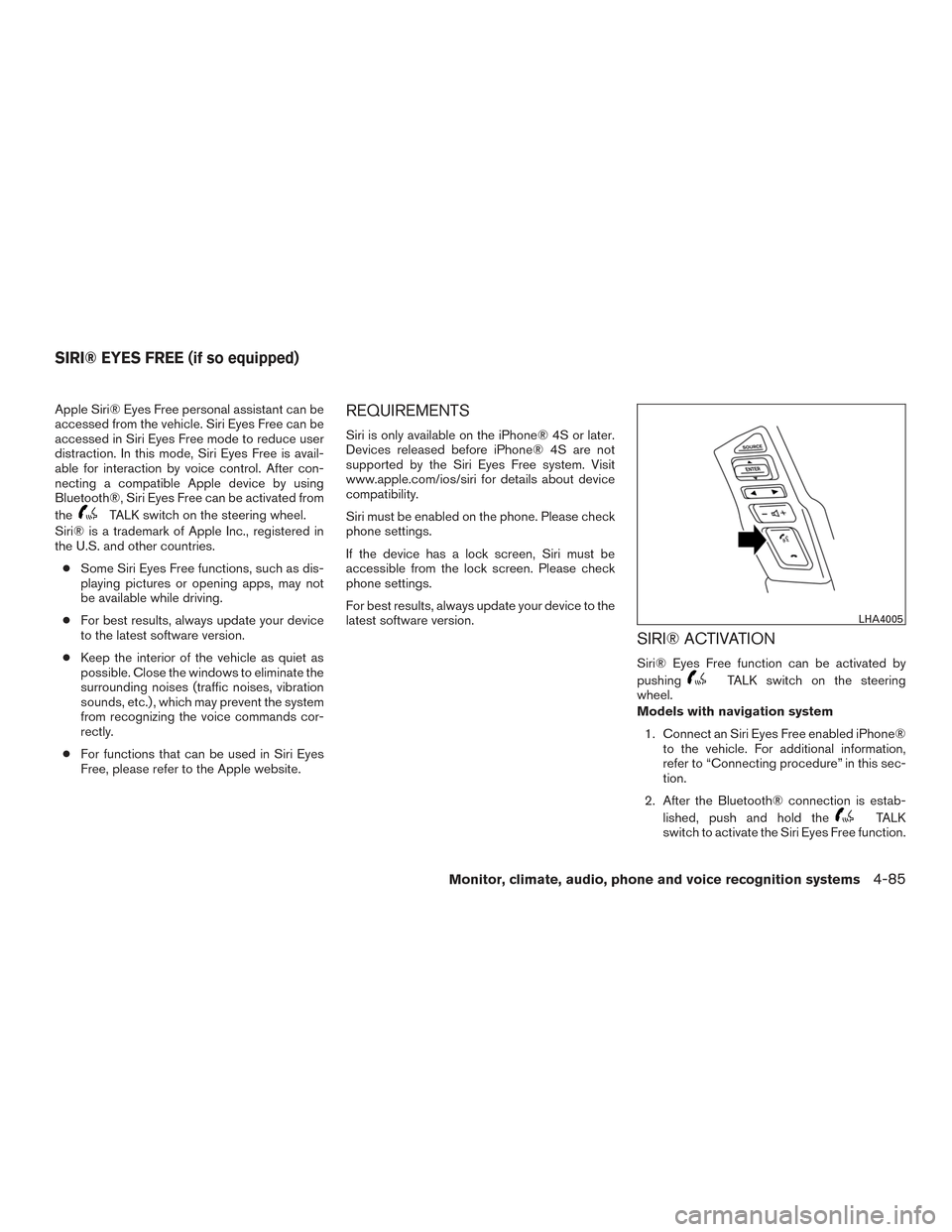
Siri® Eyes Free function can be activated by
pushing
TALK switch on the steering
wheel.
Models with navigation system
1. Connect an Siri Eyes Free enabled iPhone® to the vehicle. For additional information,
refer to “Connecting procedure” in this sec-
tion.
2. After the Bluetooth® connection is estab- lished, push and hold the
TALK
switch to activate the Siri Eyes Free function.
LHA4005
SIRI® EYES FREE (if so equipped)
Monitor, climate, audio, phone and voice recognition systems4-85
Page 323 of 671
Models without navigation system1. Connect a Siri Eyes Free enabled iPhone® to the vehicle. For additional information,
refer to “Initialization” in this section.
2. After the Bluetooth® connection is estab- lished, the switch operation select screen is
displayed.
3. Select “Short Press” or “Long Press” for Siri Eyes Free activation Switch action can also
be changed from the Bluetooth® settings
menu. For additional information, refer to
“Changing Siri Eyes Free Settings (models
without navigation system)” in this section.
OPERATING SIRI® EYES FREE
1. Push or push and hold theTALK
switch.
2. Speak your command and then listen to the Siri Eyes Free reply.
After starting Siri Eyes Free, push the
TALK switch again within 5 seconds of the end of
the Siri Eyes Free announcement to extend the
session.
Example 1 – Playing music
1. Push or push and hold the
TALK
switch.
2. Say “Play (artist name, song name, etc.)”. 3. Your vehicle will automatically change to
Bluetooth® Audio or iPod® mode* when
the music starts playing. Mode selection is
determined by the phone.
* If the iPhone® is also connected with the USB
cable.
If the audio track does not start playing automati-
cally after Siri Eyes Free ends, try changing the
track or audio source to resume playback.
NOTE:
For best results, use the native music app.
Performance of music control function
while using Podcasts, Audiobook or other
3rd party music apps may vary and is con-
trolled by the iPhone®.
Example 2 – Replying to text messages 1. If a compatible iPhone® is connected and “Show Notifications” of the iPhone® set-
tings is enabled, the vehicle will display a
notification for new incoming text messages.
2. After reading the message, push or push and hold the
TALK switch to reply
using Siri Eyes Free.
3. After a beep sounds, say “Text message” or a similar command to reply using Siri Eyes
Free.
CHANGING SIRI® EYES FREE
SETTINGS (models with navigation
system)
Settings for Siri® Eyes Free can be found in the
Bluetooth settings menu. For additional informa-
tion, refer to “Bluetooth® settings” in this section.
1. Press the [
] button.
2. Touch the “Settings” key.
3. Touch the “Phone & Bluetooth” key.
4. Touch the “Phone settings” key.
5. Select “Short Press” or “Long Press” to set the activation.
4-86Monitor, climate, audio, phone and voice recognition systems
Page 324 of 671
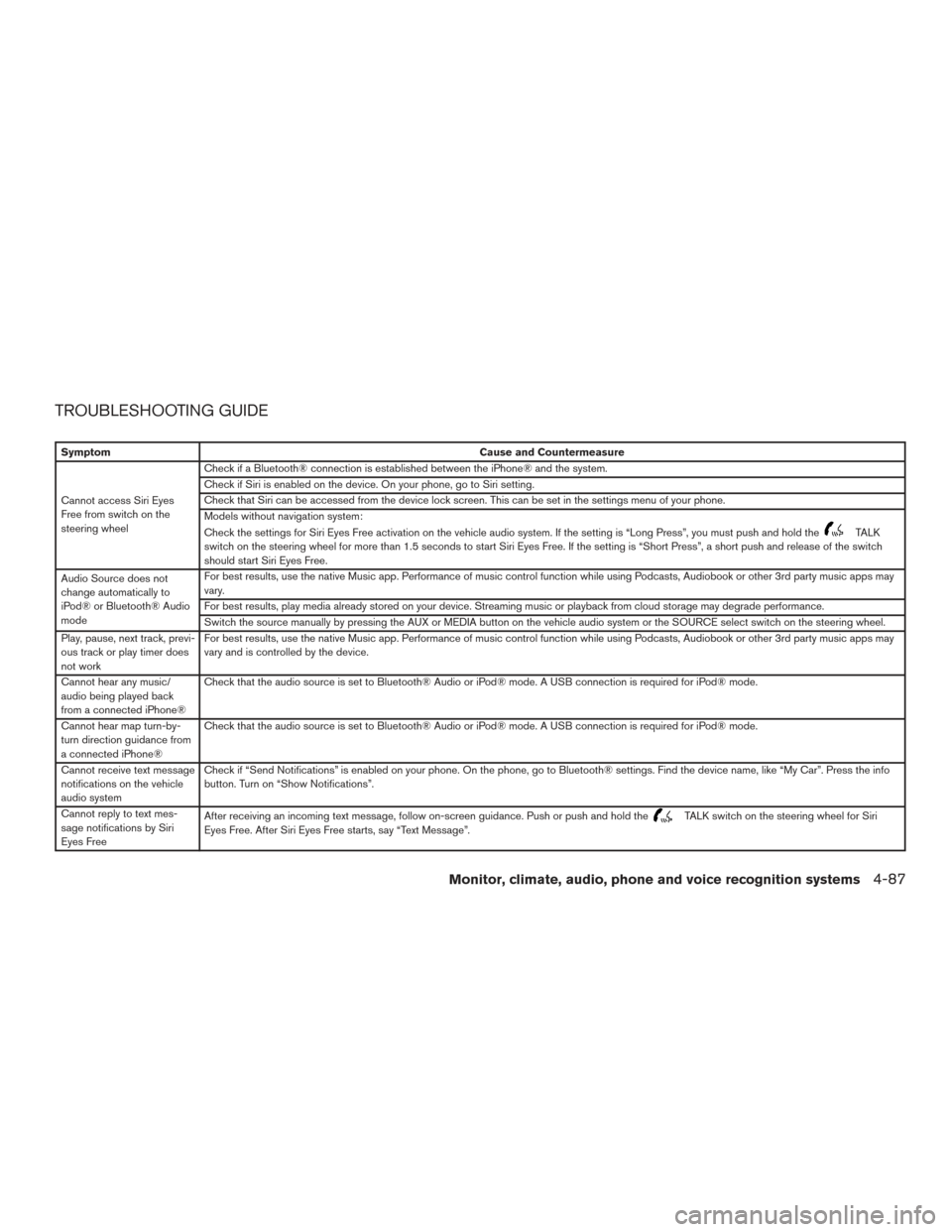
TROUBLESHOOTING GUIDE
SymptomCause and Countermeasure
Cannot access Siri Eyes
Free from switch on the
steering wheel Check if a Bluetooth® connection is established between the iPhone® and the system.
Check if Siri is enabled on the device. On your phone, go to Siri setting.
Check that Siri can be accessed from the device lock screen. This can be set in the settings menu of your phone.
Models without navigation system:
Check the settings for Siri Eyes Free activation on the vehicle audio system. If the setting is “Long Press”, you must push and hold the
TALK
switch on the steering wheel for more than 1.5 seconds to start Siri Eyes Free. If the setting is “Short Press”, a short push and release of the switch
should start Siri Eyes Free.
Audio Source does not
change automatically to
iPod® or Bluetooth® Audio
mode For best results, use the native Music app. Performance of music control function while using Podcasts, Audiobook or other 3rd party music apps may
vary.
For best results, play media already stored on your device. Streaming music or playback from cloud storage may degrade performance.
Switch the source manually by pressing the AUX or MEDIA button on the vehicle audio system or the SOURCE select switch on the steering wheel.
Play, pause, next track, previ-
ous track or play timer does
not work For best results, use the native Music app. Performance of music control function while using Podcasts, Audiobook or other 3rd party music apps may
vary and is controlled by the device.
Cannot hear any music/
audio being played back
from a connected iPhone® Check that the audio source is set to Bluetooth® Audio or iPod® mode. A USB connection is required for iPod® mode.
Cannot hear map turn-by-
turn direction guidance from
a connected iPhone® Check that the audio source is set to Bluetooth® Audio or iPod® mode. A USB connection is required for iPod® mode.
Cannot receive text message
notifications on the vehicle
audio system Check if “Send Notifications” is enabled on your phone. On the phone, go to Bluetooth® settings. Find the device name, like “My Car”. Press the info
button. Turn on “Show Notifications”.
Cannot reply to text mes-
sage notifications by Siri
Eyes Free After receiving an incoming text message, follow on-screen guidance. Push or push and hold the
TALK switch on the steering wheel for Siri
Eyes Free. After Siri Eyes Free starts, say “Text Message”.
Monitor, climate, audio, phone and voice recognition systems4-87
Page 332 of 671
NOTE:
The following remote control functions do
not apply to this model: A-B and Program.
POWER button
Press this button to turn the monitor on. Press
this button again to turn the monitor off.
Source button
Press this button to cycle between monitor A
audio/video sources and monitor B audio/video
sources.
Setup button
Press this button to navigate the DVD OSD
menu. For additional information, refer to “How to
use the DVD OSD menu” in this section.
Eject button
Press this button to eject the disc.
DVD–B button
Press this button to transmit the remote control
codes and functions to operate monitor B.
SOUND AROUND SELECT button
Selects a FM transmitter channel.
PIX button
Press this button to access the picture adjust-
ment menu and select between BRIGHTNESS,
CONTRAST, SATURATION, HUE, SHARP-
NESS, IR HEADPHONE, LANGUAGE, and RE-
SET. Press the
orbuttons to
adjust the screen.
REPEAT button
Press this button to select between different
repeat modes.
ENTER button
Press this button to make a selection or begin
playback of the media.
RIGHT button
Press this button to navigate right when display-
ing a menu or file list.
A-B button
Press the A-B button once to set point A and
then press again to set point B. Playback will now
repeat between point A and point B.
R-S button
Non-functioning.
ERASE / ADD button
Non-functioning.
AUDIO button
Press this button to select and listen to different
audio streams (this function only applies to DVD
titles that support multiple audio streams) .
ANGLE button
Press this button to select different viewing
angles (this function only applies to DVD titles
that support multiple angles) .
GO TO button
Non-functioning.
DISPLAY button
Press this button to display various information
including title, chapter/track, elapsed time, time
remaining, or turn off the display.
PROGRAM button
Edit a playback program containing desired titles
in the DVD or tracks in the CD-DA.
RANDOM button
Press this button to play content in a random
order.
Monitor, climate, audio, phone and voice recognition systems4-95
Page 333 of 671
3D button
Press this button to select between several audio
effects. DVD mode: Concert, Living Room, Hall,
Bathroom, Cave, Arena, Church, and Off.
PBC (Video CD only) button
Press this button to run the playback control on or
off.
ZOOM button
Press this button to zoom in or out when display-
ing images or playing DVDs. The zoom range for
images is from 50% to 200%. The zoom range
for DVDs is from 1/4 size to 4x the original size.
NEXT button
Press this button to select the next chapter, track,
or file.
PREV button
Press this button to select the previous chapter,
track, or file.
FF (Fast foward) button
Press this button to search media forwards.
FR (Fast rewind) button
Press this button to search media backwards.
STOP button
Press this button once to stop playback (press
play to resume playback) . Press this button twice
to perform a full stop (press play to start playback
from the beginning) .
PLAY/PAUSE button
Press this button to begin media playback. Press
this button again to pause media playback.
Number Keys
0—9
SUBTITLE button
Press this button to select and display subtitles
(this function only applies to DVD titles that sup-
port subtitles) .
TITLE button
Press this button to navigate the title menu if
included on the disc.
CH- SEARCH/SKIP button
Non-functioning.
AUTO MEMORY button
Non-functioning.
DOWN button
Press this button to navigate down when display-
ing a menu or file list.
RETURN button
Press this button to return to a previous menu
screen.
LEFT button
Press this button to navigate left when displaying
a menu or file list.
UP button
Press this button to navigate up when displaying
a menu or file list.
MENU button
Press this button to go to the root menu if in-
cluded on the disc.
MUTE button
Press this button to mute the audio when playing
discs or playing files from a USB device. Press
this button again to resume audio.
SOUND AROUND ON/OFF
Turns the FM transmitter ON/OFF.
4-96Monitor, climate, audio, phone and voice recognition systems
Page 341 of 671
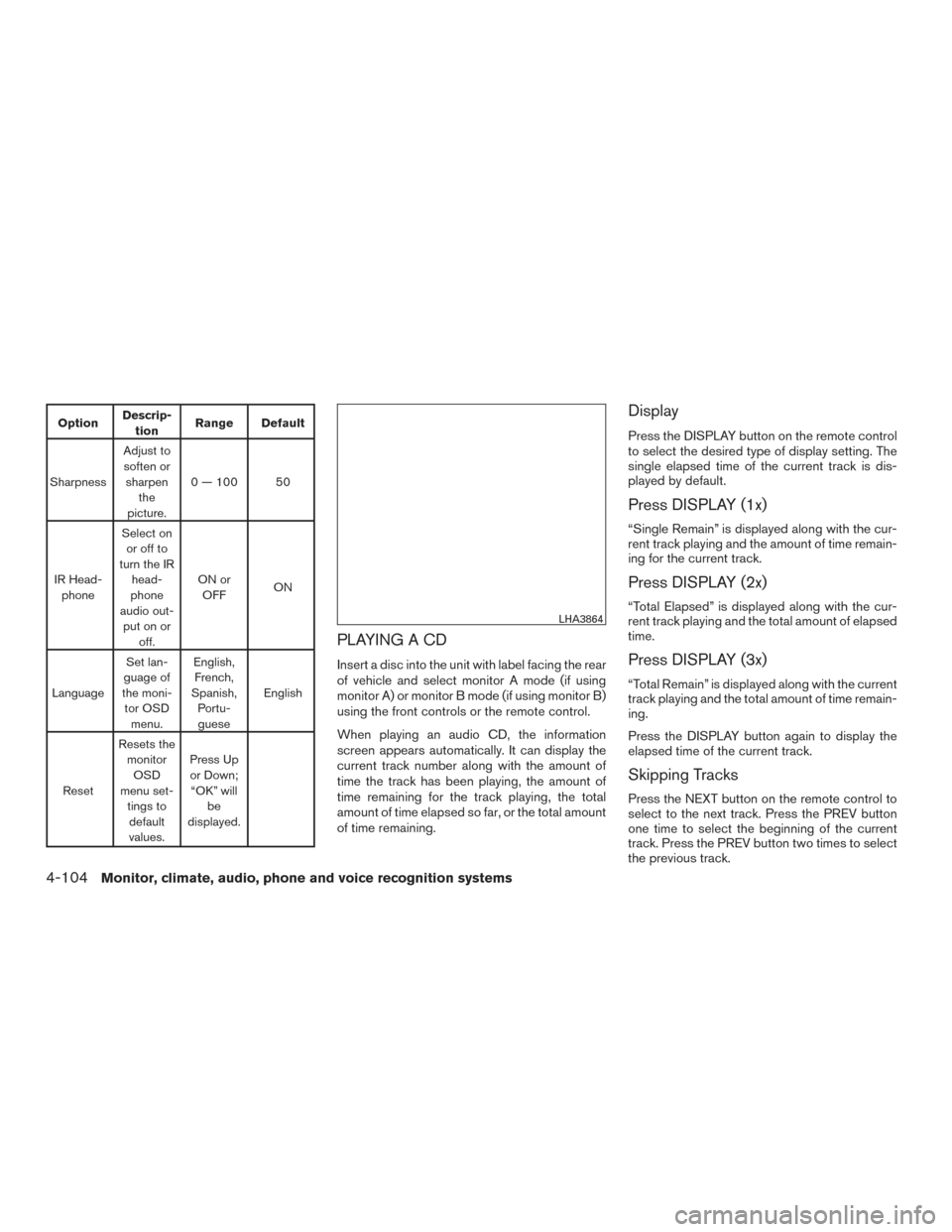
OptionDescrip-
tion Range Default
Sharpness Adjust to
soften or sharpen the
picture. 0 — 100 50
IR Head- phone Select on
or off to
turn the IR head-
phone
audio out- put on or off. ON or
OFF ON
Language Set lan-
guage of
the moni- tor OSD menu. English,
French,
Spanish, Portu-guese English
Reset Resets the
monitorOSD
menu set- tings todefault
values. Press Up
or Down; “OK” will be
displayed.
PLAYING A CD
Insert a disc into the unit with label facing the rear
of vehicle and select monitor A mode (if using
monitor A) or monitor B mode (if using monitor B)
using the front controls or the remote control.
When playing an audio CD, the information
screen appears automatically. It can display the
current track number along with the amount of
time the track has been playing, the amount of
time remaining for the track playing, the total
amount of time elapsed so far, or the total amount
of time remaining.
Display
Press the DISPLAY button on the remote control
to select the desired type of display setting. The
single elapsed time of the current track is dis-
played by default.
Press DISPLAY (1x)
“Single Remain” is displayed along with the cur-
rent track playing and the amount of time remain-
ing for the current track.
Press DISPLAY (2x)
“Total Elapsed” is displayed along with the cur-
rent track playing and the total amount of elapsed
time.
Press DISPLAY (3x)
“Total Remain” is displayed along with the current
track playing and the total amount of time remain-
ing.
Press the DISPLAY button again to display the
elapsed time of the current track.
Skipping Tracks
Press the NEXT button on the remote control to
select to the next track. Press the PREV button
one time to select the beginning of the current
track. Press the PREV button two times to select
the previous track.
LHA3864
4-104Monitor, climate, audio, phone and voice recognition systems
Page 342 of 671
Repeat Modes
To access the repeat mode options, press the
REPEAT button on the remote control. The re-
peat mode options are as follows:●
REPEAT ALL: Repeat the entire disc
(default) .
●
REPEAT ONE: Repeat the current
track.
● REPEAT OFF: Playback stops after the disc
in its entirety.
Random Mode
You can choose what order the tracks will be
played. To access the random play mode, press
the RANDOM button on the remote control. All
tracks on the disc will playback in random order.
Press RANDOM again to cancel random mode.
Direct Track Access
Press the number keys on the remote control
(0–9) to access a track directly. For example, to
go to track 14, press “1”,”4”, then ENTER on the
remote control.
PLAYING AUDIO FILES
MP3 and WMA are formats for storing digital
audio. A CD quality song can be compressed into
the MP3 or WMA format with very little loss of
quality, while talking up much less storage space.
Encoded discs and USB devices that include
MP3 or WMA audio files can be played on this
system.
Insert a disc or USB device into the unit and
select monitor A mode (if using monitor A) or
monitor B (if using monitor B) using the front
panel controls or the remote control.
Using a USB Device
Insert a USB device into the USB connection
port. When inserting a USB device, the top side
of the devices should face upwards.
When an MP3/WMA encoded disc or USB de-
vice is inserted, the information screen appears
automatically and playback will begin.
Display
During audio file playback, press the DISPLAY
button on the remote control to select between
the file list and currently playing file.
Selecting Files
1. To change files when a file is playing, press
the
orbuttons on the re-
mote control to display the file list, and then
press the
orbuttons to
select the desired file.
2. Once the desired file is highlighted, press the ENTER button on the remote control to
select it.
LHA3865
Monitor, climate, audio, phone and voice recognition systems4-105
Page 343 of 671
Selecting Folders
1. To select folders when a file is playing, pressthe
button on the remote control
to display the list. Press the
orbuttons to select the desired
folder.
2. Press the
button to access the
previous level (go up one level) or, press
the
button to access the next level
(go down one level) .
3. Once the desired folder is highlighted, press the ENTER button on the remote control to
select it.
Skipping Files
Press the NEXT button on the remote control to
select to the next file. Press the PREV button one
time to select the beginning of the current file.
Press the PREV button two times to select the
previous file.
Repeat Modes
To access the repeat mode options, press the
REPEAT button on the remote control. The re-
peat mode options are as follows:
●
REPEAT ALL: Repeat the entire disc
or USB device (default) . ●
REPEAT FOLDER: Repeat the cur-
rent folder
●
REPEAT ONE: Repeat the current
file.
● REPEAT OFF: Playback stops after the disc
or USB device is played in its entirety.
Random Mode
You can choose what order the files will be
played. To access the random play mode, press
the RANDOM button on the remote control. The
files in the current folder will playback in random
order. Press RANDOM again to cancel random
mode.
Direct File Access
Press the number keys on the remote control
(0–9) to access a file directly. For example, to go
to track 14, press “1”,”4”, then ENTER on the
remote control.
PLAYING IMAGE FILES
Insert a disc or USB device into the unit and
select monitor A mode (if using monitor A) or
monitor B (if using monitor B) using the front
panel controls or the remote control.
Using a USB Device
Insert a USB device into the USB connection
port. When inserting a USB device, the top side
of the devices should face upwards.
When a disc or USB device with JPG files is
inserted, the slideshow will begin automatically.
LHA3866
4-106Monitor, climate, audio, phone and voice recognition systems
Page 344 of 671
When a disc or USB device with mixed
audio/video/image files is inserted, the file list
screen may appear first.
Selecting Files
1. To select files during the slideshow, pressthe MENU button remote control to access
the file list. Press the
orbuttons on the remote control to select the
desired file.
2. Once the desired file is highlighted, press the ENTER button on the remote control to
select it.
Selecting Folders
1. To select folders during the slideshow, pressthe MENU button on the remote control to
access the list.
2. Press the
button to access the
previous level (go up one level) or, press
the
button to access the next level
(go down one level) .
3. Once the desired folder is highlighted, press the ENTER button on the remote control to
select it.
Repeat Modes
To access the repeat mode options, press the
REPEAT button on the remote control. The re-
peat mode options are as follows:
●
REPEAT ALL: Repeat the entire disc
or USB device (default) .
●
REPEAT FOLDER: Repeat the cur-
rent folder
●
REPEAT ONE: Repeat the current
file.
● REPEAT OFF: Playback stops after the disc
or USB device is played in its entirety.
Thumbnail Views
1. Press the STOP button on the remote con- trol during the slideshow to display images
in thumbnail mode. Press the
orand theorbuttons on the remote control to select the
desired language.
2. Once the desired image is highlighted, press the ENTER button on the remote con-
trol to select it.
Rotating Images
During the slideshow, press thebutton
on the remote control to rotate the image 90°
clockwise. Press the
button to rotate
the image 90° counter-clockwise.
Inverting Images
During the slideshow, press thebutton
on the remote control to invert the image (Up-
Down) .
Mirroring Images
During the slideshow, press thebutton
on the remote control to mirror the image (Left-
Right) .
Direct File Access
Press the number keys on the remote control
(0–9) to access a file directly. For example, to go
to track 14, press “1”,”4”, then ENTER on the
remote control.
Monitor, climate, audio, phone and voice recognition systems4-107
Page 345 of 671
PLAYING VIDEO FILES
Insert a disc or USB device into the unit and
select monitor A mode (if using monitor A) or
monitor B (if using monitor B) using the front
panel controls or the remote control.
Using a USB Device
Insert a USB device into the USB connection
port. When inserting a USB device, the top side
of the device should face upwards.
When a disc or USB device with video files is
inserted, playback will begin automatically. Whena disc or USB device with mixed
audio/video/image files is inserted, the file list
screen may appear first.
Selecting Files
1. To select files during the video playback,
press the MENU button on the remote con-
trol to access the file list. Press the
orbuttons on the remote control to
select the desired file.
2. Once the desired file is highlighted, press the ENTER button on the remote control to
select it.
Selecting Folders
1. To select folders during video playback,press the MENU button on the remote con-
trol to access the list.
2. Press the
button to access the
previous level (go up one level) or, press
the
button to access the next level
(go down one level) .
3. Once the desired folder is highlighted, press the ENTER button on the remote control to
select it.
Skipping Files
Press the NEXT button on the remote control to
select to the next file. Press the PREV button one
time to select the beginning of the current file.
Press the PREV button two times to select the
previous file.
Repeat Modes
To access the repeat mode options, press the
REPEAT button on the remote control. The re-
peat mode options are as follows:
●
REPEAT ALL: Repeat the entire disc
or USB device (default) .
●
REPEAT FOLDER: Repeat the cur-
rent folder
●
REPEAT ONE: Repeat the current
file.
● REPEAT OFF: Playback stops after the disc
or USB device is played in its entirety.
Direct File Access
Press the number keys on the remote control
(0–9) to access a file directly. For example, to go
to track 14, press “1”,”4”, then ENTER on the
remote control.
LHA3867
4-108Monitor, climate, audio, phone and voice recognition systems