AUX NISSAN TITAN 2019 Owner´s Manual
[x] Cancel search | Manufacturer: NISSAN, Model Year: 2019, Model line: TITAN, Model: NISSAN TITAN 2019Pages: 682, PDF Size: 7.99 MB
Page 34 of 682
15. Heated steering wheel switch(if so equipped) (P. 2-59)
Warning systems switch
(if so equipped) (P. 2-59)
16. Auxiliary jack* USB port*
17. Hazard warning flasher switch
(P. 6-2)
18. Trailer Brake Controller Unit (TBCU)
(if so equipped) (P. 2-66)
19. Climate control seat switch
(if so equipped) (P. 2-55)
Heated front seat switches
(if so equipped) (P. 2-56)
20. Vehicle Dynamic Control (VDC) OFF
switch (P. 2-60)
Front and rear sonar system OFF
switch (if so equipped) (P. 2-64)
21. 4WD shif t switch (if so equipped)
(P. 5-45)
22. Push-button ignition switch
(P. 5-11)
23. Tilt and telescopic steering wheel
control (P. 3-30) 24. Headlight aiming control
(if so equipped) (P. 2-49)
Power inverter switch
(if so equipped) (P. 2-63)
Cargo lamp switch (P. 2-55)
Electronic locking rear differential
(E-Lock) system switch
(if so equipped) (P. 2-62)
Hill descent control system switch
(if so equipped) (P. 2-61)
25. Headlight switch (P. 2-49) Fog light switch (if so equipped)
(P. 2-54)
Instrument brightness control
switches (P. 2-49)
Trip reset switch (P. 2-6)
*Refer to the separate NissanConnect®
Owner’s Manual
Refer to the page number indicated in
parenthesis for operating details.
Illustrated table of contents0-9
Page 124 of 682
2 Instruments and controls
Instrument panel................................2-4
Meters and gauges ..............................2-6
Speedometer and odometer .................2-6
Tachometer ..................................2-8
Engine coolant temperature gauge ..........2-8
Fuel gauge ...................................2-9
Auxiliary gauges (if so equipped) .............2-10
Diesel Exhaust Fluid (DEF) Level
(if so equipped) ............................... 2-11
Off-road monitor (if so equipped) ............2-12
Compass (if so equipped) ......................2-12
Warning lights, indicator lights and audible
reminders ...................................... 2-16
Checking lights .............................. 2-17
Warning lights ............................... 2-17
Indicator lights .............................. 2-23
Audible reminders ........................... 2-25
Vehicle information display .....................2-26
How to use the vehicle information
display ...................................... 2-27
Startup display .............................. 2-27
Settings ..................................... 2-27
Vehicle information display warnings
and indicators ............................... 2-36Diesel warnings and indicators
(if so equipped)
.............................. 2-42
Security systems ............................... 2-43
Vehicle security system .....................2-43
NISSAN Vehicle Immobilizer System .........2-44
Wiper and washer switch .......................2-46
Switch operation ............................ 2-46
Rain-sensing auto wiper system
(if so equipped) ..............................2-47
Rear window and/or outside mirror defroster
switch (if so equipped) .......................... 2-48
Headlight switch ............................... 2-49
Headlight control switch .....................2-49
Daytime Running Lights (DRL) system
(Type A) (if so equipped) .....................2-52
LED Daytime Running Lights (DRL)
system (Type B) (if so equipped) .............2-52
Instrument brightness control ...............2-53
Turn signal switch ........................... 2-53
F og light
switch (if so equipped) ................2-54
Horn ........................................... 2-54
Cargo lamp switch ............................. 2-55
Climate controlled seat switches
(if so equipped) ................................. 2-55
Page 128 of 682
15. Heated steering wheel switch(if so equipped) (P. 2-59)
Warning systems switch
(if so equipped) (P. 2-59)
16. Auxiliary jack* USB port*
17. Hazard warning flasher switch
(P. 6-2)
18. Trailer Brake Controller Unit (TBCU)
(if so equipped) (P. 2-66)
19. Climate control seat switch
(if so equipped) (P. 2-55)
Heated front seat switches
(if so equipped) (P. 2-56)
20. Vehicle Dynamic Control (VDC) OFF
switch (P. 2-60)
Front and rear sonar system OFF
switch (if so equipped) (P. 2-64)
21. 4WD shif t switch (if so equipped)
(P. 5-45)
22. Push-button ignition switch
(P. 5-11)
23. Tilt and telescopic steering wheel
control (P. 3-30) 24. Headlight aiming control
(if so equipped) (P. 2-49)
Power inverter switch
(if so equipped) (P. 2-63)
Cargo lamp switch (P. 2-55)
Electronic locking rear differential
(E-Lock) system switch
(if so equipped) (P. 2-62)
Hill descent control system switch
(if so equipped) (P. 2-61)
25. Headlight switch (P. 2-49) Fog light switch (if so equipped)
(P. 2-54)
Instrument brightness control
switches (P. 2-49)
Trip reset switch (P. 2-6)
*Refer to the separate NissanConnect®
Owner’s Manual
Refer to the page number indicated in
parenthesis for operating details.
Instruments and controls2-5
Page 133 of 682
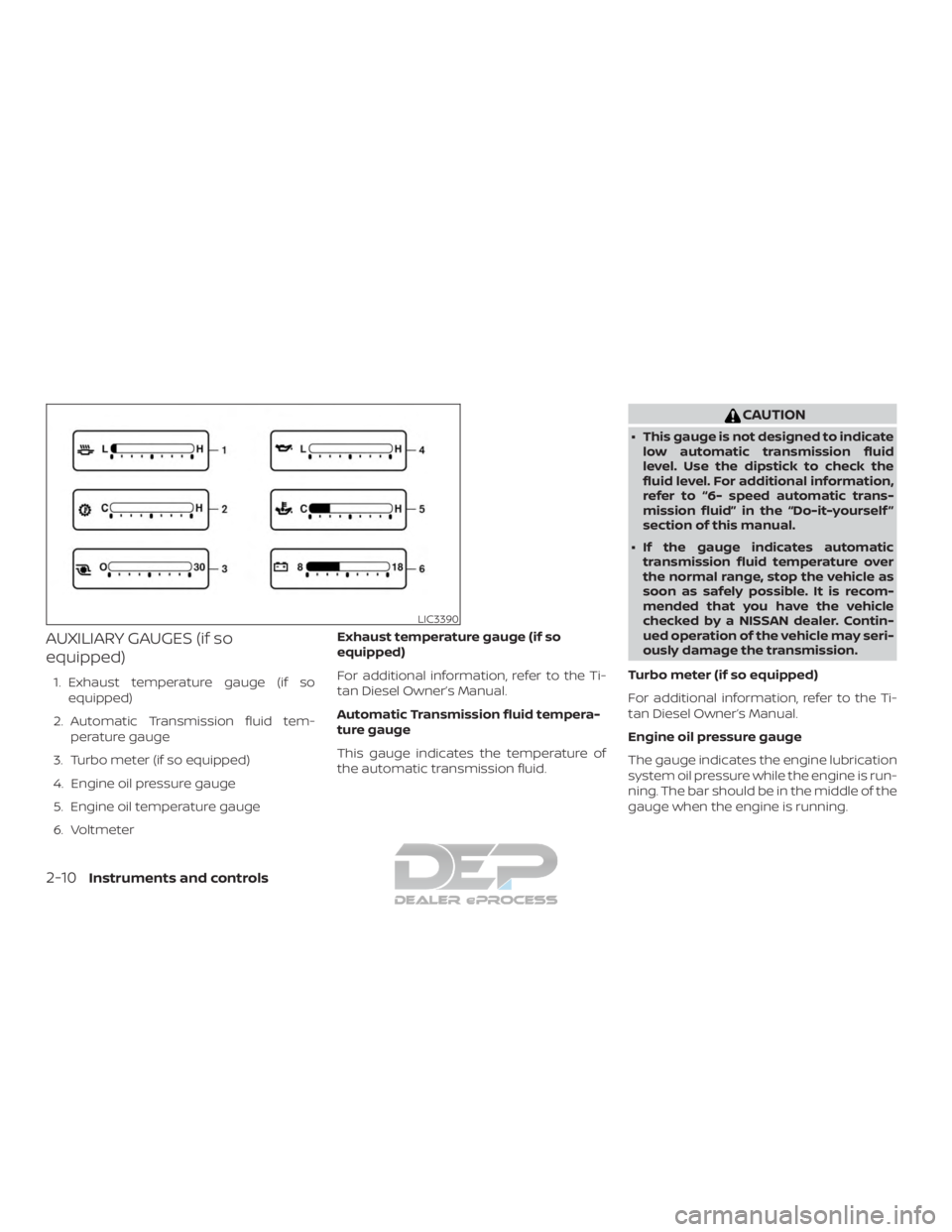
AUXILIARY GAUGES (if so
equipped)
1. Exhaust temperature gauge (if soequipped)
2. Automatic Transmission fluid tem- perature gauge
3. Turbo meter (if so equipped)
4. Engine oil pressure gauge
5. Engine oil temperature gauge
6. Voltmeter Exhaust temperature gauge (if so
equipped)
For additional information, refer to the Ti-
tan Diesel Owner’s Manual.
Automatic Transmission fluid tempera-
ture gauge
This gauge indicates the temperature of
the automatic transmission fluid.
CAUTION
∙ This gauge is not designed to indicate
low automatic transmission fluid
level. Use the dipstick to check the
fluid level. For additional information,
refer to “6- speed automatic trans-
mission fluid” in the “Do-it-yourself ”
section of this manual.
∙ If the gauge indicates automatic transmission fluid temperature over
the normal range, stop the vehicle as
soon as safely possible. It is recom-
mended that you have the vehicle
checked by a NISSAN dealer. Contin-
ued operation of the vehicle may seri-
ously damage the transmission.
Turbo meter (if so equipped)
For additional information, refer to the Ti-
tan Diesel Owner’s Manual.
Engine oil pressure gauge
The gauge indicates the engine lubrication
system oil pressure while the engine is run-
ning. The bar should be in the middle of the
gauge when the engine is running.
LIC3390
2-10Instruments and controls
Page 150 of 682
HOW TO USE THE VEHICLE
INFORMATION DISPLAY
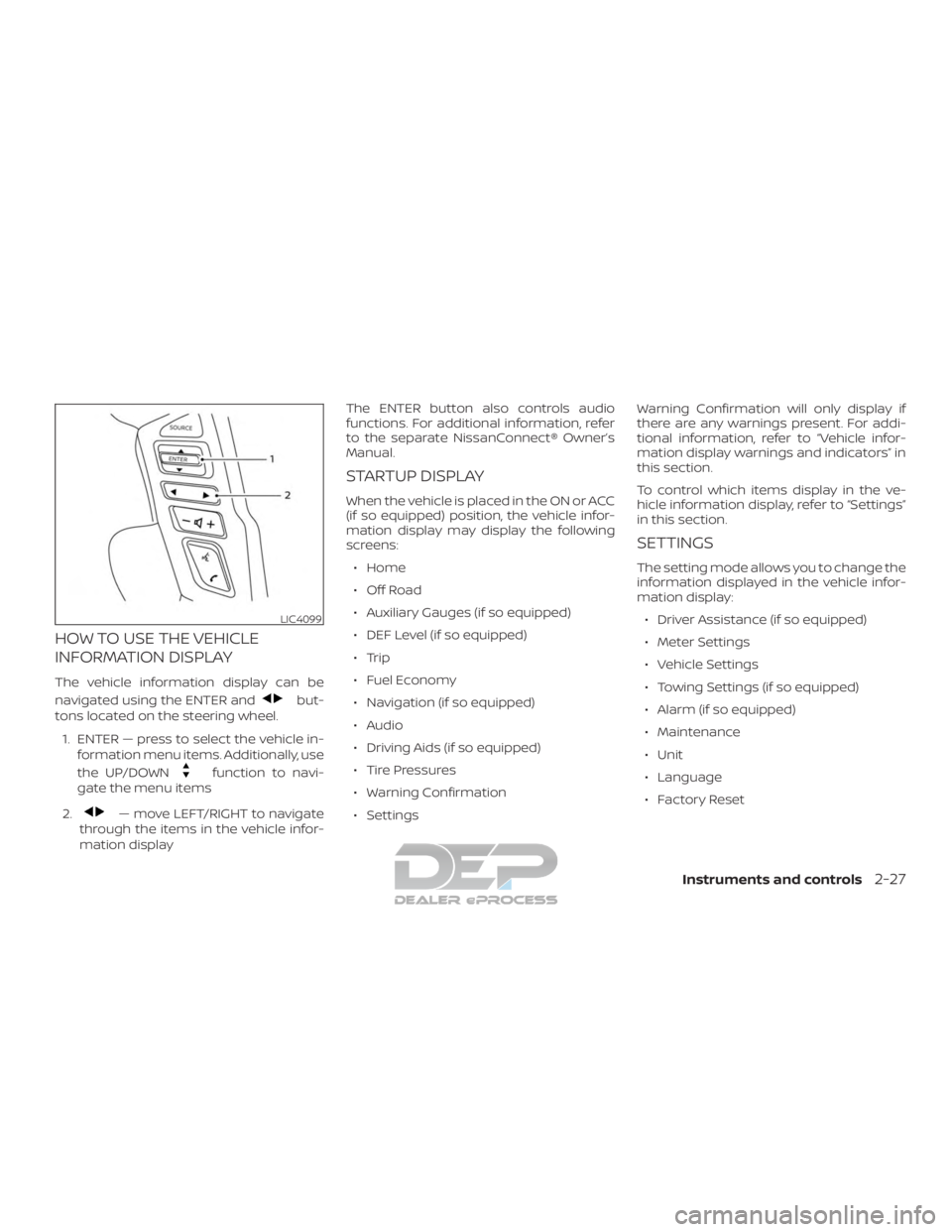
The vehicle information display can be
navigated using the ENTER and
but-
tons located on the steering wheel.
1. ENTER — press to select the vehicle in- formation menu items. Additionally, use
the UP/DOWN
function to navi-
gate the menu items
2.
— move LEFT/RIGHT to navigate
through the items in the vehicle infor-
mation display The ENTER button also controls audio
functions. For additional information, refer
to the separate NissanConnect® Owner’s
Manual.
STARTUP DISPLAY
When the vehicle is placed in the ON or ACC
(if so equipped) position, the vehicle infor-
mation display may display the following
screens:
∙ Home
∙ Off Road
∙ Auxiliary Gauges (if so equipped)
∙ DEF Level (if so equipped)
∙ Trip
∙ Fuel Economy
∙ Navigation (if so equipped)
∙ Audio
∙ Driving Aids (if so equipped)
∙ Tire Pressures
∙ Warning Confirmation
∙ Settings Warning Confirmation will only display if
there are any warnings present. For addi-
tional information, refer to “Vehicle infor-
mation display warnings and indicators” in
this section.
To control which items display in the ve-
hicle information display, refer to “Settings”
in this section.
SETTINGS
The setting mode allows you to change the
information displayed in the vehicle infor-
mation display:
∙ Driver Assistance (if so equipped)
∙ Meter Settings
∙ Vehicle Settings
∙ Towing Settings (if so equipped)
∙ Alarm (if so equipped)
∙ Maintenance
∙ Unit
∙ Language
∙ Factory Reset
LIC4099
Instruments and controls2-27
Page 152 of 682
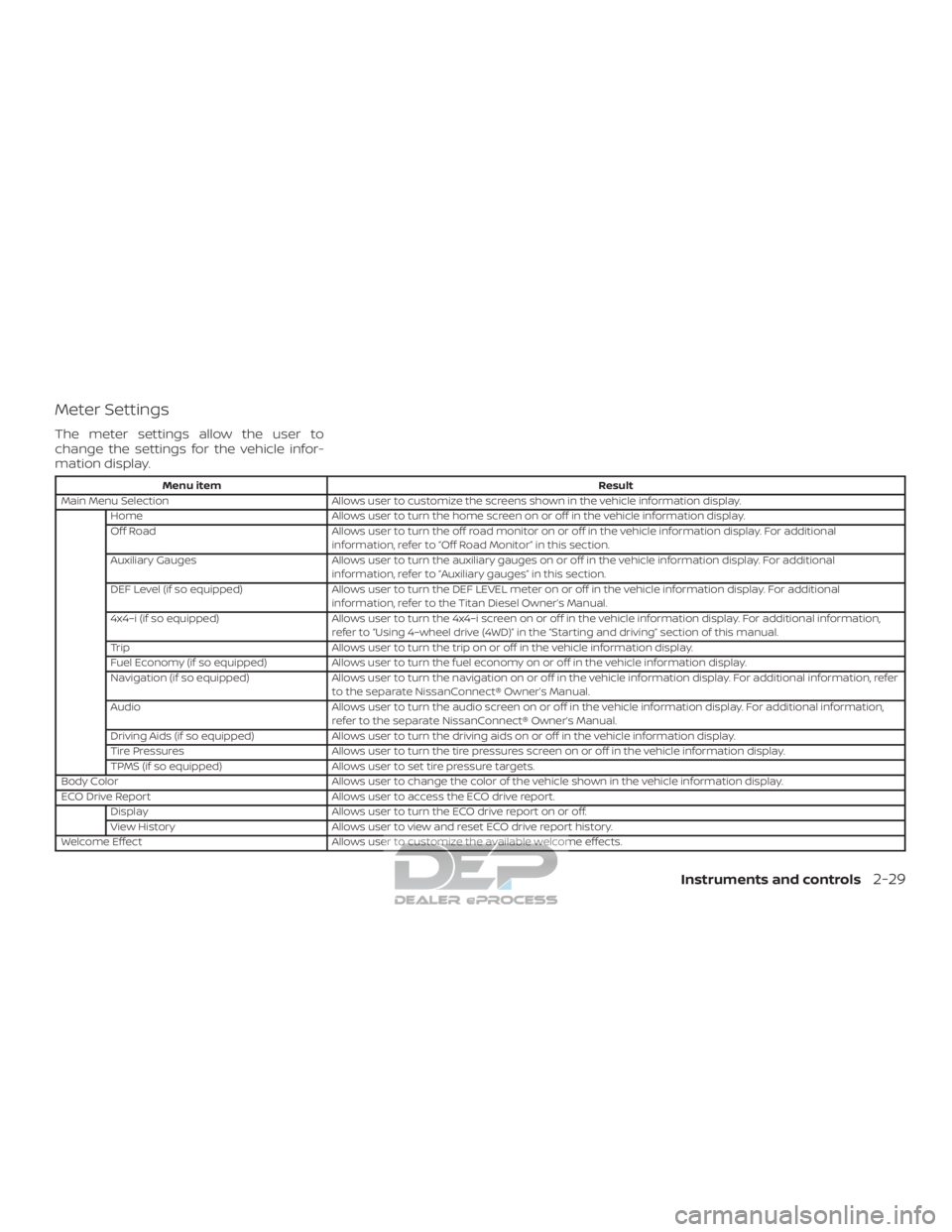
Meter Settings
The meter settings allow the user to
change the settings for the vehicle infor-
mation display.
Menu itemResult
Main Menu Selection Allows user to customize the screens shown in the vehicle information display.
Home Allows user to turn the home screen on or off in the vehicle information display.
Off Road Allows user to turn the off road monitor on or off in the vehicle information display. For additional
information, refer to “Off Road Monitor” in this section.
Auxiliary Gauges Allows user to turn the auxiliary gauges on or off in the vehicle information display. For additional
information, refer to “Auxiliary gauges” in this section.
DEF Level (if so equipped) Allows user to turn the DEF LEVEL meter on or off in the vehicle information display. For additional
information, refer to the Titan Diesel Owner’s Manual.
4x4–i (if so equipped) Allows user to turn the 4x4–i screen on or off in the vehicle information display. For additional information,
refer to “Using 4–wheel drive (4WD)” in the “Starting and driving” section of this manual.
Trip Allows user to turn the trip on or off in the vehicle information display.
Fuel Economy (if so equipped) Allows user to turn the fuel economy on or off in the vehicle information display.
Navigation (if so equipped) Allows user to turn the navigation on or off in the vehicle information display. For additional information, refer
to the separate NissanConnect® Owner’s Manual.
Audio Allows user to turn the audio screen on or off in the vehicle information display. For additional information,
refer to the separate NissanConnect® Owner’s Manual.
Driving Aids (if so equipped) Allows user to turn the driving aids on or off in the vehicle information display.
Tire Pressures Allows user to turn the tire pressures screen on or off in the vehicle information display.
TPMS (if so equipped) Allows user to set tire pressure targets.
Body Color Allows user to change the color of the vehicle shown in the vehicle information display.
ECO Drive Report Allows user to access the ECO drive report.
Display Allows user to turn the ECO drive report on or off.
View History Allows user to view and reset ECO drive report history.
Welcome Effect Allows user to customize the available welcome effects.
Instruments and controls2-29
Page 386 of 682
For Canada
Applicable law: Canada 310
This device complies with Industry Canada
licence-exempt RSS standard(s). Operation
is subject to the following two conditions:1. This device may not cause interference, and
2. This device must accept any interfer- ence, including interference that may
cause undesired operation of the de-
vice.
Frequency bands: 24.05 – 24.25GHz
Output power: less than 20 milliwatts
Droit applicable: Canada 310
Le présent appareil est conforme aux CNR
d’Industrie Canada applicables aux appar-
eils radio exempts de licence. L’exploitation
est autorisée aux deux conditions suiv-
antes: 1. L’appareil ne doit pas produire de brouillage, et
2. L’utilisateur de l’appareil doit accepter tout brouillage radioélectrique subi,
même si le brouillage est susceptible
d’en compromettre le fonctionnement. Bandes de fréquences: 24.05 - 24.25GHz
Puissance émise: Moins de 20 milliwattsWARNING
Failure to follow the warnings and in-
structions for proper use of the RCTA
system could result in serious injury or
death.
∙ The RCTA system is not a replacement
for proper driving procedures and is
not designed to prevent contact with
vehicles or objects. When backing out
of a parking space, always use the
side and rear mirrors and turn and
look in the direction your vehicle will
move. Never rely solely on the RCTA
system.
The RCTA system will assist you when
backing out from a parking space. When
the vehicle is in reverse, the system is de-
signed to detect other vehicles approach-
ing from the right or lef t of the vehicle. If the
system detects cross traffic, it will alert you.
REAR CROSS TRAFFIC ALERT (RCTA)
(if so equipped)
Starting and driving5-33
Page 394 of 682
For Canada
Applicable law: Canada 310
This device complies with Industry Canada
licence-exempt RSS standard(s). Operation
is subject to the following two conditions:1. This device may not cause interference, and
2.
This device must accept any interfer-
ence, including interference that may
cause undesired operation of the device.
Frequency bands: 24.05 – 24.25GHz
Output power: less than 20 milliwatts
Droit applicable: Canada 310
Le présent appareil est conforme aux CNR
d’Industrie Canada applicables aux appareils
radio exempts de licence. L’exploitation est
autorisée aux deux conditions suivantes:
1. L’appareil ne doit pas produire de brouillage, et
2. L’utilisateur de l’appareil doit accepter tout brouillage radioélectrique subi,
même si le brouillage est susceptible
d’en compromettre le fonctionnement.
Bandes de fréquences: 24.05 - 24.25GHz
Puissance émise: Moins de 20 milliwatts
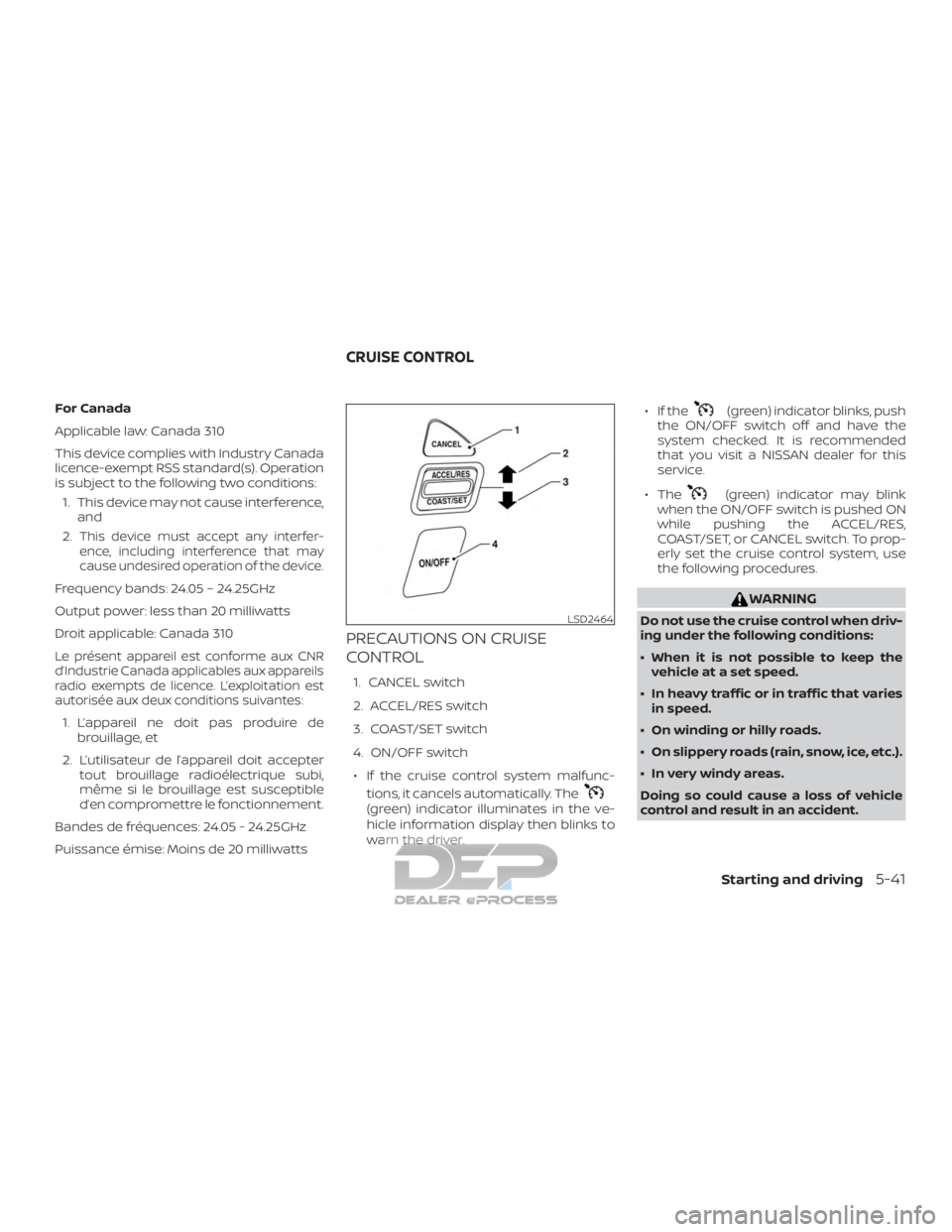
PRECAUTIONS ON CRUISE
CONTROL
1. CANCEL switch
2. ACCEL/RES switch
3. COAST/SET switch
4. ON/OFF switch
∙ If the cruise control system malfunc- tions, it cancels automatically. The
(green) indicator illuminates in the ve-
hicle information display then blinks to
warn the driver. ∙ If the
(green) indicator blinks, push
the ON/OFF switch off and have the
system checked. It is recommended
that you visit a NISSAN dealer for this
service.
∙ The
(green) indicator may blink
when the ON/OFF switch is pushed ON
while pushing the ACCEL/RES,
COAST/SET, or CANCEL switch. To prop-
erly set the cruise control system, use
the following procedures.
WARNING
Do not use the cruise control when driv-
ing under the following conditions:
∙ When it is not possible to keep the vehicle at a set speed.
∙ In heavy traffic or in traffic that varies in speed.
∙ On winding or hilly roads.
∙ On slippery roads (rain, snow, ice, etc.).
∙ In very windy areas.
Doing so could cause a loss of vehicle
control and result in an accident.LSD2464
CRUISE CONTROL
Starting and driving5-41
Page 630 of 682
Low Diesel Exhaust Fluid (DEF)
warning light
When this warning light illuminates, the
DEF fluid needs to be topped off.
For additional information, refer to the “Fuel
and refueling” section of this manual.
Diesel Particulate Filter (DPF)
warning light
When the warning light illuminates, it indi-
cates that particulate matter is accumu-
lated to the specified amount of the limit in
the filter and the filter needs to regenerate.
For additional information, refer to “Diesel
Particulate Filter (DPF)” in the “Maintenance”
section of this manual.
CAUTION
If you continue driving with the DPF
warning light on without performing
the filter regeneration, this will lead to
particle matter overload in the filter. If
this happens, the Malfunction Indicator
Light (MIL) will turn on to indicate the
necessity that a NISSAN or qualified
dealer performs the service regenera-
tion. The performance of the engine
might be limited to protect the DPF
system.
Vehicle information display
The vehicle information display shows vari-
ous meters and gauges that pertain to the
diesel engine. The information that can be
found within the vehicle information dis-
play is as follows:
Exhaust temperature gauge
The exhaust temperature gauge is part of
the Auxiliary Gauges in the vehicle informa-
tion display.
Turbo meter
The turbo meter shows the amount of en-
gine boost.Diesel Exhaust Fluid (DEF) LEVEL
This gauge indicates the level of DEF in the
diesel system.
The DEF LEVEL information screen can be
turned on or off in the vehicle information
display. For additional information, refer to
“How to use the vehicle information dis-
play” in the “Vehicle information display”
section of the Titan Owner’s Manual.
Water in Fuel warning light
If this light illuminates, pull off of the road in
a safe area, stop the engine and immedi-
ately drain the water from the fuel sedi-
ment filter. For additional information, refer
to “Draining water” in the “Do-it-yourself ”
section of this manual.
Malfunction warning light (red)
If the warning light illuminates this indi-
cates either coolant temperature is above
a critical threshold or the exhaust tem-
peratures are above a critical threshold.
When illuminated this lamp indicates the
need to stop the engine as soon as it can
be safely done. The engine must remain
shut down until the engine can be repaired.
Instrument Panel2-3