phone NISSAN VERSA NOTE 2018 Owner´s Manual
[x] Cancel search | Manufacturer: NISSAN, Model Year: 2018, Model line: VERSA NOTE, Model: NISSAN VERSA NOTE 2018Pages: 878, PDF Size: 9.62 MB
Page 276 of 878
![NISSAN VERSA NOTE 2018 Owner´s Manual BLUETOOTH® SETTINGS
To access the phone settings:1. Press the [
] button.
2. Touch the “Settings” key.
3. Touch the “Phone & Bluetooth” key.
Menu Item Result
Phone Settings For additional inf](/img/5/40333/w960_40333-275.png "NISSAN VERSA NOTE 2018 Owner´s Manual BLUETOOTH® SETTINGS
To access the phone settings:1. Press the [
] button.
2. Touch the “Settings” key.
3. Touch the “Phone & Bluetooth” key.
Menu Item Result
Phone Settings For additional inf")
BLUETOOTH® SETTINGS
To access the phone settings:1. Press the [
] button.
2. Touch the “Settings” key.
3. Touch the “Phone & Bluetooth” key.
Menu Item Result
Phone Settings For additional information, refer to “Phone settings” in this section.
Connect New Device Touch to connect a new Bluetooth® device to the Bluetooth® Hands-Free Phone System.
Select Connected Device Touch to choose a Bluetooth® device from a list of those devices connected to the Bluetooth® Hands-Free Phone System.
Replace Connected Device Touch to replace a Bluetooth® device from a list of those devices connected to the Bluetooth® Hands-Free Phone System.
Delete Connected Device Touch to delete a Bluetooth® device from a list of those devices connected to the Bluetooth® Hands-Free Phone System.
Bluetooth Touch to toggle Bluetooth® on and off.
LHA2844
Monitor, climate, audio, phone and voice recognition systems4-115
Page 277 of 878
![NISSAN VERSA NOTE 2018 Owner´s Manual PHONE SETTINGS
To access the phone settings:1. Press the [
] button.
2. Touch the “Settings” key.
3. Touch the “Phone & Bluetooth” key.
4. Touch the “Phone Settings” key and ad- just the f](/img/5/40333/w960_40333-276.png "NISSAN VERSA NOTE 2018 Owner´s Manual PHONE SETTINGS
To access the phone settings:1. Press the [
] button.
2. Touch the “Settings” key.
3. Touch the “Phone & Bluetooth” key.
4. Touch the “Phone Settings” key and ad- just the f")
PHONE SETTINGS
To access the phone settings:1. Press the [
] button.
2. Touch the “Settings” key.
3. Touch the “Phone & Bluetooth” key.
4. Touch the “Phone Settings” key and ad- just the following settings as desired:
∙ Start Siri® by: Touch “Short Press” or “Long Press” to
set how Siri® is operated on the steering
wheel.
∙ Sort Phonebook By: Touch “First Name” or “Last Name” to
choose how phonebook entries are al-
phabetically displayed on the screen.
∙ Use Phonebook From: Touch “Handset” to use the phone’s
phonebook. Select “SIM” to use the
phonebook on the SIM card. Touch
“Both” to use both sources. ∙ Download Phonebook Now:
Touch to download the phonebook to
the vehicle from the chosen source.
∙ Record Name for Phonebook Entry: Touch to record a name for a phone-
book entry for use with the NISSAN
Voice Recognition System.
∙ Phone Notifications for: Notifications may be displayed on the
center display screen.
∙ Text Messaging: Touch to toggle the text message func-
tionality on or off.
∙ Show Incoming Text for: Text notifications may be displayed on
the center display screen. Touch “Off ” to
turn off all text notifications.
∙ Auto Reply: Touch to toggle the auto reply function-
ality on or off. ∙ Auto Reply Message:
Touch to indicate preferred message to
be sent when “Auto Reply” function is
activated.
∙ Use Vehicle’s Signature: Touch to toggle on or off the addition of
the vehicle signature to outgoing mes-
sages.
∙ Custom Text Messages: Touch this option to select a custom
message to edit. There are 4 customer
message slots available.
TROUBLESHOOTING GUIDE
The system should respond correctly to all
voice commands without difficulty. If prob-
lems are encountered, try the following so-
lutions.
Where the solutions are listed by number,
try each solution in turn, starting with num-
ber 1, until the problem is resolved.
4-116Monitor, climate, audio, phone and voice recognition systems
Page 278 of 878
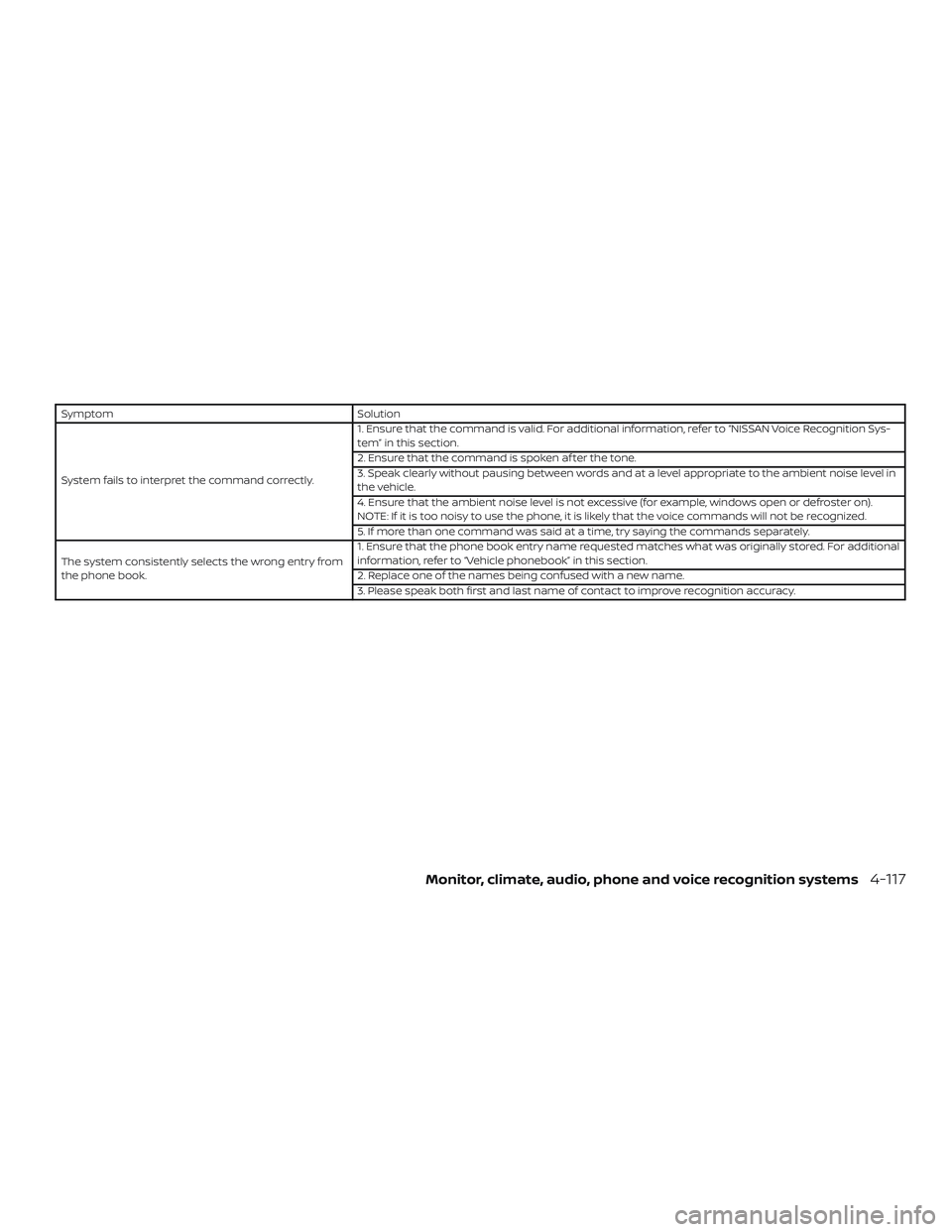
SymptomSolution
System fails to interpret the command correctly. 1. Ensure that the command is valid. For additional information, refer to “NISSAN Voice Recognition Sys-
tem” in this section.
2. Ensure that the command is spoken af ter the tone.
3. Speak clearly without pausing between words and at a level appropriate to the ambient noise level in
the vehicle.
4. Ensure that the ambient noise level is not excessive (for example, windows open or defroster on).
NOTE: If it is too noisy to use the phone, it is likely that the voice commands will not be recognized.
5. If more than one command was said at a time, try saying the commands separately.
The system consistently selects the wrong entry from
the phone book. 1. Ensure that the phone book entry name requested matches what was originally stored. For additional
information, refer to “Vehicle phonebook” in this section.
2. Replace one of the names being confused with a new name.
3. Please speak both first and last name of contact to improve recognition accuracy.
Monitor, climate, audio, phone and voice recognition systems4-117
Page 279 of 878
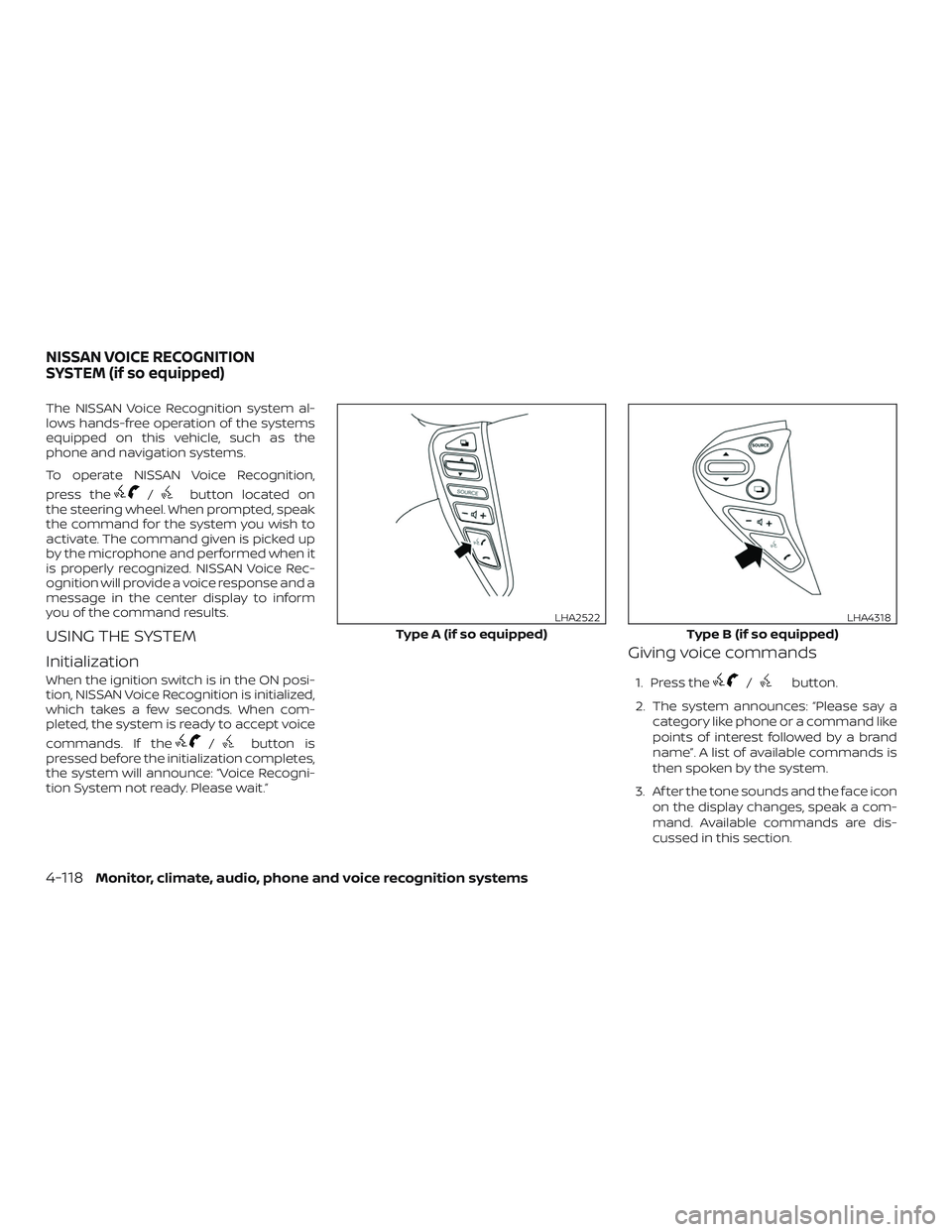
The NISSAN Voice Recognition system al-
lows hands-free operation of the systems
equipped on this vehicle, such as the
phone and navigation systems.
To operate NISSAN Voice Recognition,
press the
/button located on
the steering wheel. When prompted, speak
the command for the system you wish to
activate. The command given is picked up
by the microphone and performed when it
is properly recognized. NISSAN Voice Rec-
ognition will provide a voice response and a
message in the center display to inform
you of the command results.
USING THE SYSTEM
Initialization
When the ignition switch is in the ON posi-
tion, NISSAN Voice Recognition is initialized,
which takes a few seconds. When com-
pleted, the system is ready to accept voice
commands. If the
/button is
pressed before the initialization completes,
the system will announce: “Voice Recogni-
tion System not ready. Please wait.”
Giving voice commands
1. Press the/button.
2. The system announces: “Please say a category like phone or a command like
points of interest followed by a brand
name”. A list of available commands is
then spoken by the system.
3. Af ter the tone sounds and the face icon on the display changes, speak a com-
mand. Available commands are dis-
cussed in this section.
Type A (if so equipped)
LHA2522
Type B (if so equipped)
LHA4318
NISSAN VOICE RECOGNITION
SYSTEM (if so equipped)
4-118Monitor, climate, audio, phone and voice recognition systems
Page 280 of 878
4. Voice and display feedback are pro-vided when the command is accepted.
∙ If the command is not recognized, the system announces: “Command not
recognized”. Repeat the command in a
clear voice.
∙ If you want to cancel the command or go back to the previous menu of com-
mands, press the
/button.
The system will announce: “Canceling
voice recognition” or “Go back” depend-
ing on the current menu level.
∙ Press the BACK button on the control panel to move back through the menus
displayed on the screen.
∙ If you want to adjust the volume of the voice feedback, use the volume control
switches on the steering wheel or the
volume knob on the control panel.
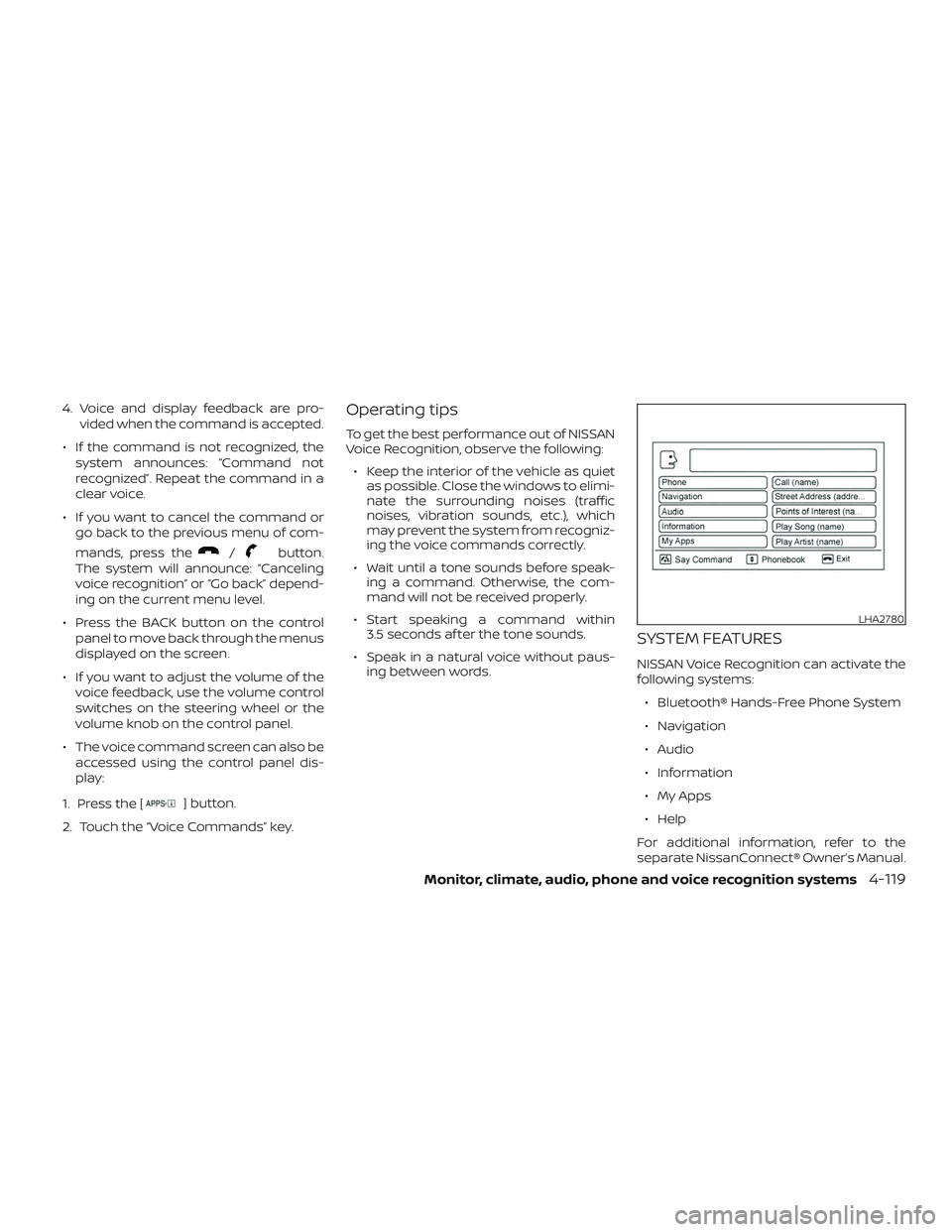
∙ The voice command screen can also be accessed using the control panel dis-
play:
1. Press the [
] button.
2. Touch the “Voice Commands” key.
Operating tips
To get the best performance out of NISSAN
Voice Recognition, observe the following: ∙ Keep the interior of the vehicle as quiet as possible. Close the windows to elimi-
nate the surrounding noises (traffic
noises, vibration sounds, etc.), which
may prevent the system from recogniz-
ing the voice commands correctly.
∙ Wait until a tone sounds before speak- ing a command. Otherwise, the com-
mand will not be received properly.
∙ Start speaking a command within 3.5 seconds af ter the tone sounds.
∙ Speak in a natural voice without paus- ing between words.
SYSTEM FEATURES
NISSAN Voice Recognition can activate the
following systems:
∙ Bluetooth® Hands-Free Phone System
∙ Navigation
∙ Audio
∙ Information
∙ My Apps
∙ Help
For additional information, refer to the
separate NissanConnect® Owner’s Manual.
LHA2780
Monitor, climate, audio, phone and voice recognition systems4-119
Page 281 of 878
How to say numbers
NISSAN Voice Recognition requires a cer-
tain way to speak numbers in voice com-
mands. Refer to the following examples.
General rule: Either “zero” or “oh” can be
used for “0”.
Phone numbers
Speak phone numbers according to the
following example. For 1-800-662-6200, say
dial number and then speak the phone
number in any of the following formats:∙ “one eight oh oh six six two six two oh oh”
∙ “one eight hundred six six two six two oh oh”
∙ “one eight zero zero six six two six two oh oh”
For the best voice recognition phone dial-
ing results, say phone numbers as single
digits. Also, full numbers can only be spo-
ken for “800”. For example, you cannot say
555-6000 as “five five five six thousand”.
BLUETOOTH® HANDS-FREE
PHONE SYSTEM VOICE
COMMANDS
To access the Bluetooth® Hands-Free
Phone System voice commands:
1. Press the
/button.
2. Say “Call” and then a name in the ve- hicle phonebook to call that entry. Oth-
erwise, say “Phone” to access various
phone commands.
If the Bluetooth® has been set to “Off ”, the
system announces: “Bluetooth® is off.
Would you like to turn Bluetooth® on?”
If no phone is connected to the system and
the vehicle is stationary, the system an-
nounces: “There is no phone connected.
Would you like to connect a phone now?”
Say “Yes” to connect a phone. All further
Bluetooth® Hands-Free Phone System
voice commands are only available if a
phone is connected. If a phone is connected and Bluetooth® is
set to “On”, the following voice commands
are available:
∙ Call (a name) Speak the name of the contact in
which you are trying to call. System will
confirm correct contact. Say “Dial” to
initiate dialing.
∙ Dial Number Allows for up to 24 digits to be dialed.
Af ter the number is entered, say “Dial”
to initiate dialing. Say “Correction” to
correct the number entered. Say “Go
Back” to return to the main menu.
∙ List Phonebook Starting with the first alphabetical en-
try in the vehicle phonebook, the sys-
tem prompts for an additional com-
mand. Say “Dial” to call the number of
the phonebook entry. Say “Send Text”
to send a text message to the number
of the phonebook entry. Say “Next En-
try” to skip to the next alphabetical en-
try in the vehicle phonebook, where
the same options will then be available.
4-120Monitor, climate, audio, phone and voice recognition systems
Page 282 of 878
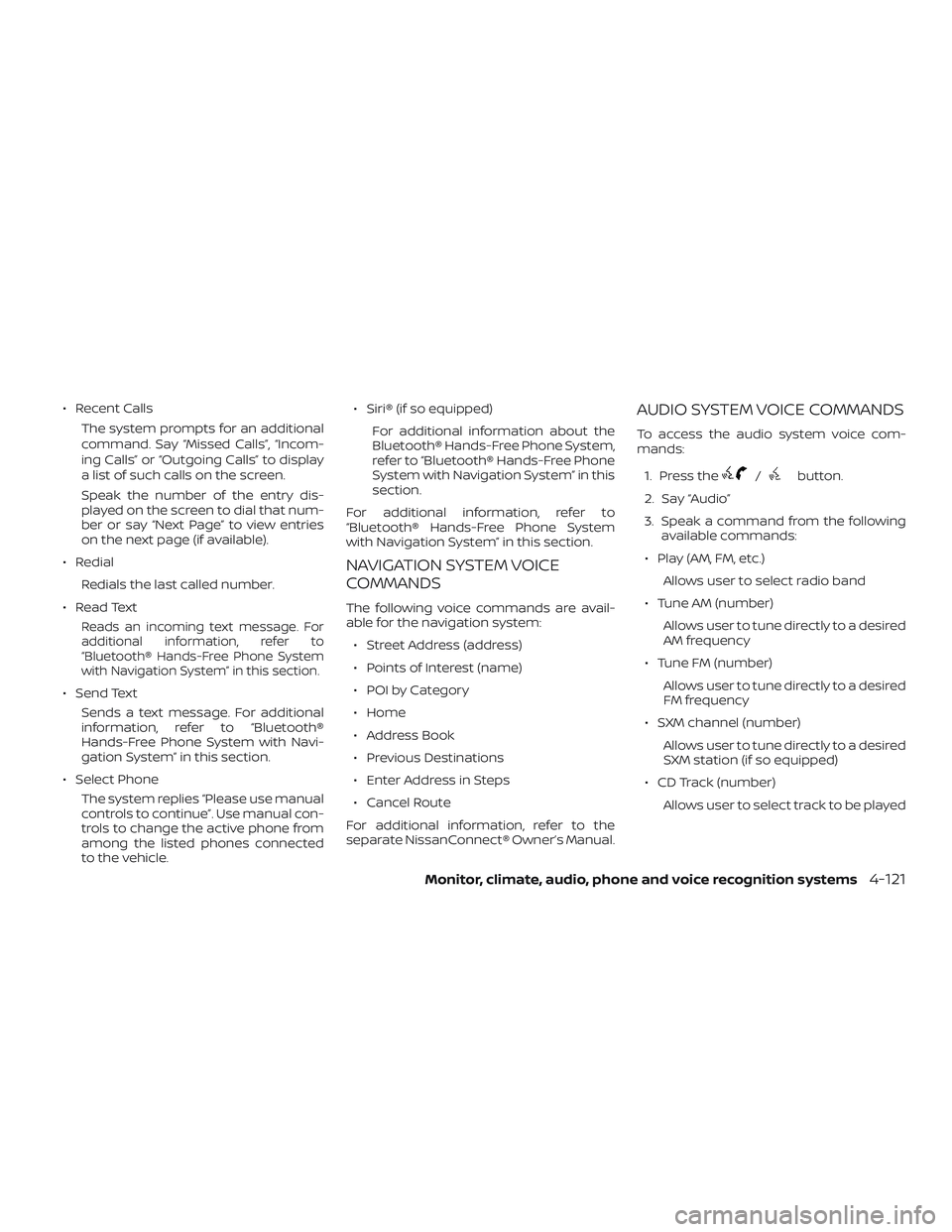
∙ Recent CallsThe system prompts for an additional
command. Say “Missed Calls”, “Incom-
ing Calls” or “Outgoing Calls” to display
a list of such calls on the screen.
Speak the number of the entry dis-
played on the screen to dial that num-
ber or say “Next Page” to view entries
on the next page (if available).
∙ Redial Redials the last called number.
∙ Read Text
Reads an incoming text message. For
additional information, refer to
“Bluetooth® Hands-Free Phone System
with Navigation System” in this section.
∙ Send Text Sends a text message. For additional
information, refer to “Bluetooth®
Hands-Free Phone System with Navi-
gation System” in this section.
∙ Select Phone The system replies “Please use manual
controls to continue”. Use manual con-
trols to change the active phone from
among the listed phones connected
to the vehicle. ∙ Siri® (if so equipped)
For additional information about the
Bluetooth® Hands-Free Phone System,
refer to “Bluetooth® Hands-Free Phone
System with Navigation System” in this
section.
For additional information, refer to
“Bluetooth® Hands-Free Phone System
with Navigation System” in this section.
NAVIGATION SYSTEM VOICE
COMMANDS
The following voice commands are avail-
able for the navigation system: ∙ Street Address (address)
∙ Points of Interest (name)
∙ POI by Category
∙ Home
∙ Address Book
∙ Previous Destinations
∙ Enter Address in Steps
∙ Cancel Route
For additional information, refer to the
separate NissanConnect® Owner’s Manual.
AUDIO SYSTEM VOICE COMMANDS
To access the audio system voice com-
mands:
1. Press the
/button.
2. Say “Audio”
3. Speak a command from the following available commands:
∙ Play (AM, FM, etc.) Allows user to select radio band
∙ Tune AM (number) Allows user to tune directly to a desired
AM frequency
∙ Tune FM (number) Allows user to tune directly to a desired
FM frequency
∙ SXM channel (number) Allows user to tune directly to a desired
SXM station (if so equipped)
∙ CD Track (number) Allows user to select track to be played
Monitor, climate, audio, phone and voice recognition systems4-121
Page 283 of 878
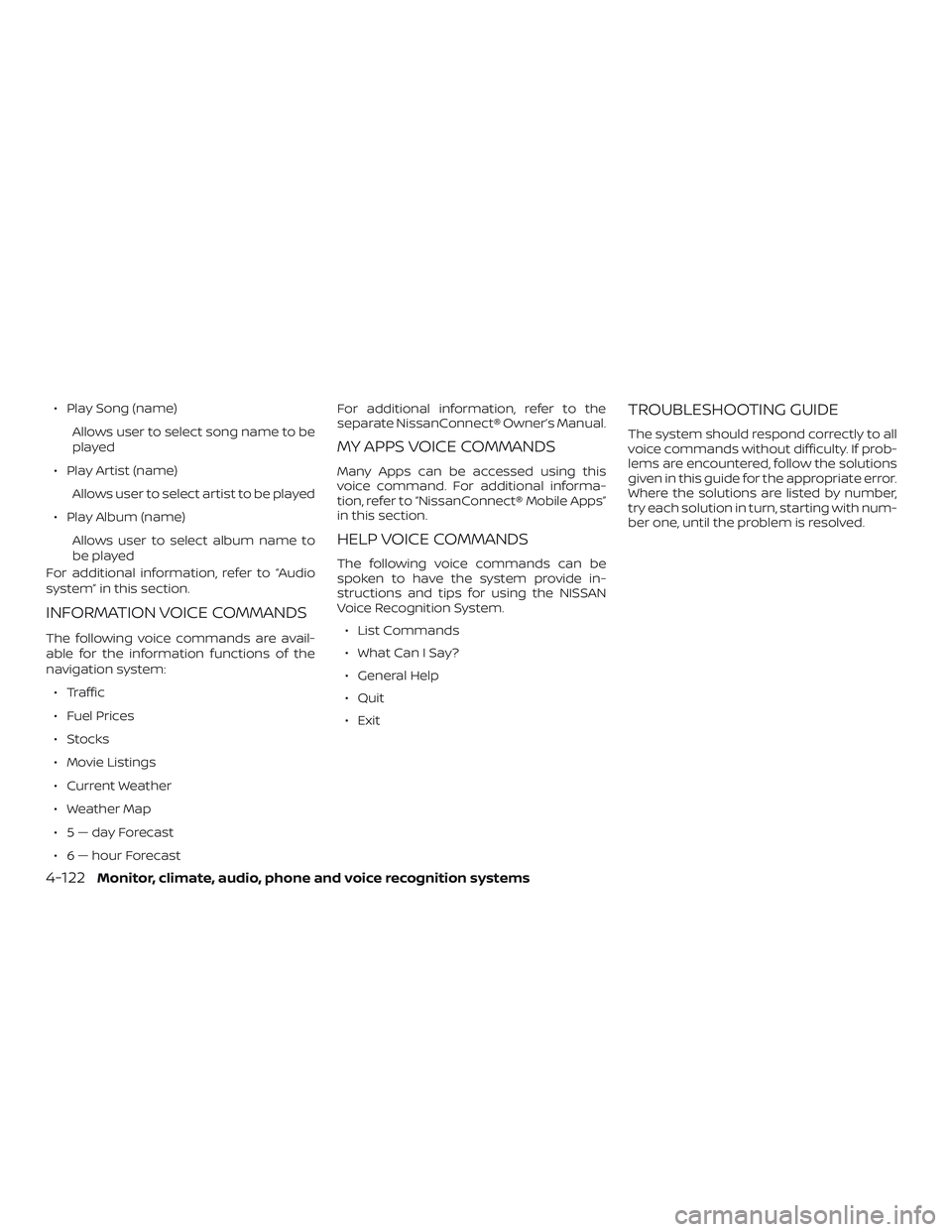
∙ Play Song (name)Allows user to select song name to be
played
∙ Play Artist (name) Allows user to select artist to be played
∙ Play Album (name) Allows user to select album name to
be played
For additional information, refer to “Audio
system” in this section.
INFORMATION VOICE COMMANDS
The following voice commands are avail-
able for the information functions of the
navigation system:
∙ Traffic
∙ Fuel Prices
∙ Stocks
∙ Movie Listings
∙ Current Weather
∙ Weather Map
∙ 5—dayForecast
∙ 6 — hour Forecast For additional information, refer to the
separate NissanConnect® Owner’s Manual.
MY APPS VOICE COMMANDS
Many Apps can be accessed using this
voice command. For additional informa-
tion, refer to “NissanConnect® Mobile Apps”
in this section.
HELP VOICE COMMANDS
The following voice commands can be
spoken to have the system provide in-
structions and tips for using the NISSAN
Voice Recognition System.
∙ List Commands
∙ What Can I Say?
∙ General Help
∙ Quit
∙ Exit
TROUBLESHOOTING GUIDE
The system should respond correctly to all
voice commands without difficulty. If prob-
lems are encountered, follow the solutions
given in this guide for the appropriate error.
Where the solutions are listed by number,
try each solution in turn, starting with num-
ber one, until the problem is resolved.
4-122Monitor, climate, audio, phone and voice recognition systems
Page 284 of 878
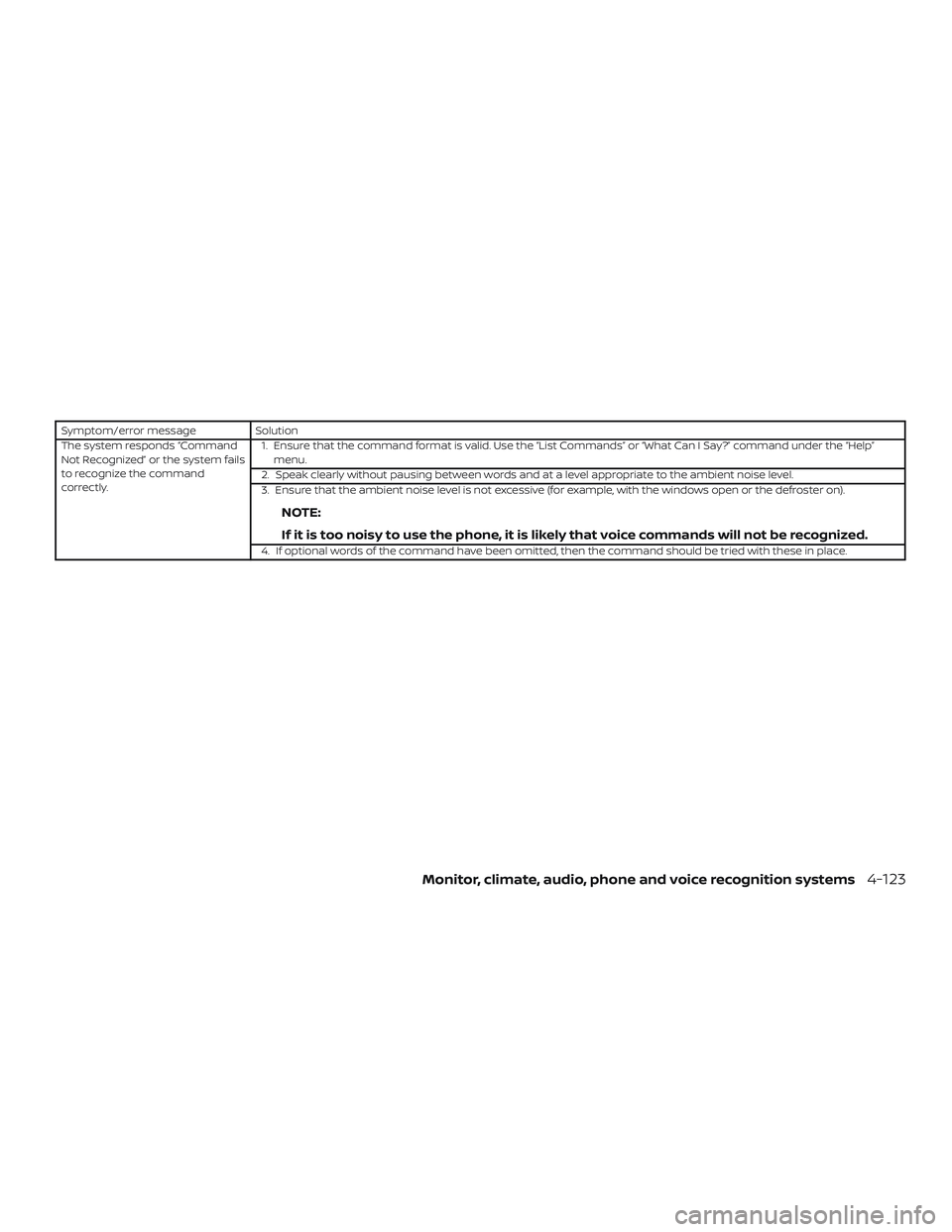
Symptom/error messageSolution
The system responds “Command
Not Recognized” or the system fails
to recognize the command
correctly. 1. Ensure that the command format is valid. Use the “List Commands” or “What Can I Say?” command under the “Help”
menu.
2. Speak clearly without pausing between words and at a level appropriate to the ambient noise level.
3. Ensure that the ambient noise level is not excessive (for example, with the windows open or the defroster on).
NOTE:
If it is too noisy to use the phone, it is likely that voice commands will not be recognized.
4. If optional words of the command have been omitted, then the command should be tried with these in place.
Monitor, climate, audio, phone and voice recognition systems4-123
Page 300 of 878
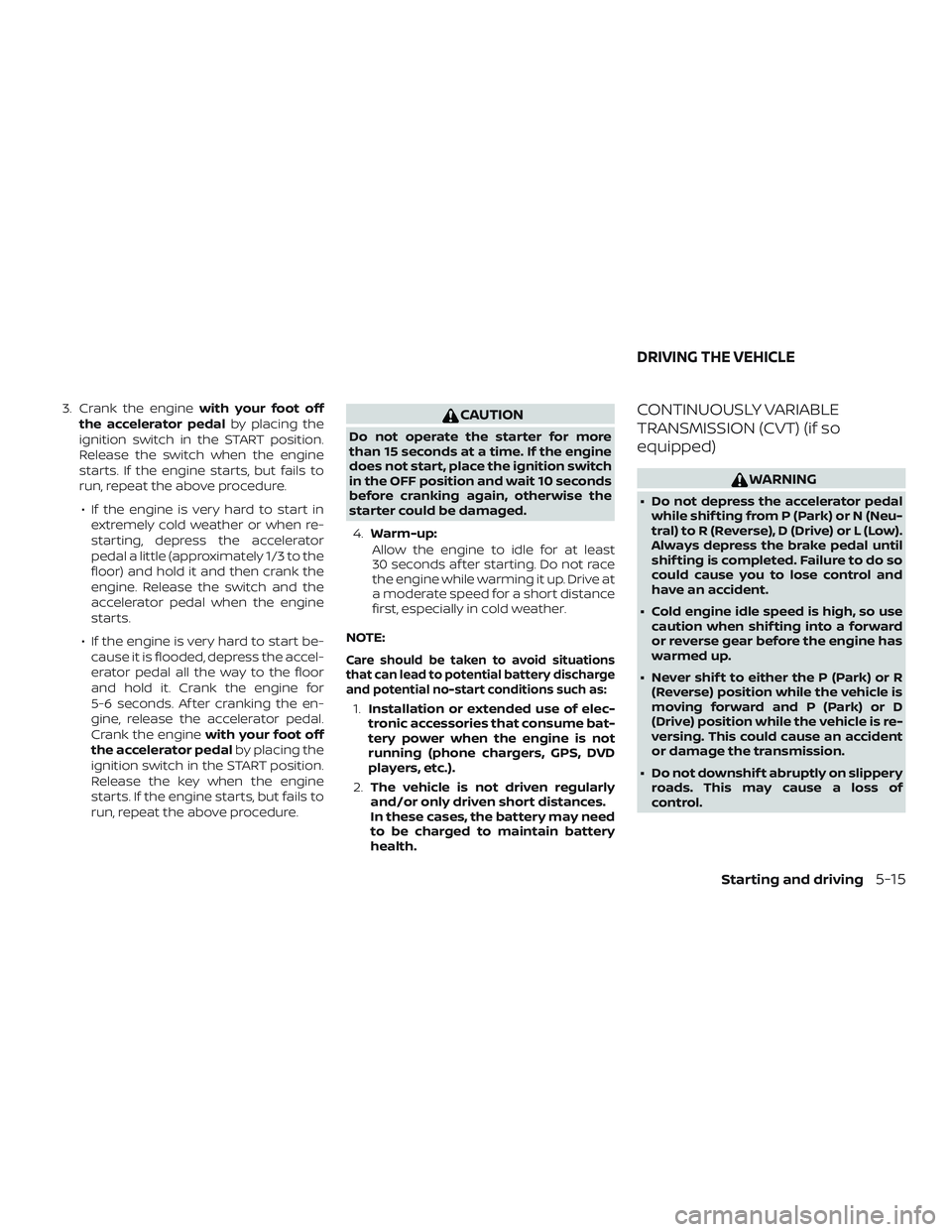
3. Crank the enginewith your foot off
the accelerator pedal by placing the
ignition switch in the START position.
Release the switch when the engine
starts. If the engine starts, but fails to
run, repeat the above procedure.
∙ If the engine is very hard to start in extremely cold weather or when re-
starting, depress the accelerator
pedal a little (approximately 1/3 to the
floor) and hold it and then crank the
engine. Release the switch and the
accelerator pedal when the engine
starts.
∙ If the engine is very hard to start be- cause it is flooded, depress the accel-
erator pedal all the way to the floor
and hold it. Crank the engine for
5-6 seconds. Af ter cranking the en-
gine, release the accelerator pedal.
Crank the engine with your foot off
the accelerator pedal by placing the
ignition switch in the START position.
Release the key when the engine
starts. If the engine starts, but fails to
run, repeat the above procedure.CAUTION
Do not operate the starter for more
than 15 seconds at a time. If the engine
does not start, place the ignition switch
in the OFF position and wait 10 seconds
before cranking again, otherwise the
starter could be damaged.
4. Warm-up:
Allow the engine to idle for at least
30 seconds af ter starting. Do not race
the engine while warming it up. Drive at
a moderate speed for a short distance
first, especially in cold weather.
NOTE:
Care should be taken to avoid situations
that can lead to potential battery discharge
and potential no-start conditions such as:
1. Installation or extended use of elec-
tronic accessories that consume bat-
tery power when the engine is not
running (phone chargers, GPS, DVD
players, etc.).
2. The vehicle is not driven regularly
and/or only driven short distances.
In these cases, the battery may need
to be charged to maintain battery
health.
CONTINUOUSLY VARIABLE
TRANSMISSION (CVT) (if so
equipped)
WARNING
∙ Do not depress the accelerator pedal while shif ting from P (Park) or N (Neu-
tral) to R (Reverse), D (Drive) or L (Low).
Always depress the brake pedal until
shif ting is completed. Failure to do so
could cause you to lose control and
have an accident.
∙ Cold engine idle speed is high, so use caution when shif ting into a forward
or reverse gear before the engine has
warmed up.
∙ Never shif t to either the P (Park) or R (Reverse) position while the vehicle is
moving forward and P (Park) or D
(Drive) position while the vehicle is re-
versing. This could cause an accident
or damage the transmission.
∙ Do not downshif t abruptly on slippery roads. This may cause a loss of
control.
DRIVING THE VEHICLE
Starting and driving5-15