ECO mode NISSAN VERSA SEDAN 2018 Owner´s Manual
[x] Cancel search | Manufacturer: NISSAN, Model Year: 2018, Model line: VERSA SEDAN, Model: NISSAN VERSA SEDAN 2018Pages: 702, PDF Size: 8.98 MB
Page 535 of 702
When installing a CB, ham radio or car
phone in your vehicle, be sure to observe
the following precautions; otherwise, the
new equipment may adversely affect the
engine control system and other electronic
parts.
WARNING
∙ A cellular phone should not be usedfor any purpose while driving so full
attention may be given to vehicle op-
eration. Some jurisdictions prohibit
the use of cellular phones while
driving.
∙ If you must make a call while your ve- hicle is in motion, the hands free cellu-
lar phone operational mode (if so
equipped) is highly recommended.
Exercise extreme caution at all times
so full attention may be given to ve-
hicle operation.
∙ If you are unable to devote full atten- tion to vehicle operation while talking
on the phone, pull off the road to a
safe location and stop your vehicle.
CAUTION
∙ Keep the antenna as far away as pos-sible from the electronic control
modules.
∙ Keep the antenna wire more than 8 in (20 cm) away from the electronic con-
trol system harnesses. Do not route
the antenna wire next to any harness.
∙ Adjust the antenna standing-wave ratio as recommended by the
manufacturer.
∙ Connect the ground wire from the CB radio chassis to the body.
∙ For additional information, it is rec- ommended that you visit a NISSAN
dealer for this service.
WARNING
∙ Use a phone af ter stopping your ve-hicle in a safe location. If you have to
use a phone while driving, exercise ex-
treme caution at all times so full at-
tention may be given to vehicle
operation.
∙ If you are unable to devote full atten- tion to vehicle operation while talking
on the phone, pull off the road to a
safe location and stop your vehicle.
CAUTION
To avoid discharging the vehicle bat-
tery, use a phone af ter starting the
engine.
CAR PHONE OR CB RADIO BLUETOOTH® HANDS-FREE PHONE
SYSTEM
Display screen, heater, air conditioner, audio and phone systems4-47
Page 544 of 702
“Select Phone”
Speak this command to access the Con-
nections menu. For additional information,
refer to “Bluetooth® connections screen” in
this section.
“Add Phone”
Speak this command to access the Con-
nections menu. For additional information,
refer to “Bluetooth® connections screen” in
this section.
“Settings”
Speak this command to access the Sys-
tem Voice settings menu. The system will
exit Voice Recognition mode. Touch one of
the following options on the screen to
change the settings.∙ Beep Only for Opening Prompt By touching the “ON” key, the indicator
light will illuminate, the system voice will
turn off and only a tone will sound when
the Bluetooth® Hands-Free Phone Sys-
tem is activated. To turn the system
voice back on, touch the “ON” key again,
the indicator light will turn off. ∙ Best Match List
When the system doesn’t recognize a
phonebook name it will provide a list of
similar sounding names. To turn this off,
touch the “ON” button, the indicator
light will turn off. To turn on, touch the
“ON” key again, the indicator light will
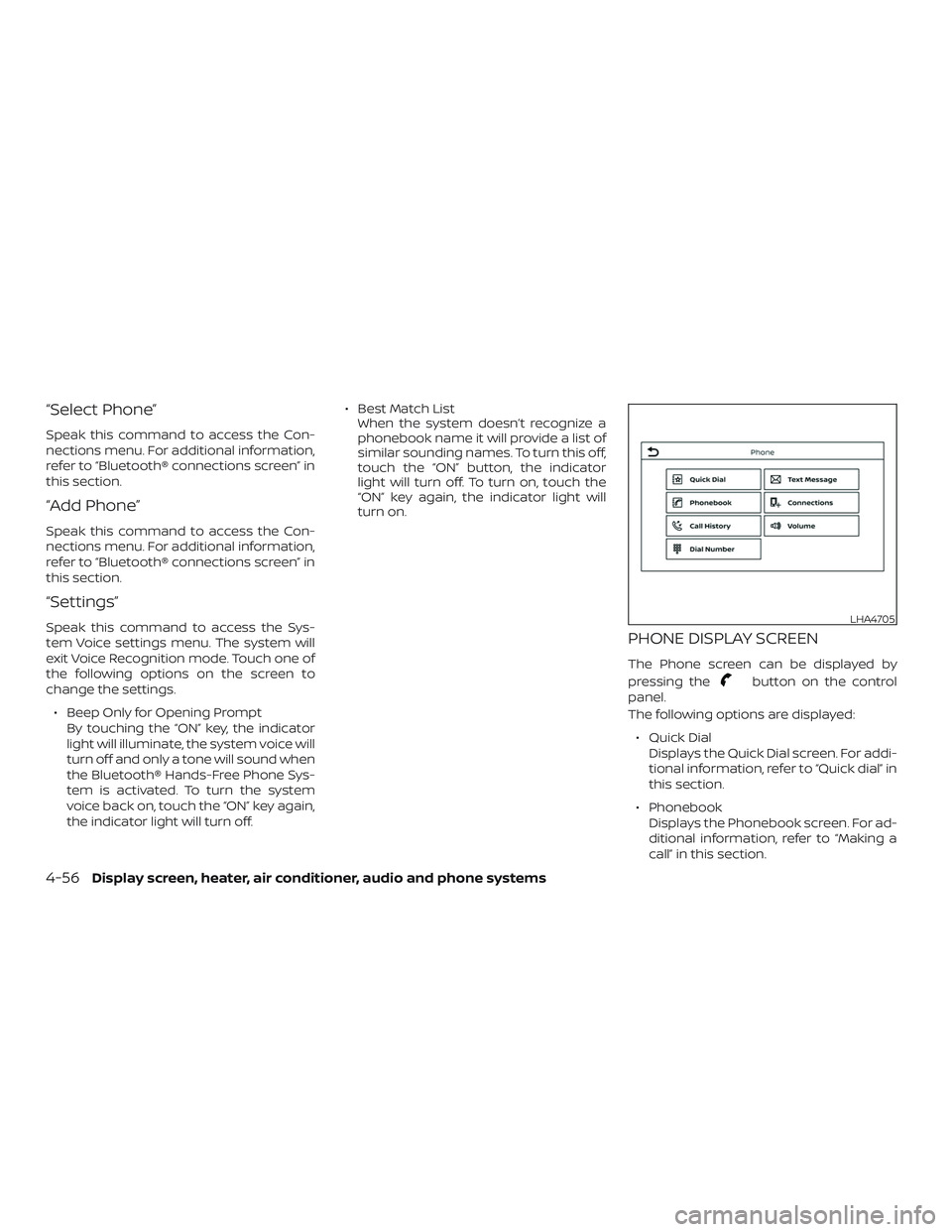
turn on.PHONE DISPLAY SCREEN
The Phone screen can be displayed by
pressing the
button on the control
panel.
The following options are displayed:
∙ Quick Dial Displays the Quick Dial screen. For addi-
tional information, refer to “Quick dial” in
this section.
∙ Phonebook Displays the Phonebook screen. For ad-
ditional information, refer to “Making a
call” in this section.
LHA4705
4-56Display screen, heater, air conditioner, audio and phone systems
Page 556 of 702
WARNING
∙ Do not leave children or adults whowould normally require the assis-
tance of others alone in your vehicle.
Pets should also not be lef t alone.
They could accidentally injure them-
selves or others through inadvertent
operation of the vehicle. Also, on hot,
sunny days, temperatures in a closed
vehicle could quickly become high
enough to cause severe or possibly
fatal injuries to people or animals.
∙ Properly secure all cargo to help pre- vent it from sliding or shif ting. Do not
place cargo higher than the seat-
backs. In a sudden stop or collision,
unsecured cargo could cause per-
sonal injury.
EXHAUST GAS (carbon monoxide)
WARNING
∙ Do not breathe exhaust gases; theycontain colorless and odorless carbon
monoxide. Carbon monoxide is dan-
gerous. It can cause unconsciousness
or death. ∙ If you suspect that exhaust fumes are
entering the vehicle, drive with all
windows fully open, and have the ve-
hicle inspected immediately.
∙ Do not run the engine in closed spaces such as a garage.
∙ Do not park the vehicle with the en- gine running for any extended length
of time.
∙ Keep the rear vent windows, doors and trunk lids (if so equipped) closed
while driving, otherwise exhaust
gases could be drawn into the pas-
senger compartment. If you must
drive with one of these open, follow
these precautions:
1. Open all the windows.
2. Turn the air recirculation mode off and set the fan speed control to
the highest level to circulate the
air.
∙ The exhaust system and body should be inspected by a qualified mechanic
whenever:
a. The vehicle is raised for service. b. You suspect that exhaust fumes
are entering into the passenger
compartment.
c. You notice a change in the sound of the exhaust system.
d. You have had an accident involving damage to the exhaust system,
underbody, or rear of the vehicle.
THREE-WAY CATALYST
The three-way catalyst is an emission con-
trol device installed in the exhaust system.
Exhaust gases in the three-way catalyst
are burned at high temperatures to help
reduce pollutants.
WARNING
∙ The exhaust gas and the exhaust sys-tem are very hot. Keep people, ani-
mals or flammable materials away
from the exhaust system
components.
∙ Do not stop or park the vehicle over flammable materials such as dry
grass, waste paper or rags. They may
ignite and cause a fire.
PRECAUTIONS WHEN STARTING AND
DRIVING
5-2Starting and driving
Page 564 of 702
∙ Make sure the area around the vehicle isclear.
∙ Check fluid levels such as engine oil, coolant, brake and clutch fluid (if so
equipped), and windshield-washer fluid
as frequently as possible, or at least
whenever you refuel.
∙ Check that all windows and lights are clean.
∙ Visually inspect tires for their appear- ance and condition. Also check tires for
proper inflation.
∙ Lock all doors.
∙ Position seat and adjust head restraints/headrests.
∙ Adjust inside and outside mirrors.
∙ Fasten seat belts and ask all passen- gers to do likewise.
∙ Check the operation of warning lights when the ignition switch is placed in the
ON position. For additional information,
refer to “Warning lights, indicator lights
and audible reminders” in the “Instru-
ments and controls” section of this
manual. 1. Apply the parking brake.
2.
Continuously Variable Transmission
models:
Move the shif t lever to P (Park) or N
(Neutral). P (Park) is recommended.
The shif t lever cannot be moved out
of P (Park) and into any of the other
gear positions if the ignition key is
turned to the OFF position or if the
key is removed from the ignition
switch.
The starter is designed not to oper-
ate if the shif t lever is in any of the
driving positions.
Manual transmission (M/T) models:
For best practice when operating an
M/T, depressing the clutch before
moving the shif t lever is ideal.
Move the shif t lever to N (Neutral). De-
press the clutch pedal to the floor
while cranking the engine.
The starter is designed not to oper-
ate unless the clutch pedal is fully
depressed. 3. Crank the engine
with your foot off
the accelerator pedal by turning the
ignition key to the START position. Re-
lease the key when the engine starts. If
the engine starts, but fails to run, repeat
the above procedure.
∙ If the engine is very hard to start in extremely cold weather or when re-
starting, depress the accelerator
pedal a little (approximately 1/3 to the
floor) and hold it and then crank the
engine. Release the key and the ac-
celerator pedal when the engine
starts.
∙ If the engine is very hard to start be- cause it is flooded, depress the accel-
erator pedal all the way to the floor
and hold it. Crank the engine for
5-6 seconds. Af ter cranking the en-
gine, release the accelerator pedal.
Crank the engine with your foot off
the accelerator pedal by turning the
ignition key to the START position. Re-
lease the key when the engine starts.
If the engine starts, but fails to run,
repeat the above procedure.
BEFORE STARTING THE ENGINE STARTING THE ENGINE
5-10Starting and driving
Page 565 of 702
CAUTION
Do not operate the starter for more
than 15 seconds at a time. If the engine
does not start, turn the key off and wait
10 seconds before cranking again, oth-
erwise the starter could be damaged.4. Allow the engine to idle for at least 30 seconds af ter starting. Do not race
the engine while warming it up. Drive at
a moderate speed for a short distance
first, especially in cold weather.
NOTE:
Care should be taken to avoid situations
that can lead to potential battery dis-
charge and potential no-start conditions
such as: 1. Installation or extended use of elec-
tronic accessories that consume bat-
tery power when the engine is not
running (phone chargers, GPS, DVD
players, etc.).
2. The vehicle is not driven regularly
and/or only driven short distances.
In these cases, the battery may need to
be charged to maintain battery health.
CONTINUOUSLY VARIABLE
TRANSMISSION (CVT) (if so
equipped)
WARNING
∙ Do not depress the accelerator pedal while shif ting from P (Park) or N (Neu-
tral) to R (Reverse), D (Drive) or L (Low).
Always depress the brake pedal until
shif ting is completed. Failure to do so
could cause you to lose control and
have an accident.
∙ Cold engine idle speed is high, so use caution when shif ting into a forward
or reverse gear before the engine has
warmed up.
∙ Never shif t to either the P (Park) or R (Reverse) position while the vehicle is
moving forward and P (Park) or D
(Drive) position while the vehicle is re-
versing. This could cause an accident
or damage the transmission.
∙ Do not downshif t abruptly on slippery roads. This may cause a loss of
control.
CAUTION
∙ To avoid possible damage to your ve-hicle, when stopping the vehicle on an
uphill grade, do not hold the vehicle by
depressing the accelerator pedal. The
foot brake should be used for this
purpose.
∙ Except in an emergency, do not shif t to the N (Neutral) position while driv-
ing. Coasting with the transmission in
the N (Neutral) position may cause se-
rious damage to the transmission.
The CVT in your vehicle is electronically
controlled to produce maximum power
and smooth operation.
The recommended operating procedures
for this transmission are shown on the fol-
lowing pages. Follow these procedures for
maximum vehicle performance and driv-
ing enjoyment.
NOTE:
Engine power may be automatically re-
duced to protect the CVT if the engine
speed increases quickly when driving on
slippery roads or while being tested on
some dynamometers.
DRIVING THE VEHICLE
Starting and driving5-11
Page 569 of 702
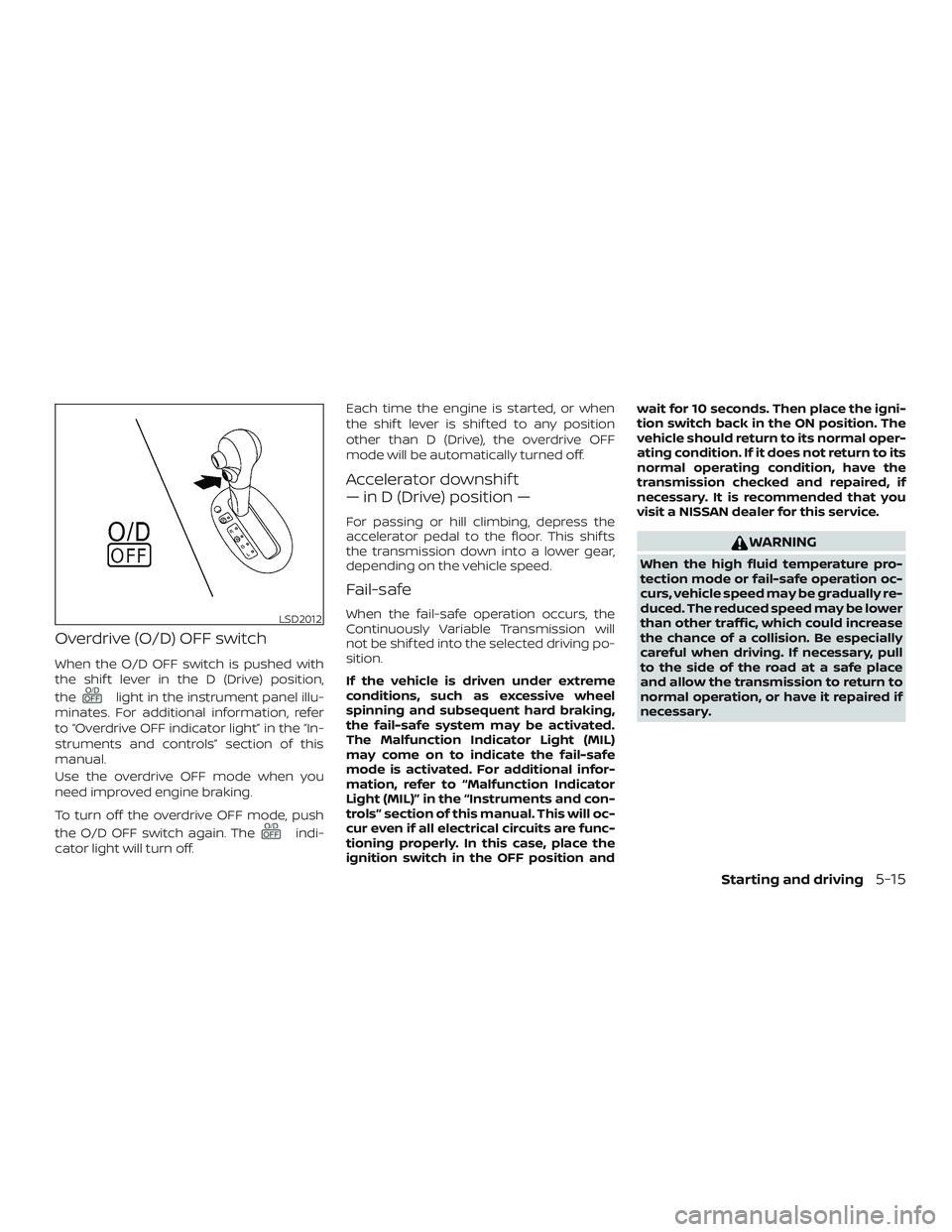
Overdrive (O/D) OFF switch
When the O/D OFF switch is pushed with
the shif t lever in the D (Drive) position,
the
light in the instrument panel illu-
minates. For additional information, refer
to “Overdrive OFF indicator light” in the “In-
struments and controls” section of this
manual.
Use the overdrive OFF mode when you
need improved engine braking.
To turn off the overdrive OFF mode, push
the O/D OFF switch again. The
indi-
cator light will turn off. Each time the engine is started, or when
the shif t lever is shif ted to any position
other than D (Drive), the overdrive OFF
mode will be automatically turned off.
Accelerator downshif t
— in D (Drive) position —
For passing or hill climbing, depress the
accelerator pedal to the floor. This shif ts
the transmission down into a lower gear,
depending on the vehicle speed.
Fail-safe
When the fail-safe operation occurs, the
Continuously Variable Transmission will
not be shif ted into the selected driving po-
sition.
If the vehicle is driven under extreme
conditions, such as excessive wheel
spinning and subsequent hard braking,
the fail-safe system may be activated.
The Malfunction Indicator Light (MIL)
may come on to indicate the fail-safe
mode is activated. For additional infor-
mation, refer to “Malfunction Indicator
Light (MIL)” in the “Instruments and con-
trols” section of this manual. This will oc-
cur even if all electrical circuits are func-
tioning properly. In this case, place the
ignition switch in the OFF position andwait for 10 seconds. Then place the igni-
tion switch back in the ON position. The
vehicle should return to its normal oper-
ating condition. If it does not return to its
normal operating condition, have the
transmission checked and repaired, if
necessary. It is recommended that you
visit a NISSAN dealer for this service.
WARNING
When the high fluid temperature pro-
tection mode or fail-safe operation oc-
curs, vehicle speed may be gradually re-
duced. The reduced speed may be lower
than other traffic, which could increase
the chance of a collision. Be especially
careful when driving. If necessary, pull
to the side of the road at a safe place
and allow the transmission to return to
normal operation, or have it repaired if
necessary.
LSD2012
Starting and driving5-15
Page 599 of 702
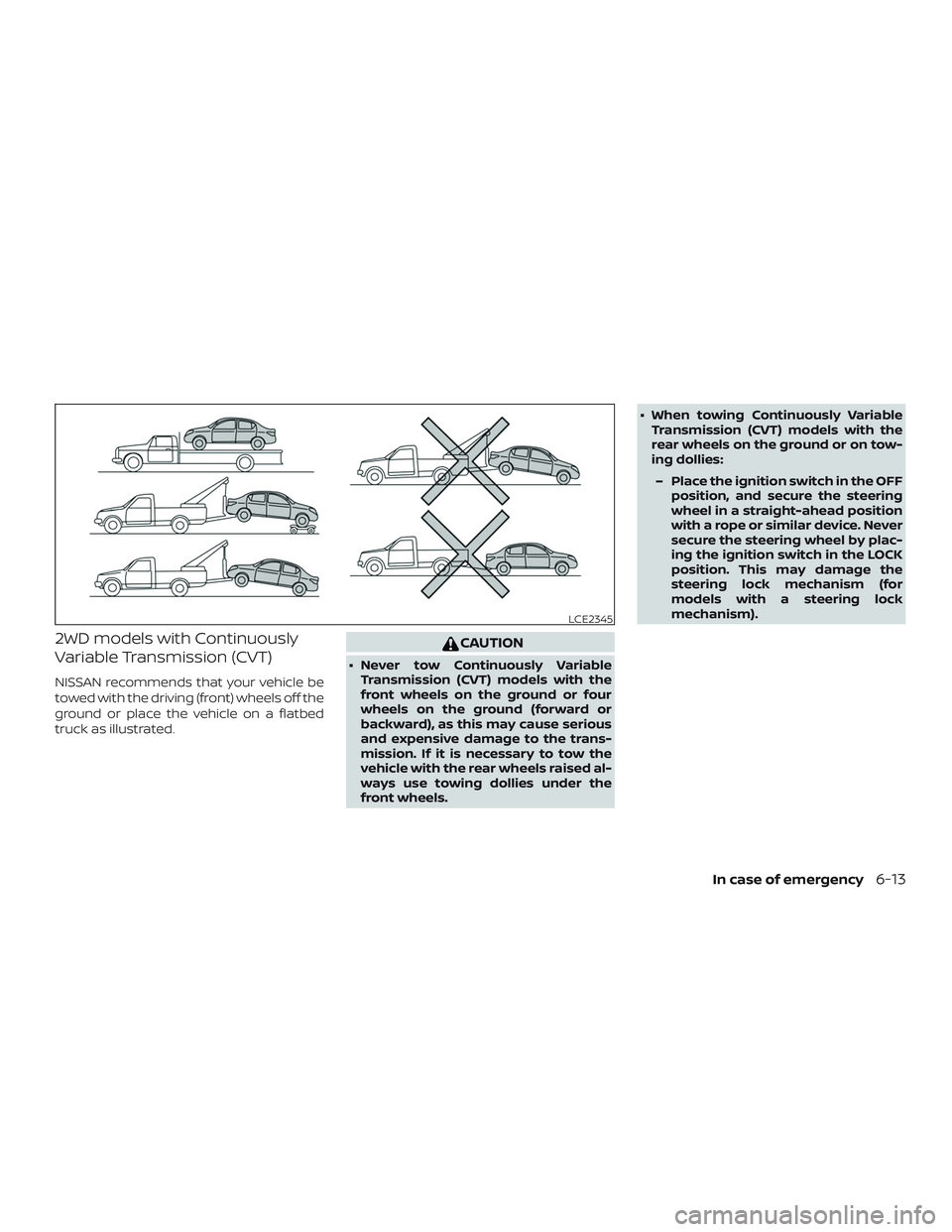
2WD models with Continuously
Variable Transmission (CVT)
NISSAN recommends that your vehicle be
towed with the driving (front) wheels off the
ground or place the vehicle on a flatbed
truck as illustrated.
CAUTION
∙ Never tow Continuously VariableTransmission (CVT) models with the
front wheels on the ground or four
wheels on the ground (forward or
backward), as this may cause serious
and expensive damage to the trans-
mission. If it is necessary to tow the
vehicle with the rear wheels raised al-
ways use towing dollies under the
front wheels. ∙ When towing Continuously Variable
Transmission (CVT) models with the
rear wheels on the ground or on tow-
ing dollies:
– Place the ignition switch in the OFF position, and secure the steering
wheel in a straight-ahead position
with a rope or similar device. Never
secure the steering wheel by plac-
ing the ignition switch in the LOCK
position. This may damage the
steering lock mechanism (for
models with a steering lock
mechanism).
LCE2345
In case of emergency6-13
Page 600 of 702
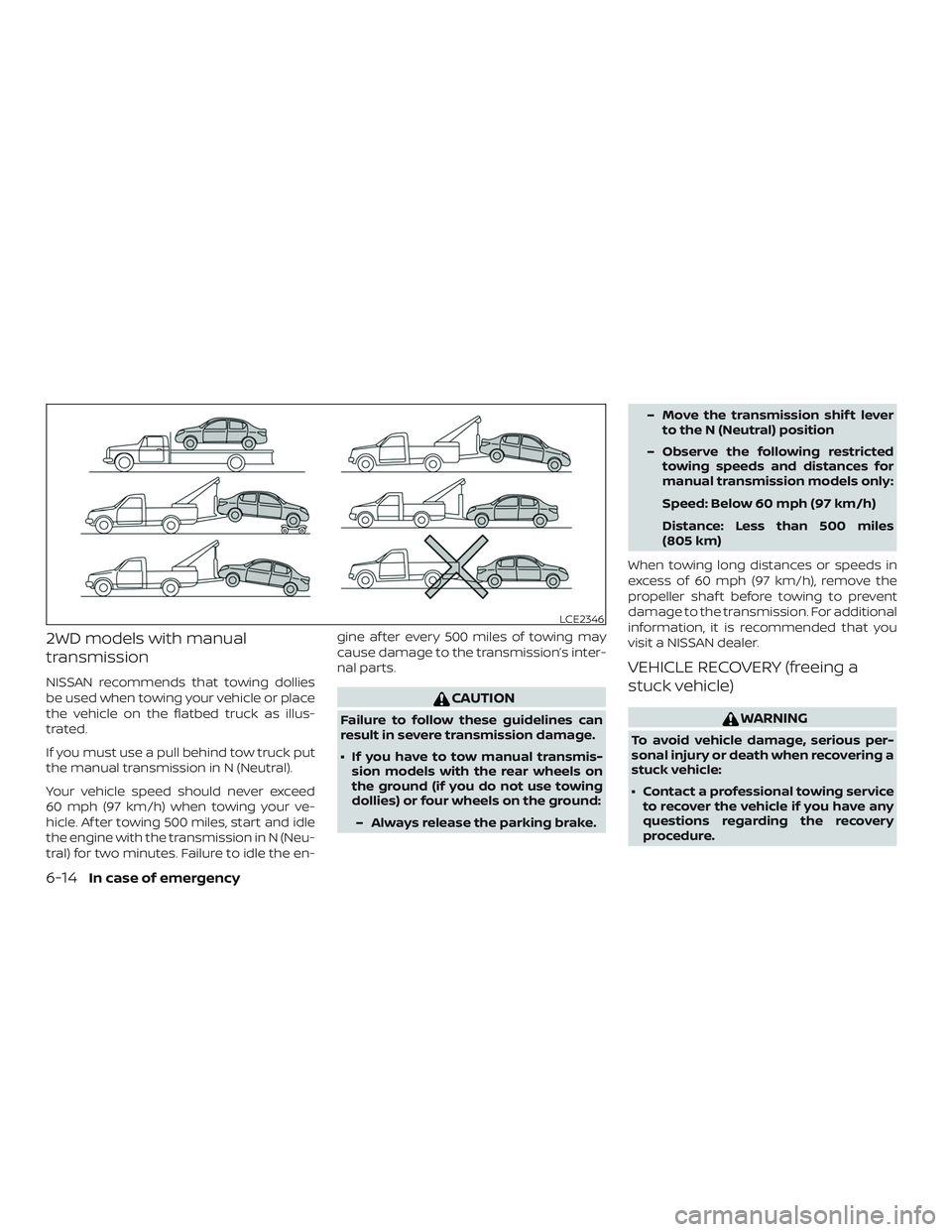
2WD models with manual
transmission
NISSAN recommends that towing dollies
be used when towing your vehicle or place
the vehicle on the flatbed truck as illus-
trated.
If you must use a pull behind tow truck put
the manual transmission in N (Neutral).
Your vehicle speed should never exceed
60 mph (97 km/h) when towing your ve-
hicle. Af ter towing 500 miles, start and idle
the engine with the transmission in N (Neu-
tral) for two minutes. Failure to idle the en-gine af ter every 500 miles of towing may
cause damage to the transmission’s inter-
nal parts.
CAUTION
Failure to follow these guidelines can
result in severe transmission damage.
∙ If you have to tow manual transmis-
sion models with the rear wheels on
the ground (if you do not use towing
dollies) or four wheels on the ground:
– Always release the parking brake. – Move the transmission shif t lever
to the N (Neutral) position
– Observe the following restricted towing speeds and distances for
manual transmission models only:
Speed: Below 60 mph (97 km/h)
Distance: Less than 500 miles
(805 km)
When towing long distances or speeds in
excess of 60 mph (97 km/h), remove the
propeller shaf t before towing to prevent
damage to the transmission. For additional
information, it is recommended that you
visit a NISSAN dealer.
VEHICLE RECOVERY (freeing a
stuck vehicle)
WARNING
To avoid vehicle damage, serious per-
sonal injury or death when recovering a
stuck vehicle:
∙ Contact a professional towing service to recover the vehicle if you have any
questions regarding the recovery
procedure.
LCE2346
6-14In case of emergency
Page 601 of 702
∙ Tow chains or cables must be at-tached only to main structural mem-
bers of the vehicle.
∙ Do not use the vehicle tie-downs to tow or free a stuck vehicle.
∙ Only use devices specifically designed for vehicle recovery and follow the
manufacturer’s instructions.
∙ Always pull the recovery device straight out from the front of the ve-
hicle. Never pull at an angle.
∙ Route recovery devices so they do not touch any part of the vehicle except
the attachment point.
If your vehicle is stuck in sand, snow, mud,
etc., use a tow strap or other device de-
signed specifically for vehicle recovery. Al-
ways follow the manufacturer’s instruc-
tions for the recovery device.Rocking a stuck vehicle
WARNING
∙ Stand clear of a stuck vehicle.
∙ Do not spin your tires at high speed. This could cause them to explode and
result in serious injury. Parts of your
vehicle could also overheat and be
damaged.
If your vehicle is stuck in sand, snow, mud,
etc., use the following procedure: 1. Turn off the Vehicle Dynamic Control (VDC) System.
2. Make sure the area in front and behind the vehicle is clear of obstructions.
3. Turn the steering wheel right and lef t to clear an area around the front tires.
4. Slowly rock the vehicle forward and backward.
∙ Shif t back and forth between R (Re- verse) and D (Drive) (Continuously
Variable Transmission models) or 1st
(Low) and R (Reverse) (manual trans-
mission models). ∙ Apply the accelerator as little as pos-
sible to maintain the rocking motion.
∙ Release the accelerator pedal before shif ting between R (Reverse) and D
(Drive) (Continuously Variable Trans-
mission models) or 1st (Low) and R
(Reverse) (manual transmission
models).
∙ Do not spin the tires above 35 mph (55 km/h).
5. If the vehicle cannot be freed af ter a few tries, contact a professional towing
service to remove the vehicle.
In case of emergency6-15
Page 608 of 702
∙ Use only Genuine NISSAN floor mats,or equivalent floor mats, that are spe-
cifically designed for use in your ve-
hicle model and model year.
∙ Properly position the mats in the floorwell using the floor mat position-
ing hook. For additional information,
refer to "Floor mat installation" in this
section.
∙ Make sure the floor mat does not in- terfere with pedal operation.
∙ Periodically check the floor mats to make sure they are properly installed.
∙ Af ter cleaning the vehicle interior, check the floor mats to make sure
they are properly installed.
The use of Genuine NISSAN floor mats can
extend the life of your vehicle carpet and
make it easier to clean the interior. Mats
should be maintained with regular clean-
ing and replaced if they become exces-
sively worn.Floor mat installation
Your vehicle is equipped with floor mat po-
sitioning hook(s). The number and shape of
the floor mat positioning hooks for each
seating position varies depending on the
vehicle.
When installing Genuine NISSAN floor mats,
follow the installation instructions provided
with the mat and the following:
1. With the ignition in the OFF position, the shif t lever in P (Park) position (Continu-
ously Variable Transmission models) or
the shif t lever in the N (Neutral) position
(manual transmission models) and
with the parking break fully applied, po-
sition the floor mat in the floorwell so
that the floor mat grommet holes are
aligned with the hook(s).
2. Secure the grommet holes into the hook(s) and ensure that the floor mat is
properly positioned.
3. Make sure the floor mat does not inter- fere with pedal operation. With the igni-
tion still in the OFF position, the shif t
lever in the P (Park) position (Continu-
ously Variable Transmission models) or
the shif t lever in the N (Neutral) position
(manual transmission models) and with the parking break applied, fully ap-
ply and release all pedals. The floor mat
must not interfere with pedal opera-
tion or prevent the pedal from return-
ing to its normal position.
It is recommended that you visit a NISSAN
dealer for details about installing the floor
mats in your vehicle.
7-6Appearance and care