audio NISSAN X-TRAIL 2001 Service Repair Manual
[x] Cancel search | Manufacturer: NISSAN, Model Year: 2001, Model line: X-TRAIL, Model: NISSAN X-TRAIL 2001Pages: 3833, PDF Size: 39.49 MB
Page 1 of 3833
MODEL T30 SERIES
© 2002 NISSAN EUROPE S.A.S.
All rights reserved. No part of this Electronic Service Manual may be reproduced or stored in a retrieval system, or transmitted in any
form, or by any means, electronic, mechanical, photocopying, recording or otherwise, without the prior written permission of Nissan
Europe S.A.S., Paris, France.
A GENERAL INFORMATION
B ENGINE
C TRANSMISSION/
TRANSAXLE
D DRIVELINE/AXLE
E SUSPENSION
F BRAKES
G STEERING
H RESTRAINTS
IBODY
J AIR CONDITIONER
K ELECTRICAL
L MAINTENANCE
M INDEXGI General Information
EM Engine Mechanical
LU Engine Lubrication System
CO Engine Cooling System
EC Engine Control System
FL Fuel System
EX Exhaust System
ACC Accelerator Control System
CL Clutch
MT Manual Transaxle
AT Automatic Transaxle
TF Transfer
PR Propeller Shaft
RFD Rear Final Drive
FAX Front Axle
RAX Rear Axle
FSU Front Suspension
RSU Rear Suspension
WT Road Wheels & Tires
BR Brake System
PB Parking Brake System
BRC Brake Control System
PS Power Steering System
SB Seat Belts
SRS Supplemental Restraint System (SRS)
BL Body, Lock & Security System
GW Glasses, Window System & Mirrors
RF Roof
EI Exterior & Interior
IP Instrument Panel
SE Seat
ATC Automatic Air Conditioner
MTC Manual AIr Conditioner
SC Starting & Charging System
LT Lighting System
DI Driver Information System
WW Wiper, Washer & Horn
BCS Body Control System
LAN LAN System
AV Audio, Visual & Telephone System
PG Power Supply, Ground & Circuit Elements
MA Maintenance
IDX Alphabetical Index
QUICK REFERENCE INDEX
A
B
C
D
E
F
G
H
I
J
K
L
M
Page 3251 of 3833
IP-1
INSTRUMENT PANEL
I BODY
CONTENTS
C
D
E
F
G
H
J
K
L
M
SECTION
A
B
IP
INSTRUMENT PANEL
PRECAUTIONS .......................................................... 2
Precautions for Supplemental Restraint System
(SRS) “AIR BAG” and “SEAT BELT PRE-TEN-
SIONER” .................................................................. 2
Precautions .............................................................. 2
INSTRUMENT PANEL ASSEMBLY ........................... 3
Component Parts Drawing ....................................... 3
Removal and Installation .......................................... 5
TABLE OF WORK ITEM ....................................... 5
FRONT SPEAKER GRILLE .................................. 6
INSTRUMENT FINISHER ..................................... 6
CUP HOLDER ....................................................... 6
CLUSTER LID A ................................................... 6
COMBINATION METER ....................................... 6
POCKET ............................................................... 6
STEERING COLUMN COVER ............................. 6
INSTRUMENT LOWER DRIVER PANEL ............. 7
MIRROR CONTROL SWITCH .............................. 7
GPS ANTENNA .................................................... 7
CLUSTER LID C ................................................... 7CLUSTER LID FINISHER ..................................... 7
AUDIO UNIT AND POCKET ................................. 7
HEATER CONTROL FINISHER ............................ 8
CD AUTO–CHANGER AND POCKET .................. 8
HEATER CONTROLLER ....................................... 8
A/T OR M/T FINISHER ......................................... 8
CONSOLE MASK AND CENTER CONSOLE ....... 8
LOWER INSTRUMENT COVER ........................... 8
INSTRUMENT LOWER CENTER PANEL ............ 8
GLOVE BOX ......................................................... 9
LOWER INSTRUMENT PANEL ............................ 9
GLOVE BOX COVER ............................................ 9
FRONT PASSENGER AIR BAG MODULE ........... 9
INSTRUMENT REINFORCEMENT ....................... 9
INSTRUMENT MASK ............................................ 9
FRONT PILLAR GARNISH ................................... 9
INSTRUMENT PANEL .......................................... 9
Disassembly and Assembly .................................... 10
CONSOLE BOX ASSEMBLY .............................. 10
Page 3254 of 3833

IP-4
INSTRUMENT PANEL ASSEMBLY
1. Front passenger air bag module 2. Front speaker grille (right) 3. Front side speaker (right)
4. Cup holder (right) 5. Instrument finisher B 6. Combination meter
7. Instrument mask (right) 8. GPS antenna 9. Instrument mask (left)
10. Instrument cluster lid A 11. Pocket 12. Front speaker grille (left)
13. Front side speaker (left) 14. Cup holder (left) 15. Mirror control switch
16. Instrument panel & pad 17. Instrument reinforcement 18. Audio unit and pocket
19. Glove box cover 20. Lower instrument panel 21. Glove box pin
22. Glove box 23. Cluster lid C 24. Instrument finisher A
25. Instrument lower driver panel 26. Column cover, key cylinder escutcheon 27. Cluster lid finisher (left)
28. Heater control finisher 29. CD auto–changer and pocket 30. instrument lower center panel
31. Lower instrument cover 32. Cluster lid finisher (right) 33. Center console
34. A/T or M/T finisher 35. Console mask 36. Seal case (inner case)
Page 3255 of 3833
![NISSAN X-TRAIL 2001 Service Repair Manual INSTRUMENT PANEL ASSEMBLY
IP-5
C
D
E
F
G
H
J
K
L
MA
B
IP
Removal and InstallationEIS000NI
TABLE OF WORK ITEM
[ ]: The number shows the removal order.
ComponentsInstrument
panelCombination
meterNavig](/img/5/57405/w960_57405-3254.png "NISSAN X-TRAIL 2001 Service Repair Manual INSTRUMENT PANEL ASSEMBLY
IP-5
C
D
E
F
G
H
J
K
L
MA
B
IP
Removal and InstallationEIS000NI
TABLE OF WORK ITEM
[ ]: The number shows the removal order.
ComponentsInstrument
panelCombination
meterNavig")
INSTRUMENT PANEL ASSEMBLY
IP-5
C
D
E
F
G
H
J
K
L
MA
B
IP
Removal and InstallationEIS000NI
TABLE OF WORK ITEM
[ ]: The number shows the removal order.
ComponentsInstrument
panelCombination
meterNavigation
DisplayAudio
Console
Up Down
Front speaker grille [1]
Instrument finisher A, B [2] [1]
Cup holder [3]
Instrument cluster lid A [4] [2]
Combination meter [5] [3]
Pocket [6]
Key cylinder escutcheon and steer-
ing column cover[7]
Instrument lower driver panel [8]
Mirror control switch [9]
GPS antenna [10]
Cluster lid C [11] [1] [1]
Cluster lid finisher [12] [1] [1]
Audio unit and pocket [13] [2] [2]
Heater control finisher [14] [2]
CD auto–changer and pocket [15] [3]
Heater controller [16]
A/T(M/T,CVT) finisher [17] [2]
Console mask [18] [3]
Center console [19] [4]
Lower instrument cover [20]
instrument lower center panel [21]
Glove box [22]
Lower instrument panel [23]
Glove box cover [24]
Front passenger air bag module [25]
Instrument reinforcement [26]
Instrument mask [27]
Front pillar garnish [28]
Instrument panel [29]
Page 3257 of 3833
INSTRUMENT PANEL ASSEMBLY
IP-7
C
D
E
F
G
H
J
K
L
MA
B
IP
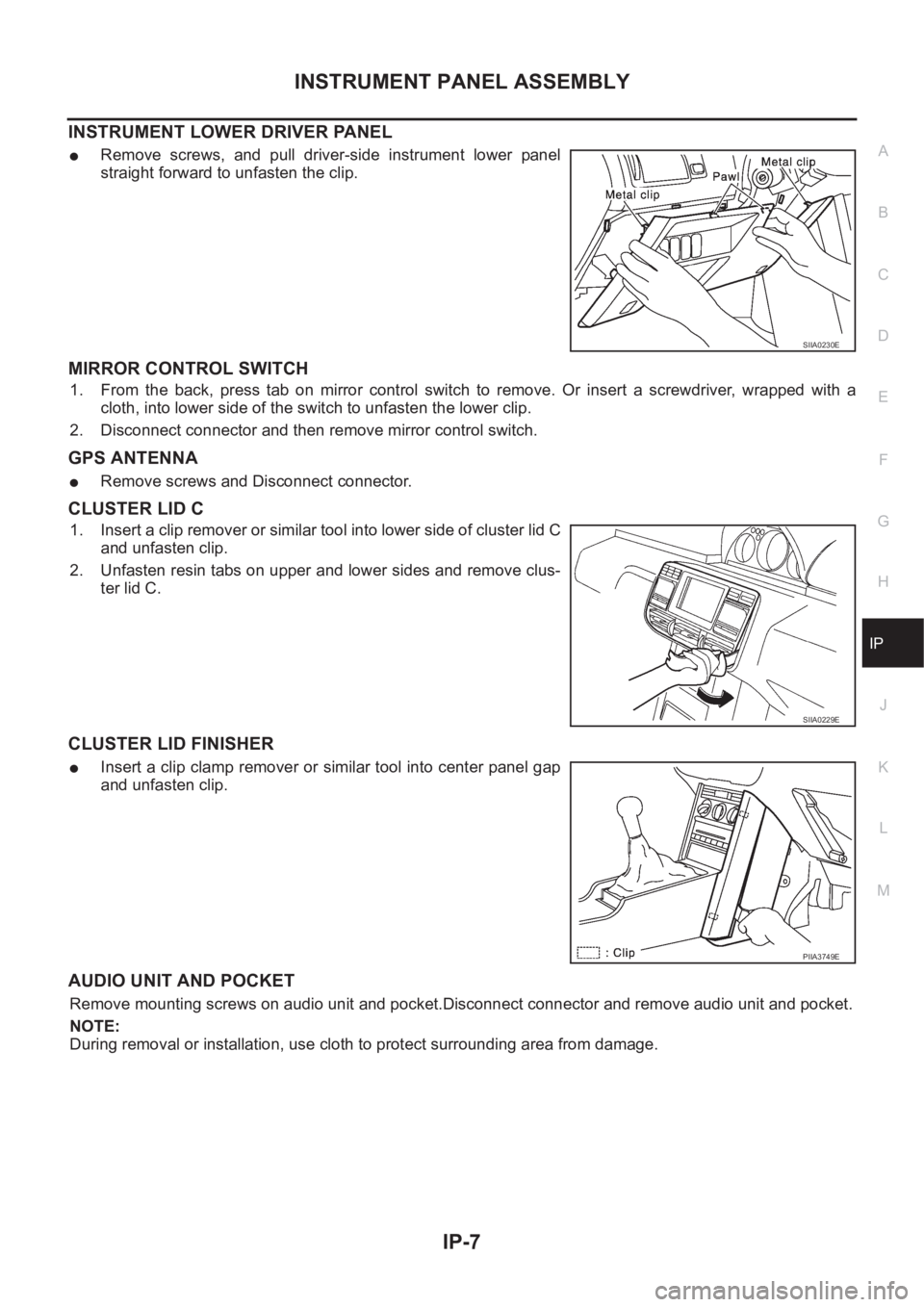
INSTRUMENT LOWER DRIVER PANEL
●Remove screws, and pull driver-side instrument lower panel
straight forward to unfasten the clip.
MIRROR CONTROL SWITCH
1. From the back, press tab on mirror control switch to remove. Or insert a screwdriver, wrapped with a
cloth, into lower side of the switch to unfasten the lower clip.
2. Disconnect connector and then remove mirror control switch.
GPS ANTENNA
●Remove screws and Disconnect connector.
CLUSTER LID C
1. Insert a clip remover or similar tool into lower side of cluster lid C
and unfasten clip.
2. Unfasten resin tabs on upper and lower sides and remove clus-
ter lid C.
CLUSTER LID FINISHER
●Insert a clip clamp remover or similar tool into center panel gap
and unfasten clip.
AUDIO UNIT AND POCKET
Remove mounting screws on audio unit and pocket.Disconnect connector and remove audio unit and pocket.
NOTE:
During removal or installation, use cloth to protect surrounding area from damage.
SIIA0230E
SIIA0229E
PIIA3749E
Page 3387 of 3833
CONTROLLER
ATC-111
C
D
E
F
G
H
I
K
L
MA
B
AT C
CONTROLLERPFP:27500
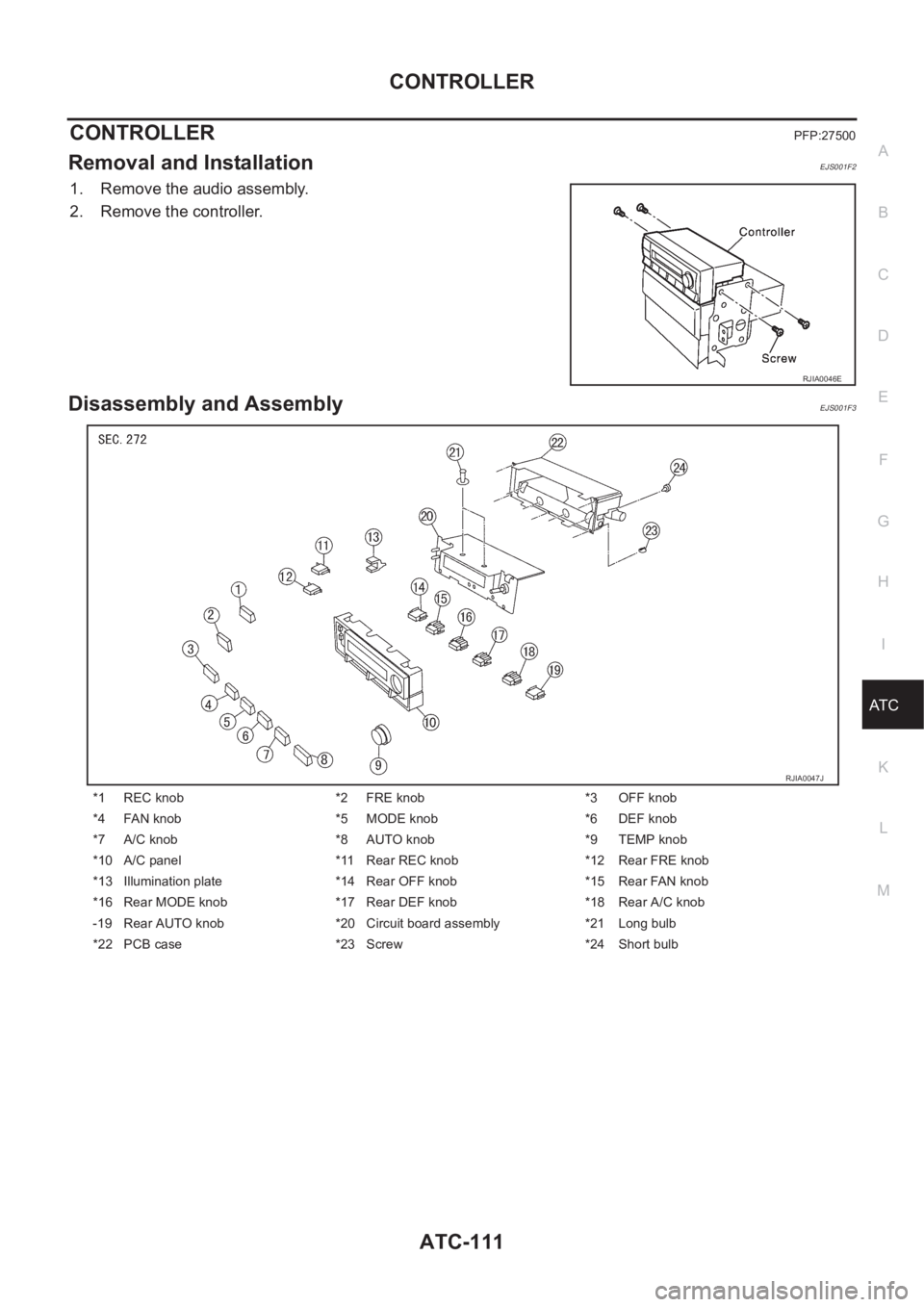
Removal and InstallationEJS001F2
1. Remove the audio assembly.
2. Remove the controller.
Disassembly and AssemblyEJS001F3
RJIA0046E
*1 REC knob *2 FRE knob *3 OFF knob
*4 FAN knob *5 MODE knob *6 DEF knob
*7 A/C knob *8 AUTO knob *9 TEMP knob
*10 A/C panel *11 Rear REC knob *12 Rear FRE knob
*13 Illumination plate *14 Rear OFF knob *15 Rear FAN knob
*16 Rear MODE knob *17 Rear DEF knob *18 Rear A/C knob
-19 Rear AUTO knob *20 Circuit board assembly *21 Long bulb
*22 PCB case *23 Screw *24 Short bulb
RJIA0047J
Page 3535 of 3833
![NISSAN X-TRAIL 2001 Service Repair Manual ILLUMINATION
LT-45
C
D
E
F
G
H
I
J
L
MA
B
LT
ILLUMINATIONPFP:27545
System Description EKS003C7
Power is supplied at all times
●through 10A fuse [No. 31, located in the fuse and fusible link box]
●](/img/5/57405/w960_57405-3534.png "NISSAN X-TRAIL 2001 Service Repair Manual ILLUMINATION
LT-45
C
D
E
F
G
H
I
J
L
MA
B
LT
ILLUMINATIONPFP:27545
System Description EKS003C7
Power is supplied at all times
●through 10A fuse [No. 31, located in the fuse and fusible link box]
●")
ILLUMINATION
LT-45
C
D
E
F
G
H
I
J
L
MA
B
LT
ILLUMINATIONPFP:27545
System Description EKS003C7
Power is supplied at all times
●through 10A fuse [No. 31, located in the fuse and fusible link box]
●to lighting switch terminal 11.
The lighting switch must be in the 1ST or 2ND position for illumination.
The following chart shows the power and ground connector terminals for the components included in the illu-
mination system.
Component Connector No. Power terminal Ground terminal
Headlamp washier switch M23 3 4
Headlamp aiming switch M24 3 4
Door mirror remote control
switchM26 10 1
ESP off switch M25 3 4
Hazard switch M51 7 8
4WD mode switch M39 4 3
Rear window defogger switch M50 5 6
A/C auto amp. M52 12 11
Combination meter
(LHD models)M46 56 66
Combination meter
(RHD models)M46 45 56
Audio M42 2 1
CD auto changer M82 34 35
Heater control panel M55 2 6
A/T device M58 3 4
Cigarette lighter M56 3 2
Heated seat switch LH
(LHD models)B131 5 6
Heated seat switch RH
(LHD models)B132 5 6
Heated seat switch LH
(RHD models)B35 5 6
Heated seat switch RH
(RHD models)B34 5 6
Page 3654 of 3833
WW-26
CIGARETTE LIGHTER
Removal and Installation
EKS0033D
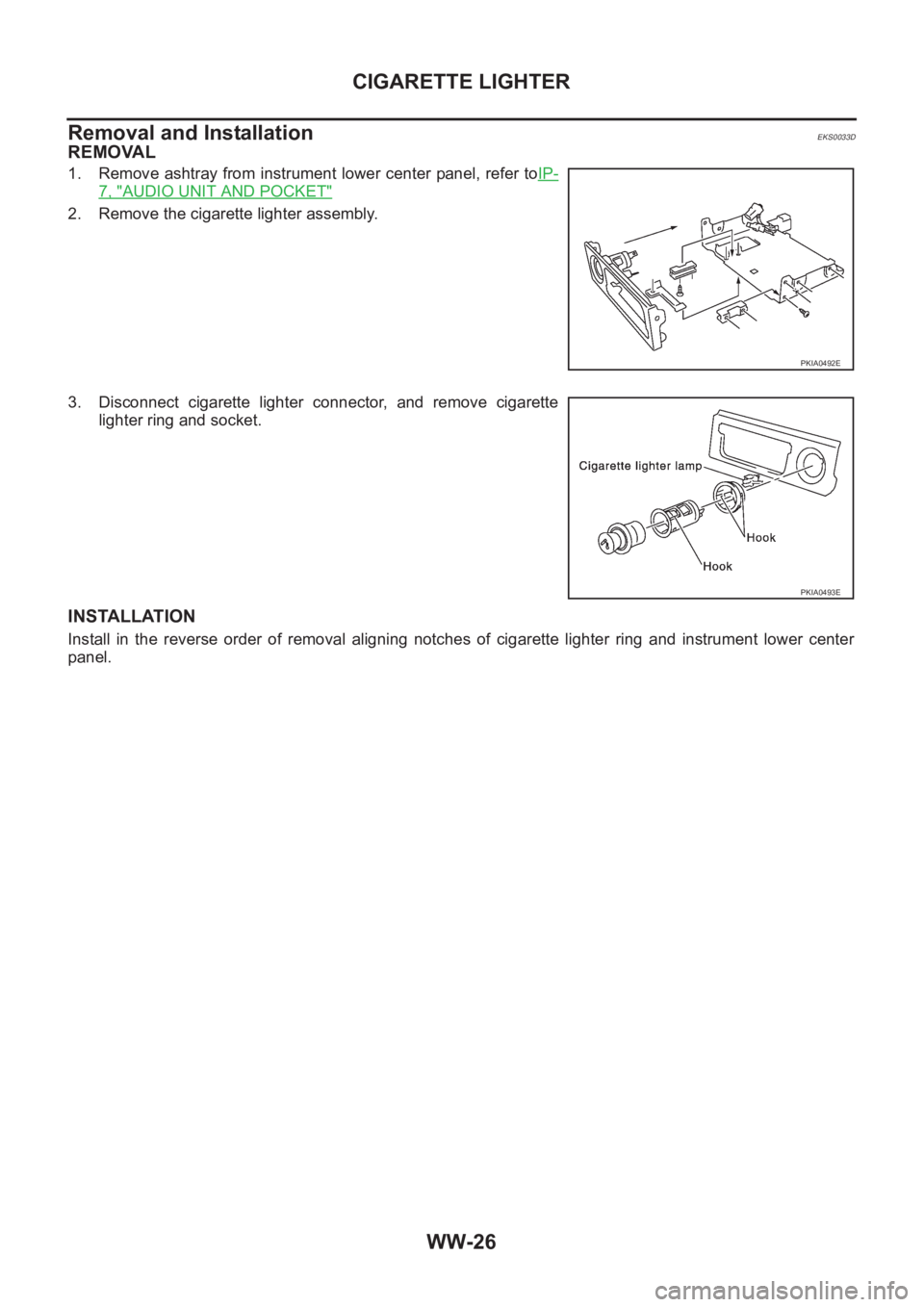
REMOVAL
1. Remove ashtray from instrument lower center panel, refer toIP-
7, "AUDIO UNIT AND POCKET"
2. Remove the cigarette lighter assembly.
3. Disconnect cigarette lighter connector, and remove cigarette
lighter ring and socket.
INSTALLATION
Install in the reverse order of removal aligning notches of cigarette lighter ring and instrument lower center
panel.
PKIA0492E
PKIA0493E
Page 3689 of 3833
AV-1
AUDIO, VISUAL & TELEPHONE SYSTEM
K ELECTRICAL
CONTENTS
C
D
E
F
G
H
I
J
L
M
SECTION
A
B
AV
AUDIO, VISUAL & TELEPHONE SYSTEM
PRECAUTIONS .......................................................... 2
Precautions for Supplemental Restraint System
(SRS) “AIR BAG” and “SEAT BELT PRE-TEN-
SIONER” .................................................................. 2
Wiring Diagrams and Trouble Diagnosis .................. 2
AUDIO ......................................................................... 3
System Description .................................................. 3
NATS AUDIO LINK ............................................... 3
SPEED DEPENDENT VOLUME CONTROL ........ 4
PERSONAL AUDIO SETTINGS ........................... 4
Schematic ................................................................ 5
Wiring Diagram —AUDIO— ..................................... 6
LHD MODELS ....................................................... 6
RHD MODELS ...................................................... 9Trouble Diagnoses ................................................. 12
AUDIO UNIT ..................................................... ... 12
Inspection ............................................................... 13
AUDIO UNIT ..................................................... ... 13
ANTENNA ........................................................ ... 13
Removal and Installation of Audio Unit ................... 13
Locking CD auto-changer mechanism ................... 14
DAMPER LOCK PROCEDURE .......................... 14
Removal and Installation of CD Auto-Changer ....... 14
Removal and Installation of Speakers .................... 15
Removal and Installation of Tweeters ..................... 15
AUDIO ANTENNA .................................................... 16
Antenna Route ........................................................ 16
Removal and Installation of Roof Antenna ............. 16
Page 3691 of 3833
AUDIO
AV-3
C
D
E
F
G
H
I
J
L
MA
B
AV
AUDIOPFP:28111
System DescriptionEKS002F2
Refer to Owner's Manual for audio system operating instructions.
Power is supplied at all times
●to audio unit terminal 3 and
●to CD auto changer terminal 32
●through 15A fuse (No. 32, located in the fuse and fusible link box).
With the ignition switch in the ACC or ON position, power is supplied
●to audio unit terminal 6 and
●to CD auto changer terminal 36
●through 10A fuse [No. 4, located in the fuse block (J/B)]
Ground is supplied through the case of the audio unit.
Audio signals are supplied
●through audio unit terminals 5, 7, 9, 10, 11, 13, 15, 16
●to terminals 1 and 2 of front door speaker LH and RH,
●to terminals 1 and 2 of rear door speaker LH and RH and
●to terminals 1 and 2 of tweeter LH and RH (with 6-speakers)
NATS AUDIO LINK
Description
The link with the NATS IMMU implies that the audio unit can basically only be operated if connected to the
matching NATS IMMU to which the audio unit was initially fitted on the production line.
Since radio operation is impossible after the link with the NATS is disrupted theft of the audio unit is basically
useless since special equipment is required to reset the audio unit.
Initialization process for audio units that are linked to the NAT S I M M U
New audio units will be delivered to the factories in the “NEW” state, i.e. ready to be linked with the vehicle's
NATS. When the audio unit in “NEW” state is first switched on at the factory, it will start up communication with
the vehicle's immobilizer control unit (IMMU) and send a code (the “audio unit Code”) to the IMMU. The IMMU
will then store this code, which is unique to each audio unit, in its (permanent) memory.
Upon receipt of the code by the IMMU, the NATS will confirm correct receipt of the audio unit code to the audio
unit. Hereafter, the audio unit will operate as normal.
During the initialization process, “NEW” is displayed on the audio unit display. Normally though, communica-
tion between audio unit and IMMU takes such a short time (300 ms) that the audio unit seems to switch on
directly without showing “NEW” on its display.
Normal operation
Each time the audio unit is switched on afterwards, the audio unit code will be verified between the audio unit
and the NATS before the audio unit becomes operational. During the code verification process, “WAIT” is
shown on the audio unit display. Again, the communication takes such a short time (300 ms) that the audio
unit seems to switch on directly without showing “WAIT” on its display.
When the radio is locked
In case of a audio unit being linked with the vehicle's NATS (immobilizer system), disconnection of the link
between the audio unit and the IMMU will cause the audio unit to switch into the lock (“SECURE”) mode in
which the audio unit is fully inoperative. Hence, repair of the audio unit is basically impossible, unless the
audio unit is reset to the “NEW” state for which special decoding equipment is required.
Clarion has provided their authorized service representatives with so called “decoder boxes” which can bring
the audio unit back to the “NEW” state, enabling the audio unit to be switched on after which repair can be car-
ried out. Subsequently, when the repaired audio unit is delivered to the final user again, it will be in the “NEW”
state to enable re-linking the audio unit to the vehicle's immobilizer system. As a result of the above, repair of
the audio unit can only be done by an authorized Clarion representative (when the owner of the vehicle
requests repair and can show personal identification).