key NISSAN X-TRAIL 2003 Electronic Manual Online
[x] Cancel search | Manufacturer: NISSAN, Model Year: 2003, Model line: X-TRAIL, Model: NISSAN X-TRAIL 2003Pages: 3066, PDF Size: 51.47 MB
Page 2453 of 3066

INTERIOR ROOM LAMP
LT-55
C
D
E
F
G
H
I
J
L
MA
B
LT
INTERIOR ROOM LAMPPFP:26410
System DescriptionEKS003BQ
POWER SUPPLY AND GROUND
Power is supplied at all times:
lthrough 10A fuse [No. 28, located in the fuse block (J/B)]
lto key switch terminal 1 and
lto time control unit terminal 1
lthrough 10A fuse [No. 26, located in the fuse block (J/B)]
lto interior room lamp terminal 1.
When the key is removed from ignition key cylinder, power is interrupted:
lthrough key switch terminal 2
lto time control unit terminal 18.
With the ignition key switch in the ON or START position, power is supplied:
lthrough 10A fuse [No. 5, located in the fuse block (J/B)]
lto time control unit terminal 17.
Ground is supplied:
lthrough body grounds terminals M27 and M70
lto time control unit terminal 16
When the driver side door is opened, ground is supplied:
lthrough body grounds B8 and B18
lto door switch driver side terminal 3
lfrom door switch driver side terminal 2
lto time control unit terminal 30.
When any door (except back door) is opened, ground is supplied:
lthroughcasegroundofeachdoorswitch
lto each door switch terminal 1
lto time control unit terminal 31.
When back door is opende, ground is supplied:
lthrough body ground D53
lto back door switch terminal 1
lto time control unit terminal 31.
When the driver side door is unlocked, the time control unit receives a ground signal:
lthrough body grounds terminals M27 and M70
lto door unlock sensor terminal 2
lfrom door unlock sensor terminal 5
lto time control unit terminal 28.
When a signal, or combination of signals is received by the time control unit, ground is supplied:
lthrough time control unit terminal 26
lto interior room lamp terminal 2.
With power and ground supplied, the interior room lamp illuminates.
SWITCH OPERATION
When interior room lamp switch is ON, ground is supplied:
lthrough case grounds of interior room lamp
lto interior room lamp.
INTERIOR ROOM LAMP TIMER OPERATION
When interior room lamp switch is in the “DOOR” position, the time control unit keeps the interior room lamp
illuminated for about 30 seconds when:
Page 2454 of 3066

LT-56
INTERIOR ROOM LAMP
lunlock signal is supplied from driver's door unlock sensor while all doors are closed and key is out of igni-
tion key cylinder
lkey is removed from ignition key cylinder while all doors are closed
ldriver's door is opened and then closed while key is out of the iginition key cylinder. (However, if the
driver's door is closed with the key inserted in the ignition key cylinder after the driver's door is opened
with the key removed, the timer is operated.)
The timer is canceled when:
ldriver's door is locked,
ldriver's door is opened, or
lignition switch is turned ON.
ON-OFF CONTROL
When the driver side door, front passenger door, rear LH or RH door is opened, the interior room lamp turns
on while the interior room lamp switch is in the “DOOR” position.
Page 2459 of 3066
INTERIOR ROOM LAMP
LT-61
C
D
E
F
G
H
I
J
L
MA
B
LT
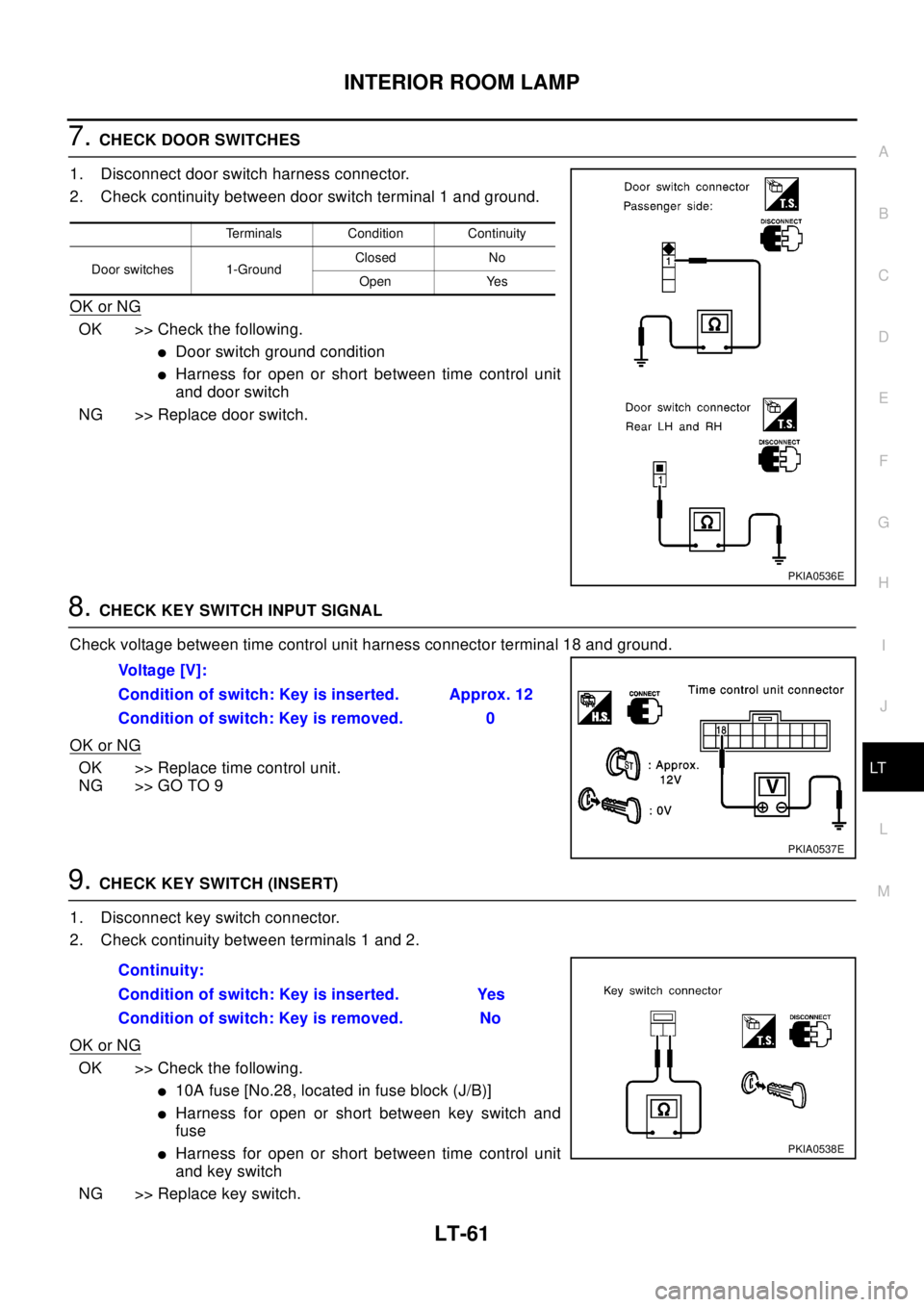
7.CHECK DOOR SWITCHES
1. Disconnect door switch harness connector.
2. Check continuity between door switch terminal 1 and ground.
OK or NG
OK >> Check the following.
lDoor switch ground condition
lHarness for open or short between time control unit
and door switch
NG >> Replace door switch.
8.CHECK KEY SWITCH INPUT SIGNAL
Check voltage between time control unit harness connector terminal 18 and ground.
OK or NG
OK >> Replace time control unit.
NG >> GO TO 9
9.CHECK KEY SWITCH (INSERT)
1. Disconnect key switch connector.
2. Check continuity between terminals 1 and 2.
OK or NG
OK >> Check the following.
l10A fuse [No.28, located in fuse block (J/B)]
lHarness for open or short between key switch and
fuse
lHarness for open or short between time control unit
and key switch
NG >> Replace key switch.
Terminals Condition Continuity
Door switches 1-GroundClosed No
Open Yes
PKIA0536E
Vo l ta g e [ V ] :
Condition of switch: Key is inserted. Approx. 12
Condition of switch: Key is removed. 0
PKIA0537E
Continuity:
Condition of switch: Key is inserted. Yes
Condition of switch: Key is removed. No
PKIA0538E
Page 2496 of 3066
MA-4
DESCRIPTION
DESCRIPTION
PFP:00000
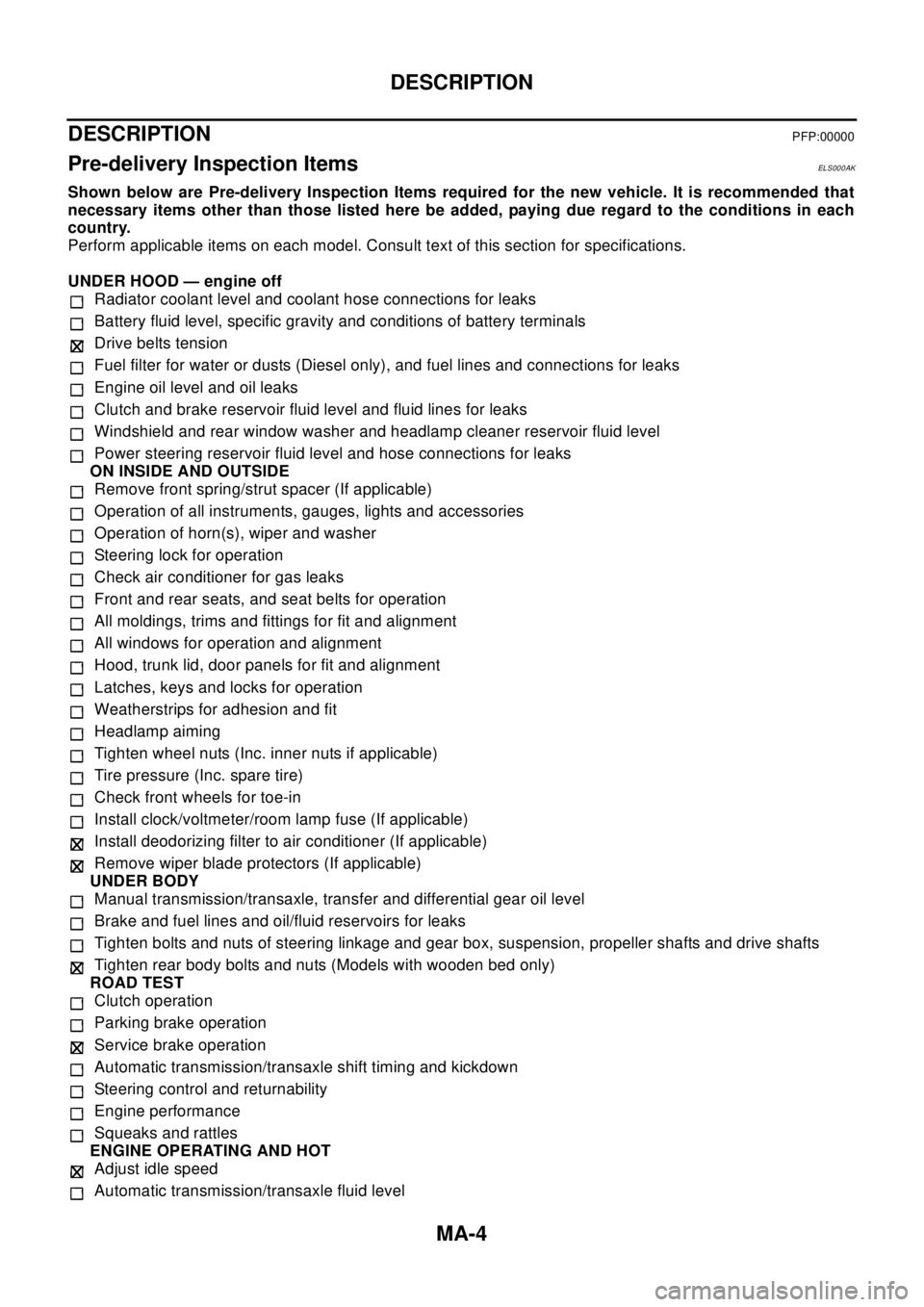
Pre-delivery Inspection ItemsELS000AK
Shown below are Pre-delivery Inspection Items required for the new vehicle. It is recommended that
necessary items other than those listed here be added, paying due regard to the conditions in each
country.
Perform applicable items on each model. Consult text of this section for specifications.
UNDER HOOD — engine off
Radiator coolant level and coolant hose connections for leaks
Battery fluid level, specific gravity and conditions of battery terminals
Drive belts tension
Fuel filter for water or dusts (Diesel only), and fuel lines and connections for leaks
Engine oil level and oil leaks
Clutch and brake reservoir fluid level and fluid lines for leaks
Windshield and rear window washer and headlamp cleaner reservoir fluid level
Power steering reservoir fluid level and hose connections for leaks
ON INSIDE AND OUTSIDE
Remove front spring/strut spacer (If applicable)
Operation of all instruments, gauges, lights and accessories
Operation of horn(s), wiper and washer
Steering lock for operation
Check air conditioner for gas leaks
Front and rear seats, and seat belts for operation
All moldings, trims and fittings for fit and alignment
All windows for operation and alignment
Hood, trunk lid, door panels for fit and alignment
Latches, keys and locks for operation
Weatherstrips for adhesion and fit
Headlamp aiming
Tighten wheel nuts (Inc. inner nuts if applicable)
Tire pressure (Inc. spare tire)
Check front wheels for toe-in
Install clock/voltmeter/room lamp fuse (If applicable)
Install deodorizing filter to air conditioner (If applicable)
Remove wiper blade protectors (If applicable)
UNDER BODY
Manual transmission/transaxle, transfer and differential gear oil level
Brake and fuel lines and oil/fluid reservoirs for leaks
Tighten bolts and nuts of steering linkage and gear box, suspension, propeller shafts and drive shafts
Tighten rear body bolts and nuts (Models with wooden bed only)
ROAD TEST
Clutch operation
Parking brake operation
Service brake operation
Automatic transmission/transaxle shift timing and kickdown
Steering control and returnability
Engine performance
Squeaks and rattles
ENGINE OPERATING AND HOT
Adjust idle speed
Automatic transmission/transaxle fluid level
Page 2770 of 3066
PS-10
STEERING COLUMN
5. Remove the key interlock cable from the steering column assembly. Refer toAT- 4 5 2 , "Removal".
6. Remove clamp and connector from steering column assembly.
7. Remove steering column assembly mounting nut and remove steering column assembly from vehicle.
CAUTION:
Do not deform lower bracket on steering column assembly during removal or installation.
INSTALLING STEERING COLUMN ASSEMBLY
lInstallation procedure should be used with steering lock unlocked.
1. Position on steering column assembly, and install steering column assembly to vehicle with mounting
nuts.
2. Attach mounting bolts and nuts on upper portion of lower joint.
CAUTION:
Do not reuse mounting nuts.
3. Connect clamp and connector.
4. Connect key interlock cable to steering column assembly. Refer toAT-453, "
Installation"
5. Connect spiral cable. Refer toSRS-32, "INSTALLATION".
6. Install instrument lower driver panel.
7. Install steering wheel and column cover. Refer toPS-7, "
INSTALLATION".
CAUTION:
After installation, turn steering wheel. Be sure it turns smoothly with no disinterred condition,
binding, noise or excessive steering effort.
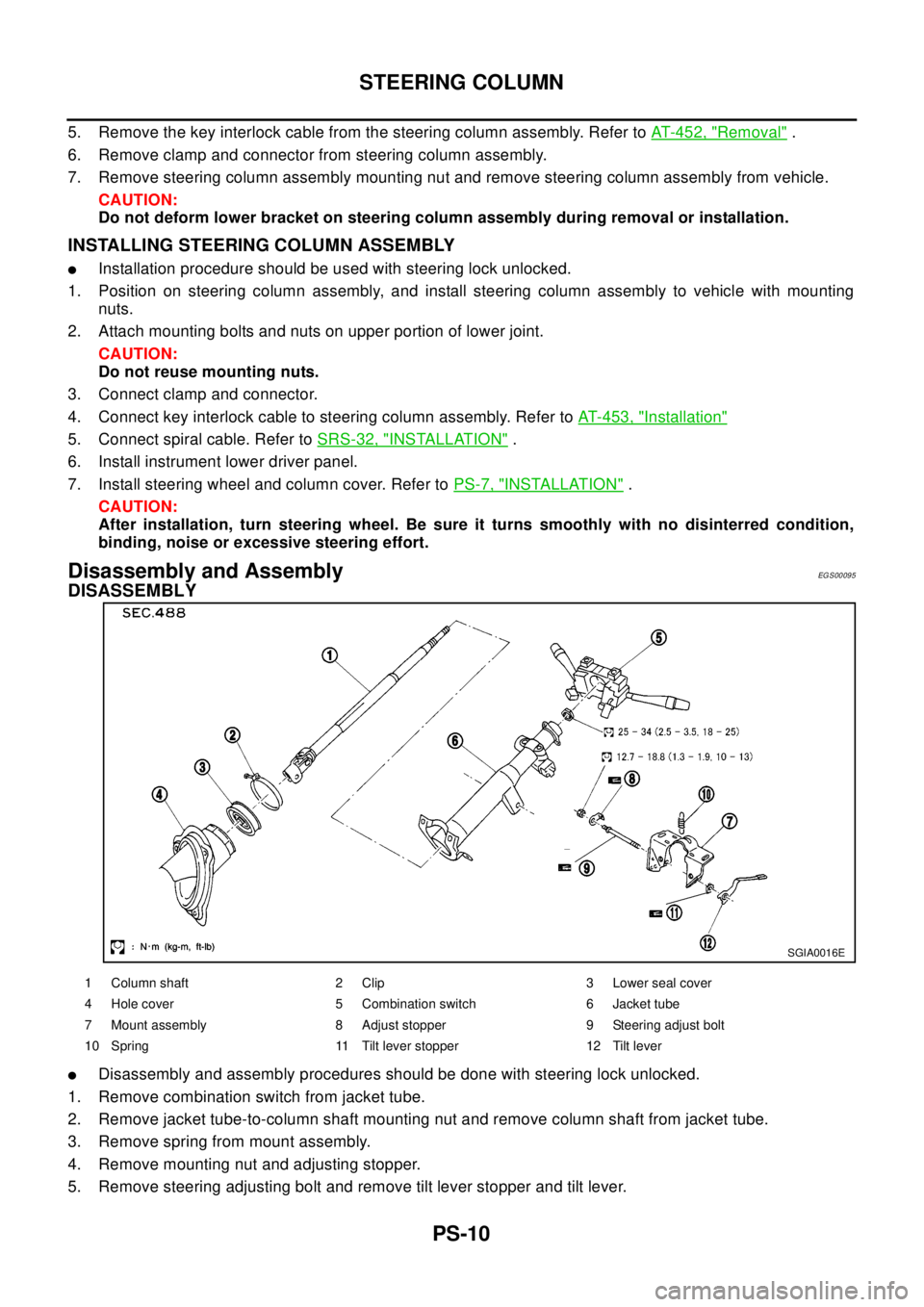
Disassembly and AssemblyEGS00095
DISASSEMBLY
lDisassembly and assembly procedures should be done with steering lock unlocked.
1. Remove combination switch from jacket tube.
2. Remove jacket tube-to-column shaft mounting nut and remove column shaft from jacket tube.
3. Remove spring from mount assembly.
4. Remove mounting nut and adjusting stopper.
5. Remove steering adjusting bolt and remove tilt lever stopper and tilt lever.
SGIA0016E
1 Column shaft 2 Clip 3 Lower seal cover
4 Hole cover 5 Combination switch 6 Jacket tube
7 Mount assembly 8 Adjust stopper 9 Steering adjust bolt
10 Spring 11 Tilt lever stopper 12 Tilt lever
Page 2936 of 3066
![NISSAN X-TRAIL 2003 Electronic Manual Online SRS-14
TROUBLE DIAGNOSIS
CONSULT-II FUNCTION
EHS000CP
DIAGNOSIS MODE FOR CONSULT-II
l“SELF-DIAG [CURRENT]”
A current Self-diagnosis result (also indicated by the number of warning lamp flashes in](/img/5/57402/w960_57402-2935.png "NISSAN X-TRAIL 2003 Electronic Manual Online SRS-14
TROUBLE DIAGNOSIS
CONSULT-II FUNCTION
EHS000CP
DIAGNOSIS MODE FOR CONSULT-II
l“SELF-DIAG [CURRENT]”
A current Self-diagnosis result (also indicated by the number of warning lamp flashes in")
SRS-14
TROUBLE DIAGNOSIS
CONSULT-II FUNCTION
EHS000CP
DIAGNOSIS MODE FOR CONSULT-II
l“SELF-DIAG [CURRENT]”
A current Self-diagnosis result (also indicated by the number of warning lamp flashes in the Diagnosis
mode) is displayed on the CONSULT-II screen in real time. This refers to a malfunctioning part requiring
repairs.
l“SELF-DIAG [PAST]”
Diagnosis results previously stored in the memory are displayed on the CONSULT-II screen. The stored
results are not erased until memory erasing is executed.
l“TROUBLE DIAG RECORD”
With TROUBLE DIAG RECORD, diagnosis results previously erased by a reset operation can be dis-
played on the CONSULT-II screen.
l“ECU DISCRIMINATED NO.”
The diagnosis sensor unit for each vehicle model is assigned with its own, individual classification num-
ber. This number will be displayed on the CONSULT-II screen, as shown below. When replacing the diag-
nosis sensor unit, refer to the part number for the compatibility. After installation, replacement with a
correct unit can be checked by confirming this classification number on the CONSULT-II screen.
HOW TO CHANGE SELF-DIAGNOSIS MODE WITH CONSULT-II
From User Mode to Diagnosis Mode
After selecting “AIR BAG” on the “SELECT SYSTEM” screen, User mode automatically changes to Diagnosis
mode.
From Diagnosis Mode to User Mode
To return to User mode from Diagnosis mode, touch “BACK” key of CONSULT-II until “SELECT SYSTEM”
appears, Diagnosis mode automatically changes to User mode.
HOW TO ERASE SELF-DIAGNOSIS RESULTS
l“SELF-DIAG [CURRENT]”
A current Self-diagnosis result is displayed on the CONSULT-II screen in real time.
After the malfunction is repaired completely, no malfunction is detected on “SELF-DIAG [CURRENT]”.
l“SELF-DIAG [PAST]”
SRS803
SRS804
Page 2937 of 3066
![NISSAN X-TRAIL 2003 Electronic Manual Online TROUBLE DIAGNOSIS
SRS-15
C
D
E
F
G
I
J
K
L
MA
B
SRS
Return to the “SELF-DIAG [CURRENT]” CONSULT-II screen by touching “BACK” key of CONSULT-II and
select “SELF-DIAG [CURRENT]” in SELECT DI](/img/5/57402/w960_57402-2936.png "NISSAN X-TRAIL 2003 Electronic Manual Online TROUBLE DIAGNOSIS
SRS-15
C
D
E
F
G
I
J
K
L
MA
B
SRS
Return to the “SELF-DIAG [CURRENT]” CONSULT-II screen by touching “BACK” key of CONSULT-II and
select “SELF-DIAG [CURRENT]” in SELECT DI")
TROUBLE DIAGNOSIS
SRS-15
C
D
E
F
G
I
J
K
L
MA
B
SRS
Return to the “SELF-DIAG [CURRENT]” CONSULT-II screen by touching “BACK” key of CONSULT-II and
select “SELF-DIAG [CURRENT]” in SELECT DIAG MODE. Touch “ERASE” in “SELF-DIAG [CURRENT]”
mode.
NOTE:
If the memory of the malfunction in “SELF-DIAG [PAST]” is not erased, the User mode shows the
system malfunction by the operation of the warning lamp even if the malfunction is repaired com-
pletely.
l“TROUBLE DIAG RECORD”
The memory of “TROUBLE DIAG RECORD” cannot be erased
SELF-DIAGNOSIS FUNCTION (WITHOUT CONSULT-II)EHS000CQ
lThe reading of these results is accomplished using one of two modes — “User mode” and “Diagnosis
mode”.
lAfter a malfunction is repaired, turn the ignition switch “OFF” for at least one second, then back “ON”.
Diagnosis mode returns to the User mode. At that time, the self-diagnostic result is cleared.
HOW TO CHANGE SELF-DIAGNOSIS MODE
HOW TO ERASE SELF-DIAGNOSIS RESULTS
After a malfunction is repaired, turn the ignition switch “OFF” for at least one second, then back “ON”. Diagno-
sis mode returns to the User mode. At that time, the self-diagnostic result is cleared.
SRS Operation CheckEHS000CR
DIAGNOSTIC PROCEDURE 1
Checking air bag operation by using “AIR BAG” warning lamp — USER MODE
1. Turn the ignition switch from OFF to ON, and check that the air bag warning lamp blinks.
SRS701
SHIA0183E
Page 2940 of 3066
SRS-18
TROUBLE DIAGNOSIS
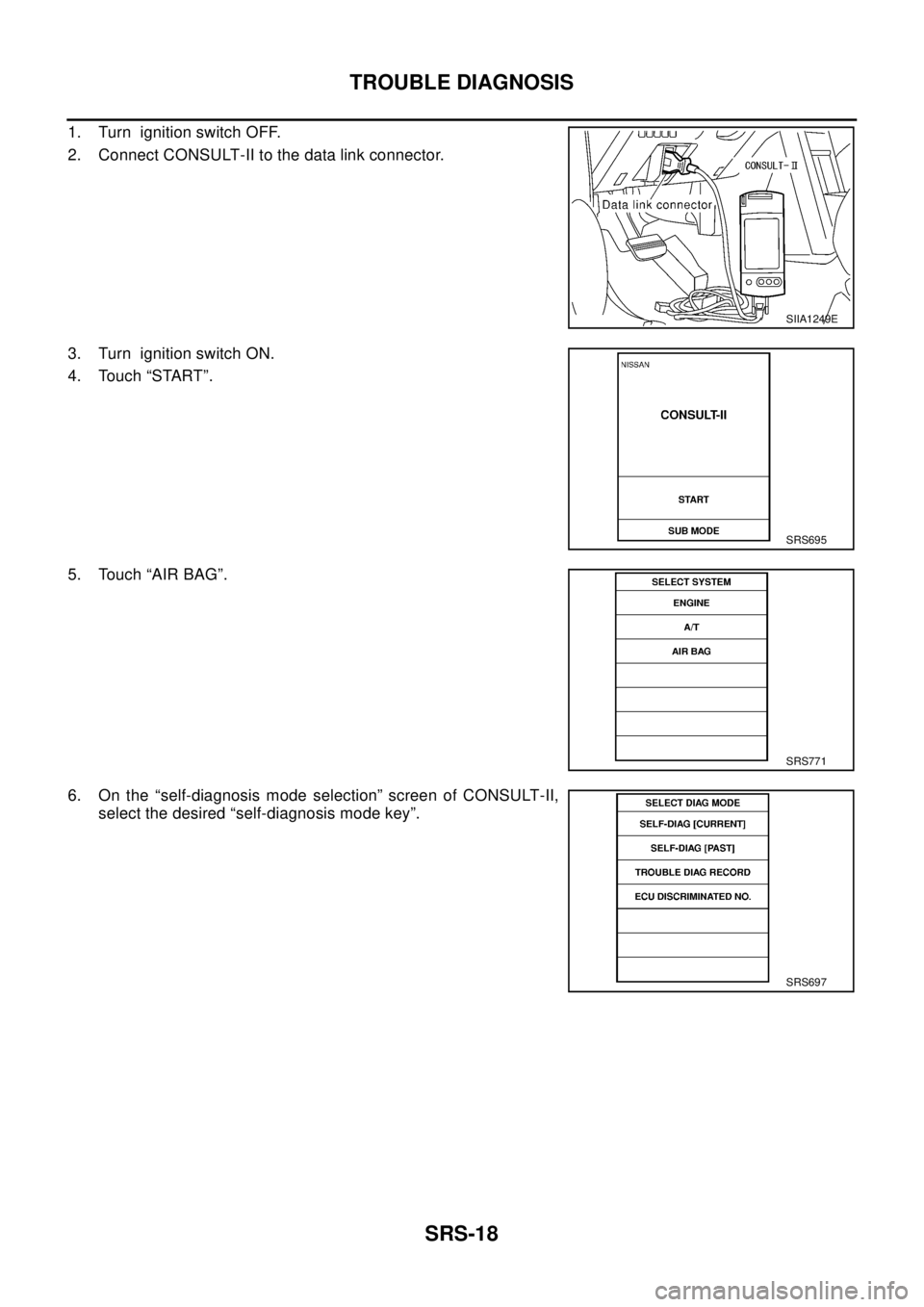
1. Turn ignition switch OFF.
2. Connect CONSULT-II to the data link connector.
3. Turn ignition switch ON.
4. Touch “START”.
5. Touch “AIR BAG”.
6. On the “self-diagnosis mode selection” screen of CONSULT-II,
select the desired “self-diagnosis mode key”.
SIIA1249E
SRS695
SRS771
SRS697
Page 2942 of 3066
![NISSAN X-TRAIL 2003 Electronic Manual Online SRS-20
TROUBLE DIAGNOSIS
10. After repairing the malfunction, touch “SELF-DIAG [CURRENT]”
to check that “No DTC IS DETECTED” is displayed.
lAfter checking the display, touch “ERASE”.
lIf a](/img/5/57402/w960_57402-2941.png "NISSAN X-TRAIL 2003 Electronic Manual Online SRS-20
TROUBLE DIAGNOSIS
10. After repairing the malfunction, touch “SELF-DIAG [CURRENT]”
to check that “No DTC IS DETECTED” is displayed.
lAfter checking the display, touch “ERASE”.
lIf a")
SRS-20
TROUBLE DIAGNOSIS
10. After repairing the malfunction, touch “SELF-DIAG [CURRENT]”
to check that “No DTC IS DETECTED” is displayed.
lAfter checking the display, touch “ERASE”.
lIf any malfunction is displayed on “SELF-DIAG [CURRENT],
repair or replace the malfunctioning again.
11. Touch “BACK” key of CONSULT-II to “SELECT SYSTEM”
screen. Touch “SELF-DIAG [PAST].
12. Check that no malfunction is detected on “SELF-DIAG [PAST].
lIf any malfunction is deployed, Touch “ERASE” in the “SELF-
DIAG [CURRENT]” screen, and check the display.
13. Turn ignition switch OFF, then turn off and disconnect CONSULT-II.
14. Turn ignition switch ON, and check the system with the SRS air bag warning lamp (User mode).
15. Check that no malfunction is detected. Now the diagnosis is complete.
DIAGNOSTIC PROCEDURE 3
Inspecting SRS malfunctioning record
If the warning lampreys mode) indicates any malfunction, but no malfunction is detected in “SELF-DIAG
[CURRENT]” on CONSULT-II, carry out the following steps.
lErase the memory that stored in diagnosis sensor unit.
lCheck that no malfunction is detected on “SELF-DIAG [PAST] and “TROUBLE DIAG RECORD” then go
toSRS-20, "
DIAGNOSTIC PROCEDURE 3".
lCheck that the battery voltage is 9V or more. If it is below 9V, charge the battery.
DIAGNOSTIC PROCEDURE 4
Inspecting SRS malfunctioning parts by using CONSULT-II — DIAGNOSIS MODE
lTouch “SELF-DIAG[PAST]” on CONSULT–II, repair or replace
the malfunction part displayed on the screen.
lIf no malfunction is displayed on “SELF-DIAG [PAST]”, touch
“BACK” key of CONSULT-II, then touch “TROUBLE DIAG
RECORD”. Malfunction part is displayed on CONSULT–II
screen, and repair or replace the malfunction part displayed on
the screen.
SRS701
SRS702
SHIA0181E