brake light OLDSMOBILE BRAVADA 1994 Owners Manual
[x] Cancel search | Manufacturer: OLDSMOBILE, Model Year: 1994, Model line: BRAVADA, Model: OLDSMOBILE BRAVADA 1994Pages: 248, PDF Size: 14.54 MB
Page 16 of 248

How to Use this Manual
These symbols are on some of your
controls: These symbols
are used on warning
and indicator lights: Here
are some other symbols you
may see:
Windshield Wipers
Engine Coolant
Temperature Fuse
w Windshield
Washer
Battery Charging
System Tailgate Window
Windshield Defroster Lighter
Fuel
Rear Window Defogger Horn
Speaker
Engine
Oil Pressure
Rear Window Wiper
Brake
Hood Release
Rear Window
WiperlWasher Anti-Lock Brakes
Ventilating Fan
Power Window
10
ProCarManuals.com
Page 43 of 248
Here you can learn about the many standard and optional features on
your Oldsmobile. and information on
starting. shifting and braking
. Also
explained are the instrument panel
and the warning systems that tell you
if everything is working properly -
and what to do if you have a problem .
Part 2
Features & Controls
Keys ........................................................................\
.......................................... .. ....... 38
Locks ........................................................................\
.................................................. 39
Remote Lock Control
........................................................................\
........................ 40
Tailgate ........................................................................\
.............................................. 42
Ignition ........................................................................\
.............................................. 45
Starting Your Engine ........................................................................\
........................ 45
Shifting the Transmission ........................................................................\
................. 48
Parking Brake ........................................................................\
.................................... 51
Shifting into Park ........................................................................\
.............................. 51
Horn ........................................................................\
................................................... 54
Tilt Steering Wheel ........................................................................\
............................ 55
Windows ........................................................................\
............................................ 55
Turn Signal/Multifunction Lever ........................................................................\
..... 55
Windshield Wipers and Washer ........................................................................\
........ 57
Cruise Control ........................................................................\
................................... 59
Headlights
........................................................................\
.......................................... 62
Fog Lights ........................................................................\
.......................................... 63
Overhead Console
........................................................................\
............................. 64
Sun Visors
........................................................................\
......................................... 69
Mirrors
........................................................................\
............................................... 69
Storage Compartments
........................................................................\
..................... 71
Ashtrays and Lighter
........................................................................\
......................... 73
Luggage Carrier ........................................................................\
................................. 74
Warning Lights, Gages and Indicators
..................................................................... 80
Instrument Panel ........................................................................\
............................... 76
37
ProCarManuals.com
Page 50 of 248

Features & Controls
44
Here’s How to Move the Arm:
1. Squeeze the release handle to free the
carrier arm.
2. Swing the carrier arm away from the
tailgate. You may need to give it a
slight tug.
To latch the carrier arm, swing it hard
toward the tailgate. The latch has one
catch,
so push hard on the carrier arm
to make sure it has locked in place. If it
is not securely latched, the carrier will
swing freely.
Glove Box
Use the door key to lock and unlock the
glove box. To open, pinch the latch
release.
New Vehicle “BreakmIn”
NOTICE:
Your modern Oldsmobile doesn’t
need an elaborate “break-in.” But it
will perform better in the long run
if you follow these guidelines:
Keep your speed at 55 mph (88
ltm/h) or less for the first 500
miles (804 ltm) .
Don’t drive at any one speed -
fast or slow - for the first 500
miles (804 ltm) . Don’t make full-
throttle starts.
Avoid malting hard stops for the
first
200 miles (322 lun) or so.
During this time your new brake
linings aren’t yet broken in. Hard
stops with new linings can mean
premature wear and earlier
replacement. Follow this
“breaking-in” guideline every
time you get new brake linings.
ProCarManuals.com
Page 67 of 248

To Increase Speed While Using
Cruise Control
There are two ways to go to a higher
speed. Here’s the first:
1. Use the accelerator pedal to get to the
2. Push the button at the end of the
higher
speed.
lever, then release the button and the
accelerator pedal. You’ll now cruise
at the higher speed.
Here’s the second way to go to a higher
speed:
Move the cruise switch from ON to
R/A. Hold it there until you get up to
the speed you want, and then release
the switch.
To increase your speed in very small
amounts, move the switch to
R/A for
less than half a second and then
release it. Each time you do this, your
vehicle will go about
1 mph (1.6
ltm/h) faster.
To Reduce Speed While Using
Cruise Control
There are two ways to reduce your
speed while using cruise control:
Push in the button at the end of the
lever until you reach the lower speed
you want, then release it.
To slow down in very small amounts,
push the button for less than half a
second. Each time you do this, you’ll
go
1 mph (1.6 lun/h) slower.
Passing Another Vehicle While
Using Cruise Control
Use the accelerator pedal to increase
your speed. When you take your foot off
the pedal, your vehicle will slow down to
the cruise control speed you set earlier.
Using Cruise Control on Hills
How well your cruise control will work
on hills depends upon your speed, load,
and the steepness of the hills. When
going up steep hills, you may have to
step on the accelerator pedal to maintain
your speed. When going downhill, you
may have to brake or shift to a lower
gear to keep your speed down. Of
course, applying the brake takes you out
of cruise control. Many drivers find this
to be too much trouble and don’t use
cruise control
on steep hills.
To Get Out of Cruise Control
There are two ways to turn off the
cruise control:
Step lightly on the brake pedal; OR
Move the cruise switch to OFF.
To Erase Cruise Speed Memory
When you turn off the cruise control or
the ignition, your cruise control set
speed memory is erased.
61
ProCarManuals.com
Page 83 of 248

The Instrument Panel-Your
Information System
Your instrument panel is designed to let
you know at a glance how your vehicle
is running. You’ll know how fast you’re
going, how much fuel you’re using, and
many other things you’ll need to drive
safely and economically.
The main components
of your
instrument panel are:
1. Side Vents
2. Side Window Defogger
3. Rear Window Wipermasher
4. Rear Window Defogger
5. Light Controls
6. Tilt Steering Wheel Lever
7. Instrument Cluster
8. Gearshift Lever
9. Climate Controls
IO. Lighter
11. Center Vents
12. Glove Box
13. Side Window Defogger
14. Side Vents
15. Audio System
16. Ashtray
17. Tailgate Window Release
18. Power Remote Control Mirrors
19. Ignition Switch
20. Hazard Warning Flashers Switch
21. Horn
22. Fuse Panel (under instrument
panel)
23. Hood Release
24. Turn Signal/Multifunction Lever
25. Parking Brake Release
77
ProCarManuals.com
Page 94 of 248

Features & Controk
88
Engine Coolant Temperature Gage
pcmoNIc CLUSTER)
This gage has bars that show the engine
coolant temperature.
A box around the temperature symbol
will flash when your engine
is too hot.
It means that your engine coolant has
overheated. If you have been operating
your vehicle under normal driving
conditions, you should pull
off the road,
stop your vehicle and turn
off the
engine as soon as possible.
HOT COOLANT
CAN BURN YOU
BADLY!
In ProbZems on the Road, this manual
shows what to do. See the
Index under
Engine Overheating.
~
Brake System Warning Light
Your Oldsmobile’s hydraulic brake
system is divided into two parts.
If one
part isn’t working, the other part can
still work and stop you. For good
braking, though, you need both parts
working well.
If the warning light comes on, there
could be a brake problem. Have your
brake system inspected right away.
This light should come on as you start
the vehicle. If it doesn’t come on then,
have it fixed
so it will be ready to warn
you
if there’s a problem.
If the light comes on while you are
driving, pull off the road and stop
carefully.
You may notice that the pedal
is harder to push. Or, the pedal may go closer
to the floor. It may take longer to
stop.
If the light is still on, have the
vehicle towed for service. (See
Towing
Your Truck in the Index.)
The brake system warning light will also
come on when you set your parking
brake, and it will stay on
if your parking
brake doesn’t release fully. If it stays
on
after your parking brake is fully released,
it means you have a brake problem.
ProCarManuals.com
Page 95 of 248

Anti-Lock Brake System Warning Light
With anti-lock, this light will go on
when you start your engine and may
stay on for several seconds. That’s
normal. If the light doesn’t come on,
have it fixed
so it will be ready to warn
you if there is
a problem.
If the light stays
on, or comes on when
you’re
driving, your Oldsmobile needs
service.
If the regular brake system
warning light isn’t
on, you still have
brakes, but you don’t have anti-lock
brakes. If the regular brake system
warning light is
also on, you don’t have
anti-lock brakes and there’s a problem
with your regular brakes. See
Brake
System Warning Light earlier in this part
Malfunction Indicator Lamp
(Service Engine Soon Light)
A computer monitors operation of your
fuel, ignition and emission control
systems. This light should come on
when the ignition
is on, but the engine
is not running, as a check to show you
it is working. If it does not come on at
all, have it fixed right away. If it stays
on, or it comes on while you are driving,
the computer is indicating that you
have a problem. You should take your
vehicle in for service soon.
NOTICE:
If you keep driving your vehicle
with this light on, after a while the
emission controls won’t work as
well, your fuel economy won’t be
as good and your engine may not
run as smoothly. This could lead
to costly repairs not covered by
your warranty.
L 1
89
ProCarManuals.com
Page 118 of 248
Your Driving and the Road
112
Steering in Emergencies
There are times when steering can be
more effective than braking. For
example, you come over a hill and find
a truck stopped in your lane,
or a car
suddenly pulls out from nowhere, or a
child darts out from between parked
cars and stops right in front of you.
You
can avoid these problems by braking -
if you can stop in time. But sometimes
you can’t; there isn’t room. That’s the
time for evasive action
- steering
around the problem.
Your Oldsmobile can perform very well
in emergemies like these. First apply
your brakes. It is better to remove as
much speed as
you can from a possible collision. Then
xeer around the
problem, to the left or right depending
on the space available.
An emergency like this requires close
attention and
a quick decision. If you
are holding the steering wheel at the
recommended
9 and 3 o’clock positions,
you can turn it a
full 180 degrees very
quickly without removing either hand.
But you have to act fast, steer quickly,
and just as quickly straighten the wheel
once
you have avoided the object.
The fact that such emergency situations
are always possible is
a good reason to
practice defensive driving at all times
and wear safety belts properly.
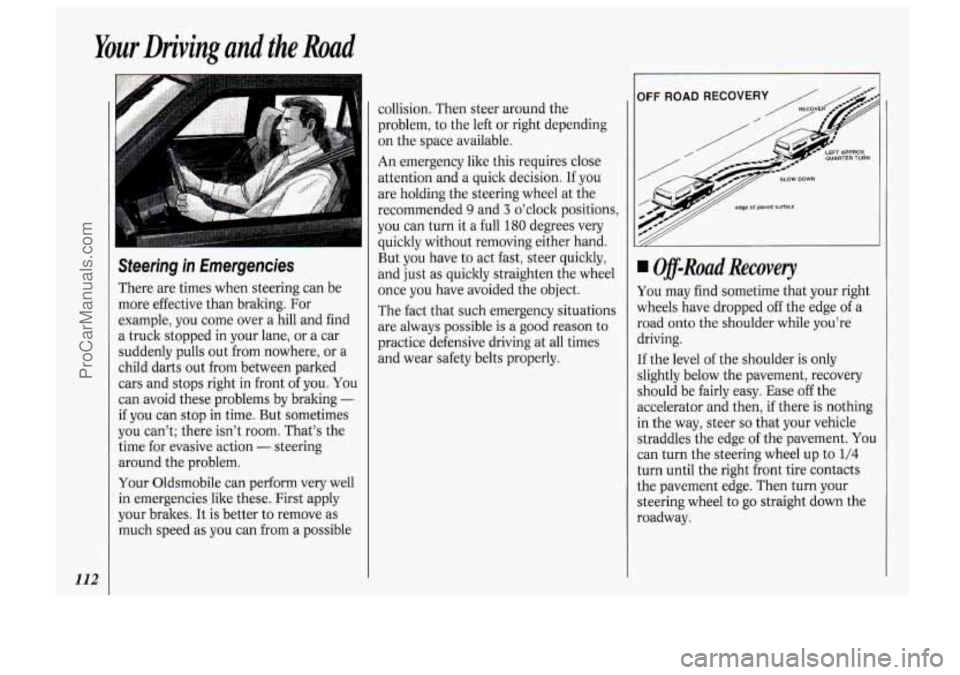
, IOFF ROAD RECOVERY /
Off-Road Recovery
You may find sometime that your right
wheels have dropped off the edge of a
road onto the shoulder while you’re
driving.
If the level of the shoulder is only
slightly below the pavement, recovery
should be fairly easy. Ease
off the
accelerator and then, if there is nothing
in the way, steer
so that your vehicle
straddles the edge of the pavement.
You
can turn the steering wheel up to 1/4
turn until the right front tire contacts
the pavement edge. Then turn your
steering wheel to
go straight down the
roadway.
ProCarManuals.com
Page 119 of 248

Passing
The driver of a vehicle about to pass
another on a two-lane highway waits for
just the right moment, accelerates,
moves around the vehicle ahead, then
goes back into the right lane again.
A
simple maneuver?
Not necessarily! Passing another vehicle
on a two-lane highway is a potentially
dangerous move, since the passing
vehicle occupies the same lane as
oncoming traffic for several seconds.
A
miscalculation, an error in judgment, or
a brief surrender to frustration or anger
can suddenly put the passing driver face
to face with the worst of all traffic
accidents
- the head-on collision.
So here are some tips for passing:
“Drive ahead.” Look down the road,
to the sides, and to crossroads for
situations that might affect your
passing patterns. If you have any
doubt whatsoever about making a
successful pass, wait for a better time.
markings, and lines. If you can see a
sign up ahead that might indicate a
turn or an intersection, delay your
Watch for traffic signs, pavement pass.
A broken
center line usually
indicates it’s all right to pass
(providing the road ahead
is clear).
Never cross a solid line on your side
of the lane or a double solid line, even
if the road seems empty of
approaching traffic.
Do not get too close to the vehicle you
want to pass while you’re awaiting an
opportunity. For one thing, following
too closely reduces your area of vision,
especially
if you’re following a larger
vehicle.
Also, you won’t have
adequate space
if the vehicle ahead
suddenly slows or stops. Keep back a
reasonable distance.
When it looks like a chance to pass is
coming up, start to accelerate but stay
in the right lane and don’t get too close.
Time your move
so you will be
increasing speed as the time comes to
move into the other lane. If the way is
clear to pass, you
will have a “running
start” that more than makes up for the
distance you would lose by dropping
back. And
if something happens to
cause you to cancel your pass, you need
only slow down and drop back again
and wait for another opportunity.
If other cars are lined up to pass a
slow vehicle, wait your turn. But take
care that.someone isn’t trying to pass
you as you pull out to pass the slow
vehicle. Remember to glance over your
shoulder and check the blind spot.
Check your mirrors, glance over your
shoulder, and start your left lane
change signal before moving out of the
right lane to pass. When you are far
enough ahead of the passed vehicle to
see its front in your inside mirror,
activate your right lane change signal
and move back into the right lane.
(Remember that your right outside
mirror is convex. The vehicle you just
passed may seem to be farther away
from
you than it really is.)
Try not to pass more than one vehicle
at a time on two-lane roads. Reconsider
before passing the next vehicle.
Don’t overtake a slowly moving
vehicle
too rapidly. Even though the
brake lights are not flashing, it may be
slowing down or starting to turn.
If you’re being passed, make it easy
for the following driver to get ahead of
you. Perhaps you can ease a little to
the right.
113
ProCarManuals.com
Page 125 of 248

Driving Uphi//
Once you decide you can safely drive
up the hill, you need to take some
special steps.
Use a low gear and get a firm grip on
the steering wheel.
Get a smooth start up the hill and try
to maintain your speed. Don’t use
more power than you need, because
you don’t want your wheels to start
spinning or sliding.
Try to drive straight up the hill if at all
possible. If the path twists and turns,
you might want to find another route.
Ease up on your speed as you
approach the top of the.hill..
Attach a flag to the vehicle to make
you more visible to approaching
traffic on trails or hills.
Sound the horn as you approach the
top of the hill to let opposing traffic
know you’re there.
Use your headlights even during the
day. They make you more visible to
oncoming traffic.
Q: What should I do if my vehicle
stalls,
or is about to stall, and I
can’t make it up the hill?
A: If this happens, there are some
things you should
do, and there are
some things you must not do. First,
here’s what you
should do:
Push the brake pedal to stop the
vehicle and keep it from rolling
backwards. Also, apply the parking
brake.
the transmission into reverse,
release the parking brake, and
slowly back down the hill in reverse.
If your engine has stopped running,
you’ll need
to restart it. With the
brake pedal depressed and the
parking brake still applied, shift the
transmission to
P (Park) and
restart the engine. Then, shift to
reverse, release the parking brake,
and slowly back down the hill as
straight as possible in reverse.
As you are backing down the hill,
put
your left hand on the steering
wheel at the
12 o’clock position.
This way, you’ll be able to tell if
your wheels are straight and
maneuver
as you back down. It’s
best that you back down the hill
with your wheels straight rather
than in the left or right direction.
Turning the wheel too far
to the
left or right will increase the
possibility
of a rollover.
If your engine is still running, shift
119
ProCarManuals.com