audio OLDSMOBILE SILHOUETTE 1993 User Guide
[x] Cancel search | Manufacturer: OLDSMOBILE, Model Year: 1993, Model line: SILHOUETTE, Model: OLDSMOBILE SILHOUETTE 1993Pages: 323, PDF Size: 17.13 MB
Page 126 of 323
Comfort Controls & Audio Systems
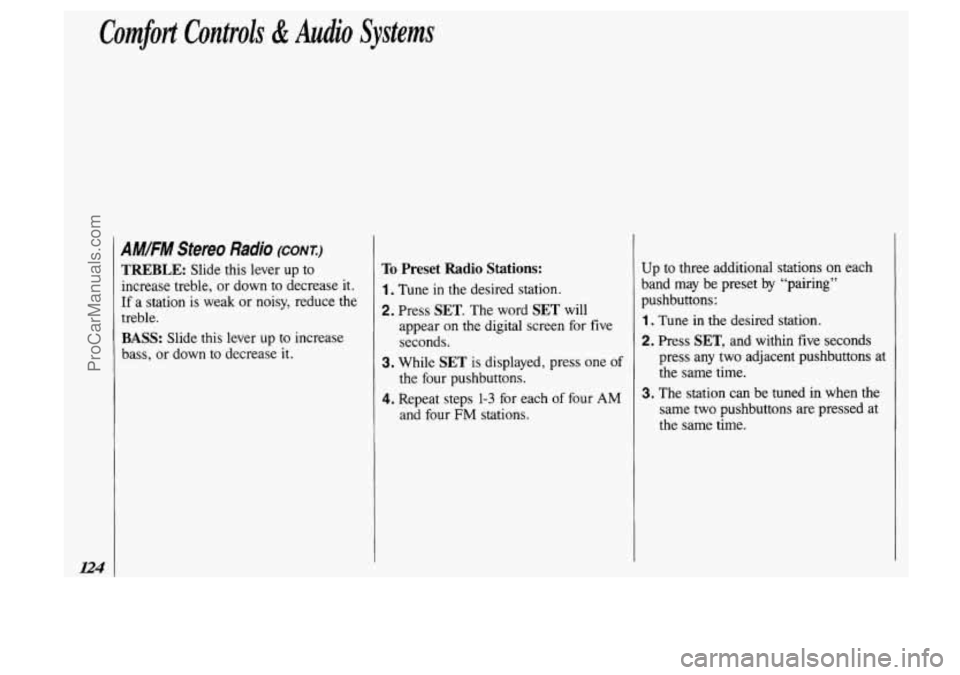
AMIFM Stereo Radio (CONT.)
TREBLE: Slide this lever up to
increase treble, or down to decrease it.
If a station is weak
or noisy, reduce the
treble.
BASS: Slide this lever up to increase
bass, or down to decrease it.
To Preset Radio Stations:
1. Tune in the desired station.
2. Press SET. The word SET will
appear
on the digital screen for five
seconds.
3. While SET is displayed, press one of
the four pushbuttons.
4. Repeat steps 1-3 for each of four AM
and four FM stations. Up to
three additional stations on each
band may be preset by “pairing”
pushbuttons:
1 . Tune in the desired station.
2. Press SET, and within five seconds
press any two adjacent pushbuttons at
the same time.
3. The station can be tuned in when the
same two pushbuttons are pressed
at
the same time.
ProCarManuals.com
Page 128 of 323
Comfort Controls & Audio Systems
126
AM/FM Stereo with Cassette
Player (CONT.)
To Preset Radio Stations:
1 . Tune in the desired station.
2. Press SET. The word SET will
appear on the digital screen for five seconds.
3. While SET is displayed, press one of
the four pushbuttons.
4. Repeat steps 1-3 for each of four AM
and four FM stations.
Up to three additional stations on each
band may be preset by "pairing"
pushbuttons:
1. Tune in the desired station.
2. Press SET, and within five seconds
press any two adjacent pushbuttons at the same time.
3. The station can be tuned in when the
same two pushbuttons are pressed at
the same time.
I_".__.
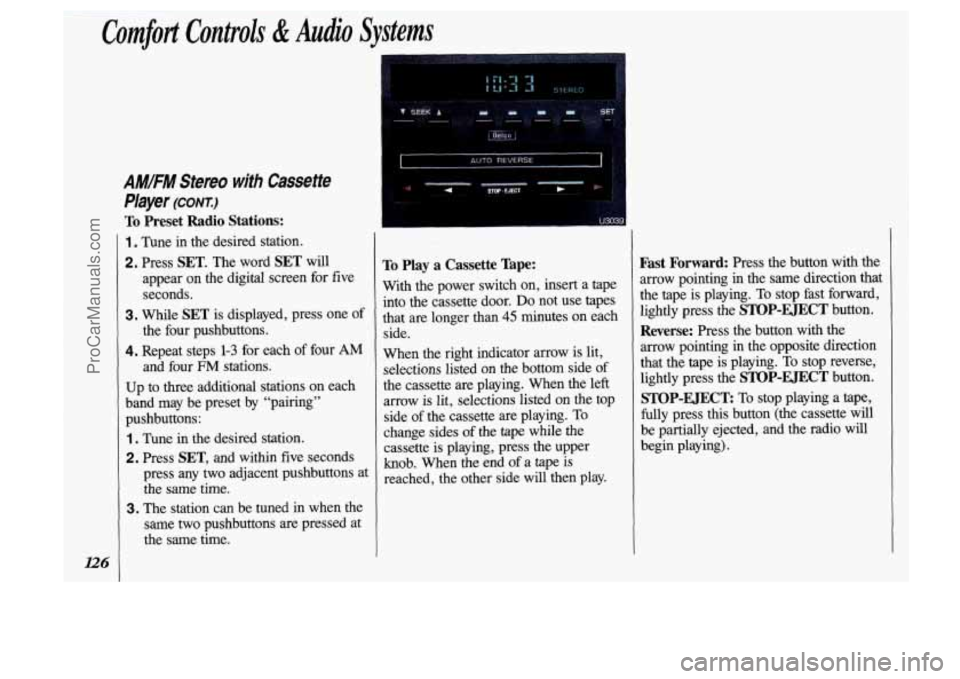
To Play a Cassette Tape:
With the power switch on, insert a tape
into the cassette door.
Do not use tapes
that are longer than
45 minutes on each
side.
When the right indicator arrow is lit,
selections listed on the bottom side of
the cassette are playing. When the left
arrow is lit, selections listed on the
top
side of the cassette are playing. To
change sides of the
tape while the
cassette is playing, press the upper
knob. When the end
of a tape is
reached, the other side will then play.
Fast Forward: Press the button with the
arrow pointing in the same direction that
the tape is playing.
To stop fast forward,
lightly press the
STOP-EJECT button.
Reverse: Press the button with the
arrow pointing
in the opposite direction
that the tape is playing. To stop reverse,
lightly press the
STOP-EJECT button.
STOP-EJECT To stop playing a tape,
fully press this button (the cassette will
be partially ejected, and the radio will
begin playing).
ProCarManuals.com
Page 130 of 323
Comfort Controls & Audio Systems
AM/FM Sfereo with Cassette
Player
with Dolby@ (CONZ)
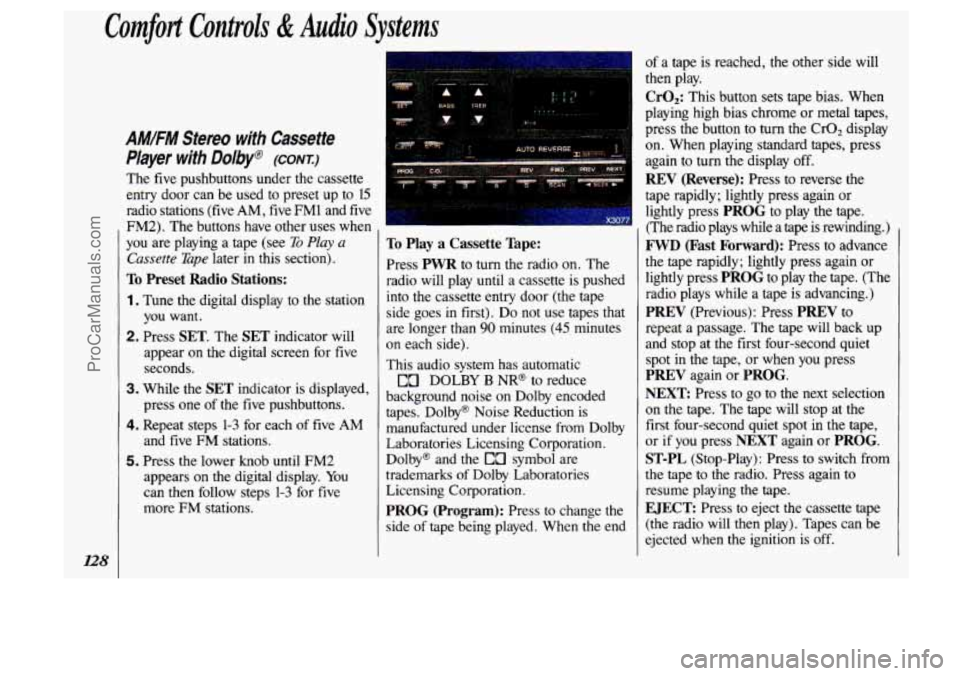
The five pushbuttons under the cassette
entry door can be used to preset up to 15
radio stations
(five AM, five FM1 and five
FM2). The buttons have other uses when
you are playing a tape (see
To Play a
Cassette Tape later in this section).
To Preset Radio Stations:
1. Tune the digital display to the station
you want.
2. Press SET. The SET indicator will
appear
on the digital screen for five
seconds.
3. While the SET indicator is displayed,
press one
of the five pushbuttons.
4. Repeat steps 1-3 for each of five AM
and five FM stations.
5. Press the lower knob until FM2
appears on the digital display. You
can then follow steps
1-3 for five
more
FM stations.
To Play a Cassette Tape:
Press PWR to turn the radio on. The
radio will play until a cassette is pushed
into the cassette entry door (the tape
side goes
in first). Do not use tapes that
are longer than
90 minutes (45 minutes
on each side).
This audio system has automatic
DOLBY
B NR@ to reduce
background noise on Dolby encoded
tapes. Dolby@ Noise Reduction is manufactured under license from Dolby
Laboratories Licensing Corporation.
Dolby@ and the
EO symbol are
trademarks of Dolby Laboratories
Licensing Corporation.
PROG (Program): Press to change the
side
of tape being played. When the end
of a tape is reached, the other side will
then play.
CrO,: This button sets tape bias. When
playing high bias chrome or metal tapes,
press the button
to turn the CrOz display
on. When playing standard tapes, press
again to turn the display off.
REV (Reverse): Press to reverse the
tape rapidly; lightly press again or
lightly press
PROG to play the tape.
(The radio plays while a tape is rewinding.)
FWD (Fast Forward): Press to advance
the tape rapidly; lightly press again or
lightly press
PROG to play the tape. (The
radio plays while a tape is advancing.)
PREV (Previous): Press PREV to
repeat a passage. The tape will back up
and stop at the first four-second quiet spot in the tape, or when
you press
PREV again or PROG.
NEXT
Press to go to the next selection
on the tape. The tape will stop at the
first four-second quiet spot in the tape,
or if you press
NEXT again or PROG.
ST-PL (Stop-Play): Press to switch from
the tape to the radio. Press again to
resume playing the tape.
EJECT: Press to eject the cassette tape
(the radio will then play). Tapes can be
ejected when the ignition
is off.
ProCarManuals.com
Page 132 of 323
Comfort Controls & Audio Systems
AM/FM Stereo with Compact
Disc Player (CONT:)
Radio Controls
AM/FM: Press to select either the AM
or FM radio band. The band you select
will be momentarily displayed on the
digital screen. The frequency of the
station will be displayed, and if the
station is in stereo, the
ST (Stereo)
indicator will also be displayed.
Your radio has an AMAX-certified
receiver. It can produce quality AM
stereo sound and receive C-Quam@
stereo broadcasts. AMAX reduces noise
without reducing the high frequencies
you need for the best sound. You don’t
have to do anything to your Delco/GM
radio because AMAX is automatic.
SEEK: Press SEEK to tune in and stop
on the
next station on the AM or FM
radio band.
SCAN: When you press SCAN, the
radio will go to the next station and
pause there for
a few seconds. SCAN
will display on the digital screen. Press
SCAN again to stop on a station.
RCL (Recall): When the ignition is off,
press to display the clock. When the
radio is on, press to change between the
clock and
the radio station frequency
displayed on the digital screen. The
five pushbuttons in the lower right
corner can be used to preset up
to ten
radio stations (five AM and five FM
stations). These buttons have other uses
when you are playing a compact disc
(see Compact
Disc Controls later in this
section).
To Preset Radio Stations:
1 . Tune the digital display to the station
you want.
2. Press SET. The SET indicator will
appear on the digital screen for five
seconds.
3. While the SET indicator is displayed,
press one of
the five pushbuttons.
4. Repeat steps 1-3 for each of five AM
and five
FM stations.
ProCarManuals.com
Page 134 of 323
Comfort Controls & Audio Systems
AM/FM Stereo with Compact
Disc Player
(CONT.)
When Finished with the Compact
Disc Player:
If you press POWER or turn off the
ignition, the disc will stay in the player
and
start again when you turn on the
ignition or power switch. The disc will
begin playing at the point where it had
been stopped.
ST/PL (Stop/Play): Press to stop the
disc player; the radio will play. Press
again to play the disc (the player will
start playing the disc where it was
stopped earlier).
EJCT (Eject): Press to eject the disc;
the radio will play.
CD Player Anti-Theft Fieature
Delco LOC II@ is a security feature for
the compact disc player. It can be used
or ignored. If ignored, the system plays
normally.
If it is used, your player won’t
be usable if it is ever stolen, because it
will go to
LOC mode any time battery
power is removed. Until an unLOC
code is entered, it will not
turn on.
The instructions below tell you how to
enter a secret code into the system.
If
your vehicle loses battery power for any
reason, you must unlock the system with
the secret code before the radio will turn
on.
To Set the Anti-Theft System:
1. Write down any six-digit number and
keep it in a safe place.
2. Turn the ignition to the Accessory or
Run position.
3. Press the POWER button to turn the
radio
off.
4. Press the PREV and FF buttons
together. Hold them down until
“- - -” shows on the display (at least
five seconds). You are ready to enter
your secret code.
NOTE:
If you allow more than 15
seconds to elapse between any steps, the
radio automatically reverts to time and
you must
start the procedure over at step 4.
ProCarManuals.com
Page 313 of 323
Index
Accessory Power Outlet .......... 89
Adding Brake Fluid
............. .240. 272
Engine Coolant
.. .198. 236. 269. 272
Engine Oil
............. .225. 269
Power Steering Fluid
.. .239. 270. 272
Sound Equipment
............. 121
Transaxle Fluid
..... .234. 269. 272
Adjusting Rear Seats
............. 19
Air Cleaner
.............. .230. 271
Air Conditioner
................ 114
Air Inflator System
.............. 90
Alcohol. Driving Under the Influence
of ......................... 145
Alcohol in Gasoline
............. 217
Aluminum Wheels
........ .252. 260
Antenna
...................... 136
Antifreeze
........... .235. 269. 272
Anti-Lock Brake System
......... 149
Brake Master Cylinder
........ 240
Junction Block Fuse
.......... 267
Warning Light
............... 109
Appearance Care ............... 254
Ashtrays and Lighter
..... .94. 95. 96
Electrical Equipment
.. .63.
121. 263
Windshield Washer Fluid
.. .239. 292 Audio Systems
................. 121
AM/FM Stereo Radio
......... 123
Cassette Player
........ .125. 127
AM/FM Stereo Radio with
Compact Disc Player
........ 129
Care of Audio Systems
......... 135
Radio Reception. For the Best
... 134
Setting the Clock
............. 122
Steering Wheel Touch Controls
. . 134
Adding Fluid
....... .234. 269. 272
Checking Fluid
.............. 232
Shifting
..................... 65
Automatic Transaxle
Battery
...................... 242
Jump Starting
................ 187
Battery Warning Gage
........... 107
Blizzard
...................... 175
Block Heater. Engine ........ .63. 229
“Blowout
,” Tire ................ 203
Brake Adjustment
.................. 153
Anti-Lock Brakes
............. 149
Anti-Lock Brake System Warning Light
..................... 109 Junction Block
Fuse
........... 267
Fluid
.................. .240. 272
Master Cylinder
.............. 240
Parking
..................... -68
Pedal Travel
................. 152
Rear Drums
................. 152
Warning Light
................ 108
Wear Indicators
............... 151
Brake System Warning Light
...... 108
Braking
....................... 148
Braking in Emergencies
.......... 153
Braking Technique .............. 148
“Break-In,” New Vehicle
..... .60, 178
Bucket Seats, Removable Rear
...... 17
Buckling Up (see Safety Belts)
Bulb Replacement
Headlight
................... 243
Taillight
.................... 244
Bulbs, Replacement
............. 273
Capacities
& Specifications ...... 269
Carbon Monoxide in
Cassette Tape Player Exhaust
.... .60, 71, 72,
111, 175, 181
(see
Audio Systems)
311
ProCarManuals.com
Page 314 of 323
312
Center Passenger Position (see Safety
Chains. Safety ................. 180
Chains. Tire
.............. .2l2. 253
Changing a Flat Tire
............ 204
Checking Brake Fluid
.................. 240
Engine Coolant
............... 236
Engine Oil
.................. 225
Power Steering Fluid
.......... 238
Things Under the Hood
........ 220
Transaxle Fluid
.............. 232
Child Restraints
................. 35
How to Install ................. 35
Where to Put
................. 36
Children and Safety Belts
..... .34, 40
Cigarette Lighter ................ 94
Circuit BreakerIRelay Panel
....... 267
Circuit Breakers
& Fuses ......... 264
City Driving
................... 165
Cleaner. Air
.............. .230. 271
Cleaning Aluminum Wheels
............ 260
Cassette Tape Player
........... 135
Belts)
Safety Belt Systems ............ 42
Chemical Paint Spotting
.......... 262 Compact Discs
............... 136
Finish Care
.................. 259
Foreign Material
.............. 261
Glass
...................... 258
Inside of Your Vehicle
......... 255
Leather or Vinyl
.............. 257
Outside of the Windshield
and Wiper Blades
........... 259
Outside
of Your Vehicle ....... -259
Safety Belts
.................. 258
Special Problems
............. 257
Stains. Removing
............. 257
Top of the Instrument Panel
..... 258
Underbody Maintenance
........ 261
Vinyl or Leather
.............. 257
Warnings
................... 254
Weatherstrips
................ 260
White Sidewall Tires
.......... 260
Windshield
.................. 259
Climate Control System
...... .114, 117
Clock, Setting the
............... 122
Cluster, Instrument Panel
......... 102
Comfort Controls
............... 113
Air Conditioner
............... 114
Heater
...................... 115
Fabric .................. .255. 256 Rear
........................ 116
Ventilation
................... 120
Compact Disc Player (seeAudio Systems)
Compact Overhead Console ....... 99
Compact Spare Tire
............. 212
Compass Display
................ 87
Console, Overhead
.............. 85
Control of a Vehicle
............ -147
Convenience Net
................ 96
Convex Outside Mirror
........... 92
Coolant
...................... 235
Checking
& Adding ........... 236
Proper Mixture to Use
......... 198
Safety Warnings About
.. .199. 200, 236
Temperature Gage
............. 108
Cruise Control
.................. 75
Cup HoldedAshtray, Front ......... 94
Curves. Driving on
.............. 154
Customer Assistance Information
. . 297
Dead Battery: What
to Do ....... 187
Defensive Driving
.............. 144
Defogger. Rear Window
.......... 119
Defogging and Defrosting
......... 118
Delco LOC
II@ ................. 132
ProCarManuals.com
Page 318 of 323

316
New Vehicle “Break-In”
Requirements
............ .60. 178
Night Driving
.................. 159
Night Vision
................... 160
octane Requirements
(see
Fuel Requirements)
Odometer and Speedometer ....... 103
Oil. Engine ................... 225
Pressure Gage
................ 106
Pressure Indicator
............. 106
Quality
..................... 227
Thickness
................... 227
UsedOil
.................... 230
When to Change .............. 229
Oil Warning
................... 106
Operation
of Lights .............. 80
Outside Rearview Mirrors
......... 92
Overhead Console
............... 85
Overheated Engine .............. 195
Warnings
........... .195, 236, 238
Owner Checks
& Services ........ 287 park.
Shifting Into
.............. 69
Parking On
Hills ................ .171. 183
Parking Brake
.................. 68
Parking on
Hills ........... .171. 183
Passing
....................... 156
Payload ...................... 245
Over Things That
Burn.
......... 71
With the Engine Running
.... .70. 72
Passenger Belts (see
Safety Belts)
Periodic Maintenance Inspections ... 290
Polishing and Waxing
(see
Appearance Care)
Power (Anti-Lock) Brakes ........ 149
Power Door Locks
.............. 48
Power Mirrors
.................. 92
Power Outlet. Accessory
.......... 90
Power Seat Controls ............. 15
Power Sliding
Door .............. 54
Power Steering
................. 153
Power Steering Fluid
... .238. 270, 272
Power Windows
........... .74. 268
Pregnancy. Use of Safety Belts During
...................... 29
Problems on the Road
........... 185
Publications
.................. 304 Radiator
Overheating
(see Overheated Engine)
Radiator Pressure Cap ........... 238
Radio (see
Audio Systems)
Reading Lights .................. 85
Rear Climate Control
............ 117
Rear Interior Lights
.............. 89
Rear Seats
...................... 17
Adjusting
.................... 19
Removing
.................... 18
Replacing
.................... 20
Third Row Entry
............... 17
Rear Window Defogger
........... 119
Rear Window Wiper and Washer
.... 84
Rearview Mirror
................ 92
Reclining Seatbacks
.............. 15
Reminder Light ................. 25
Remote Keyless Entry
............ 49
Replacement Bulbs
.............. 273
Replacement Fuses
............. 265
Replacement
Parts .............. 271
Remote Fuel Door Release
........ 219
Removing Rear Bucket Seats
...... -18
Replacing Brake System
Parts ..... 242
Replacing Bulbs
........... .243, 244
Replacing Rear Bucket Seats
....... 20
ProCarManuals.com
Page 320 of 323
318
Sound Equipment. Adding ........ 121
Spare Tire. Compact
............. 212
Speedometer
& Odometer ........ 103
Stains. Removing
............... 257
Starting the Engine
............... 61
Sound Systems (see
Audio
Systems)
Specifications and Capacities ..... $269
Speed Control (see
Cruise Control)
Starting Your Vehicle if the Battery
is “Dead” (see
Jump Starting)
Steering
In Emergencies ............... 155
Off-Road Recovery
........... -156
Power ...................... 153
Tips
........................ 154
Steering Wheel. Tilt
.............. 73
Steering Wheel Touch Controls
.... 134
Stereo Sound Systems
(see Audio Systems)
Storing Your Vehicle ............ 242
Compartment
................. 88
Cup Holder .................. 94
Storage
Compact Overhead Console
...... 99
Convenience Net .............. 96
Garage Door Opener ........... 85
Glove Box .................... 93
Locking Bin
.................. 95
Luggage Carrier
............... 97
Overhead Console
............. 85
Rear Compartment ............. 95
Sunglasses ................... 88
Stuck, If You Are ............... 213
Sunroof
....................... 99
SunVisors ..................... 93
Tachometer
................... 103
Taillights
..................... 244
Tape Player (see Audio
Systems)
Technical Facts & Specifications
Bulbs
...................... 273
Capacities and Specifications
.... 269
Electrical Equipment, Circuit
BreakerdRelays
........ 267
Add-on
........... .63, 121, 263
Engine
...................... 271
Fluids
& Lubricants ........... 272
Fuses
............. .264, 265, 266
Replacement Parts
............. 271
Label
..................... 263
Service
Parts Identification Vehicle Identification Number
(VIN)
.................... 262
Temperature Display
............. 87
Temperature Warning
............ 108
Theft ......................... 53
Thermostat .................... 238
Tilt Steering Wheel
.............. 73
Time, Setting the
............... 122
Tire Loading
.................. 245
Tires
......................... 247
“Blow Out”
................. 203
Buying New
................. 250
Chains
................. .2l2. 253
Flat. Changing
............... 204
Inflation
............... .212, 248
Inflator
................. .90, 203
Inspection
& Rotation .......... 249
Loading
.................... 245
Pressure
.................... 248
Quality Grading
.............. 250
Spare, Compact ............... 212
Wear Indicators
.............. 249
Wheel Alignment
&
Tire Balance ............... 252
Wheel Nut Torque
........ .210. 270
Wheel Replacement
........... 252
ProCarManuals.com