radio OLDSMOBILE SILHOUETTE 1997 Owner's Manual
[x] Cancel search | Manufacturer: OLDSMOBILE, Model Year: 1997, Model line: SILHOUETTE, Model: OLDSMOBILE SILHOUETTE 1997Pages: 436, PDF Size: 21.87 MB
Page 217 of 436
Rear Seat Audio
This feature allows rear seat passengers to listen to a
different music source than
the front seat passengers
including AM-FM automatic tone control, cassette tapes
or
CDs. For example, rear seat passengers may listen to
a cassette tape or
CD through headphones while the
driver listens to the radio through the front speakers.
The rear seat passengers have control of
the volume for
each headphone. Be aware that the front seat audio
controls always override
the rear seat audio controls.
note that this feature is intended for rear seat
passengers. Please do not use headphones while driving.
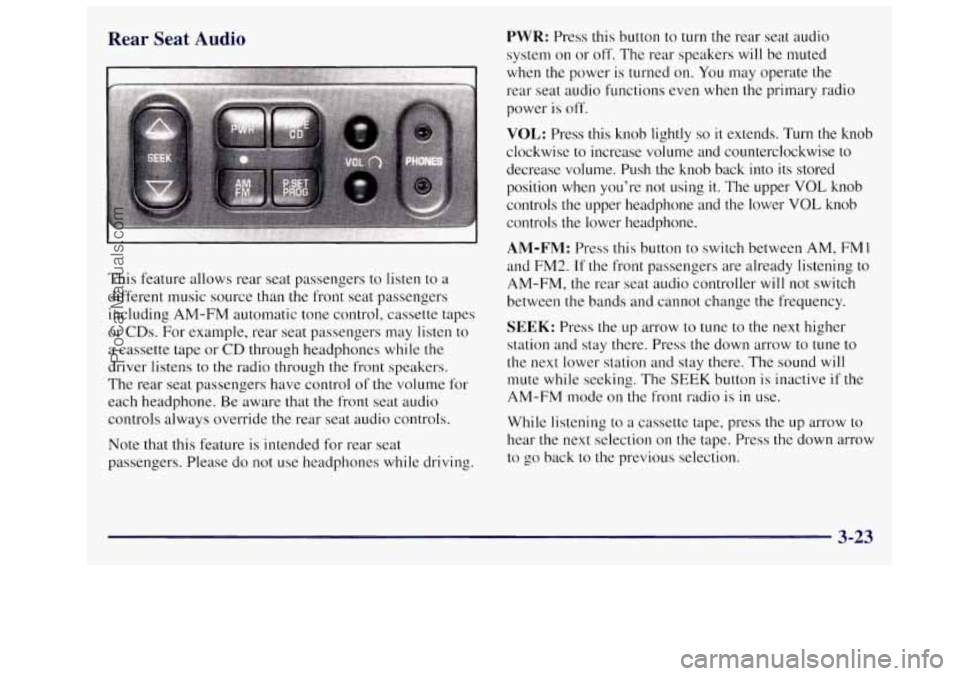
PWR: Press this button to turn the rear seat audio
system on or off. The rear speakers will be muted
when the power is turned
on. You may operate the
rear seat audio functions even when the primary radio
power is off.
VOL: Press this knob lightly so it extends. Turn the knob
clockwise to increase volume and counterclockwise to
decrease volume. Push the knob back into its stored
position
when you’re not using it. The upper VOL knob
controls
the upper headphone and the lower VOL knob
controls the lower headphone.
AM-FM: Press this button to switch between AM, FM I
and FM2. If the front passengers are already listening to
AM-FM, the rear seat audio controller will not switch
between the bands and cannot change the frequency.
SEEK: Press the up arrow to tune to the next higher
station and stay there. Press the down arrow to tune to
the next lower station and stay there. The sound
will
mute while seeking. The SEEK button is inactive if the
AM-FM mode on the front radio is in use.
While listening to a cassette tape, press the
up arrow to
hear the next selection on the tape. Press the down arrow
to go back to the previous selection.
3-23
ProCarManuals.com
Page 218 of 436
SCAN: Press and hold SEEK until the radio goes into
SCAN mode. SCAN allows you to listen to stations
for a few seconds. The receiver will continue to scan
and momentarily stop at each station
until you press
SEEK again.
P.SET PROG: The front passengers must be listening to
something different for each of these functions to work:
Press this button to seek through your preset radio
stations set
on your primary radio pushbuttons.
When a cassette tape is playing, press this button to
go to the other side
of the tape.
TAPE CD: With a cassette tape in the player and the
radio playing, press this button to play a cassette tape.
Press TAPE CD to switch between the tape
and compact
disc if both are loaded. Press
AM-FM to return to the
radio when a cassette tape or compact disc
is playing.
The inactive tape or
CD will remain safely inside the
radio for future listening.
Theft-Deterrent Feature
THEFTLOCK" is designed to discourage theft of your
radio. It works by using a secret code to disable
all radio
functions whenever battery power
is removed.
The THEFTLOCK feature for the radio may be used or
ignored. If ignored, the system plays normally and the
radio is not protected by
the feature. If THEFTLOCK is
activated, your radio will not operate if stolen.
When THEFTLOCK is activated, the radio will display
LOC to indicate a locked condition anytime battery
power is removed. If your battery loses power for any
reason, you must unlock the radio with the secret code
before it will operate.
Activating the Theft-Deterrent Feature
The instructions which follow, explain how to enter your
secret code to activate the THEFTLOCK system. It is
recommended that you read through all nine steps
before starting
the procedure.
NOTE: If you allow more than
15 seconds to elapse
between any steps, the radio automatically reverts to
time and
you must start the procedure over at Step 4.
1. Write down any three or four-digit number from
000 to 1999 and keep it in a safe place separate
from the vehicle.
2. Turn the ignition to ACCESSORY or RUN.
3-24
ProCarManuals.com
Page 219 of 436
3. Turn the radio off.
4. Press the 1 and 4 buttons together. Hold them down
until
--- shows on the display. Next you will use the
secret code number which you have written down.
5. Press MN and 000 will appear on the display.
6. Press MN again to make the last two digits agree
7. Press HR to make the first one or two digits agree
with your
code.
with your code.
code matches the secret code you have written down.
The display will show REP to let you know that
you
need to repeat Steps 5 through 7 to confirm your
secret code.
8. Press AM-FM after you have confirmed that the
9. Press AM-FM and this time the display will show
SEC to let you know that your radio is secure. The
indicator
by the volume control will begin flashing
when the ignition is turned
off.
Unlocking the Theft-Deterrent Feature After a
Power
Loss
Enter your secret code as follows; pause no more than
15 seconds between steps:
1.
2.
3.
4.
5.
LOC appears when the ignition is on.
Press MN and
000 will appear on the display.
Press MN again to make the last two digits agree
with your code.
Press
HR to make the first one or two digits agree
with your code.
Press AM-FM after you have confirmed that the
code matches the secret code you have written down.
The display will show
SEC, indicating the radio is
now operable and secure.
If you enter the wrong code eight times, INOP will
appear on the display.
You will have to wait an hour
with the ignition on before you can try again. When you
try again, you will only have three chances to enter the
correct code before
INOP appears.
If you lose or forget your code, contact your retailer.
3-25
ProCarManuals.com
Page 220 of 436
Disabling the Theft-Deterrent Feature
Enter your secret code as follows; pause no more than
15 seconds between steps:
1. Turn the ignition to ACCESSORY or RUN.
2. Turn the radio off.
3. Press the 1 and 4 buttons together. Hold them down
until
SEC shows on the display.
4. Press MN and 000 will appear on the display.
5. Press MN again to make the last two digits agree
6. Press HR to make the first one or two digits agree
with
your code.
with your code.
7. Press AM-FM after you have confirmed that the
code matches the secret code you have written down.
The display will show
---, indicating that the radio is
no longer secured.
If the code entered is incorrect, SEC will appear on the
display. The radio will remain secured until the correct
code is entered.
When battery power
is removed and later applied to a
secured radio, the radio won’t turn on and LOC will
appear on
the display.
To unlock a secured radio, see “Unlocking the
Theft-Deterrent Feature After a Power
Loss” earlier in
this section.
Steering Wheel Controls (If Equipped)
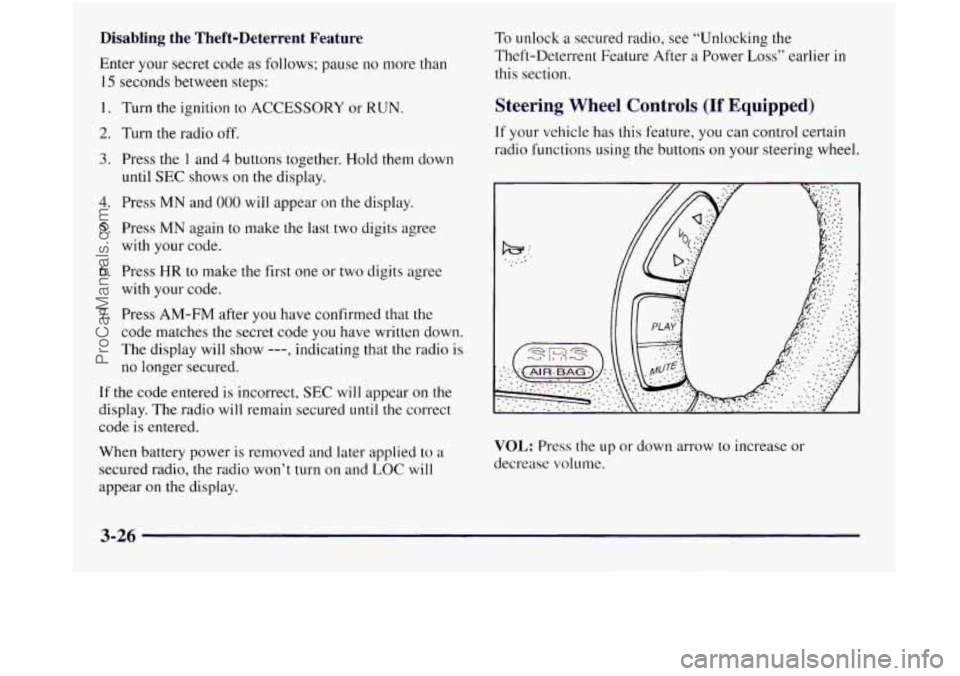
If your vehicle has this feature, you can control certain
radio functions using
the buttons on your steering wheel.
VOL: Press the up or down arrow to increase or
decrease volume.
3-26
ProCarManuals.com
Page 221 of 436
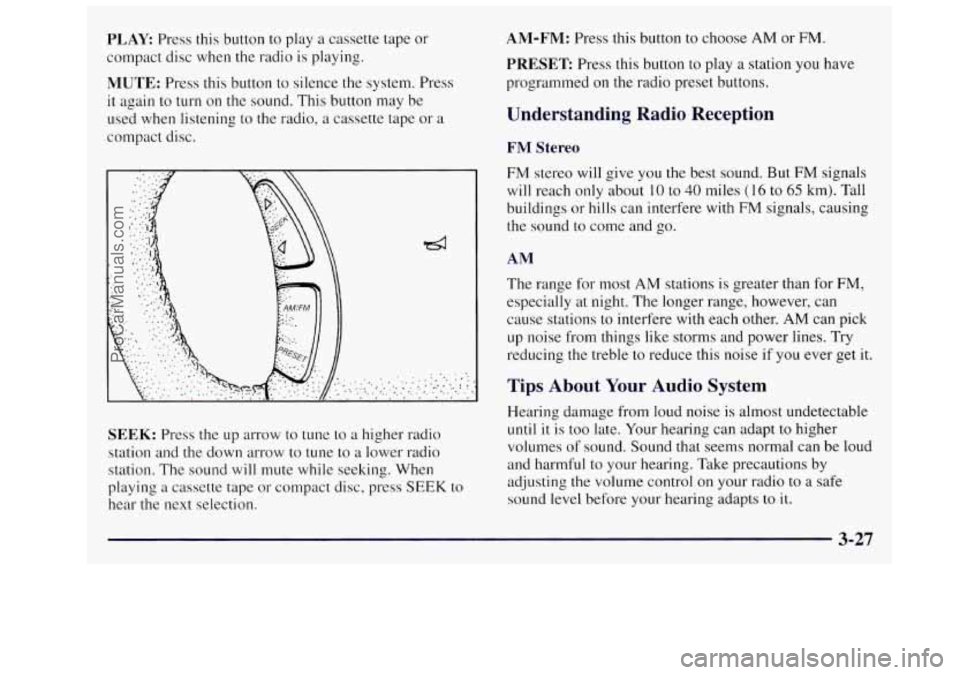
PLAY Press this button to play a cassette tape or
compact disc when the radio is playing.
MUTE: Press this button to silence the system. Press
it again to turn on the sound. This button may be
used when listening to the radio, a cassette tape or
a
compact disc.
SEEK: Press the up arrow to tune to a higher radio
station and the down arrow to tune to
a lower radio
station. The sound
will mute while seeking. When
playing a cassette tape or compact disc, press
SEEK to
hear the next selection.
AM-FM: Press this button to choose AM or FM.
PRESET Press this button to play a station you have
programmed on the radio preset buttons.
Understanding Radio Reception
FM Stereo
FM stereo will give you the best sound. But FM signals
will reach only about
10 to 40 miles (16 to 65 km). Tall
buildings or hills can interfere with
FM signals, causing
the sound to come and go.
AM
The range for most AM stations is greater than for FM,
especially at night. The longer range, however, can
cause stations to interfere with each other.
AM can pick
up noise from things like storms and power lines. Try
reducing the treble
to reduce this noise if you ever get it.
Tips About Your Audio System
Hearing damage from loud noise is almost undetectable
until it is too late. Your hearing can adapt to higher
volumes
of sound. Sound that seems normal can be loud
and harmful to your hearing. Take precautions by
adjusting
the volume control on your radio to a safe
sound level before your hearing adapts to
it.
3-27
ProCarManuals.com
Page 222 of 436
To help avoid hearing loss or damage:
Adjust the volume control to the lowest setting.
Increase volume slowly until you hear comfortably
and clearly.
NOTICE:
r
Before you add any sound equipment to your
vehicle
-- like a tape player, CB radio, mobile
telephone or two-way radio
-- be sure you can add
what you want.
If you can, it’s very important to
do it properly. Added sound equipment may
interfere with the operation of your vehicle’s
engine, Delco radio or other systems, and even
damage them. Your vehicle’s systems may
interfere with the operation of sound equipment
that has been added improperly.
So, before adding sound equipment, check with
your retailer and be sure to check Federal rules
covering mobile radio and telephone units.
Care of Your Cassette Tape Player
A tape player that is not cleaned regularly can cause
reduced sound quality, ruined cassettes or a damaged
mechanism. Cassette tapes should be stored in their
cases away from contaminants, direct sunlight and
extreme heat. If they aren’t, they may not operate
properly or may cause failure of the tape player.
Your tape player should be cleaned regularly after every
50 hours of use. Your radio may display CLN to indicate
that you have used your tape player for
50 hours without
resetting the tape clean timer. If this message appears
on the display, your cassette tape player needs to be
cleaned.
It will still play tapes, but you should clean it
as soon as possible to prevent damage to your tapes and
player. If you notice a reduction in sound quality, try a
known good cassette
to see if it is the tape or the tape
player at fault. If this other cassette has no improvement
in sound quality, clean the tape player.
3-28
ProCarManuals.com
Page 223 of 436
Cleaning may be done with a scrubbing action,
non-abrasive cleaning cassette with pads which scrub
the tape head as the hubs of the cleaner cassette turn. It
is normal for
the cassette to eject while cleaning because
your unit is equipped with a cut tape feature. To
temporarily override this feature for vehicles with
Automatic Tone Control (for one insertion), turn on the
ignition and turn the radio off. Press and hold TAPE
AUX until the tape symbol flashes
on the display, and
insert the cassette again. For vehicles without Automatic
Tone Control, press both
SEEK arrows within five
seconds of inserting the cassette with the ignition and
radio off. Insert the cassette at least three times to ensure
thorough cleaning.
A scrubbing action cleaning cassette
is available through your Oldsmobile retail facility.
You may also choose a non-scrubbing action, wet-type
cleaner which uses a cassette with a fabric belt to clean
the tape head. This type
of cleaning cassette will not
eject. It may not clean as thoroughly as the scrubbing
type cleaner. The cassette
tape player
is able to detect a broken tape.
Some cleaning cassettes may appear as a broken tape. If
the cleaning cassette is ejected immediately from the
tape player, follow these steps:
1. Turn the radio off.
2. Turn the ignition on.
3. Press and hold the TAPE-AUX button until the tape
symbol flashes.
4. Insert the cleaning cassette and the radio will turn on
in cassette mode.
5. Eject the tape after the tape player has been cleaned.
When
the cleaning cassette has been ejected, the broken
tape detection feature is active again.
After you clean the player, press and hold EJECT for
five seconds to reset the CLN indicator. The radio will
display
--- to show the indicator was reset.
Cassettes are subject to wear and the sound quality
may degrade over time. Always make sure the cassette
tape is
in good condition before you have your tape
player serviced.
3-29
ProCarManuals.com
Page 268 of 436
1. Check the other vehicle. It must have a 12-volt
battery with
a negative ground system.
NOTICE:
If the other system isn’t a 12-volt system with a
negative ground, both vehicles can be damaged.
Get the vehicles close enough
so the jumper cables
can reach, but be sure the vehicles aren’t touching
each other.
If they are, it could cause a ground
connection you don’t want.
You wouldn’t be able to
start your Oldsmobile, and the bad grounding could
damage the electrical systems.
NOTICE:
To avoid the possibility of the vehicles rolling, set
the parking brake firmly on both vehicles
involved in the jump start procedure. Put an
automatic transaxle in PARK
(P).
2. Turn off the ignition on both vehicles. Unplug
unnecessary accessories plugged into the cigarette
lighter or accessory power outlet. Turn
off all lamps
that aren’t needed as well as radios. This will avoid
sparks and help save both batteries. In addition, it
could save your radio!
NOTICE:
~~ -
If you leave your radio on, it could be badly
damaged. The repairs wouldn’t be covered by
your warranty.
3. Open the hoods and locate the batteries.
An electric fan can start up even when the engine
is not running and can injure you. Keep hands,
clothing and tools
away from any underhood
electric fan.
5-4
ProCarManuals.com
Page 355 of 436
Fuses and Circuit Breakers
The wiring circuits in your vehicle are protected from
short circuits by a combination of fuses, circuit breakers
and fusible thermal links.
Look at the silver-colored band inside the fuse. If the
band
is broken or melted, replace the fuse. Be sure you
replace a bad fuse with a new one of the identical size
and rating.
If you ever have a problem on the road and don’t have a
spare fuse,
you can borrow one that has the same
amperage
or use one of the spare fuses in the underhood
fuse and relay center. Just pick some feature of your
vehicle that you can get along without
-- like the radio
or cigarette lighter -- and use its fuse, if it is the right
amperage. Replace it as soon as you can.
There are two fuse blocks in your vehicle: the
instrument panel fuse block and the underhood fuse and
relay center.
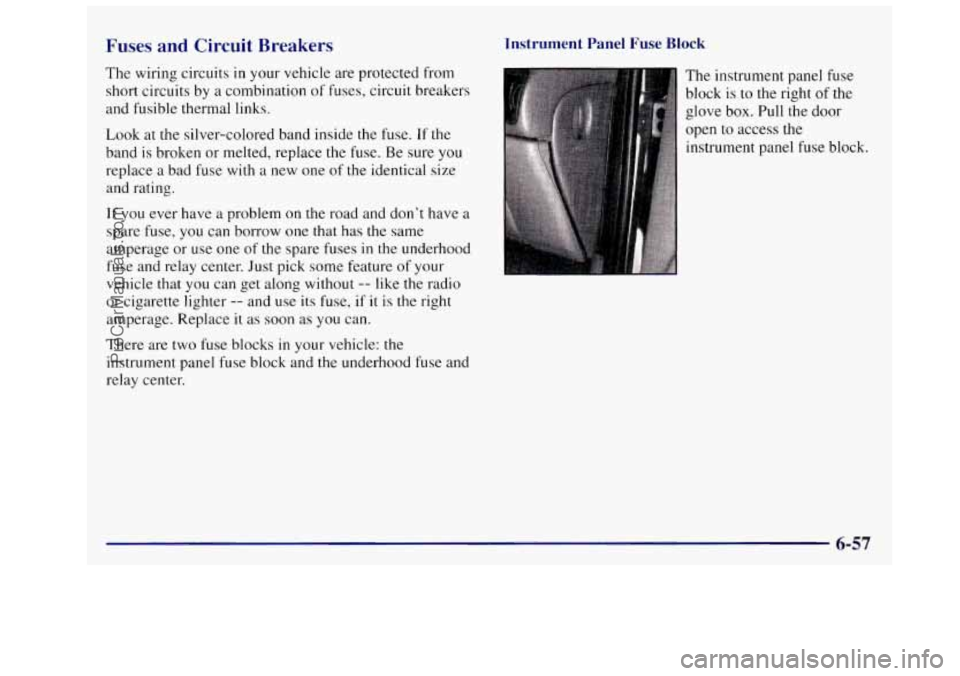
Instrument Panel Fuse Block
The instrument panel fuse
block
is to the right of the
glove box. Pull the door
open to access the
instrument panel fuse block.
ProCarManuals.com
Page 356 of 436
/ -.
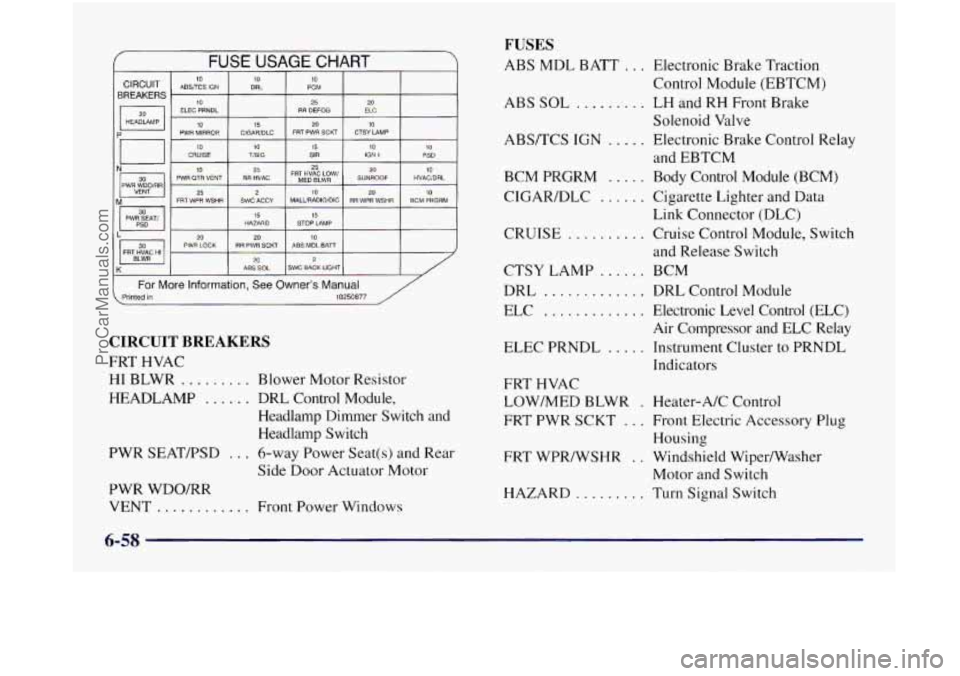
FUSE USAGE CHART
BREAKERS
ELEC PRNDL RR DEFOG ELC
HEADlAMP
20
10 CRUISE 10 TlSlG 15 SIR 10 IGN 1 10 PSD
10 25
‘a 25
25 PWR OTR VENT RR HVAC FR$~~~~~~w’ SUNROOF HVAC/DRL
10
20 10
PIM WDQ/RR 2 10 M 20 FRT WPR WSHR SWC ACCY MALURADIO/DC RR WPR WSHR BCM PRGRM -- I PWGiAT, I HAZARD 15 STOP LAMP 15
L 20 PWR LOCK RR PWR SCKT ABS MOL BATT 20 10
FRT HVAC HI 20 2 K ABS SOL SWC BACK LIGHT
For More Information, See Owner’s Manual . Printed in 10250877 /
CIRCUIT BREAKERS
FRT HVAC
HI BLWR ......... Blower Motor Resistor
HEADLAMP
...... DRL Control Module,
Headlamp Dimmer Switch and
Headlamp Switch
PWR SEATFSD
... 6-way Power Seat(s) and Rear
Side Door Actuator Motor
PWR WDO/RR VENT
............ Front Power Windows
FUSES
ABS MDL BATT ... Electronic Brake Traction
ABS
SOL ......... LH and RH Front Brake
ABS/TCS
IGN ..... Electronic Brake Control Relay
BCM
PRGRM ..... Body Control Module (BCM)
CIGARDLC
...... Cigarette Lighter and Data
CRUISE
.......... Cruise Control Module, Switch
CTSY LAMP
...... BCM
DRL
............. DRL Control Module
ELC
............. Electronic Level Control (ELC)
Air Compressor and ELC Relay
ELEC PRNDL
..... Instrument Cluster to PRNDL
Indicators Control Module
(EBTCM)
Solenoid Valve
and EBTCM
Link Connector (DLC)
and Release Switch
FRT HVAC
LOW/MED BLWR
. Heater-A/C Control
FRT PWR SCKT
... Front Electric Accessory Plug
Housing
Motor and Switch
FRT
WPR/WSHR
. . Windshield Wiper/Washer
HAZARD
......... Turn Signal Switch
6-58
ProCarManuals.com