hold OPEL AMPERA E 2018.5 Owner's Manual
[x] Cancel search | Manufacturer: OPEL, Model Year: 2018.5, Model line: AMPERA E, Model: OPEL AMPERA E 2018.5Pages: 273, PDF Size: 6.6 MB
Page 19 of 273
Keys, doors and windows17Radio remote control
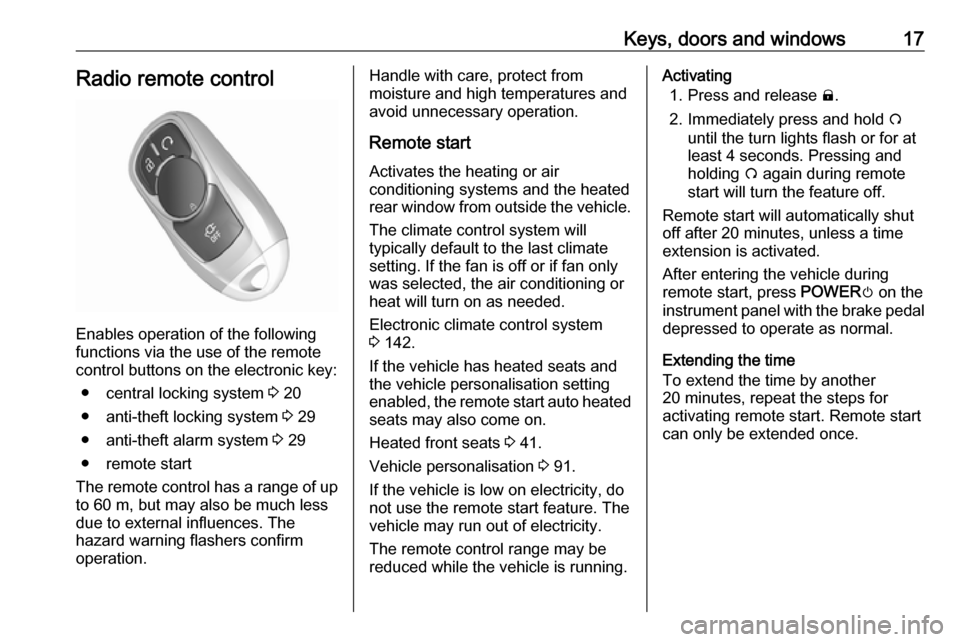
Enables operation of the following
functions via the use of the remote control buttons on the electronic key:
● central locking system 3 20
● anti-theft locking system 3 29
● anti-theft alarm system 3 29
● remote start
The remote control has a range of up
to 60 m, but may also be much less
due to external influences. The
hazard warning flashers confirm
operation.
Handle with care, protect from
moisture and high temperatures and
avoid unnecessary operation.
Remote start
Activates the heating or air
conditioning systems and the heated
rear window from outside the vehicle.
The climate control system will
typically default to the last climate
setting. If the fan is off or if fan only
was selected, the air conditioning or
heat will turn on as needed.
Electronic climate control system
3 142.
If the vehicle has heated seats and
the vehicle personalisation setting
enabled, the remote start auto heated seats may also come on.
Heated front seats 3 41.
Vehicle personalisation 3 91.
If the vehicle is low on electricity, do
not use the remote start feature. The
vehicle may run out of electricity.
The remote control range may be
reduced while the vehicle is running.Activating
1. Press and release ).
2. Immediately press and hold O
until the turn lights flash or for at
least 4 seconds. Pressing and
holding O again during remote
start will turn the feature off.
Remote start will automatically shut
off after 20 minutes, unless a time
extension is activated.
After entering the vehicle during
remote start, press POWERm on the
instrument panel with the brake pedal
depressed to operate as normal.
Extending the time
To extend the time by another
20 minutes, repeat the steps for
activating remote start. Remote start
can only be extended once.
Page 20 of 273
18Keys, doors and windowsCancelling remote start
To cancel remote start, do any of the
following:
● Aim the radio remote control at the vehicle and press and hold
O until the sidelights turn off.
● Turn on the hazard warning flashers.
● Press POWERm on the
instrument panel with the brake
pedal depressed, then press
POWER m again to switch off the
vehicle.
Conditions in which remote start will not work
● An open bonnet.
● Vehicle propulsion system fault conditions.
● High voltage battery fault conditions.
● The selector lever is not in P
(Park).Conditions in which remote start may be cancelled include:
● Vehicle propulsion system or high voltage battery fault
conditions.
● Electric drive unit coolant temperature is too high.
Replacing battery in the electronic key
Replace the battery as soon as the
range reduces.
Batteries do not belong in household
waste. They must be disposed of at
an appropriate recycling collection
point.
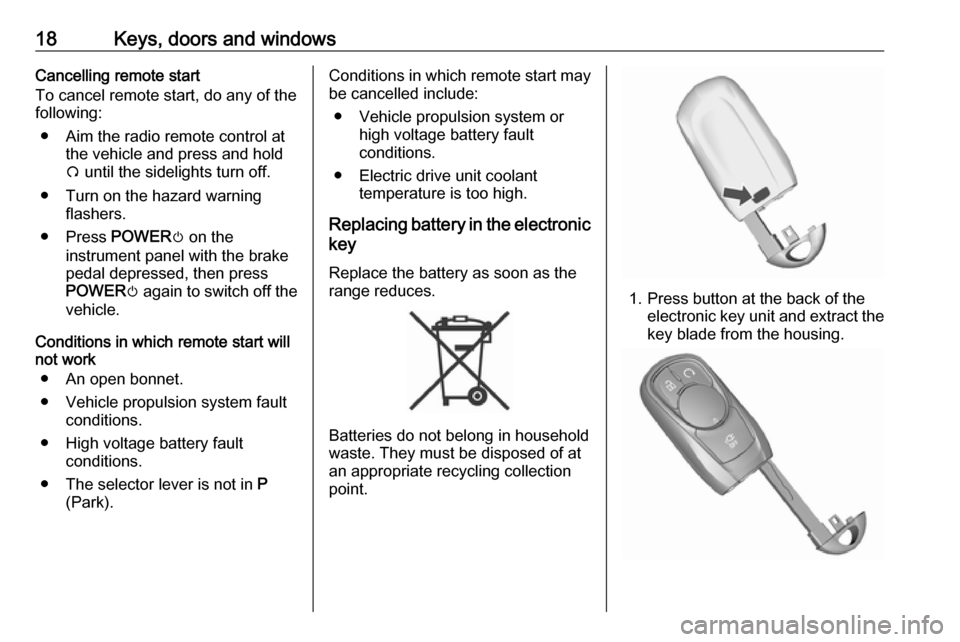
1. Press button at the back of the electronic key unit and extract thekey blade from the housing.
Page 25 of 273
Keys, doors and windows23Operation with buttons on the
electronic key
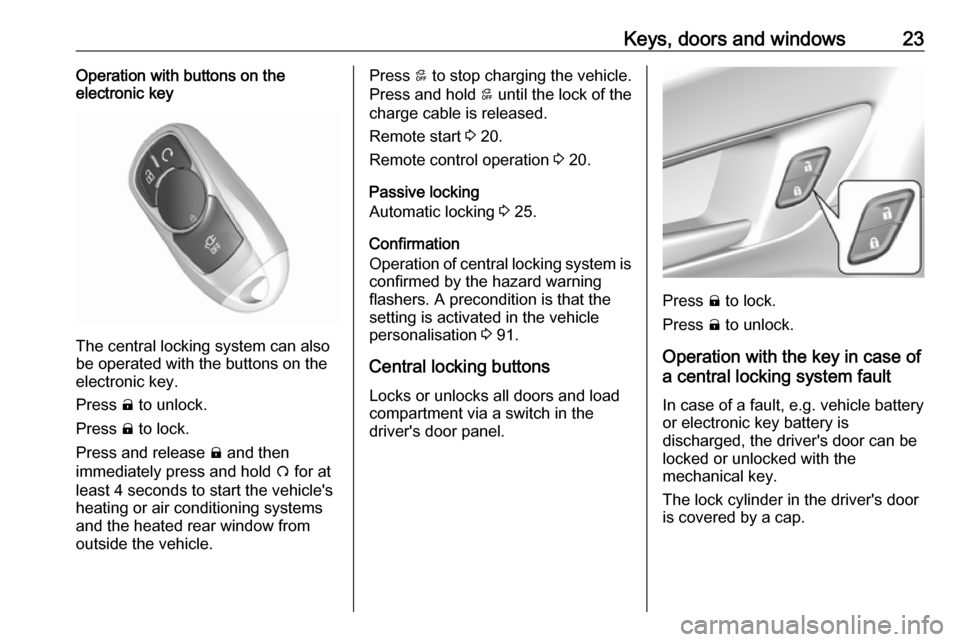
The central locking system can also
be operated with the buttons on the
electronic key.
Press ( to unlock.
Press ) to lock.
Press and release ) and then
immediately press and hold O for at
least 4 seconds to start the vehicle's heating or air conditioning systems
and the heated rear window from
outside the vehicle.
Press 5 to stop charging the vehicle.
Press and hold 5 until the lock of the
charge cable is released.
Remote start 3 20.
Remote control operation 3 20.
Passive locking
Automatic locking 3 25.
Confirmation
Operation of central locking system is
confirmed by the hazard warning
flashers. A precondition is that the
setting is activated in the vehicle
personalisation 3 91.
Central locking buttons Locks or unlocks all doors and load
compartment via a switch in the
driver's door panel.
Press ) to lock.
Press ( to unlock.
Operation with the key in case of
a central locking system fault
In case of a fault, e.g. vehicle battery
or electronic key battery is
discharged, the driver's door can be locked or unlocked with the
mechanical key.
The lock cylinder in the driver's door
is covered by a cap.
Page 36 of 273

34Keys, doors and windowsPower windows9Warning
Take care when operating the
power windows. Risk of injury,
particularly to children.
If there are children on the rear seats, switch on the child safety
system for the power windows.
Keep a close watch on the
windows when closing them.
Ensure that nothing becomes
trapped in them as they move.
Switch on the vehicle to operate
power windows.
Retained power off 3 151.
Operate the switch for the respective
window by pushing to open or pulling to close.
All windows: Pushing or pulling the
switch gently to the first detent moves
the window down or up as long as the switch is operated.
The driver's window opens or closes
automatically with safety function
enabled when the switch # is
pushed or pulled firmly to the second detent. To stop movement, operate
the switch once more in the same
direction. The co-driver's window
opens automatically when respective
switch is being pushed firmly to the
second detent.
Safety function
If the driver's window glass
encounters resistance above the
middle of the window during
automatic closing, it is immediately
stopped and opened again.
Override safety function In the event of closing difficulties due
to frost or the like, switch on the
vehicle, then pull the switch to the first
detent and hold. The window moves
up without safety function enabled.
To stop movement, release the
switch.
Page 38 of 273

36Keys, doors and windowsSun visors
The extendable sun visors can be
folded down or swivelled to the side
to prevent dazzling.
The covers of the mirrors should be
closed when driving.
A ticket holder is located on the
backside of the sun visor.
Page 44 of 273

42Seats, restraintsRear seats
Armrest
Fold armrest down. The armrest
contains cupholders.
Heating
Activate seat heating by pressing ß
in the door panel for the respective
rear outer seat. Activation is indicated
by the LED in the button.
Press ß once more to deactivate seat
heating.
Prolonged use for people with
sensitive skin is not recommended.
Seat heating is operational when
engine is running.
Seat belts
The seat belts are locked during
heavy acceleration or deceleration of
the vehicle, holding the occupants in
the seat position. Thereby the risk of
injury is considerably reduced.
9 Warning
Fasten seat belt before each trip.
In the event of an accident, people
not wearing seat belts endanger their fellow occupants and
themselves.
Page 59 of 273

Storage57StorageStorage compartments................57
Glovebox ................................... 57
Cupholders ................................ 57
Armrest storage .........................58
Centre console storage .............58
Load compartment .......................59
Load compartment cover ...........60
Rear floor storage cover ............60
Lashing eyes ............................. 61
Warning triangle ........................61
First aid kit ................................. 61
Roof rack system .........................62
Roof rack ................................... 62
Loading information .....................62Storage compartments9Warning
Do not store heavy or sharp
objects in the storage
compartments. Otherwise, the
storage compartment lid could
open and vehicle occupants could be injured by objects being thrown
around in the event of hard
braking, a sudden change in
direction or an accident.
Glovebox
To open the glovebox, pull the
handle.
The glovebox should be closed whilst driving.
Cupholders
Cupholders are located in the centre
console.
Page 60 of 273

58Storage
Additional cupholders are located in
the rear armrest. Fold down armrest.
Armrest storage
Storage under the front armrest
Press button to fold up the armrest.
The armrest must be in rearmost
position.
Centre console storage
A storage compartment is located in
the centre console.
Page 61 of 273

Storage59Load compartment
Load compartment extension
The rear seat backrest is divided into
two parts. Both parts can be folded
down.
Remove the load compartment cover
if necessary 3 60.
Press and hold the catch, then push the head restraints down 3 37.
Fold up the rear armrest.
Guide the seat belts of the outer seats
into the belt guides.
Pull the release lever on one or both
outer sides and fold down the
backrests onto the seat cushion.
To fold up, raise the backrests and
guide them into an upright position
until they engage audibly.
Make sure the seat belt is in the belt guide and is not twisted or caught in
the behind of backrests.The backrests are properly engaged
when the red mark near the release
lever is no longer visible.
9 Warning
When folding up, ensure that
backrests are securely locked in
position before driving. Failure to
do so may result in personal injury or damage to the load or vehicle in the event of hard braking or a
collision.
Page 85 of 273
![OPEL AMPERA E 2018.5 Owners Manual Instruments and controls83
● Press ] to open main menu
page.
● Select a main menu page with { or }.
● Confirm a main menu page with 9.
Once a main menu page is selected,
press { or } to selec](/img/37/18756/w960_18756-84.png "OPEL AMPERA E 2018.5 Owners Manual Instruments and controls83
● Press ] to open main menu
page.
● Select a main menu page with { or }.
● Confirm a main menu page with 9.
Once a main menu page is selected,
press { or } to selec")
Instruments and controls83
● Press ] to open main menu
page.
● Select a main menu page with { or }.
● Confirm a main menu page with 9.
Once a main menu page is selected,
press { or } to select subpages.
● Press [ to open the next folder of
the selected subpage.
● Press { or } to select functions
or to set a numeric value, if
required.
● Press 9 to select and confirm a
function.
Vehicle and service messages pop-
up in the Driver Information Centre
when required.
Confirm messages by pressing 9.
Vehicle messages 3 89.
Vehicle info The following list contains all possible
Vehicle info menu pages. Some may
not be available for your particular
vehicle. Depending on the display,
some functions are symbolised.
Press { or } to select a page:
● Trip
● Tyre pressure (kPa)
● Average speed
● Timer
● Traffic sign assistant
● Following distance
● Blank page
Trip
Trip odometer displays the current
distance and the current average
electrical energy economy since a
certain reset.The distance counts up to
99,999.9 km then restarts at 0.
The average electrical energy
economy displays the approximate
average kWh per 100 km (kWh/100
km).
To reset, press and hold 9.
Tyre pressure (kPa)
Checks tyre pressure of all wheels
during driving 3 233.
Average speed
Display of average speed. The
measurement can be reset at any
time.
Timer
To start and stop, press 9. To reset,
press [ and confirm reset.
Traffic sign assistant
Displays the detected traffic signs for
the current route section 3 189.
Following distance
Displays the distance in seconds to a preceding moving vehicle 3 169.