radio OPEL AMPERA E 2018 User Guide
[x] Cancel search | Manufacturer: OPEL, Model Year: 2018, Model line: AMPERA E, Model: OPEL AMPERA E 2018Pages: 267, PDF Size: 6.45 MB
Page 93 of 267
Instruments and controls91Vehicle personalisation
The vehicle's behaviour can be
personalised by changing the settings in the Info display.
Depending on vehicle equipment and
country-specific regulations some of
the functions described below may
not be available.
Some functions are only displayed or
active when the vehicle is on.
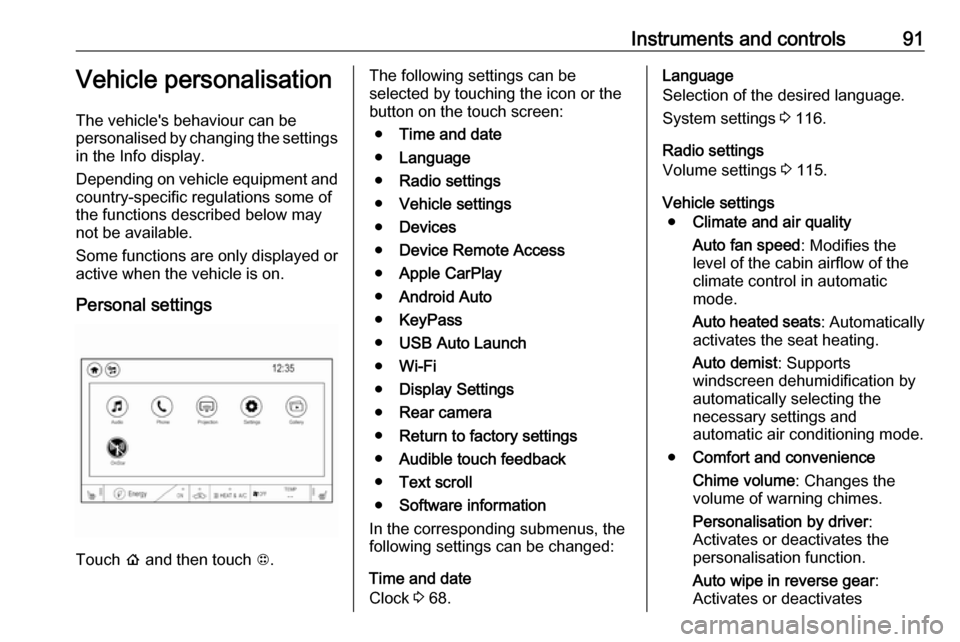
Personal settings
Touch p and then touch 1.
The following settings can be
selected by touching the icon or the
button on the touch screen:
● Time and date
● Language
● Radio settings
● Vehicle settings
● Devices
● Device Remote Access
● Apple CarPlay
● Android Auto
● KeyPass
● USB Auto Launch
● Wi-Fi
● Display Settings
● Rear camera
● Return to factory settings
● Audible touch feedback
● Text scroll
● Software information
In the corresponding submenus, the
following settings can be changed:
Time and date
Clock 3 68.Language
Selection of the desired language.
System settings 3 116.
Radio settings
Volume settings 3 115.
Vehicle settings ● Climate and air quality
Auto fan speed : Modifies the
level of the cabin airflow of the
climate control in automatic
mode.
Auto heated seats : Automatically
activates the seat heating.
Auto demist : Supports
windscreen dehumidification by
automatically selecting the
necessary settings and
automatic air conditioning mode.
● Comfort and convenience
Chime volume : Changes the
volume of warning chimes.
Personalisation by driver :
Activates or deactivates the
personalisation function.
Auto wipe in reverse gear :
Activates or deactivates
Page 95 of 267

Instruments and controls93automatically the heated seats
when using remote start.
Passive door unlock : Changes
the configuration to unlock only
the driver's door or the whole
vehicle whilst unlocking.
Relock remotely unlocked doors :
Activates or deactivates the
passive locking function. This
feature locks the vehicle
automatically after several
seconds if all doors have been
closed and an electronic key has been removed from the vehicle.
Remote start auto heat seats :
Activates or deactivates automatically the heated seats
when using remote start.
Passive door unlock : Changes
the configuration to unlock only
the driver's door or the whole
vehicle whilst unlocking.
Passive door lock : Activates or
deactivates the passive locking
function. This feature locks the
vehicle automatically after
several seconds if all doors have
been closed and an electronickey has been removed from the
vehicle.
Remote left in vehicle alert :
Activates or deactivates the
warning chime when the
electronic key remains in the
vehicle.
Devices
External devices 3 125.
Device remote access
Smartphone remote function 3 26.
Apple CarPlay
Using smartphone applications
3 131.
Android Auto
Using smartphone applications
3 131.
KeyPass
Smartphone remote function 3 26.
USB Auto Launch
External devices 3 125.
Wi-Fi
System settings 3 116.Display Settings
System settings 3 116.
Rear camera
Symbols : Activates or deactivates the
symbols.
Guidelines : Activates or deactivates
the guiding lines.
Return to factory settings
Reset vehicle settings : Resets all
settings to the default settings.
Clear all private data : Deletes all
private information from the vehicle.
Restore radio settings : Resets all
radio settings to the default settings.
System settings 3 116.
Audible touch feedback
Usage 3 109.
Text scroll
System settings 3 116.
Software information
System settings 3 116.
Page 107 of 267

Infotainment system105Infotainment systemIntroduction................................ 105
General information .................105
Theft-deterrent feature ............106
Control elements overview ......107
Usage ...................................... 109
Basic operation .......................... 112
Tone settings ........................... 114
Volume settings .......................115
System settings .......................116
Radio ......................................... 119
Usage ...................................... 119
Station search ......................... 120
Radio data system (RDS) ........122
Digital audio broadcasting .......123
External devices ........................125
General information .................125
Playing audio ........................... 127
Displaying pictures ..................129
Playing movies ........................ 130
Using smartphone applications ............................ 131
Speech recognition ....................132
General information .................132
Usage ...................................... 132Phone........................................ 133
General information .................133
Bluetooth connection ...............134
Emergency call ........................136
Operation ................................. 136
Mobile phones and CB radio equipment ............................... 140Introduction
General information
The Infotainment system provides
you with state-of-the-art in-car
infotainment.
Using radio tuner functions, you can
listen to a great number of different
radio stations.
You can connect external data
storage devices to the Infotainment
system as further audio sources;
either via cable or via Bluetooth.
The Infotainment system is equipped
with a phone portal that allows for
comfortable and safe use of your
mobile phone in the vehicle.
You can also operate specific
smartphone applications via the
Infotainment system.
Optionally, the Infotainment system
can be operated using the touch
screen and buttons on the control
panel, the controls on the steering wheel, or - if provided by your mobile
phone - via speech recognition.
Page 108 of 267

106Infotainment systemThe well-thought-out design of the
control elements, the touch screen
and the clear displays enable you to
control the system easily and
intuitively.
Note
This manual describes all options
and features available for the
various Infotainment systems.
Certain descriptions, including those
for display and menu functions, may
not apply to your vehicle due to
model variant, country
specifications, special equipment or
accessories.
Important information on
operation and traffic safety9 Warning
The Infotainment system must be
used so that the vehicle can be
driven safely at all times. If in
doubt, stop the vehicle and
operate the Infotainment system
while the vehicle is stationary.
Radio reception
Radio reception may be disrupted by
static, noise, distortion or loss of
reception due to:
● changes in distance from the transmitter
● multipath reception due to reflection
● shadowing
Theft-deterrent feature The Infotainment system is equipped
with an electronic security system for the purpose of theft deterrence.
The Infotainment system therefore
functions only in your vehicle and is
worthless to a thief.
Page 110 of 267
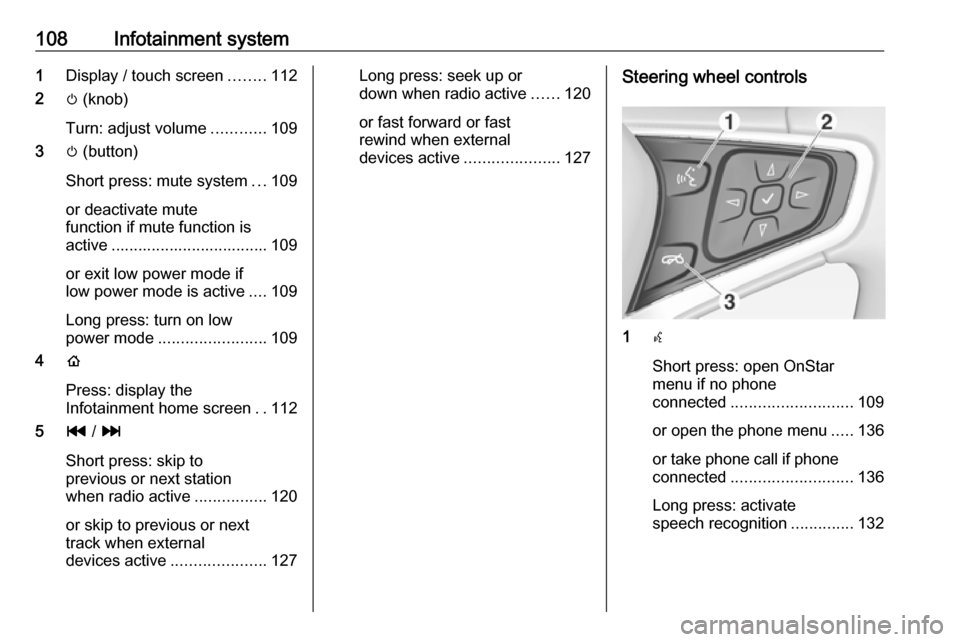
108Infotainment system1Display / touch screen ........112
2 m (knob)
Turn: adjust volume ............109
3 m (button)
Short press: mute system ...109
or deactivate mute
function if mute function is
active ................................... 109
or exit low power mode if
low power mode is active ....109
Long press: turn on low
power mode ........................ 109
4 p
Press: display the
Infotainment home screen ..112
5 t / v
Short press: skip to
previous or next station
when radio active ................120
or skip to previous or next
track when external
devices active .....................127Long press: seek up or
down when radio active ......120
or fast forward or fast
rewind when external
devices active .....................127Steering wheel controls
1w
Short press: open OnStar
menu if no phone
connected ........................... 109
or open the phone menu .....136
or take phone call if phone connected ........................... 136
Long press: activate
speech recognition ..............132
Page 113 of 267
Infotainment system111
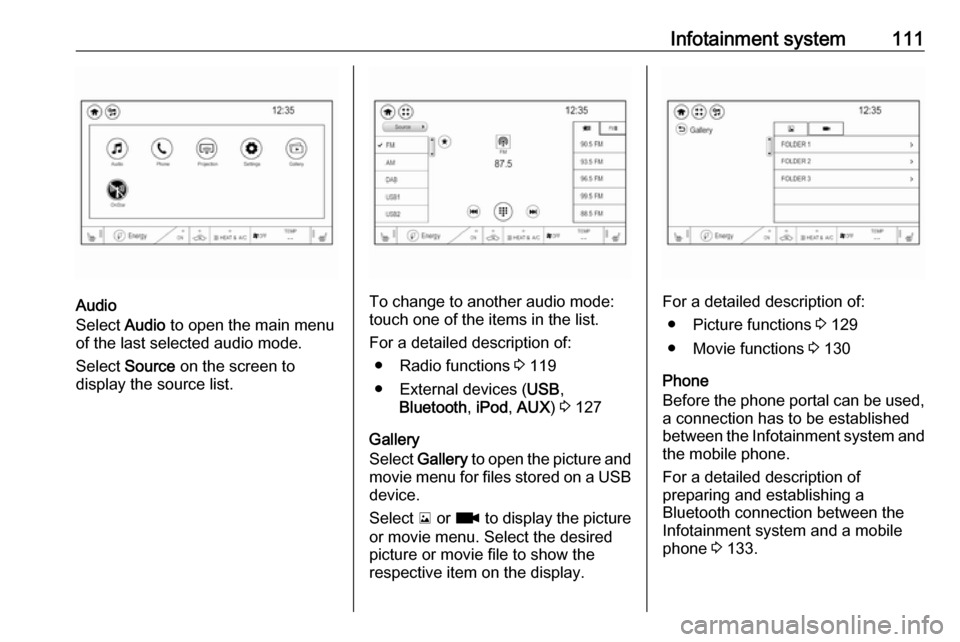
Audio
Select Audio to open the main menu
of the last selected audio mode.
Select Source on the screen to
display the source list.To change to another audio mode:
touch one of the items in the list.
For a detailed description of: ● Radio functions 3 119
● External devices ( USB,
Bluetooth , iPod , AUX ) 3 127
Gallery
Select Gallery to open the picture and
movie menu for files stored on a USB device.
Select y or z to display the picture
or movie menu. Select the desired
picture or movie file to show the
respective item on the display.For a detailed description of:
● Picture functions 3 129
● Movie functions 3 130
Phone
Before the phone portal can be used, a connection has to be established
between the Infotainment system and
the mobile phone.
For a detailed description of
preparing and establishing a
Bluetooth connection between the Infotainment system and a mobile
phone 3 133.
Page 117 of 267
Infotainment system115
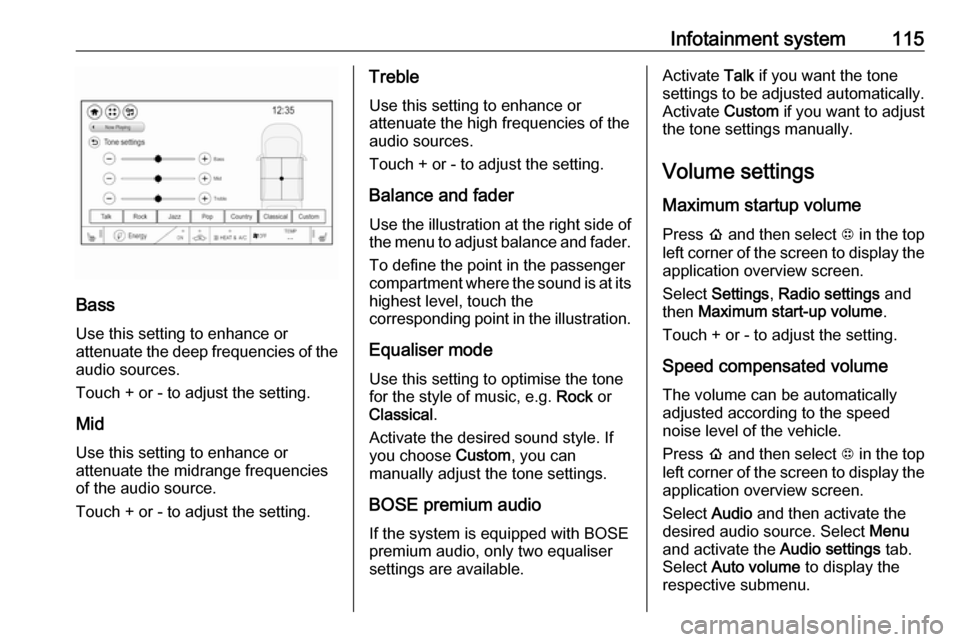
Bass
Use this setting to enhance or
attenuate the deep frequencies of the
audio sources.
Touch + or - to adjust the setting.
Mid
Use this setting to enhance or
attenuate the midrange frequencies
of the audio source.
Touch + or - to adjust the setting.
Treble
Use this setting to enhance or
attenuate the high frequencies of the
audio sources.
Touch + or - to adjust the setting.
Balance and fader
Use the illustration at the right side of
the menu to adjust balance and fader.
To define the point in the passenger
compartment where the sound is at its
highest level, touch the
corresponding point in the illustration.
Equaliser mode
Use this setting to optimise the tone
for the style of music, e.g. Rock or
Classical .
Activate the desired sound style. If you choose Custom, you can
manually adjust the tone settings.
BOSE premium audio If the system is equipped with BOSE
premium audio, only two equaliser
settings are available.Activate Talk if you want the tone
settings to be adjusted automatically.
Activate Custom if you want to adjust
the tone settings manually.
Volume settings Maximum startup volume
Press p and then select 1 in the top
left corner of the screen to display the application overview screen.
Select Settings , Radio settings and
then Maximum start-up volume .
Touch + or - to adjust the setting.
Speed compensated volumeThe volume can be automatically
adjusted according to the speed
noise level of the vehicle.
Press p and then select 1 in the top
left corner of the screen to display the application overview screen.
Select Audio and then activate the
desired audio source. Select Menu
and activate the Audio settings tab.
Select Auto volume to display the
respective submenu.
Page 118 of 267

116Infotainment systemTo adjust the degree of volume
adaptation, select one of the options
in the list.
Off : no enhancement of volume with
increasing vehicle speed.
High : maximum enhancement of
volume with increasing vehicle
speed.
Audible touch feedback function
If the audible touch feedback function
is activated, each touch of a screen
button or menu item is indicated by a
beeping sound.
Press p and then select 1 in the top
left corner of the screen to display the application overview screen.
Select Settings and then scroll
through the list to Audible touch
feedback .
Touch the screen button next to
Audible touch feedback to activate or
deactivate the function.
Audio Cues Audio cues are short sound effects
indicating certain system actions.
Configuration
Press p and then select 1 in the top
left corner of the screen to display the
application overview screen.
Select Settings and then Radio
settings . Activate or deactivate Audio
Cues .
Audio Cues Volume
Press p and then select 1 in the top
left corner of the screen to display the application overview screen.
Select Settings and then Radio
settings . Select Audio Cues Volume
to display the respective submenu.
Adjust the volume as desired.
Note
The Audio Cues Volume setting is
only available if Audio Cues is
activated.
Volume of traffic announcements
To adjust the volume of traffic
announcements, set the desired volume while a traffic announcement
is given out by the system. The
respective setting is then stored by
the system.
System settings
The following settings concern the
whole system. All other settings are
described by theme in the respective
chapters of this manual.
Page 121 of 267

Infotainment system119To reset tone and volume settings,
delete all favourites, and erase the ringtone selection, select Restore
radio settings .
In each case, a warning message is
displayed. Select Continue to reset
the settings.
System version
Open source information
Press p and then select 1 in the top
left corner of the screen to display the application overview screen.
Select Settings . Scroll through the list
and select Software information .
To display open source software
licensing information, select Open
source .
Software updates
Press p and then select 1 in the top
left corner of the screen to display the
application overview screen.
Select Settings . Scroll through the list
and select Software information .To start a software update, select
Software Update . For a detailed
description on software updates
3 255.
To display a menu with further
settings, select Update Preferences .
If Download New Updates in
Background is activated, software
updates are downloaded
automatically by the system without
specific notification. If Download New
Updates in Background is
deactivated, a message might be
displayed before an update is carried out. Activate or deactivate the
function as desired.
Vehicle settings Vehicle personalisation 3 91.Radio
Usage
Activation of the radio function Press p and then select 1 in the top
left corner of the screen to display the
application overview screen.
Select Audio. The audio main menu
last selected is displayed.
Select Source .
Select the desired waveband.
The station last played in the selected waveband will be received.
Page 122 of 267

120Infotainment systemAudio menu
Select Menu to display the audio
menu.
To return from the audio menu to the
audio main screen, select Now
playing .
Current station information From the FM or DAB main screen,
select Menu and then activate the
Browse audio tab.
To display additional information on
the station currently playing, select
Current station information .
Station search
Automatic station search Briefly press or touch t or v on the
control panel or on the screen to play the previous or next station available.
Manual station search
Press and hold t or v on the
control panel. Release when the required frequency has almost been
reached.
A search is made for the next station that can be received and it is played
automatically.
Note
FM waveband: when the RDS
function is activated, only RDS
stations 3 122 are searched for, and
when the radio traffic service (TP) is activated, only traffic service
stations 3 122 are searched for.
Station tuning
Touch x on the screen. The tuning
display is shown.
Enter the desired frequency.
Use { to delete digits entered.
Select x to delete the whole input. If
necessary, touch d or c to
subsequently adjust the input.
Note
A " ." between the digits is
automatically added by the system
at the right location.
Stations lists
Stations
Select Menu to open the
corresponding waveband-specific
submenu.