brake OPEL ANTARA 2009 User Guide
[x] Cancel search | Manufacturer: OPEL, Model Year: 2009, Model line: ANTARA, Model: OPEL ANTARA 2009Pages: 234, PDF Size: 3.01 MB
Page 70 of 234

70 Instruments, controls
Instruments, controls
Control indicators ............................... 70
Instrument display .............................. 75
Information display ............................ 76
Display of current tyre pressure3.... 91
Check control 3.................................. 91
Warning buzzers................................. 92
Windscreen wipers .............................. 92
Control indicators
The control indicators described here are
not present in all vehicles. The description
applies to all instrument versions.
The colours of the control indicators mean:
uABS (Anti-lock Brake System)
see page 148.
gTrailer indicator 3
Illuminates in green when a trailer is
connected to the vehicle. Extinguishes
when the trailer is disconnected.
4Brake system
Illuminates in red when ignition is switched
on. Extinguishes after engine is started.
Illuminates when engine is running if
hand brake is applied and/or fluid level for
brake hydraulics is too low.
Further information - see page 145.
z
Red Danger, important reminder,
z Yellow Warning, information, fault,
z Green Confirmation of activation,
z Blue Confirmation of activation.
9 Warning
If it illuminates when the hand brake is
not applied: stop vehicle; interrupt your
journey immediately. Consult a
workshop.
Page 74 of 234

Instruments, controls74
aAnti-theft alarm system activation
without monitoring of passenger
compartment and vehicle tilt 3
see page 28.
IEngine oil pressure
Illuminates in red when ignition is switched
on. Extinguishes after engine is started.
Can illuminate intermit tently when idling
with hot engine; must extinguish when
engine speed is increased.
If
it illuminates during driving;
engine oil pressure may be dangerously
low, interrupting engine lubrication and
resulting in damage to the engine and/or
locking of the driving wheels:
z Move out of the flow of traffic as quickly
as possible without impeding other
vehicles,
z Depress clutch,
z Move gearshift lever to neutral
(automatic transmission to N),
z Switch off ignition. Check engine oil level before consulting
a workshop. If the oil level is low, top up
using the specified engine oil - see pages
192, 213, 217.
If the oil level is normal, have a workshop
check the vehicle’s lubricating system.
pAlternator
Illuminates in red when ignition is switched
on. Extinguishes after engine is started.
If
it illuminates during driving:
stop vehicle and switch off engine. The
battery is not being charged and the
engine cooling may be interrupted. The
brake servo unit may cease to be effective.
Interrupt your journey immediately.
Remove key and check drive belt condition
and tensioning before consulting a
workshop.
ZExhaust emissions
Illuminates in yellow when ignition is
switched on. Extinguishes after engine is
started. Can illuminate briefly when
driving; this is normal and does not
indicate a system fault.
If it illuminates when the engine is running
;
fault in emission control system.
The permitted emission limits may be
exceeded. Fuel economy and vehicle
driveability may be impaired.
The control indicator also illuminates if
there is a fault in the diesel particle filter 3.
Consult a workshop as soon as possible.
If it flashes when the engine is running
;
for a fault that can lead to destruction of
the catalytic converter, see page 134.
Consult a workshop as soon as possible.
0Winter program 3
Illuminates in yellow when Winter program
for the automatic transmission is enabled -
see page 117.
9 Warning
When the engine is off, considerably
greater force will be required for braking
and steering.
Do not remove key until vehicle has come
to a standstill, otherwise the steering
column lock could engage unexpectedly.
Page 96 of 234

Lighting96
Front fog lamps
>
The front fog lamps can only be switched
on when both the ignition and headlamps
are on.
With automatic dipped beam activation 3,
parking lamps and dipped beam come on
simultaneously when the front fog lamps
are switched on.
Follow the regulations of the country in
which you are driving when using front fog
lamps.Fog tail lamp r
The fog tail lamp can only be switched on
when the ignition is on and the light switch
is in position 9, or the front fog lamps are
on and the light switch is in position 8.
With automatic dipped beam activation 3,
parking lamps and dipped beam come on
simultaneously when the fog tail lamp is
switched on.
Reversing lamps
Come on when reverse gear is engaged
and ignition is switched on.
Centre high-mounted stop lamp
Comes on when the brakes are applied,
acting as a third stop lamp, to supplement
the brake lamps.
On = Press button >, >
illuminates in instrument
panel.
Off = Press button > again, >
extinguishes in instrument
panel.
On = Press button r, r
illuminates in instrument
panel.
Off = Press button r again, r
extinguishes in instrument
panel.
Page 115 of 234

Driving and operation115
Driving and operationAutomatic transmission 3
The automatic transmission permits
manual gearshifting (manual mode) or
automatic gearshifting ( automatic mode)
with fully automatic clutch control.
The engine can only be started when the
selector lever is in position P or N. When
starting in P, turn key in ignition switch to
ACC or ON, depress foot brake and press
selector lever button before selecting a
gear.
Do not accelerate whilst gearshifting. If a
gear has been selected and the foot brake
is released without accelerating, the
vehicle will "creep".
Never operate the brake pedal and
accelerator simultaneously. Selecting
D puts the transmission in
automatic mode.
If the selector lever is moved to the left from
position D, manual mode is activated.
Forward gear changes only can then be
made manually by tipping the selector
lever towards + or -.
Automatic transmission
3................. 115
All Wheel Drive.................................... 121
Driving hints ........................................ 127
Save fuel, protect the environment ... 129
Fuels, refuelling ................................... 131
Catalytic converter, exhaust emissions........................................... 133
Drive control systems ......................... 136
Brake system ....................................... 145
Anti-lock Brake System (ABS) u....... 148
Wheels, tyres ....................................... 149
Roof racks 3........................................ 153
Flex-Fix system 3................................ 154
Towing equipment 3 .......................... 164
Towing ................................................. 1679 Warning
Disregard of these instructions may
cause damage to the vehicle and lead to
injuries or endanger life.
Page 116 of 234
Driving and operation116
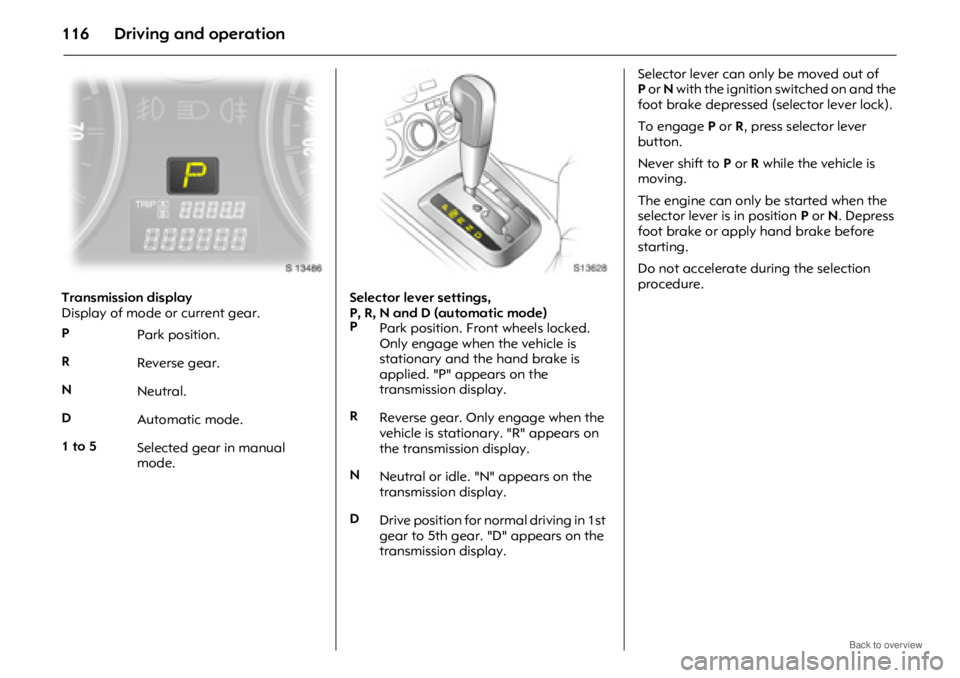
Transmission display
Display of mode or current gear.Selector lever settings,
P, R, N and D (automatic mode)Selector lever can only be moved out of
P
or N with the ignition switched on and the
foot brake depressed (selector lever lock).
To engage P or R, press selector lever
button.
Never shift to P or R while the vehicle is
moving.
The engine can only be started when the
selector lever is in position P or N. Depress
foot brake or apply hand brake before
starting.
Do not accelerate during the selection
procedure.
P Park position.
R Reverse gear.
N Neutral.
D Automatic mode.
1 to 5 Selected gear in manual
mode.
P
Park position. Front wheels locked.
Only engage when the vehicle is
stationary and the hand brake is
applied. "P" appears on the
transmission display.
R Reverse gear. Only engage when the
vehicle is stationary. "R" appears on
the transmission display.
N Neutral or idle. "N" appears on the
transmission display.
D Drive position for normal driving in 1st
gear to 5th gear. "D" appears on the
transmission display.
Page 118 of 234
Driving and operation118
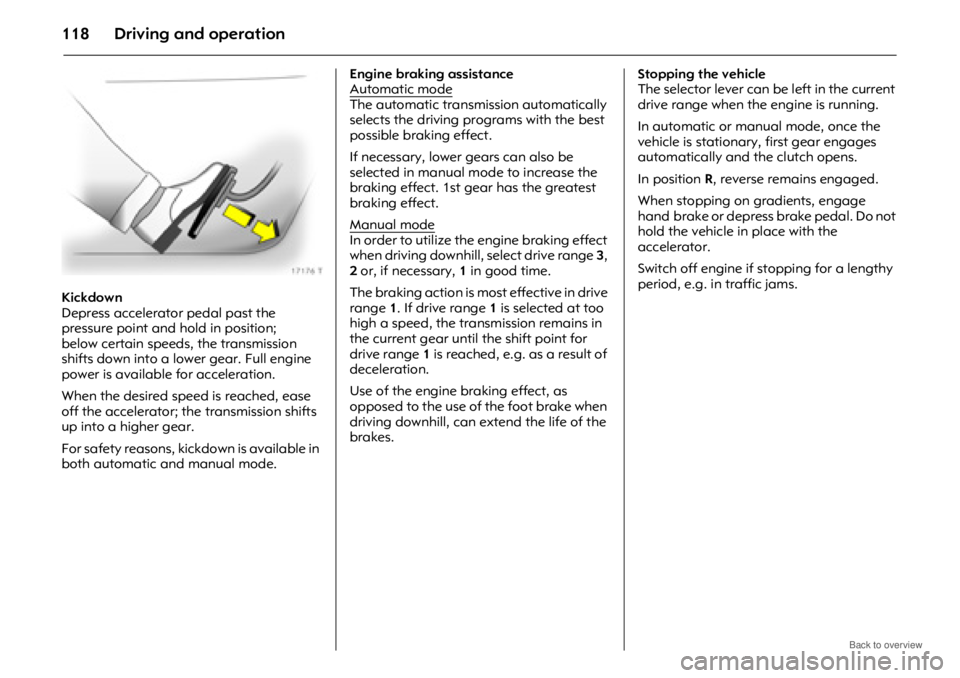
Kickdown
Depress accelerator pedal past the
pressure point and hold in position;
below certain speeds, the transmission
shifts down into a lower gear. Full engine
power is available for acceleration.
When the desired speed is reached, ease
off the accelerator; the transmission shifts
up into a higher gear.
For safety reasons, kickdown is available in
both automatic and manual mode. Engine braking assistance
Automatic mode
The automatic transmi
ssion automatically
selects the driving programs with the best
possible braking effect.
If necessary, lower gears can also be
selected in manual mo de to increase the
braking effect. 1st gear has the greatest
braking effect.
Manual mode
In order to utilize the engine braking effect
when driving downhill, select drive range 3,
2 or, if necessary, 1 in good time.
The braking action is mo st effective in drive
range 1. If drive range 1 is selected at too
high a speed, the transmission remains in
the current gear until the shift point for
drive range 1 is reached, e.g. as a result of
deceleration.
Use of the engine braking effect, as
opposed to the use of the foot brake when
driving downhill, can ex tend the life of the
brakes. Stopping the vehicle
The selector lever can be
left in the current
drive range when the engine is running.
In automatic or manual mode, once the
vehicle is stationary, first gear engages
automatically and the clutch opens.
In position R, reverse remains engaged.
When stopping on gradients, engage
hand brake or depress brake pedal. Do not
hold the vehicle in place with the
accelerator.
Switch off engine if stopping for a lengthy
period, e.g. in traffic jams.
Page 119 of 234

Driving and operation119
Parking
Before leaving the vehicle:
zDepress and hold foot brake,
z Apply hand brake,
z Move selector lever to position P,
z Turn key to LOCK position,
z Remove ignition key,
z Engage steering column lock,
z Lock the vehicle.
When the ignition is switched off, the
automatic transmission no longer responds
to movements of the selector lever. Rocking the vehicle
If it becomes necessary to rock the vehicle
to free it from water, ice, sand, mud, snow
or a dip, observe the following:
Check there are no objects or people in the
vicinity before attempting to rock the
vehicle.
Turn the steering wheel fully from left to
right to clear the area around the front
tyres.
Move the selector lever between
R and a
forward gear in a repeat pattern while
applying light pressure to the accelerator
pedal when the vehicle is in gear.
Do not spin the wheels or race the engine
and avoid sudden acceleration.
This applies only in the exceptional
circumstances mentioned above.
If the vehicle cannot be released after
rocking the vehicle several times, your
vehicle may need to be towed.
Towing - see page 174. Manoeuvring the vehicle
To manoeuvre the vehicle back and forth
during attempts to park or in garage
entrances, the creeping movement can be
utilized by releasing the foot brake.
Never actuate the accelerator and brake
pedals simultaneously.
Page 120 of 234
Driving and operation120
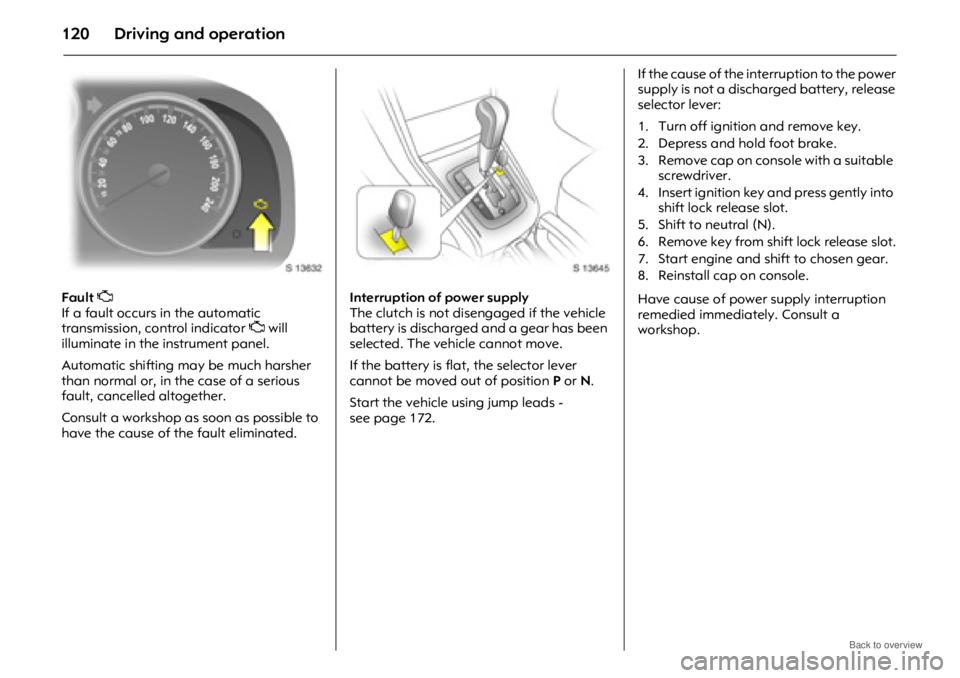
Fault Z
If a fault occurs in the automatic
transmission, control indicator Z will
illuminate in the instrument panel.
Automatic shifting may be much harsher
than normal or, in the case of a serious
fault, cancelled altogether.
Consult a workshop as soon as possible to
have the cause of the fault eliminated. Interruption of power supply
The clutch is not disengaged if the vehicle
battery is discharged and a gear has been
selected. The vehicle cannot move.
If the battery is flat, the selector lever
cannot be moved out of position
P or N.
Start the vehicle using jump leads -
see page 172. If the cause of the interruption to the power
supply is not a discharged battery, release
selector lever:
Have cause of power supply interruption
remedied immediately. Consult a
workshop.
1. Turn off ignition and remove key.
2. Depress and hold foot brake.
3. Remove cap on console with a suitable
screwdriver.
4. Insert ignition key and press gently into shift lock release slot.
5. Shift to neutral (N).
6. Remove key from shift lock release slot.
7. Start engine and shift to chosen gear.
8. Reinstall cap on console.
Page 122 of 234

Driving and operation122
Always exercise caution when in slippery
conditions (caused by sand, gravel, water,
snow or ice on the road), in order to
maintain vehicle control.
Use the accelerator to control the vehicle -
keep brake pedal use to a minimum.
zDo not slip the clutch.
z Do not spin the wheels.
z Do not make exaggerated or jerky
steering movements.
Driving a vehicle in snow and ice should be
undertaken with extreme caution:
z Select a gear suitable for the conditions.
z Start the vehicle moving with minimal
engine revs, low gear and combined
clutch and accelerator control.
z Change to a higher gear as quickly as
possible, to keep the engine revs low.
z With automatic transmission 3, select
drive range D and press button n, to
activate the Winter program. Off-road driving
During off-road drivin
g, you will encounter
a variety of driving conditions and
circumstances too numerous to list here.
Always use good judgement and common
sense. If you feel uncomfortable about
tackling a given situation, do not attempt
it.
Avoid protruding objects (such as rocks or
tree stumps) that may damage the
underbody and tyres of your vehicle.
Test the brakes after operating in mud, to
clear excess mud from the braking
surfaces.
Gripping the steering wheel
Terrain conditions can cause rapid and
unexpected movement in the steering,
especially rough terrain. Preparation
The duration, distance and conditions of
the off-road activity determine the extent
of the preparation th
at is required. The
following are given as guidelines.
Know the area where you will be driving,
either by inspection or from terrain maps.
Decide your route in advance and ensure
that it is a vehicular right of way
1).
Make a thorough check of the vehicle.
Check the following:
z Oil, water, fuel, brake and clutch fluid
levels,
z Drive belts,
z Windscreen wipers and washer system,
z Lamps.
Maintenance - see pages 126, 206.
9 Warning
Be ready to deal with these movements
by having a firm grip on the outer rim of
the steering wheel with the thumbs
outside the spokes, to guard against
injury from kickback.
1)Observe national regulations.
Page 124 of 234

Driving and operation124
The ground clearance, ramp angle, angle
of approach and departure and wading
depth need to be considered, especially in
hilly conditions and when wading, to
prevent the vehicle becoming stuck and
possibly damaged.
Technical data - see page 215. Driving through water
Do not exceed th
e maximum wading
depth.
Check the depth of water: choose the
lowest entry and departure angles before
entering.
Maintain a steady engine speed, to help
prevent water from entering the exhaust
system, but do not exceed 5 km/h (3 mph),
to avoid splashing the water.
Drive with the flow wherever possible, not
against it. If you have to drive against the
flow, try to drive at an angle to it, so that
the leading corner of the vehicle will help
deflect water from the engine
compartment.
Avoid splashing the water - if the ignition
system becomes wet, the engine may stall. Avoid water entering the air intake system.
Test the brakes after leaving the water -
wet brakes are less effective than dry ones.
Perform the service operations for wading,
involving checks for water contamination,
at the earliest opportunity.
Service checks after wading -
see page 126.
9 Warning
If water enters the air intake system,
engine seizure with severe costly damage
may result.