Turn on OPEL COMBO E 2019 Infotainment system
[x] Cancel search | Manufacturer: OPEL, Model Year: 2019, Model line: COMBO E, Model: OPEL COMBO E 2019Pages: 89, PDF Size: 2.05 MB
Page 34 of 89
34NavigationTouch the traffic jam icon to show
traffic events on the map. Touch Ï to
show a list with information on these
traffic events.
If you want to display a different map
section:
Touch õ to show the area around the
current location.
Touch ö to show the entire route.
Touch ÷ to show the area around the
destination.
To return to the default navigation
view, touch Ù.
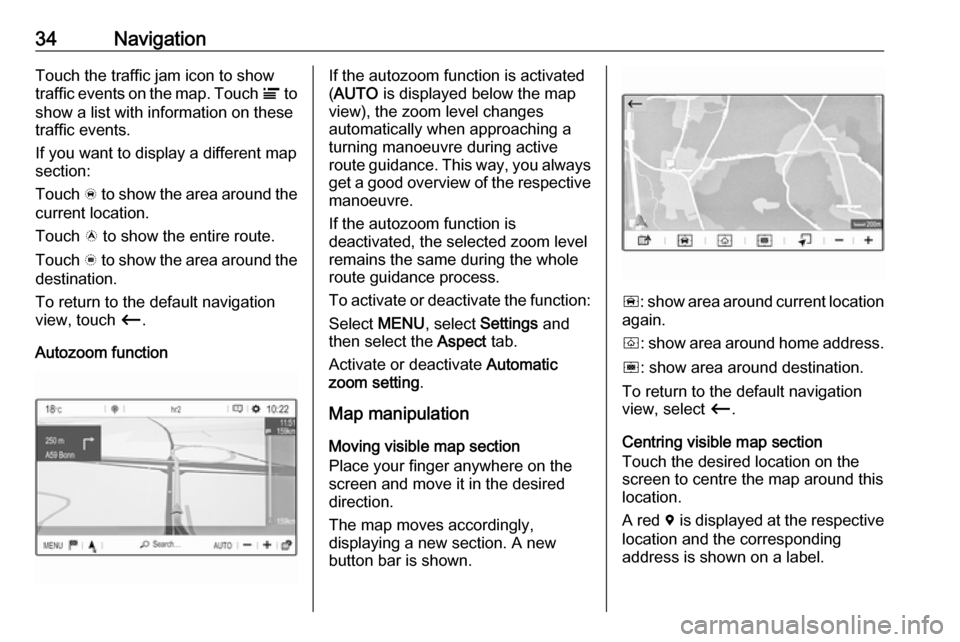
Autozoom functionIf the autozoom function is activated
( AUTO is displayed below the map
view), the zoom level changes
automatically when approaching a
turning manoeuvre during active
route guidance. This way, you always get a good overview of the respective
manoeuvre.
If the autozoom function is
deactivated, the selected zoom level
remains the same during the whole
route guidance process.
To activate or deactivate the function: Select MENU, select Settings and
then select the Aspect tab.
Activate or deactivate Automatic
zoom setting .
Map manipulation
Moving visible map section
Place your finger anywhere on the
screen and move it in the desired
direction.
The map moves accordingly,
displaying a new section. A new
button bar is shown.
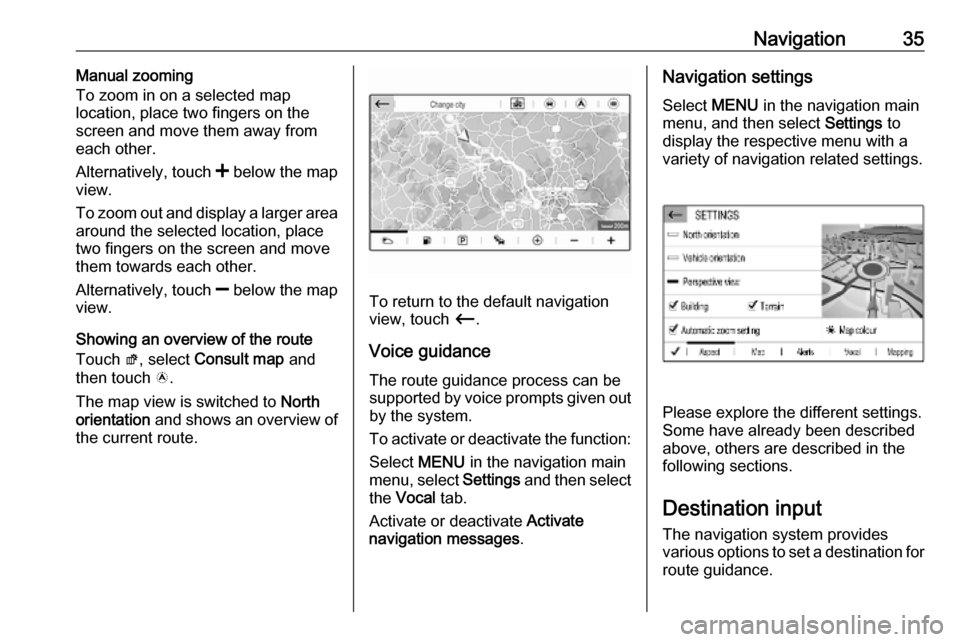
ñ : show area around current location
again.
ò : show area around home address.
ó : show area around destination.
To return to the default navigation
view, select Ù.
Centring visible map section
Touch the desired location on the
screen to centre the map around this
location.
A red d is displayed at the respective
location and the corresponding
address is shown on a label.
Page 35 of 89
Navigation35Manual zooming
To zoom in on a selected map
location, place two fingers on the
screen and move them away from
each other.
Alternatively, touch < below the map
view.
To zoom out and display a larger area
around the selected location, place
two fingers on the screen and move
them towards each other.
Alternatively, touch ] below the map
view.
Showing an overview of the route
Touch ø, select Consult map and
then touch ö.
The map view is switched to North
orientation and shows an overview of
the current route.
To return to the default navigation
view, touch Ù.
Voice guidance
The route guidance process can be
supported by voice prompts given out by the system.
To activate or deactivate the function: Select MENU in the navigation main
menu, select Settings and then select
the Vocal tab.
Activate or deactivate Activate
navigation messages .
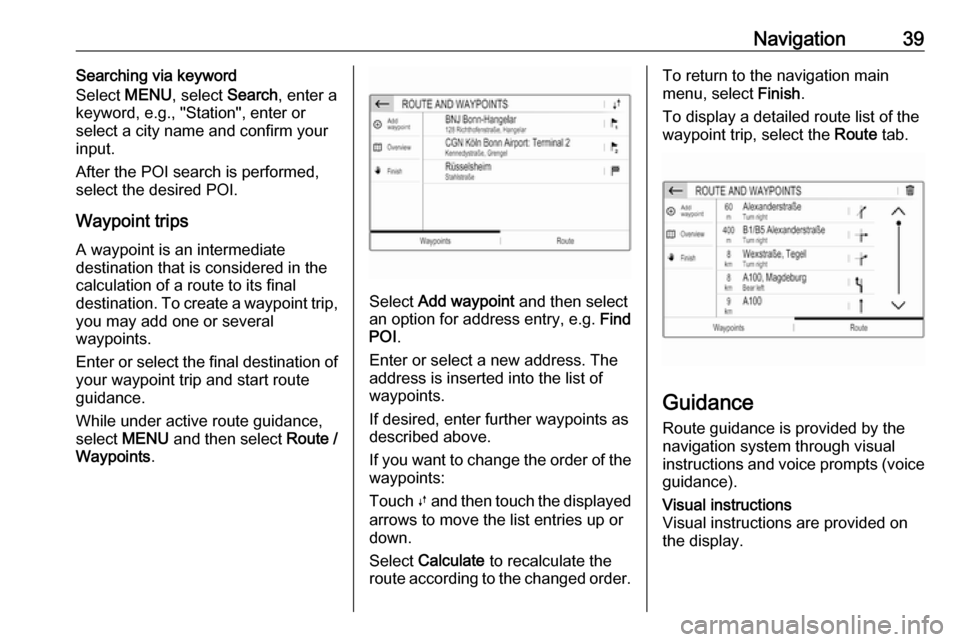
Navigation settings
Select MENU in the navigation main
menu, and then select Settings to
display the respective menu with a
variety of navigation related settings.
Please explore the different settings.
Some have already been described
above, others are described in the
following sections.
Destination input The navigation system provides
various options to set a destination for
route guidance.
Page 39 of 89
Navigation39Searching via keyword
Select MENU, select Search, enter a
keyword, e.g., "Station", enter or
select a city name and confirm your
input.
After the POI search is performed, select the desired POI.
Waypoint trips
A waypoint is an intermediate
destination that is considered in the
calculation of a route to its final
destination. To create a waypoint trip, you may add one or several
waypoints.
Enter or select the final destination of
your waypoint trip and start route
guidance.
While under active route guidance,
select MENU and then select Route /
Waypoints .
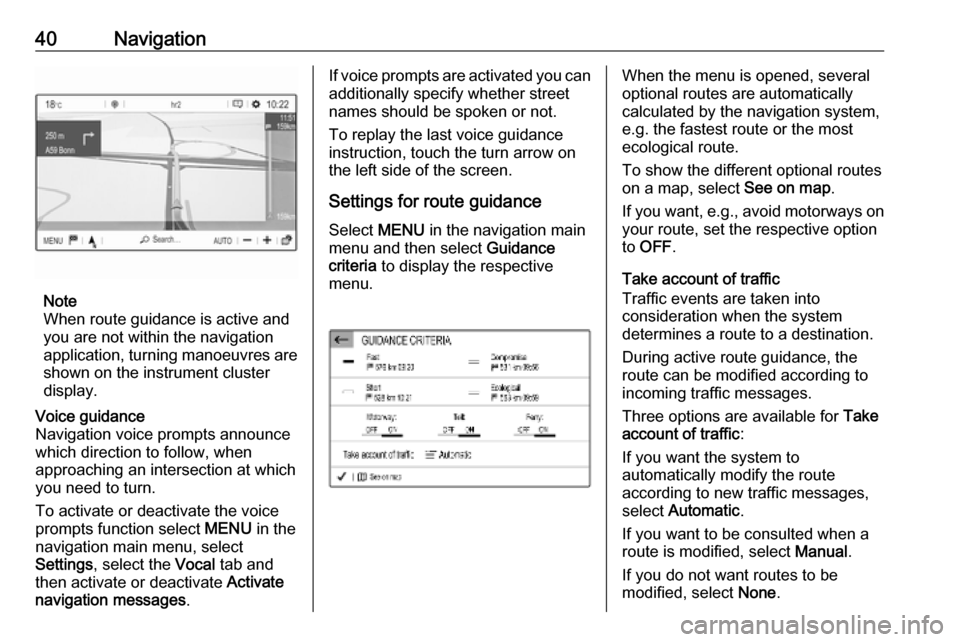
Select Add waypoint and then select
an option for address entry, e.g. Find
POI .
Enter or select a new address. The
address is inserted into the list of
waypoints.
If desired, enter further waypoints as
described above.
If you want to change the order of the waypoints:
Touch Ú and then touch the displayed
arrows to move the list entries up or
down.
Select Calculate to recalculate the
route according to the changed order.
To return to the navigation main
menu, select Finish.
To display a detailed route list of the waypoint trip, select the Route tab.
Guidance
Route guidance is provided by the
navigation system through visual
instructions and voice prompts (voice guidance).
Visual instructions
Visual instructions are provided on
the display.
Page 40 of 89
40Navigation
Note
When route guidance is active and
you are not within the navigation
application, turning manoeuvres are shown on the instrument clusterdisplay.
Voice guidance
Navigation voice prompts announce
which direction to follow, when
approaching an intersection at which
you need to turn.
To activate or deactivate the voice
prompts function select MENU in the
navigation main menu, select
Settings , select the Vocal tab and
then activate or deactivate Activate
navigation messages .If voice prompts are activated you can
additionally specify whether street
names should be spoken or not.
To replay the last voice guidance
instruction, touch the turn arrow on
the left side of the screen.
Settings for route guidance
Select MENU in the navigation main
menu and then select Guidance
criteria to display the respective
menu.When the menu is opened, several
optional routes are automatically
calculated by the navigation system,
e.g. the fastest route or the most
ecological route.
To show the different optional routes
on a map, select See on map.
If you want, e.g., avoid motorways on
your route, set the respective option
to OFF .
Take account of traffic
Traffic events are taken into
consideration when the system
determines a route to a destination.
During active route guidance, the
route can be modified according to
incoming traffic messages.
Three options are available for Take
account of traffic :
If you want the system to
automatically modify the route
according to new traffic messages,
select Automatic .
If you want to be consulted when a
route is modified, select Manual.
If you do not want routes to be
modified, select None.
Page 41 of 89
Navigation41Starting, cancelling, resuming
route guidance
To start route guidance, enter or
select a destination address 3 35.
Depending on the situation, route
guidance may start automatically, or
you may have to follow some
instructions on the screen.
To cancel route guidance, select
MENU in the navigation main menu
and then select STOP NAVIGATION .
To resume a cancelled route
guidance, select MENU in the
navigation main menu and then
select RESUME GUIDANCE .
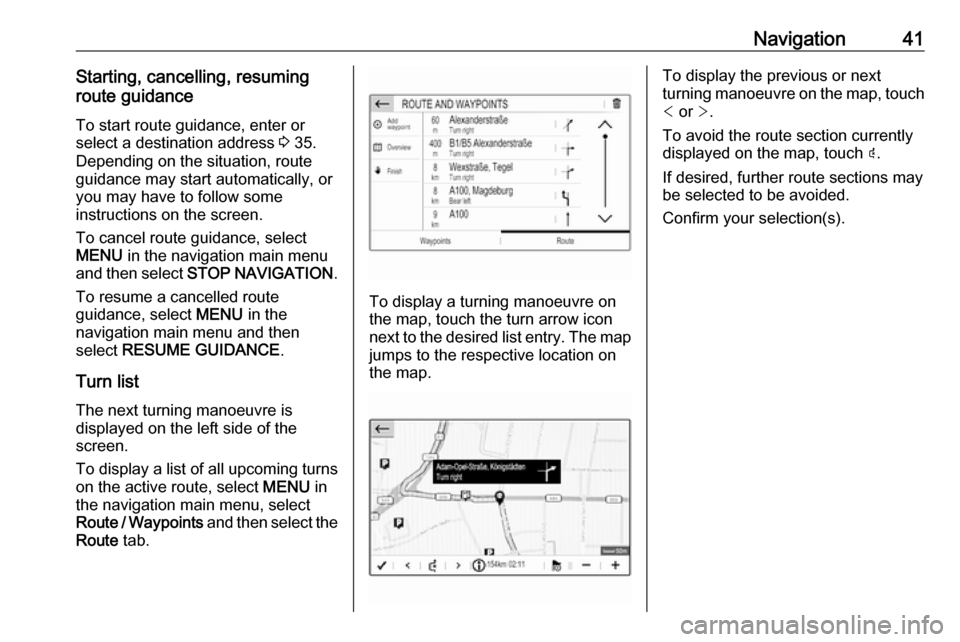
Turn list The next turning manoeuvre is
displayed on the left side of the
screen.
To display a list of all upcoming turns
on the active route, select MENU in
the navigation main menu, select
Route / Waypoints and then select the
Route tab.
To display a turning manoeuvre on
the map, touch the turn arrow icon
next to the desired list entry. The map jumps to the respective location on
the map.
To display the previous or next
turning manoeuvre on the map, touch < or >.
To avoid the route section currently
displayed on the map, touch þ.
If desired, further route sections may
be selected to be avoided.
Confirm your selection(s).
Page 44 of 89

44Speech recognitionOperation via speech commands
Follow the instructions given by voice output and shown on the display.
For best results: ● Listen for the voice prompt and wait for the beep before saying acommand or replying.
● Read the example commands on
the display.
● The voice prompt can be interrupted by pressing w again.
● Wait for the beep and then speak
the command naturally, not toofast, not too slow.
Usually commands can be spoken in
a single command.
Voice pass-thru application
Activating speech recognition
Press and hold s on the steering
wheel until a speech recognition session is started.Adjusting the volume of voice
prompts
Turn m on the control panel or press
volume button on the steering wheel
upwards (increase volume) À or
downwards (decrease volume) Á.
Deactivating speech recognition
Press v on the steering wheel. The
speech recognition session is ended.
Page 55 of 89

55Audio files.................................. 27
Picture files................................ 27
G
General information 26, 27 , 31 , 42 , 45
Bluetooth ................................... 27
DAB ........................................... 23
Infotainment system ....................6
Navigation ................................. 31
Phone ........................................ 45
Smartphone applications ..........27
USB ........................................... 27
Guidance ..................................... 39
I
Infotainment control panel ..............8
M Maps ............................................. 32
Menu operation............................. 14
Mobile phones and CB radio equipment ................................ 51
Mute.............................................. 10
N Navigation Contacts .................................... 35
Current location ......................... 32
Destination input .......................35
Map display ............................... 32
Map manipulation ......................32Map update............................... 31
Recent destinations ..................35
Route guidance ......................... 39
TMC stations ....................... 31, 39
Traffic incidents ......................... 39
Turn list ..................................... 39
Waypoint trip ............................. 35
O Operation ...................................... 48
CD ............................................. 26
External devices ........................27
Menu ......................................... 14
Navigation system .....................32
Phone ........................................ 48
Radio ......................................... 21
P
Pairing .......................................... 46
Personal settings ..........................18
Phone Bluetooth ................................... 45
Bluetooth connection ................46
Call history ................................ 48
Contacts .................................... 48
Emergency calls ........................47
Entering a number ....................48
Functions during a call ..............48
General information................... 45
Incoming call ............................. 48Phone book............................... 48
Phone main menu .....................48
Phone book .................................. 48
Phone projection .......................... 30
Picture files ................................... 27
Playing audio ................................ 28
POIs.............................................. 35
Presets Retrieving stations..................... 21
Storing stations ......................... 21
Profile settings .............................. 18
R Radio Activating................................... 21
Configuring DAB .......................23
Configuring RDS .......................23
DAB announcements ................23
Digital audio broadcasting
(DAB) ........................................ 23
Presets ...................................... 21
Radio data system (RDS) .........23
Regional .................................... 23
Regionalisation ......................... 23
Retrieving stations..................... 21
Selecting the waveband ............21
Station search ........................... 21
Station tuning ............................ 21
Storing stations ......................... 21
Usage ........................................ 21
Page 56 of 89

56Radio data system .......................23
RDS .............................................. 23
Regional ....................................... 23
Regionalisation ............................. 23
Retrieving stations ........................21
Ring tone ...................................... 48
Ring tone volume ......................17
Route guidance ............................ 39
S Smartphone .................................. 27
Phone projection .......................30
Speech output volume ..................17
Speech recognition .......................42
Storing stations ............................. 21
Switching the Infotainment system on .................................. 10
System settings ............................ 18
T
Time adjust......................................... 18
TMC stations ................................ 31
Tone settings ................................ 17
Touch beep volume ......................17
Traffic incidents ............................ 39
Turn list ......................................... 39
U Update software ........................... 18
Usage ................... 10, 21, 26, 32, 43Bluetooth................................... 27
CD ............................................. 26
Menu ......................................... 14
Navigation system .....................32
Phone ........................................ 48
Radio ......................................... 21
USB ........................................... 27
USB Connecting device ....................27
General information................... 27
USB audio menu .......................28
USB picture menu .....................29
Using smartphone applications ....30
V Voice guidance ............................. 32
Voice recognition ..........................42
Volume Auto volume .............................. 17
Mute function............................. 10
Ring tone volume ......................17
Setting the volume ....................10
Speech output ........................... 17
Speed compensated volume ....17
Touch beep volume ..................17
Volume settings ............................ 17
W
Waveband selection .....................21
Waypoint trip................................. 35
Page 61 of 89

Introduction611X
If switched off: short press:
switch power on ....................63
If switched on: short press:
mute system; long press:
switch power off ....................63
Turn: adjust volume ..............63
2 BAND
Short press: toggle
between the wavebands .......69
3 TA INFO
Short press: activate or
deactivate traffic
announcements ....................70
Long press: open the TA
settings .................................. 71
4 Info Display
5 G
Short press: open menu
for tone and volume
settings .................................. 666 LIST
Radio: short press: displaystations list; long press:
update stations list ................69
Media: short press: display
folders list; long press:
display the track listing
options .................................. 74
7 ß
Menu: one level back ............65
Input: delete last character
or entire entry ........................ 82
8 MENU
Short press: display home
page ...................................... 65
9 OK
Short press: confirm a
setting or open a submenu ...65
10 Y / Z
Radio: short press:
manual station search ...........69Media: short press: select
next or previous folder,
genre, artist or playlist;
long press: scroll in a list .......74
f / g
Radio: short press:
automatic station search
for the previous or next
station; long press: seek
up or down ............................ 69
Media: short press: select
previous or next track; long
press: fast forward or
rewind ................................... 74
11 USB port ............................... 74
12 Preset buttons
Short press: select
favourites .............................. 69
Long press: save radio
stations as favourites ............69
Page 62 of 89

62Introduction13Î
Short press: toggle
through the different
display modes ....................... 63
Long press: turn display off (while the sound remains
active) ................................... 63
14 SRC q
Short press: toggle
between the audio sources ...69
Long press: open phone
menu if phone connected .....82Steering wheel controls
1 SRC
Select audio source,
confirm selection with G....... 63
2 ä / å
Select next / previous
preset radio station when
radio active ............................ 69
or select next / previous
track when media sources
active ..................................... 74
or select next / previous
entry in call / contacts list
when phone function
active and call / contact list
open ...................................... 82
Confirm selection with G
3 G
Confirm selected item
Open list
4 x
Activate/deactivate mute
function ................................. 63
5 À / Á
Turn upwards /
downwards: increase /
decrease volume
6 v
Take phone call ....................82
or reject phone call ...............82
or open call / contacts list .....82
7 w
Activate voice pass-thru
application ............................. 78