warning OPEL CORSA 2009 Owner's Guide
[x] Cancel search | Manufacturer: OPEL, Model Year: 2009, Model line: CORSA, Model: OPEL CORSA 2009Pages: 284, PDF Size: 4.96 MB
Page 80 of 284
74 Seats, InteriorThe curtain airbag system will not be
deployed in the event of
zthe ignition is switched off,
z frontal collisions,
z accidents in which the vehicle overturns,
z collisions involving a rear impact,
z side-on collisions outside the passenger
cell.
Picture no: 18247s.tif
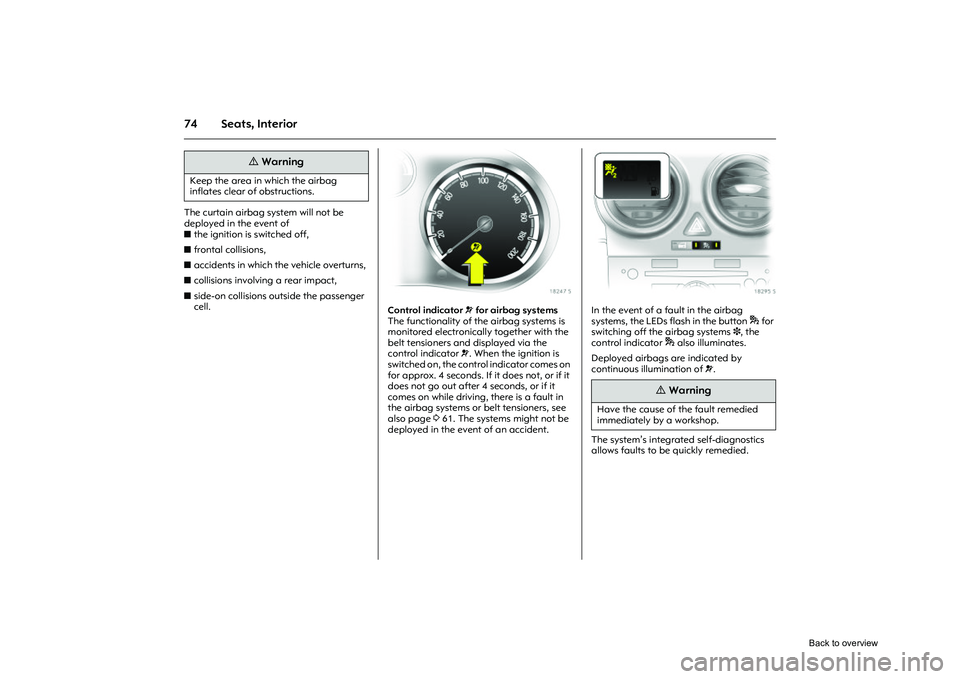
Control indicator v for airbag systems
The functionality of the airbag systems is
monitored electronically together with the
belt tensioners and displayed via the
control indicator v. When the ignition is
switched on, the control indicator comes on
for approx. 4 seconds. If it does not, or if it
does not go out after 4 seconds, or if it
comes on while driving, there is a fault in
the airbag systems or belt tensioners, see
also page 361. The systems might not be
deployed in the event of an accident.
Picture no: 18295s.tif
In the event of a fault in the airbag
systems, the LEDs flash in the button * for
switching off the airbag systems 3 , the
control indicator * also illuminates.
Deployed airbags are indicated by
continuous illumination of v.
The system’s integrated self-diagnostics
allows faults to be quickly remedied.
9
Warning
Keep the area in which the airbag
inflates clear of obstructions.
9
Warning
Have the cause of the fault remedied
immediately by a workshop.
Back to overview
Page 83 of 284
77
Seats, Interior
Picture no: 18298s.tif
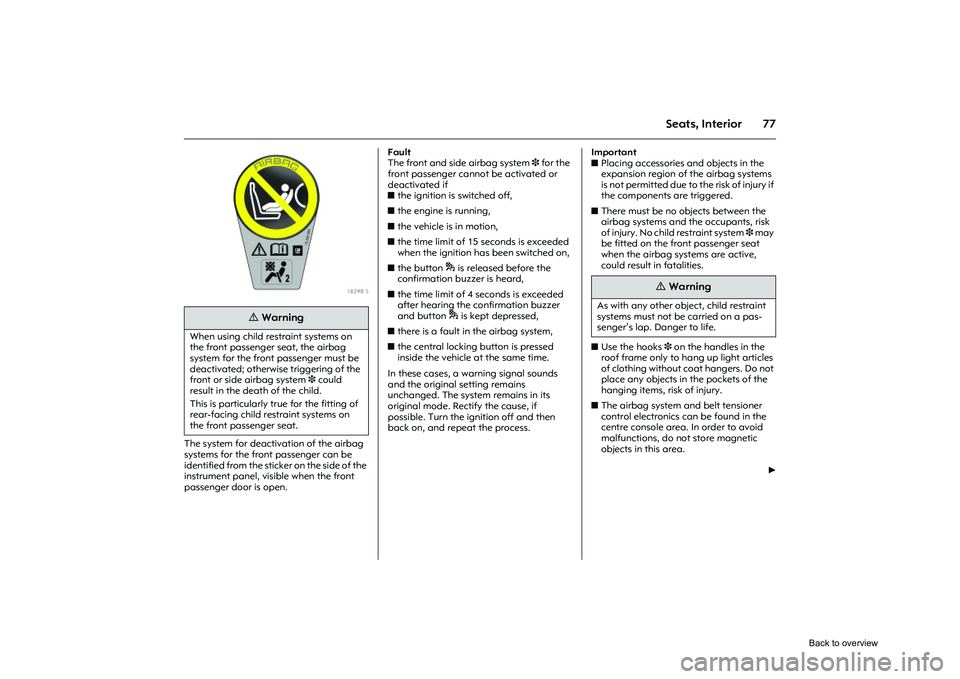
The system for deactivation of the airbag
systems for the front passenger can be
identified from the sticker on the side of the
instrument panel, visible when the front
passenger door is open. Fault
The front and side airbag system
3 for the
front passenger cannot be activated or
deactivated if
z the ignition is switched off,
z the engine is running,
z the vehicle is in motion,
z the time limit of 15 seconds is exceeded
when the ignition has been switched on,
z the button * is released before the
confirmation buzzer is heard,
z the time limit of 4 seconds is exceeded
after hearing the confirmation buzzer
and button * is kept depressed,
z there is a fault in the airbag system,
z the central locking button is pressed
inside the vehicle at the same time.
In these cases, a warning signal sounds
and the original setting remains
unchanged. The system remains in its
original mode. Rectify the cause, if
possible. Turn the ignition off and then
back on, and repeat the process. Important
z
Placing accessories and objects in the
expansion region of the airbag systems
is not permitted due to the risk of injury if
the components are triggered.
z There must be no objects between the
airbag systems and the occupants, risk
of injury. No child restraint system 3 may
be fitted on the front passenger seat
when the airbag systems are active,
could result in fatalities.
z Use the hooks 3 on the handles in the
roof frame only to hang up light articles
of clothing without co at hangers. Do not
place any objects in the pockets of the
hanging items, risk of injury.
z The airbag system and belt tensioner
control electronics can be found in the
centre console area. In order to avoid
malfunctions, do not store magnetic
objects in this area.
6
9
Warning
When using child restraint systems on
the front passenger seat, the airbag
system for the front passenger must be
deactivated; otherwise triggering of the
front or side airbag system 3 could
result in the death of the child.
This is particularly true for the fitting of
rear-facing child restraint systems on
the front passenger seat.
9
Warning
As with any other object, child restraint
systems must not be carried on a pas-
senger’s lap. Danger to life.
Back to overview
Page 84 of 284
78 Seats, InteriorzDo not stick anything on the steering
wheel, instrument panel, front seat
backrests or roof frame in the vicinity of
the airbags. Do not cover any of these
areas with other materials.
z Use only a dry cloth or interior cleaner to
clean the steering wheel, instrument
panel, front seat backrests and roof
frame. Do not use any aggressive
cleaning agents.
z Only protective covers which are
approved for your vehicle with side
airbag 3 may be fitted on the front
seats. When fitting the protective covers,
make sure that the airbag units on the
outboard sides of the front seat
backrests are not covered.
z The airbag systems are triggered
independently of each other based on
the severity of the accident and the type
of impact. The side airbag system 3 and
the curtain airbag system 3 are
triggered together.
z The speeds, directions of movement and
deformation properties of the vehicles,
and the properties of the obstacle
concerned, determine the severity of the
accident and triggering of the airbags.
The degree of damage to your vehicle
and the resulting repair costs alone are
not indicative that the criteria for
triggering of the airbags were met. z
Do not perform any alterations on the
components of the airbag system, as this
would render the vehicle unroadworthy.
z We recommend having the steering
wheel, the instrument panel, all panelling
parts, the door seals, the handles and
the seats removed by a workshop.
z The applicable safety regulations must
be adhered to when the vehicle is
disposed of. The vehicle should therefore
be disposed of by a recycling company.
z People weighing less than 35 kg should
travel in the rear se ats only. This ruling
does not refer to ch ildren who travel in
child restraint systems on the front
passenger seat with the airbag systems
switched off. Use of child restraint systems
3 on the
front passenger seat
9
Warning
If handled improperly the airbag sys-
tems can be triggered in an explosive
manner – risk of injury!
9
Warning
No child restraint sy stem may be fitted
on the front passenger seat when the
airbag systems are active, could result in
fatalities.
If child restraint systems are to be used
on the front passenger seat, the front
passenger airbag systems must be
deactivated 3, otherwise child’s life may
be at risk if the front and side airbag sys-
tems are deployed 3. This is particularly
true for rear-facing child restraint sys-
tems that are fitted to the front pas-
senger seat.
if the airbag systems for the front pas-
senger are not deactivated, the child
restraint system must be fitted in an
outer position on the rear seats.
Back to overview
Page 90 of 284
84 Instruments, controlsInstruments,
controls
Control indicators ................................ 84
Instrument display ............................... 90
Trip computer display in instrument panel 3.............................................. 92
Information display in the centre console ................................... 94
Warning buzzers.................................. 105
Windscreen wipers ............................... 106
Picture no: 18468s.tif
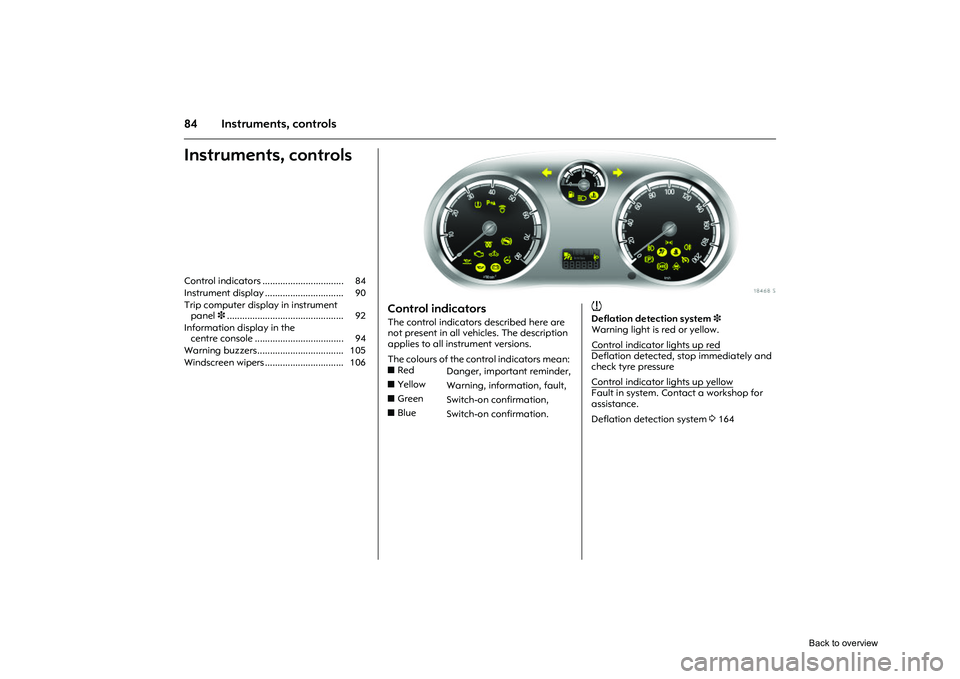
Control indicators The control indicators described here are
not present in all vehicles. The description
applies to all instrument versions.
The colours of the control indicators mean:
Picture no:
w
Deflation detection system 3
Warning light is red or yellow.
Control indicator lights up redDeflation detected, stop immediately and
check tyre pressure
Control indicator lights up yellowFault in system. Contact a workshop for
assistance.
Deflation detection system 3164
z
Red
Danger, important reminder,
z Yellow
Warning, information, fault,
z Green
Switch-on confirmation,
z Blue
Switch-on confirmation.
Back to overview
Page 92 of 284

86 Instruments, controls
Picture no: 18469s.tif
A
Engine electronics, transmission
electronics 3, immobiliser,
diesel fuel filter 3
Control indicator lights up and/or flashes
yellow.
It illuminates for a few seconds when the
ignition is switched on.
Illuminates when the engine is running
Fault in engine electronics or transmission
electronics. Electronics switches to
emergency running program, fuel
consumption may increase and driveability
of vehicle may be affected 3156. If the
fault is still there when the engine is started
again, contact a workshop for assistance.
Picture no:
Lamps
together with InSP4 on the service
display: Diesel fuel filter needs to be
drained of water 3244.
Flashes when the ignition is on
Fault in the electronic immobiliser system;
the engine cannot be started 327.
S
Engine oil level 3
Control indicator lights up yellow.
The engine oil level is checked
automatically.
Illuminates when the engine is running
Engine oil level too low. Check engine oil
level and top up engine oil if necessary
3 242.
I
Engine oil pressure
Control indicator lights up red.
It illuminates when the ignition is switched
on and goes out shortly after the engine
starts.
Illuminates when the engine is running
1. Depress clutch.
2. Shift manual transmission or manual
transmission automated 3 into neutral;
for automatic transmission 3, set
selector lever to N.
3. Move out of the flow of traffic as quickly as possible without impeding other
vehicles.
4. Switch off ignition.
Contact a workshop for assistance. Caution
Engine lubrication may be interrupted.
This may result in damage to the engine
and/or locking of the drive wheels.
9
Warning
When the engine is off, considerably
more force is needed to brake and steer.
Do not remove key until vehicle has
come to a standstill, otherwise the
steering column lock could engage
unexpectedly.
Back to overview
Page 93 of 284

87
Instruments, controls
p
Alternator
Control indicator lights up and/or flashes
red.
It illuminates when the ignition is switched
on and goes out shortly after the engine
starts.
Flashes during or after engine start
Battery voltage too lo w. Have electrical
system tested by a workshop.
Illuminates when the engine is runningStop and switch engine off. Battery will not
be charged. Engine cooling may be
interrupted. Effect of brake servo unit may
stop in vehicles with diesel engines.
Contact a workshop for assistance. p
Electro-hydraulic power assisted steering
Control indicator lights up yellow.
Fault in electro-hydr aulic power assisted
steering system. The power assisted
steering may have failed. The vehicle can
be steered but considerably more force is
required. Contact a workshop for
assistance.
O
Turn signal lamps
Control indicator flashes green.
The control indicator flashes if a turn signal
or the hazard warning flashers are
activated.
Rapid flashes: A turn signal lamp or the
related fuse has failed, failure of turn signal
lamp on the trailer 3.
Change bulbs 3212. Fuses 3 209.
Y
Fuel level
Control indicator lights up and/or flashes
yellow
Lamps
Level in fuel tank too low.
Flashes
Fuel level is used up, fuel immediately.
Never let the tank run dry!
Erratic fuel supply can cause catalytic
converter to overheat 3155.
Diesel engines: Bleed the fuel system after
running empty 3190.
C
Main beam
Control indicator lights up blue.
It is illuminated when main beam is on and
during headlamp flash 311, 3109.
W
Coolant temperature
Stop, switch off engine.
Check coolant level immediately 3244.
If there is sufficient coolant, consult a
workshop. Caution
Coolant temperature too high.
Back to overview
Page 95 of 284
89
Instruments, controls
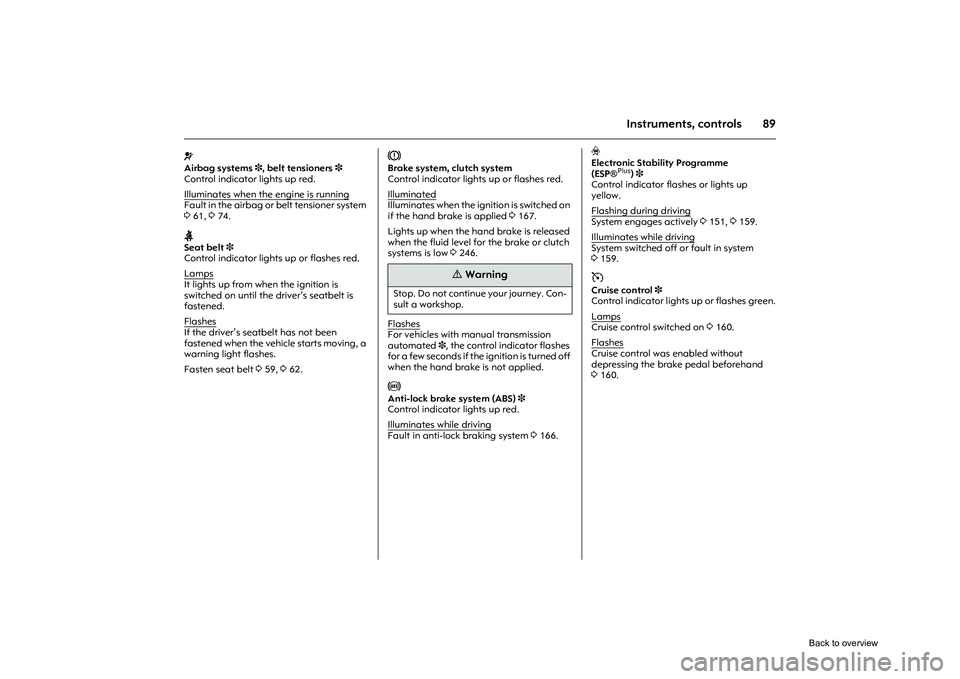
v
Airbag systems 3, belt tensioners 3
Control indicator lights up red.
Illuminates when the engine is runningFault in the airbag or belt tensioner system
3 61, 374.X
Seat belt 3
Control indicator lights up or flashes red.
Lamps
It lights up from when the ignition is
switched on until the dr iver’s seatbelt is
fastened.
Flashes
If the driver’s seatbelt has not been
fastened when the vehicle starts moving, a
warning light flashes.
Fasten seat belt 359, 362.
R
Brake system, clutch system
Control indicator lights up or flashes red.
Illuminated
Illuminates when the ignition is switched on
if the hand brake is applied 3167.
Lights up when the hand brake is released
when the fluid level for the brake or clutch
systems is low 3246.
FlashesFor vehicles with ma nual transmission
automated 3, the control indicator flashes
for a few seconds if the ignition is turned off
when the hand brake is not applied. u
Anti-lock brake system (ABS) 3
Control indicator lights up red.
Illuminates while driving
Fault in anti-lock braking system 3166.
v
Electronic Stability Programme
(ESP ®
Plus
)3
Control indicator flashes or lights up
yellow.
Flashing during driving
System engages actively 3151, 3159.
Illuminates while drivingSystem switched off or fault in system
3 159.m
Cruise control 3
Control indicator lights up or flashes green.
Lamps
Cruise control switched on 3160.
Flashes
Cruise control was enabled without
depressing the brake pedal beforehand
3 160.
9
Warning
Stop. Do not continue your journey. Con-
sult a workshop.
Back to overview
Page 96 of 284
90 Instruments, controls
Picture no: 18240s.tif
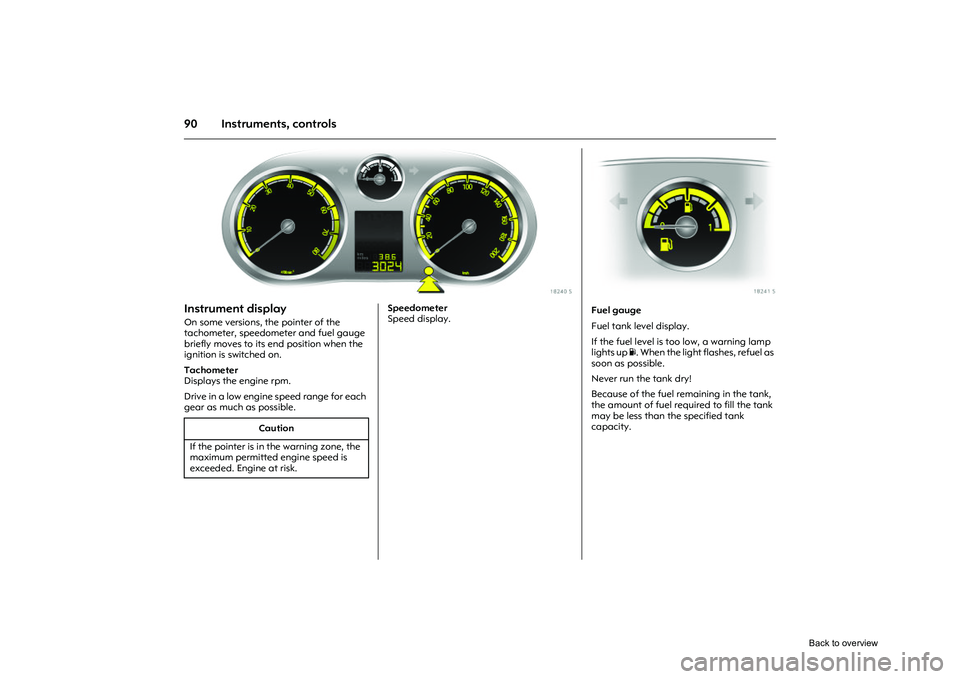
Instrument display On some versions, the pointer of the
tachometer, speedometer and fuel gauge
briefly moves to its end position when the
ignition is switched on.
Tachometer
Displays the engine rpm.
Drive in a low engine speed range for each
gear as much as possible.
Picture no:
Speedometer
Speed display.
Caution
If the pointer is in the warning zone, the
maximum permitted engine speed is
exceeded. Engine at risk.
Picture no: 18241s.tif
Fuel gauge
Fuel tank level display.
If the fuel level is too low, a warning lamp
lights up Y. When the light flashes, refuel as
soon as possible.
Never run the tank dry!
Because of the fuel remaining in the tank,
the amount of fuel requ ired to fill the tank
may be less than the specified tank
capacity.
Back to overview
Page 98 of 284
92 Instruments, controls
Picture no: 18401s.tif
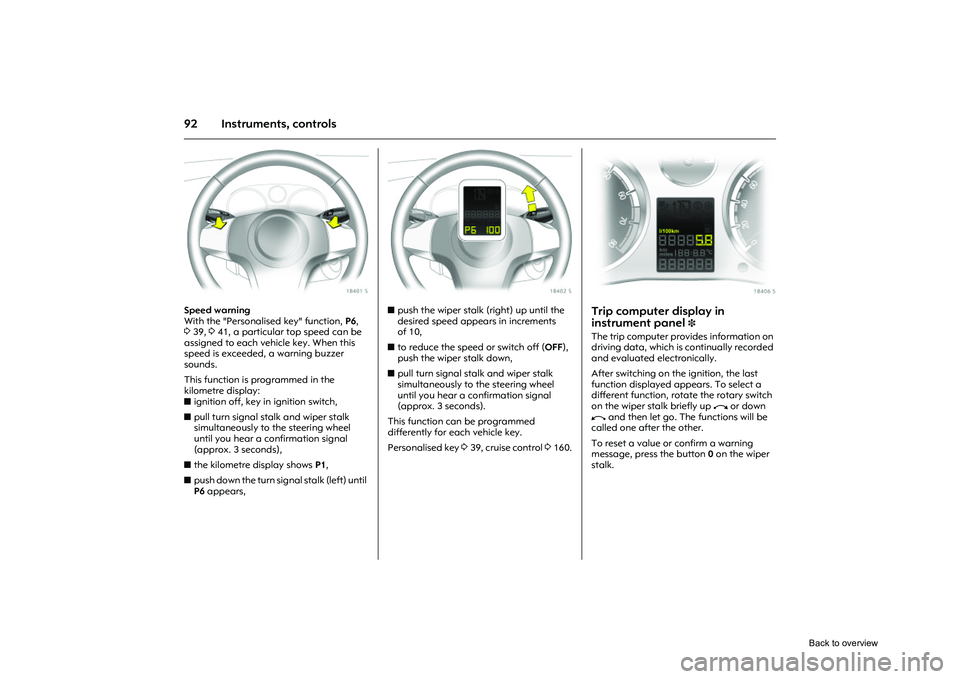
Speed warning
With the "Personalised key" function, P6,
3 39, 341, a particular top speed can be
assigned to each vehicle key. When this
speed is exceeded, a warning buzzer
sounds.
This function is programmed in the
kilometre display:
z ignition off, key in ignition switch,
z pull turn signal stalk and wiper stalk
simultaneously to the steering wheel
until you hear a confirmation signal
(approx. 3 seconds),
z the kilometre display shows P1,
z push down the turn signal stalk (left) until
P6 appears,
Picture no: 18402s.tif
zpush the wiper stalk (right) up until the
desired speed appears in increments
of 10,
z to reduce the speed or switch off ( OFF),
push the wiper stalk down,
z pull turn signal st alk and wiper stalk
simultaneously to the steering wheel
until you hear a confirmation signal
(approx. 3 seconds).
This function can be programmed
differently for each vehicle key.
Personalised key 339, cruise control 3160.
Picture no: 18406s.tif
Trip computer display in
instrument panel
3
The trip computer provides information on
driving data, which is continually recorded
and evaluated electronically.
After switching on the ignition, the last
function displayed appears. To select a
different function, rotate the rotary switch
on the wiper stalk briefly up i or down
h and then let go. The functions will be
called one after the other.
To reset a value or confirm a warning
message, press the button 0 on the wiper
stalk.
Back to overview
Page 99 of 284

93
Instruments, controls
Picture no: 18436s.tif
Functions:
zRange
z Instantaneous consumption
z Distance travelled
z Average speed
z Effective consumption
z Average consumption
z Stop watch
To select, rotate the rotary switch on the
wiper stalk briefly up i or down h for
each function and then let go. The
functions will be called one after the other. Range
Range is calculated fr
om current fuel tank
content and instantaneous consumption.
The display shows average values.
After refuelling, the vehicle updates the
range automatically after a brief delay.
When there is insufficient fuel in the tank
for more than 30 km, the warning REFILL
appears on the display.
Confirm the warning message by pressing 0
on the wiper stalk.
Instantaneous consumption
Display of current consumption. At low
speeds, consumption per hour is displayed.
Distance travelled
Display of distance travelled. The
measurement can be reset at any time.
Average speed
Display of aver age speed. The
measurement can be reset at any time.
Stoppages in the journey with the ignition
off are not included in the calculations. Effective consumption
Display of fuel consumed. The
measurement can be reset at any time.
Average consumption
Display of average
consumption. The
measurement can be reset at any time.
Restart trip computer information
Select the desired trip computer function:
rotate the rotary switch on the wiper stalk
briefly up i or down h for each function
and then let go. To reset a value to zero,
hold down the button 0 on the wiper stalk
for more than three seconds: this restarts
measurement. To reset all functions at the
same time, hold down the button 0 for
more than 6 seconds.
All trip computer information, apart from
range and instantaneous consumption,
can be reset.
Stop watch
Select function using rotary
switch iorh ,
push button 0: start/stop
for longer than
three seconds: reset to zero
Back to overview