tailgate OPEL GRANDLAND X 2018 Infotainment system
[x] Cancel search | Manufacturer: OPEL, Model Year: 2018, Model line: GRANDLAND X, Model: OPEL GRANDLAND X 2018Pages: 265, PDF Size: 7.5 MB
Page 187 of 265
Driving and operating185No alert will be given in the following
situations:
● In the presence of non-moving objects (parked vehicles,
barriers, street lamps, road
signs...).
● With vehicles moving in the opposite direction.
● Driving on a winding road or a sharp corner.
● When passing (or being passed by) a very long vehicle (lorry,
coach...) which is at the same time detected at the rear in the
blind spot angle and present in
the driver's forward field of vision.
● In very heavy traffic: vehicles detected in front and behind are
confused with a lorry or a
stationary object.
● When passing too quickly.
Deactivation The system is deactivated in the
vehicle personalisation 3 106. B
extinguishes in the instrument cluster.
Additionally, an acoustic signal
sounds.The state of the system is stored when switching off the ignition.
The system is automatically
deactivated when towing an
electrically connected trailer.
Due to adverse weather conditions
such as heavy rain, false detections
may occur.
Fault
In the event of a fault, B flashes for a
few moments in the instrument panel,
accompanied by F and a
display message. Contact a dealer or a qualified workshop to have the
system checked.
Panoramic view system
This system allows views of the
vehicle's surroundings to be
displayed as a nearly 360° picture in
the Info display, like a bird's eye view.
The system uses: ● rear camera, installed in the tailgate
● ultrasonic parking sensors in the rear bumper●front camera, installed in the front
grill below the enblem
● ultrasonic parking sensors in the front bumper
The screen in the Info display is
divided into two parts: on the right
there is a view from above the vehicle,
and on the left there is the view from
the rear or the front displayed. The
parking sensors complete the
information on the view from above
the vehicle.
Activation The panoramic view system is
activated by:
● engaging a gear or gearbox in a neutral position (front view)
● engaging reverse gear (rear view)
● manually in the view selection menu
● approaching too close to an object ahead
● driving up to 20 km/h
Vehicle personalisation 3 106
Page 189 of 265
Driving and operating187Auto mode
This mode is activated by default.
Using sensors in the rear or in the
front bumper, the automatic view
changes from rear view or front view
to a view from above, as an obstacle
is approached during a manoeuvre.
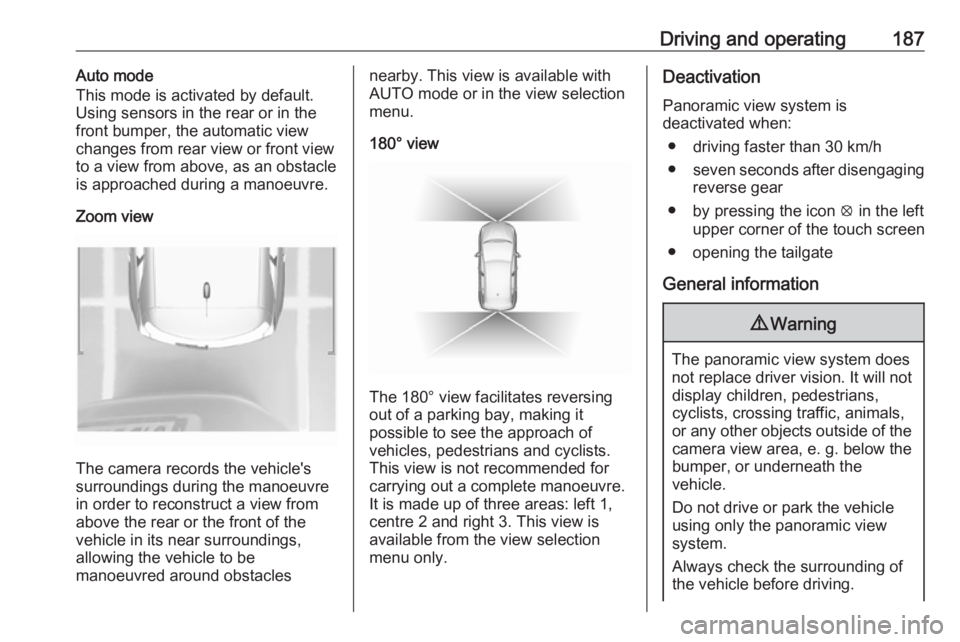
Zoom view
The camera records the vehicle's
surroundings during the manoeuvre in order to reconstruct a view fromabove the rear or the front of the
vehicle in its near surroundings,
allowing the vehicle to be
manoeuvred around obstacles
nearby. This view is available with
AUTO mode or in the view selection
menu.
180° view
The 180° view facilitates reversing
out of a parking bay, making it
possible to see the approach of
vehicles, pedestrians and cyclists.
This view is not recommended for
carrying out a complete manoeuvre.
It is made up of three areas: left 1,
centre 2 and right 3. This view is
available from the view selection menu only.
Deactivation
Panoramic view system is
deactivated when:
● driving faster than 30 km/h
● seven seconds after disengaging
reverse gear
● by pressing the icon q in the left
upper corner of the touch screen
● opening the tailgate
General information9 Warning
The panoramic view system does
not replace driver vision. It will not display children, pedestrians,
cyclists, crossing traffic, animals,
or any other objects outside of the camera view area, e. g. below the
bumper, or underneath the
vehicle.
Do not drive or park the vehicle
using only the panoramic view
system.
Always check the surrounding of
the vehicle before driving.
Page 190 of 265
188Driving and operatingDisplayed images may be furtheror closer than they appear. The
area displayed is limited and
objects that are close to either
edge of the bumper or under the
bumper are not displayed on the
screen.
System limitations
Caution
For optimal operation of the
system, it is important to keep the
lense of the camera in the tailgate between the number plate lightsand the lense in the front grill
below the enblem always clean. Rinse the lenses with water and
wipe with a soft cloth.
Do not clean the lenses with a
steam-jet or high-pressure jet
cleaner.
The panoramic view system may not operate properly when:
● The surrounding is dark.
● The sun or the beam of headlights is shining directly into
the camera lenses.
● During nighttime driving.
● Weather limits visibility, such as fog, rain, or snow.
● The camera lenses are blocked by snow, ice, slush, mud, dirt.
● The vehicle is towing a trailer. ● The vehicle had an accident.● There are extreme temperature changes.
Rear view camera The rear view camera assists the
driver when reversing by displaying a
view of the area behind the vehicle.
The view of the camera is displayed
in the Info-Display.9 Warning
The rear view camera does not
replace driver vision. Note that
objects that are outside the
camera's field of view and the
parking assist sensors, e.g. below
the bumper or underneath the
vehicle, are not displayed.
Do not reverse or park the vehicle
using only the rear view camera.
Always check the surrounding of
the vehicle before driving.
Switching on
Rear view camera is automatically
activated when reverse gear is
engaged.
Page 191 of 265
Driving and operating189Functionality
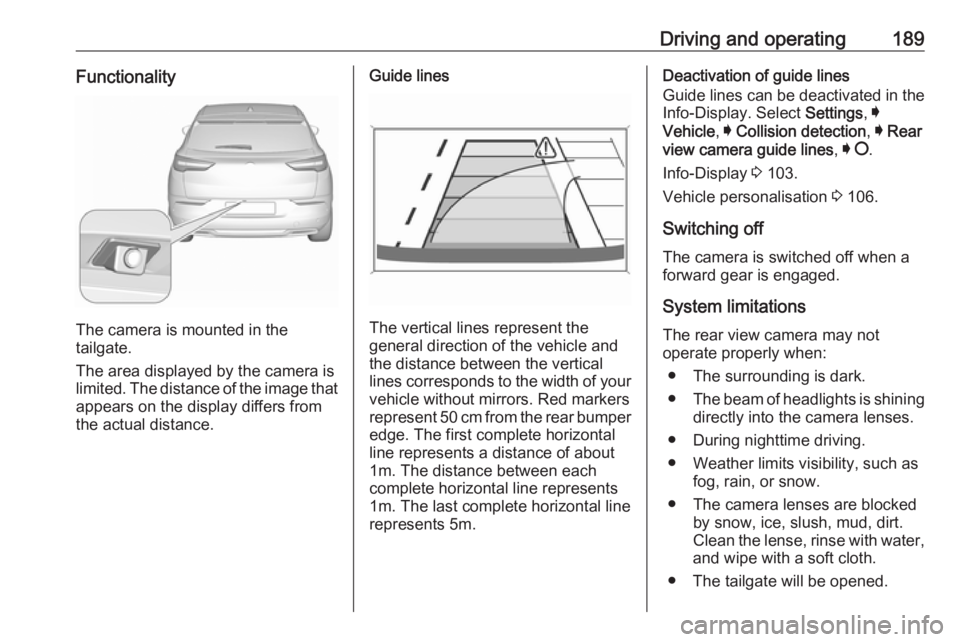
The camera is mounted in the
tailgate.
The area displayed by the camera is
limited. The distance of the image that
appears on the display differs from
the actual distance.
Guide lines
The vertical lines represent the
general direction of the vehicle and
the distance between the vertical
lines corresponds to the width of your vehicle without mirrors. Red markers
represent 50 cm from the rear bumper
edge. The first complete horizontal
line represents a distance of about
1m. The distance between each
complete horizontal line represents
1m. The last complete horizontal line
represents 5m.
Deactivation of guide lines
Guide lines can be deactivated in the Info-Display. Select Settings, I
Vehicle , I Collision detection , I Rear
view camera guide lines , I § .
Info-Display 3 103.
Vehicle personalisation 3 106.
Switching off
The camera is switched off when a
forward gear is engaged.
System limitations The rear view camera may not
operate properly when:
● The surrounding is dark.
● The beam of headlights is shining
directly into the camera lenses.
● During nighttime driving.
● Weather limits visibility, such as fog, rain, or snow.
● The camera lenses are blocked by snow, ice, slush, mud, dirt.
Clean the lense, rinse with water,
and wipe with a soft cloth.
● The tailgate will be opened.
Page 215 of 265
Vehicle care213Tail lights
Tail lights, daytime running lights and
centre high-mounted brake light are
designed as LEDs. In case of failure, have LEDs replaced by a workshop.
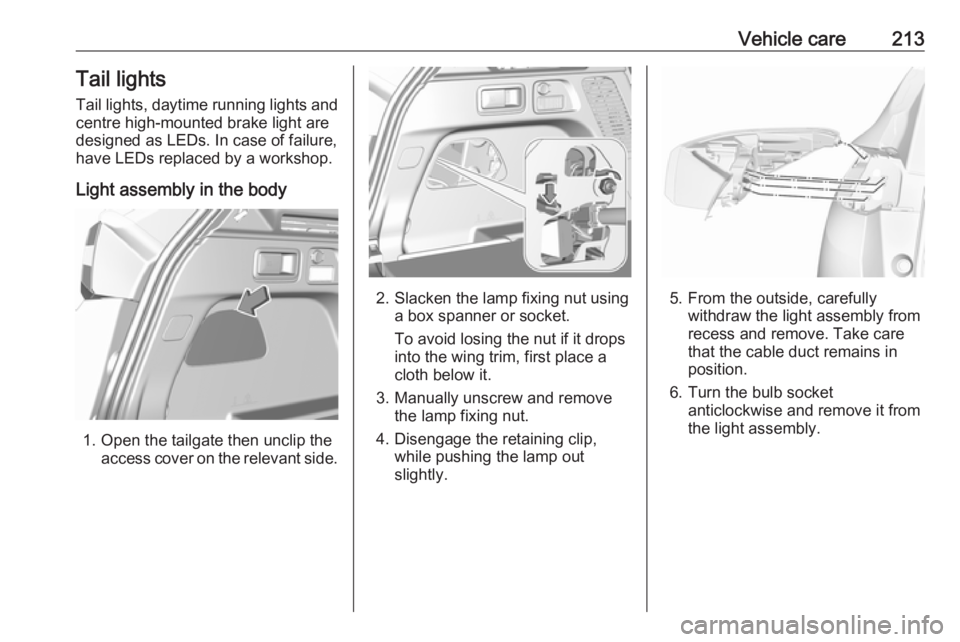
Light assembly in the body
1. Open the tailgate then unclip the access cover on the relevant side.
2. Slacken the lamp fixing nut usinga box spanner or socket.
To avoid losing the nut if it drops
into the wing trim, first place a
cloth below it.
3. Manually unscrew and remove the lamp fixing nut.
4. Disengage the retaining clip, while pushing the lamp out
slightly.5. From the outside, carefully withdraw the light assembly from
recess and remove. Take care
that the cable duct remains in
position.
6. Turn the bulb socket anticlockwise and remove it from
the light assembly.
Page 216 of 265
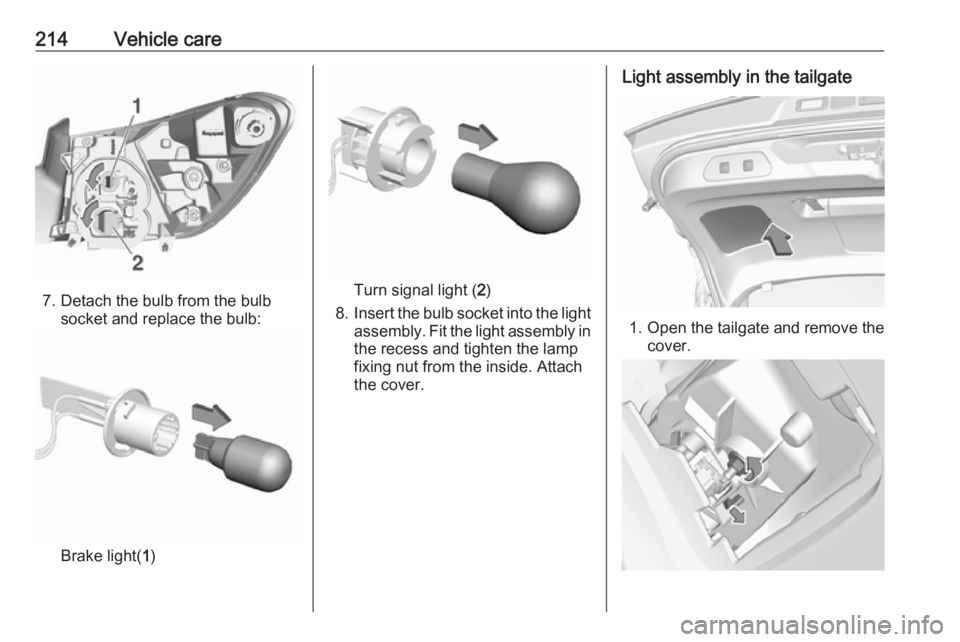
214Vehicle care
7. Detach the bulb from the bulbsocket and replace the bulb:
Brake light( 1)
Turn signal light ( 2)
8. Insert the bulb socket into the light
assembly. Fit the light assembly in the recess and tighten the lamp
fixing nut from the inside. Attach the cover.
Light assembly in the tailgate
1. Open the tailgate and remove the
cover.
Page 250 of 265
![OPEL GRANDLAND X 2018 Infotainment system 248Technical dataVehicle dimensionsLength [mm]4478Width without exterior mirrors [mm]1841Width with two exterior mirrors folded [mm]1970Width with two exterior mirrors [mm]2098Height (without antenna)](/img/37/18844/w960_18844-249.png "OPEL GRANDLAND X 2018 Infotainment system 248Technical dataVehicle dimensionsLength [mm]4478Width without exterior mirrors [mm]1841Width with two exterior mirrors folded [mm]1970Width with two exterior mirrors [mm]2098Height (without antenna)")
248Technical dataVehicle dimensionsLength [mm]4478Width without exterior mirrors [mm]1841Width with two exterior mirrors folded [mm]1970Width with two exterior mirrors [mm]2098Height (without antenna) [mm]1623Length of load compartment floor [mm]876Length of load compartment with second row at foremost position and folded third row [mm]1868,8Load compartment width [mm]1053Load compartment height at tailgate [mm]996,6Wheelbase [mm]2675Turning circle diameter [m]10,5
Page 263 of 265
261QQuickheat ................................... 133
R
Radio Frequency Identification (RFID) ..................................... 257
Radio remote control ...................23
Rain sensor ................................ 100
REACH ....................................... 253
Reading lights ............................ 123
Rear floor storage cover ..............74
Rear fog light .....................100, 121
Rear seats .................................... 53
Rear view camera ...................... 188
Rear window wiper/washer .......... 84
Recommended fluids and lubricants ........................ 237, 242
Refuelling ................................... 196 Registered trademarks ...............256
Reversing lights .........................122
Ride control systems ..................155
Roller blinds ................................. 44
Roof .............................................. 44
Roof load ...................................... 78
Roof rack ..................................... 77
S
Safety net .................................... 75
Seat adjustment ............................. 7 Seat belt ........................................ 8
Seat belt reminder .......................95Seat belts ..................................... 54
Seat heating ................................. 52
Seat heating, rear .....................53
Seat position ................................ 47
Selective catalytic reduction .......145
Selective ride control ..................156
Selector lever ............................. 149
Service ............................... 134, 236
Service display ............................ 93
Service information ....................236
Side airbag system ......................61
Side blind spot alert ....................183
Sidelights .................................... 114
Side turn signal lights ................216
Software acknowledgement .......253
Software update ......................... 255
Spare wheel ............................... 228
Speed limiter....................... 101, 162
Speedometer ............................... 91
Sport mode ................................ 158
Starting and operating ................136
Starting off ................................... 18
Starting the engine ....................139
Steering ...................................... 136
Steering wheel adjustment ......9, 81
Steering wheel controls ...............81
Stop engine .................................. 96
Stop-start system........................ 141
Storage ......................................... 70
Storage compartments .................70Sunvisor lights ........................... 123
Sun visors .................................... 44
Symbols ......................................... 4
System check ............................... 97
T
Tachometer ................................. 92
Tailgate ......................................... 31
Tail lights ................................... 213
Three-point seat belt .................... 55
Tools .......................................... 217
Tow bar....................................... 198 Towing ................................ 198, 230
Towing another vehicle .............231
Towing equipment .....................199
Towing the vehicle .....................230
Trailer coupling ........................... 198
Trailer stability assist .................202
Trailer towing ............................. 199
Transmission ............................... 18
Transmission display .................148
Tread depth ............................... 220
Trip odometer .............................. 92
Turn and lane-change signals ...120
Turn signal ................................... 95
Tyre chains ................................ 222
Tyre deflation detection system . 219
Tyre designations ......................218
Tyre pressure ............................ 218