steering wheel OPEL GRANDLAND X 2019 Manual user
[x] Cancel search | Manufacturer: OPEL, Model Year: 2019, Model line: GRANDLAND X, Model: OPEL GRANDLAND X 2019Pages: 277, PDF Size: 7.75 MB
Page 193 of 277
Driving and operating191the correction. A warning message in
the Driver Information Centre
accompanied by a warning chime
alerts the driver when immediate
driver´s action is required.
Deactivation
To deactivate the system, press and
hold Ó. Deactivation of the system is
confirmed by the illuminated LED in
the button. In the Driver Information
Centre solid grey lines are displayed.
Fault
In the event of a fault, a and H
appear in the instrument panel,
accompanied by a display message
and a warning chime. Contact a
dealer or a qualified workshop to have the system checked.
System limitations The system performance may beaffected by:
● windscreen not clean or affected by foreign objects, e.g. stickers
● close vehicles ahead
● banked roads● winding or hilly roads
● road edges
● sudden lighting changes
● adverse environmental conditions, e.g. heavy rain or
snow
● vehicle modifications, e.g. tyres
Switch off the system if the system is
disturbed by tar marks, shadows,
road cracks, temporary or
construction lane markings, or other
road imperfections.9 Warning
Always keep your attention on the
road and maintain proper vehicle
position within the lane, otherwise
vehicle damage, injury or death
could occur.
Lane keep assist does not
continuously steer the vehicle.
The system may not keep the
vehicle in the lane or give an alert,
even if a lane marking is detected.
The steering of the lane keep
assist may not be sufficient to
avoid a lane departure.
The system may not detect hands-
off driving due to external
influences like road condition and
surface and weather. The driver has full responsibility to control the vehicle and is always required to
keep the hands on the steering
wheel while driving.
Using the system while towing a
trailer or on slippery roads could
cause loss of control of the vehicle
and a crash. Switch the system off.
Driver alert
The driver alert system monitores the driving time and the vigilance of the
driver. Monitoring the vigilance of the
driver is based on the trajectory
variations of the vehicle compared to
the lane markings.
The system includes a driving time
alert combined with driver drowsiness detection.
Page 194 of 277

192Driving and operating9Warning
The system cannot replace the
need for vigilance on the part of
the driver. Taking a break is
recommended as soon as feeling tired or at least every two hours.
Do not take the steering wheel
when feeling tired.
Activation or Deactivation
The system can be activated or
deactivated in the vehicle
personalisation 3 105.
The state of the system stays in
memory when the ignition is switched
off.
Driving time alert The driver gets notified by a pop-up
reminder symbol € in the Driver
Information Centre simultaneously with an acoustic alert if the driver has
not taken a break after 2 hours of
driving at a speed above 65 km/h. The
alert is repeated hourly until the
vehicle is stopped, no matter how
vehicle speed evolves.
The counting of driving time alert is
reset when the ignition has been
switched off for a few minutes.
Driver drowsiness detection The system monitors the driver's level
of vigilance. A camera at the top of the
windscreen detects variations in
trajectory compared to the lane
markings. This system is particularly suited to fast roads (speed higher
than 65 km/h).
If the trajectory of the vehicle
suggests a certain level of
drowsiness or inattention by the
driver, the system triggers the first
level of alert. The driver is notified by
a message and an audible signal is
given.
After three first level alerts, the
system triggers a new alert with a
message, accompanied by a more
pronounced audible signal.
In certain driving conditions (poor
road surface or strong winds), the
system may give alerts independent of the driver's level of vigilance.The driver drowsiness detection is
reinitialised when the ignition has
been switched off for a few minutes or the speed remains below 65 km/h for a few minutes.
System limitations
In the following situations, the system
may not operate properly or even not operate at all:
● poor visibility caused by inadequate lighting of the
roadway, falling snow, heavy
rain, dense fog etc.
● dazzle caused by headlamps of an oncoming vehicles, low sun,
reflections on damp roads,
leaving a tunnel, alternating
shade and light etc.
● windscreen area in front of the camera covered by dirt, snow,
stickers etc.
● no lane markings detected or multiple lane markings due to
roadworks
● close vehicles ahead
● winding roads or narrow roads
Page 202 of 277
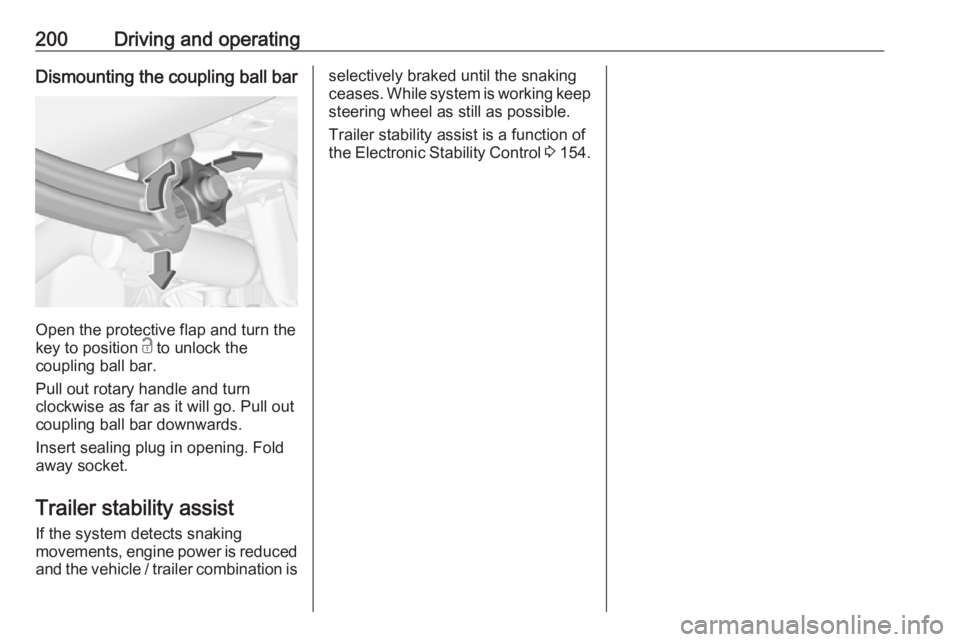
200Driving and operatingDismounting the coupling ball bar
Open the protective flap and turn the
key to position c to unlock the
coupling ball bar.
Pull out rotary handle and turn
clockwise as far as it will go. Pull out coupling ball bar downwards.
Insert sealing plug in opening. Fold away socket.
Trailer stability assist
If the system detects snaking
movements, engine power is reduced
and the vehicle / trailer combination is
selectively braked until the snaking
ceases. While system is working keep steering wheel as still as possible.
Trailer stability assist is a function of
the Electronic Stability Control 3 154.
Page 219 of 277
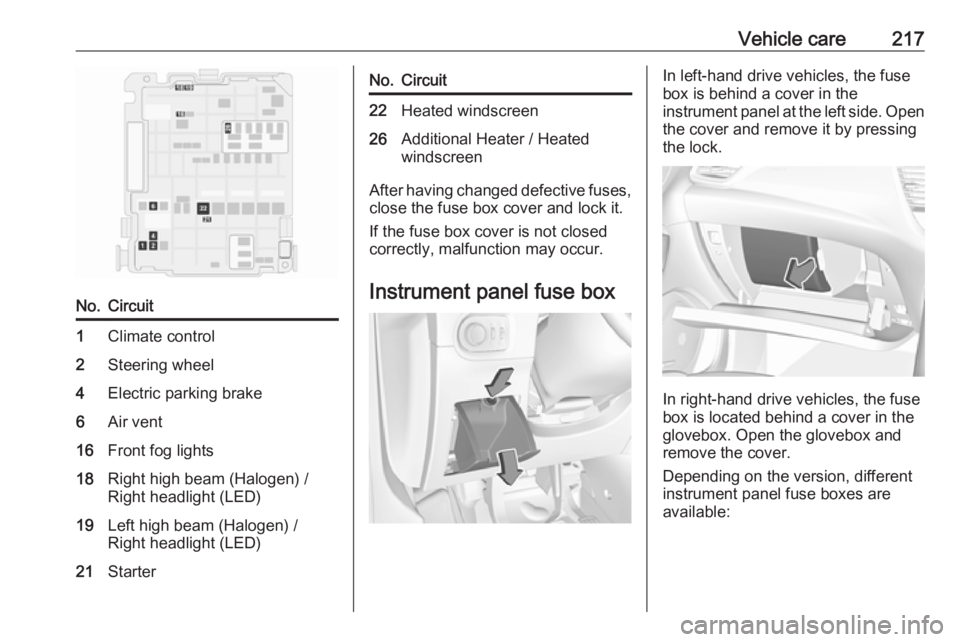
Vehicle care217No.Circuit1Climate control2Steering wheel4Electric parking brake6Air vent16Front fog lights18Right high beam (Halogen) /
Right headlight (LED)19Left high beam (Halogen) /
Right headlight (LED)21StarterNo.Circuit22Heated windscreen26Additional Heater / Heated
windscreen
After having changed defective fuses,
close the fuse box cover and lock it.
If the fuse box cover is not closed
correctly, malfunction may occur.
Instrument panel fuse box
In left-hand drive vehicles, the fuse
box is behind a cover in the
instrument panel at the left side. Open
the cover and remove it by pressing
the lock.
In right-hand drive vehicles, the fuse
box is located behind a cover in the
glovebox. Open the glovebox and
remove the cover.
Depending on the version, different
instrument panel fuse boxes are
available:
Page 220 of 277

218Vehicle careNo.Circuit1Electronic key system / Anti-
theft alarm system4Stop-start system5Advanced parking assist /
Camera / Transmission control
module7Amplifier8Rear wiper10Central locking system11Central locking systemNo.Circuit13Anti-theft alarm system16Electrical power steering wheel18OnStar21Interior lights22Glovebox light23Blind spot alert system / Exterior
mirror adjustment / Inductive
charging24Column electrical assembly25Interior mirror26Seat belt reminder27Camera / Rain sensor / Auto‐
matic light control28USB / Infotainment31Airbag33Power outlet front36InfotainmentNo.Circuit1Interior mirror / Electrical power
steering wheel / Selective ride
control / Radar / Diesel exhaust
system3Trailer provisions control
module4Horn5Windscreen washer6Windscreen washer7Power outlet rear10Doors lock / Tailgate lock
Page 221 of 277
Vehicle care219No.Circuit11Doors lock / Tailgate lock12Stop-start system / Diagnostic
connector module / Brake
system13Infotainment / Climate control
system14Alarm siren15Climate control system16Stop-start system / Brake
system17Instrument cluster19Column electrical assembly /
Steering wheel controls21Anti-theft alarm system22Camera / Rain sensor / Auto‐
matic light control23Seat belt reminder24Automatic transmission /
Advanced parking assist /
Panoramic view systemNo.Circuit25Airbag26Electronic Stability Control27Alarm28OnStar29Infotainment32Cigarette lighter / Power outlet front34Heated rear window / Heated
windscreen / Inductive charging35Light switch / Diagnostic
connector module36LightingVehicle tools
Tools
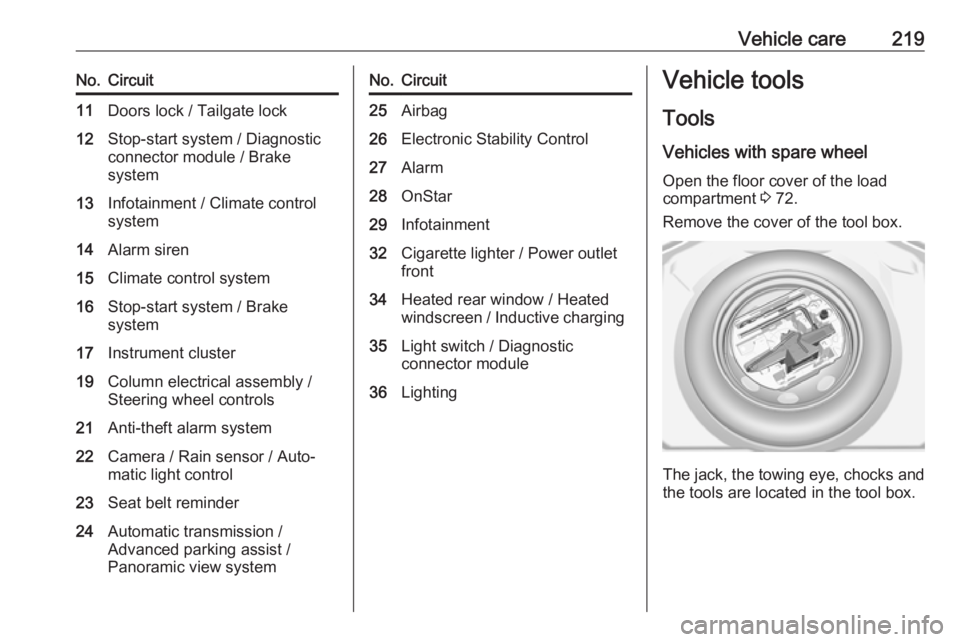
Vehicles with spare wheel Open the floor cover of the load
compartment 3 72.
Remove the cover of the tool box.
The jack, the towing eye, chocks and
the tools are located in the tool box.
Page 227 of 277
Vehicle care225Temporary spare wheel
The use of tyre chains is not permitted on the temporary spare wheel.
Tyre repair kit
Minor damage to the tyre tread can be
repaired with the tyre repair kit.
Do not remove foreign bodies from
the tyres.
Tyre damage exceeding 4 mm or that
is at tyre's sidewall cannot be repaired with the tyre repair kit.9 Warning
Do not drive faster than 80 km/h.
Do not use for a lengthy period.
Steering and handling may be
affected.
In the case of a flat tyre:
Apply the parking brake and engage
first gear, reverse gear or P.
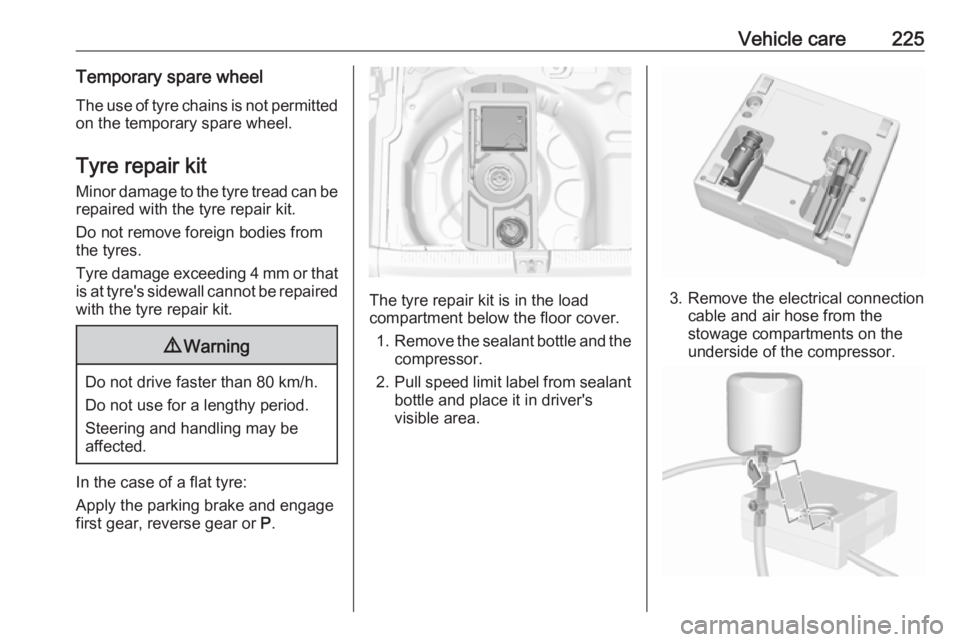
The tyre repair kit is in the load
compartment below the floor cover.
1. Remove the sealant bottle and the
compressor.
2. Pull speed limit label from sealant
bottle and place it in driver's
visible area.3. Remove the electrical connection cable and air hose from the
stowage compartments on the
underside of the compressor.
Page 236 of 277
234Vehicle care3. Connect the black lead to thenegative terminal of the booster
battery.
4. Connect the other end of the black
lead to a vehicle grounding point
of your vehicle in the engine
compartment.
Route the leads so that they cannot
catch on rotating parts in the engine
compartment.
To start the engine: 1. Start the engine of the vehicle providing the jump.
2. After 5 minutes, start the other engine. Start attempts should be
made for no longer than
15 seconds at an interval of
1 minute.
3. Allow both engines to idle for approx. 3 minutes with the leads
connected.
4. Switch on electrical consumers e.g. headlights, heated rear
window of the vehicle receiving
the jump start.
5. Reverse above sequence exactly when removing leads.Towing
Towing the vehicle
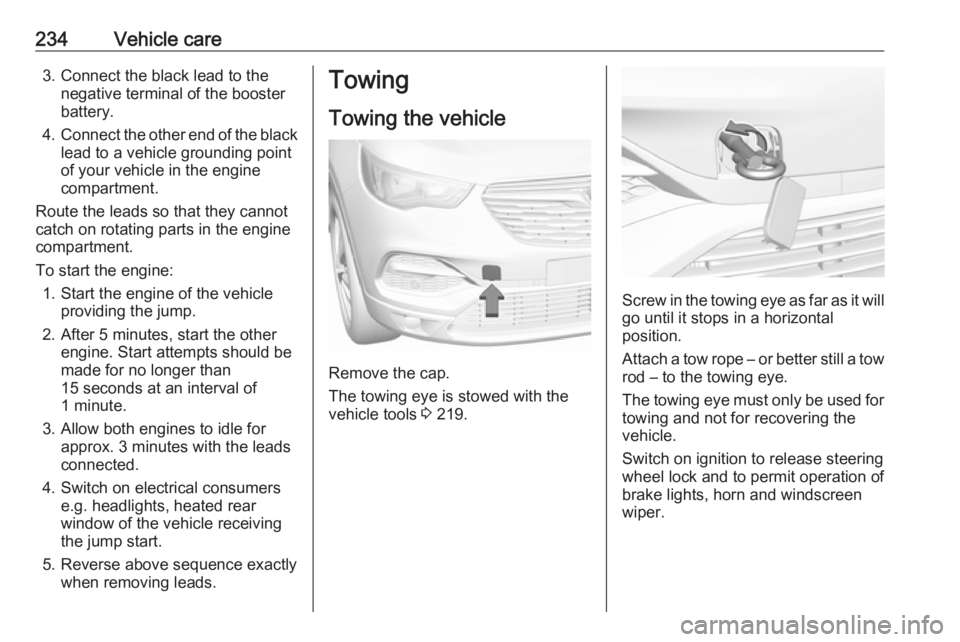
Remove the cap.
The towing eye is stowed with the
vehicle tools 3 219.
Screw in the towing eye as far as it will
go until it stops in a horizontal
position.
Attach a tow rope – or better still a tow
rod – to the towing eye.
The towing eye must only be used for towing and not for recovering the
vehicle.
Switch on ignition to release steering
wheel lock and to permit operation of
brake lights, horn and windscreen
wiper.
Page 269 of 277
Customer information267Comfort and infotainment
functions
Comfort settings and custom settings
can be stored in the vehicle and
changed or reset at any time.
Depending on the equipment level in
question, these include
● seat and steering wheel position settings
● chassis and air conditioning settings
● custom settings such as interior lighting
You can input your own data in the
infotainment functions for your
vehicle as part of the selected
features.
Depending on the equipment level in
question, these include
● multimedia data such as music, videos or photos for playback in
an integrated multimedia system
● address book data for use with an
integrated hands-free system or an integrated navigation system● input destinations
● data on the use of online services
This data for comfort and
infotainment functions can be stored
locally in the vehicle or be kept on a
device that you have connected to the
vehicle ( e.g. a smartphone, USB stick
or MP3 player). Data that you have input yourself can be deleted at any
time.
This data can only be transmitted out
of the vehicle at your request,
particularly when using online
services in accordance with the
settings selected by you.
Smartphone integration, e.g.
Android Auto or Apple CarPlay
If your vehicle is equipped
accordingly, you can connect your
smartphone or another mobile device
to the vehicle so that you can control
it via the controls integrated in the
vehicle. The smartphone image and
sound can be output via the
multimedia system in this case. At the same time, specific information is
transmitted to your smartphone.
Depending on the type of integration,this includes data such as position
data, day / night mode and other
general vehicle information. For more
information, please see the operating
instructions for the vehicle /
infotainment system.
Integration allows selected
smartphone apps to be used, such as navigation or music playback. No
further integration is possible
between smartphone and vehicle, in
particular active access to vehicle
data. The nature of further data
processing is determined by the
provider of the app used. Whether
you can define settings, and if so
which ones, is dependent on the app
in question and your smartphone's
operating system.
Page 274 of 277

272Headlights when driving abroad 115
Head restraint adjustment .............8
Head restraints ............................ 44
Heated mirrors ............................. 38
Heated rear window ..................... 41
Heated steering wheel .................79
Heated windscreen .......................42
Heating .................................. 50, 51
Heating and ventilation system . 123
High beam ........................... 98, 114
High beam assist ..........................98
Hill start assist ........................... 154
Horn ....................................... 14, 80
I Identification plate .....................246
Ignition switch positions .............135
Immobiliser .................................. 37
Indicators ...................................... 90
Inductive charging ........................86
Info Display ................................. 102
Instrument cluster ........................87
Instrument panel fuse box .........217
Instrument panel illumination control .................................... 120
Instrument panel overview ........... 10
Interior care ............................... 238
Interior lighting ............................ 120
Interior lights ...................... 120, 214
Interior mirrors .............................. 39Interruption of power supply ......149
Introduction .................................... 3
J
Jump starting ............................. 233
K Keys ............................................. 21
Keys, locks ................................... 21
L
Lane departure warning .......96, 188
Lane keep assist ..................96, 189
Lashing eyes ............................... 73
LED headlights .............98, 115, 210
Lighting features .........................121
Light switch ................................ 113
Load compartment ................30, 69
Load compartment cover .............71
Loading information .....................76
Low beam ..................................... 98
Low fuel ....................................... 98
M
Malfunction indicator light ............94
Manual anti-dazzle ......................39
Manual mode ............................. 148
Manual seat adjustment ...............46
Manual transmission .................. 150
Mirror adjustment ........................... 9
Misted light covers .....................120N
New vehicle running-in ..............135
Number plate light .....................214
O
Object detection systems ...........175
Odometer ..................................... 90
Oil, engine .......................... 244, 248
OnStar ........................................ 108
Outside temperature ....................82
Overrun cut-off ........................... 139
P
Panoramic view system ..............184
Parking ................................ 20, 142
Parking assist ............................ 175
Parking brake ............................ 151
Parking lights ............................. 119
Particulate filter ........................... 143
Performance .............................. 253
Performing work ........................203
Power button .............................. 136
Power outlets ............................... 84
Power saving mode ....................137
Power seat adjustment ................48
Power windows ............................ 40
Preheating ................................... 97
Puncture ..................................... 229
Q Quickheat ................................... 131