lock OPEL KARL 2015 Owner's Guide
[x] Cancel search | Manufacturer: OPEL, Model Year: 2015, Model line: KARL, Model: OPEL KARL 2015Pages: 217, PDF Size: 4.16 MB
Page 107 of 217
OPEL Karl Owner Manual (GMK-Localizing-EU RHD-9231168) - 2016 - crc -
5/7/15
106 Infotainment System
The list is displayed in the order
of Information→Pop →Rock →
Classical →Music →All.
. DAB announcements: Enter
the DAB announcements menu,
and then set the list entry of
interest.
Available announcements :
News →Weather →Sports →
Finance →Travel →Event →
Special →Radio Info →
Warning →Traffic →Alarm.
. DAB to DAB linking: Turn the
DAB linking feature on or off
(activate or deactivate the Auto
ensemble linking function).
. DAB to FM linking: Turn the FM
linking feature on or off (activate
or deactivate the Auto linking
DAB-FM function).
. L band: Turn L Band feature on
or off.
When L Band is turned on, the
system will seek/tune the station
to include the L Band frequency
blocks. .
Intellitext: Selects the specially
broadcast text providing
information such as sports
scores, headline news, and
others.
Radio Data System (RDS)
The Radio Data System (RDS) is a
service by FM stations that
considerably makes it easier to find
radio stations with fault-free
reception.
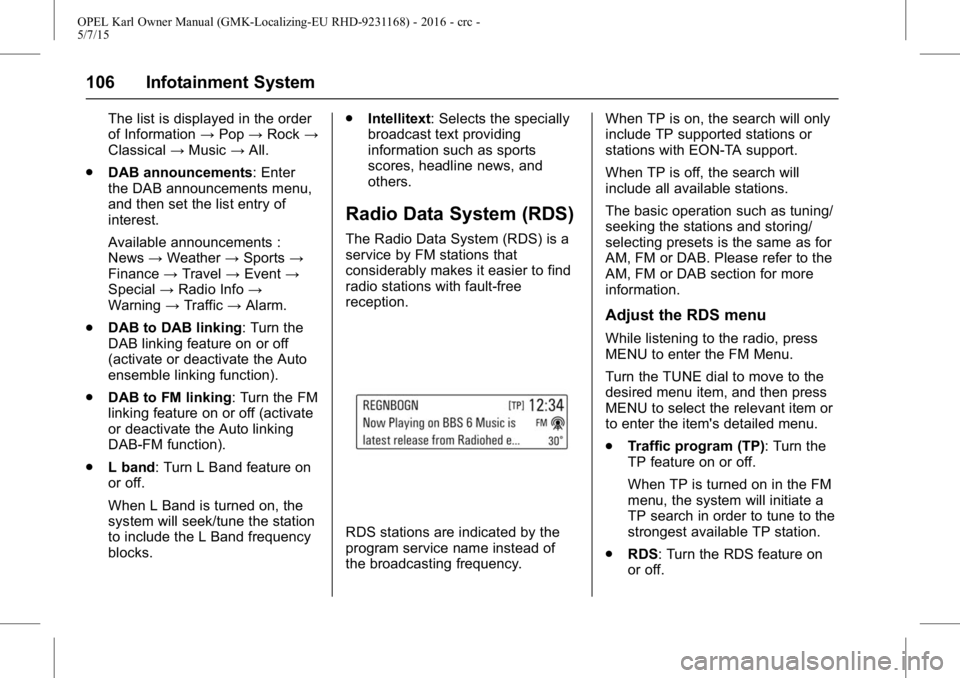
RDS stations are indicated by the
program service name instead of
the broadcasting frequency. When TP is on, the search will only
include TP supported stations or
stations with EON-TA support.
When TP is off, the search will
include all available stations.
The basic operation such as tuning/
seeking the stations and storing/
selecting presets is the same as for
AM, FM or DAB. Please refer to the
AM, FM or DAB section for more
information.
Adjust the RDS menu
While listening to the radio, press
MENU to enter the FM Menu.
Turn the TUNE dial to move to the
desired menu item, and then press
MENU to select the relevant item or
to enter the item's detailed menu.
.
Traffic program (TP): Turn the
TP feature on or off.
When TP is turned on in the FM
menu, the system will initiate a
TP search in order to tune to the
strongest available TP station.
. RDS: Turn the RDS feature on
or off.
Page 108 of 217
OPEL Karl Owner Manual (GMK-Localizing-EU RHD-9231168) - 2016 - crc -
5/7/15
Infotainment System 107
When RDS is turned on, the
program service name of the
current station appears instead
of its frequency.
When RDS is turned off, the
RDS Text will be switched off,
the alternate frequency feature
will not function, and the
frequency will be displayed in
the place of the PSN (PS name).
. Region: Turns the Region
feature on or off.
Only alternative frequencies with
the same regional programmes
are selected.
. Categories (FM category):
Selects a station from the list.
The list is displayed in the order
of Information →Pop →Rock →
Classical →Music →All.
Volume of the traffic
announcements (TA)
While the Traffic Alert is playing, the
Traffic alert volume can be adjusted
by turning the VOLUME dial. The system will store this setting for
future traffic alerts.
.
Once an alert is completed, the
system volume returns to its
previously set level prior to the
traffic alert.
. If the traffic alert volume is set to
zero during an alert, the next
traffic alert will arrive at the
minimum connection volume
level.
. The same process will apply to
DAB Announcements.
Radio traffic service
(TP : Traffic Program)
Radio traffic service stations are
RDS stations that broadcast
traffic news.
Press MENU > turn the TUNE dial
to select TP > press MENU to turn
the TP feature on or off.
.If the current station is not a
radio traffic service station, then
a search is automatically started
for the next radio traffic service
station. .
Once a radio traffic service
station has been found, "TP " is
displayed in the display screen.
. If the radio traffic service is
switched on, then it is
interrupted for the duration of the
traffic announcement in all
modes.
Blocking out traffic
announcements
If a traffic alert comes in while
listening to an audio source, the
system will display the Traffic Alert
Pop-up.
The pop-up will display with a
Dismiss option highlighted by
default for the alert.
.If a Traffic Alert pop-up is
displayed, the Traffic Alert
pop-up can also be dismissed by
SRC on the SWC.
. If a Traffic Alert pop-up is
displayed when an external
device is connected, the system
does not read the device.
Page 113 of 217
OPEL Karl Owner Manual (GMK-Localizing-EU RHD-9231168) - 2016 - crc -
5/7/15
112 Infotainment System
.Folder View: Enter the Folder
View mode, and move to the
previous or next folder.
. Shuffle: Turn the shuffle feature
on or off.
Browsing/indexing device
. Browsing is not supported until
indexing is completed for the
connected device.
. If the browse function is selected
during the indexing process, a
pop-up “Feature not supported
during Indexing Use folder
view to browse contents ”will
display.
. When a single device with
greater than 6,000 songs is
connected, a pop-up “Media
indexing memory full Use
folder view or remove other
device ”will display.
Remove USB
Remove the USB device from the
USB connection terminal.
If the USB device is removed, the
system will display the No
Connection message for each source on the display screen and
keep the current status until the
device is reconnected.
Using the Media transfer protocol
(MTP) menu
Charge Only: Select the charge
option for the MTP device. The MTP
device will be charged, and the
system will show the pop-up
message, when it is connected.
.
The default setting is
Charge Only.
. When the Charge Only option is
selected in the Media Transfer
Protocol (MTP) Setting Menu,
the audio source is not changed
and the connected device is only
charged.
. If you change to USB mode
while charging the device, a
Charge message with charging
activity indicator is shown on the
display screen. In this case, the
system will not start indexing the
files on the device.
. Charging may not be supported
by some MTP devices. Scan Music Folder Only: Select
the Music Folder Scan option for the
MTP device.
The system can display the Artist
Name/Song Name/Elapsed Time
regarding the current song and
access the playlist on the MTP
device.
Scan All Folder: Select the All
Folder scan option for the MTP
device.
.
The device indexing time takes
longer than the setting of Scan
Music Folder Only. It depends on
the smartphone and the files/
folders on the smartphone.
. With some phones featuring
Media Transfer Protocol (MTP),
music search can take a
long time.
. If the phone screen is locked,
you cannot search for music. To
access music on the phone,
unlock the phone screen.
Page 116 of 217
OPEL Karl Owner Manual (GMK-Localizing-EU RHD-9231168) - 2016 - crc -
5/7/15
Infotainment System 115
Personalisation
How to use the Settings menu for
personalisation
.Settings menus and functions
may differ according to car
model.
. The settings menu comprises a
detailed list for the relevant
setup menu or functioning state.
. If there is another detailed list
from the relevant detailed list,
you can repeat this action.
Select Settings in the Menu > turn
the TUNE dial to move to the
desired menu item > press MENU to
enter the item's detailed menu.
Setting the time and date
Set time : Manually set the hours
and minutes for the current time.
. Press Set Time in the Time and
Date menu.
. Press - to select the Time format
12HR or 24HR.
. Turn the TUNE dial to change
the hour, and then press MENU
to move to the Minute Setting. .
Turn the TUNE dial to change
the minute, and then press
MENU to move to the AM or PM
Setting.
. Turn the TUNE dial to select the
AM or PM, and then press
MENU to finish the Time Setting.
When MENU is pressed, the
Time and Date menu is
automatically displayed.
Set date : Manually set the current
year, month or date.
Press Set Date in the Time and
Date menu.
Press - to select the Date format.
The format shows: DD/MM/YYYY: 15. Oct. 2014
MM/DD/YYYY: Oct. 15. 2014
YYYY/MM/DD: 2014. Oct. 15
. Turn the TUNE dial to change
the Month, and then press
MENU to move to the Day
Setting.
. Turn the TUNE dial to change
the Day, and then press MENU
to move to the Year Setting. .
Turn the TUNE dial to change
the Year, and then press MENU
to finish the Date Setting. When
MENU is pressed, the Time and
Date menu is automatically
displayed.
Set time and date automatically.
Press - to select the Time setting
mode in the Set Time menu.
. Off (Manual): Activates
manual mode.
. On-Cell Network: Set the Cell
Network clock synchronization
feature on or off.
. On-RDS: Set the RDS clock
synchronization feature on or off.
Setting the tone
. For details, see page7.
Setting the auto volume
Auto Volume adjusts the volume of
the audio based on the speed or
ambient noise of the vehicle.
. Off: Auto Volume does not act.
Page 135 of 217
OPEL Karl Owner Manual (GMK-Localizing-EU RHD-9231168) - 2016 - crc -
5/7/15
134 Driving and Operating
Driving and
Operating
Driving Information
Control of a Vehicle . . . . . . . . . . . 134
Steering . . . . . . . . . . . . . . . . . . . . . . 135
Starting and Operating
New Vehicle Run-In . . . . . . . . . . 135
Ignition Positions . . . . . . . . . . . . . 135
Starting the Engine . . . . . . . . . . . 136
Retained AccessoryPower (RAP) . . . . . . . . . . . . . . . . 137
Automatic Engine Start/Stop Feature . . . . . . . . . . . . . . . . . . . . . 137
Parking . . . . . . . . . . . . . . . . . . . . . . . 139
Engine Exhaust
Engine Exhaust . . . . . . . . . . . . . . 140
Catalytic Converter . . . . . . . . . . . 140
Manual Gearbox
Manual Gearbox . . . . . . . . . . . . . . 141
Brakes
Brakes . . . . . . . . . . . . . . . . . . . . . . . 141
Antilock Brake System (ABS) . . . . . . . . . . . . . . . 142
Parking Brake . . . . . . . . . . . . . . . . 142
Brake Assist . . . . . . . . . . . . . . . . . . 143 Hill Start Assist (HSA) . . . . . . . . 143
Ride Control Systems
Traction Control
System (TCS) . . . . . . . . . . . . . . . 143
Electronic Stability Control (ESC) . . . . . . . . . . . . . . . 144
Object Detection Systems
Parking Assist . . . . . . . . . . . . . . . . 146
Driver Assistance Systems
Driver Assistance Systems . . . 148
Cruise Control . . . . . . . . . . . . . . . . 148
Speed Limiter . . . . . . . . . . . . . . . . . 149
Lane DepartureWarning (LDW) . . . . . . . . . . . . . 150
Fuel
Fuel (for Petrol Engines) . . . . . . 152
Filling the Tank . . . . . . . . . . . . . . . 152
Fuel Consumption -CO2-Emissions . . . . . . . . . . . . . 154
Driving Information
Control of a Vehicle
Never coast with engine not
running (except during
Autostop)
Many systems will not function in
this situation (e.g. brake servo unit,
power steering). Driving in this
manner is a danger to yourself and
others.
Idle boost
If charging of the vehicle battery is
required due to vehicle battery
condition, the power output of the
alternator must be increased. This
will be achieved by an idle boost
which may be audible.
Pedals
To ensure the pedal travel is
uninhibited, there must be no mats
in the area of the pedals.
Page 136 of 217
OPEL Karl Owner Manual (GMK-Localizing-EU RHD-9231168) - 2016 - crc -
5/7/15
Driving and Operating 135
Steering
If power steering assist is lost
because the engine stops or due to
a system malfunction, the vehicle
can be steered but may require a
higher or lower steering effort.
Control indicator
mVariable Effort
Steering Light 071.
Caution
Vehicle equipped with electric
power steering:
If the steering wheel is turned
until it reaches the end of its
travel and is held against that
position for an extended period of
time, power steering assist may
be reduced.
If the steering assistance is used
for an extended period of time,
power assistance may be
reduced.
Normal use of the power steering
assist should return when the
system cools down.
Starting and
Operating
New Vehicle Run-In
Do not brake unnecessarily hard for
the first few journeys.
During the first drive, smoke may
occur because of wax and oil
evaporating off the exhaust system.
Park the vehicle in the open for a
while after the first drive and avoid
inhaling the fumes.
During the running-in period fuel
and engine oil consumption may be
higher.
Autostop may be inhibited to allow
for charging the vehicle battery.
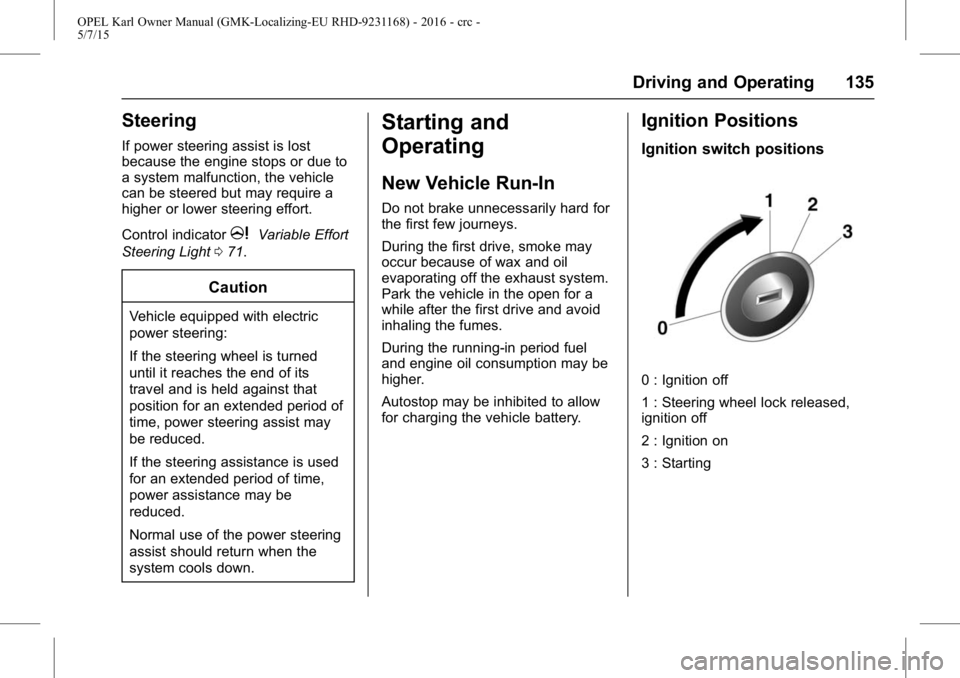
Ignition Positions
Ignition switch positions
0 : Ignition off
1 : Steering wheel lock released,
ignition off
2 : Ignition on
3 : Starting
Page 140 of 217
OPEL Karl Owner Manual (GMK-Localizing-EU RHD-9231168) - 2016 - crc -
5/7/15
Driving and Operating 139
Restart of the engine by the
stop-start system
The selector lever must be in
neutral to enable an automatic
restart.
If one of the following conditions
occurs during an Autostop, the
engine will be restarted
automatically by the stop-start
system.
.The stop-start system is
manually deactivated.
. The bonnet is opened.
. The driver's seat belt is
unfastened and the driver's door
is opened.
. The engine temperature is
too low.
. The vehicle battery is
discharged.
. The brake vacuum is not
sufficient.
. The vehicle starts to move.
. The climate control system
requests an engine start. .
The air conditioning is manually
switched on.
If the bonnet is not fully closed, a
warning message is displayed in the
Driver Information Centre.
If an electrical accessory, e.g. a
portable CD player, is connected to
the power socket, a brief power
drop during restart might be
noticeable.
Parking
{Warning
. Do not park the vehicle on
an easily ignitable surface.
The high temperature of the
exhaust system could ignite
the surface.
. Always apply parking brake.
Apply manual parking brake
without pressing release
button. Apply as firmly as
possible on downhill or
(Continued)
Warning (Continued)
uphill slopes. Depress the
foot brake at the same time
to reduce operating force.
. Switch off the engine and
ignition. Turn the steering
wheel until the steering
wheel lock engages.
. If the vehicle is on a level
surface or uphill slope,
engage first gear before
switching off the ignition. On
an uphill slope, turn the
front wheels away from
the kerb.
If the vehicle is on a
downhill slope, engage
reverse gear before
switching off the ignition.
Turn the front wheels
towards the kerb.
. Lock the vehicle and
activate the anti-theft alarm
system.
Page 143 of 217
OPEL Karl Owner Manual (GMK-Localizing-EU RHD-9231168) - 2016 - crc -
5/7/15
142 Driving and Operating
Antilock Brake
System (ABS)
Anti-lock brake system (ABS)
prevents the wheels from locking.
ABS starts to regulate brake
pressure as soon as a wheel shows
a tendency to lock. The vehicle
remains steerable, even during hard
braking.
ABS control is made apparent
through a pulse in the brake pedal
and the noise of the regulation
process.
For optimum braking, keep the
brake pedal fully depressed
throughout the braking process,
despite the fact that the pedal is
pulsating. Do not reduce the
pressure on the pedal.
After starting off, the system
performs a self-test which may be
audible.
Control indicator
!0Antilock
Brake System (ABS) Warning
Light 071.
Adaptive brake light
During full braking, all three brake
lights flash for the duration of ABS
control.
Fault
{Warning
If there is a fault in the ABS, the
wheels may be liable to lock due
to braking that is heavier than
normal. The advantages of ABS
are no longer available. During
hard braking, the vehicle can no
longer be steered and may
swerve.
Have the cause of the fault
remedied by a workshop.
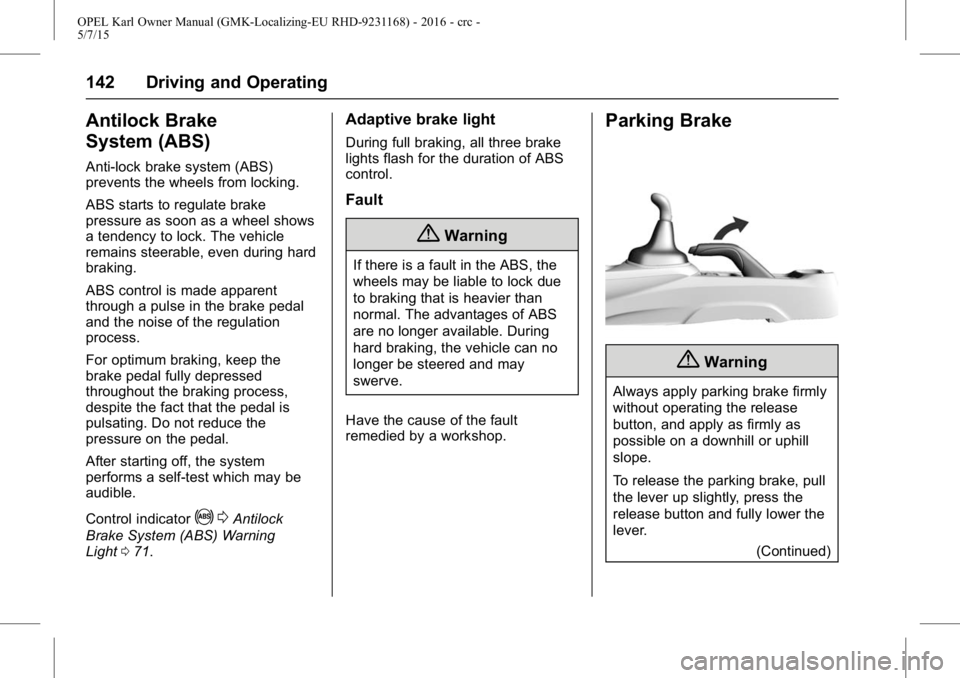
Parking Brake
{Warning
Always apply parking brake firmly
without operating the release
button, and apply as firmly as
possible on a downhill or uphill
slope.
To release the parking brake, pull
the lever up slightly, press the
release button and fully lower the
lever. (Continued)
Page 154 of 217
OPEL Karl Owner Manual (GMK-Localizing-EU RHD-9231168) - 2016 - crc -
5/7/15
Driving and Operating 153
{Danger
Fuel is flammable and explosive.
No smoking. No naked flames or
sparks.
If you can smell fuel in your
vehicle, have the cause of this
remedied immediately by a
workshop.
Caution
In case of misfuelling, do not
switch on ignition.
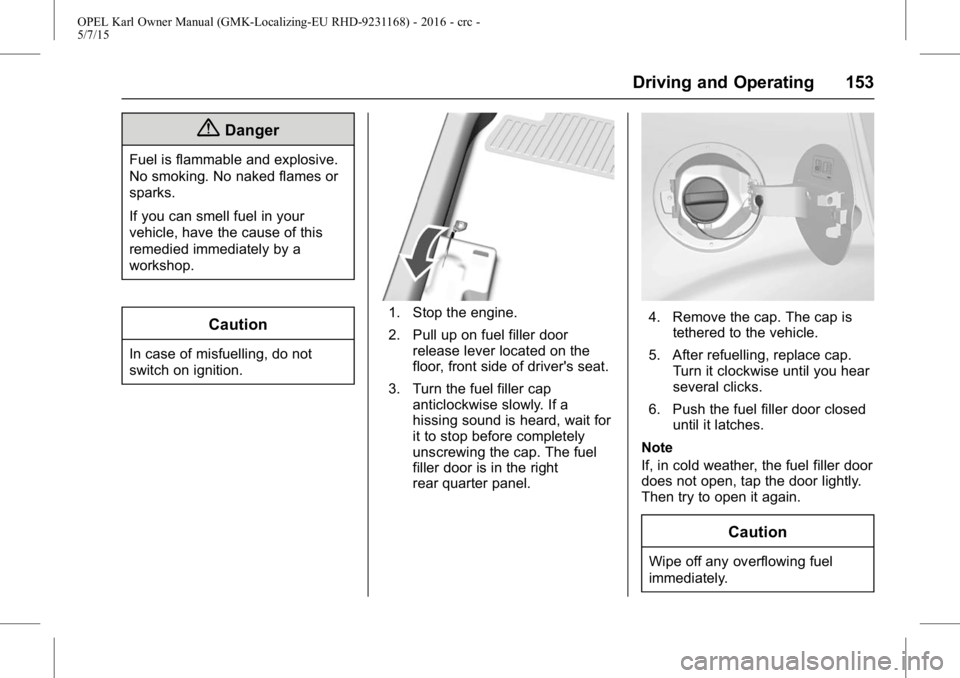
1. Stop the engine.
2. Pull up on fuel filler doorrelease lever located on the
floor, front side of driver's seat.
3. Turn the fuel filler cap anticlockwise slowly. If a
hissing sound is heard, wait for
it to stop before completely
unscrewing the cap. The fuel
filler door is in the right
rear quarter panel.4. Remove the cap. The cap is
tethered to the vehicle.
5. After refuelling, replace cap. Turn it clockwise until you hear
several clicks.
6. Push the fuel filler door closed until it latches.
Note
If, in cold weather, the fuel filler door
does not open, tap the door lightly.
Then try to open it again.
Caution
Wipe off any overflowing fuel
immediately.
Page 156 of 217
OPEL Karl Owner Manual (GMK-Localizing-EU RHD-9231168) - 2016 - crc -
5/7/15
Vehicle Care 155
Vehicle Care
General Information
Accessories andModifications . . . . . . . . . . . . . . . . 156
Vehicle Storage . . . . . . . . . . . . . . 156
End-of-Life Vehicle Recovery . . . . . . . . . . . . . . . . . . . . 157
Vehicle Checks
Doing Your OwnService Work . . . . . . . . . . . . . . . 157
Bonnet . . . . . . . . . . . . . . . . . . . . . . . 157
Engine Oil . . . . . . . . . . . . . . . . . . . . 158
Engine Coolant . . . . . . . . . . . . . . . 159
Washer Fluid . . . . . . . . . . . . . . . . . 160
Brakes . . . . . . . . . . . . . . . . . . . . . . . 160
Brake Fluid . . . . . . . . . . . . . . . . . . . 160
Battery . . . . . . . . . . . . . . . . . . . . . . . . 160
Wiper Blade Replacement . . . . 162
Bulb Replacement
Bulb Replacement . . . . . . . . . . . . 163
Headlamps and Parking Lamps . . . . . . . . . . . . . . . . . . . . . . 163
Fog Lamps . . . . . . . . . . . . . . . . . . . 165
Front Indicator Lamps . . . . . . . . 165
Taillights . . . . . . . . . . . . . . . . . . . . . . 165
Side Indicator Lamps . . . . . . . . . 167 Centre High-Mounted Brake
lamp (CHMBL) . . . . . . . . . . . . . . 167
Number Plate Lamp . . . . . . . . . . 168
Interior Lamps . . . . . . . . . . . . . . . . 168
Instrument Panel Illumination . . . . . . . . . . . . . . . . . . 168
Electrical System
Fuses . . . . . . . . . . . . . . . . . . . . . . . . 169
Engine Compartment FuseBlock . . . . . . . . . . . . . . . . . . . . . . . . 170
Instrument Panel Fuse Block . . . . . . . . . . . . . . . . . . . . . . . . 172
Vehicle Tools
Tools . . . . . . . . . . . . . . . . . . . . . . . . . 173
Wheels and Tyres
Wheels and Tyres . . . . . . . . . . . . 174
Winter Tyres . . . . . . . . . . . . . . . . . . 174
Tyre Designations . . . . . . . . . . . . 174
Tyre Pressure . . . . . . . . . . . . . . . . 175
Tyre Pressure MonitorSystem . . . . . . . . . . . . . . . . . . . . . . 176
Tread Depth . . . . . . . . . . . . . . . . . . 179
Wheel Covers . . . . . . . . . . . . . . . . 180
Tyre Chains . . . . . . . . . . . . . . . . . . 180
Tyre Repair Kit . . . . . . . . . . . . . . . 180
Tyre Changing . . . . . . . . . . . . . . . . 184
Compact Spare Tyre . . . . . . . . . 186
Jump Starting
Jump Starting . . . . . . . . . . . . . . . . 188
Towing the Vehicle
Towing the Vehicle . . . . . . . . . . . 190
Appearance Care
Exterior Care . . . . . . . . . . . . . . . . . 191
Interior Care . . . . . . . . . . . . . . . . . . 192