warning OPEL MOVANO_B 2020 Manual user
[x] Cancel search | Manufacturer: OPEL, Model Year: 2020, Model line: MOVANO_B, Model: OPEL MOVANO_B 2020Pages: 353, PDF Size: 9.4 MB
Page 104 of 353

102Instruments and controlsAdBlue level is low. Refill AdBlue as
soon as possible, to avoid prevention
of engine starts.
Illuminates together with control
indicator j to indicate a system
failure or as a warning that engine
starting may not be possible after a
certain distance. Seek the assistance
of a workshop immediately.
A corresponding message may
appear in the Driver Information
Centre 3 105.
AdBlue 3 234.
Tyre pressure monitoring system
w illuminates or flashes yellow.
Illuminates briefly when the ignition is
switched on.
Illuminates
Tyre pressure loss. Stop immediately
and check tyre pressure.
Control indicator w illuminates
together with C 3 100 and a
corresponding message appears inthe Driver Information Centre when a puncture or severely under-inflated
tyre is detected.
Flashes
Fault in system. After a delay the
control indicator illuminates
continuously. Consult a workshop.
Control indicator w illuminates
together with j 3 99 and a
corresponding message appears in
the Driver Information Centre when a
tyre without a pressure sensor is
mounted (e.g. spare wheel).
Tyre pressure monitoring system
3 292.
Engine oil pressure I illuminates red.
Illuminates briefly when the ignition is
switched on.Illuminates when the engine is
runningCaution
Engine lubrication may be
interrupted. This may result in
damage to the engine and/or
locking of the drive wheels.
1. Depress clutch.
2. Select neutral gear, set selector lever to N.
3. Move out of the flow of traffic as quickly as possible without
impeding other vehicles.
4. Switch off ignition.
Page 105 of 353
Instruments and controls1039Warning
When the engine is off,
considerably more force is needed
to brake and steer. During an
Autostop the brake servo unit will still be operational.
Do not remove key until vehicle is stationary, otherwise the steeringwheel lock could engage
unexpectedly.
Check engine oil level 3 271.
Keep engine turned off and let the
vehicle be towed to a workshop.
Low fuel Y illuminates yellow.
Illuminates when the ignition is
switched on and extinguishes shortly
after the engine starts.
Illuminates when the engine is
running
Fuel level in the tank is too low. Refuel
immediately.
Never run the tank dry.
Refuelling 3 263.
Catalytic converter 3 234.
Bleeding the diesel fuel system
3 276.
Stop-start system \ illuminates when an Autostop is
inhibited when certain conditions are
not fulfilled.
Ï illuminates during an Autostop.
Ï flashes if the clutch is not released
sufficiently.
Stop-start system 3 228.
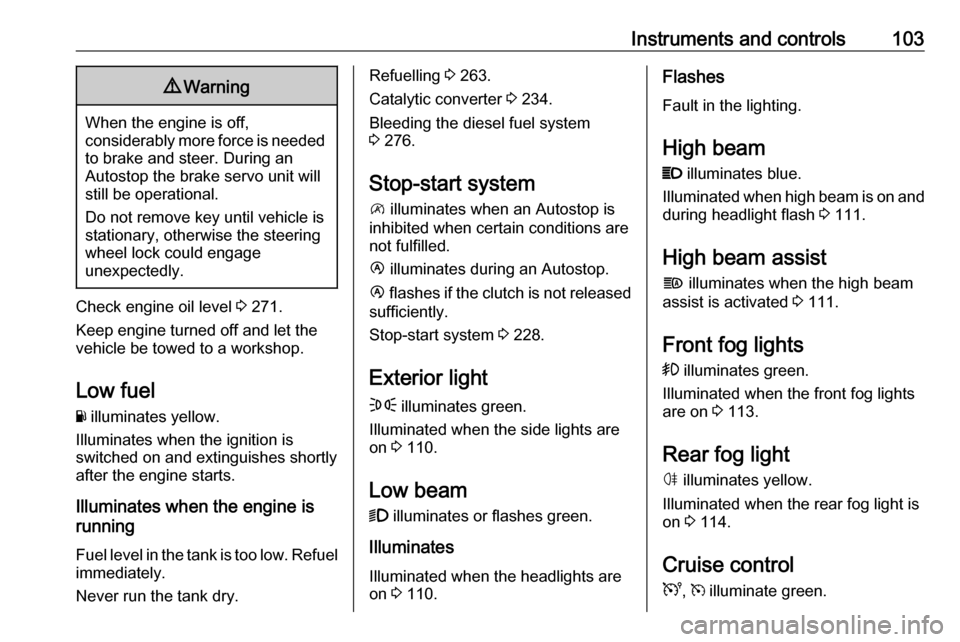
Exterior light
F illuminates green.
Illuminated when the side lights are
on 3 110.
Low beam
9 illuminates or flashes green.
Illuminates
Illuminated when the headlights are on 3 110.Flashes
Fault in the lighting.
High beam P illuminates blue.
Illuminated when high beam is on and during headlight flash 3 111.
High beam assist f illuminates when the high beam
assist is activated 3 111.
Front fog lights
> illuminates green.
Illuminated when the front fog lights
are on 3 113.
Rear fog light ø illuminates yellow.
Illuminated when the rear fog light is on 3 114.
Cruise control
U , m illuminate green.
Page 106 of 353

104Instruments and controlsU illuminates green when the system
is on.
m illuminates green when a certain
speed is stored.
Cruise control 3 249.
Active emergency braking
l illuminates or flashes red.
Illuminates
The system has been deactivated or
a fault has been detected.
Additionally, a warning message is
displayed in the Driver Information
Centre.
In case of a system fault, seek the
assistance of a workshop.
Flashes The system is actively engaged.
Depending on the situation, the
vehicle may automatically brake
moderately or hard.
Active emergency braking 3 253.Speed warning
Depending on vehicle and country,
$ is displayed as long as the speed
is over a set value.
Limited speed
Depending on version and country, the maximum speed is set by default.
A warning chime will sound for
10 seconds if the vehicle briefly
exceeds the set limit.
Note
Under certain conditions (e.g. steep inclines) the vehicle speed may
exceed the set limit.
Speed limiter 3 251.
Speed limiter
U illuminates yellow.
Illuminates when the system is on.
Speed limiter 3 251.
Tachograph & illuminates when there is a fault in
the system.Tachograph 3 109.
Door open y illuminates yellow.
Illuminates with the ignition switched
on when a door or the load
compartment is open.
Page 108 of 353

106Instruments and controlsTouchscreen operationMake the appropriate selection from
the available menus and options by
touching the display screen with the
finger.
For further information, refer to the
Infotainment system manual.
Journey record
When the engine is switched off, a
record of the last journey may be
shown in the Info Display.
The following information is
displayed:
● average fuel consumption
● trip odometer
● fuel saved in km
If equipped, a rating of 0 to 100 is
shown in the Info Display, to help
evaluate fuel efficiency, based on
driving style. Higher ratings indicate
better fuel economy.
Tips to improve fuel economy are also given in the display. Journeys can be
saved in the system memory,enabling to compare performances. Refer to Infotainment manual for
further information.Vehicle messages
Messages are indicated in the Driver
Information Centre, in some cases
together with a warning chime. The
vehicle messages are displayed as
text. Follow the instructions given in
the messages.
Fault messages Displayed in combination with control indicator j. Drive with caution and
seek the assistance of a workshop.
To remove fault message, press a
button on end of wiper lever. After a
few seconds the message may
disappear automatically and j
remains illuminated. The fault will
then be stored in the on board
system.
Warning messages These may appear with control
indicator C or in combination with
other warning messages, control
indicators or an audible warning. Stop
engine immediately and seek the
assistance of a workshop.
Page 109 of 353

Instruments and controls107Warning chimesIf several warnings appear at the
same time, only one warning chime will sound.
When starting the engine or whilst driving
The warning chime regarding
unfastened seat belts has priority
over any other warning chime.
● If seat belt is not fastened 3 56.
● If a certain speed is exceeded with the parking brake applied
3 245.
● If the parking assist detects an object or a fault is present
3 255.
● If the vehicle has manual transmission automated and the
clutch temperature is too high
3 241.
● If the vehicle speed briefly exceeds a set limit 3 91.
● During closing of the power sliding door 3 30.
● If the sliding door is open and the
parking brake is released 3 30.● During activation and
deactivation of alarm monitoring
of vehicle inclination 3 36.
● If the AdBlue level falls below a certain amount or a fault is
present 3 234.
● If the lane departure warning system detects an unintended
lane change and when the
system is activated 3 261.
When the vehicle is parked and /
or the driver's door is opened
● When the key is in the ignition switch.
● With exterior lights on 3 110.
● There is a fault with the power door lock system 3 28.
● If the vehicle has manual transmission automated 3 241,
the parking brake has not been
applied, neutral is not selected or the brake pedal has not been
depressed. A corresponding
message may also appear in the
Driver Information Centre 3 105.● If the sliding side door exterior
handle is in the open position
when unlocking the vehicle 3 30.
● If the parking brake is not applied
when the power sliding door
switch is pressed 3 30.
● If the power sliding door is locked
from the inside with the child lock
active 3 30.
● If the engine is in an Autostop but
not switched off. Stop-start
system 3 228.
Page 112 of 353
110LightingLightingExterior lighting.......................... 110
Light switch .............................. 110
Automatic light control .............110
High beam ............................... 111
High beam assist .....................111
Headlight flash ......................... 112
Headlight range adjustment ....112
Headlights when driving abroad .................................... 112
Daytime running lights .............113
Hazard warning flashers ..........113
Turn lights ................................ 113
Front fog lights ......................... 113
Rear fog light ........................... 114
Reversing lights .......................114
Misted light covers ...................114
Interior lighting ........................... 114
Interior lights ............................ 114
Load compartment lighting ......115
Reading lights .......................... 116
Lighting features ........................116
Exit lighting .............................. 116
Battery discharge protection ....117Exterior lighting
Light switch
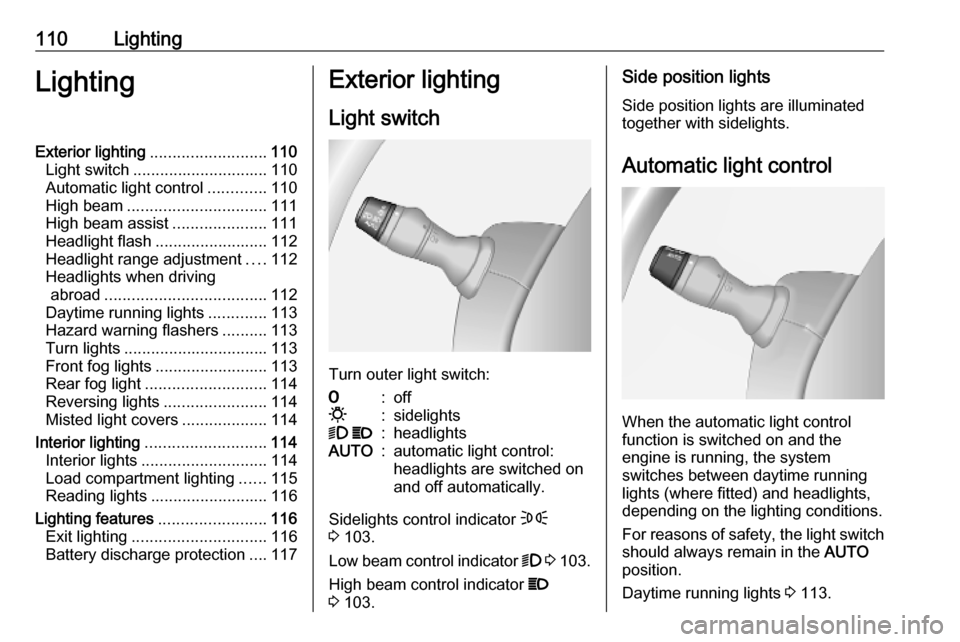
Turn outer light switch:
7:off0:sidelights9 P:headlightsAUTO:automatic light control:
headlights are switched on
and off automatically.
Sidelights control indicator F
3 103.
Low beam control indicator 9 3 103.
High beam control indicator P
3 103.
Side position lights
Side position lights are illuminated
together with sidelights.
Automatic light control
When the automatic light control
function is switched on and the
engine is running, the system
switches between daytime running
lights (where fitted) and headlights,
depending on the lighting conditions.
For reasons of safety, the light switch
should always remain in the AUTO
position.
Daytime running lights 3 113.
Page 115 of 353
Lighting113Daytime running lightsDaytime running lights increase
visibility of the vehicle during daylight.
The lights operate automatically
when the ignition is switched on.
If the vehicle is equipped with the
automatic light control function, the
system switches between daytime
running lights and headlights
automatically depending on the
lighting conditions.
Automatic light control 3 110.
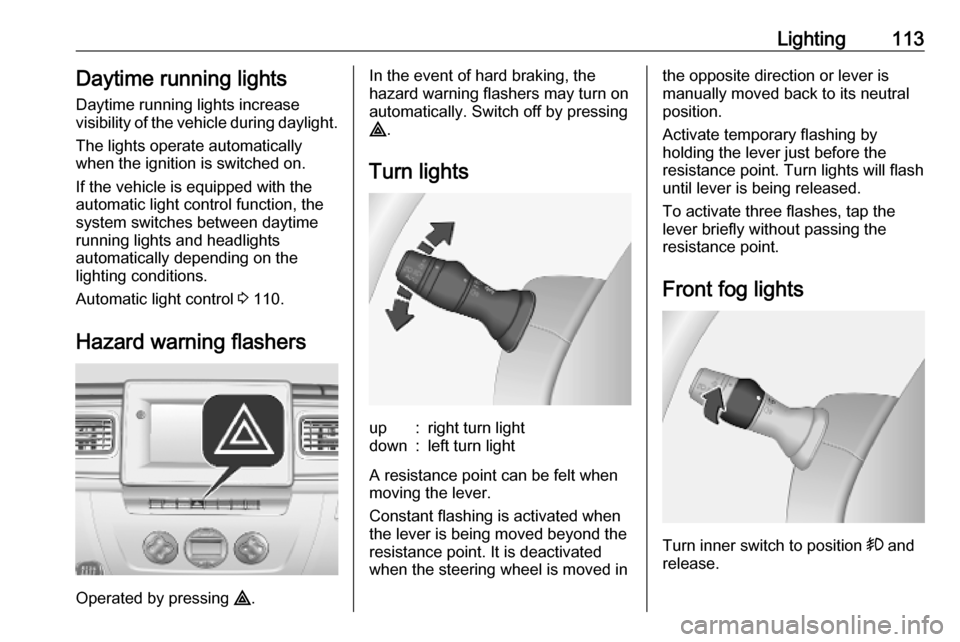
Hazard warning flashers
Operated by pressing ¨.
In the event of hard braking, the
hazard warning flashers may turn on automatically. Switch off by pressing
¨ .
Turn lightsup:right turn lightdown:left turn light
A resistance point can be felt when
moving the lever.
Constant flashing is activated when
the lever is being moved beyond the
resistance point. It is deactivated
when the steering wheel is moved in
the opposite direction or lever is
manually moved back to its neutral
position.
Activate temporary flashing by
holding the lever just before the
resistance point. Turn lights will flash
until lever is being released.
To activate three flashes, tap the
lever briefly without passing the
resistance point.
Front fog lights
Turn inner switch to position > and
release.
Page 121 of 353

Infotainment system119In addition, the Infotainment system
can be equipped with a handsfree
phone system.
The well-thought-out design of the
controls and the clear displays enable
to control the system easily and
intuitively.
Note
This manual describes all options
and features available for the
various Infotainment systems.
Certain descriptions, including those for display and menu functions, may
not apply to your vehicle due to
model variant, country
specifications, special equipment or
accessories.
Important information on
operation and traffic safety9 Warning
Drive safely at all times when
using the Infotainment system.
If in doubt, stop the vehicle before operating the Infotainment
system.
Radio reception
Radio reception may be disrupted by static, noise, distortion or loss of
reception due to:
● changes in distance from the transmitter
● multi-path reception due to reflection
● shadowing
In case of poor radio reception the
volume will automatically drop as to
minimize the disturbance effect.
Using this manual ● This manual describes features that may or may not be on your
specific vehicle, either because
they are optional or due to
changes subsequent to the
printing of this manual. Please
refer to the purchase
documentation to confirm each of the features found on the vehicle.
● Certain controls and descriptions, including symbols,
displays and menu functions may not apply to your vehicle due tomodel variant, country
specifications, special equipment or accessories.
● The table of contents at the beginning of this manual and
within each section shows where
the information is located.
● The index will enable to search for specific information.
● The vehicle display screens may not support your specific
language.
● Display messages and interior labelling are written in bold
letters.
● The operations given within this manual refer to Infotainment
system controls. For equivalent
steering column controls, refer to the control elements overview
3 122.
Page 122 of 353
120Infotainment systemWarnings and cautions9Warning
Text marked 9 Warning provides
information on risk of accident or
injury. Disregarding this
information may lead to injury.
Caution
Text marked Caution provides
information on possible damage to
the vehicle. Disregarding this
information may lead to vehicle
damage.
Symbols
Page references are indicated with 3.
3 means "see page".
Theft-deterrent feature
Depending on Infotainment system,
an electronic security system is
included for the purpose of theft
deterrence. The Infotainment system
functions only in your vehicle and is
therefore worthless to a thief.
The security code (supplied
separately) must be entered upon
first use of the system and after
prolonged interruptions to the power
supply.
Entering the security code
When first switching on the
Infotainment system, an enter
security code message, e.g. Radio
code followed by 0000 appears on the
display screen. Depending on
Infotainment system, the message
may only appear after a brief delay.
To enter first digit of security code,
press numbered button 1 on the unit
repeatedly until desired number is
displayed. Enter second, third and
fourth digits using buttons 2, 3 and 4
in the same way.
When the full code is displayed, press and hold button 6 until an audible
signal sounds. The system is
unlocked when the correct code has
been entered.
NAVI 50 IntelliLink,
NAVI 80 IntelliLink : Enter the security
code using numbered buttons 0 to 9on the touchscreen display. The
system is unlocked when the correct
code has been entered.
Incorrect code entered
Depending on Infotainment system,
when the security code has been
entered incorrectly, an incorrect code message, e.g. Error code followed by
a countdown value, e.g. Wait 100 is
displayed.
Wait until the countdown has expired, then enter the correct code. Each
time the code is entered incorrectly,
the countdown time may be doubled,
depending on Infotainment system.
Changing the geographical area When the security code is entered,
depending on Infotainment system it
will be necessary to choose a
geographical area, for example:
● Europe
● Asia
● Arabia
● America
Page 143 of 353

Infotainment system141Note
Navigation maps for the current
country must be installed on the
system to ensure the local time is
correct.
● Factory settings
The following settings can be
reset to the factory default:
● All
● Phone - Smartphone
● Navigation
● Audio-Media-Radio-System
● Navigation (On/Off)
● System version (displays
Infotainment system software
version number)
When system setting adjustments
have been made, touch 7 (and select
another menu on the display) to exit
the settings menu and save changes.
The system also saves and exits
automatically after a delay.
NAVI 80 IntelliLink To access the system settings menufrom the Home page, touch MENU
followed by System.The following settings submenus are
displayed:
● Language
● Display
● Sound
● Clock
● Safety warnings
● Home screen
● Keyboards
● Set units
● Status & Information
● Remove SD-card
● Restore factory settings
● Android Auto Settings ™
After system settings are changed,
touch Done to confirm.Language
To change Infotainment system
language then voice type (depending on version).Display
The following settings are displayed:
● Daytime brightness : Change
screen brightness to suit external light levels (daylight).During low external light levels,
the display screen is easier to
view when the display is not too
bright.
● Nighttime brightness /Night
brightness : Change screen
brightness to suit external light
levels (night light).
During low external light levels,
the display screen is easier to
view when the display is not too
bright.
● Automatic day/night mode /
Change to night colours : To
activate automatic switching
between daytime/night
brightness.
Night mode is activated during
low external light levels and when
the headlights are switched on.
● Force night mode /Use night
colours : To activate night mode.