warning OPEL MOVANO_B 2020 Manual user
[x] Cancel search | Manufacturer: OPEL, Model Year: 2020, Model line: MOVANO_B, Model: OPEL MOVANO_B 2020Pages: 353, PDF Size: 9.4 MB
Page 202 of 353

200Infotainment systemSelect your device from the displayed
list. Depending on phone model,
confirm the pairing request or enter
the pairing code on the mobile phone keypad to pair it to the Infotainment
system.
To pair further devices, from the
Manage devices screen, touch < to
open a pop-up menu and select Add
to pair additional devices in the same
way.
If pairing fails, repeat procedure if
necessary.
Unpairing a mobile phone from
the handsfree phone system
If the list of paired phones is full, a new
phone can only be paired if an
existing phone is unpaired.
Note
Unpairing a phone erases all of its
downloaded contacts and its call
history from the handsfree phone
system phonebook.Radio 15 USB
To unpair, i.e. to delete a phone from
the handsfree phone system
memory, press TEL and select Delete
device .
Select the desired phone from the device list and press OK to confirm
deletion when prompted.
NAVI 50 IntelliLink
To unpair, i.e. to delete a phone from
the handsfree phone system
memory, touch 7 followed by
ÿ Settings .
Select Connectivity then View
Bluetooth device list .
Select the desired phone from the
device list, then touch ë to delete the
device. If required, delete all devices
in the list by selecting Options
followed by Delete all. Confirm by
touching OK.
NAVI 80 IntelliLink
To unpair, i.e. to delete a phone from
the handsfree phone system
memory, access the Manage
devices screen.From the Home page, touch MENU
then gPhone followed by Settings.
Select Manage devices , then touch
< to open a pop-up menu, select
Delete and remove the selected
device from the list.
Emergency call9 Warning
Do not end the call until you are
requested to do so by the
emergency call centre.
NAVI 50 IntelliLink
To view the emergency number for
the current location, touch 7 followed
by sMAP (available depending on
version).
Select Options then Where am I? .
When the Where am I? screen is
displayed, touch Options followed by
Country information : Emergency
number (e.g. 112) is shown on the
display.
Page 209 of 353

Infotainment system207Mobile phones and CB radio
equipment
Installation instructions and
operating guidelines
The vehicle specific installation
instructions and the operating
guidelines of the mobile phone and
handsfree manufacturer must be observed when installing and
operating a mobile telephone. Failure to do so could invalidate the vehicle
type approval (EU directive 95/54/
EC).
Recommendations for fault-free
operation:
● professionally installed exterior antenna to obtain the maximum
range possible
● maximum transmission power ten watts
● installation of the phone in a suitable spot, consider relevant
Note in the Owner's Manual
section Airbag system
Seek advice on predetermined
installation points for the external
antenna or equipment holder andways of using devices with a
transmission power exceeding
ten watts.
Use of a handsfree attachment
without external antenna with mobile
telephone standards GSM
900/1800/1900 and UMTS is only
permitted if the maximum
transmission power of the mobile
telephone is two watts for GSM 900
or one watt for the other types.
For reasons of safety, do not use the
phone while driving. Even use of a handsfree set can be a distractionwhile driving.9 Warning
Operation of radio equipment and
mobile telephones which fail to
meet above mentioned mobile
telephone standards is only
permitted using an antenna
located outside of the vehicle.
Caution
Mobile telephones and radio
equipment may lead to
malfunctions in the vehicle
electronics when operated inside
the vehicle with no exterior
antenna, unless the above
mentioned regulations are
observed.
Page 212 of 353
210Climate controlAir recirculation system
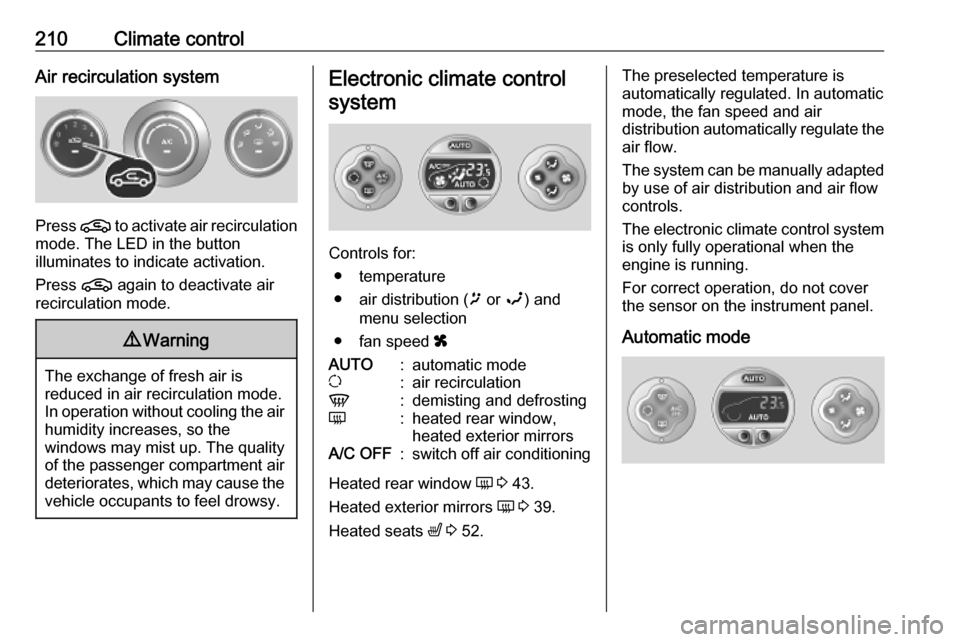
Press n to activate air recirculation
mode. The LED in the button
illuminates to indicate activation.
Press n again to deactivate air
recirculation mode.
9 Warning
The exchange of fresh air is
reduced in air recirculation mode.
In operation without cooling the air humidity increases, so the
windows may mist up. The quality
of the passenger compartment air
deteriorates, which may cause the vehicle occupants to feel drowsy.
Electronic climate control
system
Controls for: ● temperature
● air distribution ( ï or î) and
menu selection
● fan speed x
AUTO:automatic modeu:air recirculationV:demisting and defrostingÜ:heated rear window,
heated exterior mirrorsA/C OFF:switch off air conditioning
Heated rear window Ü 3 43.
Heated exterior mirrors Ü 3 39.
Heated seats ß 3 52.
The preselected temperature is
automatically regulated. In automatic
mode, the fan speed and air
distribution automatically regulate the
air flow.
The system can be manually adapted by use of air distribution and air flow
controls.
The electronic climate control system
is only fully operational when the
engine is running.
For correct operation, do not cover
the sensor on the instrument panel.
Automatic mode
Page 214 of 353
212Climate controlNote
If V is pressed while the engine is
running, an Autostop will be inhibited
until V is pressed again.
If V is pressed while the engine is
in an Autostop, the engine will restart
automatically.
Stop-start system 3 228.
Air distribution
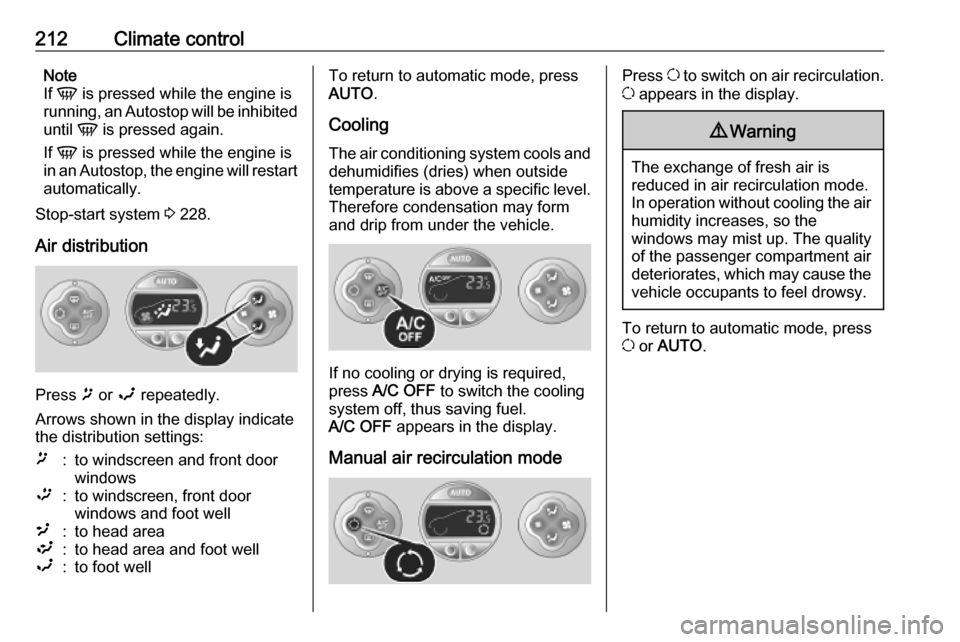
Press ï or î repeatedly.
Arrows shown in the display indicate
the distribution settings:
ï:to windscreen and front door
windows™:to windscreen, front door
windows and foot well²:to head area³:to head area and foot wellî:to foot wellTo return to automatic mode, press
AUTO .
Cooling
The air conditioning system cools and
dehumidifies (dries) when outside
temperature is above a specific level. Therefore condensation may form
and drip from under the vehicle.
If no cooling or drying is required,
press A/C OFF to switch the cooling
system off, thus saving fuel.
A/C OFF appears in the display.
Manual air recirculation mode
Press u to switch on air recirculation.
u appears in the display.9 Warning
The exchange of fresh air is
reduced in air recirculation mode.
In operation without cooling the air humidity increases, so the
windows may mist up. The quality
of the passenger compartment air
deteriorates, which may cause the vehicle occupants to feel drowsy.
To return to automatic mode, press
u or AUTO .
Page 215 of 353
Climate control213Rear heating system
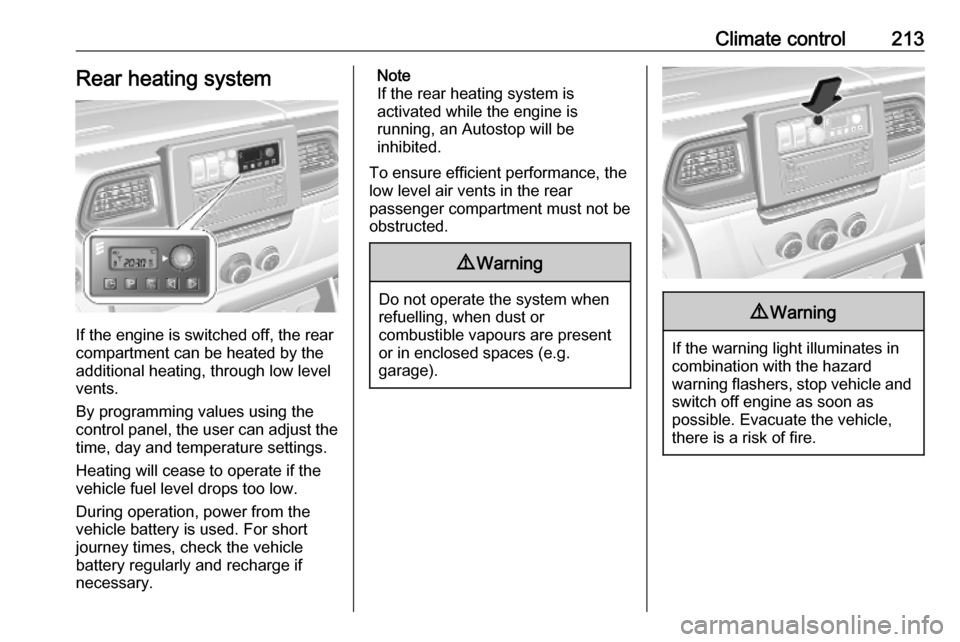
If the engine is switched off, the rear
compartment can be heated by the
additional heating, through low level
vents.
By programming values using the
control panel, the user can adjust the
time, day and temperature settings.
Heating will cease to operate if the
vehicle fuel level drops too low.
During operation, power from the
vehicle battery is used. For short
journey times, check the vehicle
battery regularly and recharge if
necessary.
Note
If the rear heating system is
activated while the engine is
running, an Autostop will be
inhibited.
To ensure efficient performance, the
low level air vents in the rear
passenger compartment must not be
obstructed.9 Warning
Do not operate the system when
refuelling, when dust or
combustible vapours are present
or in enclosed spaces (e.g.
garage).
9 Warning
If the warning light illuminates in
combination with the hazard
warning flashers, stop vehicle and switch off engine as soon as
possible. Evacuate the vehicle, there is a risk of fire.
Page 218 of 353
216Climate controlCombi
Additional air conditioning is supplied to the rear passenger compartment
via the air vents located above the
driver and front passenger
compartment.
With the front passenger
compartment air conditioning system
switched on, adjust the air flow to
select the desired speed.
Ensure the air vents are open when in use, to prevent ice forming in the
system due to lack of air movement.
Auxiliary heater Coolant heater
The engine-independent, fuel-
powered coolant heater provides rapid heating of the engine coolant to
enable heating of the vehicle interior
without the engine running.
Note
Depending on version, an additional
coolant heater may be switched on
automatically to speed up heating
when the ignition is on and the
outside temperature is below 5 ℃.9 Warning
Do not operate the system when
refuelling, when dust or
combustible vapours are present
or in enclosed spaces (e.g.
garage).
Before starting or programming the
system to start, turn the vehicle's
climate control system to heat, set the
air distribution to V and turn the fan
on.
Switch off when not required. Heating stops automatically after the
programmed runtime. It will also
cease to operate if the vehicle fuel
level drops too low.
During operation, power from the
vehicle battery is used. The driving
time should therefore be at least as
long as the heating time. For short
journey times, check the vehicle
battery regularly and recharge if
necessary.
To ensure efficient performance,
briefly operate the auxiliary heater
once a month.
Control units
The timer or remote control unit turns the system on and off, and is used to
programme specific departure times.
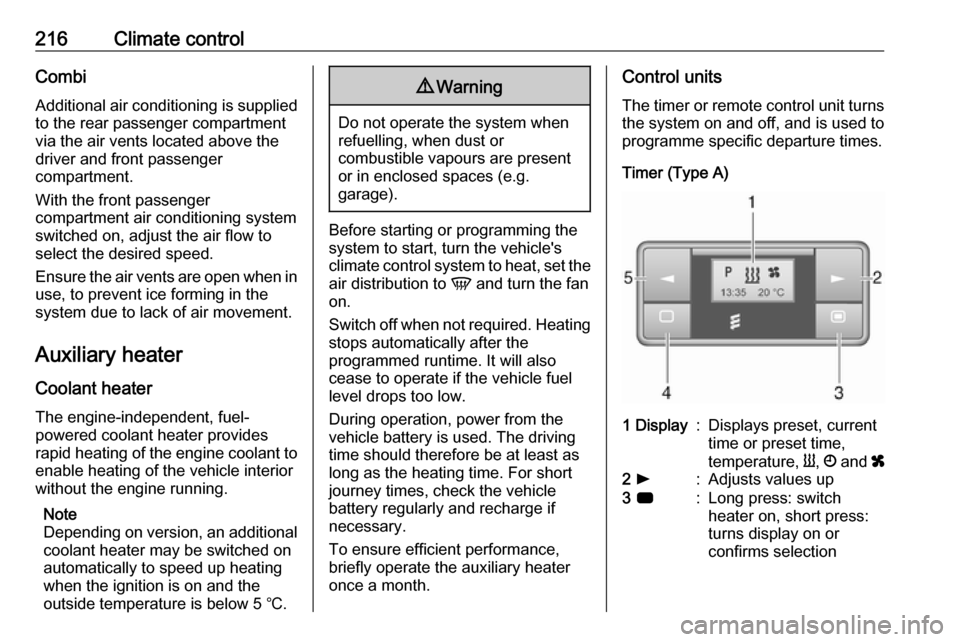
Timer (Type A)1 Display:Displays preset, current
time or preset time,
temperature, Y, Ö and x2 l:Adjusts values up3 7:Long press: switch
heater on, short press:
turns display on or
confirms selection
Page 220 of 353
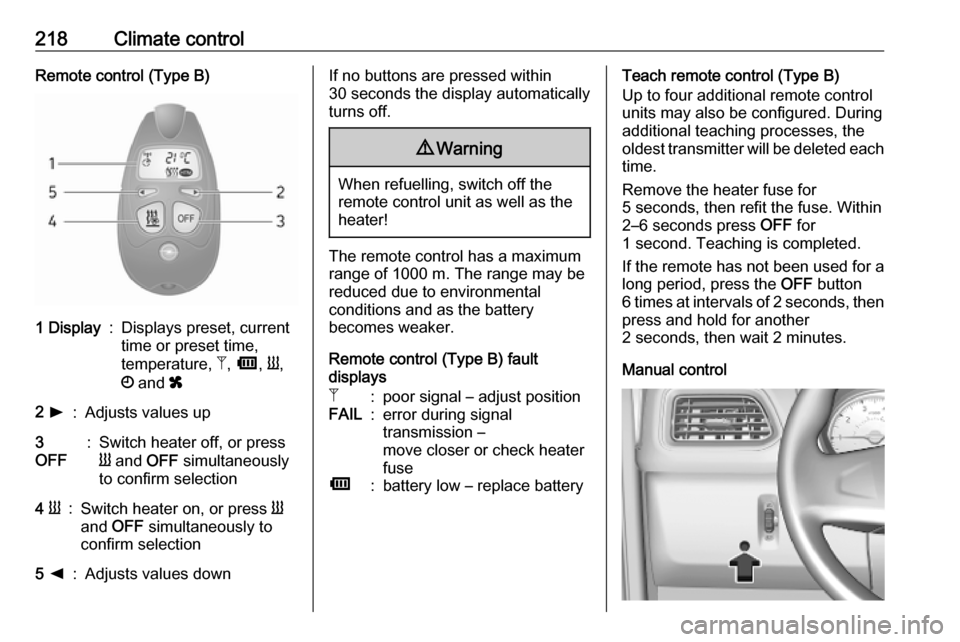
218Climate controlRemote control (Type B)1 Display:Displays preset, current
time or preset time,
temperature, Z, Ü , Y ,
Ö and x2 l:Adjusts values up3
OFF:Switch heater off, or press
Y and OFF simultaneously
to confirm selection4 Y:Switch heater on, or press Y
and OFF simultaneously to
confirm selection5 k:Adjusts values downIf no buttons are pressed within
30 seconds the display automatically
turns off.9 Warning
When refuelling, switch off the
remote control unit as well as the
heater!
The remote control has a maximum
range of 1000 m. The range may be
reduced due to environmental
conditions and as the battery
becomes weaker.
Remote control (Type B) fault
displays
Z:poor signal – adjust positionFAIL:error during signal
transmission –
move closer or check heater
fuseÜ:battery low – replace batteryTeach remote control (Type B)
Up to four additional remote control
units may also be configured. During
additional teaching processes, the
oldest transmitter will be deleted each
time.
Remove the heater fuse for
5 seconds, then refit the fuse. Within 2–6 seconds press OFF for
1 second. Teaching is completed.
If the remote has not been used for a long period, press the OFF button
6 times at intervals of 2 seconds, then
press and hold for another
2 seconds, then wait 2 minutes.
Manual control
Page 224 of 353
222Climate controlSide air vents
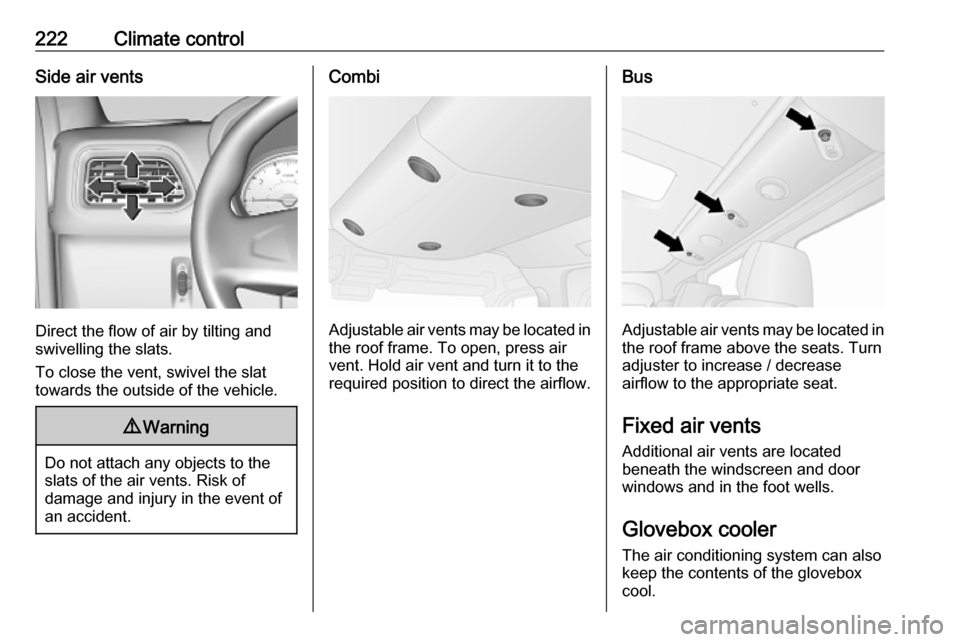
Direct the flow of air by tilting and
swivelling the slats.
To close the vent, swivel the slat
towards the outside of the vehicle.
9 Warning
Do not attach any objects to the
slats of the air vents. Risk of
damage and injury in the event of
an accident.
Combi
Adjustable air vents may be located in the roof frame. To open, press air
vent. Hold air vent and turn it to the
required position to direct the airflow.
Bus
Adjustable air vents may be located in the roof frame above the seats. Turn
adjuster to increase / decrease
airflow to the appropriate seat.
Fixed air vents
Additional air vents are located
beneath the windscreen and door
windows and in the foot wells.
Glovebox cooler The air conditioning system can alsokeep the contents of the glovebox
cool.
Page 226 of 353

224Driving and operatingDriving and
operatingDriving hints ............................... 225
Driving economically ...............225
Control of the vehicle ...............225
Steering ................................... 225
Starting and operating ...............226
New vehicle running-in ............226
Ignition switch positions ...........226
Starting the engine ..................227
Idle speed control ....................228
Overrun cut-off ........................ 228
Stop-start system ....................228
Parking .................................... 231
Air suspension ......................... 231
Engine exhaust .......................... 233
Diesel particle filter ..................233
Catalytic converter ...................234
AdBlue ..................................... 234
Manual transmission ..................241
Manual transmission automa‐ ted .............................................. 241
Transmission display ...............241
Starting the engine ..................242
Selector lever .......................... 242Manual mode........................... 243
Electronic driving programmes 243
Fault ........................................ 244
Interruption of power supply ....244
Brakes ........................................ 244
Antilock brake system .............244
Parking brake .......................... 245
Brake assist ............................. 246
Hill start assist ......................... 246
Ride control systems .................247
Traction Control system ..........247
Electronic Stability Control ......248
Limited-slip rear axle ...............249
Driver assistance systems .........249
Cruise control .......................... 249
Speed limiter ........................... 251
Active emergency braking .......253
Parking assist .......................... 255
Side blind spot alert .................257
Rear view camera ...................259
Lane departure warning ..........261
Fuel ............................................ 262
Fuel for diesel engines ............262
Refuelling ................................ 263
Trailer hitch ................................ 265
General information .................265
Driving characteristics and towing tips .............................. 265
Trailer towing ........................... 265Towing equipment ...................266
Trailer stability assist ...............266
Auxiliary features .......................266
Power take-off ......................... 266
Page 231 of 353
Driving and operating229Deactivation
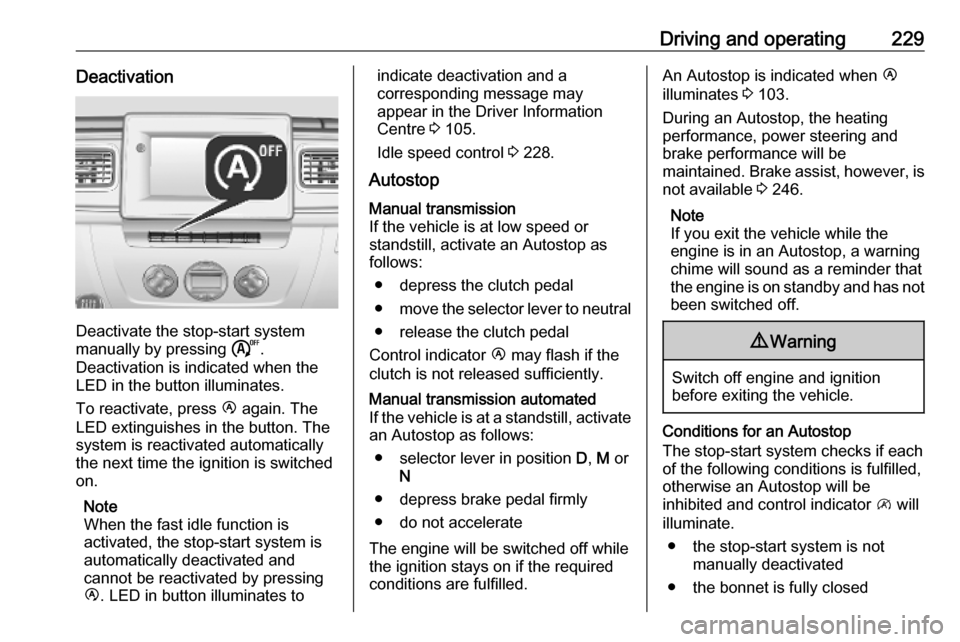
Deactivate the stop-start system
manually by pressing ).
Deactivation is indicated when the
LED in the button illuminates.
To reactivate, press Ï again. The
LED extinguishes in the button. The system is reactivated automatically
the next time the ignition is switched
on.
Note
When the fast idle function is
activated, the stop-start system is
automatically deactivated and
cannot be reactivated by pressing
Ï . LED in button illuminates to
indicate deactivation and a
corresponding message may
appear in the Driver Information
Centre 3 105.
Idle speed control 3 228.
AutostopManual transmission
If the vehicle is at low speed or
standstill, activate an Autostop as
follows:
● depress the clutch pedal
● move the selector lever to neutral
● release the clutch pedal
Control indicator Ï may flash if the
clutch is not released sufficiently.Manual transmission automated
If the vehicle is at a standstill, activate an Autostop as follows:
● selector lever in position D, M or
N
● depress brake pedal firmly
● do not accelerate
The engine will be switched off while
the ignition stays on if the required
conditions are fulfilled.
An Autostop is indicated when Ï
illuminates 3 103.
During an Autostop, the heating
performance, power steering and
brake performance will be
maintained. Brake assist, however, is
not available 3 246.
Note
If you exit the vehicle while the
engine is in an Autostop, a warning
chime will sound as a reminder that
the engine is on standby and has not been switched off.9 Warning
Switch off engine and ignition
before exiting the vehicle.
Conditions for an Autostop
The stop-start system checks if each
of the following conditions is fulfilled,
otherwise an Autostop will be
inhibited and control indicator \ will
illuminate.
● the stop-start system is not manually deactivated
● the bonnet is fully closed