ignition PEUGEOT 108 2014 Owner's Guide
[x] Cancel search | Manufacturer: PEUGEOT, Model Year: 2014, Model line: 108, Model: PEUGEOT 108 2014Pages: 256, PDF Size: 5.88 MB
Page 140 of 256
138
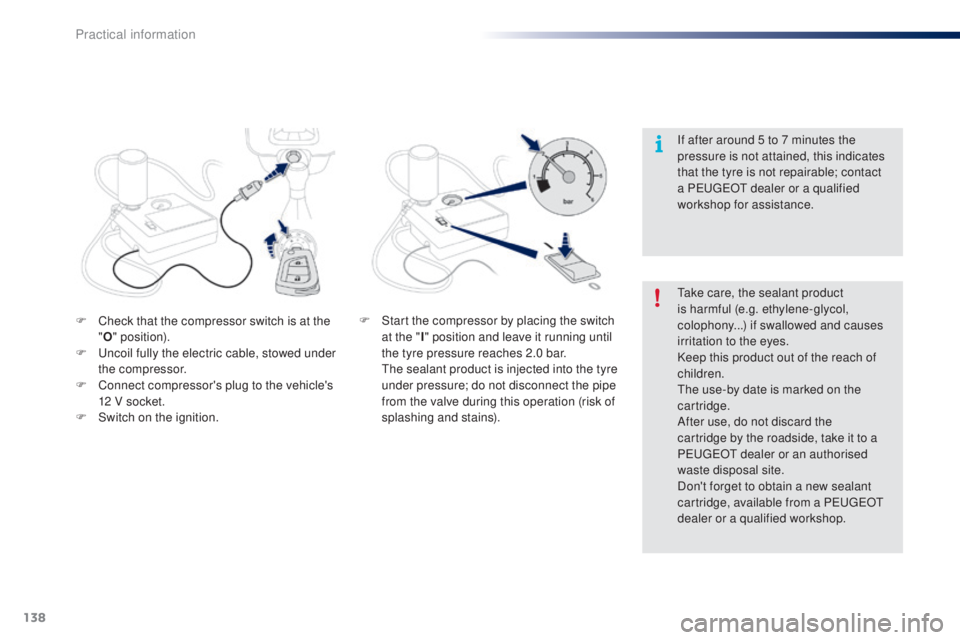
F Check that the compressor switch is at the "O " position).
F
u
n
coil fully the electric cable, stowed under
the compressor.
F
C
onnect compressor's plug to the vehicle's
12 V socket.
F
S
witch on the ignition.
ta
ke care, the sealant product
is harmful (e.g. ethylene-glycol,
colophony...) if swallowed and causes
irritation to the eyes.
Keep this product out of the reach of
children.
th
e use-by date is marked on the
cartridge.
After use, do not discard the
cartridge by the roadside, take it to a
P
e
uge
Ot
dealer or an authorised
waste disposal site.
Don't forget to obtain a new sealant
cartridge, available from a P
e
uge
Ot
dealer or a qualified workshop. If after around 5 to 7 minutes the
pressure is not attained, this indicates
that the tyre is not repairable; contact
a P
e
uge
Ot
dealer or a qualified
workshop for assistance.
F S tart the compressor by placing the switch
at the " I" position and leave it running until
the tyre pressure reaches 2.0 bar.
t
h
e sealant product is injected into the tyre
under pressure; do not disconnect the pipe
from the valve during this operation (risk of
splashing and stains).
Practical information
Page 141 of 256
139
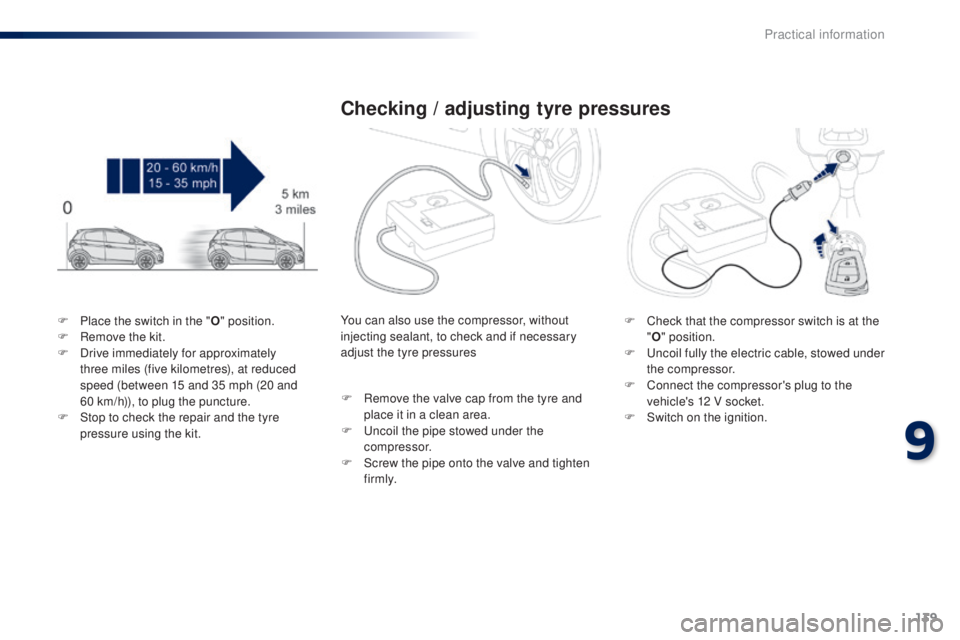
F Place the switch in the "O" position.
F R emove the kit.
F
D
rive immediately for approximately
three miles (five kilometres), at reduced
speed (between 15 and 35 mph (20 and
60
km/h)), to plug the puncture.
F
S
top to check the repair and the tyre
pressure using the kit.
Checking / adjusting tyre pressures
F Check that the compressor switch is at the "O " position.
F
u
n
coil fully the electric cable, stowed under
the compressor.
F
C
onnect the compressor's plug to the
vehicle's 12 V socket.
F
S
witch on the ignition.
You can also use the compressor, without
injecting sealant, to check and if necessary
adjust the tyre pressures
F
R
emove the valve cap from the tyre and
place it in a clean area.
F
u
n
coil the pipe stowed under the
compressor.
F
S
crew the pipe onto the valve and tighten
f i r m l y.
9
Practical information
Page 143 of 256
141
Changing a wheel
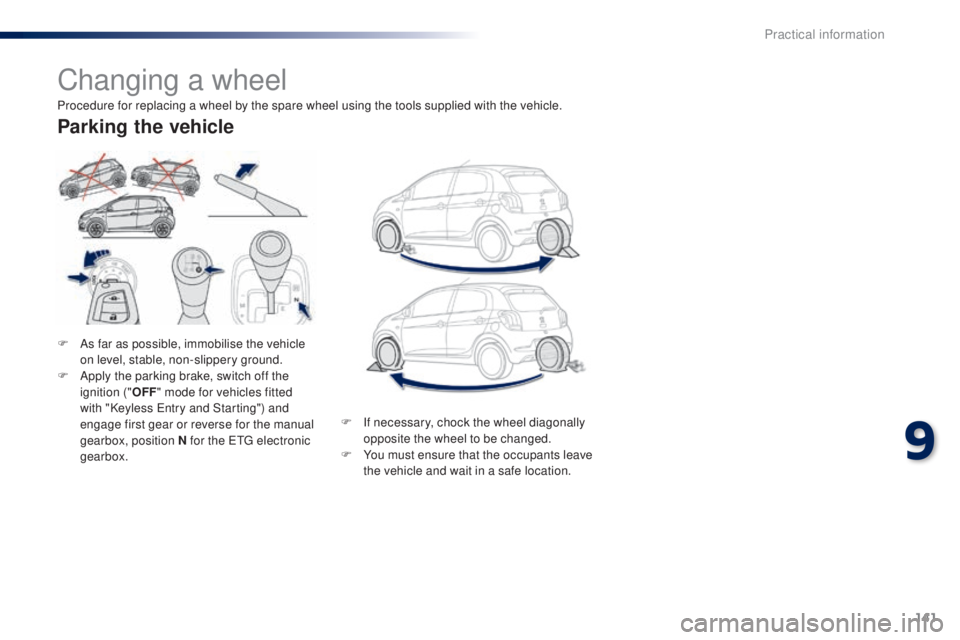
F As far as possible, immobilise the vehicle on level, stable, non-slippery ground.
F
A
pply the parking brake, switch off the
ignition (" OFF" mode for vehicles fitted
with "Keyless
e
n
try and Starting") and
engage first gear or reverse for the manual
gearbox, position N for the
etg electronic
gearbox.
Parking the vehicle
Procedure for replacing a wheel by the spare wheel using the tools supplied with the vehicle.
F
I
f necessary, chock the wheel diagonally
opposite the wheel to be changed.
F
Y
ou must ensure that the occupants leave
the vehicle and wait in a safe location.
9
Practical information
Page 155 of 256
153
Before changing a fuse, it is necessary to
F i mmobilise the vehicle and switch off the
ignition,
F
s
witch off all electrical consumers,
F
i
dentify the failed fuse using the fuse
allocation tables and diagrams in the
following pages,
F
i
dentify and correct the cause of the
problem.
Replacing a fuse
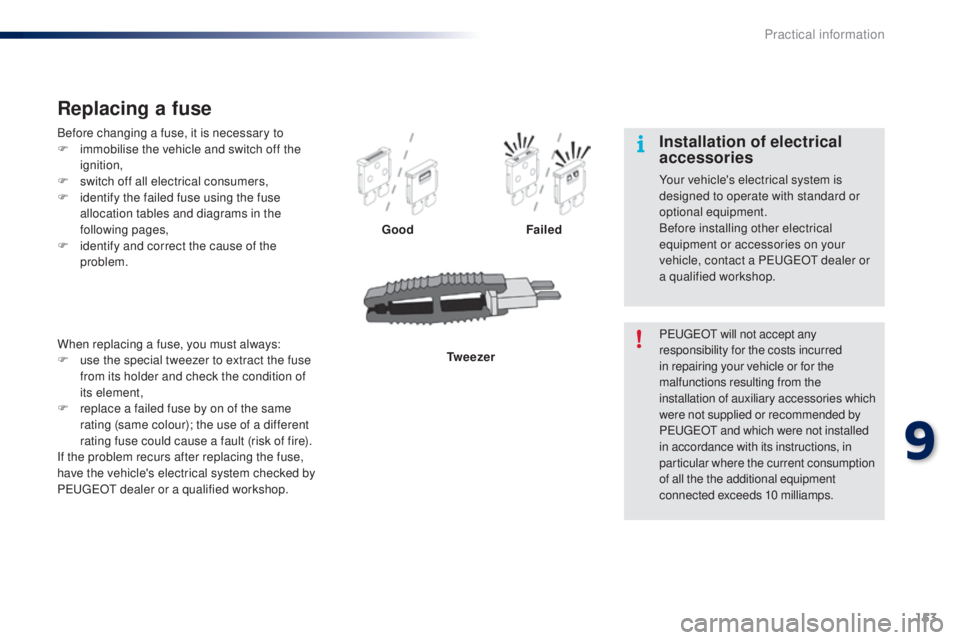
Good Failed
Tw e e z e r
When replacing a fuse, you must always:
F
u
se the special tweezer to extract the fuse
from its holder and check the condition of
its element,
F
r
eplace a failed fuse by on of the same
rating (same colour); the use of a different
rating fuse could cause a fault (risk of fire).
If the problem recurs after replacing the fuse,
have the vehicle's electrical system checked by
P
e
uge
Ot
dealer or a qualified workshop. P
e
uge
Ot
will not accept any
responsibility for the costs incurred
in repairing your vehicle or for the
malfunctions resulting from the
installation of auxiliary accessories which
were not supplied or recommended by
P
e
uge
Ot
and which were not installed
in accordance with its instructions, in
particular where the current consumption
of all the the additional equipment
connected exceeds 10 milliamps.
Installation of electrical
accessories
Your vehicle's electrical system is
designed to operate with standard or
optional equipment.
Before installing other electrical
equipment or accessories on your
vehicle, contact a P
e
uge
Ot
dealer or
a qualified workshop.
9
Practical information
Page 163 of 256
161
12 V battery
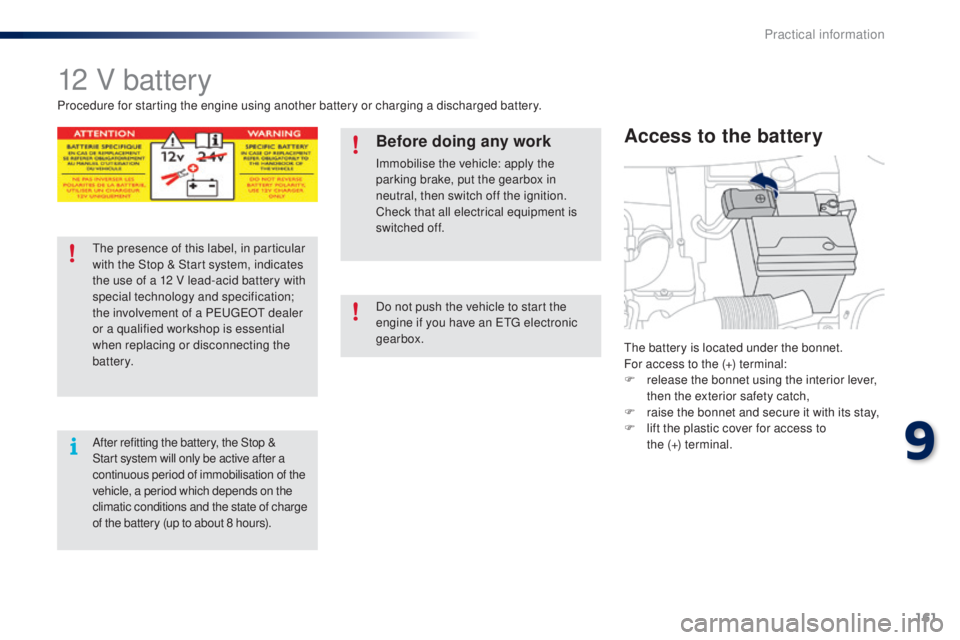
the battery is located under the bonnet.
For access to the (+) terminal:
F
r
elease the bonnet using the interior lever,
then the exterior safety catch,
F
r
aise the bonnet and secure it with its stay,
F
l
ift the plastic cover for access to
the (+)
terminal.
Access to the battery
Procedure for starting the engine using another battery or charging a discharged battery.
Before doing any work
Immobilise the vehicle: apply the
parking brake, put the gearbox in
neutral, then switch off the ignition.
Check that all electrical equipment is
switched off.
th
e presence of this label, in particular
with the Stop & Start system, indicates
the use of a 12 V lead-acid battery with
special technology and specification;
the involvement of a P
e
uge
Ot
dealer
or a qualified workshop is essential
when replacing or disconnecting the
battery.
After refitting the battery, the Stop &
Start system will only be active after a
continuous period of immobilisation of the
vehicle, a period which depends on the
climatic conditions and the state of charge
of the battery (up to about 8 hours). Do not push the vehicle to start the
engine if you have an
etg electronic
gearbox.
9
Practical information
Page 164 of 256
162
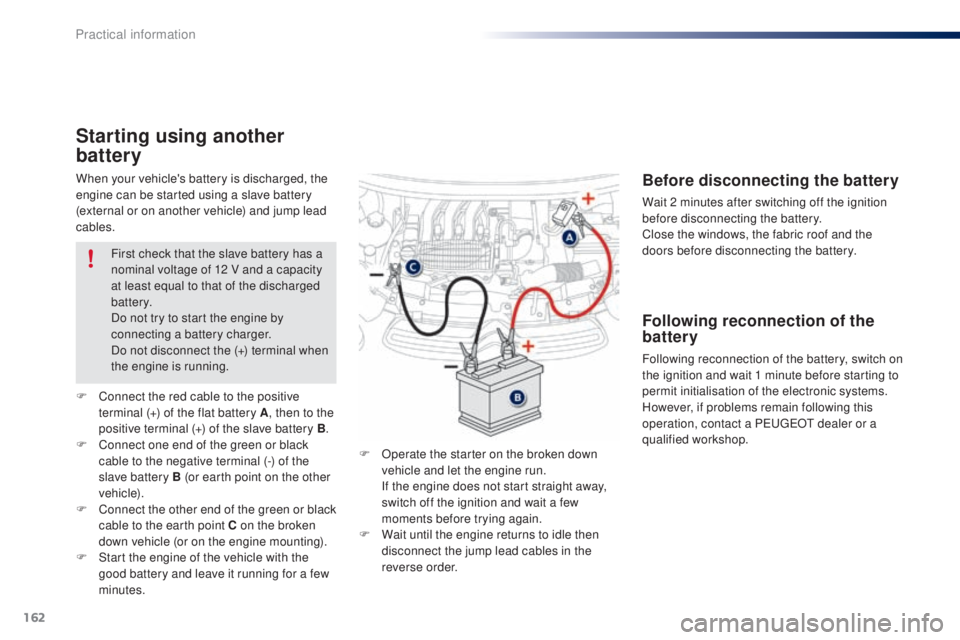
When your vehicle's battery is discharged, the
engine can be started using a slave battery
(external or on another vehicle) and jump lead
cables.
Starting using another
battery
F Operate the starter on the broken down vehicle and let the engine run.
I
f the engine does not start straight away,
switch off the ignition and wait a few
moments before trying again.
F
W
ait until the engine returns to idle then
disconnect the jump lead cables in the
reverse order.
F
C
onnect the red cable to the positive
terminal (+) of the flat battery A , then to the
positive terminal (+) of the slave battery B.
F
C
onnect one end of the green or black
cable to the negative terminal (-) of the
slave battery B (or earth point on the other
vehicle).
F
C
onnect the other end of the green or black
cable to the earth point C on the broken
down vehicle (or on the engine mounting).
F
S
tart the engine of the vehicle with the
good battery and leave it running for a few
minutes. First check that the slave battery has a
nominal voltage of 12 V and a capacity
at least equal to that of the discharged
battery.
Do not try to start the engine by
connecting a battery charger.
Do not disconnect the (+) terminal when
the engine is running.
Before disconnecting the battery
Wait 2 minutes after switching off the ignition
before disconnecting the battery.
Close the windows, the fabric roof and the
doors before disconnecting the battery.
Following reconnection of the
battery
Following reconnection of the battery, switch on
the ignition and wait 1 minute before starting to
permit initialisation of the electronic systems.
However, if problems remain following this
operation, contact a P
e
uge
Ot
dealer or a
qualified workshop.
Practical information
Page 174 of 256
172
Checking levels
take care when working under the
bonnet, as certain areas of the engine
may be extremely hot (risk of burns) and
the cooling fan could start at any time
(even with the ignition off).
Oil level
the check of the oil level is carried
out with the dipstick, located under
the bonnet. For the position of the
dipstick, refer to the under-bonnet
view on a previous page.
Checking with dipstick
Check all of these levels regularly, in line with the warranty and maintenance record. top them up if necessary, unless other wise indicated.
If a level drops significantly, have the corresponding system checked by a Pe ugeOt dealer or a qualified workshop.
to e
nsure the accuracy of the reading,
your vehicle must be on a level
sur face, with the engine off for at least
30
minutes.
It is normal to top up the oil level between
two services (or oil changes). P
e
uge
Ot
recommends that you check the level, and top
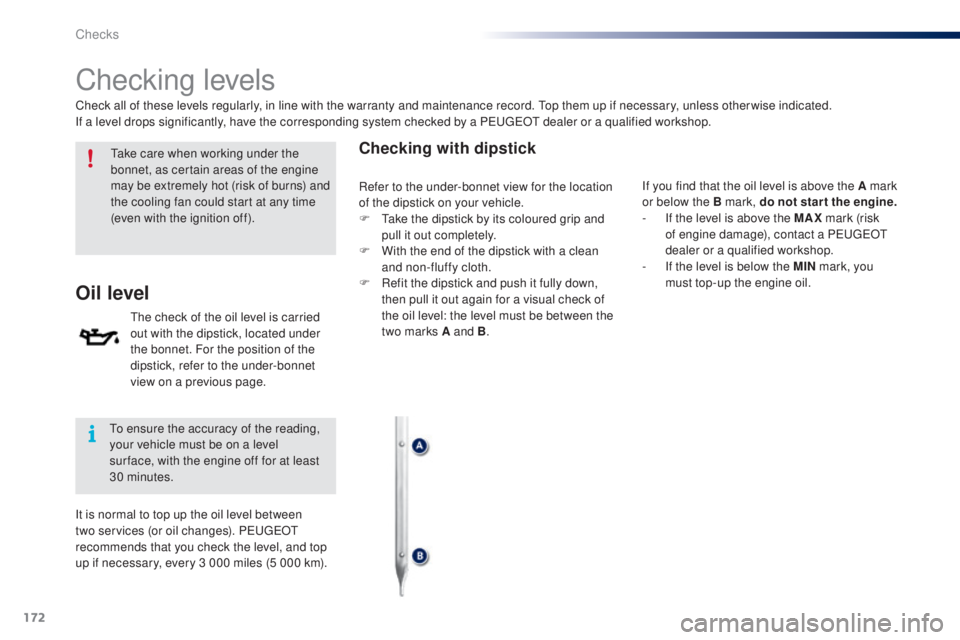
up if necessary, every 3 000 miles (5 000 km). If you find that the oil level is above the A mark
or below the B mark, do not star t the engine.
-
I
f the level is above the MAX mark (risk
of engine damage), contact a P
e
uge
Ot
dealer or a qualified workshop.
-
I
f the level is below the MIN mark, you
must top-up the engine oil.
Refer to the under-bonnet view for the location
of the dipstick on your vehicle.
F
t
a
ke the dipstick by its coloured grip and
pull it out completely.
F
W
ith the end of the dipstick with a clean
and non-fluffy cloth.
F
R
efit the dipstick and push it fully down,
then pull it out again for a visual check of
the oil level: the level must be between the
two marks A and B .
Checks
Page 196 of 256
04
194
USB player
MUSIC
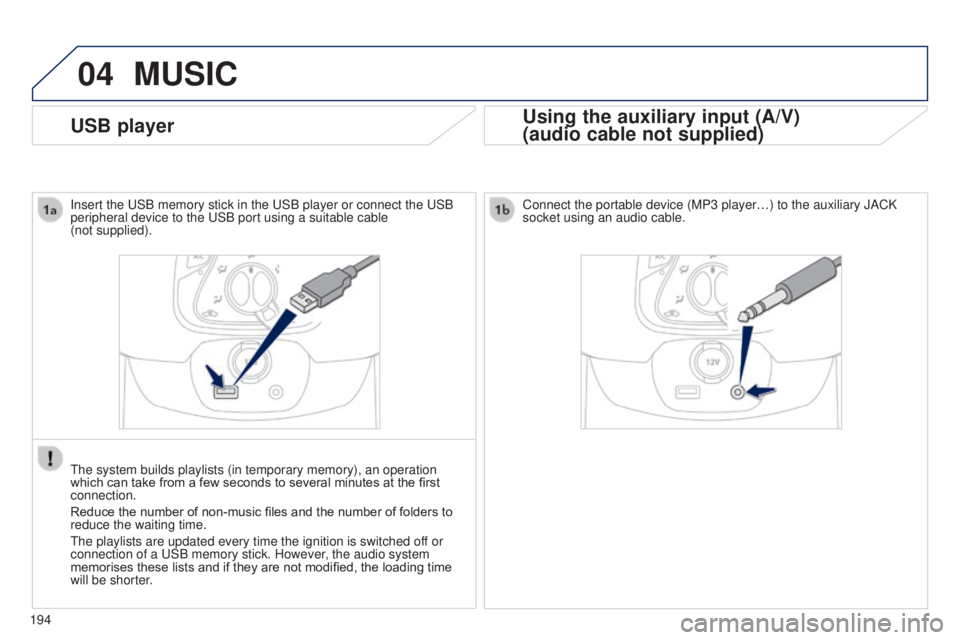
Using the auxiliary input (A/V)
(audio cable not supplied)
Insert the uSB memory stick in the uSB player or connect the uSB
peripheral device to the u SB port using a suitable cable
(not supplied).
t
he system builds playlists (in temporary memory), an operation
which can take from a few seconds to several minutes at the first
connection.
Reduce the number of non-music files and the number of folders to
reduce the waiting time.
t
he playlists are updated every time the ignition is switched off or
connection of a
u SB memory stick. However, the audio system
memorises these lists and if they are not modified, the loading time
will be shorter. Connect the portable device (MP3 player…) to the auxiliary JACK
socket using an audio cable.
Page 203 of 256
05
201
t
he services available depend on the network, the SIM card and the
compatibility of the Bluetooth telephone used. Check the telephone
manual and with your network provider for details of the services
available to you.
The profiles compatible with the system are: HFP, OPP, PBAP,
A2DP, AVRCP, MAP.
BLUETOOTH
Automatic reconnection
When the ignition is switched on, the last telephone connected
when the ignition was switched off reconnects automatically, if this
connection made had been activated during the pairing procedure
(see previous pages).
Connection is confirmed by the display of a message and the name
of the telephone.
Managing paired telephones
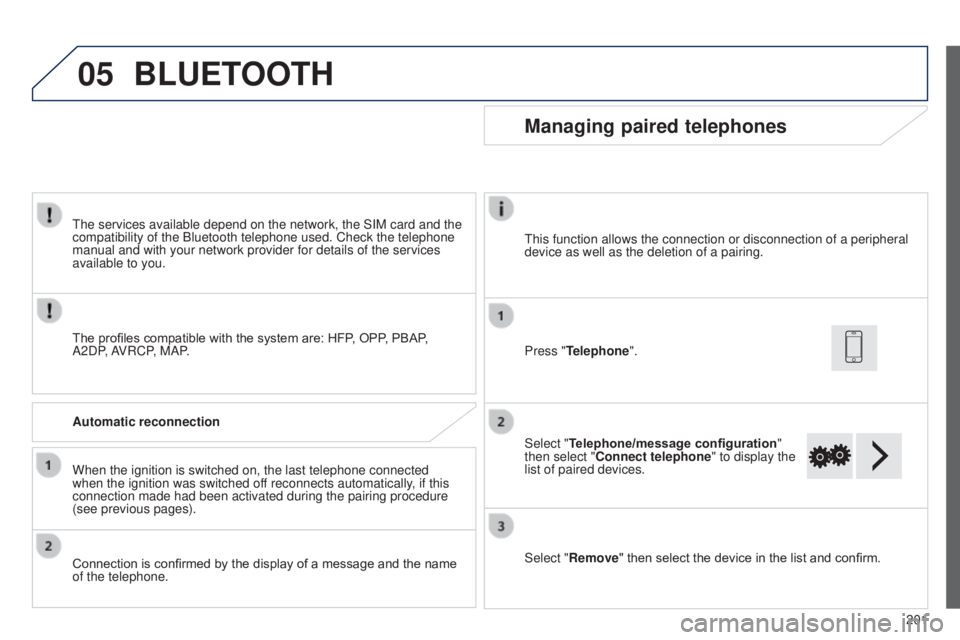
Press "Telephone".
Select "Telephone/message configuration "
then select "Connect telephone" to display the
list of paired devices.
Select "Remove " then select the device in the list and confirm.
t
his function allows the connection or disconnection of a peripheral
device as well as the deletion of a pairing.
B3_en_Chap12a_Autoradio-t oyota-tactile-1_ed01-2014
Page 230 of 256
04
228
MEDIA
USB playerUsing the auxiliary input (A/V)
(audio cable not supplied)
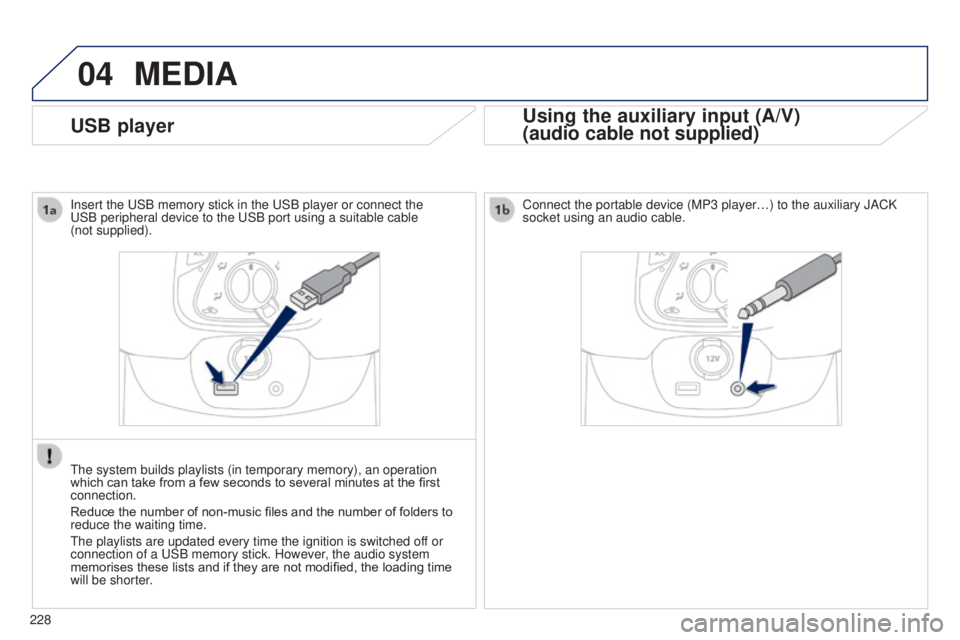
Connect the portable device (MP3 player…) to the auxiliary JACK
socket using an audio cable.
Insert the
u
SB memory stick in the
u
SB player or connect the u
SB peripheral device to the
u
SB port using a suitable cable
(not
supplied).
t
he system builds playlists (in temporary memory), an operation
which can take from a few seconds to several minutes at the first
connection.
Reduce the number of non-music files and the number of folders to
reduce the waiting time.
t
he playlists are updated every time the ignition is switched off or
connection of a
u
SB memory stick. However, the audio system
memorises these lists and if they are not modified, the loading time
will be shorter.