AUX PEUGEOT 108 2014 Owners Manual
[x] Cancel search | Manufacturer: PEUGEOT, Model Year: 2014, Model line: 108, Model: PEUGEOT 108 2014Pages: 256, PDF Size: 5.88 MB
Page 68 of 256
66
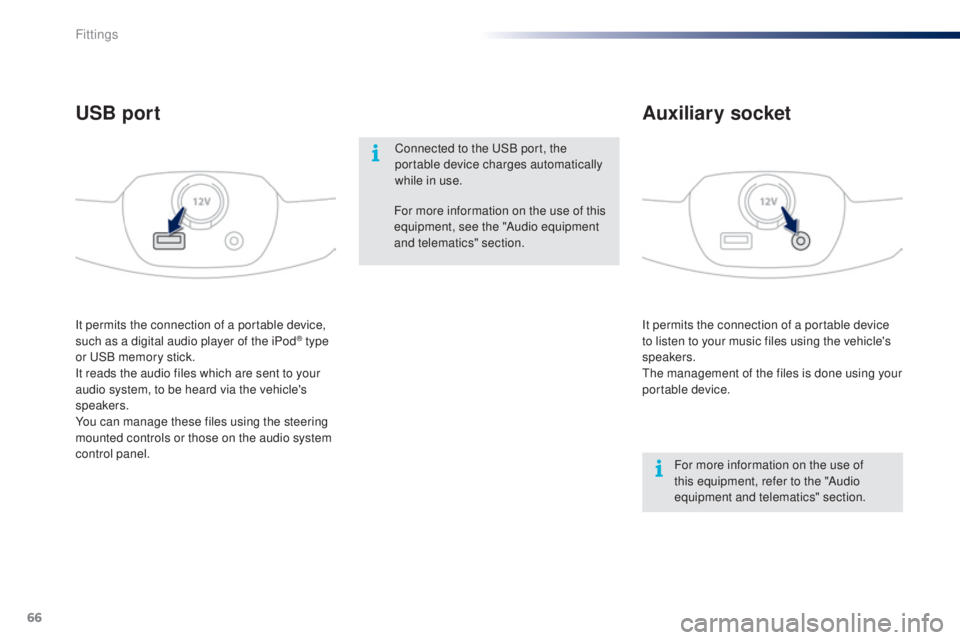
It permits the connection of a portable device
to listen to your music files using the vehicle's
speakers.
th
e management of the files is done using your
portable device.
It permits the connection of a portable device,
such as a digital audio player of the iPod® type
or
uS
B memory stick.
It reads the audio files which are sent to your
audio system, to be heard via the vehicle's
speakers.
You can manage these files using the steering
mounted controls or those on the audio system
control panel.
Auxiliary socket
USB port
For more information on the use of
this equipment, refer to the "Audio
equipment and telematics" section.
For more information on the use of this
equipment, see the "Audio equipment
and telematics" section.
Connected to the
u
S
B port, the
portable device charges automatically
while in use.
Fittings
Page 155 of 256
153
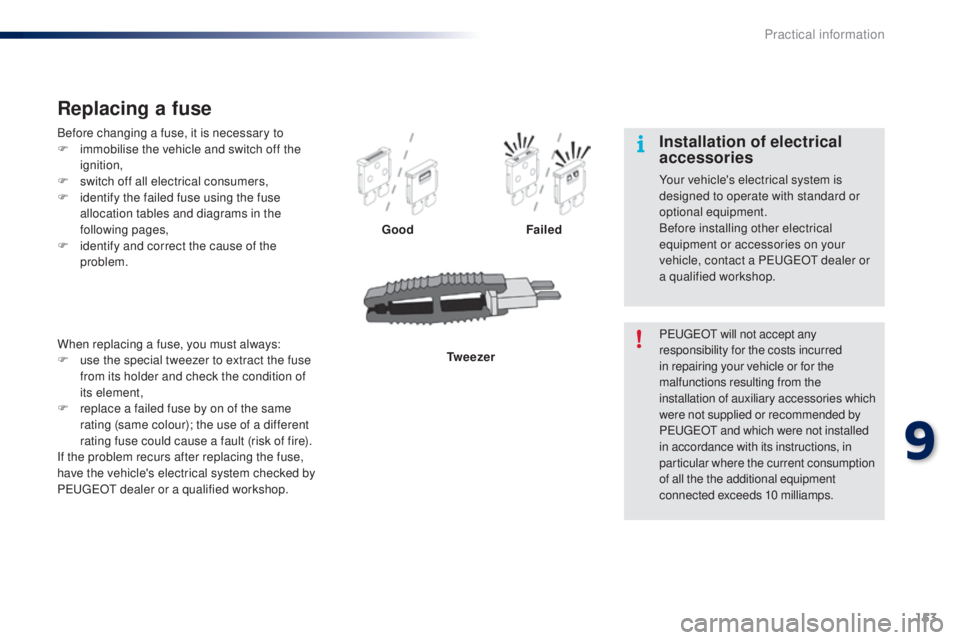
Before changing a fuse, it is necessary to
F i mmobilise the vehicle and switch off the
ignition,
F
s
witch off all electrical consumers,
F
i
dentify the failed fuse using the fuse
allocation tables and diagrams in the
following pages,
F
i
dentify and correct the cause of the
problem.
Replacing a fuse
Good Failed
Tw e e z e r
When replacing a fuse, you must always:
F
u
se the special tweezer to extract the fuse
from its holder and check the condition of
its element,
F
r
eplace a failed fuse by on of the same
rating (same colour); the use of a different
rating fuse could cause a fault (risk of fire).
If the problem recurs after replacing the fuse,
have the vehicle's electrical system checked by
P
e
uge
Ot
dealer or a qualified workshop. P
e
uge
Ot
will not accept any
responsibility for the costs incurred
in repairing your vehicle or for the
malfunctions resulting from the
installation of auxiliary accessories which
were not supplied or recommended by
P
e
uge
Ot
and which were not installed
in accordance with its instructions, in
particular where the current consumption
of all the the additional equipment
connected exceeds 10 milliamps.
Installation of electrical
accessories
Your vehicle's electrical system is
designed to operate with standard or
optional equipment.
Before installing other electrical
equipment or accessories on your
vehicle, contact a P
e
uge
Ot
dealer or
a qualified workshop.
9
Practical information
Page 186 of 256
02
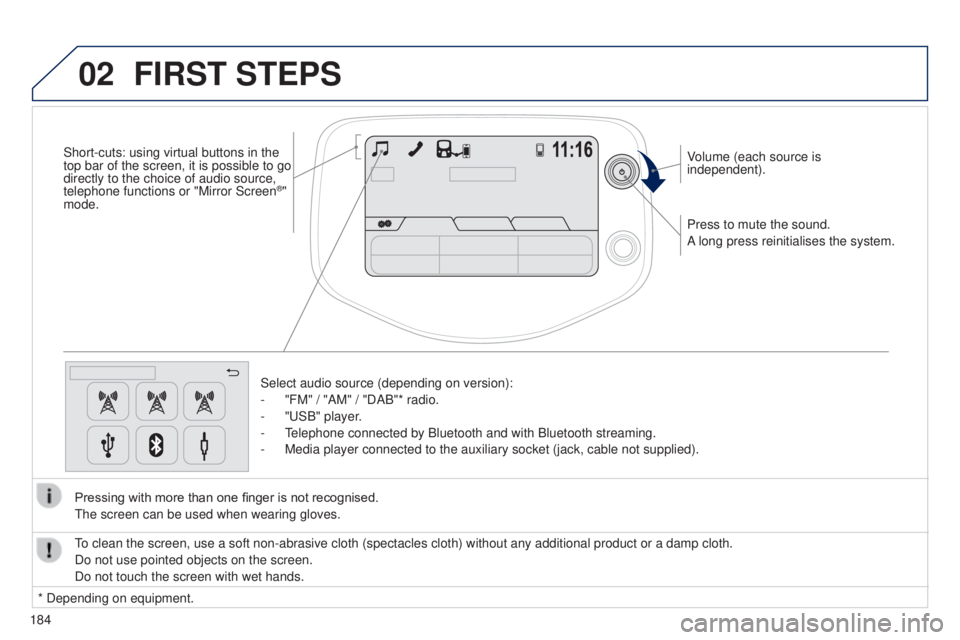
184Press to mute the sound.
A long press reinitialises the system. Volume (each source is
independent).
Select audio source (depending on version):
-
"FM" / "AM" / "DAB"* radio.
-
"
u SB" player.
- t
elephone connected by Bluetooth and with Bluetooth streaming.
-
Media player connected to the auxiliary socket (jack, cable not supplie\
d).
Pressing with more than one finger is not recognised.
t
he screen can be used when wearing gloves.
FIRST STEPS
* Depending on equipment.
to clean the screen, use a soft non-abrasive cloth (spectacles cloth) w\
ithout any additional product or a damp cloth.
Do not use pointed objects on the screen.
Do not touch the screen with wet hands.
Short-cuts: using virtual buttons in the
top bar of the screen, it is possible to go
directly to the choice of audio source,
telephone functions or "Mirror Screen
®"
mode.
Page 196 of 256
04
194
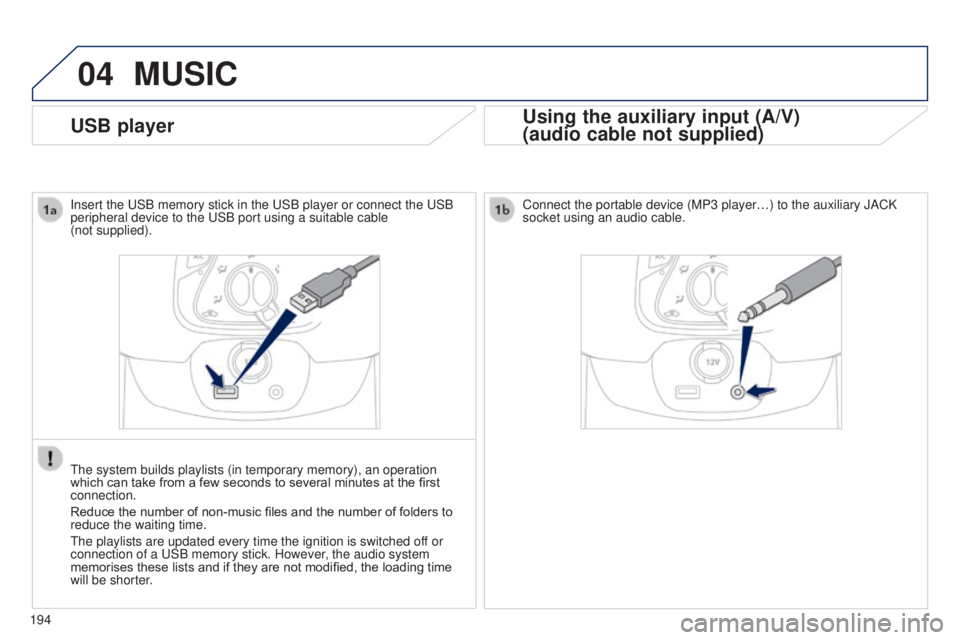
USB player
MUSIC
Using the auxiliary input (A/V)
(audio cable not supplied)
Insert the uSB memory stick in the uSB player or connect the uSB
peripheral device to the u SB port using a suitable cable
(not supplied).
t
he system builds playlists (in temporary memory), an operation
which can take from a few seconds to several minutes at the first
connection.
Reduce the number of non-music files and the number of folders to
reduce the waiting time.
t
he playlists are updated every time the ignition is switched off or
connection of a
u SB memory stick. However, the audio system
memorises these lists and if they are not modified, the loading time
will be shorter. Connect the portable device (MP3 player…) to the auxiliary JACK
socket using an audio cable.
Page 197 of 256
04
195
MUSIC
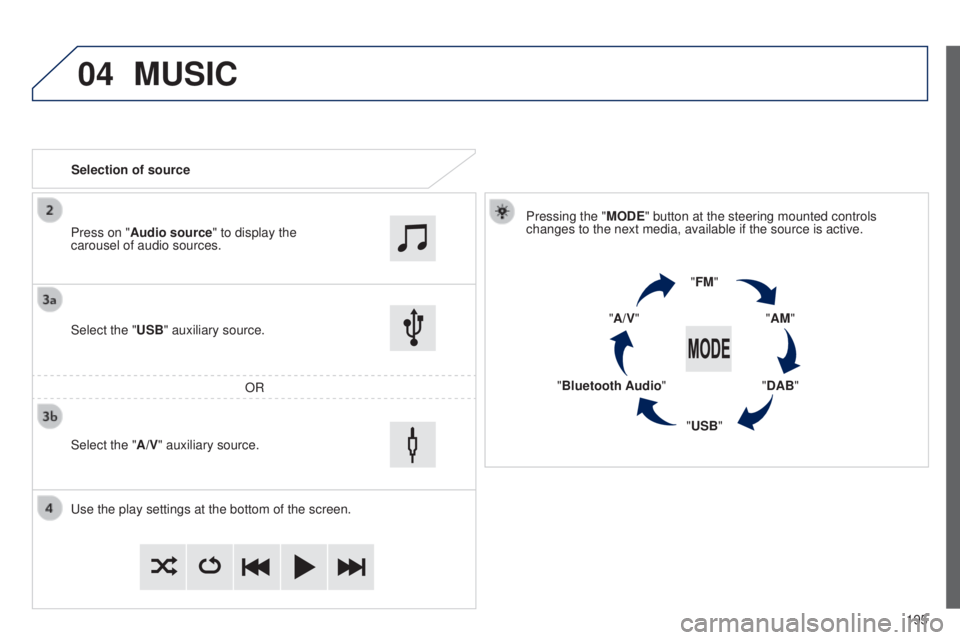
Selection of sourcePressing the "MODE" button at the steering mounted controls
changes to the next media, available if the source is active.
"FM""AM"
"DAB"
"USB"
"Bluetooth Audio" "A/V"
u
se the play settings at the bottom of the screen.
Select the "USB" auxiliary source.
OR
Select the "A/V" auxiliary source. Press on "Audio source" to display the
carousel of audio sources.
B3_en_Chap12a_Autoradio-t oyota-tactile-1_ed01-2014
Page 198 of 256
04MUSIC
196
MP3 / USB player
Information and advice
t
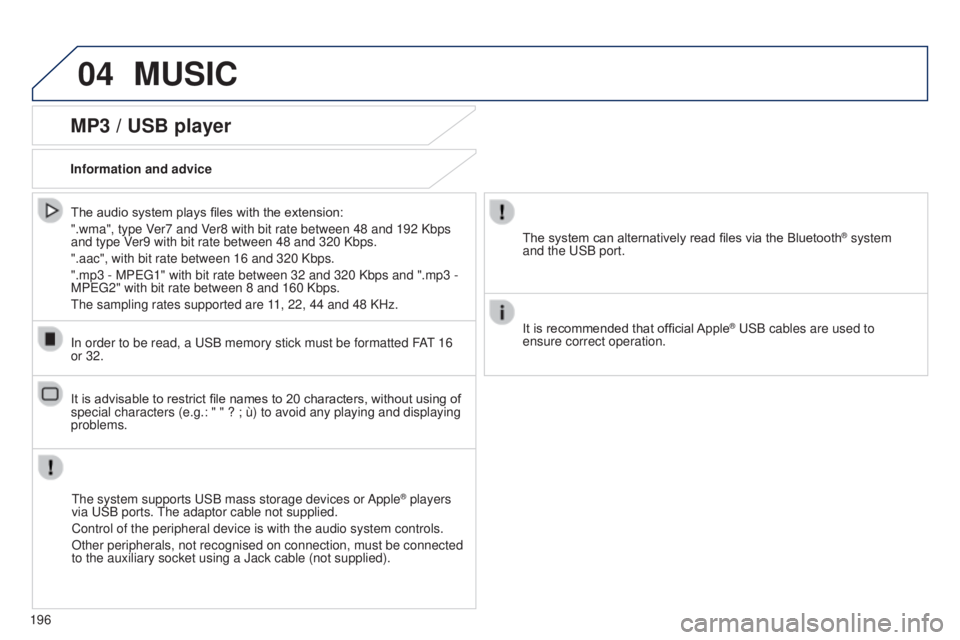
he system supports u SB mass storage devices or Apple
® players
via
u
SB ports. t
he adaptor cable not supplied.
Control of the peripheral device is with the audio system controls.
Other peripherals, not recognised on connection, must be connected
to the auxiliary socket using a Jack cable (not supplied).
In order to be read, a
u
SB memory stick must be formatted FA
t 16
or 32. The system can alternatively read files via the Bluetooth
® system
and the
u
SB port.
It is recommended that official Apple
® uSB cables are used to
ensure correct operation.
The audio system plays files with the extension:
".wma", type V
er7 and Ver8 with bit rate between 48 and 192 Kbps
and type Ver9 with bit rate between 48 and 320 Kbps.
".aac", with bit rate between 16 and 320 Kbps.
".mp3 - MP
eg
1" with bit rate between 32 and 320 Kbps and ".mp3 -
MP
eg
2" with bit rate between 8 and 160 Kbps.
t
he sampling rates supported are 11, 22, 44 and 48 KHz.
It is advisable to restrict file names to 20 characters, without using of
special characters (e.g.: " " ? ; ù) to avoid any playing and displ\
aying
problems.
Page 208 of 256
06
206
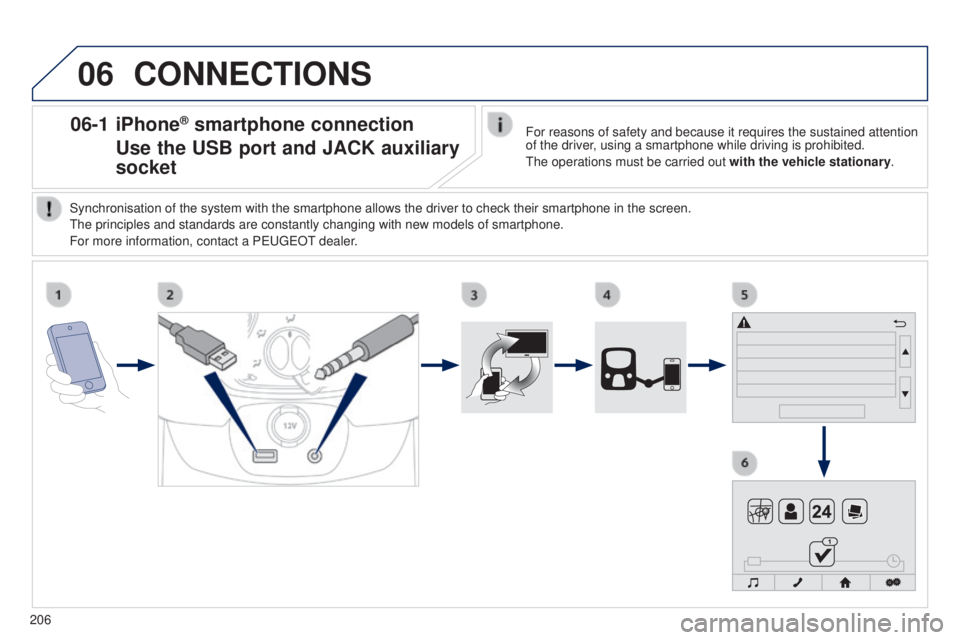
06-1 iPhone® smartphone connection
Use the USB port
and JACK auxiliary
socket
CONNECTIONS
For reasons of safety and because it requires the sustained attention
of the driver, using a smartphone while driving is prohibited.
t
he operations must be carried out with the vehicle stationary.
Synchronisation of the system with the smartphone allows the driver to c\
heck their smartphone in the screen.
t
he principles and standards are constantly changing with new models of s\
martphone.
For more information, contact a P
euge
O
t
dealer
.
Page 209 of 256
06
207
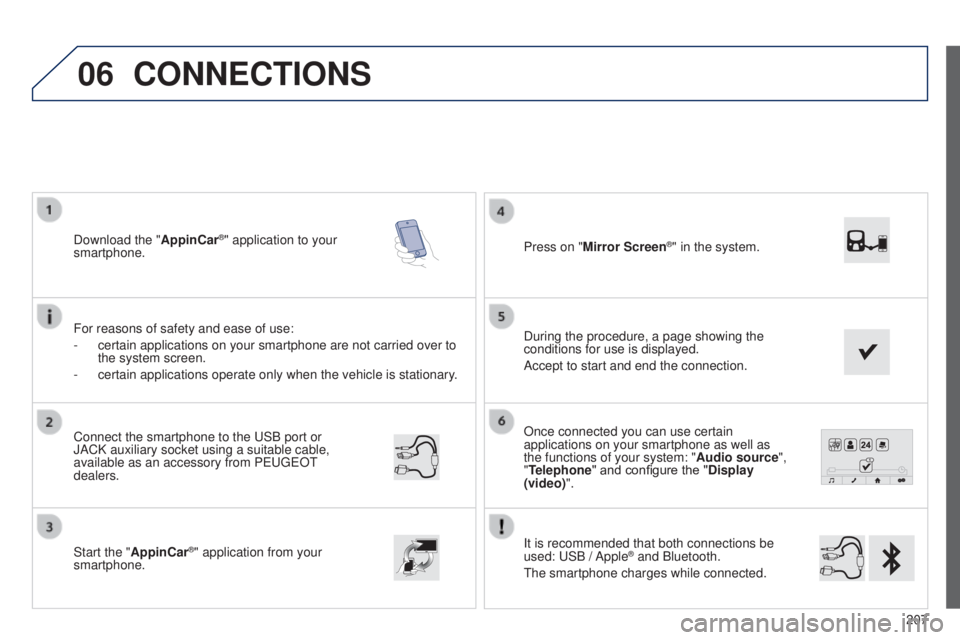
Once connected you can use certain
applications on your smartphone as well as
the functions of your system: "Audio source",
"Telephone" and configure the "Display
(video)".
It is recommended that both connections be
used:
u
SB / Apple
® and Bluetooth.
t
he smartphone charges while connected.
Connect the smartphone to the
u
SB
port or
JACK auxiliary socket using a suitable cable,
available as an accessory from P
euge
O
t
dealers.
Start the "
AppinCar®" application from your
smartphone. During the procedure, a page showing the
conditions for use is displayed.
Accept to start and end the connection. Press on "Mirror Screen
®" in the system.
Download the "
AppinCar®" application to your
smartphone.
For reasons of safety and ease of use:
-
certain applications on your smartphone are not carried over to
the system screen.
-
certain applications operate only when the vehicle is stationary
.
CONNECTIONS
B3_en_Chap12a_Autoradio-toyota-tactile-1_ed01-2014
Page 217 of 256
215
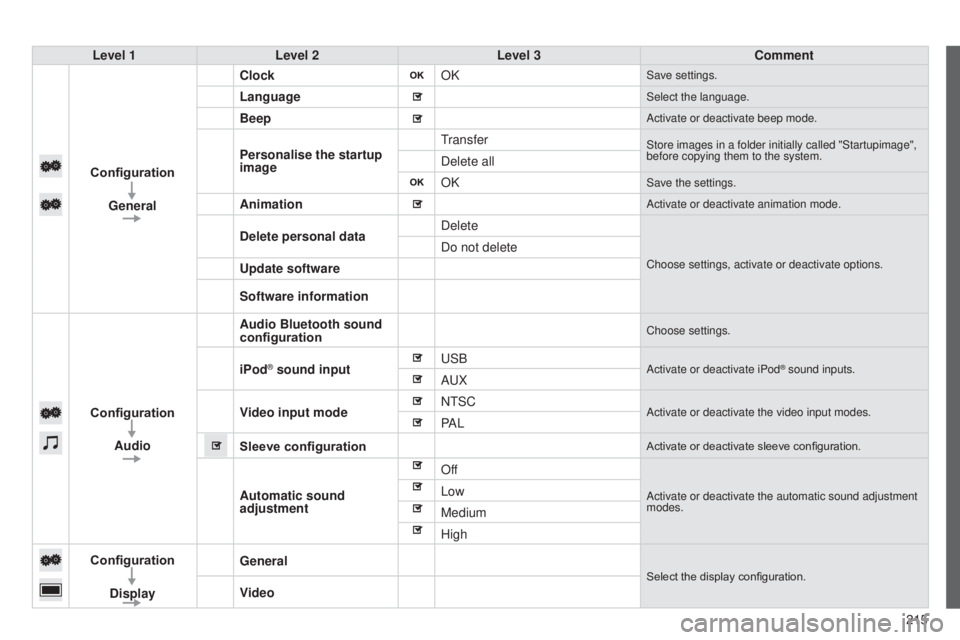
Level 1
Level 2 Level 3 Comment
Configuration General Clock
OK
Save settings.
LanguageSelect the language.
BeepActivate or deactivate beep mode.
Personalise the startup
imagetransferStore images in a folder initially called "Startupimage",
before copying them to the system.
Delete all
OK
Save the settings.
AnimationActivate or deactivate animation mode.
Delete personal dataDelete
Choose settings, activate or deactivate options.
Do not delete
Update software
Software information
Configuration Audio Audio Bluetooth sound
configuration
Choose settings.
iPod® sound inputu
SBActivate or deactivate iPod® sound inputs.AuX
V
ideo input mode N
t SC
Activate or deactivate the video input modes.PA L
Sleeve configuration
Activate or deactivate sleeve configuration.
Automatic sound
adjustment OffActivate or deactivate the automatic sound adjustment
modes.Low
Medium
High
Configuration
Display General
Select the display configuration.
Video
B3_en_Chap12a_Autoradio-t
oyota-tactile-1_ed01-2014
Page 230 of 256
04
228
MEDIA
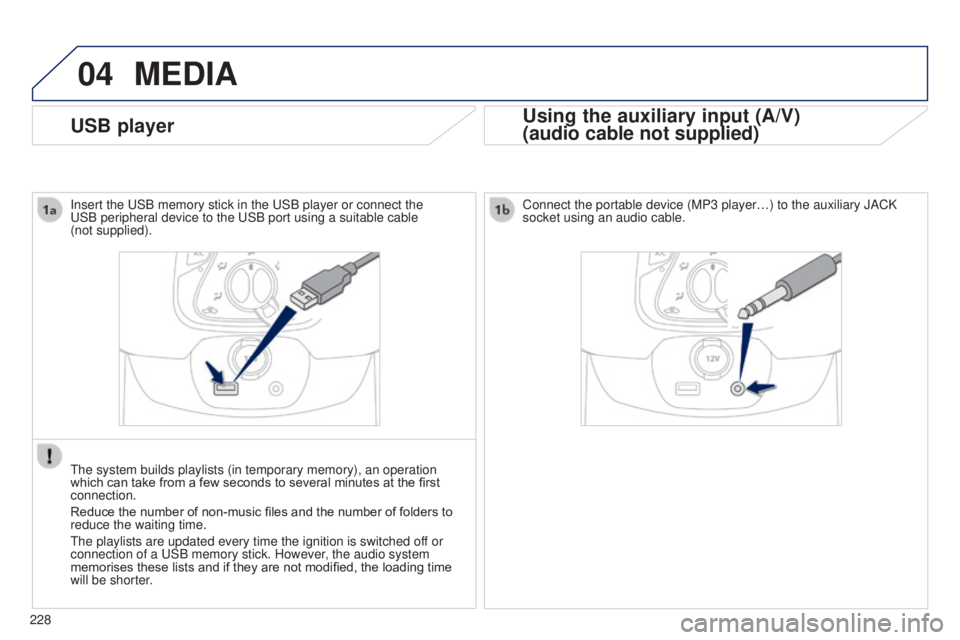
USB playerUsing the auxiliary input (A/V)
(audio cable not supplied)
Connect the portable device (MP3 player…) to the auxiliary JACK
socket using an audio cable.
Insert the
u
SB memory stick in the
u
SB player or connect the u
SB peripheral device to the
u
SB port using a suitable cable
(not
supplied).
t
he system builds playlists (in temporary memory), an operation
which can take from a few seconds to several minutes at the first
connection.
Reduce the number of non-music files and the number of folders to
reduce the waiting time.
t
he playlists are updated every time the ignition is switched off or
connection of a
u
SB memory stick. However, the audio system
memorises these lists and if they are not modified, the loading time
will be shorter.