key PEUGEOT 108 2016 Owners Manual
[x] Cancel search | Manufacturer: PEUGEOT, Model Year: 2016, Model line: 108, Model: PEUGEOT 108 2016Pages: 268, PDF Size: 6.17 MB
Page 3 of 268
Keysafety warning
Your vehicle will be fitted with some of the equipment described in this
document, depending on its trim level, version and the specification for
the country in which it is sold.
th
is handbook has been designed to enable you to make the most
of your vehicle in all situations.
th
is handbook describes all of the equipment available in the whole
range.
Welcome
the descriptions and illustrations are given without any obligation.
Automobiles Pe ugeOt reserves the right to modify the technical
specifications, equipment and accessories without having to update this
edition of the handbook.
th
is document is an integral part of your vehicle. It should be passed on
to the new user in the event of sale or transfer.
th
ank you for choosing a 108.
additional information
contributes to the protection of the environment
Page 4 of 268
.
.
108_en_Chap00a_sommaire_ed01-2016
Instrument panels 11
Display screens
1
3
Indicator and warning lamps
1
5
Indicators
26
tr
ip computer
2
7
Setting the time
2
9
InstrumentsOver view
Keys
31
Keyless e
n
try and Starting system
3
4
Doors
38
Boot
39
Front electric windows
4
1
Rear quarter windows
4
1
ele
ctric fabric roof
4
2
Access
Front seats 4 6
Rear seats
4
8
Mirrors
50
Steering wheel adjustment
5
1
Ventilation
52
Heating
54
Manual air conditioning
5
5
Automatic air conditioning
5
7
Front demist - defrost
6
0
Rear screen demist - defrost
6
1
Courtesy lamp
6
2
Boot lamp
6
2
Interior fittings
6
3
Rear parcel shelf
6
7
Boot fittings
6
8
ease of use and comfort
Driving recommendations 70
Starting - switching off the engine
with the key
7
1
Starting - switching off the engine with
the
Keyless e
n
try and Starting system
7
2
Manual parking brake
7
6
5-speed manual gearbox
7
6
e
tg
el
ectronic gearbox
7
7
ge
ar shift indicator
8
1
Hill start assist
8
2
Stop & Start
8
3
Speed limiter
8
6
Reversing camera
9
2
Lane departure warning system
9
3
Under-inflation detection
9
5
Driving
e
co-driving
Contents
Page 6 of 268
4
108_en_Chap00b_vue-ensemble_ed01-2016
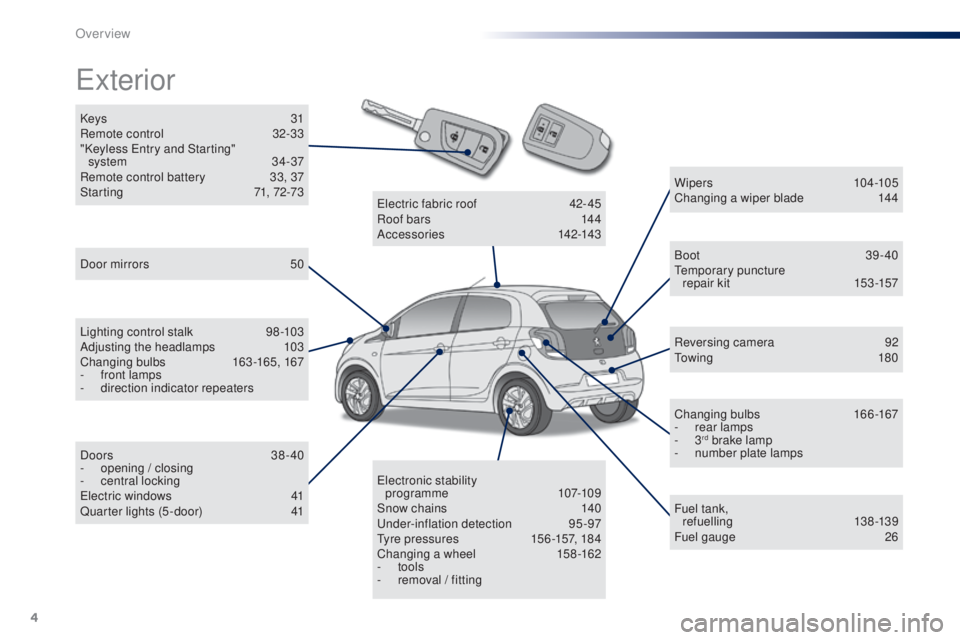
Keys 31
Remote control 3 2-33
"Keyless
e
n
try and Starting"
system
34-37
Remote control battery
3
3, 37
Starting
7
1, 72-73
exterior
Door mirrors 5 0
Lighting control stalk
9
8 -103
Adjusting the headlamps
1
03
Changing bulbs
1
63-165, 167
-
f
ront lamps
-
d
irection indicator repeaters
Doors
38-40
-
ope
ning / closing
-
c
entral locking
el
ectric windows
4
1
Quarter lights (5 -door)
4
1 Wipers
10
4 -105
Changing a wiper blade
1
44
Boot 39-40te
mporary puncture
repair kit
1
53-157
Reversing camera
9
2
to
w i n g
18 0
Changing bulbs
1
66-167
-
r
ear lamps
-
3
rd brake lamp
-
n
umber plate lamps
Fuel tank, ref uelling
13 8 -13 9
Fuel gauge
26
ele
ctronic stability
programme
107-109
Snow chains
1
40
un
der-inflation detection
9
5-97
ty
re pressures
1
56 -157, 184
Changing a wheel
1
58-162
-
tools
-
r
emoval / fitting
ele
ctric fabric roof
4
2-45
Roof bars
1
44
Accessories
1
42-143
Over view
Page 9 of 268
7
108_en_Chap00b_vue-ensemble_ed01-2016
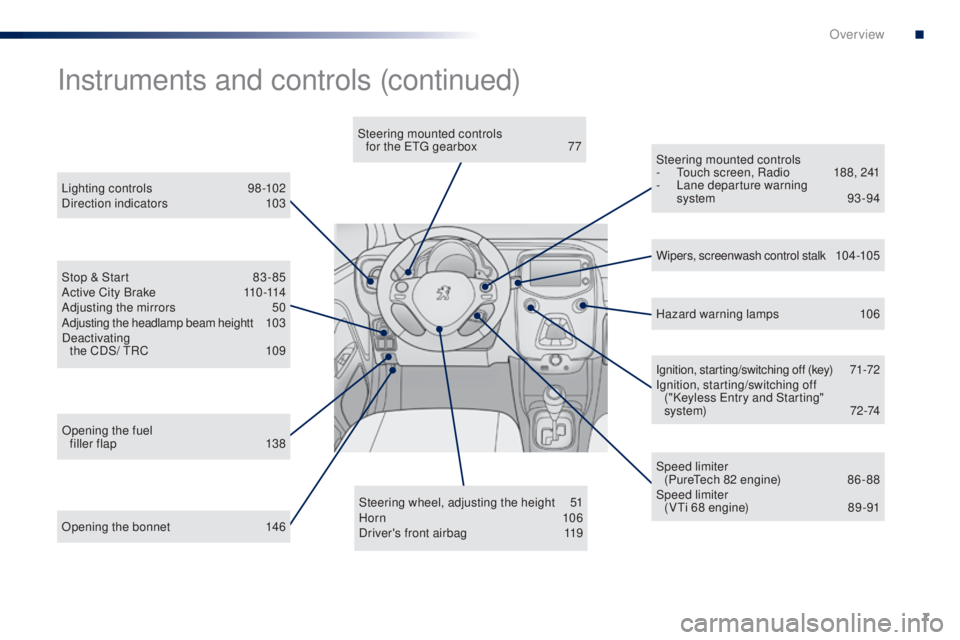
Opening the bonnet 146Steering wheel, adjusting the height
5
1
Horn 10 6
Driver's front airbag 1 19Ignition, starting/switching off (key)
7
1-72
Ignition, starting/switching off ("Keyless e
n
try and Starting"
system)
7
2-74
Steering mounted controls
- t
o
uch screen, Radio
1
88, 241
-
L
ane departure warning
system 93 -94
Instruments and controls (continued)
Lighting controls 9
8-102
Direction indicators 1 03
Stop & Start
8
3 - 85
Active City Brake
1
10 -114
Adjusting the mirrors
5
0
Adjusting the headlamp beam heightt
1
03
Deactivating the CDS/
t
R
C
1
09 Wipers, screenwash control stalk
1
0 4 -10 5
Speed limiter (Pure
te
ch 82 engine)
8
6 - 88
Speed limiter (V
ti 6
8 engine)
8
9 -91
Opening the fuel
filler flap
1
38 Hazard warning lamps
1
06
Steering mounted controls
for the etg gearbox
7
7
.
Over view
Page 22 of 268
20
Warning / indicator lampStateCause Action / ob servations
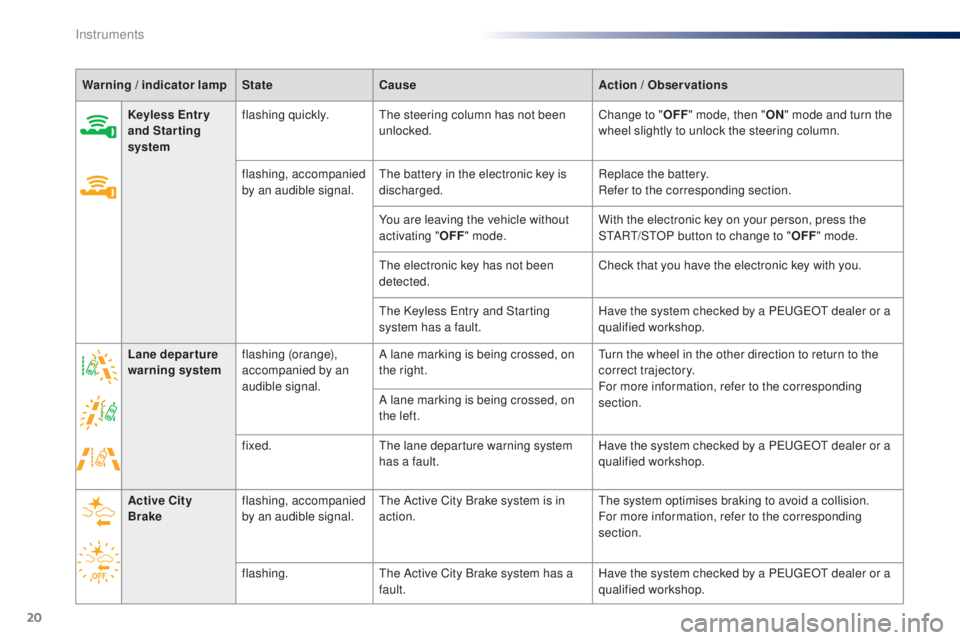
Keyless e
n
tr y
and Starting
system flashing quickly.
th
e steering column has not been
unlocked. Change to "
oFF
" m
ode, then "
oN" m
ode and turn the
wheel slightly to unlock the steering column.
flashing, accompanied
by an audible signal.
th
e battery in the electronic key is
discharged. Replace the battery.
Refer to the corresponding section.
You are leaving the vehicle without
activating "
oFF " m
ode.With the electronic key on your person, press the
S
tA
R
t/
S
tO
P button to change to "
oFF" m
ode.
th
e electronic key has not been
detected. Check that you have the electronic key with you.
th
e Keyless e
n
try and Starting
system has a fault. Have the system checked by a P
e
uge
Ot
dealer or a
qualified workshop.
Lane departure
warning system flashing (orange),
accompanied by an
audible signal. A lane marking is being crossed, on
the right.
tu
rn the wheel in the other direction to return to the
correct trajectory.
For more information, refer to the corresponding
section.
A lane marking is being crossed, on
the left.
fixed.
th
e lane departure warning system
has a fault. Have the system checked by a P
e
uge
Ot
dealer or a
qualified workshop.
Active City
Brake flashing, accompanied
by an audible signal.
th
e Active City Brake system is in
action.
th
e system optimises braking to avoid a collision.
For more information, refer to the corresponding
section.
flashing.
th
e Active City Brake system has a
fault. Have the system checked by a P
e
uge
Ot
dealer or a
qualified workshop.
Instruments
Page 24 of 268
22
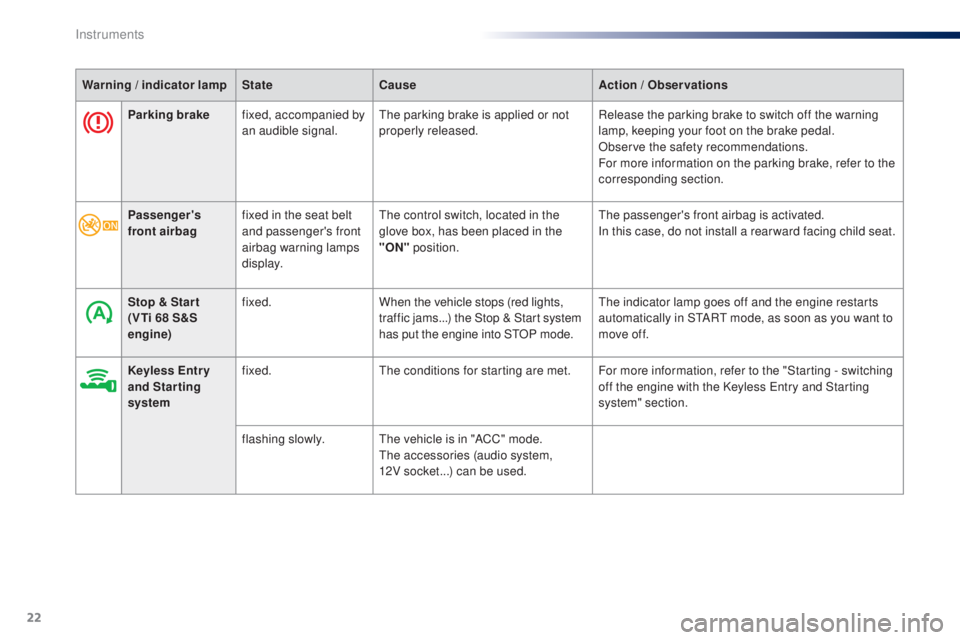
Parking brakefixed, accompanied by
an audible signal.th e parking brake is applied or not
properly released. Release the parking brake to switch off the warning
lamp, keeping your foot on the brake pedal.
Observe the safety recommendations.
For more information on the parking brake, refer to the
corresponding section.
Warning / indicator lamp
StateCause Action / o
b
servations
Passenger's
front airbag fixed in the seat belt
and passenger's front
airbag warning lamps
display.
th
e control switch, located in the
glove box, has been placed in the
"
o
N
" position.
the
passenger's front airbag is activated.
In this case, do not install a rear ward facing child seat.
Stop & Star t
(V
ti 6
8 S&S
engine) fixed.
When the vehicle stops (red lights,
traffic jams...) the Stop & Start system
has put the engine into S
tO
P mode.
th
e indicator lamp goes off and the engine restarts
automatically in S
tA
R
t
mode, as soon as you want to
move off.
Keyless
e
n
tr y
and Starting
system fixed.
th
e conditions for starting are met. For more information, refer to the "Starting - switching off the engine with the Keyless
e
n
try and Starting
system" section.
flashing slowly.
th
e vehicle is in "ACC" mode.
th
e accessories (audio system,
12V socket...) can be used.
Instruments
Page 33 of 268
31
108_en_Chap02_ouvertures_ed01-2016
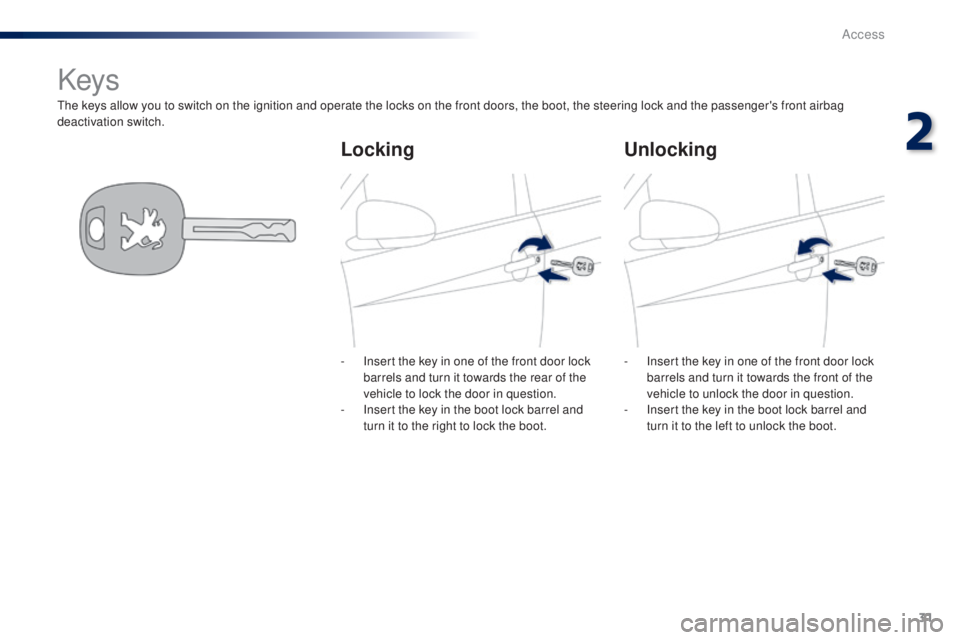
the keys allow you to switch on the ignition and operate the locks on the front doors, the boot, the steering lock and the passenger's front airbag
deactivation switch.
Keys
Lockingun locking
- Insert the key in one of the front door lock
barrels and turn it towards the rear of the
vehicle to lock the door in question.
-
I
nsert the key in the boot lock barrel and
turn it to the right to lock the boot. -
I nsert the key in one of the front door lock
barrels and turn it towards the front of the
vehicle to unlock the door in question.
-
I
nsert the key in the boot lock barrel and
turn it to the left to unlock the boot.
2
Access
Page 34 of 268
32
108_en_Chap02_ouvertures_ed01-2016
Remote control
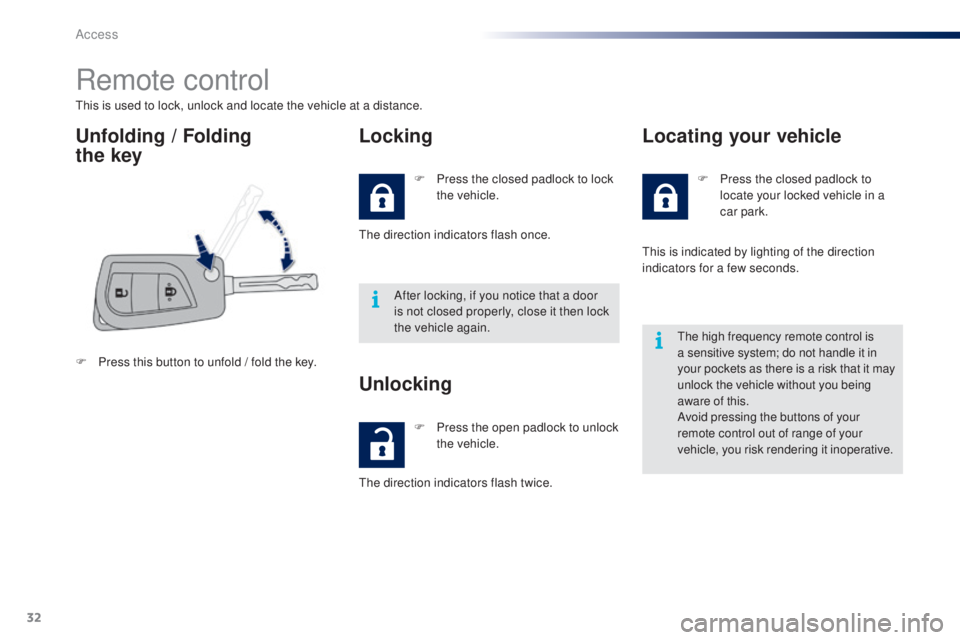
this is used to lock, unlock and locate the vehicle at a distance.
unfolding / Folding
the keyLocking
F Press this button to unfold / fold the key. F
P
ress the closed padlock to lock
the vehicle.
th
e direction indicators flash once.
After locking, if you notice that a door
is not closed properly, close it then lock
the vehicle again.
F
P
ress the open padlock to unlock
the vehicle.
unlocking
the direction indicators flash twice. F
P
ress the closed padlock to
locate your locked vehicle in a
car park.
Locating your vehicle
this is indicated by lighting of the direction
indicators for a few seconds.
th
e high frequency remote control is
a sensitive system; do not handle it in
your pockets as there is a risk that it may
unlock the vehicle without you being
aware of this.
Avoid pressing the buttons of your
remote control out of range of your
vehicle, you risk rendering it inoperative.
Access
Page 36 of 268
34
108_en_Chap02_ouvertures_ed01-2016
Keyless entry and Starting system
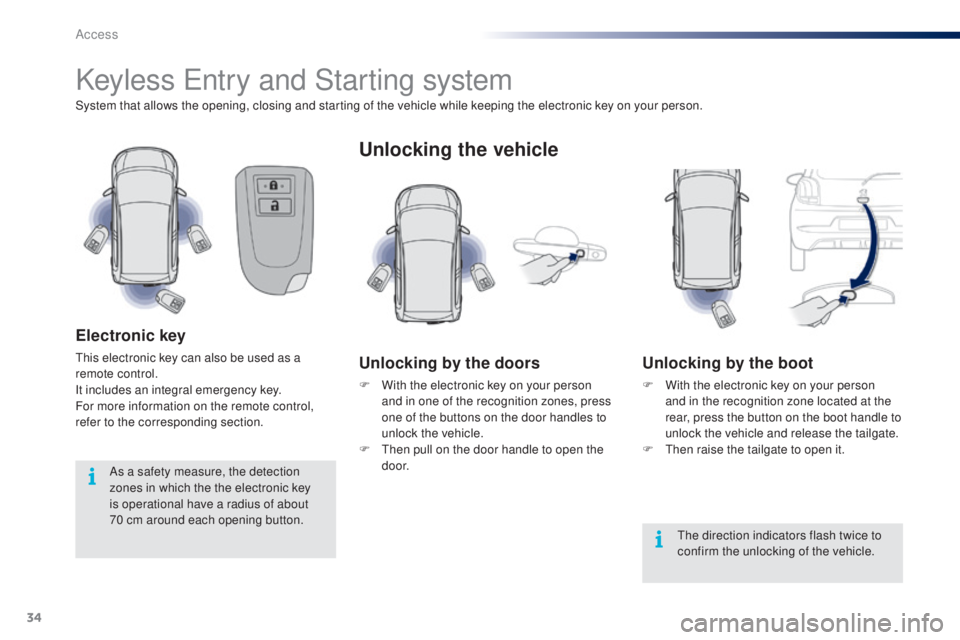
System that allows the opening, closing and starting of the vehicle while keeping the electronic key on your person.
electronic key
this electronic key can also be used as a
remote control.
It includes an integral emergency key.
For more information on the remote control,
refer to the corresponding section.
unlocking the vehicle
unlocking by the doors
F With the electronic key on your person and in one of the recognition zones, press
one of the buttons on the door handles to
unlock the vehicle.
F
t
h
en pull on the door handle to open the
d o o r.
unlocking by the boot
F With the electronic key on your person and in the recognition zone located at the
rear, press the button on the boot handle to
unlock the vehicle and release the tailgate.
F
t
hen
raise the tailgate to open it.
th
e direction indicators flash twice to
confirm the unlocking of the vehicle.
As a safety measure, the detection
zones in which the the electronic key
is operational have a radius of about
70
cm around each opening button.
Access
Page 37 of 268
35
108_en_Chap02_ouvertures_ed01-2016
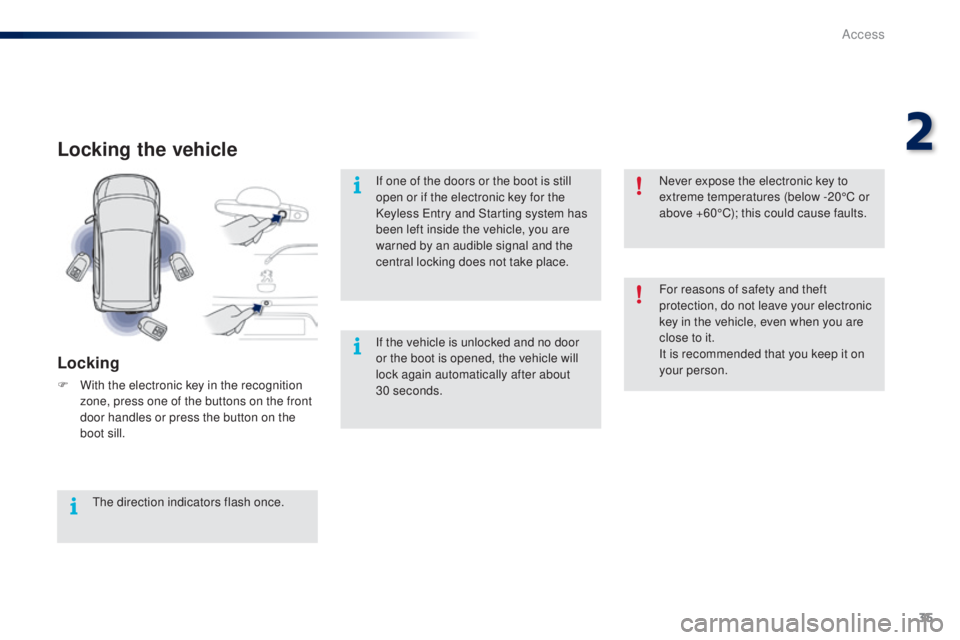
Locking the vehicle
Locking
F With the electronic key in the recognition zone, press one of the buttons on the front
door handles or press the button on the
boot sill.
th
e direction indicators flash once. If one of the doors or the boot is still
open or if the electronic key for the
Keyless
e
n
try and Starting system has
been left inside the vehicle, you are
warned by an audible signal and the
central locking does not take place.
If the vehicle is unlocked and no door
or the boot is opened, the vehicle will
lock again automatically after about
30 seconds.For reasons of safety and theft
protection, do not leave your electronic
key in the vehicle, even when you are
close to it.
It is recommended that you keep it on
your person. Never expose the electronic key to
extreme temperatures (below -20°C or
above +60°C); this could cause faults.
2
Access