display PEUGEOT 2008 2014 Owners Manual
[x] Cancel search | Manufacturer: PEUGEOT, Model Year: 2014, Model line: 2008, Model: PEUGEOT 2008 2014Pages: 336, PDF Size: 9.35 MB
Page 285 of 336
04
283
Audio CD
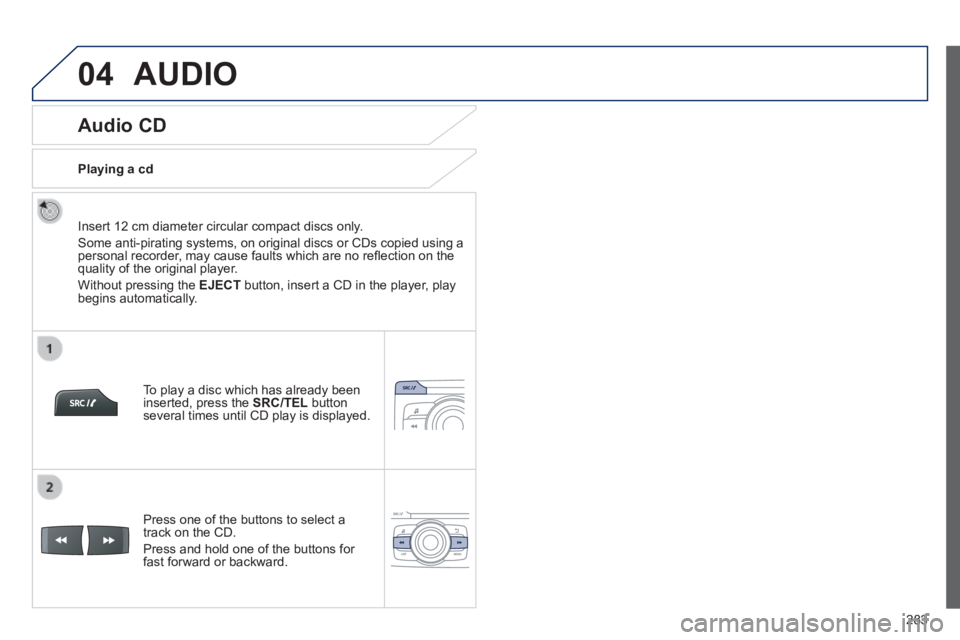
Insert 12 cm diameter circular compact discs only.
Some anti-pirating systems, on original discs or CDs copied using a personal recorder, may cause faults which are no refl ection on the quality of the original player.
Without pressing the EJECT button, insert a CD in the player, play begins automatically.
To play a disc which has already been inserted, press the SRC/TEL button several times until CD play is displayed.
Press one of the buttons to select a track on the CD.
Press and hold one of the buttons for fast forward or backward.
Playing a cd
AUDIO
Page 288 of 336
04
286
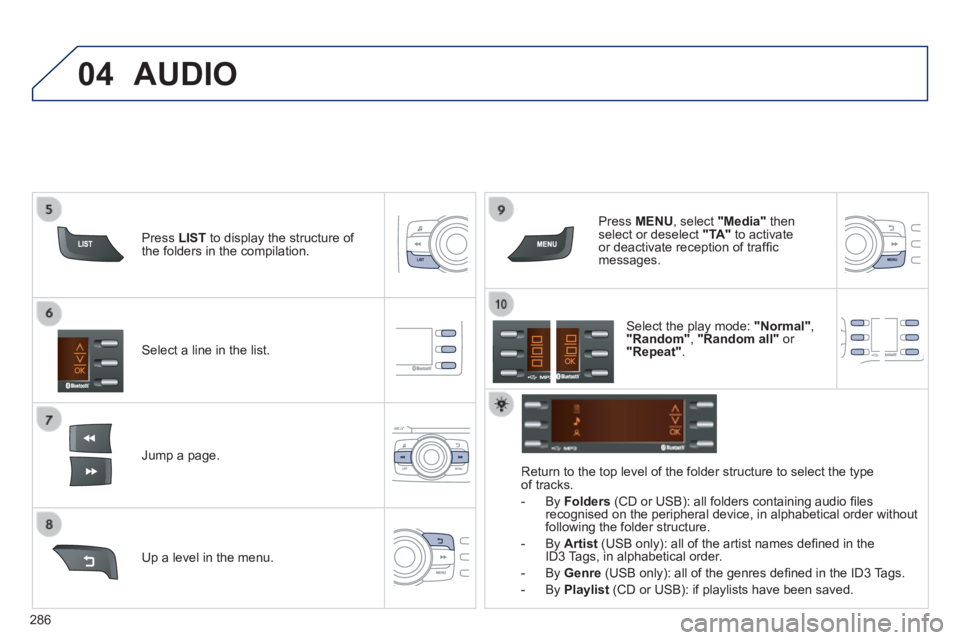
Select a line in the list.
Jump a page.
Press MENU , select "Media" then select or deselect "TA" to activate or deactivate reception of traffi c messages.
Up a level in the menu.
AUDIO
Return to the top level of the folder structure to select the type of tracks.
- By Folders (CD or USB): all folders containing audio fi les recognised on the peripheral device, in alphabetical order without following the folder structure.
- By Artist (USB only): all of the artist names defi ned in the ID3 Tags, in alphabetical order.
- By Genre (USB only): all of the genres defi ned in the ID3 Tags.
- By Playlist (CD or USB): if playlists have been saved.
Press LIST to display the structure of the folders in the compilation.
Select the play mode: "Normal" , "Random" , "Random all" or "Repeat" .
Page 290 of 336

04
288
Streaming - Playing audio files via Bluetooth
Depending on the compatibility of the phone
Connect the telephone: see the "USING THE TELEPHONE" section.
Streaming allows music fi les on a telephone to be heard via the vehicle's speakers.
The telephone must support the appropriate Bluetooth ® profi les ® profi les ®
(profi les A2DP / AVRCP).
Activate the streaming source by pressing SRC/TEL . Control of playback is via the audio system. The contextual information can be displayed in the screen.
In certain cases, playing of the audio fi les must be initiated from the telephone.
The audio quality depends on the quality of the transmission from the telephone.
AUDIO
Page 291 of 336

05
289
USING THE TELEPHONE
Pairing a Bluetooth telephone / First connection
The services offered depend on the network, the SIM card and the compatibility of the B\
luetooth telephone used.
Consult your telephone's manual and your operator to fi nd out which services are available to you.
Activate the telephone's Bluetooth function and ensure that it is set as visible to all (refer to the telephone instructions).
Press MENU then select "Bluetooth" .
A window is displayed with " Searching device ".
Select the telephone to be paired from the list and confi rm with "OK" . Only one telephone can be paired at a time.
Select " Search ".
For safety reasons and because they require prolonged attention on the p\
art of the driver, the operations for pairing of the Bluetooth mobile telephone with the Bluetooth hands-free system of your audio system must\
be carried out with the vehicle stationary and the ignition on.
It is not possible to pair more that 5 telephones. Press MENU and select "Bluetooth" . Select "BT management" . If 5 telephones are already paired, select the telephone to be deleted by pressing "OK"and select "Delete" (refer to "Managing connections").
Visit www.peugeot.co.uk for more information (compatibility, more help, ...).
Page 292 of 336
05
290
USING THE TELEPHONE
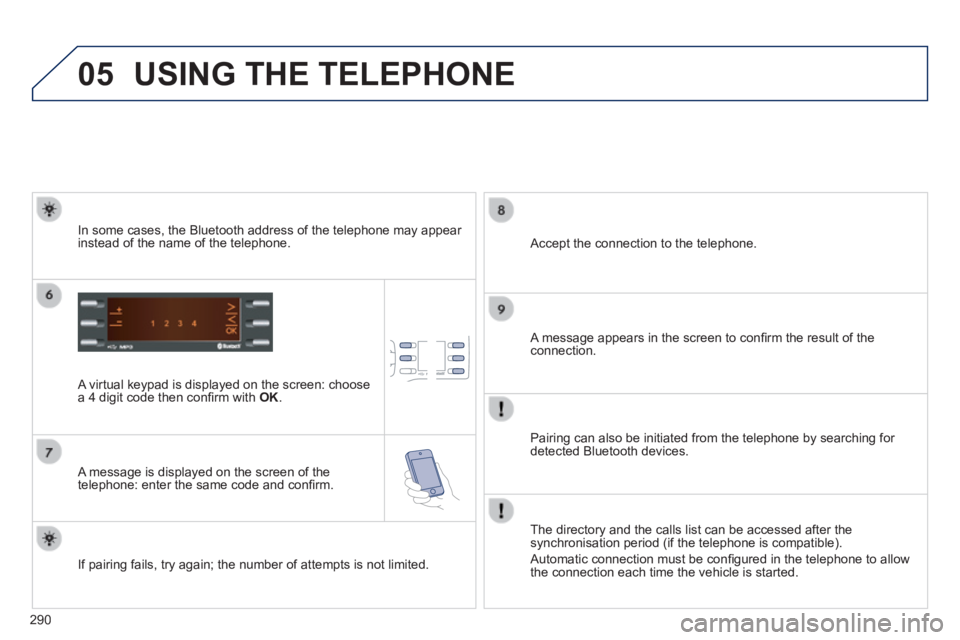
A virtual keypad is displayed on the screen: choose a 4 digit code then confi rm with OK .
A message is displayed on the screen of the telephone: enter the same code and confi rm.
A message appears in the screen to confi rm the result of the connection.
Pairing can also be initiated from the telephone by searching for detected Bluetooth devices.
Accept the connection to the telephone.
If pairing fails, try again; the number of attempts is not limited.
The directory and the calls list can be accessed after the synchronisation period (if the telephone is compatible).
Automatic connection must be confi gured in the telephone to allow the connection each time the vehicle is started.
In some cases, the Bluetooth address of the telephone may appear instead of the name of the telephone.
Page 293 of 336
05
291
USING THE TELEPHONE
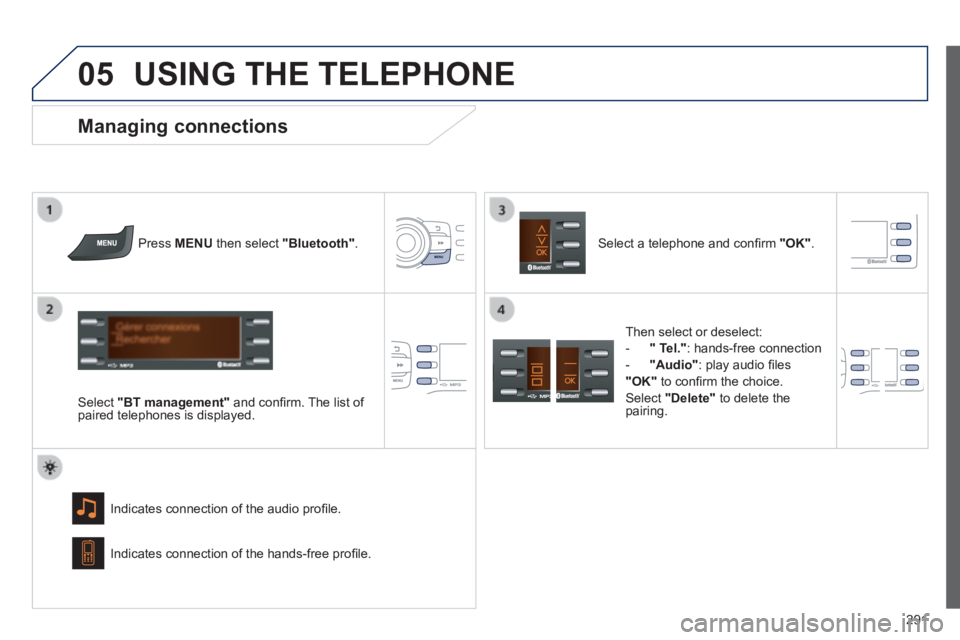
Press MENU then select "Bluetooth" .
Select "BT management" and confi rm. The list of paired telephones is displayed.
Indicates connection of the audio profi le.
Managing connections
Select a telephone and confi rm "OK" .
Indicates connection of the hands-free profi le.
Then select or deselect:
- " Tel." : hands-free connection
- "Audio" : play audio fi les
"OK" to confi rm the choice.
Select "Delete" to delete the pairing.
Page 294 of 336
05
292
USING THE TELEPHONE
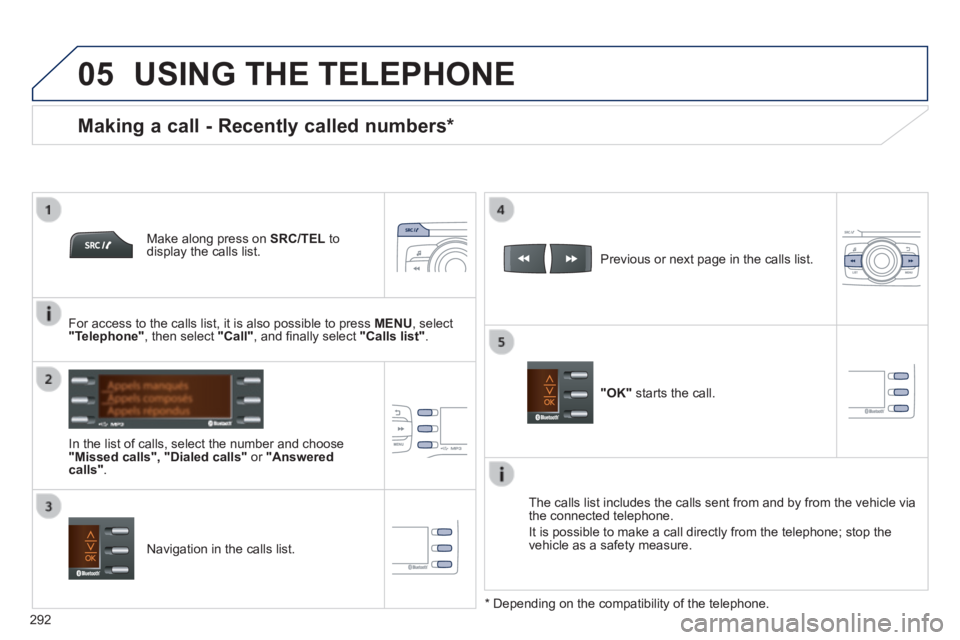
Make along press on SRC/TEL to display the calls list.
In the list of calls, select the number and choose "Missed calls", "Dialed calls" or "Answered calls" .
Previous or next page in the calls list.
"OK" starts the call.
Making a call - Recently called numbers *
Navigation in the calls list.
The calls list includes the calls sent from and by from the vehicle via \
the connected telephone.
It is possible to make a call directly from the telephone; stop the vehicle as a safety measure.
* Depending on the compatibility of the telephone.
For access to the calls list, it is also possible to press MENU , select "Telephone" , then select "Call" , and fi nally select "Calls list".
Page 295 of 336
05
293
USING THE TELEPHONE
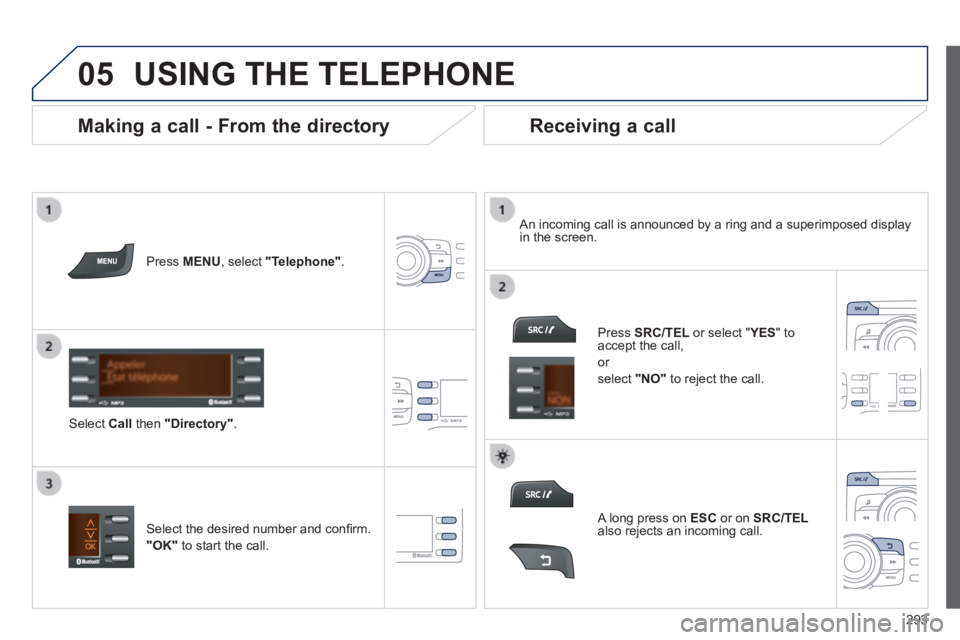
Press MENU , select "Telephone" .
Select Call then "Directory" .
An incoming call is announced by a ring and a superimposed display in the screen.
Select the desired number and confi rm.
"OK" to start the call.
Press SRC/TEL or select " YES or select " YES or select " " to accept the call,
or
select "NO" to reject the call.
Making a call - From the directory Receiving a call
A long press on ESC or on SRC/TELalso rejects an incoming call.
Page 297 of 336
06
295
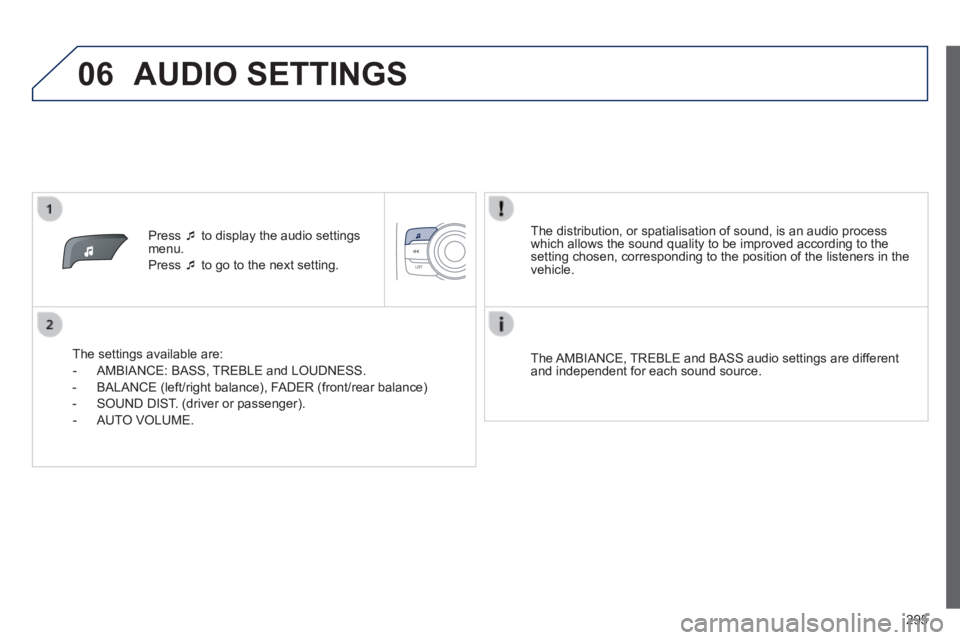
Press to display the audio settings menu.
Press to go to the next setting.
The settings available are:
- AMBIANCE: BASS, TREBLE and LOUDNESS.
- BALANCE (left/right balance), FADER (front/rear balance)
- SOUND DIST. (driver or passenger).
- AUTO VOLUME.
The distribution, or spatialisation of sound, is an audio process which allows the sound quality to be improved according to the setting chosen, corresponding to the position of the listeners in the vehicle.
The AMBIANCE, TREBLE and BASS audio settings are different and independent for each sound source.
AUDIO SETTINGS
Page 298 of 336
07
296
Display and language settings
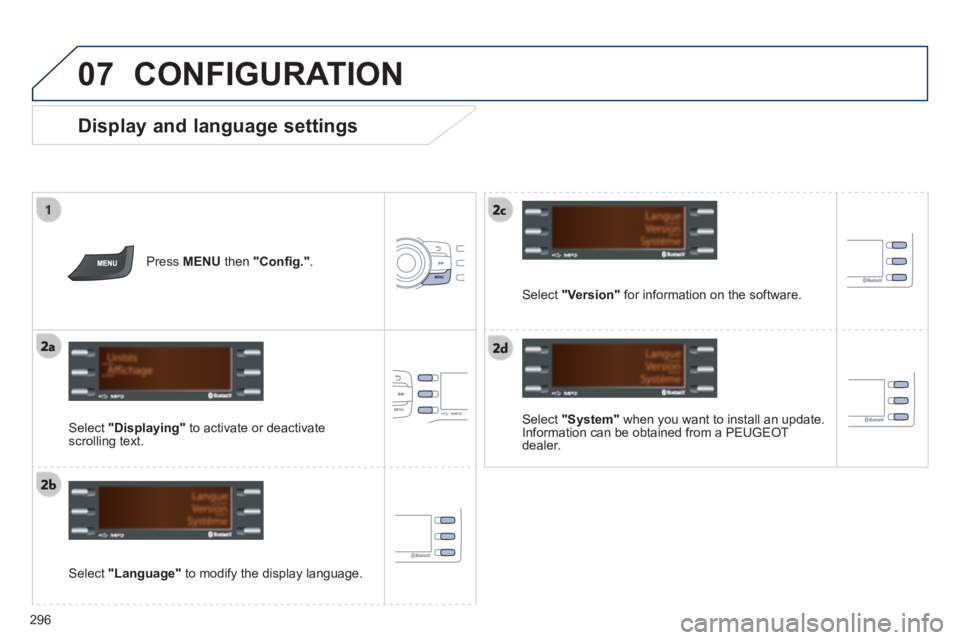
Select "System" when you want to install an update. Information can be obtained from a PEUGEOT dealer.
Select "Language" to modify the display language.
Press MENU then "Confi g." .
Select "Displaying" to activate or deactivate scrolling text.
Select "Version" for information on the software.
CONFIGURATION