display PEUGEOT 2008 2014 Manual PDF
[x] Cancel search | Manufacturer: PEUGEOT, Model Year: 2014, Model line: 2008, Model: PEUGEOT 2008 2014Pages: 336, PDF Size: 9.35 MB
Page 250 of 336
06
248
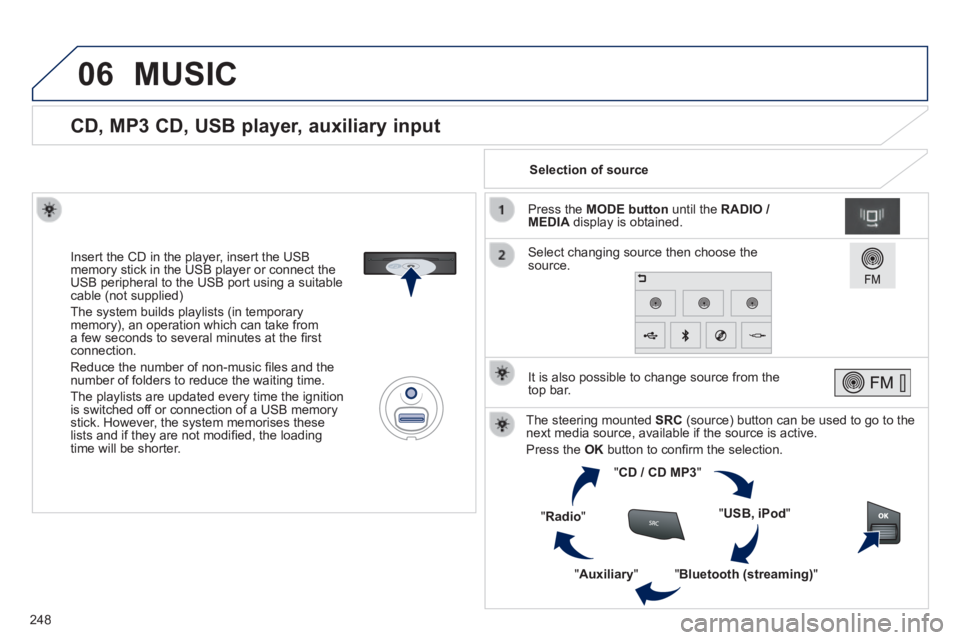
CD, MP3 CD, USB player, auxiliary input
Insert the CD in the player, insert the USB memory stick in the USB player or connect the USB peripheral to the USB port using a suitable cable (not supplied)
The system builds playlists (in temporary memory), an operation which can take from a few seconds to several minutes at the fi rst connection.
Reduce the number of non-music fi les and the number of folders to reduce the waiting time.
The playlists are updated every time the ignition is switched off or connection of a USB memory stick. However, the system memorises these lists and if they are not modifi ed, the loading time will be shorter.
Selection of source
The steering mounted SRC (source) button can be used to go to the next media source, available if the source is active.
Press the OK button to confi rm the selection.
" CD / CD MP3 "
" USB, iPod "
" Bluetooth (streaming) " " Auxiliary "
" Radio "
Select changing source then choose the source.
Press the MODE button until the RADIO / MEDIA display is obtained.
It is also possible to change source from the top bar.
MUSIC
Page 254 of 336
06
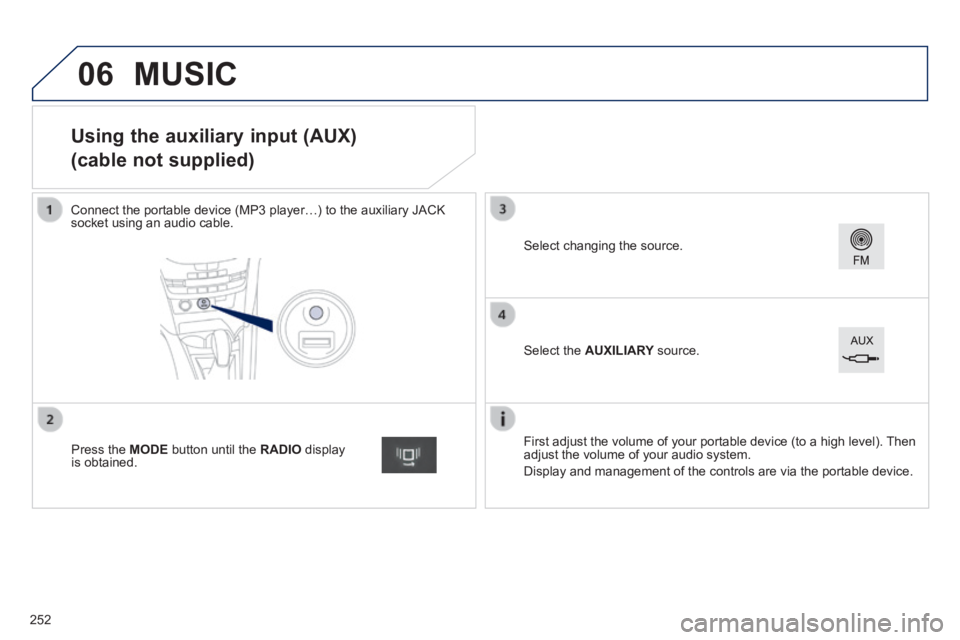
Using the auxiliary input (AUX)
(cable not supplied)
Connect the portable device (MP3 player…) to the auxiliary JACK socket using an audio cable.
First adjust the volume of your portable device (to a high level). Then adjust the volume of your audio system.
Display and management of the controls are via the portable device.
Select changing the source.
Press the MODE button until the RADIO display is obtained.
Select the AUXILIARY source. AUXILIARY source. AUXILIARY
MUSIC
252
Page 255 of 336
06
253
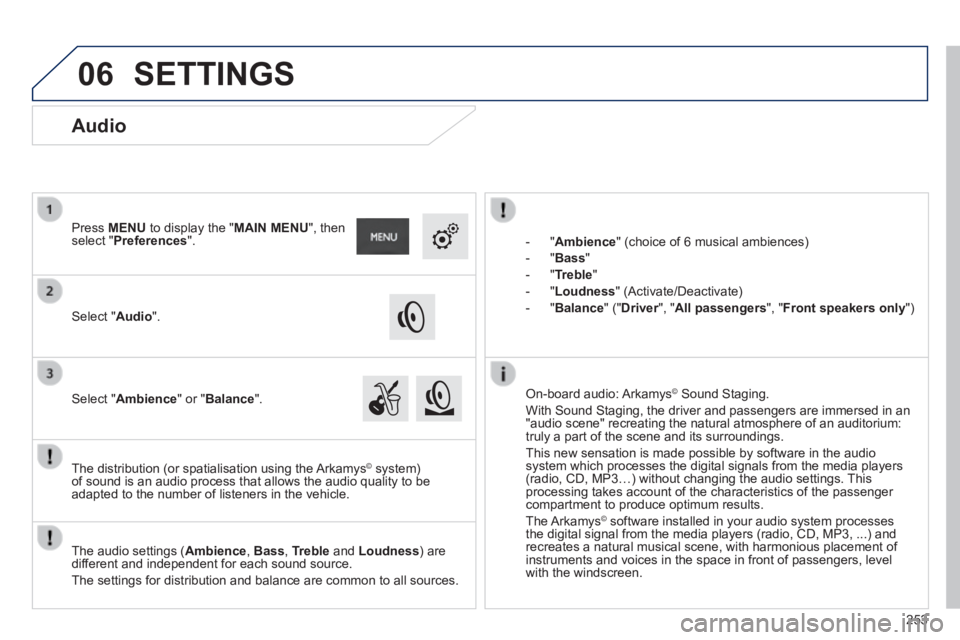
- " Ambience " (choice of 6 musical ambiences)
- " Bass "
- " Treble "
- " Loudness " (Activate/Deactivate)
- " Balance " (" Driver ", " Driver ", " DriverAll passengers ", " Front speakers only ")
The audio settings ( Ambience , Bass , Treble and Loudness ) are different and independent for each sound source.
The settings for distribution and balance are common to all sources.
The distribution (or spatialisation using the Arkamys© system) © system) ©
of sound is an audio process that allows the audio quality to be adapted to the number of listeners in the vehicle.
On-board audio: Arkamys © Sound Staging. © Sound Staging. ©
With Sound Staging, the driver and passengers are immersed in an "audio scene" recreating the natural atmosphere of an auditorium: truly a part of the scene and its surroundings.
This new sensation is made possible by software in the audio system which processes the digital signals from the media players (radio, CD, MP3…) without changing the audio settings. This processing takes account of the characteristics of the passenger compartment to produce optimum results.
The Arkamys© software installed in your audio system processes © software installed in your audio system processes ©
the digital signal from the media players (radio, CD, MP3, ...) and recreates a natural musical scene, with harmonious placement of instruments and voices in the space in front of passengers, level with the windscreen.
Audio
Select " Audio ".
Press MENU to display the " MAIN MENU ", then select " Preferences ".
Select " Ambience " or " Balance ".
SETTINGS
Page 257 of 336
255
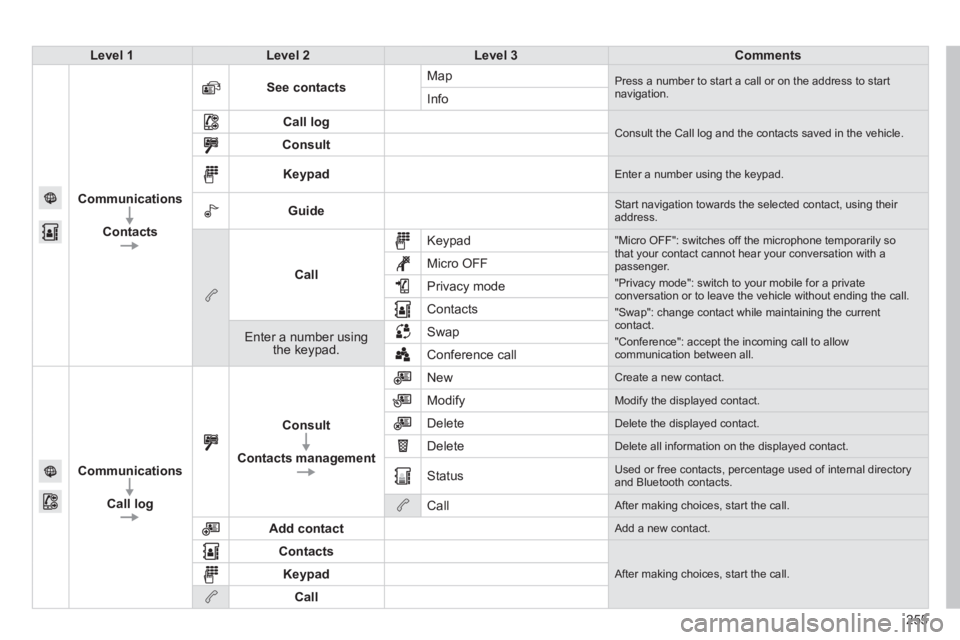
Level 1Level 2Level 3Comments
Communications
Contacts
See contacts Map Press a number to start a call or on the address to start navigation. Info
Call log Consult the Call log and the contacts saved in the vehicle. Consult
Keypad Enter a number using the keypad.
Guide Start navigation towards the selected contact, using their address.
Call
Keypad "Micro OFF": switches off the microphone temporarily so that your contact cannot hear your conversation with a passenger.
"Privacy mode": switch to your mobile for a private conversation or to leave the vehicle without ending the call.
"Swap": change contact while maintaining the current contact.
"Conference": accept the incoming call to allow communication between all.
Micro OFF
Privacy mode
Contacts
Enter a number using the keypad.
Swap
Conference call
Communications
Call log
Consult
Contacts management
New Create a new contact.
Modify Modify the displayed contact.
Delete Delete the displayed contact.
Delete Delete all information on the displayed contact.
Status Used or free contacts, percentage used of internal directory and Bluetooth contacts.
Call After making choices, start the call.
Add contact Add a new contact.
Contacts
After making choices, start the call. Keypad
Call
Page 260 of 336
07
258
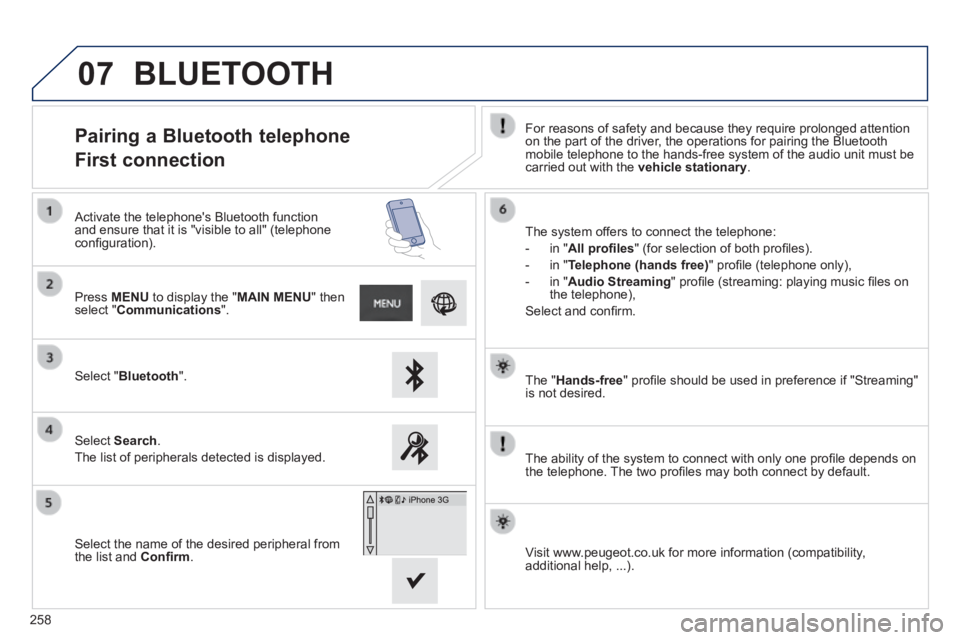
The " Hands-free " profi le should be used in preference if "Streaming" is not desired.
The ability of the system to connect with only one profi le depends on the telephone. The two profi les may both connect by default.
Pairing a Bluetooth telephone
First connection For reasons of safety and because they require prolonged attention on the part of the driver, the operations for pairing the Bluetooth mobile telephone to the hands-free system of the audio unit must be carried out with the vehicle stationary .
Select " Bluetooth ".
Press MENU to display the " MAIN MENU " then select " Communications ".
Select Search .
The list of peripherals detected is displayed.
Activate the telephone's Bluetooth function and ensure that it is "visible to all" (telephone confi guration). The system offers to connect the telephone:
- in " All profi les " (for selection of both profi les).
- in " Telephone (hands free) " profi le (telephone only),
- in " Audio Streaming " profi le (streaming: playing music fi les on the telephone),
Select and confi rm.
Select the name of the desired peripheral from the list and Confi rm . Visit www.peugeot.co.uk for more information (compatibility, additional help, ...).
BLUETOOTH
Page 262 of 336
07
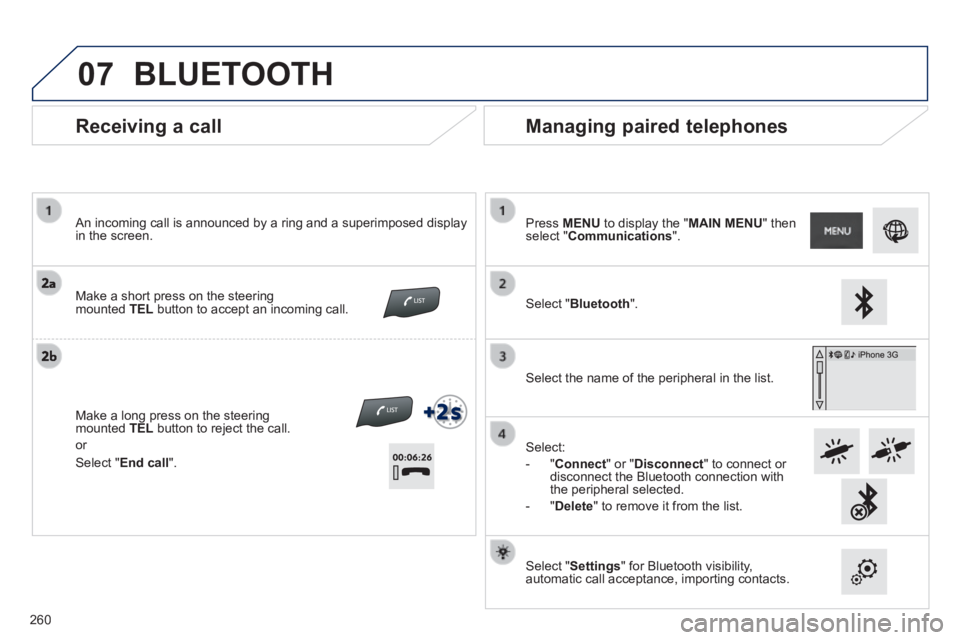
Receiving a call
An incoming call is announced by a ring and a superimposed display in the screen.
Make a short press on the steering mounted TEL button to accept an incoming call.
Make a long press on the steering mounted TEL button to reject the call.
or
Managing paired telephones
Press MENU to display the " MAIN MENU " then select " Communications ".
Select " Bluetooth ".
Select the name of the peripheral in the list.
Select:
- " Connect " or " Disconnect " to connect or disconnect the Bluetooth connection with the peripheral selected.
- " Delete " to remove it from the list.
Select " Settings " for Bluetooth visibility, automatic call acceptance, importing contacts.
BLUETOOTH
Select " End call ".
260
Page 263 of 336
07
261
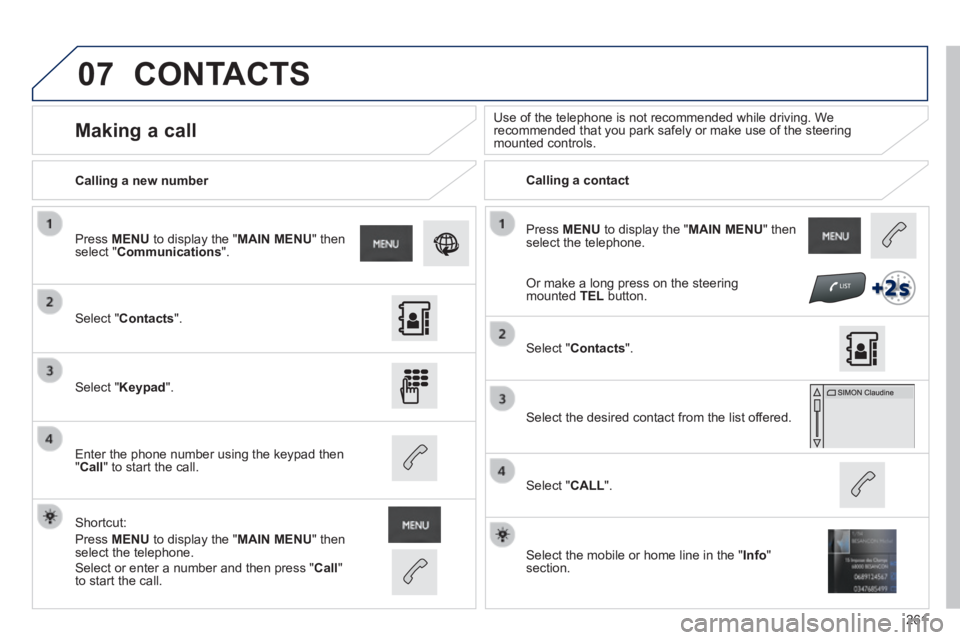
Press MENU to display the " MAIN MENU " then select the telephone.
Calling a new number Calling a contact
Making a call Use of the telephone is not recommended while driving. We recommended that you park safely or make use of the steering mounted controls.
Select " Contacts ".
Press MENU to display the " MAIN MENU " then select " Communications ".
Select " Keypad ".
Enter the phone number using the keypad then " Call " to start the call.
Shortcut:
Press MENU to display the " MAIN MENU " then select the telephone.
Select " Contacts ".
Select the desired contact from the list offered.
Select the mobile or home line in the " Info " section.
Select " CALL ".
CONTACTS
Select or enter a number and then press " Call " to start the call.
Or make a long press on the steering mounted TEL button.
Page 264 of 336
07
262
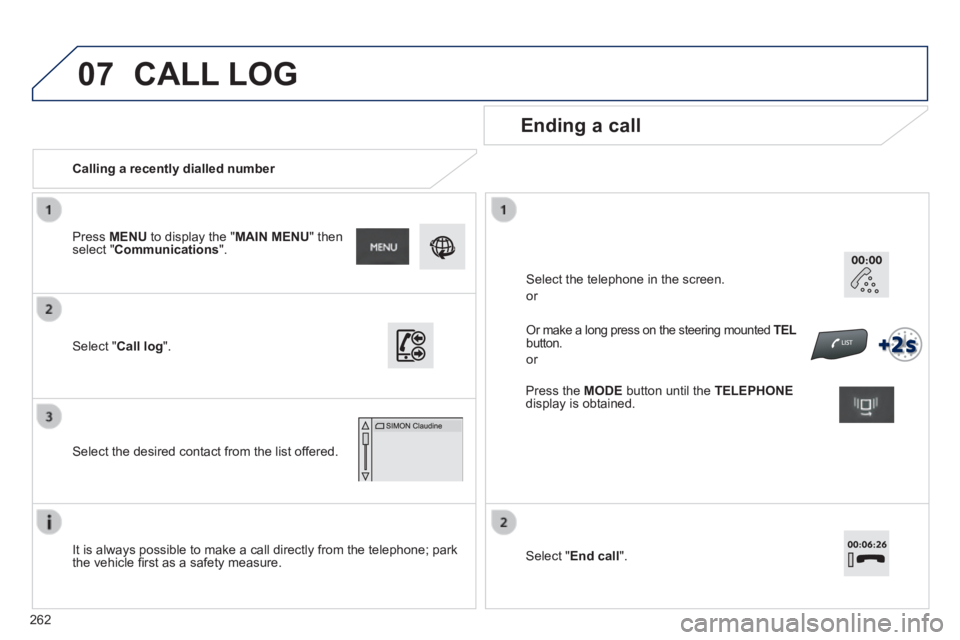
Calling a recently dialled number
Ending a call
It is always possible to make a call directly from the telephone; park the vehicle fi rst as a safety measure.
Select " Call log ".
Press MENU to display the " MAIN MENU " then select " Communications ".
Select the desired contact from the list offered.
Or make a long press on the steering mounted TEL TEL TELbutton.
or
Select the telephone in the screen.
or
CALL LOG
Press the MODE button until the TELEPHONEdisplay is obtained.
Select " End call ".
Page 265 of 336
07
263
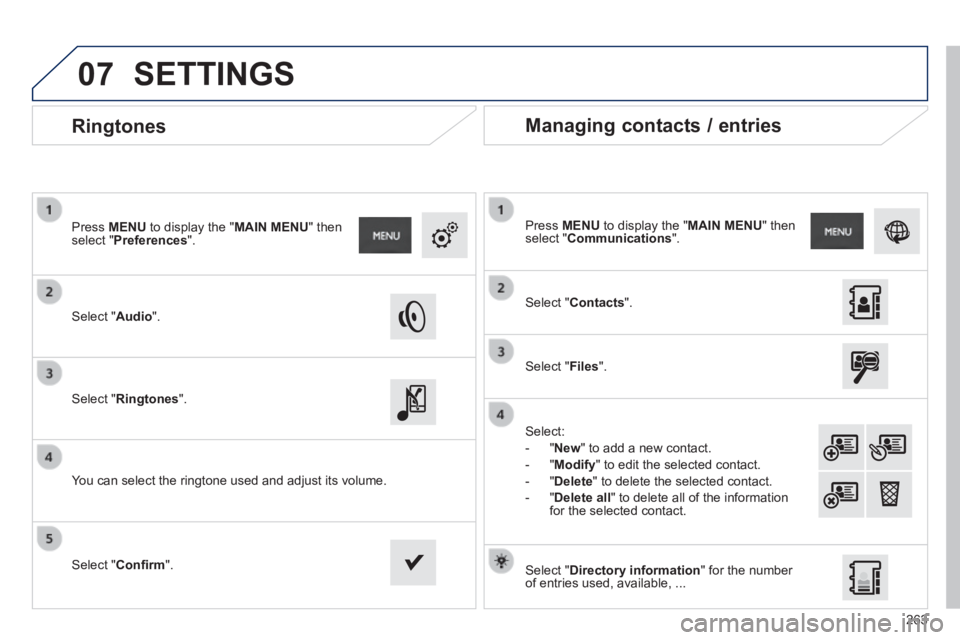
Ringtones
Select " Audio ".
Press MENU to display the " MAIN MENU " then select " Preferences ".
Select " Ringtones ".
You can select the ringtone used and adjust its volume.
Select " Contacts ".
Press MENU to display the " MAIN MENU " then select " Communications ".
Select " Files ".
Select:
- " New " to add a new contact.
- " Modify " to edit the selected contact.
- " Delete " to delete the selected contact.
- " Delete all " to delete all of the information for the selected contact.
Select " Confi rm ". Select " Directory information " for the number of entries used, available, ...
Managing contacts / entries
SETTINGS
Page 267 of 336
265
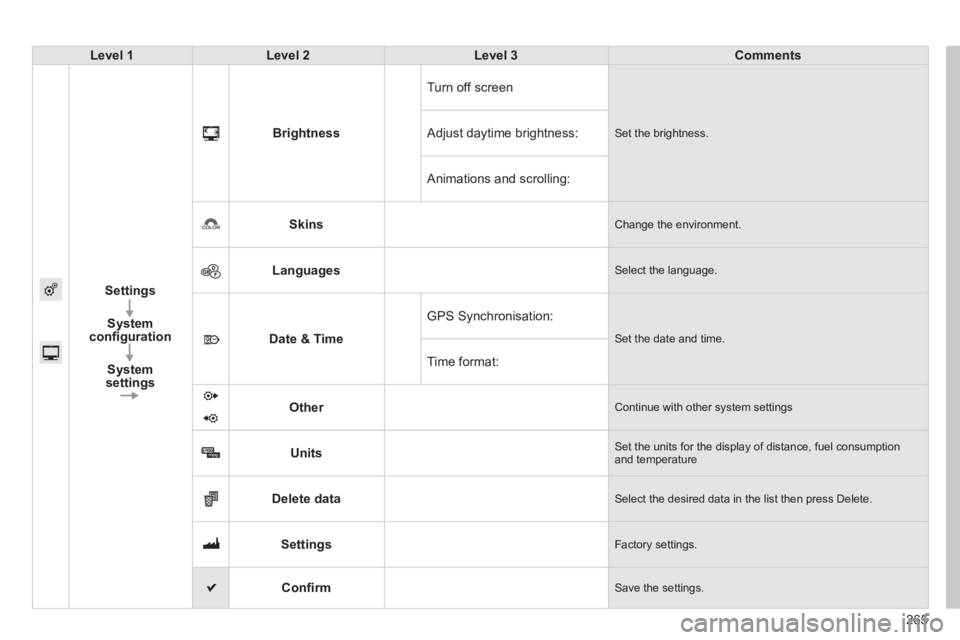
Level 1Level 2Level 3Comments
Settings
System confi guration
System settings
Brightness
Turn off screen
Set the brightness. Adjust daytime brightness:
Animations and scrolling:
Skins Change the environment.
Languages Select the language.
Date & Time
GPS Synchronisation:
Set the date and time.
Time format:
Other Continue with other system settings
Units Set the units for the display of distance, fuel consumption and temperature
Delete data Select the desired data in the list then press Delete.
Settings Factory settings.
Confi rm Save the settings.