display PEUGEOT 2008 2014 Workshop Manual
[x] Cancel search | Manufacturer: PEUGEOT, Model Year: 2014, Model line: 2008, Model: PEUGEOT 2008 2014Pages: 336, PDF Size: 9.35 MB
Page 227 of 336
05
225
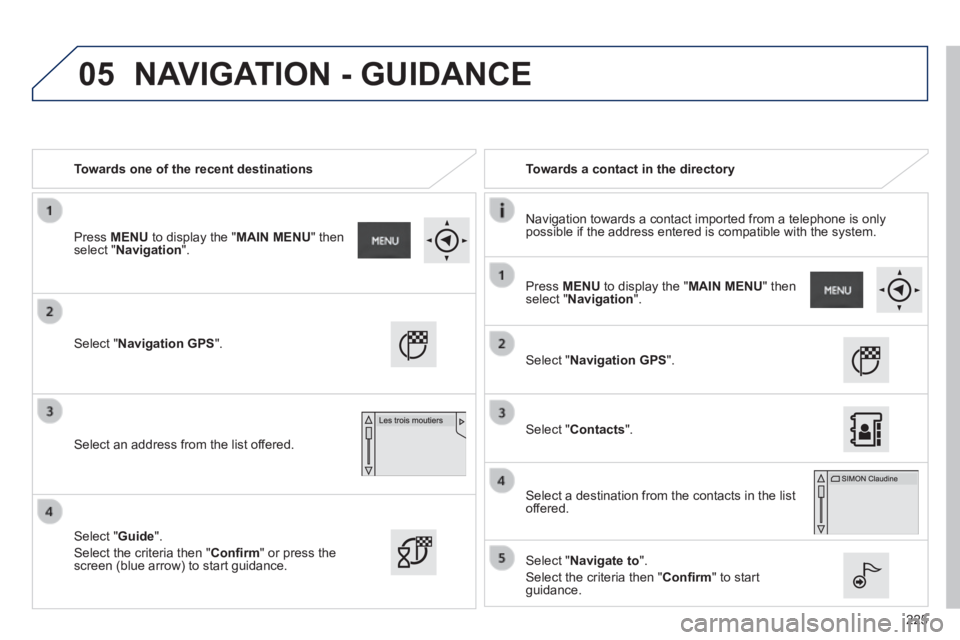
Towards one of the recent destinations Towards a contact in the directory
Navigation towards a contact imported from a telephone is only possible if the address entered is compatible with the system.
Select " Navigation GPS ".
Select an address from the list offered.
Select " Navigation GPS ".
Select " Contacts ".
Select a destination from the contacts in the list offered.
Select " Navigate to ".
Select the criteria then " Confi rm " to start guidance.
Select " Guide ".
Select the criteria then " Confi rm " or press the screen (blue arrow) to start guidance.
Press MENU to display the " MAIN MENU " then select " Navigation ".
Press MENU to display the " MAIN MENU " then select " Navigation ".
NAVIGATION - GUIDANCE
Page 228 of 336
05
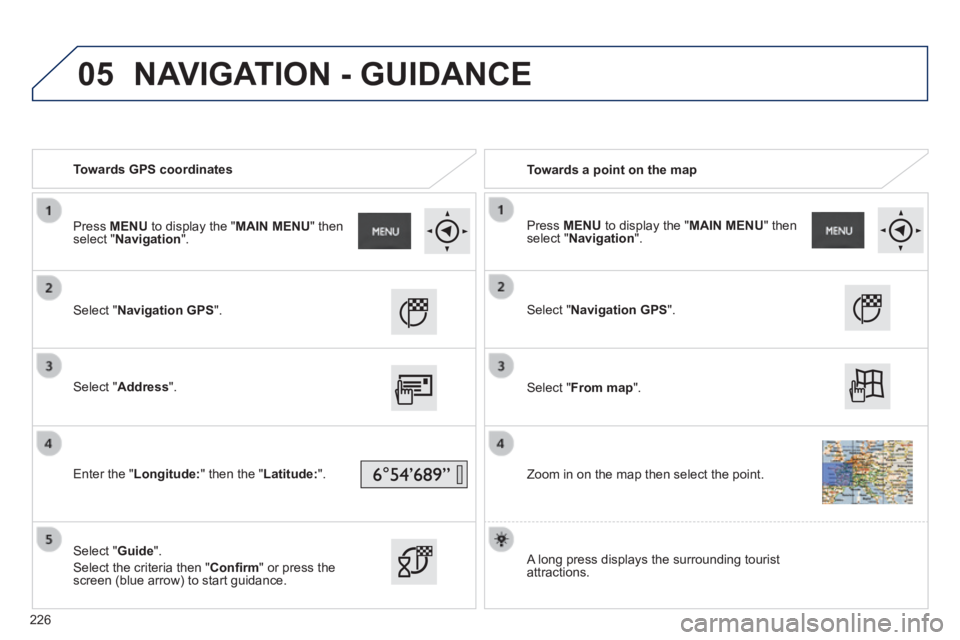
Towards GPS coordinates Towards a point on the map
Select " Navigation GPS ".
Select " Address ".
Enter the " Longitude: " then the " Latitude: ".
Select " Guide ".
Select the criteria then " Confi rm " or press the screen (blue arrow) to start guidance.
Select " Navigation GPS ".
Select " From map ".
Zoom in on the map then select the point.
Press MENU to display the " MAIN MENU " then select " Navigation ". Press MENU to display the " MAIN MENU " then select " Navigation ".
A long press displays the surrounding tourist attractions.
NAVIGATION - GUIDANCE
226
Page 229 of 336
 Points of Interest (POI) show all of the locations of services nearby \
(hotels, retail outlet, airports, ...).
Select \" GPS Navigation \".
Select")
05
227
Towards points of interest (POI) Points of Interest (POI) show all of the locations of services nearby \
(hotels, retail outlet, airports, ...).
Select " GPS Navigation ".
Select " Address ".
Select " Pts of Interest ".
Select a category from the list offered (the categories are presented on following pages).
Select " Along the route " or " Near " or " Near " or " NearAt a destination " or " At an address " to fi lter the points of interest.
Select a point of interest from the list offered.
Select " Guide ".
Select the criteria then " Confi rm " to start guidance.
Select " Search ".
or
Select a point of interest from the list offered.
Press MENU to display the " MAIN MENU " then select " Navigation ".
NAVIGATION - GUIDANCE
Page 231 of 336
05
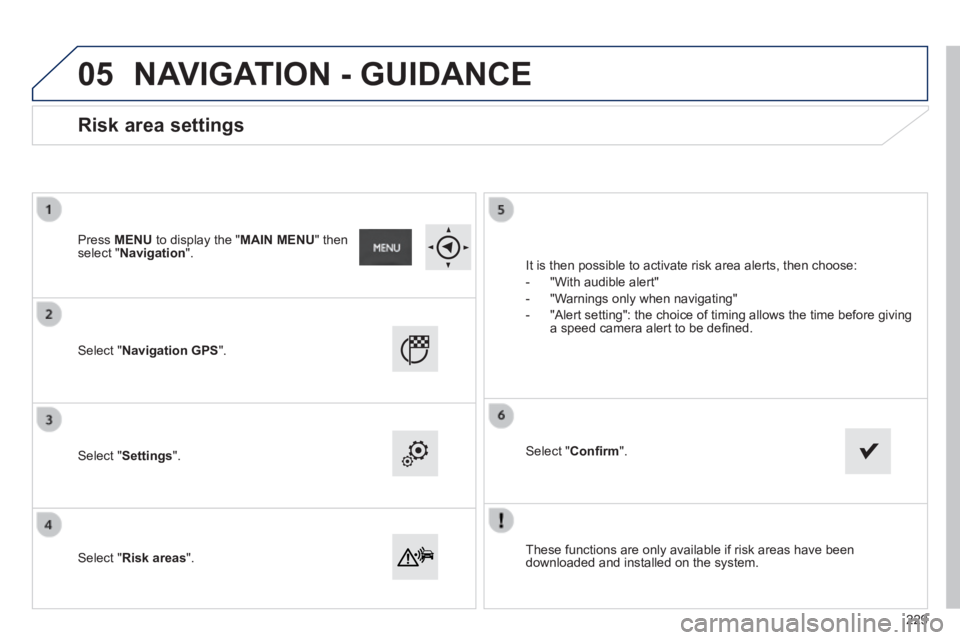
These functions are only available if risk areas have been downloaded and installed on the system.
Select " Navigation GPS ".
Select " Settings ".
Select " Risk areas ".
Risk area settings
It is then possible to activate risk area alerts, then choose:
- "With audible alert"
- "Warnings only when navigating"
- "Alert setting": the choice of timing allows the time before giving a speed camera alert to be defi ned.
Select " Confi rm ".
Press MENU to display the " MAIN MENU " then select " Navigation ".
NAVIGATION - GUIDANCE
229
Page 232 of 336
05
230
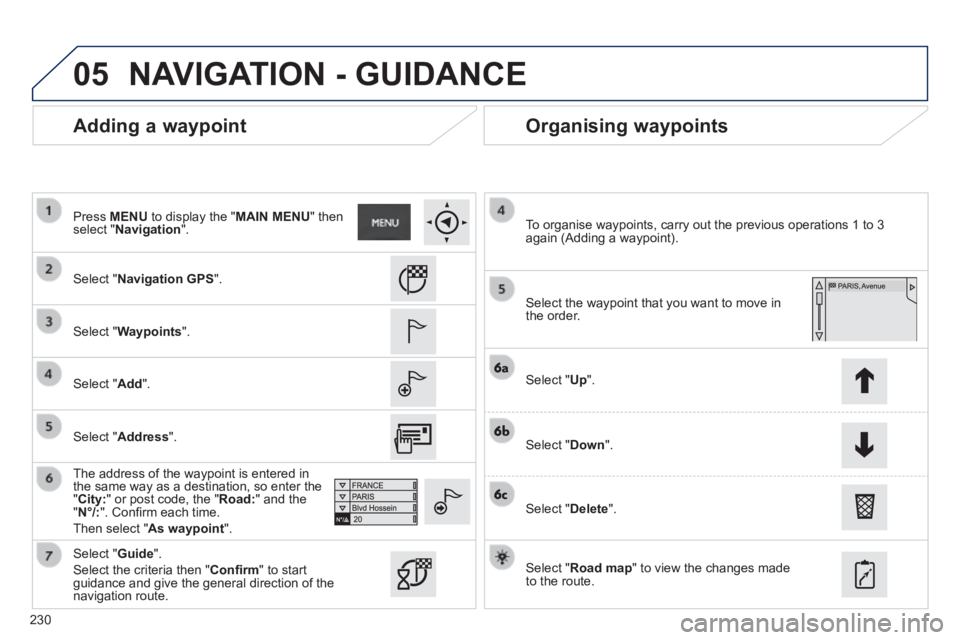
Adding a waypoint Organising waypoints
Select " Navigation GPS ".
Select " Waypoints ".
Select " Add ".
The address of the waypoint is entered in the same way as a destination, so enter the " City: " or post code, the " Road: " and the " N°/: ". Confi rm each time.
Then select " As waypoint ".
Select the waypoint that you want to move in the order.
To organise waypoints, carry out the previous operations 1 to 3 again (Adding a waypoint).
Select " Up ".
Select " Down ".
Select " Delete ".
Select " Road map " to view the changes made to the route.
Select " Guide ".
Select the criteria then " Confi rm " to start guidance and give the general direction of the navigation route.
Press MENU to display the " MAIN MENU " then select " Navigation ".
NAVIGATION - GUIDANCE
Select " Address ".
Page 233 of 336
05
231
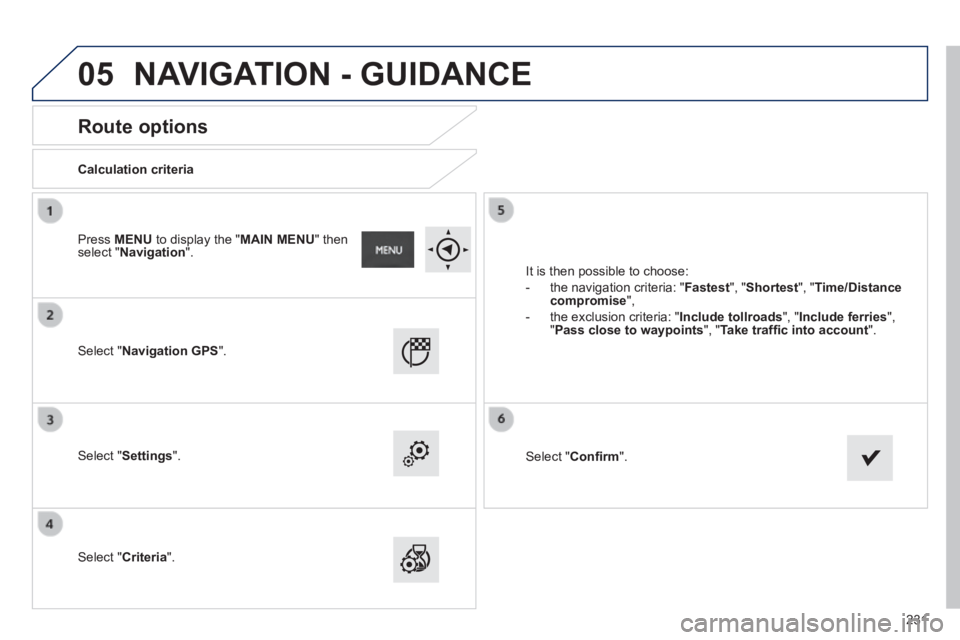
Route options
Calculation criteria
Select " Navigation GPS ".
Select " Settings ".
Select " Criteria ".
It is then possible to choose:
- the navigation criteria: " Fastest ", " Shortest ", " Time/Distance compromise ",
- the exclusion criteria: " Include tollroads ", " Include ferries ", " Pass close to waypoints ", " Take traffi c into account ".
Select " Confi rm ".
Press MENU to display the " MAIN MENU " then select " Navigation ".
NAVIGATION - GUIDANCE
Page 234 of 336
05
232
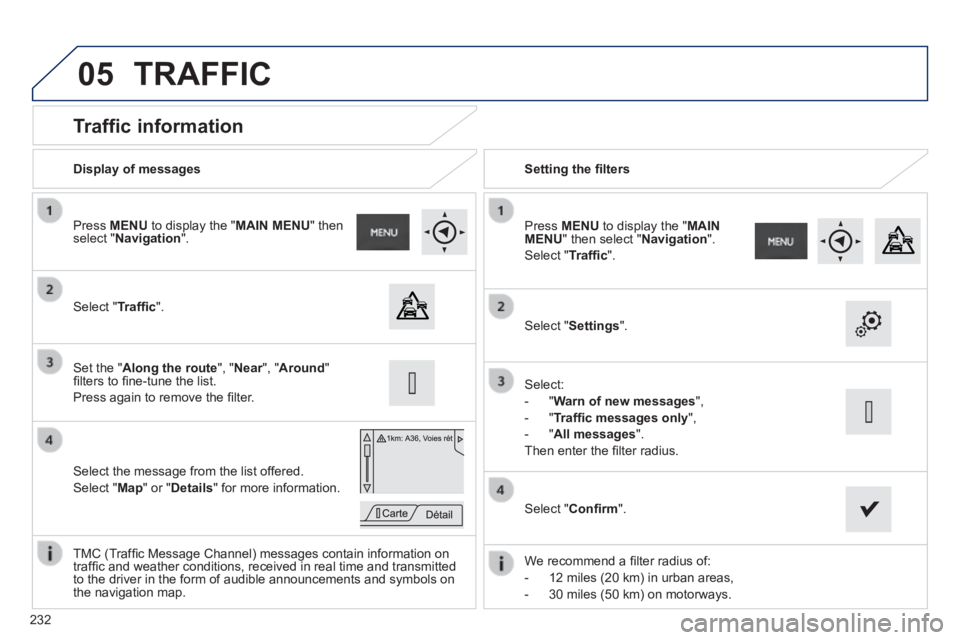
Traffic information
Select " Traffi c ".
Press MENU to display the " MAIN MENU " then select " Navigation ".
Select the message from the list offered.
Select " Map " or " Details " for more information.
Set the " Along the route ", " Near ", " Near ", " NearAround " fi lters to fi ne-tune the list.
Press again to remove the fi lter.
Select " Settings ".
Select:
- " Warn of new messages ",
- " Traffi c messages only ",
- " All messages ".
Then enter the fi lter radius.
Press MENU to display the " MAIN MENU " then select " Navigation ".
Select " Traffi c ".
Display of messages Setting the fi lters
We recommend a fi lter radius of:
- 12 miles (20 km) in urban areas,
- 30 miles (50 km) on motorways.
TMC (Traffi c Message Channel) messages contain information on traffi c and weather conditions, received in real time and transmitted to the driver in the form of audible announcements and symbols on the navigation map.
Select " Confi rm ".
TRAFFIC
Page 235 of 336
05
233
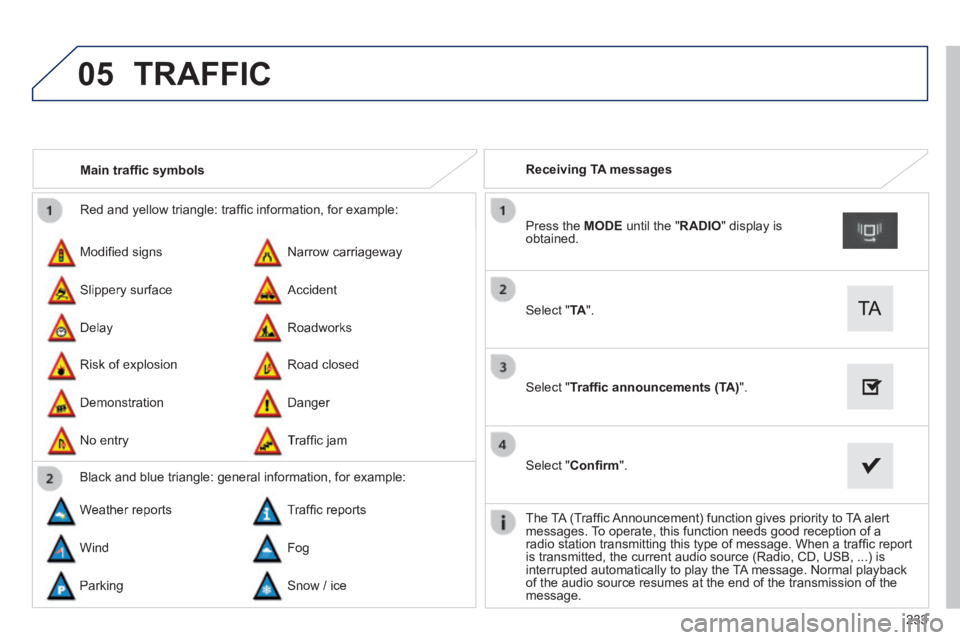
Red and yellow triangle: traffi c information, for example:
Modifi ed signs
Risk of explosion
Narrow carriageway
Road closed
Slippery surface
Demonstration
Accident
Danger
Delay
No entry
Roadworks
Traffi c jam
Main traffi c symbols
Black and blue triangle: general information, for example:
Weather reports Traffi c reports
Wind Fog
Parking Snow / ice
Receiving TA messages
Select " TA ".
Press the MODE until the " RADIO " display is obtained.
Select " Traffi c announcements (TA) ".
Select " Confi rm ".
The TA (Traffi c Announcement) function gives priority to TA alert messages. To operate, this function needs good reception of a radio station transmitting this type of message. When a traffi c report is transmitted, the current audio source (Radio, CD, USB, ...) is interrupted automatically to play the TA message. Normal playback of the audio source resumes at the end of the transmission of the message.
TRAFFIC
Page 236 of 336
05
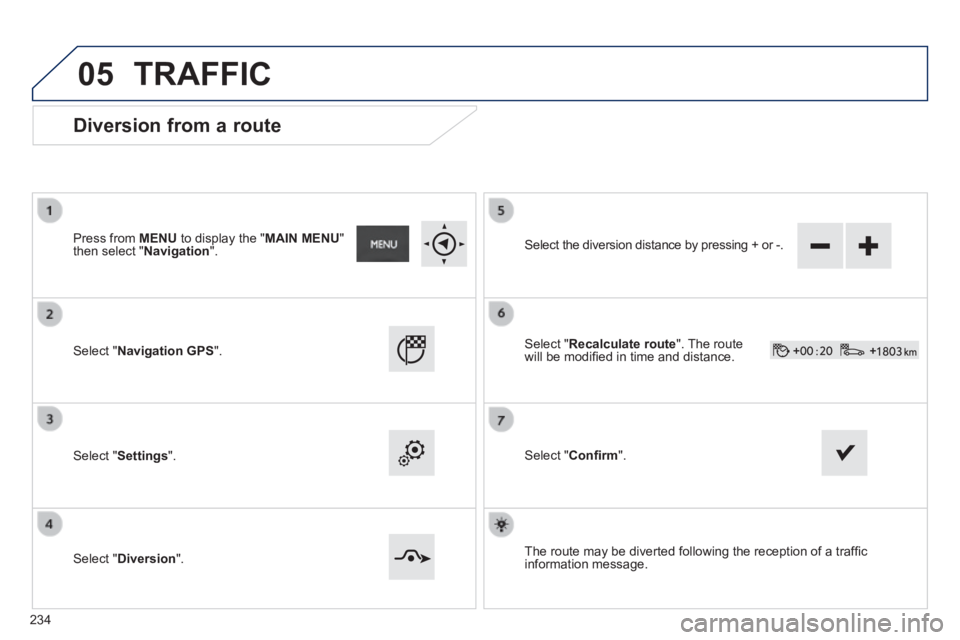
Diversion from a route
Press from MENU to display the " MAIN MENU " then select " Navigation ".
Select " Navigation GPS ".
Select " Settings ".
Select " Diversion ".
Select the diversion distance by pressing + or -.
Select " Recalculate route ". The route will be modifi ed in time and distance.
Select " Confi rm ".
The route may be diverted following the reception of a traffi c information message.
TRAFFIC
234
Page 237 of 336
05
235
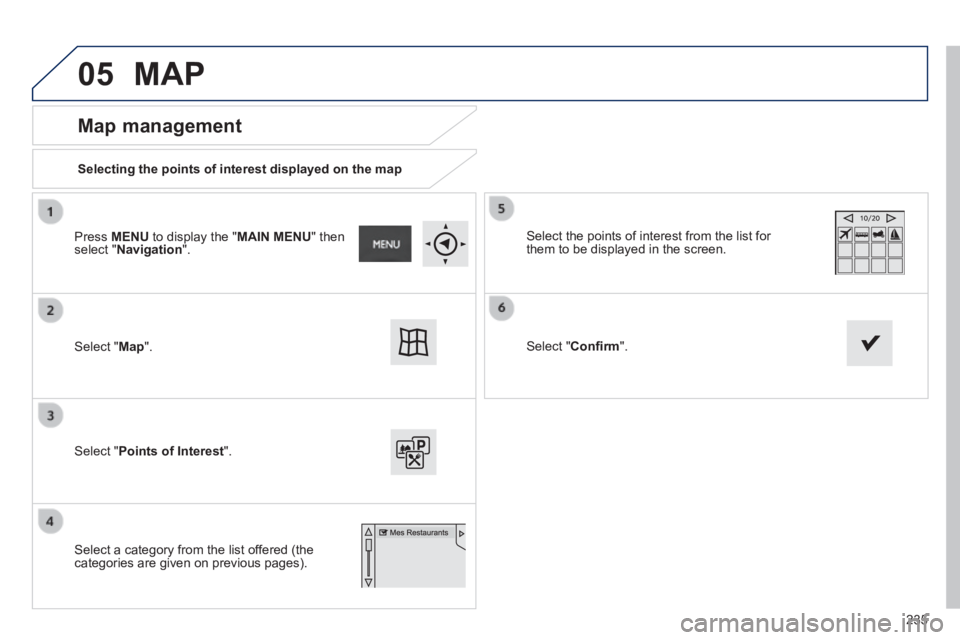
Map management
Selecting the points of interest displayed on the map
Select " Map ".
Select " Points of Interest ".
Select the points of interest from the list for them to be displayed in the screen.
Select a category from the list offered (the categories are given on previous pages).
Select " Confi rm ".
Press MENU to display the " MAIN MENU " then select " Navigation ".
MAP