display PEUGEOT 2008 2014 Owner's Manual
[x] Cancel search | Manufacturer: PEUGEOT, Model Year: 2014, Model line: 2008, Model: PEUGEOT 2008 2014Pages: 336, PDF Size: 9.35 MB
Page 81 of 336
79
4
Driving
Starting - Stopping the engine
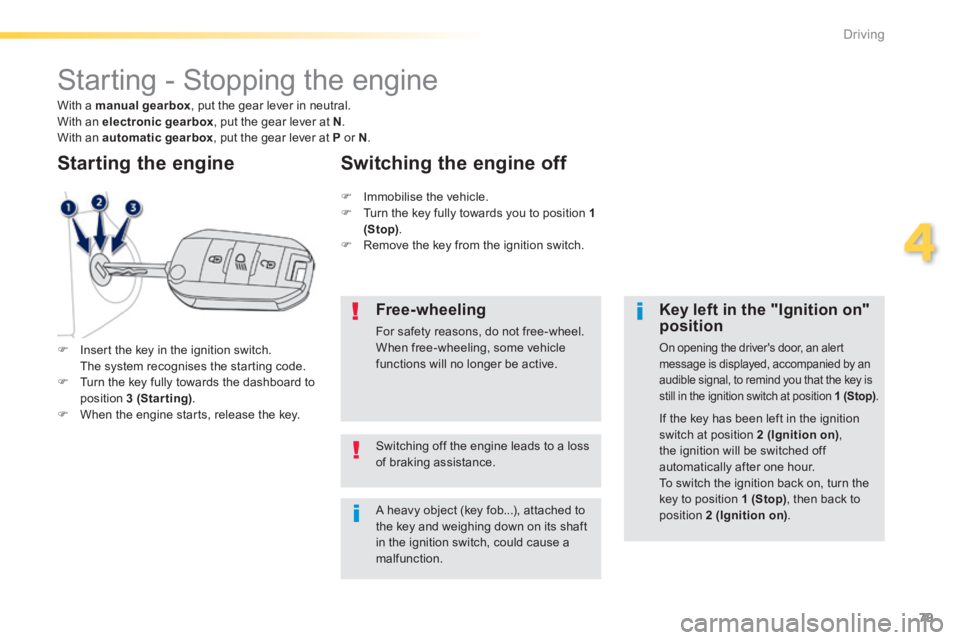
Insert the key in the ignition switch. The system recognises the starting code. Turn the key fully towards the dashboard to position 3 (Starting) . When the engine starts, release the key.
Starting the engine
A heavy object (key fob...), attached to the key and weighing down on its shaft in the ignition switch, could cause a malfunction.
Key left in the "Ignition on" position
On opening the driver's door, an alert message is displayed, accompanied by an audible signal, to remind you that the key is still in the ignition switch at position 1 (Stop) .
Immobilise the vehicle. Turn the key fully towards you to position 1 (Stop) . Remove the key from the ignition switch.
Switching the engine off
If the key has been left in the ignition
switch at position 2 (Ignition on) , the ignition will be switched off automatically after one hour. To switch the ignition back on, turn the key to position 1 (Stop) , then back to position 2 (Ignition on) .
Free-wheeling
For safety reasons, do not free-wheel. When free-wheeling, some vehicle functions will no longer be active.
Switching off the engine leads to a loss of braking assistance.
With a manual gearbox , put the gear lever in neutral. With an electronic gearbox , put the gear lever at N . With an automatic gearbox , put the gear lever at P or N .
Page 85 of 336
83
4
Driving
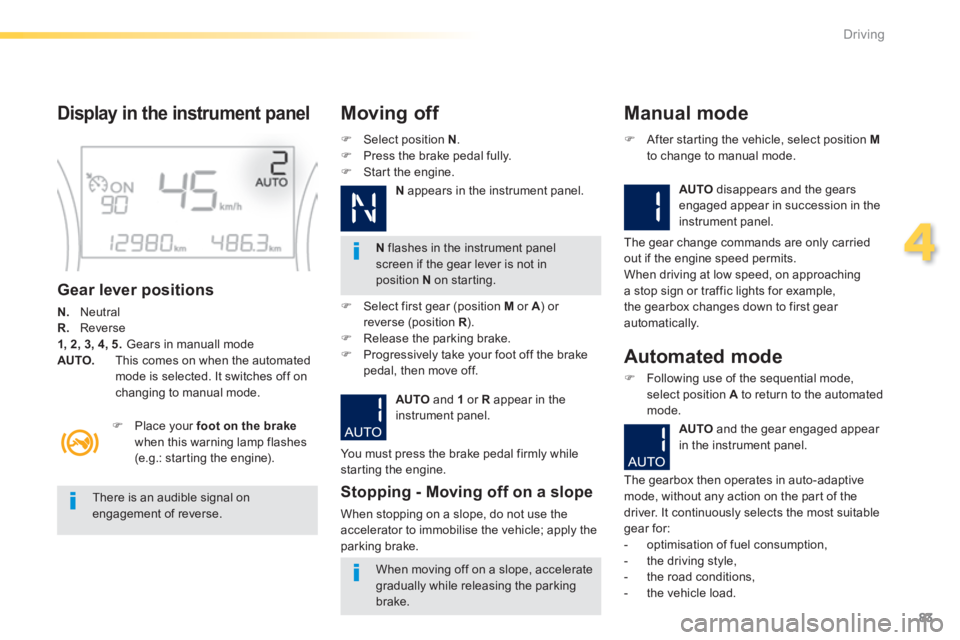
Display in the instrument panel
Gear lever positions
N. Neutral R. Reverse 1, 2, 3, 4, 5. Gears in manuall mode AUTO. This comes on when the automated mode is selected. It switches off on changing to manual mode.
Select position N . Press the brake pedal fully. Start the engine.
Moving off
N flashes in the instrument panel screen if the gear lever is not in position N on starting.
Place your foot on the brakewhen this warning lamp flashes (e.g.: starting the engine).
There is an audible signal on engagement of reverse.
When moving off on a slope, accelerate
gradually while releasing the parking brake.
Select first gear (position M or A ) or A ) or Areverse (position R ) .R ) .R Release the parking brake. Progressively take your foot off the brake pedal, then move off.
AUTO and 1 or R appear in the instrument panel.
Stopping - Moving off on a slope
When stopping on a slope, do not use the accelerator to immobilise the vehicle; apply the parking brake.
Manual mode
AUTO disappears and the gears engaged appear in succession in the instrument panel.
After starting the vehicle, select position Mto change to manual mode.
The gear change commands are only carried out if the engine speed permits. When driving at low speed, on approaching a stop sign or traffic lights for example, the gearbox changes down to first gear automatically.
You must press the brake pedal firmly while starting the engine.
Automated mode
Following use of the sequential mode, select position A to return to the automated mode.
AUTO and the gear engaged appear
in the instrument panel.
The gearbox then operates in auto-adaptive mode, without any action on the part of the driver. It continuously selects the most suitable gear for: - optimisation of fuel consumption, - the driving style, - the road conditions,
- the vehicle load.
N appears in the instrument panel.
Page 86 of 336
84
Driving
Never select neutral N while the vehicle is moving. Only engage reverse gear R when the vehicle is immobilised, with your foot on the brake pedal. In all cases, you must apply the parking brake to immobilise the vehicle.
"Auto sequential" mode
In the automated mode, you can resume control temporarily at any time using the steering mounted control paddles. The use of these paddles permits manual selection of the gears in situations which require a more rapid change-down than in the automated mode (arrival at a roundabout, leaving a car park with a steep gradient, over taking...). The gearbox engages the required gear if the engine speed permits. AUTO remains displayed on the instrument panel. After a few moments, the gearbox resumes automatic control of the gears.
Stopping the vehicle
Before switching off the engine, you can change to position N to be in neutral. In this case, you must apply the parking brake to immobilise the vehicle.
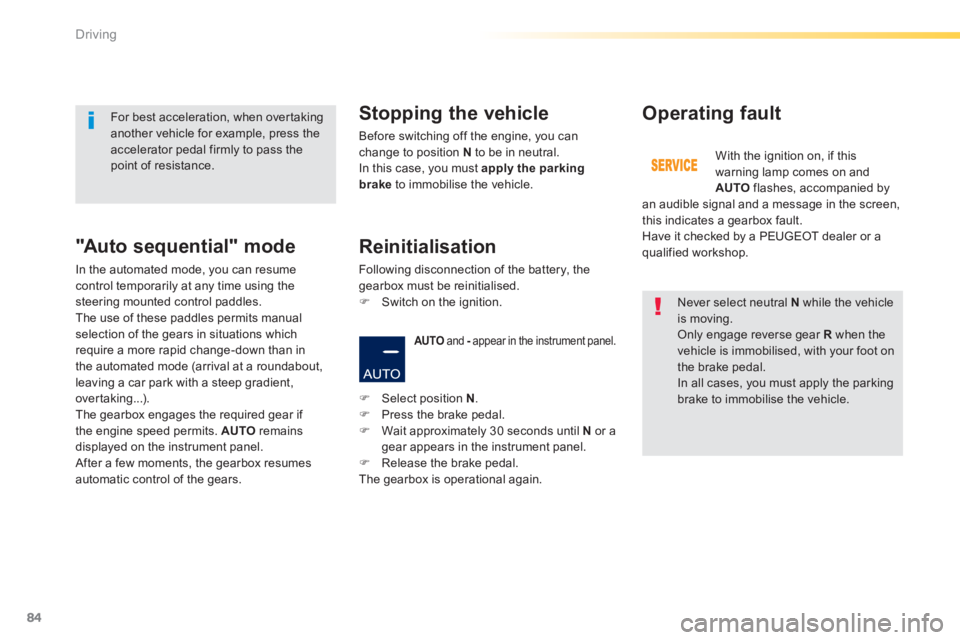
AUTO and - appear in the instrument panel. - appear in the instrument panel. -
Operating fault
With the ignition on, if this warning lamp comes on and AUTO flashes, accompanied by an audible signal and a message in the screen, this indicates a gearbox fault. Have it checked by a PEUGEOT dealer or a qualified workshop.
For best acceleration, when overtaking another vehicle for example, press the accelerator pedal firmly to pass the point of resistance.
Select position N . Press the brake pedal. Wait approximately 30 seconds until N or a gear appears in the instrument panel. Release the brake pedal. The gearbox is operational again.
Reinitialisation
Following disconnection of the battery, the gearbox must be reinitialised. Switch on the ignition.
Page 88 of 336
86
Driving
Engagement of reverse gear is accompanied by an audible signal.
N flashes in the instrument panel, accompanied by an audible signal and a message in the instrument panel screen, if the gear lever is not in position N on starting.
For optimum acceleration, for example when overtaking another vehicle, press the accelerator pedal firmly past the point of resistance.
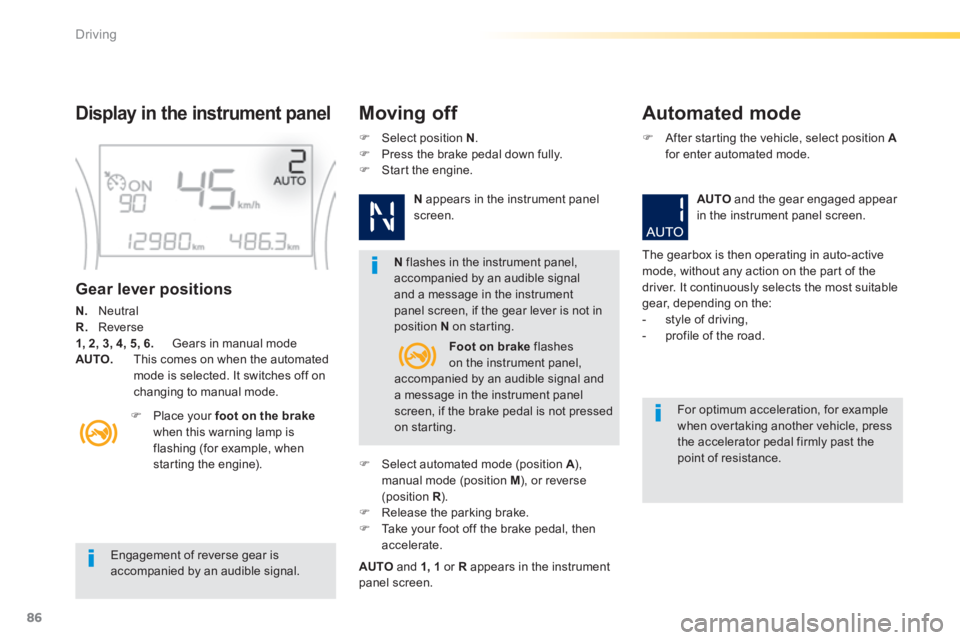
Display in the instrument panel Moving off Automated mode
Gear lever positions
N. Neutral R. Reverse 1, 2, 3, 4, 5, 6. Gears in manual mode AUTO. This comes on when the automated mode is selected. It switches off on changing to manual mode.
Place your foot on the brakewhen this warning lamp is flashing (for example, when starting the engine).
Select position N . Press the brake pedal down fully. Start the engine.
N appears in the instrument panel screen.
Select automated mode (position A ), A ), Amanual mode (position M ), or reverse (position R ). R ). R Release the parking brake. Take your foot off the brake pedal, then accelerate.
AUTO and 1, 1 or R appears in the instrument panel screen.
After starting the vehicle, select position Afor enter automated mode.
AUTO and the gear engaged appear in the instrument panel screen.
The gearbox is then operating in auto-active mode, without any action on the part of the driver. It continuously selects the most suitable gear, depending on the: - style of driving, - profile of the road. Foot on brake flashes on the instrument panel, accompanied by an audible signal and a message in the instrument panel screen, if the brake pedal is not pressed on starting.
Page 89 of 336

87
4
Driving
At very low speed, if reverse gear is requested, this will only be taken into account when the vehicle is immobilised. A warning lamp appears in the instrument panel screen.
Manual gear changing Manual mode
On sharp acceleration, the gearbox will not change up unless the driver acts on the gear lever or the steering mounted paddles. Never select neutral N while the vehicle is moving. Only engage reverse gear R when the vehicle is immobilised with the brake pedal pressed.
This selective gear change mode enables you to overtake, for example, while still remaining in automatic mode. Operate the + or - steering mounted control paddle. The gearbox engages the gear requested if the engine speed permits. AUTO is still displayed in the instrument panel.
After a few moments without any action on the controls, the gearbox resumes automatic control of the gears.
When the vehicle has moved off, select position M to change to manual mode. Pull the lever towards the + sign to change up a gear. Push the lever towards the - sign to change
down a gear.
The gears engaged appear successively in the instrument panel screen.
The gear change requests are only carried out if the engine speed permits. It is not necessary to release the accelerator during gear changes. When braking or slowing down, the gearbox changes down automatically to permit acceleration in the correct gear.
Page 91 of 336
89
4
Driving
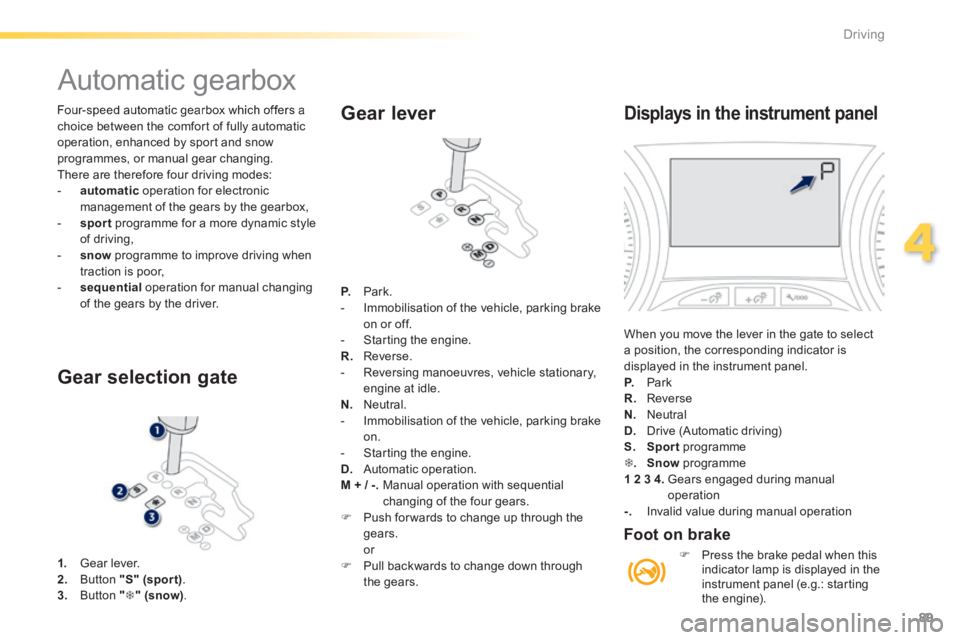
Four-speed automatic gearbox which offers a choice between the comfort of fully automatic operation, enhanced by sport and snow programmes, or manual gear changing. There are therefore four driving modes: - automatic operation for electronic management of the gears by the gearbox, - sport programme for a more dynamic style of driving, - snow programme to improve driving when traction is poor, - sequential operation for manual changing of the gears by the driver.
Automatic gearbox
1. Gear lever. 2. Button "S" (spor t) . 3. Button "" (snow).
Gear selection gate
Gear lever
P. Park. - Immobilisation of the vehicle, parking brake on or off. - Starting the engine. R. Reverse. - Reversing manoeuvres, vehicle stationary, engine at idle. N. Neutral. - Immobilisation of the vehicle, parking brake on. - Starting the engine. D. Automatic operation. M + / -. Manual operation with sequential changing of the four gears. Push for wards to change up through the gears. or Pull backwards to change down through the gears.
Displays in the instrument panel
When you move the lever in the gate to select a position, the corresponding indicator is displayed in the instrument panel. P. Park R. Reverse N. Neutral
D. Drive (Automatic driving) S. Sport programme . Snow programme 1 2 3 4. Gears engaged during manual operation -. Invalid value during manual operation
Foot on brake
Press the brake pedal when this indicator lamp is displayed in the instrument panel (e.g.: starting the engine).
Page 92 of 336
90
Driving
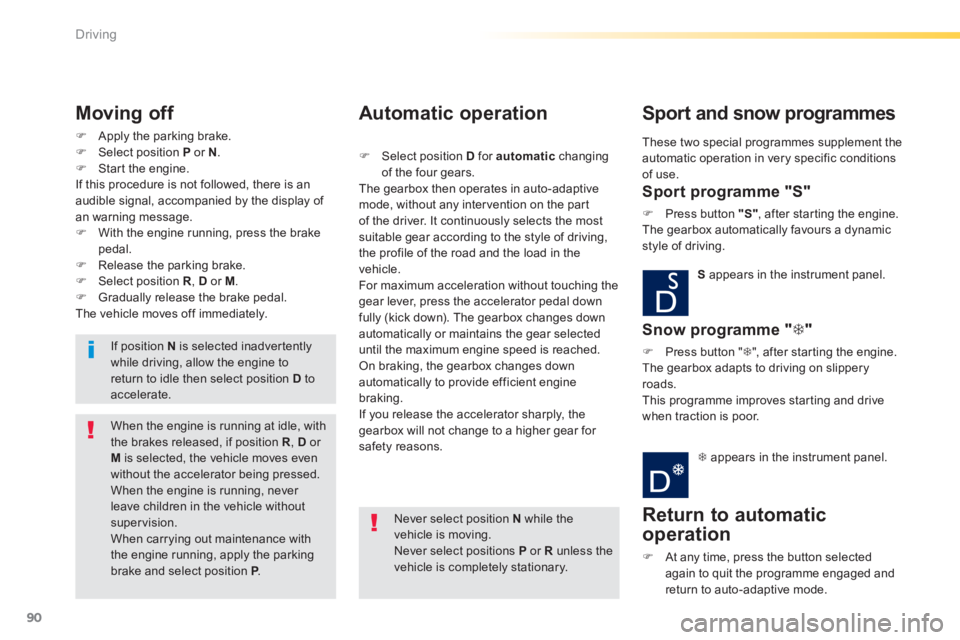
Apply the parking brake. Select position P or N . Start the engine. If this procedure is not followed, there is an audible signal, accompanied by the display of an warning message. With the engine running, press the brake pedal. Release the parking brake. Select position R , D or M . Gradually release the brake pedal. The vehicle moves off immediately.
Moving off
When the engine is running at idle, with the brakes released, if position R , D or M is selected, the vehicle moves even without the accelerator being pressed. When the engine is running, never leave children in the vehicle without supervision. When carrying out maintenance with the engine running, apply the parking brake and select position P . P . P
If position N is selected inadvertently while driving, allow the engine to return to idle then select position D to accelerate.
Never select position N while the vehicle is moving. Never select positions P or R unless the vehicle is completely stationary.
Automatic operation
Select position D for automatic changing of the four gears. The gearbox then operates in auto-adaptive mode, without any intervention on the part of the driver. It continuously selects the most
suitable gear according to the style of driving, the profile of the road and the load in the vehicle. For maximum acceleration without touching the gear lever, press the accelerator pedal down fully (kick down). The gearbox changes down automatically or maintains the gear selected until the maximum engine speed is reached. On braking, the gearbox changes down automatically to provide efficient engine braking. If you release the accelerator sharply, the gearbox will not change to a higher gear for safety reasons.
Sport and snow programmes
Sport programme "S"
Press button "S" , after starting the engine. The gearbox automatically favours a dynamic style of driving.
S appears in the instrument panel.
Snow programme " "
Press button " ", after starting the engine. The gearbox adapts to driving on slippery roads. This programme improves starting and drive when traction is poor.
appears in the instrument panel.
Return to automatic
operation
At any time, press the button selected again to quit the programme engaged and return to auto-adaptive mode.
These two special programmes supplement the automatic operation in very specific conditions of use.
Page 93 of 336
91
4
Driving
Manual operation
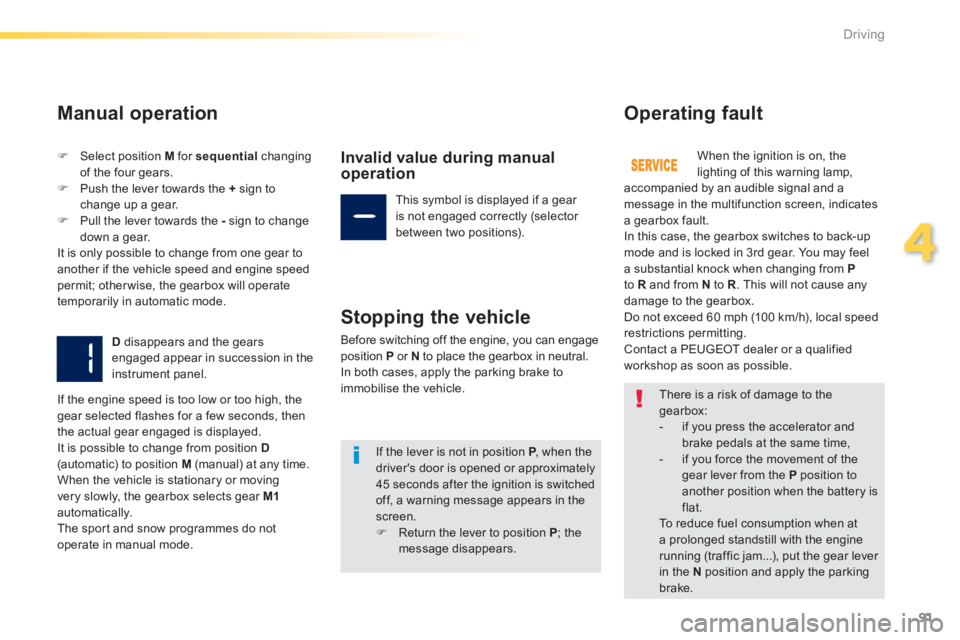
Select position M for sequential changing of the four gears. Push the lever towards the + sign to change up a gear. Pull the lever towards the - sign to change
down a gear. It is only possible to change from one gear to another if the vehicle speed and engine speed permit; otherwise, the gearbox will operate temporarily in automatic mode.
D disappears and the gears engaged appear in succession in the instrument panel.
Invalid value during manual operation
This symbol is displayed if a gear is not engaged correctly (selector between two positions).
Stopping the vehicle
Before switching off the engine, you can engage position P or N to place the gearbox in neutral. In both cases, apply the parking brake to immobilise the vehicle.
Operating fault
When the ignition is on, the lighting of this warning lamp, accompanied by an audible signal and a message in the multifunction screen, indicates a gearbox fault. In this case, the gearbox switches to back-up mode and is locked in 3rd gear. You may feel a substantial knock when changing from Pto R and from N to R . This will not cause any damage to the gearbox. Do not exceed 60 mph (100 km/h), local speed restrictions permitting. Contact a PEUGEOT dealer or a qualified workshop as soon as possible.
If the engine speed is too low or too high, the gear selected flashes for a few seconds, then the actual gear engaged is displayed. It is possible to change from position D(automatic) to position M (manual) at any time. When the vehicle is stationary or moving very slowly, the gearbox selects gear M1automatically. The sport and snow programmes do not
operate in manual mode.
There is a risk of damage to the gearbox: - if you press the accelerator and
brake pedals at the same time, - if you force the movement of the gear lever from the P position to another position when the battery is flat. To reduce fuel consumption when at a prolonged standstill with the engine running (traffic jam...), put the gear lever in the N position and apply the parking
brake.
If the lever is not in position P , when the P , when the Pdriver's door is opened or approximately 45 seconds after the ignition is switched off, a warning message appears in the screen. Return the lever to position P ; the message disappears.
Page 99 of 336
97
4
Driving
Speed limiter
System which prevents the vehicle from exceeding the speed programmed by the driver. When the programmed speed limit is reached, pressing the accelerator pedal in the normal manner no longer has any effect.
The speed limiter is switched on manually: the programmed speed must be at least 20 mph (30 km/h).
The speed limiter is switched off by manual switched off by manual switched offoperation of the control.
The programmed speed can be exceeded temporarily by pressing the accelerator firmly. To return to the programmed speed, simply slow down to a speed below the programmed speed.
The speed limiter cannot, in any circumstances, replace the need to respect speed limits, nor can it replace the need for vigilance and responsibility on the part of the driver.
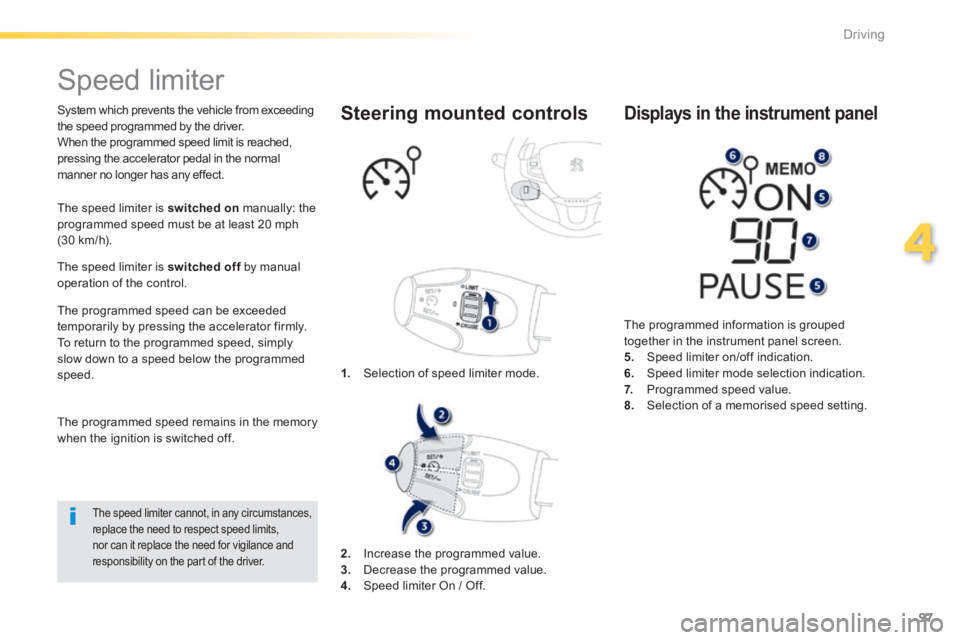
1. Selection of speed limiter mode.
Steering mounted controls
The programmed information is grouped together in the instrument panel screen. 5. Speed limiter on/off indication. 6. Speed limiter mode selection indication. 7. Programmed speed value. 8. Selection of a memorised speed setting.
Displays in the instrument panel
The programmed speed remains in the memory when the ignition is switched off.
2. Increase the programmed value. 3. Decrease the programmed value. 4. Speed limiter On / Off.
Page 100 of 336
98
Driving
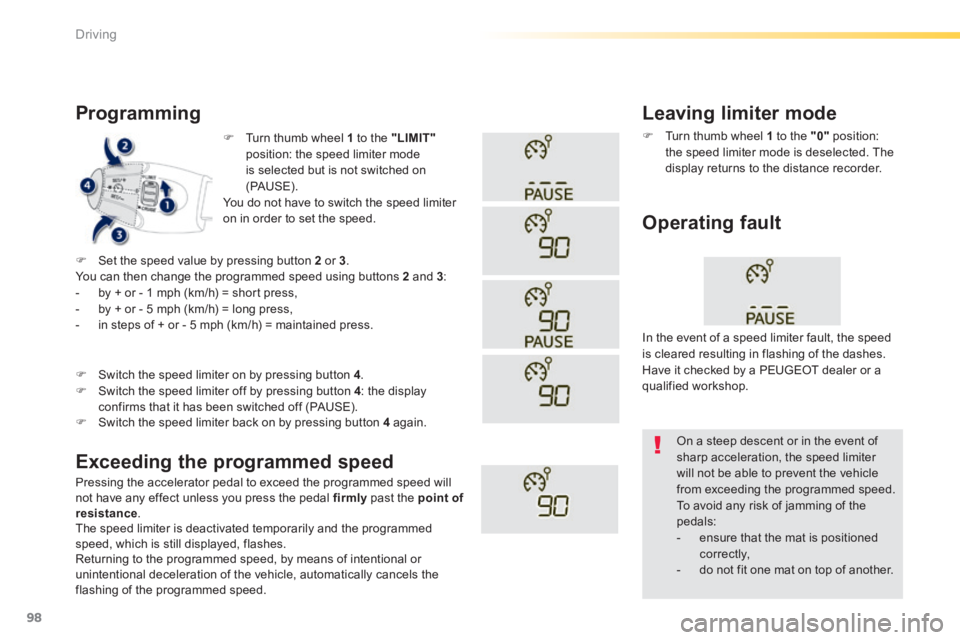
Turn thumb wheel 1 to the "LIMIT"position: the speed limiter mode is selected but is not switched on (PAUS E). You do not have to switch the speed limiter on in order to set the speed.
Programming
Pressing the accelerator pedal to exceed the programmed speed will not have any effect unless you press the pedal firmly past the point of resistance . The speed limiter is deactivated temporarily and the programmed speed, which is still displayed, flashes. Returning to the programmed speed, by means of intentional or unintentional deceleration of the vehicle, automatically cancels the flashing of the programmed speed.
Leaving limiter mode
Turn thumb wheel 1 to the "0" position: the speed limiter mode is deselected. The display returns to the distance recorder.
Operating fault
Set the speed value by pressing button 2 or 3 . You can then change the programmed speed using buttons 2 and 3 : - by + or - 1 mph (km/h) = short press, - by + or - 5 mph (km/h) = long press, - in steps of + or - 5 mph (km/h) = maintained press.
Exceeding the programmed speed
Switch the speed limiter back on by pressing button 4 again.
Switch the speed limiter on by pressing button 4 .
Switch the speed limiter off by pressing button 4 : the display confirms that it has been switched off (PAUSE).
In the event of a speed limiter fault, the speed is cleared resulting in flashing of the dashes. Have it checked by a PEUGEOT dealer or a qualified workshop.
On a steep descent or in the event of sharp acceleration, the speed limiter will not be able to prevent the vehicle from exceeding the programmed speed. To avoid any risk of jamming of the pedals: - ensure that the mat is positioned c o r r e c t l y, - do not fit one mat on top of another.