display PEUGEOT 2008 2014 Service Manual
[x] Cancel search | Manufacturer: PEUGEOT, Model Year: 2014, Model line: 2008, Model: PEUGEOT 2008 2014Pages: 336, PDF Size: 9.35 MB
Page 121 of 336

119
5
Visibility
Automatic rain sensitive
windscreen wipers
The windscreen wipers operate automatically, without any action on the part of the driver, if rain is detected (sensor behind the rear view mirror), adapting their speed to the intensity of the rainfall.
Switching on
Briefly push the control stalk downwards. This warning lamp comes on in the instrument panel and a message is displayed.
Briefly push the control stalk downwards again, or place the control stalk in another position (Int, 1 or 2). This warning lamp goes off in the instrument panel and a message is displayed.
Switching off
The automatic rain sensitive windscreen wipers must be reactivated by pushing the control stalk downwards, if the ignition has been off for more than one minute.
Page 203 of 336
201
8
Checks
Avoid prolonged contact of used oil or fluids with the skin. Most of these fluids are harmful to health or indeed very corrosive.
Do not discard used oil or fluids into sewers or onto the ground. Take used oil to a PEUGEOT dealer or a qualified workshop (France) or to an authorised waste disposal site.
Used products
Topping up
This additive must be topped up by a PEUGEOT dealer or a qualified workshop without delay.
Diesel additive level
(Diesel engine with particle
emission filter)
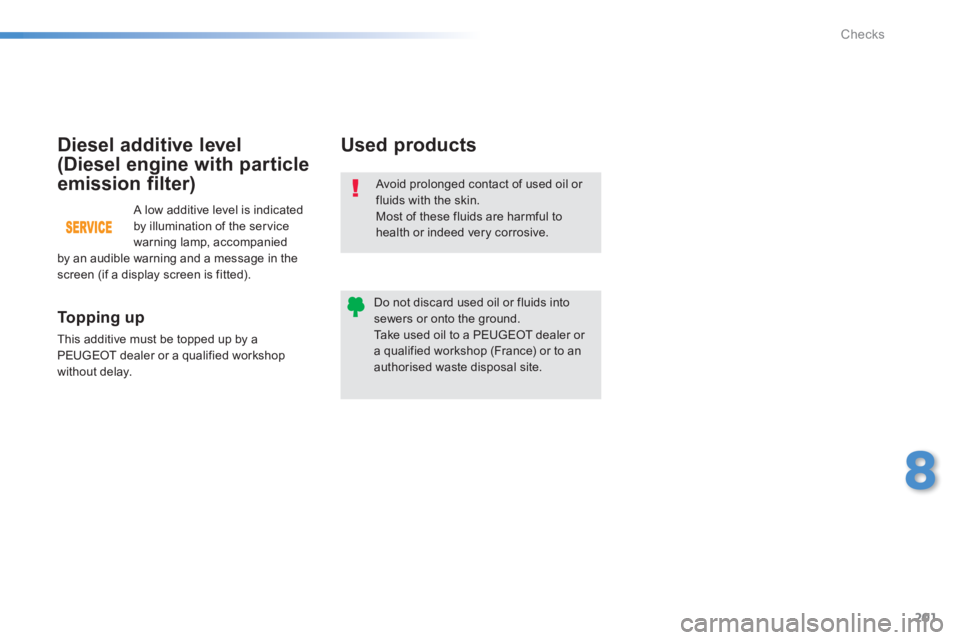
A low additive level is indicated by illumination of the service warning lamp, accompanied by an audible warning and a message in the screen (if a display screen is fitted).
Page 204 of 336
202
Checks
Checks
12 V battery
The battery does not require any maintenance. However, check that the terminals are clean and correctly tightened, particularly in summer and winter.
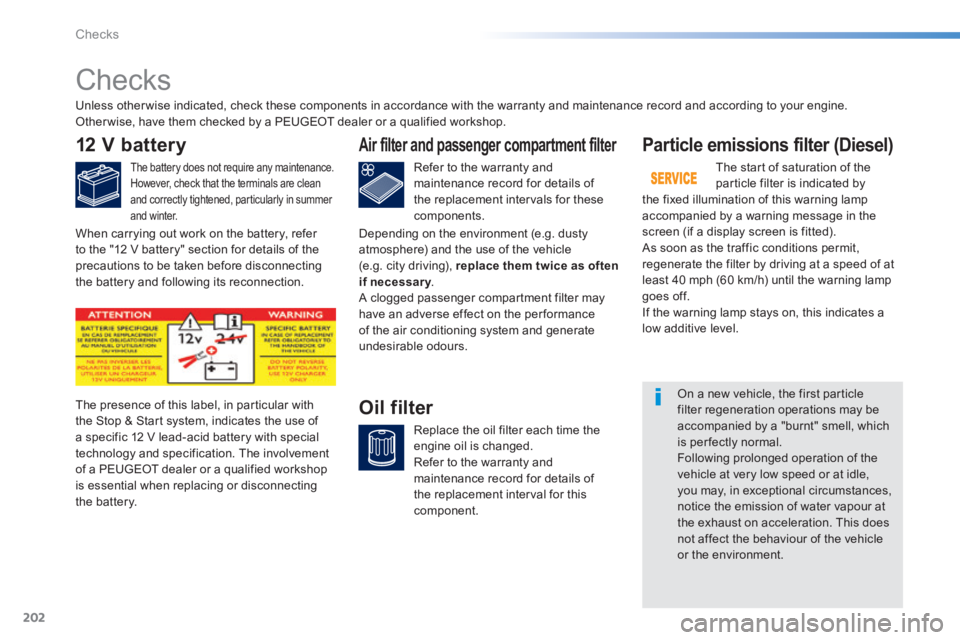
The presence of this label, in particular with the Stop & Start system, indicates the use of a specific 12 V lead-acid battery with special technology and specification. The involvement of a PEUGEOT dealer or a qualified workshop is essential when replacing or disconnecting the battery.
Particle emissions filter (Diesel)
The start of saturation of the particle filter is indicated by the fixed illumination of this warning lamp accompanied by a warning message in the screen (if a display screen is fitted). As soon as the traffic conditions permit, regenerate the filter by driving at a speed of at least 40 mph (60 km/h) until the warning lamp goes off. If the warning lamp stays on, this indicates a low additive level.
On a new vehicle, the first particle filter regeneration operations may be accompanied by a "burnt" smell, which is per fectly normal. Following prolonged operation of the vehicle at very low speed or at idle, you may, in exceptional circumstances, notice the emission of water vapour at the exhaust on acceleration. This does not affect the behaviour of the vehicle or the environment.
Unless other wise indicated, check these components in accordance with the warranty and maintenance record and according to your engine. Other wise, have them checked by a PEUGEOT dealer or a qualified workshop.
Air filter and passenger compartment filter
Refer to the warranty and maintenance record for details of the replacement intervals for these components.
Oil filter
Replace the oil filter each time the engine oil is changed. Refer to the warranty and maintenance record for details of the replacement interval for this component.
When carrying out work on the battery, refer to the "12 V battery" section for details of the precautions to be taken before disconnecting the battery and following its reconnection.
Depending on the environment (e.g. dusty atmosphere) and the use of the vehicle (e.g. city driving), replace them twice as often if necessary . if necessary . if necessary A clogged passenger compartment filter may have an adverse effect on the per formance of the air conditioning system and generate undesirable odours.
Page 218 of 336
01
216
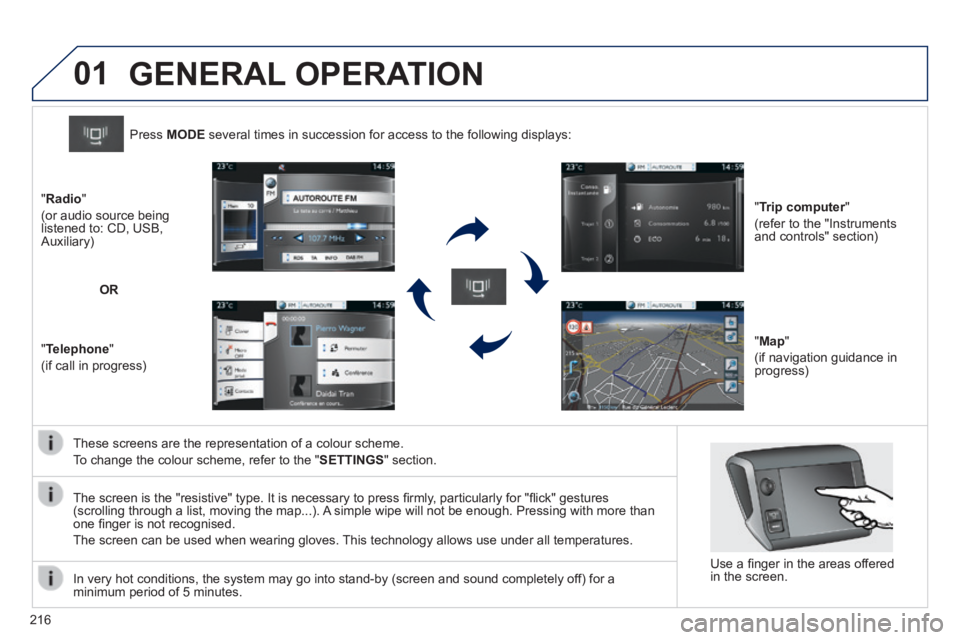
These screens are the representation of a colour scheme.
To change the colour scheme, refer to the " SETTINGS " section.
Press MODE several times in succession for access to the following displays:
" Trip computer " Trip computer " Trip computer
(refer to the "Instruments and controls" section)
" Map "
(if navigation guidance in progress)
" Radio "
(or audio source being listened to: CD, USB, Auxiliary)
" Telephone "
(if call in progress)
OR
GENERAL OPERATION
In very hot conditions, the system may go into stand-by (screen and sou\
nd completely off) for a minimum period of 5 minutes.
Use a fi nger in the areas offered in the screen.
The screen is the "resistive" type. It is necessary to press fi rmly, particularly for "fl ick" gestures (scrolling through a list, moving the map...). A simple wipe will not be enough. Pressing with more than one fi nger is not recognised.
The screen can be used when wearing gloves. This technology allows use under all temperatures.
Page 219 of 336
02
217
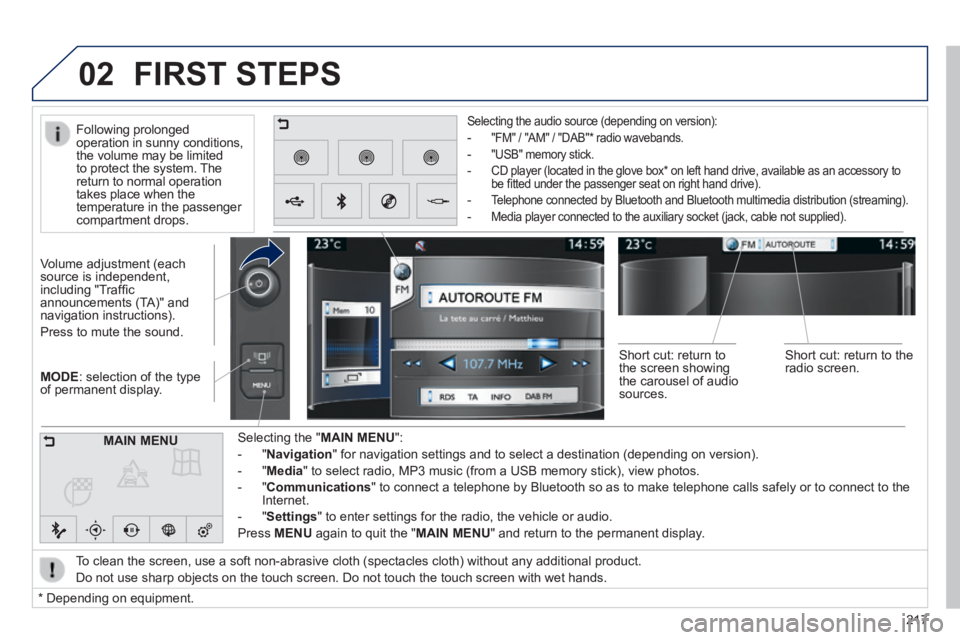
MODE : selection of the type of permanent display.
Volume adjustment (each source is independent, including "Traffi c announcements (TA)" and navigation instructions).
Press to mute the sound.
Selecting the " MAIN MENU ":
- " Navigation " for navigation settings and to select a destination (depending on ver\
sion).
- " Media " to select radio, MP3 music (from a USB memory stick), view photos.
- " Communications " to connect a telephone by Bluetooth so as to make telephone calls safe\
ly or to connect to the Internet.
- " Settings " to enter settings for the radio, the vehicle or audio.
Press MENU again to quit the " MAIN MENU " and return to the permanent display.
Selecting the audio source (depending on version):
- "FM" / "AM" / "DAB" * radio wavebands.
- "USB" memory stick.
- CD player (located in the glove box * on left hand drive, available as an accessory to be fi tted under the passenger seat on right hand drive).
- Telephone connected by Bluetooth and Bluetooth multimedia distribution (streaming).
- Media player connected to the auxiliary socket (jack, cable not supplie\
d).
To clean the screen, use a soft non-abrasive cloth (spectacles cloth) w\
ithout any additional product.
Do not use sharp objects on the touch screen. Do not touch the touch scr\
een with wet hands.
FIRST STEPS
* Depending on equipment.
MAIN MENU
Following prolonged operation in sunny conditions, the volume may be limited to protect the system. The return to normal operation takes place when the temperature in the passenger compartment drops.
Short cut: return to the screen showing the carousel of audio sources.
Short cut: return to the radio screen.
Page 220 of 336
03
218
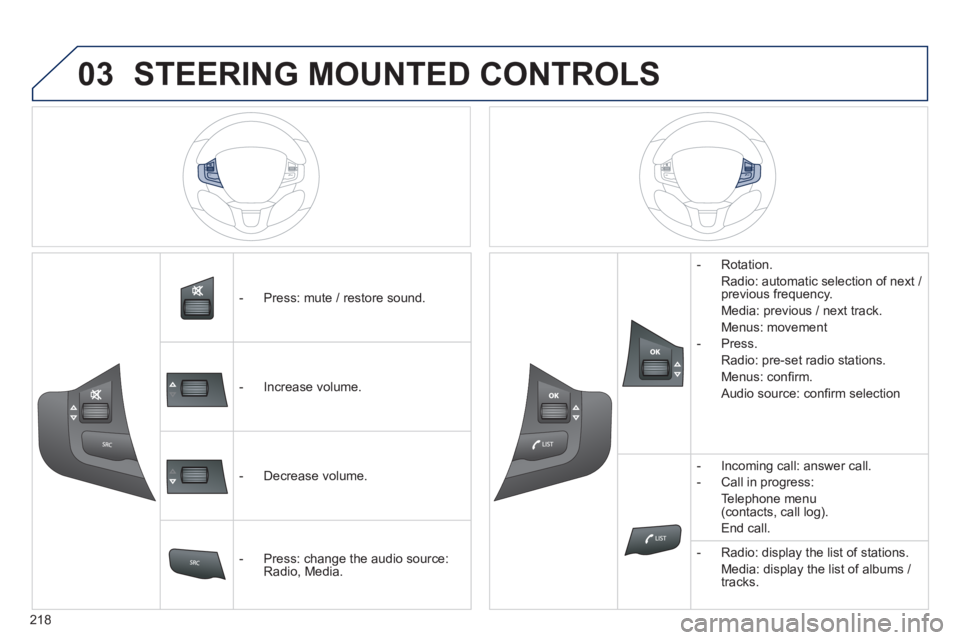
- Press: mute / restore sound.
- Increase volume.
- Decrease volume.
- Press: change the audio source: Radio, Media.
- Rotation.
Radio: automatic selection of next / previous frequency.
Media: previous / next track.
Menus: movement
- Press.
Radio: pre-set radio stations.
Menus: confi rm.
Audio source: confi rm selection
- Incoming call: answer call.
- Call in progress:
Telephone menu (contacts, call log).
End call.
- Radio: display the list of stations.
Media: display the list of albums / tracks.
STEERING MOUNTED CONTROLS
Page 221 of 336
04
219
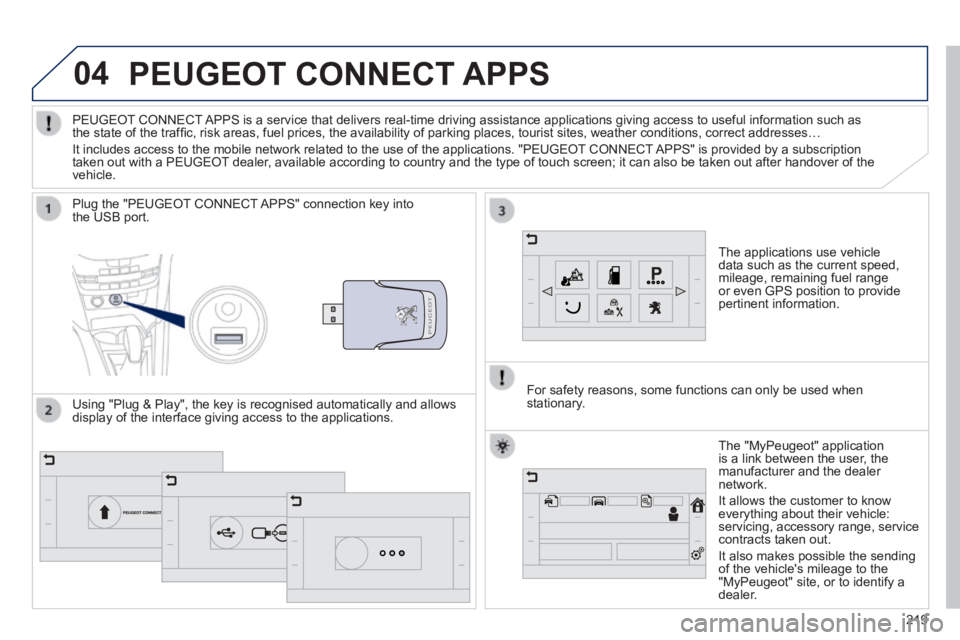
PEUGEOT CONNECT APPS
The applications use vehicle data such as the current speed, mileage, remaining fuel range or even GPS position to provide pertinent information.
Plug the "PEUGEOT CONNECT APPS" connection key into the USB port.
The "MyPeugeot" application is a link between the user, the manufacturer and the dealer network.
It allows the customer to know everything about their vehicle: servicing, accessory range, service contracts taken out.
It also makes possible the sending of the vehicle's mileage to the "MyPeugeot" site, or to identify a dealer.
PEUGEOT CONNECT APPS is a service that delivers real-time driving assistance application\
s giving access to useful information such as the state of the traffi c, risk areas, fuel prices, the availability of parking places, tourist sites, weather conditions, correct addresses…
It includes access to the mobile network related to the use of the appli\
cations. "PEUGEOT CONNECT APPS" is provided by a subscription taken out with a PEUGEOT dealer, available according to country and the type of touch screen; it can al\
so be taken out after handover of the vehicle.
For safety reasons, some functions can only be used when stationary. Using "Plug & Play", the key is recognised automatically and allows display of the interface giving access to the applications.
Page 223 of 336
221
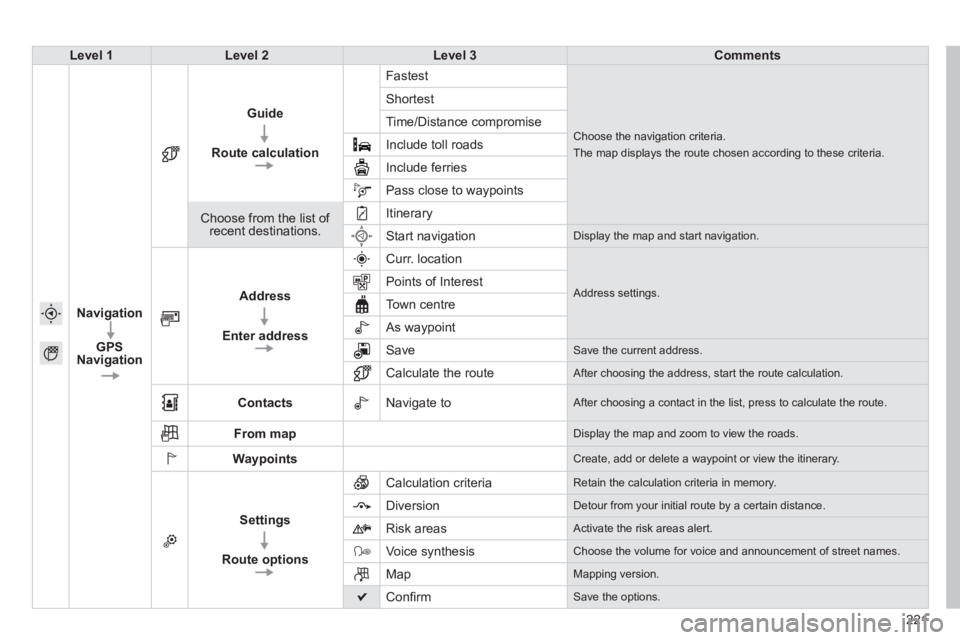
Level 1Level 2Level 3Comments
Navigation
GPS Navigation
Guide
Route calculation
Fastest
Choose the navigation criteria.
The map displays the route chosen according to these criteria.
Shortest
Time/Distance compromise
Include toll roads
Include ferries
Pass close to waypoints
Choose from the list of recent destinations.
Itinerary
Start navigation Display the map and start navigation.
Address
Enter address
Curr. location
Address settings. Points of Interest
Town centre
As waypoint
Save Save the current address.
Calculate the route After choosing the address, start the route calculation.
Contacts Navigate to After choosing a contact in the list, press to calculate the route.
From map Display the map and zoom to view the roads.
Waypoints Create, add or delete a waypoint or view the itinerary.
Settings
Route options
Calculation criteria Retain the calculation criteria in memory.
Diversion Detour from your initial route by a certain distance.
Risk areas Activate the risk areas alert.
Voice synthesis Choose the volume for voice and announcement of street names.
Map Mapping version.
Confi rm Save the options.
Page 225 of 336
223223223
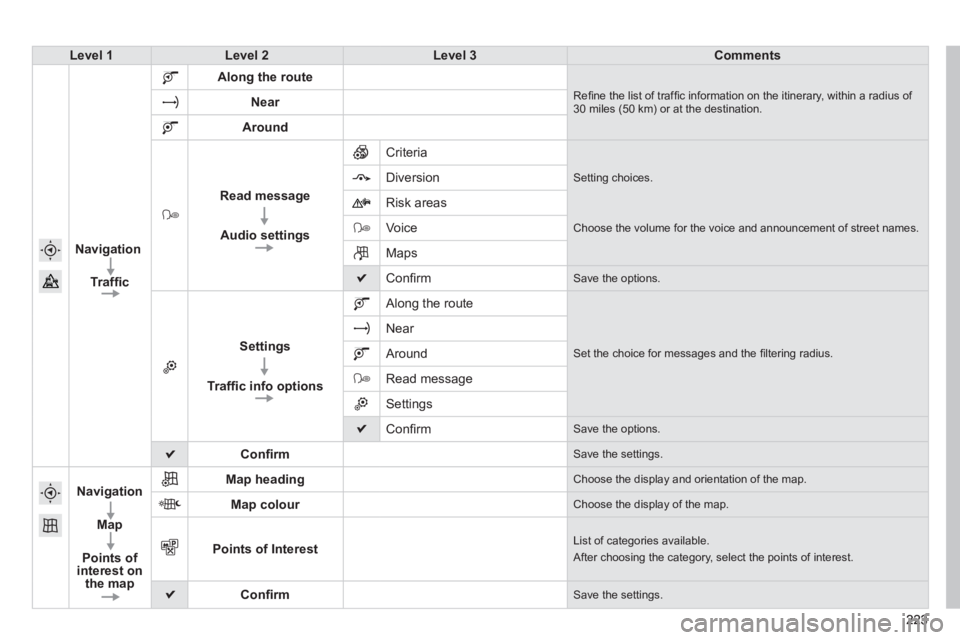
Level 1Level 2Level 3Comments
Navigation
Traffi c
Along the route
Refi ne the list of traffi c information on the itinerary, within a radius of 30 miles (50 km) or at the destination. Near
Around
Read message
Audio settings
Criteria
Setting choices. Diversion
Risk areas
Voice Choose the volume for the voice and announcement of street names.
Maps
Confi rm Save the options.
Settings
Traffi c info options
Along the route
Set the choice for messages and the fi ltering radius.
Near
Around
Read message
Settings
Confi rm Save the options.
Confi rm Save the settings.
Navigation
Map
Points of interest on the map
Map heading Choose the display and orientation of the map.
Map colour Choose the display of the map.
Points of Interest List of categories available.
After choosing the category, select the points of interest.
Confi rm Save the settings.
Page 226 of 336
05
224
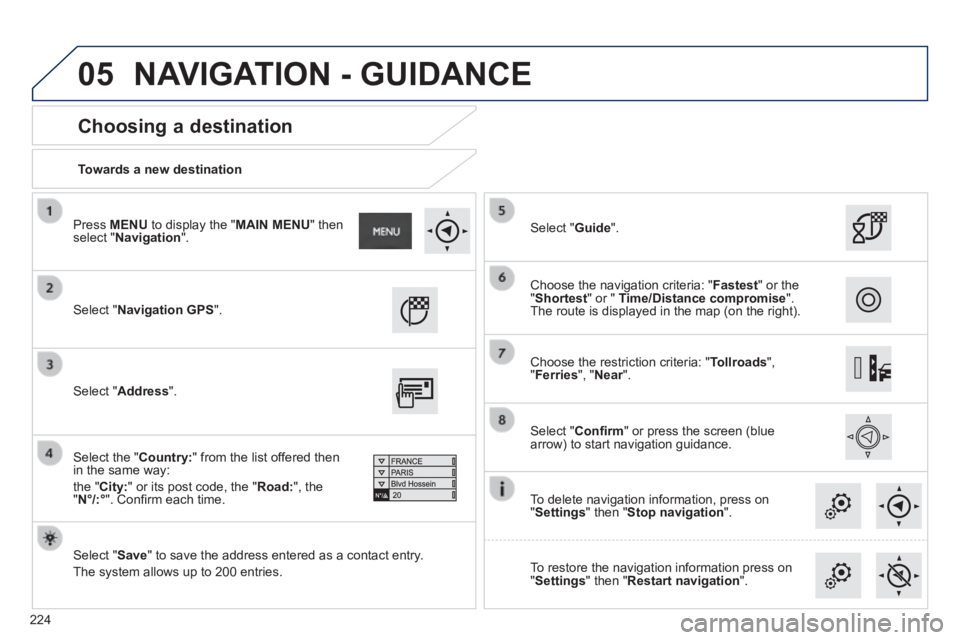
Towards a new destination
Choosing a destination
Select " Navigation GPS ".
Select " Save " to save the address entered as a contact entry.
The system allows up to 200 entries.
Select " Confi rm " or press the screen (blue arrow) to start navigation guidance.
Select " Address ".
Select the " Country: " from the list offered then in the same way:
the " City: " or its post code, the " Road: ", the " N°/:° ". Confi rm each time.
Select " Guide ".
Choose the restriction criteria: " Tollroads ", " Ferries ", " Near ". Near ". Near
Choose the navigation criteria: " Fastest " or the " Shortest " or " Time/Distance compromise ". The route is displayed in the map (on the right).
To delete navigation information, press on " Settings " then " Stop navigation ".
To restore the navigation information press on " Settings " then " Restart navigation ".
Press MENU to display the " MAIN MENU " then select " Navigation ".
NAVIGATION - GUIDANCE