ESP PEUGEOT 2008 2015 User Guide
[x] Cancel search | Manufacturer: PEUGEOT, Model Year: 2015, Model line: 2008, Model: PEUGEOT 2008 2015Pages: 340, PDF Size: 8.4 MB
Page 59 of 340
57
2008_en_Chap03_confort_ed01-2015
Rear seats
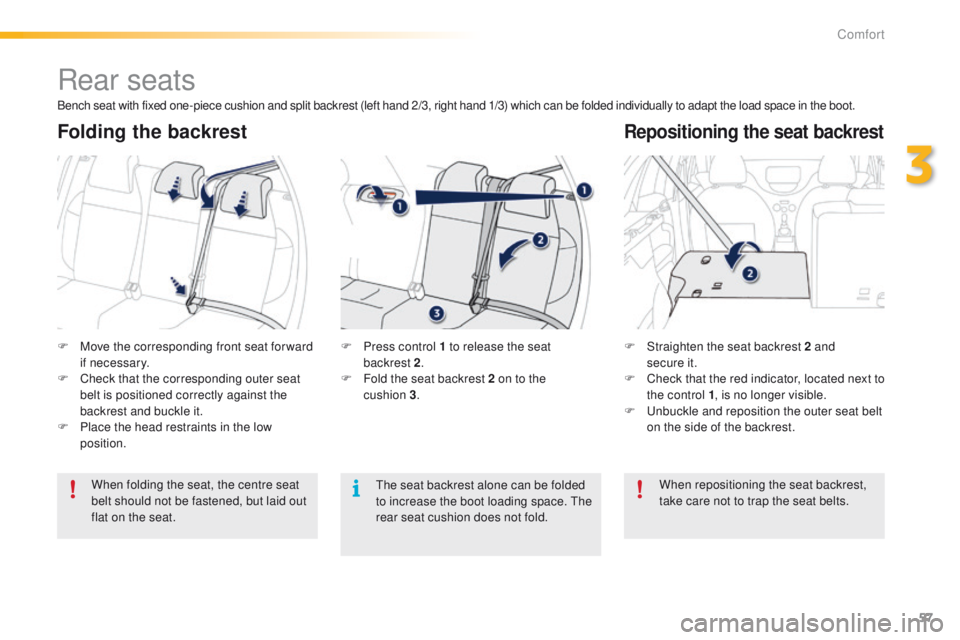
F Move the corresponding front seat for ward if necessary.
F
C
heck that the corresponding outer seat
belt is positioned correctly against the
backrest and buckle it.
F
P
lace the head restraints in the low
position. F
S traighten the seat backrest 2 and
secure it.
F
C
heck that the red indicator, located next to
the control 1 , is no longer visible.
F
U
nbuckle and reposition the outer seat belt
on the side of the backrest.
When folding the seat, the centre seat
belt should not be fastened, but laid out
flat on the seat. F
P ress control 1 to release the seat
backrest 2.
F
F
old the seat backrest 2 on to the
cushion
3.
Folding the backrestRepositioning the seat backrest
Bench seat with fixed one-piece cushion and split backrest (left hand 2/3, right hand 1/3) which can be folded individually to adapt the load space in the boot.
When repositioning the seat backrest,
take care not to trap the seat belts.
The seat backrest alone can be folded
to increase the boot loading space. The
rear seat cushion does not fold.
3
Comfort
Page 61 of 340
59
2008_en_Chap03_confort_ed01-2015
Mirrors
Each fitted with an adjustable mirror glass
providing the lateral rear ward vision necessary
for overtaking or parking. They can also be
folded for parking in confined spaces.
Door mirrors
The objects observed are, in reality,
closer than they appear.
Take this into account in order to
correctly judge the distance of vehicles
approaching from behind.
Demisting - DefrostingAdjustment
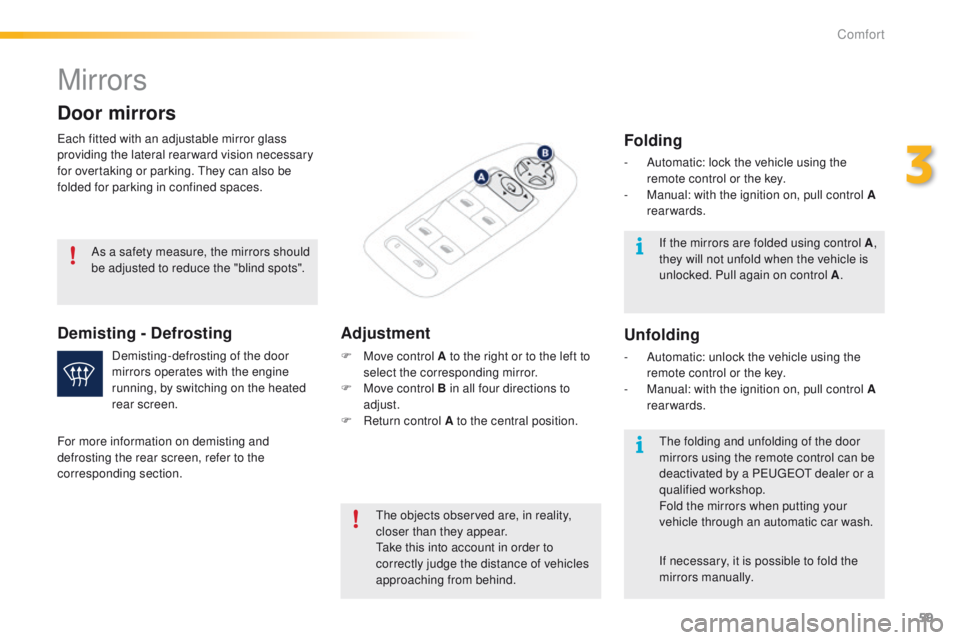
F Move control A to the right or to the left to
select the corresponding mirror.
F
M
ove control B in all four directions to
adjust.
F
R
eturn control A to the central position.
Demisting-defrosting of the door
mirrors operates with the engine
running, by switching on the heated
rear screen.
As a safety measure, the mirrors should
be adjusted to reduce the "blind spots".
For more information on demisting and
defrosting the rear screen, refer to the
corresponding section. If the mirrors are folded using control A
,
they will not unfold when the vehicle is
unlocked. Pull again on control A .
The folding and unfolding of the door
mirrors using the remote control can be
deactivated by a PEUGEOT dealer or a
qualified workshop.
Fold the mirrors when putting your
vehicle through an automatic car wash.
Folding
- Automatic: lock the vehicle using the remote control or the key.
-
M
anual: with the ignition on, pull control A
rearwards.
Unfolding
- Automatic: unlock the vehicle using the remote control or the key.
-
M
anual: with the ignition on, pull control A
rearwards.
If necessary, it is possible to fold the
mirrors manually.
3
Comfort
Page 64 of 340
62
2008_en_Chap03_confort_ed01-2015
In order for these systems to be fully effective, follow the operation and maintenance
guidelines below:
F
T
o obtain an even air distribution, take care not to obstruct the exterior air intake grilles
located at the base of the windscreen, the nozzles, the vents and the air outlets, as well
as the air extractor located in the boot.
F
D
o not cover the sunshine sensor, located on the dashboard; this is used for regulation
of the air conditioning system.
F
O
perate the air conditioning system for at least 5 to 10 minutes, once or twice a month
to keep it in per fect working order.
F
E
nsure that the passenger compartment filter is in good condition and have the filter
elements replaced regularly.
W
e recommend the use of a combined passenger compartment filter. Thanks to its
special active additive, it contributes to the purification of the air breathed by the
occupants and the cleanliness of the passenger compartment (reduction of allergic
symptoms, bad odours and greasy deposits).
F
T
o ensure correct operation of the air conditioning system, you are also advised to have
it checked regularly as recommended in the warranty and maintenance record.
F
I
f the system does not produce cold air, switch it off and contact a PEUGEOT dealer or
a qualified workshop.
When towing the maximum load on a steep gradient in high temperatures, switching off the
air conditioning increases the available engine power and so improves the towing ability.
Recommendations for ventilation and air conditioning
If after an extended stop in sunshine,
the interior temperature is very high, first
ventilate the passenger compartment for
a few moments.
Put the air flow control at a setting high
enough to quickly change the air in the
passenger compartment.
The air conditioning system does not
contain chlorine and does not present
any danger to the ozone layer.
The condensation created by the air
conditioning results in a discharge
of water under the vehicle which is
perfectly normal.
Stop & Start
The heating and air conditioning systems only work when the engine is running. To maintain
a comfortable temperature in the passenger compartment, you can temporarily deactivate
the Stop & Start system (see the corresponding section).
Comfort
Page 69 of 340
67
2008_en_Chap03_confort_ed01-2015
A setting around 21 enables you to obtain an
optimum level of comfort. Depending on your
requirements, a setting between 18 and 24 is usual.
In addition, it is recommended that you avoid a left /
right setting difference of more than 3.
On entering the vehicle, if the interior
temperature is much colder or warmer
than the comfort value, there is no need
to alter the value displayed in order to
obtain the required level of comfort.
The system corrects the temperature
difference automatically and as quickly
as possible.
Automatic visibility
programme
For maximum cooling or heating of
the passenger compartment, you can
exceed the minimum value of 14 or the
maximum value of 28.
F
P
ush the switch 2 or 3 down
until
"LO" is displayed or up
until
"HI" is displayed.
See the "Front demisting-defrosting"
section.
Depending on your requirements, you can
make a different selection from that offered by
the system by changing a setting. The other
functions will still be controlled automatically.
Resuming manual control
The air conditioning is designed to
operate efficiently in all seasons, with
the windows closed.
Air conditioning On/Off
It allows you:
- i n summer, to lower the temperature,
-
i
n winter, above 3 °C, to improve demisting.
Switching on
F
P
ress the " A/C" button, the associated
indicator lamp comes on.
The air conditioning cannot operate when the
air flow is set to off.
Switching off
F
P
ress the "A /C " button again; the
associated indicator lamp goes off.
Switching off may cause some problems
(humidity, misting).
When you modify a setting, the indicator
lamp in the "AUTO"
button goes off.
F
P
ress the "AUTO" button again
to return to the automatic comfort
programme.
Temperature adjustment
The driver and front passenger can each set
the temperature to suit their requirements.
The value indicated in the screen corresponds
to a level of comfort and not to a temperature in
degrees Celsius or Fahrenheit.
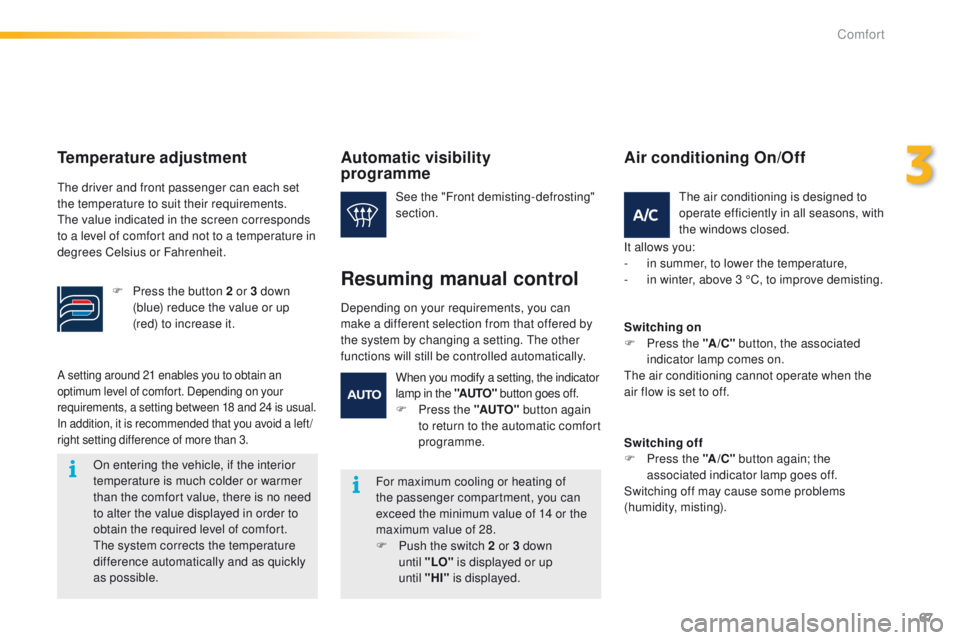
F
P
ress the button 2 or 3 down
(blue) reduce the value or up
(red) to increase it.
3
Comfort
Page 77 of 340
75
2008_en_Chap04_amenagements_ed01-2015
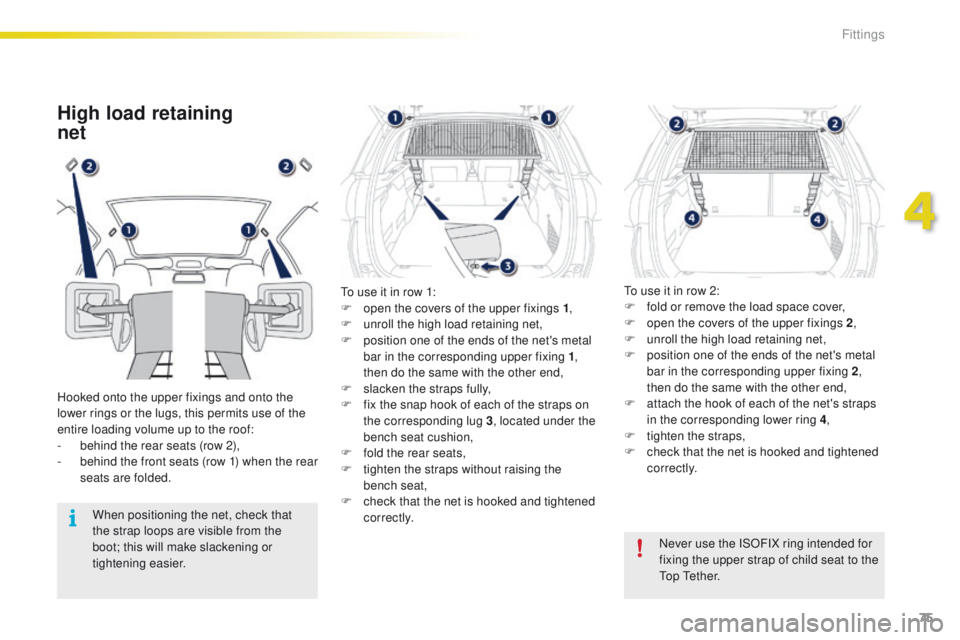
High load retaining
net
Hooked onto the upper fixings and onto the
lower rings or the lugs, this permits use of the
entire loading volume up to the roof:
-
b
ehind the rear seats (row 2),
-
b
ehind the front seats (row 1) when the rear
seats are folded.
When positioning the net, check that
the strap loops are visible from the
boot; this will make slackening or
tightening easier. Never use the ISOFIX ring intended for
fixing the upper strap of child seat to the
Top Tether.
To use it in row 1:
F
o
pen the covers of the upper fixings 1
,
F
u
nroll the high load retaining net,
F
p
osition one of the ends of the net's metal
bar in the corresponding upper fixing 1 ,
then do the same with the other end,
F s lacken the straps fully,
F f ix the snap hook of each of the straps on
the corresponding lug 3 , located under the
bench seat cushion,
F
f
old the rear seats,
F
t
ighten the straps without raising the
bench
seat,
F
c
heck that the net is hooked and tightened
c o r r e c t l y. To use it in row 2:
F
f
old or remove the load space cover,
F
o
pen the covers of the upper fixings 2
,
F
u
nroll the high load retaining net,
F
p
osition one of the ends of the net's metal
bar in the corresponding upper fixing 2 ,
then do the same with the other end,
F a ttach the hook of each of the net's straps
in the corresponding lower ring 4 ,
F
t
ighten the straps,
F
c
heck that the net is hooked and tightened
c o r r e c t l y.
4
Fittings
Page 92 of 340
90
2008_en_Chap05_conduite_ed01-2015
Four-speed automatic gearbox which offers a
choice between the comfort of fully automatic
operation, enhanced by sport and snow
programmes, or manual gear changing.
There are therefore four driving modes:
-
a
utomatic operation for electronic
management of the gears by the gearbox,
-
sp
ort programme for a more dynamic style
of driving,
-
s
now programme to improve driving when
traction is poor,
-
s
equential operation for manual changing
of the gears by the driver.
Automatic gearbox
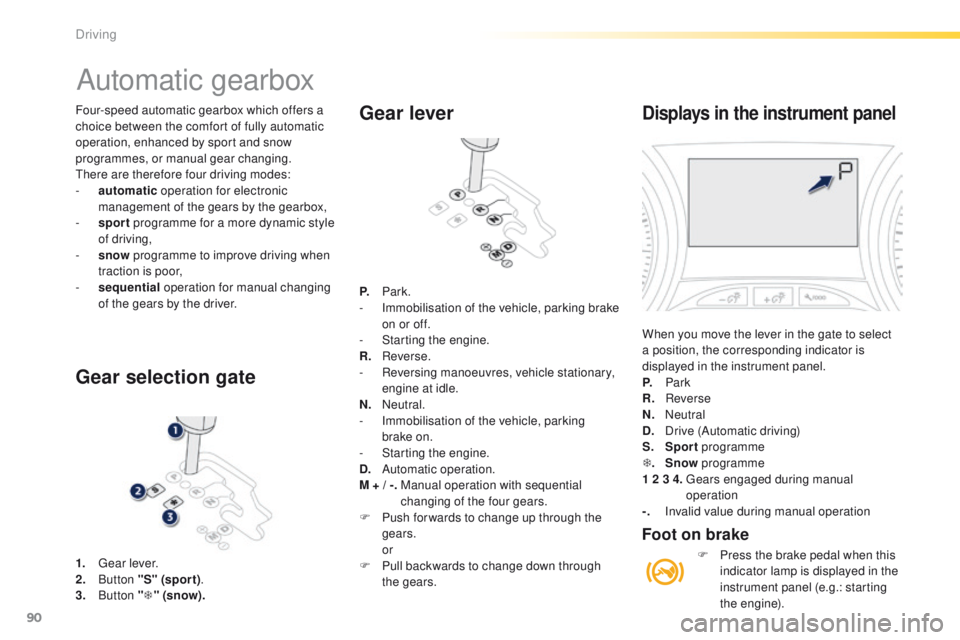
1. Gear lever.
2. B utton "S" (spor t) .
3.
Button "T " (snow).
Gear selection gate Gear lever
P.
Park.
- I mmobilisation of the vehicle, parking brake
on or off.
-
S
tarting the engine.
R.
R
everse.
-
R
eversing manoeuvres, vehicle stationary,
engine at idle.
N.
N
eutral.
-
I
mmobilisation of the vehicle, parking
brake on.
-
S
tarting the engine.
D.
A
utomatic operation.
M + / -.
M
anual operation with sequential
changing of the four gears.
F
P
ush for wards to change up through the
gears.
or
F
P
ull backwards to change down through
the gears.
Displays in the instrument panel
When you move the lever in the gate to select
a position, the corresponding indicator is
displayed in the instrument panel.
P.
Park
R.
Reverse
N.
N
eutral
D.
D
rive (Automatic driving)
S.
Sport programme
T .
Snow programme
1 2 3 4.
G
ears engaged during manual
operation
-.
I
nvalid value during manual operation
Foot on brake
F Press the brake pedal when this indicator lamp is displayed in the
instrument panel (e.g.: starting
the engine).
Driving
Page 96 of 340
94
2008_en_Chap05_conduite_ed01-2015
Gear shift indicator
Operation
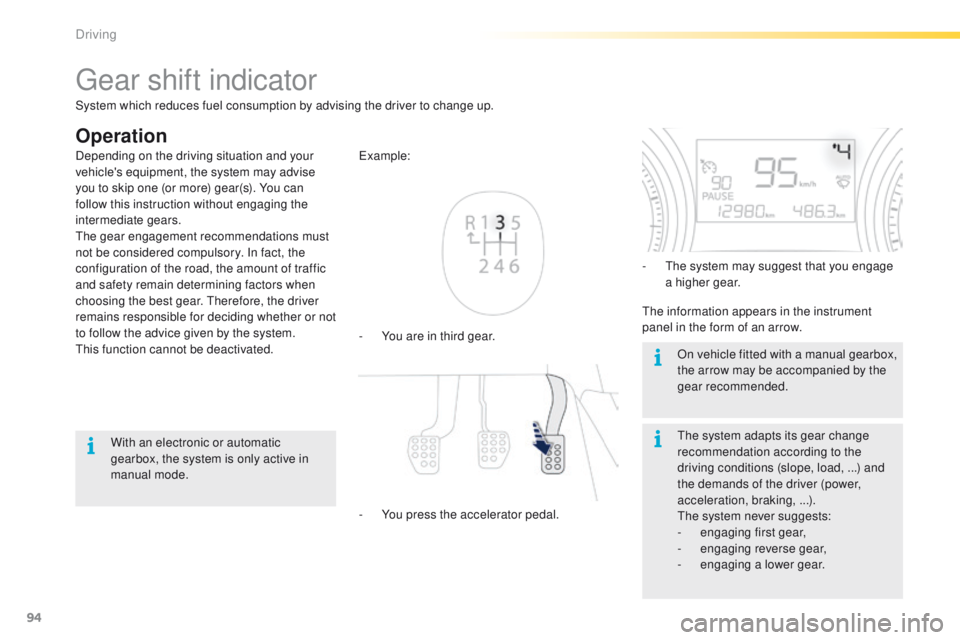
- You are in third gear. Example:
-
Y
ou press the accelerator pedal. -
T
he system may suggest that you engage
a higher gear.
The information appears in the instrument
panel in the form of an arrow.
The system adapts its gear change
recommendation according to the
driving conditions (slope, load, ...) and
the demands of the driver (power,
acceleration, braking, ...).
The system never suggests:
-
e
ngaging first gear,
-
enga
ging reverse gear,
-
enga
ging a lower gear.
Depending on the driving situation and your
vehicle's equipment, the system may advise
you to skip one (or more) gear(s). You can
follow this instruction without engaging the
intermediate gears.
The gear engagement recommendations must
not be considered compulsory. In fact, the
configuration of the road, the amount of traffic
and safety remain determining factors when
choosing the best gear. Therefore, the driver
remains responsible for deciding whether or not
to follow the advice given by the system.
This function cannot be deactivated.
With an electronic or automatic
gearbox, the system is only active in
manual mode. On vehicle fitted with a manual gearbox,
the arrow may be accompanied by the
gear recommended.
System which reduces fuel consumption by advising the driver to change up.
Driving
Page 101 of 340
99
2008_en_Chap05_conduite_ed01-2015
Speed limiter
System which prevents the vehicle from
exceeding the speed programmed by the driver.
When the programmed speed limit is reached,
pressing the accelerator pedal in the normal
manner no longer has any effect.
The speed limiter is switched on manually: the
programmed speed must be at least 20 mph
(30 km/h).
The speed limiter is switched off by manual
operation of the control.
The programmed speed can be exceeded
temporarily by pressing the accelerator firmly.
To return to the programmed speed, simply
slow down to a speed below the programmed
speed.
The speed limiter cannot, in any circumstances,
replace the need to respect speed limits, nor can it
replace the need for vigilance on the part of the driver.
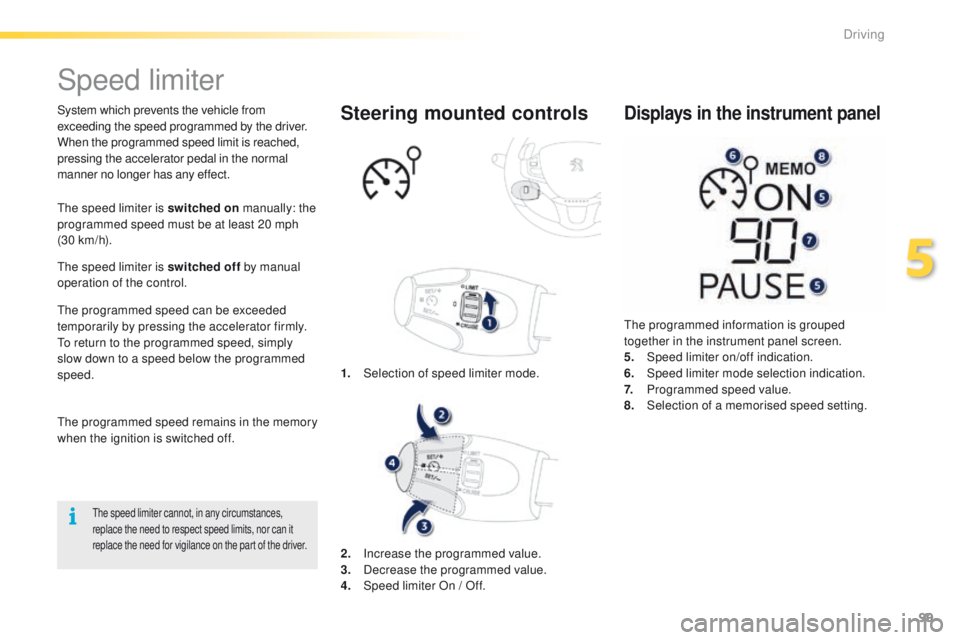
1. Selection of speed limiter mode.
Steering mounted controls
The programmed information is grouped
together in the instrument panel screen.
5.
Spe
ed limiter on/off indication.
6.
Spe
ed limiter mode selection indication.
7.
P
rogrammed speed value.
8.
Sel
ection of a memorised speed setting.
Displays in the instrument panel
The programmed speed remains in the memory
when the ignition is switched off.
2.
In
crease the programmed value.
3.
D
ecrease the programmed value.
4.
S
peed limiter On / Off.
5
Driving
Page 109 of 340
107
2008_en_Chap05_conduite_ed01-2015
Park Assist
This system provides active assistance with parking, detecting a parking space then controlling the steering to park in the space.
It controls the steering while the driver manages the accelerator, brakes, gears and clutch (manual gearbox). During phases of entry into and exit from
a parking space, the system provides visual and audible information to the driver in order to make the manoeuvre safe. It may be necessary to move
forwards and backwards more than once.The Park Assist system cannot in any
circumstances replace the care and
responsibility of the driver.
The driver must remain in control of
their vehicle ensuring that the space
remains clear during the manoeuvre.
In some circumstances, the sensors
may not detect small obstacles located
in their blind spots.
Changing tyre sizes (out-size tyres,
winter tyres, ...) can inter fere with
the correct operation of the parking
assistance system.
During a manoeuvre the steering wheel
turns quickly: do not hold the steering
wheel, do not place your hand between
the spokes of the steering wheel and
take care with loose and bulky clothing,
scarves, handbags... There is a risk of
injury. For entry into a parking space (parallel
parking) the system does not detect
spaces which are clearly much smaller
or larger than the size of the vehicle.
This "parking assistance" system
is activated automatically during
manoeuvres; it is therefore possible
that a symbol comes on in the screen,
accompanied by an audible signal,
without affecting the manoeuvre.
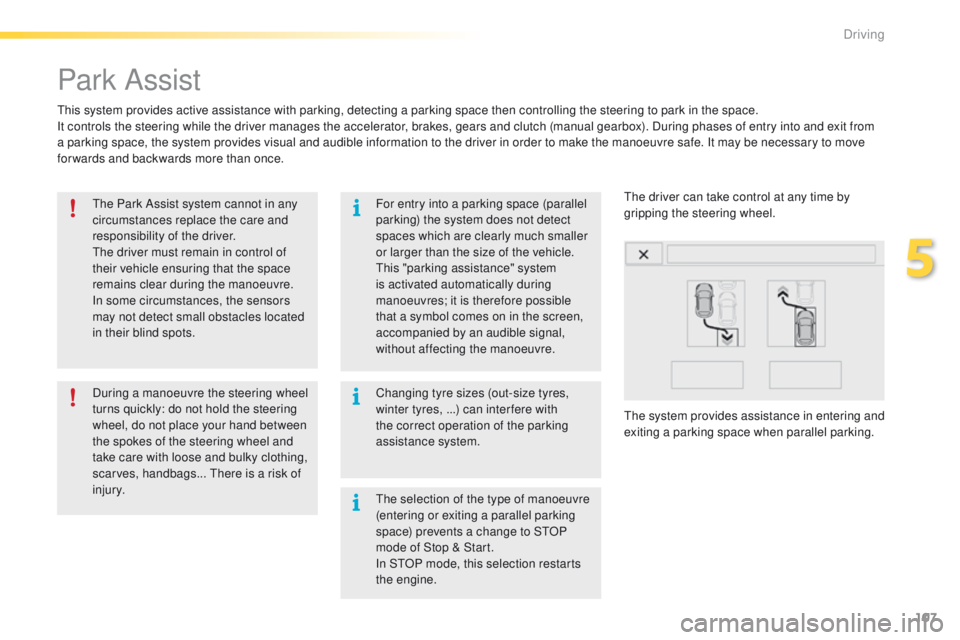
The system provides assistance in entering and
exiting a parking space when parallel parking. The driver can take control at any time by
gripping the steering wheel.
The selection of the type of manoeuvre
(entering or exiting a parallel parking
space) prevents a change to STOP
mode of Stop & Start.
In STOP mode, this selection restarts
the engine.
5
Driving
Page 114 of 340
112
2008_en_Chap06_visibilite_ed01-2015
Model without AUTO lighting
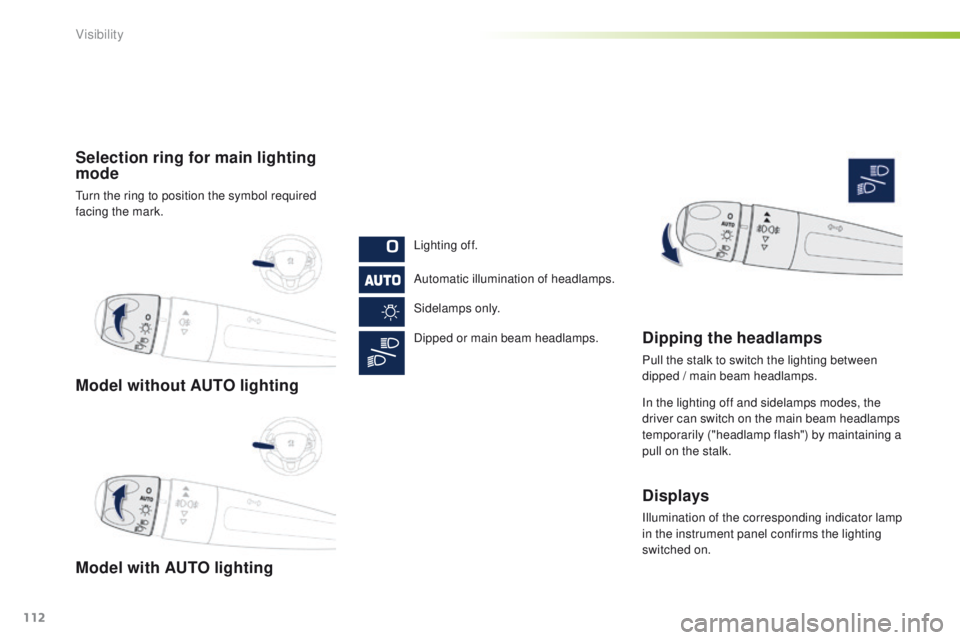
Model with AUTO lighting Selection ring for main lighting
mode
Turn the ring to position the symbol required
facing the mark.Lighting off.
Automatic illumination of headlamps.
Sidelamps only.
Dipped or main beam headlamps.
Dipping the headlamps
Pull the stalk to switch the lighting between
dipped / main beam headlamps.
In the lighting off and sidelamps modes, the
driver can switch on the main beam headlamps
temporarily ("headlamp flash") by maintaining a
pull on the stalk.
Displays
Illumination of the corresponding indicator lamp
in the instrument panel confirms the lighting
switched on.
Visibility