ESP PEUGEOT 2008 2015 Service Manual
[x] Cancel search | Manufacturer: PEUGEOT, Model Year: 2015, Model line: 2008, Model: PEUGEOT 2008 2015Pages: 340, PDF Size: 8.4 MB
Page 223 of 340
221
2008_en_Chap11_caracteristiques-techniques_ed01-2015
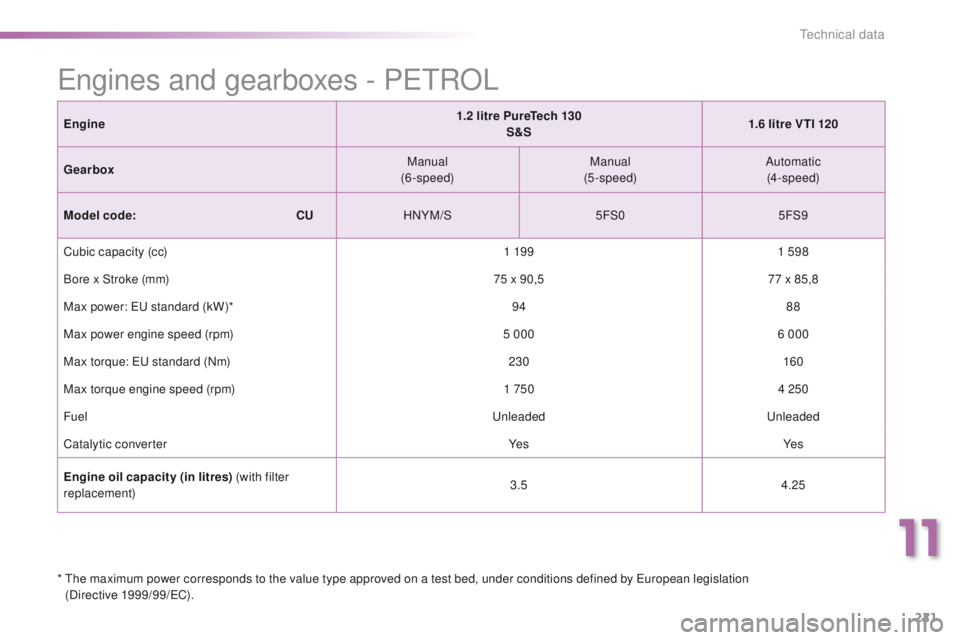
Engine1.2 litre PureTech 130
S&S 1.6 litre VTI 120
Gearbox Manual
(6-speed) Manual
(5-speed) Automatic
(4-speed)
Model code:
C
UHNYM/S 5FS05FS9
Cubic capacity (cc) 1 19 91 598
Bore x Stroke (mm) 75 x 90,577 x 85,8
Max power: EU standard (kW)* 9488
Max power engine speed (rpm) 5 0006 000
Max torque: EU standard (Nm) 230160
Max torque engine speed (rpm) 1 7504 250
Fuel UnleadedUnleaded
Catalytic converter Ye sYe s
Engine oil capacity (in litres) (with filter
replacement) 3.5
4.25
Engines and gearboxes - PETROL
* The maximum power corresponds to the value type approved on a test bed, under conditions defined by European legislation
(Directive 1999/99/EC).
11
Technical data
Page 226 of 340
224
2008_en_Chap11_caracteristiques-techniques_ed01-2015
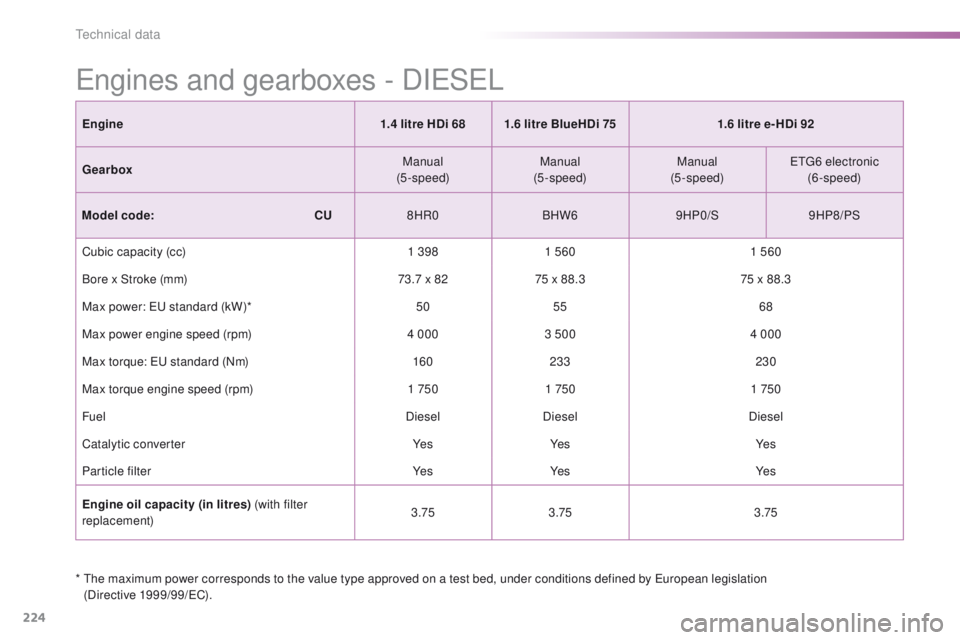
* The maximum power corresponds to the value type approved on a test bed, under conditions defined by European legislation (Directive 1999/99/EC).
Engines and gearboxes - DIESEL
Engine 1.4 litre HDi 681.6 litre BlueHDi 75 1.6 litre e- HDi 92
Gearbox Manual
(5-speed) Manual
(5-speed) Manual
(5-speed) ETG6 electronic
(6-speed)
Model code:
C
U8HR0 BHW69HP0/S9HP8/PS
Cubic capacity (cc) 1 3981 560 1 560
Bore x Stroke (mm) 73.7 x 8275 x 88.3 75 x 88.3
Max power: EU standard (kW)* 5055 68
Max power engine speed (rpm) 4 0003 500 4 000
Max torque: EU standard (Nm) 160233 230
Max torque engine speed (rpm) 1 7501 750 1 750
Fuel DieselDiesel Diesel
Catalytic converter Ye sYe s Ye s
Particle filter Ye sYe s Ye s
Engine oil capacity (in litres) (with filter
replacement) 3.75
3.75 3.75
Technical data
Page 227 of 340
225
2008_en_Chap11_caracteristiques-techniques_ed01-2015
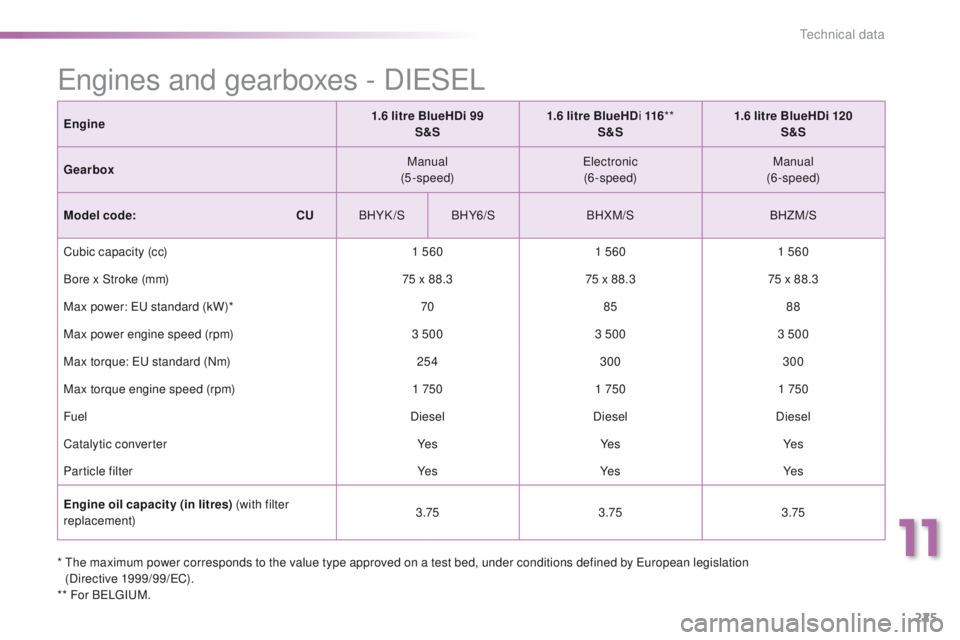
* The maximum power corresponds to the value type approved on a test bed, under conditions defined by European legislation (Directive 1999/99/EC).
** For BELGIUM.
Engines and gearboxes - DIESEL
Engine 1.6 litre BlueHDi 99
S&S 1.6 litre BlueHD
i 116**
S&S 1.6 litre BlueHDi 120
S&S
Gearbox Manual
(5-speed) Electronic
(6-speed) Manual
(6-speed)
Model code:
C
UBHYK /S BHY6/S BHXM/S BHZM/S
Cubic capacity (cc) 1 5601 5601 560
Bore x Stroke (mm) 75 x 88.375 x 88.375 x 88.3
Max power: EU standard (kW)* 7085 88
Max power engine speed (rpm) 3 5003 5003 500
Max torque: EU standard (Nm) 254300 300
Max torque engine speed (rpm) 1 7501 7501 750
Fuel DieselDieselDiesel
Catalytic converter Ye sYe sYe s
Particle filter Ye sYe sYe s
Engine oil capacity (in litres) (with filter
replacement) 3.75
3.753.75
11
Technical data
Page 263 of 340
261
2008_en_Chap12b_SMEGplus_ed01-2015
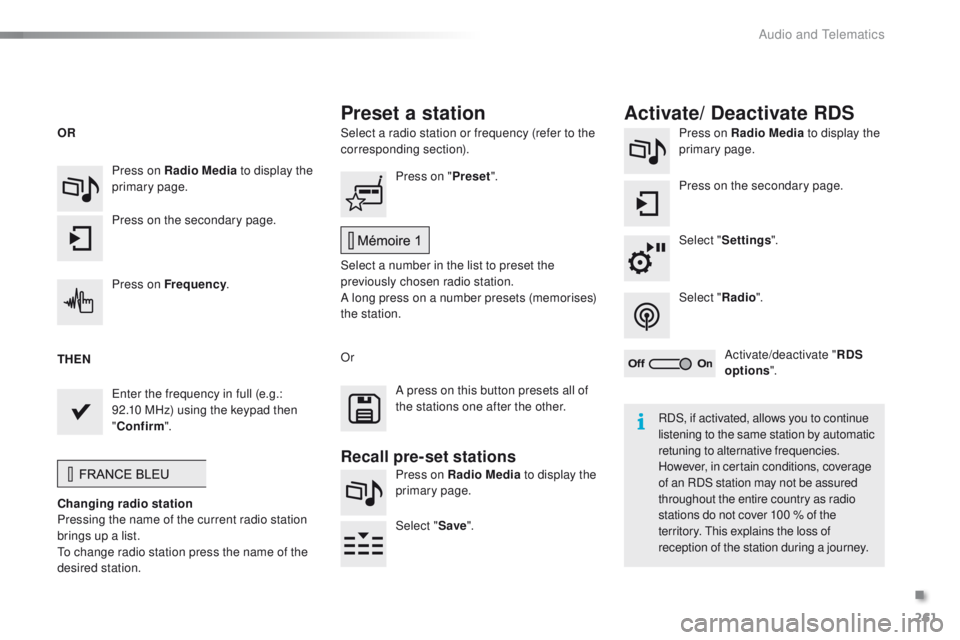
Select a radio station or frequency (refer to the
corresponding section).Press on Radio Media
to display the
primary page.
Press on the secondary page.
Select " Settings ".
Select " Radio".
Activate/deactivate " RDS
options ".
Press on Radio Media
to display the
primary page.
Press on the secondary page. Press on "
Preset".
Select a number in the list to preset the
previously chosen radio station.
A long press on a number presets (memorises)
the station.
Press on Frequency
.
Enter the frequency in full (e.g.:
92.10 MHz) using the keypad then
" Confirm ".
Changing radio station
Pressing the name of the current radio station
brings up a list.
To change radio station press the name of the
desired station. Or
Press on Radio Media to display the
primary page.
Select " Save".
Preset a station Activate/ Deactivate RDS
OR
THEN
A press on this button presets all of
the stations one after the other.
Recall pre-set stations
RDS, if activated, allows you to continue
listening to the same station by automatic
retuning to alternative frequencies.
However, in certain conditions, coverage
of an RDS station may not be assured
throughout the entire country as radio
stations do not cover 100 % of the
territory. This explains the loss of
reception of the station during a journey.
.
Audio and Telematics
Page 265 of 340
263
2008_en_Chap12b_SMEGplus_ed01-2015
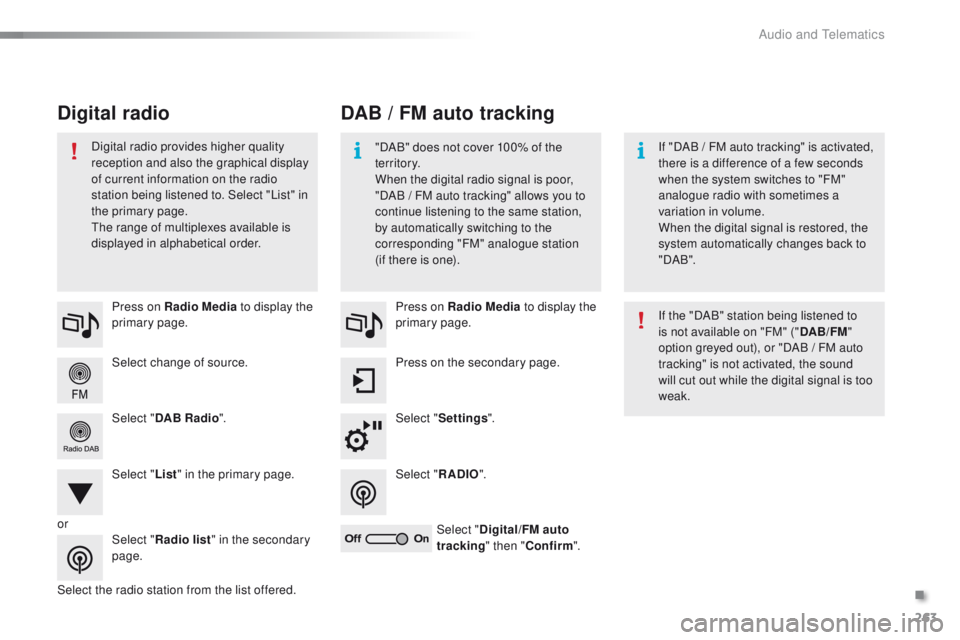
Select change of source. Press on Radio Media to display the
primary page.
Select " DAB Radio ".
Select " List" in the primary page.
Select the radio station from the list offered. Press on Radio Media
to display the
primary page.
Press on the secondary page.
Select " Settings ".
Select " RADIO".
Select " Digital/FM auto
tracking " then "Confirm ".
DAB / FM auto tracking
Digital radio
"DAB" does not cover 100% of the
te r r i to r y.
When the digital radio signal is poor,
"DAB
/ FM auto tracking" allows you to
continue listening to the same station,
by automatically switching to the
corresponding "FM" analogue station
(if there is one). If "DAB
/ FM auto tracking" is activated,
there is a difference of a few seconds
when the system switches to "FM"
analogue radio with sometimes a
variation in volume.
When the digital signal is restored, the
system automatically changes back to
" DA B ".
Digital radio provides higher quality
reception and also the graphical display
of current information on the radio
station being listened to. Select "List" in
the primary page.
The range of multiplexes available is
displayed in alphabetical order.
If the "DAB" station being listened to
is not available on "FM" ("DAB/FM"
option greyed out), or "DAB
/ FM auto
tracking" is not activated, the sound
will cut out while the digital signal is too
weak.
or Select "Radio list " in the secondary
page.
.
Audio and Telematics
Page 276 of 340
274
2008_en_Chap12b_SMEGplus_ed01-2015
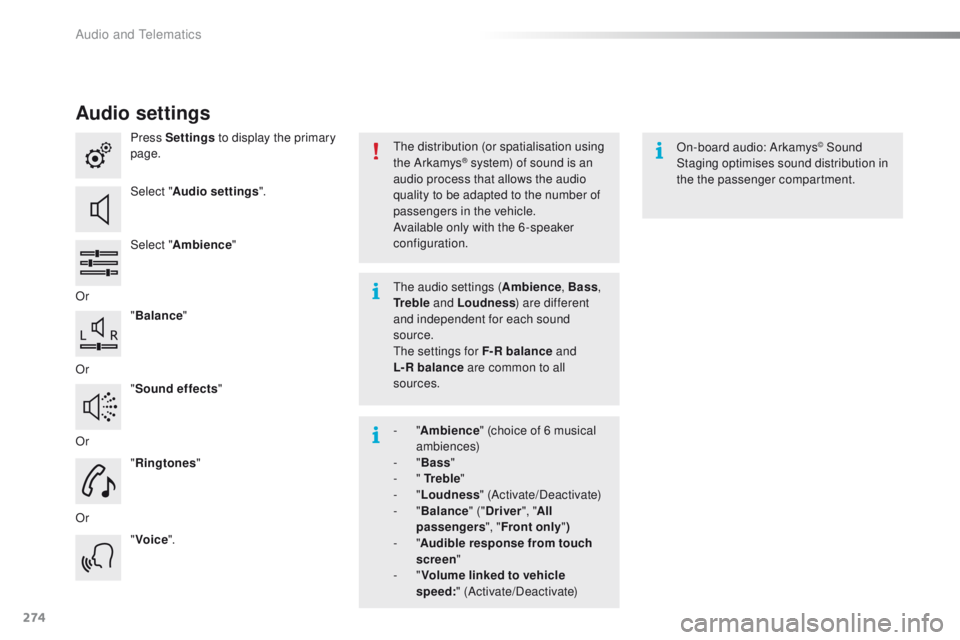
Audio settings
Press Settings to display the primary
page.
Select " Audio settings ".
Select " Ambience "
Or "Balance "
Or "Sound effects "
Or "Ringtones "
Or "Voice ". On-board audio: Arkamys© Sound
Staging optimises sound distribution in
the the passenger compartment.
The distribution (or spatialisation using
the Arkamys® system) of sound is an
audio process that allows the audio
quality to be adapted to the number of
passengers in the vehicle.
Available only with the 6 -speaker
configuration.
The audio settings ( Ambience, Bass,
Tr e b l e and Loudness ) are different
and independent for each sound
source.
The settings for F-R balance and
L-R
balance are common to all
sources.
-
" Ambience " (choice of 6 musical
ambiences)
-
" Bass "
-
" Tr e b l e "
-
" Loudness " (Activate/Deactivate)
-
" Balance " ("Driver ", "All
passengers ", "Front only ")
-
" Audible response from touch
screen "
-
" Volume linked to vehicle
speed: " (Activate/Deactivate)
Audio and Telematics
Page 300 of 340
298
2008_en_Chap12c_RDE2_ed01-2015
First steps
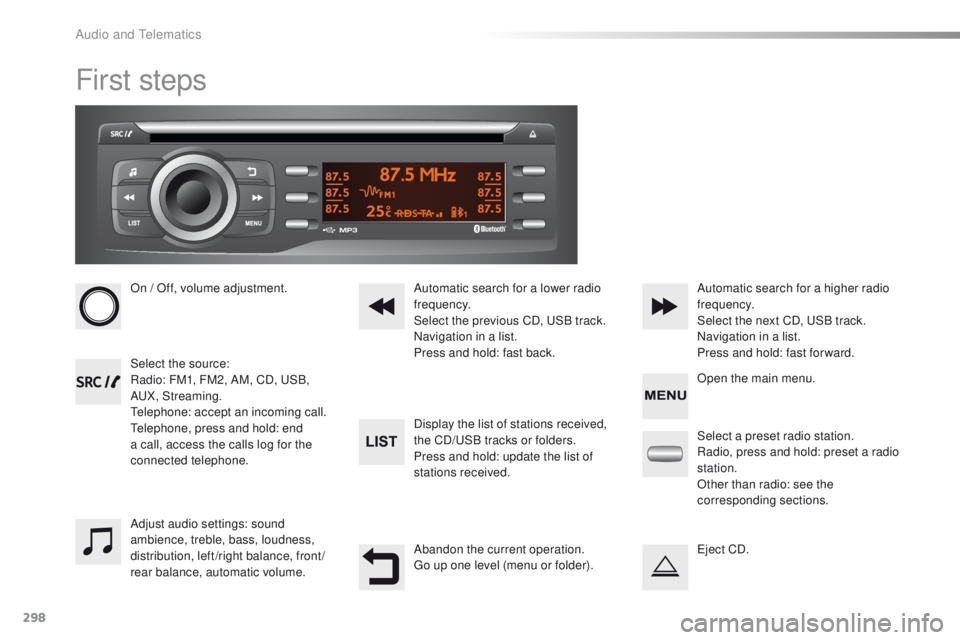
On / Off, volume adjustment.
Select the source:
Radio: FM1, FM2, AM, CD, USB,
AUX, Streaming.
Telephone: accept an incoming call.
Telephone, press and hold: end
a call, access the calls log for the
connected telephone.Display the list of stations received,
the CD/USB tracks or folders.
Press and hold: update the list of
stations received. Automatic search for a lower radio
frequency.
Select the previous CD, USB track.
Navigation in a list.
Press and hold: fast back.Automatic search for a higher radio
frequency.
Select the next CD, USB track.
Navigation in a list.
Press and hold: fast for ward.
Adjust audio settings: sound
ambience, treble, bass, loudness,
distribution, left/right balance, front/
rear balance, automatic volume. Abandon the current operation.
Go up one level (menu or folder).Select a preset radio station.
Radio, press and hold: preset a radio
station.
Other than radio: see the
corresponding sections.
Eject CD. Open the main menu.
Audio and Telematics
Page 302 of 340
300
2008_en_Chap12c_RDE2_ed01-2015
Radio
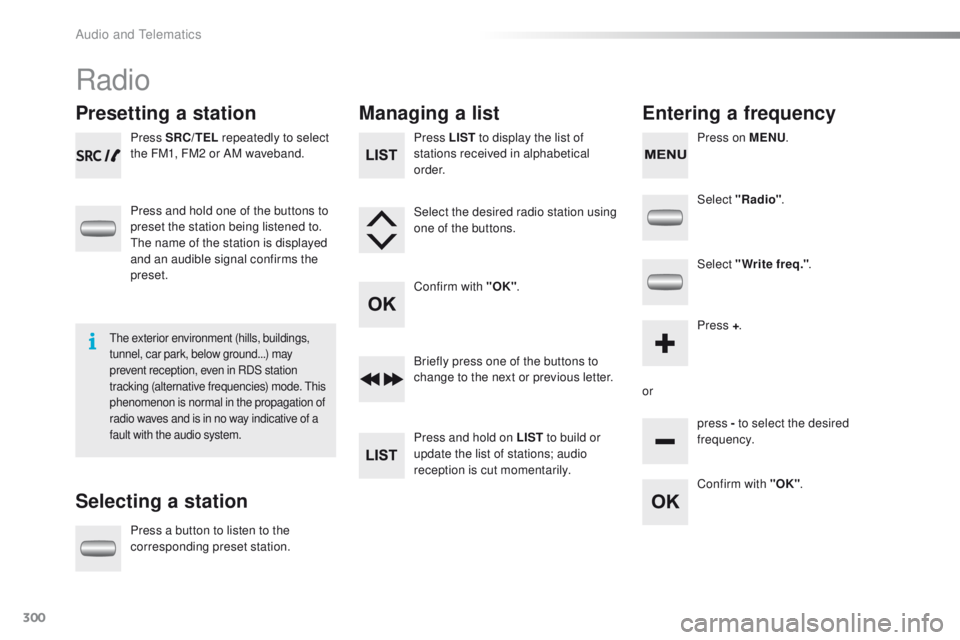
Presetting a station
Selecting a stationManaging a list
Entering a frequency
Press SRC/TEL repeatedly to select
the FM1, FM2 or AM waveband.
Press and hold one of the buttons to
preset the station being listened to.
The name of the station is displayed
and an audible signal confirms the
preset.
Press a button to listen to the
corresponding preset station. Select "Radio"
.
Select "Write freq." .
Press + .
or press - to select the desired
frequency.
Briefly press one of the buttons to
change to the next or previous letter.
Press and hold on LIST
to build or
update the list of stations; audio
reception is cut momentarily. Press LIST to display the list of
stations received in alphabetical
o r d e r.
Select the desired radio station using
one of the buttons.
Confirm with "OK" .
Confirm with "OK".
The exterior environment (hills, buildings,
tunnel, car park, below ground...) may
prevent reception, even in RDS station
tracking (alternative frequencies) mode. This
phenomenon is normal in the propagation of
radio waves and is in no way indicative of a
fault with the audio system.
Press on MENU.
Audio and Telematics
Page 311 of 340
309
2008_en_Chap12c_RDE2_ed01-2015
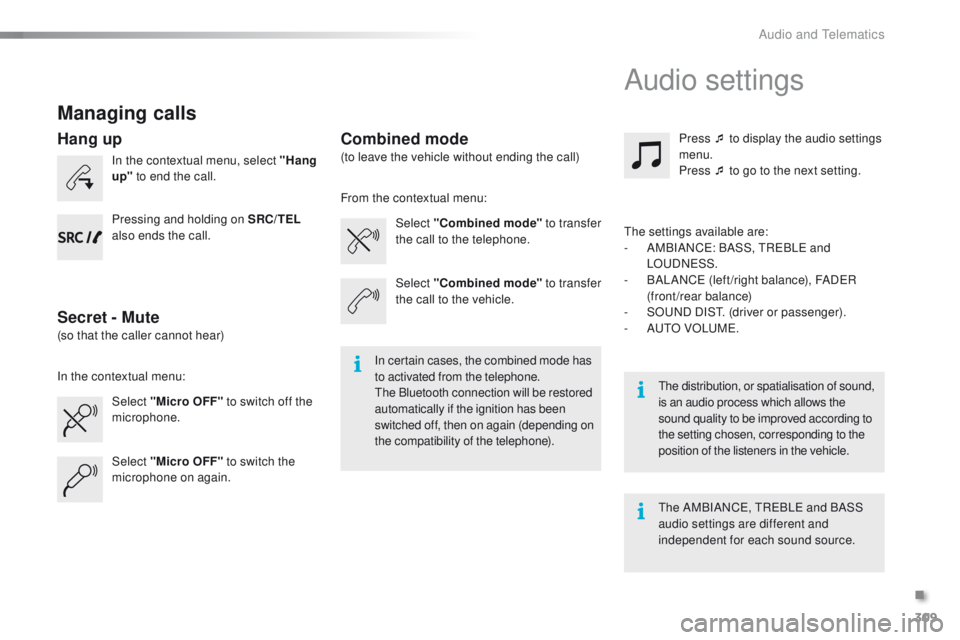
Managing calls
In the contextual menu, select "Hang
up" to end the call.
Select "Micro OFF" to switch off the
microphone. Select
"Combined mode " to transfer
the call to the telephone. Press ¯ to display the audio settings
menu.
Press ¯ to go to the next setting.
Select "Micro OFF" to switch the
microphone on again. Select
"Combined mode"
to transfer
the call to the vehicle.
In the contextual menu: From the contextual menu:
In certain cases, the combined mode has
to activated from the telephone.
The Bluetooth connection will be restored
automatically if the ignition has been
switched off, then on again (depending on
the compatibility of the telephone). The distribution, or spatialisation of sound,
is an audio process which allows the
sound quality to be improved according to
the setting chosen, corresponding to the
position of the listeners in the
vehicle.
Hang up
Secret - MuteCombined mode
Pressing and holding on SRC/TEL
also ends the call.
(so that the caller cannot hear) (to leave the vehicle without ending the call)
The settings available are:
-
A
MBIANCE: BASS, TREBLE and
LOUDNESS.
-
B
ALANCE (left /right balance), FADER
(front/rear balance)
-
S
OUND DIST. (driver or passenger).
-
A
UTO VOLUME.
The AMBIANCE, TREBLE and BASS
audio settings are different and
independent for each sound source.
Audio settings
.
Audio and Telematics
Page 313 of 340
311
2008_en_Chap12c_RDE2_ed01-2015
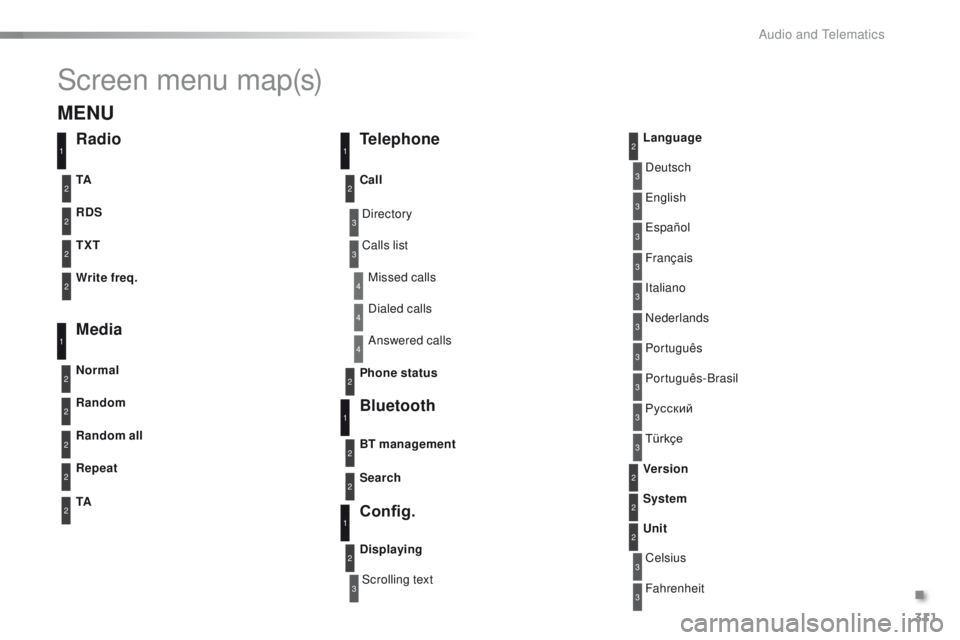
Screen menu map(s)
3
3
3
3
3
3
3
3
3
3
3
3
3
3
3
4
4
4
Directory
Scrolling textDeutsch
Italiano Español
Português
Русский
Celsius English
Nederlands Français
Português-Brasil
Türkçe
Fahrenheit
Calls list
Missed calls
Dialed calls
Answered calls
Radio Telephone
Bluetooth
Config.
RDS
TXT
Write freq.
Media
Normal
Random all TA Call
BT management
Unit
Search
Displaying Language
Version
System
Phone status
11
1
1
22
2
2
2
2
2
2
2
2
2
2
2
1
2
2
MENU
Random
Repeat
TA2
2
2
.
Audio and Telematics