display PEUGEOT 2008 2015 User Guide
[x] Cancel search | Manufacturer: PEUGEOT, Model Year: 2015, Model line: 2008, Model: PEUGEOT 2008 2015Pages: 340, PDF Size: 8.4 MB
Page 38 of 340
36
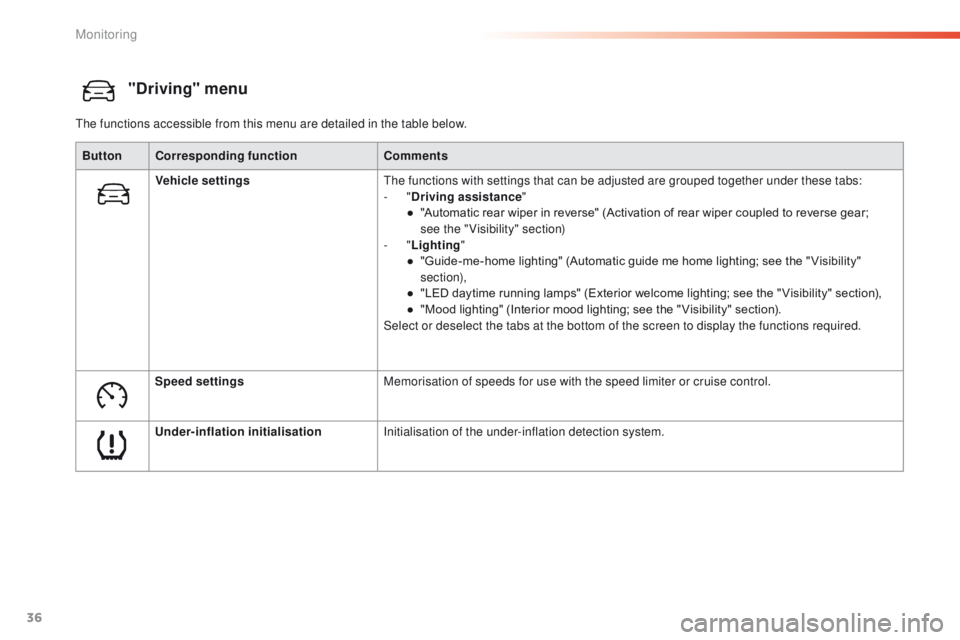
"Driving" menu
The functions accessible from this menu are detailed in the table below.Button Corresponding function Comments
Vehicle settings The functions with settings that can be adjusted are grouped together under these tabs:
-
"Driving assistance "
●
"
Automatic rear wiper in reverse" (Activation of rear wiper coupled to reverse gear;
see
the "Visibility" section)
-
"Lighting "
●
"
Guide-me-home lighting" (Automatic guide me home lighting; see the " Visibility"
section),
●
"
LED daytime running lamps" (Exterior welcome lighting; see the " Visibility" section),
●
"
Mood lighting" (Interior mood lighting; see the " Visibility" section).
Select or deselect the tabs at the bottom of the screen to display the functions required.
Speed settings Memorisation of speeds for use with the speed limiter or cruise control.
Under-inflation initialisation Initialisation of the under-inflation detection system.
Monitoring
Page 39 of 340
37
2008_en_Chap01_controle-de-marche_ed01-2015
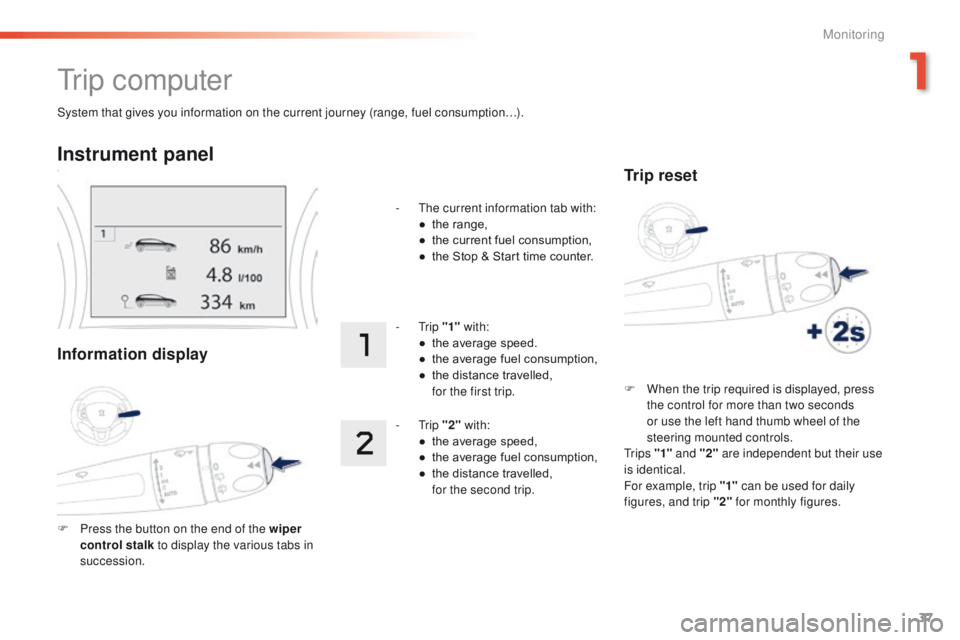
System that gives you information on the current journey (range, fuel consumption…).
Tr i p c o m p u t e r
Instrument panel
Information display
F Press the button on the end of the wiper control stalk to display the various tabs in
succession. -
T
he current information tab with:
●
t
he range,
●
t
he current fuel consumption,
●
t
he Stop & Start time counter.
- Trip
"1" with:
●
t
he average speed.
●
t
he average fuel consumption,
●
t
he distance travelled,
f
or the first trip.
- Trip
"2" with:
●
t
he average speed,
●
t
he average fuel consumption,
●
t
he distance travelled,
f
or the second trip.
Trip reset
F When the trip required is displayed, press
the control for more than two seconds
or use the left hand thumb wheel of the
steering mounted controls.
Tr i p s "1" and "2" are independent but their use
is identical.
For example, trip "1" can be used for daily
figures, and trip "2" for monthly figures.
1
Monitoring
Page 40 of 340
38
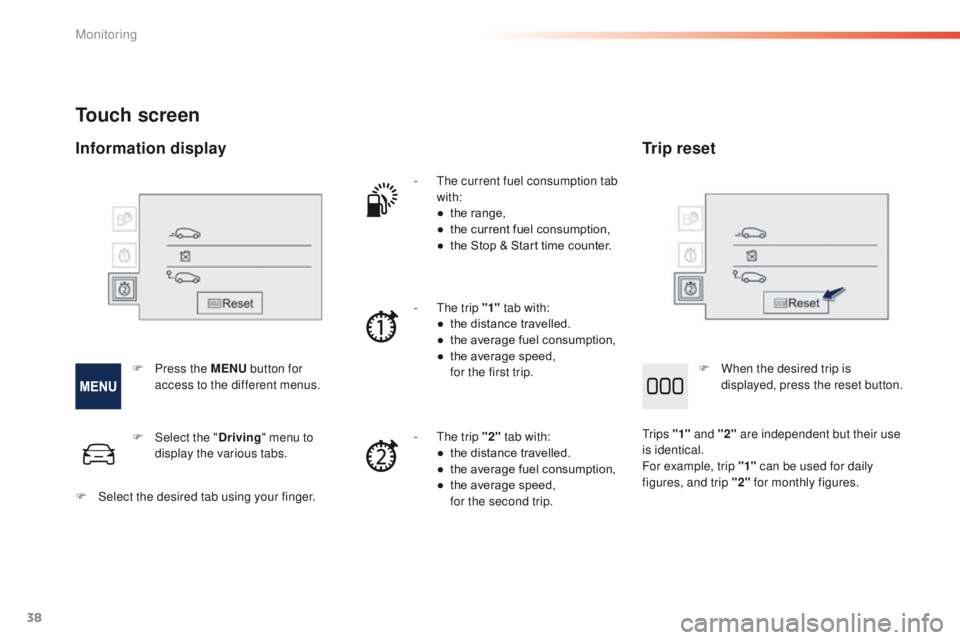
Touch screen
- The current fuel consumption tab with:
●
t
he range,
●
t
he current fuel consumption,
●
t
he Stop & Start time counter.
-
T
he trip "1" tab with:
●
t
he distance travelled.
●
t
he average fuel consumption,
●
t
he average speed,
f
or the first trip.
-
T
he trip "2" tab with:
●
t
he distance travelled.
●
t
he average fuel consumption,
●
t
he average speed,
f
or the second trip.
F
P
ress the MENU button for
access to the different menus. F
W
hen the desired trip is
displayed, press the reset button.
Tr i p s "1" and "2" are independent but their use
is identical.
For example, trip "1" can be used for daily
figures, and trip "2" for monthly figures.
F
Sel
ect the " Driving" menu to
display the various tabs.
F
S
elect the desired tab using your finger.
Information display Trip reset
Monitoring
Page 41 of 340

39
2008_en_Chap01_controle-de-marche_ed01-2015
Stop & Start time
counter
(minutes / seconds or hours /
minutes)
If dashes are displayed continuously
while driving in place of the digits,
contact a PEUGEOT dealer or a
qualified workshop. This function is only displayed from
20 mph (30 km/h).
This value may vary following a change
in the style of driving or the relief,
resulting in a significant change in the
current fuel consumption.
Trip computer, a few definitions
Range
(miles or km)
The distance which can still be
travelled with the fuel remaining
in the tank (related to the
average fuel consumption over
the last few miles (kilometres)
travelled).
When the range falls below 20 miles (30 km),
dashes are displayed. After filling with at least
5 litres of fuel, the range is recalculated and is
displayed when it exceeds 60 miles (100 km).
Current fuel consumption
(mpg or l/100 km or km/l)
Calculated over the last few seconds.
Average fuel consumption
(mpg or l/100 km or km/l)
Calculated since the last trip
computer reset.
Average speed
(mph or km/h)
Calculated since the last trip
computer reset.
Distance travelled
(miles or km)
Calculated since the last trip
computer reset.
If your vehicle is fitted with Stop & Start, a time
counter calculates the time spent in STOP
mode during a journey.
It resets to zero every time the ignition is
switched on with the key.
1
Monitoring
Page 42 of 340
40
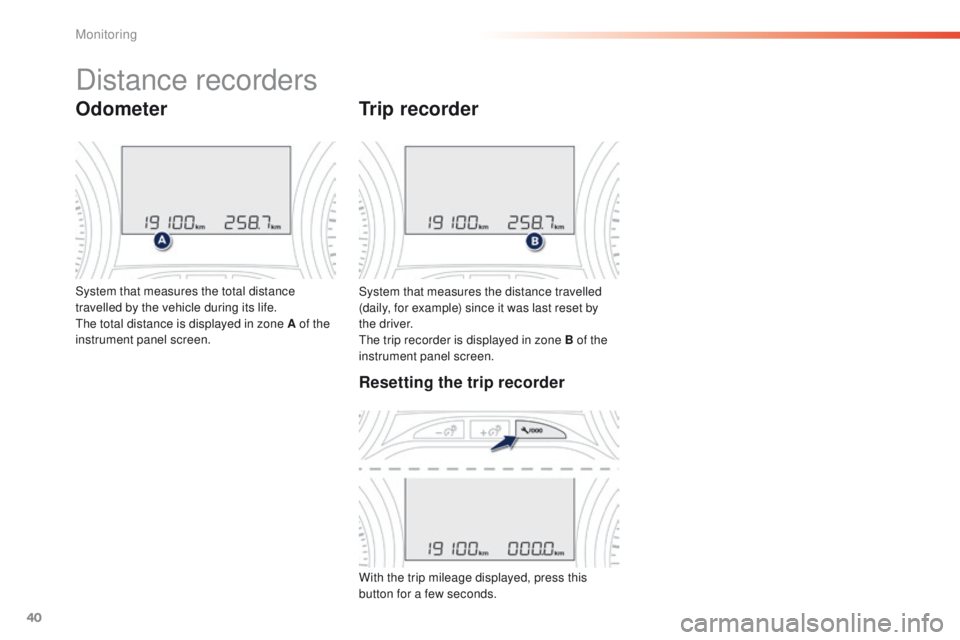
System that measures the distance travelled
(daily, for example) since it was last reset by
the driver.
The trip recorder is displayed in zone B of the
instrument panel screen.
Trip recorder
System that measures the total distance
travelled by the vehicle during its life.
The total distance is displayed in zone A of the
instrument panel screen.
Distance recorders
Odometer
Resetting the trip recorder
With the trip mileage displayed, press this
button for a few seconds.
Monitoring
Page 43 of 340
41
2008_en_Chap01_controle-de-marche_ed01-2015
LCD instrument panel
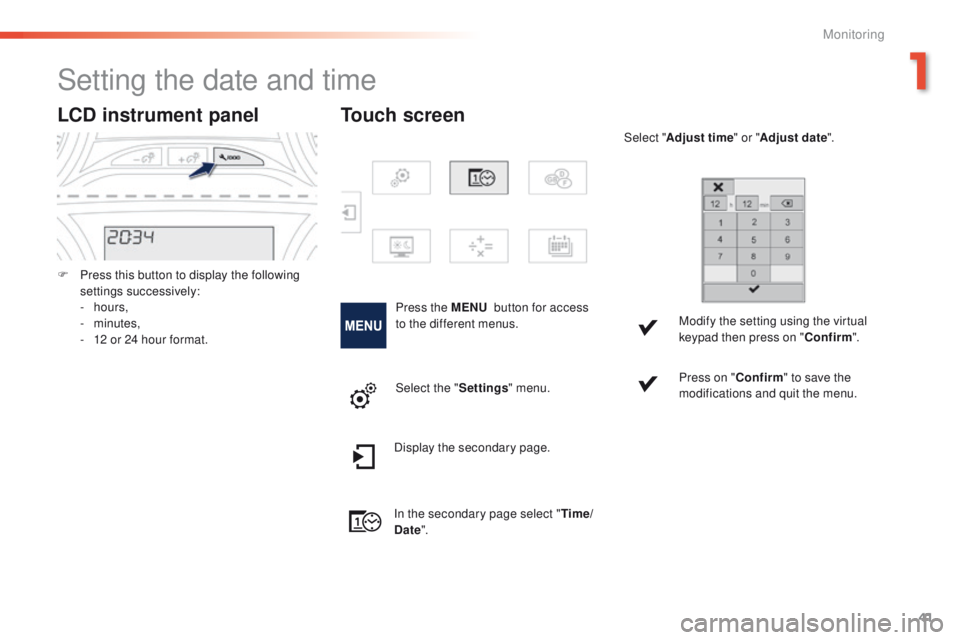
F Press this button to display the following settings successively:
-
hours,
-
minutes,
-
1
2 or 24 hour format.
Setting the date and time
Press the MENU button for access
to the different menus. Select "
Adjust time " or "Adjust date".
Modify the setting using the virtual
keypad then press on " Confirm".
Touch screen
Select the " Settings" menu. Press on "
Confirm" to save the
modifications and quit the menu.
Display the secondary page.
In the secondary page select " Time/
Date ".
1
Monitoring
Page 49 of 340
47
2008_en_Chap02_ouvertures_ed01-2015
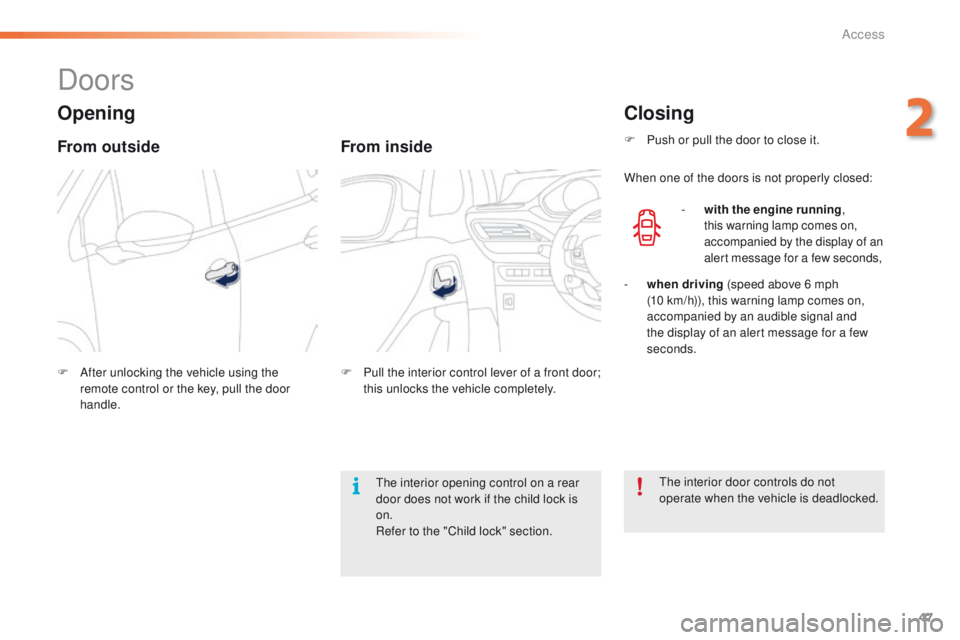
Doors
Opening
From outside
F After unlocking the vehicle using the remote control or the key, pull the door
handle.
From inside
F Pull the interior control lever of a front door; this unlocks the vehicle completely.
Closing
F Push or pull the door to close it.
When one of the doors is not properly closed:
-
w
ith the engine running ,
this warning lamp comes on,
accompanied by the display of an
alert message for a few seconds,
-
wh
en driving (speed above 6 mph
(10
km/h)), this warning lamp comes on,
accompanied by an audible signal and
the display of an alert message for a few
seconds.
The interior door controls do not
operate when the vehicle is deadlocked.
The interior opening control on a rear
door does not work if the child lock is
on.
Refer to the "Child lock" section.
2
Access
Page 51 of 340

49
2008_en_Chap02_ouvertures_ed01-2015
Boot
F After unlocking the boot or the vehicle using the remote control or the key, press
the opening control, then raise the tailgate.
Tailgate release
System for mechanical unlocking of the boot in
the event of a central locking malfunction.
Opening Closing
F Lower the tailgate using the interior grab
handle.
F
I
f necessary, press down on the tailgate to
fully close it.
-
w
hen the engine is running ,
this warning lamp comes on,
accompanied by the display of an
alert message for a few seconds,
-
w
hen the vehicle is moving (speed above
6 mph (10 km/h)), this warning lamp comes
on, accompanied by an audible signal and
the display of an alert message for a few
seconds.
Unlocking
F Fold back the rear seats to gain access to the lock from inside the boot.
F
I
nsert a small screwdriver into hole A of the
lock to unlock the tailgate.
If the tailgate is not closed correctly:
2
Access
Page 52 of 340
50
2008_en_Chap02_ouvertures_ed01-2015
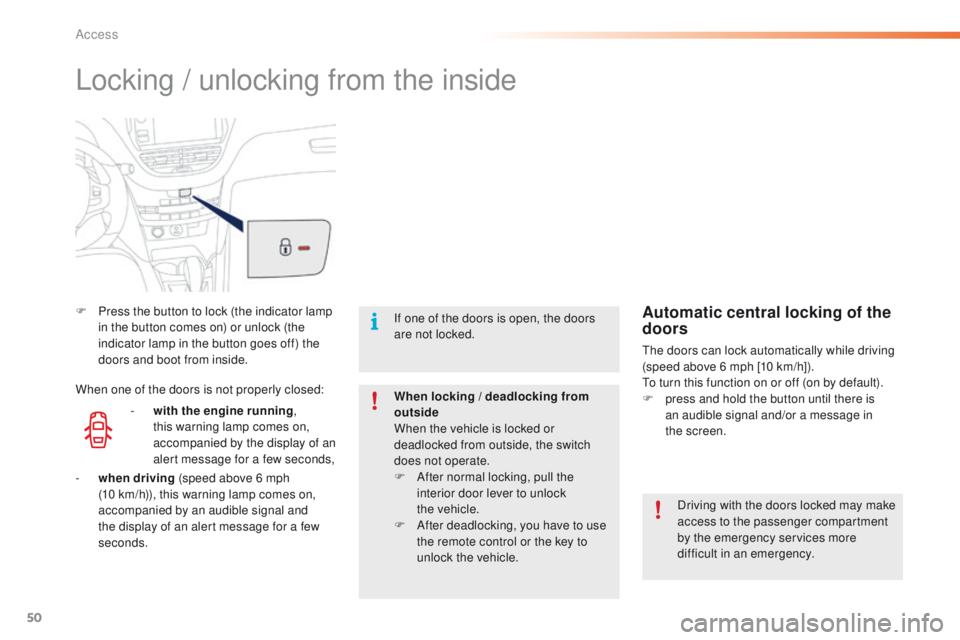
Locking / unlocking from the inside
F Press the button to lock (the indicator lamp in the button comes on) or unlock (the
indicator lamp in the button goes off) the
doors and boot from inside.
Driving with the doors locked may make
access to the passenger compartment
by the emergency services more
difficult in an emergency.
If one of the doors is open, the doors
are not locked.
When locking / deadlocking from
outside
When the vehicle is locked or
deadlocked from outside, the switch
does not operate.
F
A
fter normal locking, pull the
interior door lever to unlock
the
vehicle.
F
A
fter deadlocking, you have to use
the remote control or the key to
unlock the vehicle.Automatic central locking of the
doors
The doors can lock automatically while driving
(speed above 6 mph [10 km/h]).
To turn this function on or off (on by default).
F
p
ress and hold the button until there is
an audible signal and/or a message in
the
screen.
-
w
ith the engine running ,
this warning lamp comes on,
accompanied by the display of an
alert message for a few seconds,
When one of the doors is not properly closed:
-
wh
en driving (speed above 6 mph
(10
km/h)), this warning lamp comes on,
accompanied by an audible signal and
the display of an alert message for a few
seconds.
Access
Page 69 of 340
67
2008_en_Chap03_confort_ed01-2015
A setting around 21 enables you to obtain an
optimum level of comfort. Depending on your
requirements, a setting between 18 and 24 is usual.
In addition, it is recommended that you avoid a left /
right setting difference of more than 3.
On entering the vehicle, if the interior
temperature is much colder or warmer
than the comfort value, there is no need
to alter the value displayed in order to
obtain the required level of comfort.
The system corrects the temperature
difference automatically and as quickly
as possible.
Automatic visibility
programme
For maximum cooling or heating of
the passenger compartment, you can
exceed the minimum value of 14 or the
maximum value of 28.
F
P
ush the switch 2 or 3 down
until
"LO" is displayed or up
until
"HI" is displayed.
See the "Front demisting-defrosting"
section.
Depending on your requirements, you can
make a different selection from that offered by
the system by changing a setting. The other
functions will still be controlled automatically.
Resuming manual control
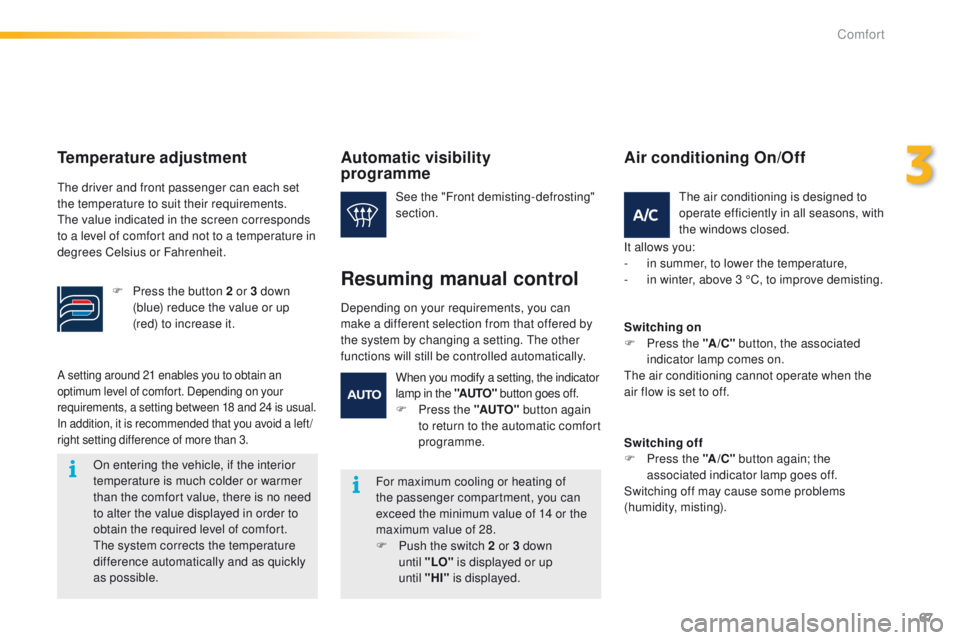
The air conditioning is designed to
operate efficiently in all seasons, with
the windows closed.
Air conditioning On/Off
It allows you:
- i n summer, to lower the temperature,
-
i
n winter, above 3 °C, to improve demisting.
Switching on
F
P
ress the " A/C" button, the associated
indicator lamp comes on.
The air conditioning cannot operate when the
air flow is set to off.
Switching off
F
P
ress the "A /C " button again; the
associated indicator lamp goes off.
Switching off may cause some problems
(humidity, misting).
When you modify a setting, the indicator
lamp in the "AUTO"
button goes off.
F
P
ress the "AUTO" button again
to return to the automatic comfort
programme.
Temperature adjustment
The driver and front passenger can each set
the temperature to suit their requirements.
The value indicated in the screen corresponds
to a level of comfort and not to a temperature in
degrees Celsius or Fahrenheit.
F
P
ress the button 2 or 3 down
(blue) reduce the value or up
(red) to increase it.
3
Comfort