display PEUGEOT 2008 2015 Owner's Guide
[x] Cancel search | Manufacturer: PEUGEOT, Model Year: 2015, Model line: 2008, Model: PEUGEOT 2008 2015Pages: 340, PDF Size: 8.4 MB
Page 95 of 340
93
2008_en_Chap05_conduite_ed01-2015
There is a risk of damage to the
gearbox:
-
i
f you press the accelerator and
brake pedals at the same time,
-
i
f you force the movement of the
gear lever from the P position to
another position when the battery
is flat.
To reduce fuel consumption when at
a prolonged standstill with the engine
running (traffic jam...), put the gear lever
in the N position and apply the parking
brake.
Operating fault
When the ignition is on, the
lighting of this warning lamp,
accompanied by an audible signal and a
message in the multifunction screen, indicates
a gearbox fault.
In this case, the gearbox switches to back-up
mode and is locked in 3rd gear. You may feel
a substantial knock when changing from P
to R and from N to R . This will not cause any
damage to the gearbox.
Do not exceed 60 mph (100 km/h), local speed
restrictions permitting.
Contact a PEUGEOT dealer or a qualified
workshop as soon as possible.
If the lever is not in position P
, when the
driver's door is opened or approximately
45 seconds after the ignition is switched
off, a warning message appears in the
screen.
F
R
eturn the lever to position P ; the
message disappears.
When driving on flooded roads or when
crossing a ford, proceed at walking
pace.
Stopping the vehicle
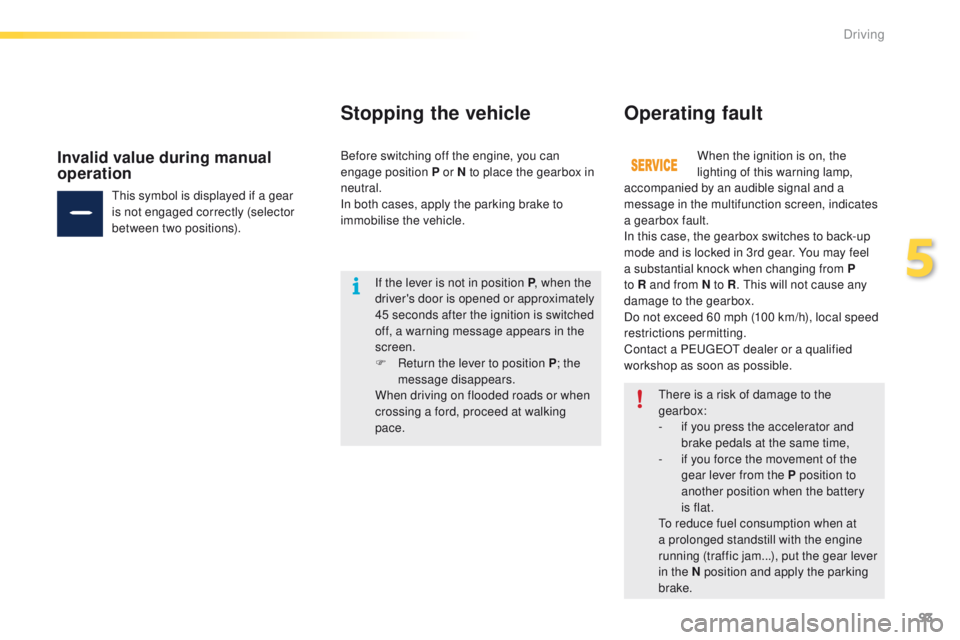
This symbol is displayed if a gear
is not engaged correctly (selector
between two positions).
Invalid value during manual
operationBefore switching off the engine, you can
engage position P or N to place the gearbox in
neutral.
In both cases, apply the parking brake to
immobilise the vehicle.
5
Driving
Page 101 of 340
99
2008_en_Chap05_conduite_ed01-2015
Speed limiter
System which prevents the vehicle from
exceeding the speed programmed by the driver.
When the programmed speed limit is reached,
pressing the accelerator pedal in the normal
manner no longer has any effect.
The speed limiter is switched on manually: the
programmed speed must be at least 20 mph
(30 km/h).
The speed limiter is switched off by manual
operation of the control.
The programmed speed can be exceeded
temporarily by pressing the accelerator firmly.
To return to the programmed speed, simply
slow down to a speed below the programmed
speed.
The speed limiter cannot, in any circumstances,
replace the need to respect speed limits, nor can it
replace the need for vigilance on the part of the driver.
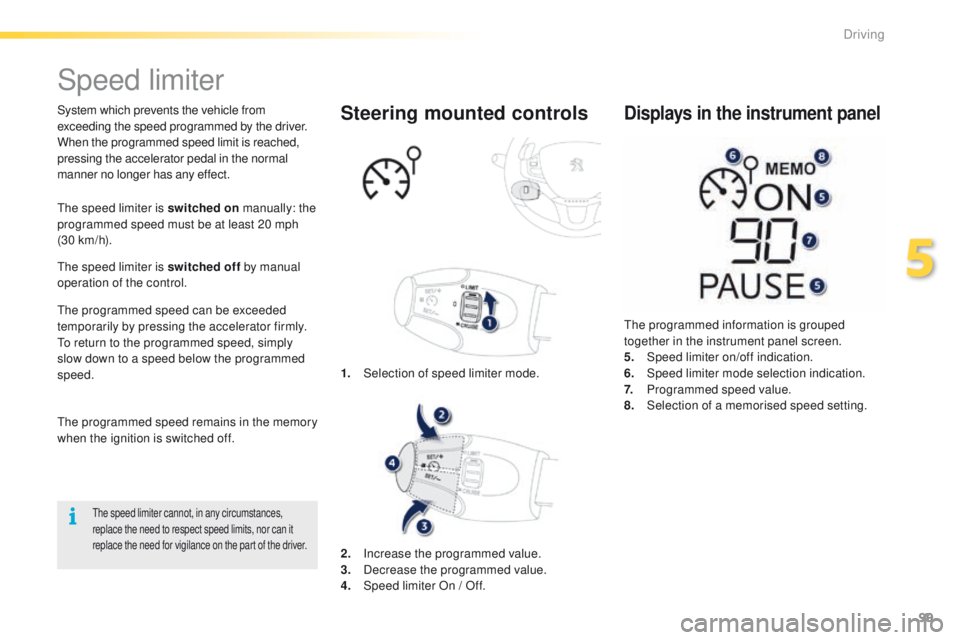
1. Selection of speed limiter mode.
Steering mounted controls
The programmed information is grouped
together in the instrument panel screen.
5.
Spe
ed limiter on/off indication.
6.
Spe
ed limiter mode selection indication.
7.
P
rogrammed speed value.
8.
Sel
ection of a memorised speed setting.
Displays in the instrument panel
The programmed speed remains in the memory
when the ignition is switched off.
2.
In
crease the programmed value.
3.
D
ecrease the programmed value.
4.
S
peed limiter On / Off.
5
Driving
Page 102 of 340
100
2008_en_Chap05_conduite_ed01-2015
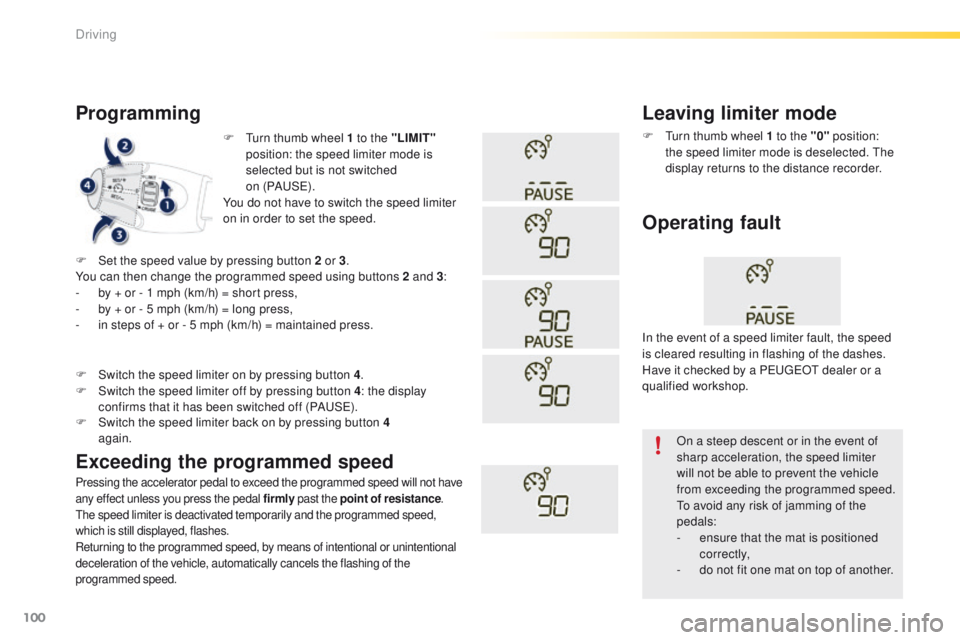
F Turn thumb wheel 1 to the "LIMIT"
position: the speed limiter mode is
selected but is not switched
on (PAUS E).
You do not have to switch the speed limiter
on in order to set the speed.
Programming
Pressing the accelerator pedal to exceed the programmed speed will not have
any effect unless you press the pedal firmly past the point of resistance.
The speed limiter is deactivated temporarily and the programmed speed,
which is still displayed, flashes.
Returning to the programmed speed, by means of intentional or unintentional
deceleration of the vehicle, automatically cancels the flashing of the
programmed speed.
Leaving limiter mode
F Turn thumb wheel 1 to the "0" position:
the speed limiter mode is deselected. The
display returns to the distance recorder.
Operating fault
F Set the speed value by pressing button 2 or 3 .
You can then change the programmed speed using buttons 2 and 3 :
-
b
y + or - 1 mph (km/h) = short press,
-
b
y + or - 5 mph (km/h) = long press,
-
i
n steps of + or - 5 mph (km/h) = maintained press.
Exceeding the programmed speed
F Switch the speed limiter back on by pressing button 4 again.
F
S
witch the speed limiter on by pressing button 4
.
F
S
witch the speed limiter off by pressing button 4
: the display
confirms that it has been switched off (PAUSE). In the event of a speed limiter fault, the speed
is cleared resulting in flashing of the dashes.
Have it checked by a PEUGEOT dealer or a
qualified workshop.
On a steep descent or in the event of
sharp acceleration, the speed limiter
will not be able to prevent the vehicle
from exceeding the programmed speed.
To avoid any risk of jamming of the
pedals:
-
e
nsure that the mat is positioned
c o r r e c t l y,
-
d
o not fit one mat on top of another.
Driving
Page 103 of 340
101
2008_en_Chap05_conduite_ed01-2015
Cruise control
System which automatically maintains the
speed of the vehicle at the value programmed
by the driver, without any action on the
accelerator pedal.
The cruise control is switched off manually
or by pressing the brake or clutch pedal or on
triggering of the electronic stability system for
safety reasons.
It is possible to exceed the programmed speed
temporarily by pressing the accelerator pedal.
To return to the programmed speed, simply
release the accelerator pedal.
Switching off the ignition cancels any
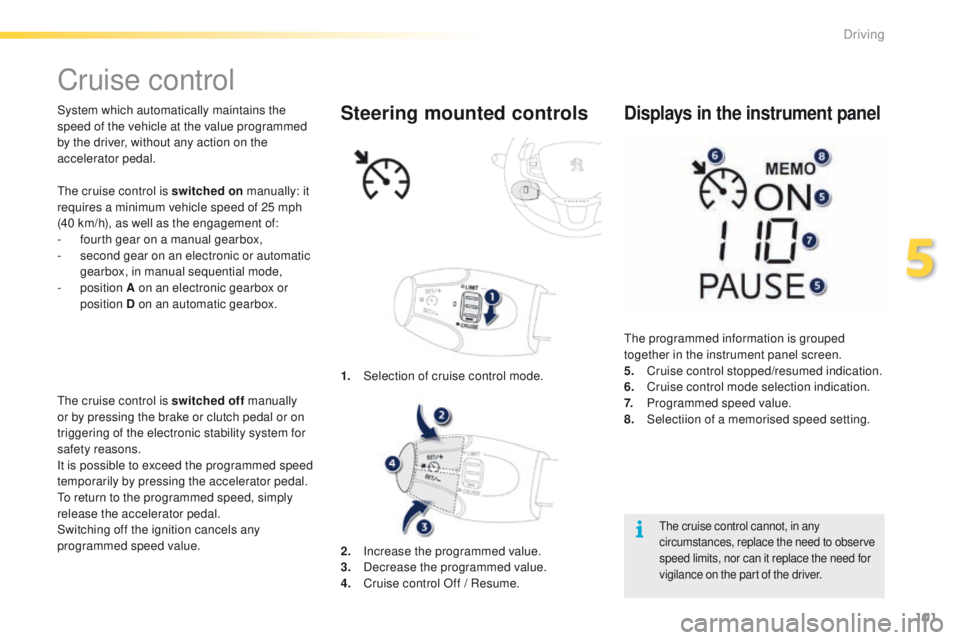
programmed speed value. 1.
Sel
ection of cruise control mode.Steering mounted controls
The cruise control cannot, in any
circumstances, replace the need to observe
speed limits, nor can it replace the need for
vigilance on the part of the driver.
The programmed information is grouped
together in the instrument panel screen.
5.
C
ruise control stopped/resumed indication.
6.
C
ruise control mode selection indication.
7.
P
rogrammed speed value.
8.
Sel
ectiion of a memorised speed setting.
Displays in the instrument panel
2. Increase the programmed value.
3. D ecrease the programmed value.
4.
C
ruise control Off / Resume.
The cruise control is switched on
manually: it
requires a minimum vehicle speed of 25 mph
(40 km/h), as well as the engagement of:
-
f
ourth gear on a manual gearbox,
-
s
econd gear on an electronic or automatic
gearbox, in manual sequential mode,
-
position
A on an electronic gearbox or
position D on an automatic gearbox.
5
Driving
Page 104 of 340
102
2008_en_Chap05_conduite_ed01-2015
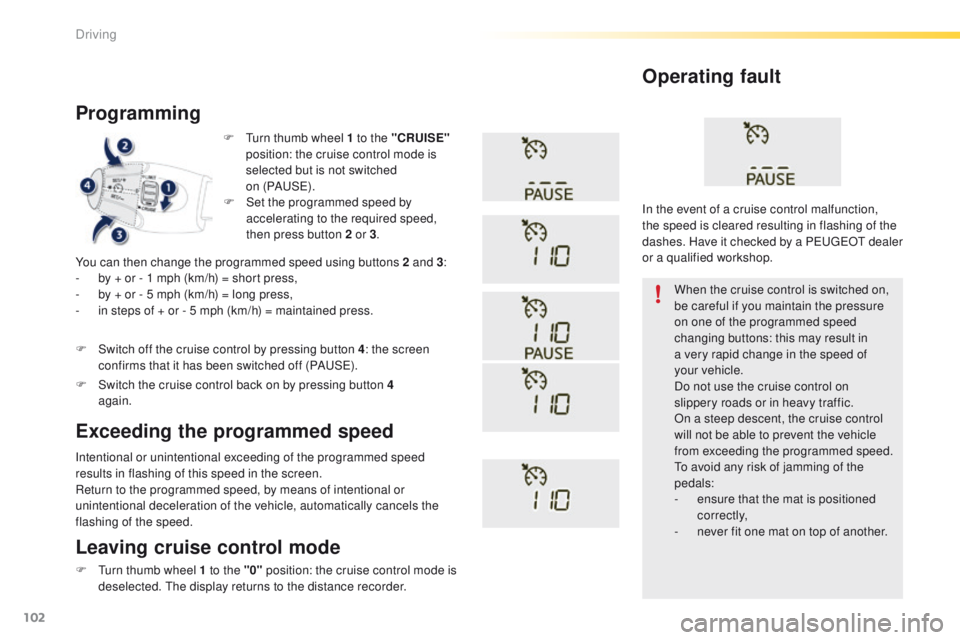
F Turn thumb wheel 1 to the "CRUISE"
position: the cruise control mode is
selected but is not switched
on (PAUS E).
Programming
You can then change the programmed speed using buttons 2 and 3 :
- b y + or - 1 mph (km/h) = short press,
-
b
y + or - 5 mph (km/h) = long press,
-
i
n steps of + or - 5 mph (km/h) = maintained press.
Intentional or unintentional exceeding of the programmed speed
results in flashing of this speed in the screen.
Return to the programmed speed, by means of intentional or
unintentional deceleration of the vehicle, automatically cancels the
flashing of the speed. When the cruise control is switched on,
be careful if you maintain the pressure
on one of the programmed speed
changing buttons: this may result in
a very rapid change in the speed of
your
vehicle.
Do not use the cruise control on
slippery roads or in heavy traffic.
On a steep descent, the cruise control
will not be able to prevent the vehicle
from exceeding the programmed speed.
To avoid any risk of jamming of the
pedals:
-
e
nsure that the mat is positioned
c o r r e c t l y,
-
n
ever fit one mat on top of another.
Operating fault
Leaving cruise control mode
F Turn thumb wheel 1 to the "0" position: the cruise control mode is
deselected. The display returns to the distance recorder.
Exceeding the programmed speed
F Set the programmed speed by accelerating to the required speed,
then press button 2 or 3 .
F
S
witch off the cruise control by pressing button 4 : the screen
confirms that it has been switched off (PAUSE).
F
S
witch the cruise control back on by pressing button 4
again. In the event of a cruise control malfunction,
the speed is cleared resulting in flashing of the
dashes. Have it checked by a PEUGEOT dealer
or a qualified workshop.
Driving
Page 105 of 340
103
2008_en_Chap05_conduite_ed01-2015
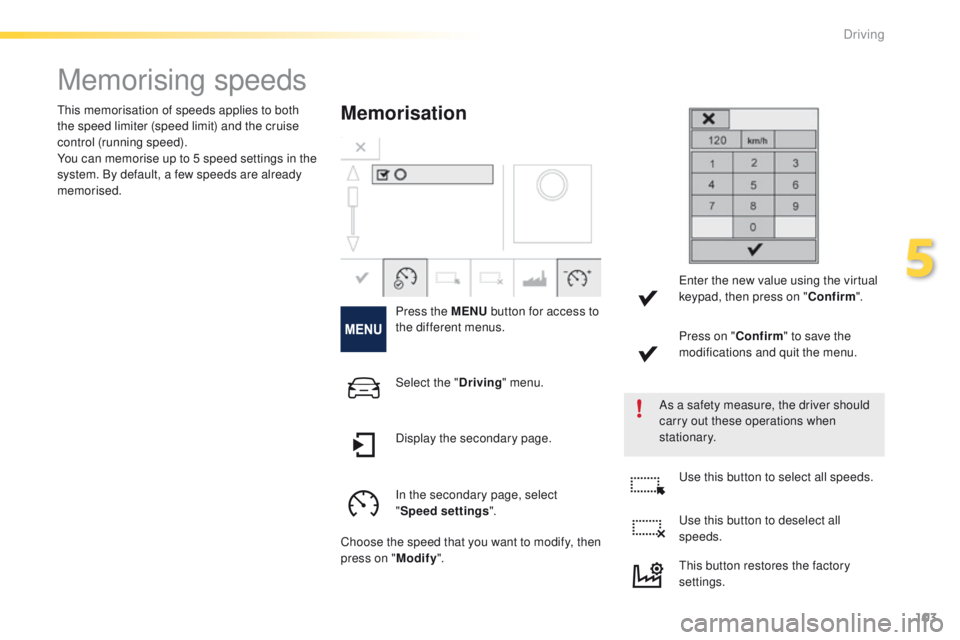
Memorising speeds
Memorisation
Press the MENU button for access to
the different menus.
As a safety measure, the driver should
carry out these operations when
stationary.
This memorisation of speeds applies to both
the speed limiter (speed limit) and the cruise
control (running speed).
You can memorise up to 5 speed settings in the
system. By default, a few speeds are already
memorised.
Select the "Driving" menu.
In the secondary page, select
" Speed settings ".
Choose the speed that you want to modify, then
press on " Modify". Use this button to select all speeds.
Use this button to deselect all
speeds.
Display the secondary page. Enter the new value using the virtual
keypad, then press on "
Confirm".
Press on " Confirm" to save the
modifications and quit the menu.
This button restores the factory
settings.
5
Driving
Page 106 of 340
104
2008_en_Chap05_conduite_ed01-2015
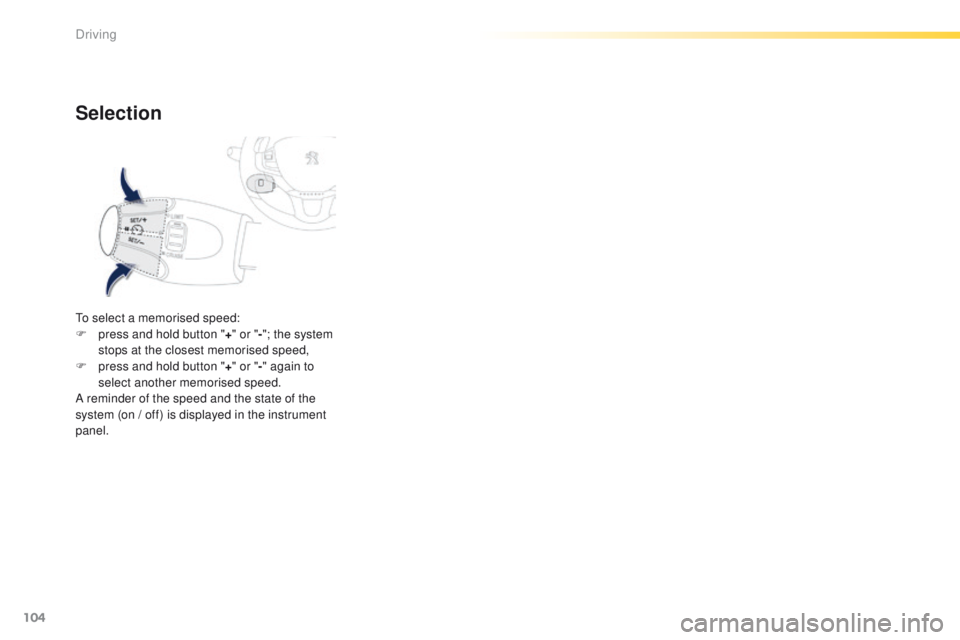
Selection
To select a memorised speed:
F p ress and hold button " +" or " -"; the system
stops at the closest memorised speed,
F
p
ress and hold button " +" or " -" again to
select another memorised speed.
A reminder of the speed and the state of the
system (on / off) is displayed in the instrument
panel.
Driving
Page 107 of 340
105
2008_en_Chap05_conduite_ed01-2015
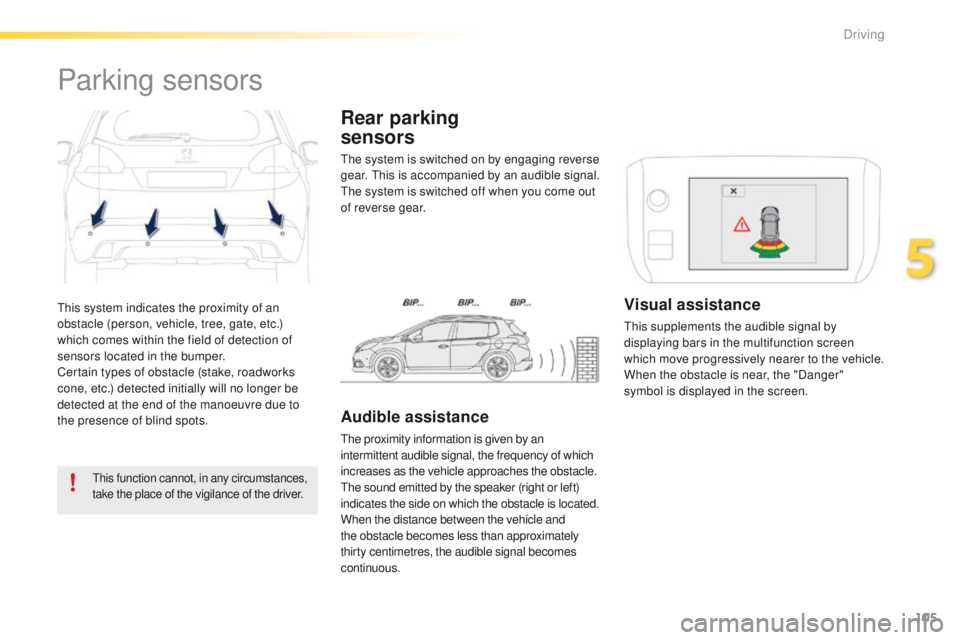
This system indicates the proximity of an
obstacle (person, vehicle, tree, gate, etc.)
which comes within the field of detection of
sensors located in the bumper.
Certain types of obstacle (stake, roadworks
cone, etc.) detected initially will no longer be
detected at the end of the manoeuvre due to
the presence of blind spots.
Parking sensors
This function cannot, in any circumstances,
take the place of the vigilance of the driver.
The system is switched on by engaging reverse
gear. This is accompanied by an audible signal.
The system is switched off when you come out
of reverse gear.
Rear parking
sensors
Audible assistance
The proximity information is given by an
intermittent audible signal, the frequency of which
increases as the vehicle approaches the obstacle.
The sound emitted by the speaker (right or left)
indicates the side on which the obstacle is located.
When the distance between the vehicle and
the obstacle becomes less than approximately
thirty centimetres, the audible signal becomes
continuous.
Visual assistance
This supplements the audible signal by
displaying bars in the multifunction screen
which move progressively nearer to the vehicle.
When the obstacle is near, the "Danger"
symbol is displayed in the screen.
5
Driving
Page 108 of 340
106
2008_en_Chap05_conduite_ed01-2015
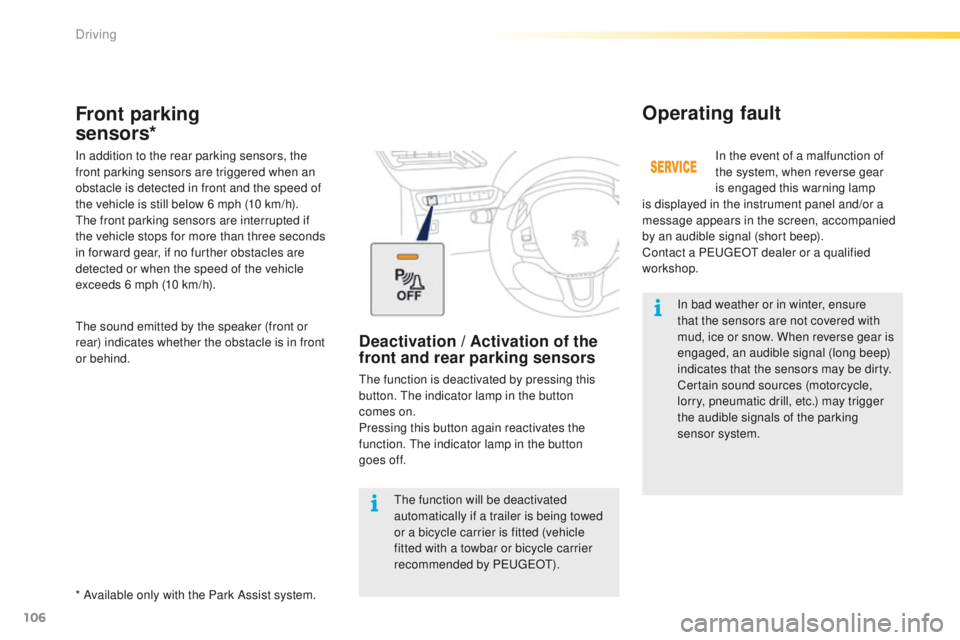
In bad weather or in winter, ensure
that the sensors are not covered with
mud, ice or snow. When reverse gear is
engaged, an audible signal (long beep)
indicates that the sensors may be dirty.
Certain sound sources (motorcycle,
lorry, pneumatic drill, etc.) may trigger
the audible signals of the parking
sensor system.In the event of a malfunction of
the system, when reverse gear
is engaged this warning lamp
is displayed in the instrument panel and/or a
message appears in the screen, accompanied
by an audible signal (short beep).
Contact a PEUGEOT dealer or a qualified
workshop.
Operating fault
The function will be deactivated
automatically if a trailer is being towed
or a bicycle carrier is fitted (vehicle
fitted with a towbar or bicycle carrier
recommended by PEUGEOT).
Front parking
sensors*
In addition to the rear parking sensors, the
front parking sensors are triggered when an
obstacle is detected in front and the speed of
the vehicle is still below 6 mph (10 km/h).
The front parking sensors are interrupted if
the vehicle stops for more than three seconds
in for ward gear, if no further obstacles are
detected or when the speed of the vehicle
exceeds 6 mph (10 km/h).
* Available only with the Park Assist system. The sound emitted by the speaker (front or
rear) indicates whether the obstacle is in front
or behind.
Deactivation / Activation of the
front and rear parking sensors
The function is deactivated by pressing this
button. The indicator lamp in the button
comes on.
Pressing this button again reactivates the
function. The indicator lamp in the button
goes off.
Driving
Page 110 of 340
108
2008_en_Chap05_conduite_ed01-2015
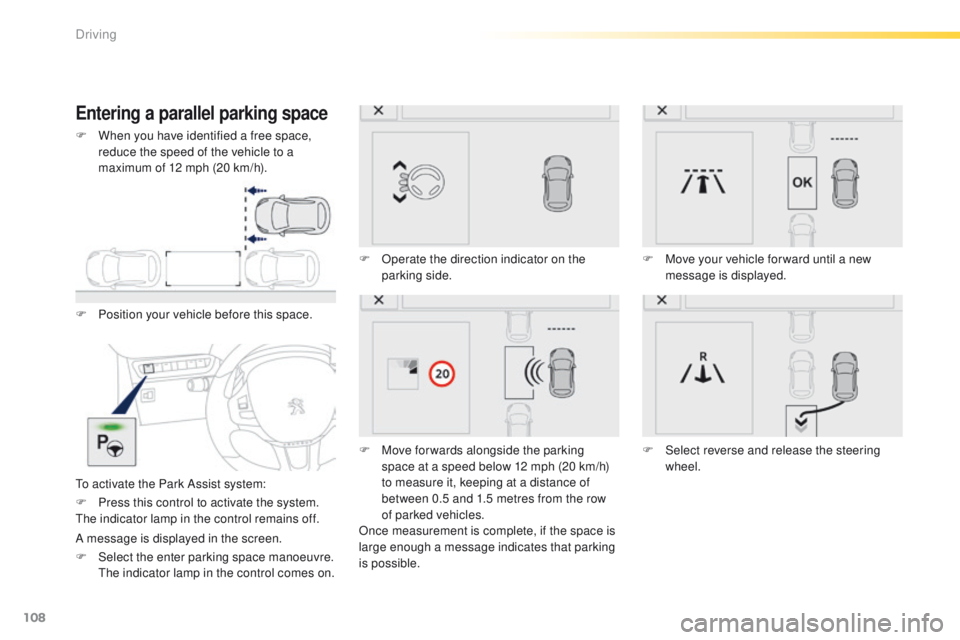
Entering a parallel parking space
F Position your vehicle before this space.
To activate the Park Assist system:F
O
perate the direction indicator on the
parking side.
F
M
ove for wards alongside the parking
space at a speed below 12 mph (20 km/h)
to measure it, keeping at a distance of
between 0.5 and 1.5 metres from the row
of parked vehicles.
Once measurement is complete, if the space is
large enough a message indicates that parking
is possible. F
M
ove your vehicle for ward until a new
message is displayed.
F
S
elect reverse and release the steering
wheel.
F
P
ress this control to activate the system.
The indicator lamp in the control remains off.
A message is displayed in the screen.
F
S
elect the enter parking space manoeuvre.
T
he indicator lamp in the control comes on.
F
W
hen you have identified a free space,
reduce the speed of the vehicle to a
maximum of 12 mph (20 km/h).
Driving