service Peugeot 206 CC 2003 User Guide
[x] Cancel search | Manufacturer: PEUGEOT, Model Year: 2003, Model line: 206 CC, Model: Peugeot 206 CC 2003Pages: 135, PDF Size: 2.11 MB
Page 29 of 135

30-06-2003
INSTRUMENTS AND CONTROLS
30
Instrument panel display After switching on the ignition, three functions are shown in succession:- service indicator (see corresponding section),
- engine oil level indicator,- total distance recorder (total or trip distances).Note:
the total or trip distances are displayed for 30 seconds when the ignition
is switched off, on opening the driver's door, as well as on locking and unlocking the vehicle. Engine oil level When the ignition is switched on, the engine oil level is indicated for approximate- ly 10 seconds, after the servicing information.
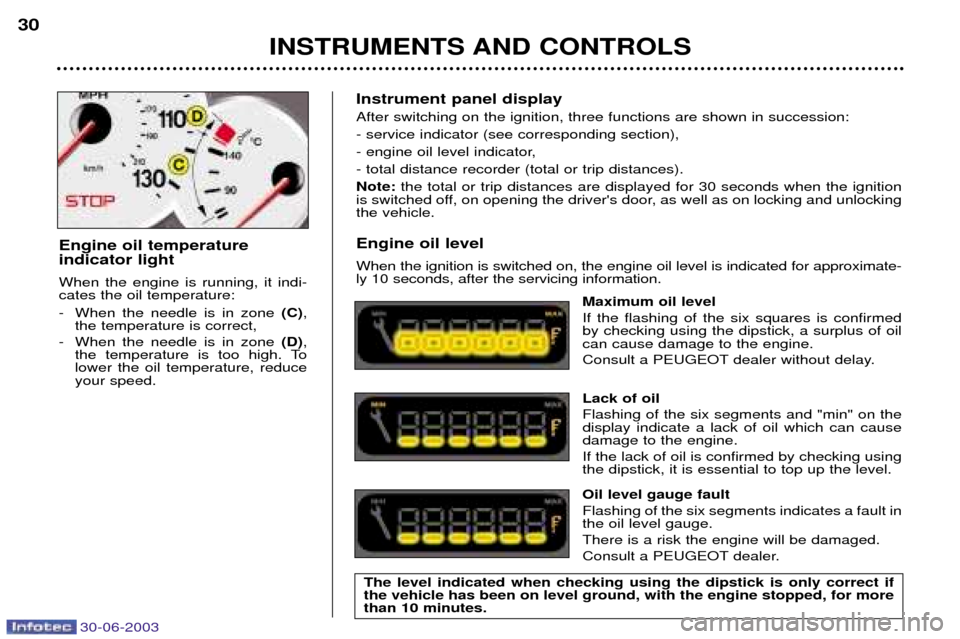
Maximum oil level If the flashing of the six squares is confirmed by checking using the dipstick, a surplus of oilcan cause damage to the engine.
Consult a PEUGEOT dealer without delay. Lack of oil Flashing of the six segments and "min" on the display indicate a lack of oil which can causedamage to the engine. If the lack of oil is confirmed by checking using the dipstick, it is essential to top up the level. Oil level gauge fault Flashing of the six segments indicates a fault in the oil level gauge. There is a risk the engine will be damaged.
Consult a PEUGEOT dealer.
Engine oil temperature indicator light When the engine is running, it indi- cates the oil temperature:
- When the needle is in zone
(C),
the temperature is correct,
- When the needle is in zone (D),
the temperature is too high. To lower the oil temperature, reduceyour speed.
The level indicated when checking using the dipstick is only correct ifthe vehicle has been on level ground, with the engine stopped, for morethan 10 minutes.
Page 30 of 135
30-06-2003
INSTRUMENTS AND CONTROLS
30
Instrument panel display After switching on the ignition, three functions are shown in succession:- service indicator (see corresponding section),
- engine oil level indicator,- total distance recorder (total or trip distances).Note:
the total or trip distances are displayed for 30 seconds when the ignition
is switched off, on opening the driver's door, as well as on locking and unlocking the vehicle. Engine oil level When the ignition is switched on, the engine oil level is indicated for approximate- ly 10 seconds, after the servicing information.
Maximum oil level If the flashing of the six squares is confirmed by checking using the dipstick, a surplus of oilcan cause damage to the engine.
Consult a PEUGEOT dealer without delay. Lack of oil Flashing of the six segments and "min" on the display indicate a lack of oil which can causedamage to the engine. If the lack of oil is confirmed by checking using the dipstick, it is essential to top up the level. Oil level gauge fault Flashing of the six segments indicates a fault in the oil level gauge. There is a risk the engine will be damaged.
Consult a PEUGEOT dealer.
Engine oil temperature indicator light When the engine is running, it indi- cates the oil temperature:
- When the needle is in zone
(C),
the temperature is correct,
- When the needle is in zone (D),
the temperature is too high. To lower the oil temperature, reduceyour speed.
The level indicated when checking using the dipstick is only correct ifthe vehicle has been on level ground, with the engine stopped, for morethan 10 minutes.
Page 41 of 135

30-06-2003
YOUR 206 CC IN DETAIL41
PTY function: This allows you to listen to stations broadcasting a specific type of programme (news, culture, sport, rock etc.). With FMselected, press the "TA"button for two seconds to switch this function on or off.
To search for a PTYprogramme:
Ð select the PTYfunction,
Ð briefly press button Jor Lto scroll down the list of the various types of programmes
offered.
Ð when the programme of your choice is displayed, keep button Jor Lpressed for two seconds
to carry out an automatic search (after an automatic search the PTYfunction is switched off).
In PTY mode the different types of programmes can be stored in memory. To do this, press the preselection buttons
"1" to "6" for more than two seconds. Briefly press the corresponding button to recall the type of programme stored in the
memory.
EON system
This connects stations which are part of the same network. It enables the broadcasting of traffic information or a PTY
programme by a station that is part of the same network as the station to which you are listening. This service is available when you have selected the TAtraffic information programme or the PTYfunction.
Page 45 of 135
30-06-2003
YOUR 206 CC IN DETAIL
45
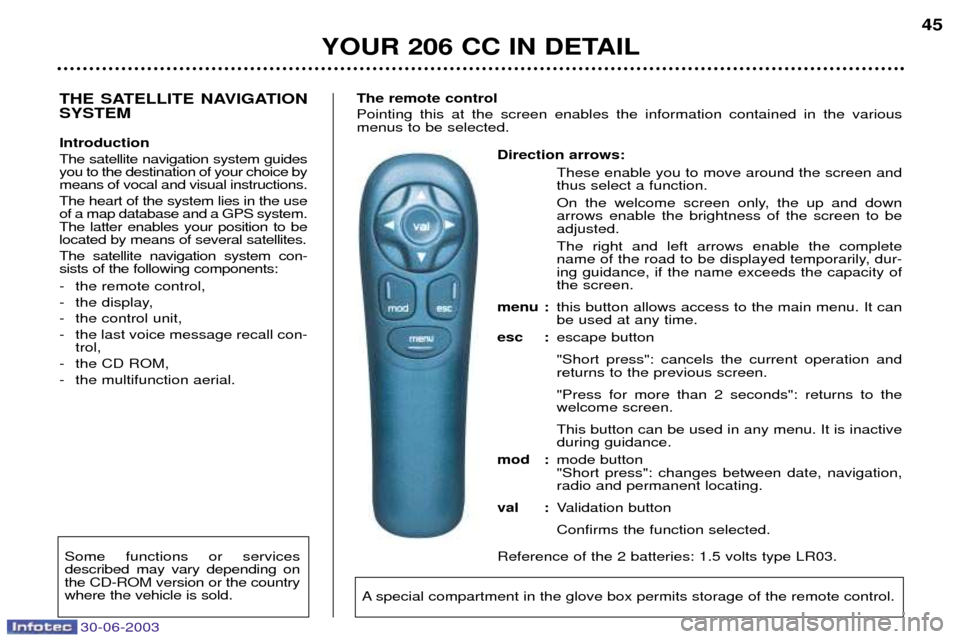
Direction arrows: These enable you to move around the screen and thus select a function.
On the welcome screen only, the up and down arrows enable the brightness of the screen to beadjusted. The right and left arrows enable the complete
name of the road to be displayed temporarily, dur-ing guidance, if the name exceeds the capacity ofthe screen.
menu : this button allows access to the main menu. It canbe used at any time.
esc : escape button "Short press": cancels the current operation and returns to the previous screen. "Press for more than 2 seconds": returns to the welcome screen. This button can be used in any menu. It is inactive during guidance.
mod : mode button"Short press": changes between date, navigation,radio and permanent locating.
val : Validation button Confirms the function selected.
Reference of the 2 batteries: 1.5 volts type LR03.
THE SATELLITE NAVIGATION SYSTEM Introduction The satellite navigation system guides you to the destination of your choice bymeans of vocal and visual instructions. The heart of the system lies in the use of a map database and a GPS system.The latter enables your position to belocated by means of several satellites. The satellite navigation system con- sists of the following components:
- the remote control,
- the display,
- the control unit,
- the last voice message recall con- trol,
- the CD ROM,
- the multifunction aerial. The remote control Pointing this at the screen enables the information contained in the various menus to be selected.
A special compartment in the glove box permits storage of the remote control.
Some functions or services described may vary depending onthe CD-ROM version or the countrywhere the vehicle is sold.
Page 48 of 135
30-06-2003
YOUR 206 CC IN DETAIL
48
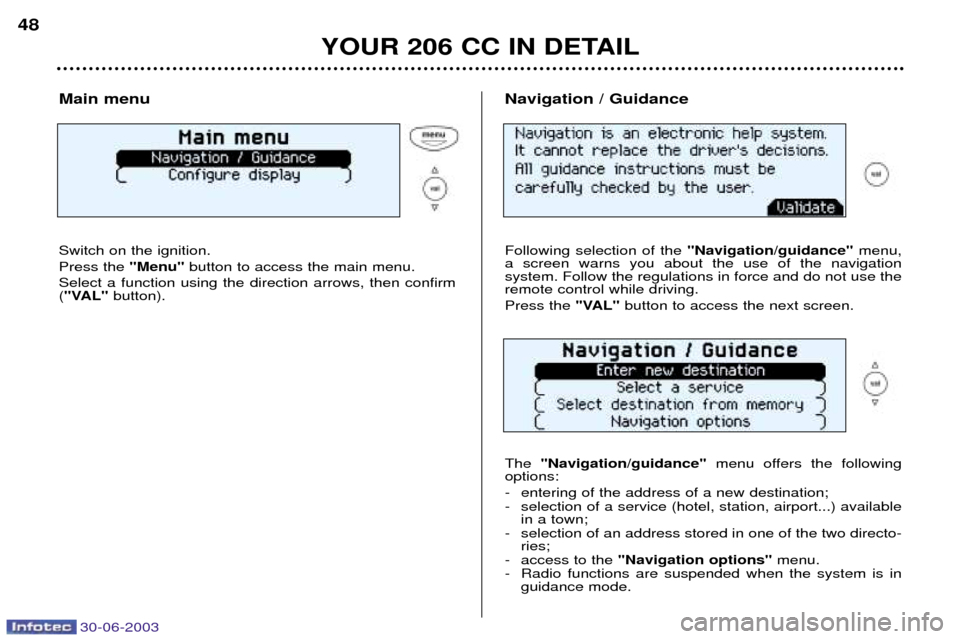
Main menu Switch on the ignition. Press the "Menu"button to access the main menu.
Select a function using the direction arrows, then confirm ( "VAL" button). Navigation / Guidance Following selection of the
"Navigation/guidance"menu,
a screen warns you about the use of the navigation system. Follow the regulations in force and do not use theremote control while driving. Press the "VAL"button to access the next screen.
The "Navigation/guidance" menu offers the following
options:
- entering of the address of a new destination;
- selection of a service (hotel, station, airport...) available in a town;
- selection of an address stored in one of the two directo- ries;
- access to the "Navigation options" menu.
- Radio functions are suspended when the system is in guidance mode.
Page 49 of 135
30-06-2003
YOUR 206 CC IN DETAIL
48
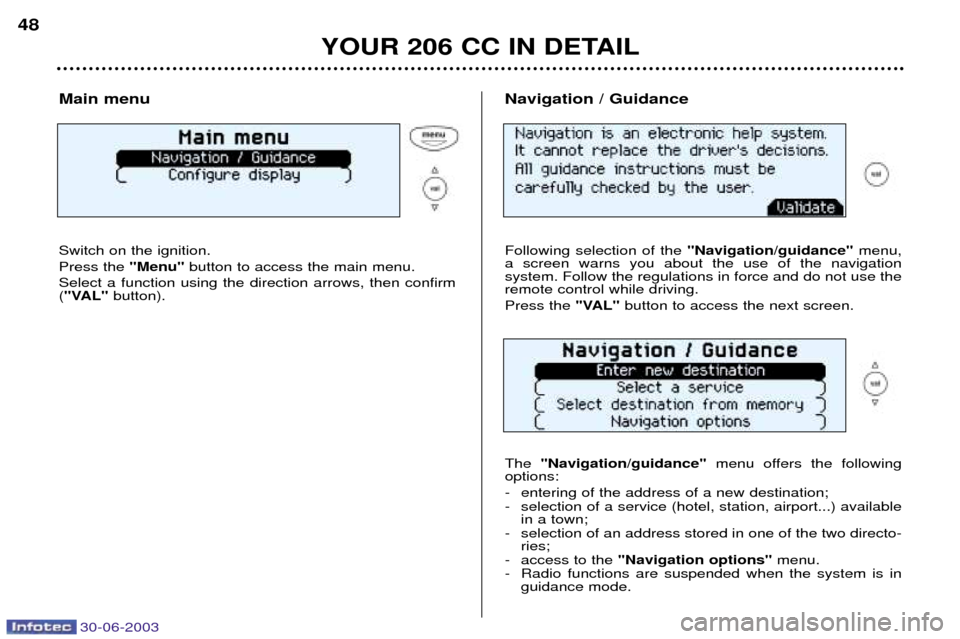
Main menu Switch on the ignition. Press the "Menu"button to access the main menu.
Select a function using the direction arrows, then confirm ( "VAL" button). Navigation / Guidance Following selection of the
"Navigation/guidance"menu,
a screen warns you about the use of the navigation system. Follow the regulations in force and do not use theremote control while driving. Press the "VAL"button to access the next screen.
The "Navigation/guidance" menu offers the following
options:
- entering of the address of a new destination;
- selection of a service (hotel, station, airport...) available in a town;
- selection of an address stored in one of the two directo- ries;
- access to the "Navigation options" menu.
- Radio functions are suspended when the system is in guidance mode.
Page 52 of 135

30-06-2003
YOUR 206 CC IN DETAIL
51
Selecting a service The last address entered is displayed. There are 3 options for defining the location in which you wish to obtain a service:
- resume the last address entered by means of the "Validate" function.
- enter the name of a new town then enter the street (or the "City centre" function) by means of the "Change"
function.
- automatically enter your current location by using the "Current location" function.
The address of the required service is displayed. An indication on the right-hand side of the screen (e.g. 1/50) indicates whether there are any other establish-
ments (50 maximum) offering the same service within aradius of approximately 30 miles (50 km). Use the "Next"or "Previous" functions to consult the list
offered.When the establishment of your choice is displayed, select the "Validate" function then press the "VAL" button.
Select a guidance criterion. Guidance begins, follow theinstructions.
After confirming the address, select a service by scrolling through the list using the direction arrows then press the
"VAL" button.
A cursor on the left-hand side of the screen indicates yourposition in the list.
Page 72 of 135
30-06-2003
YOUR 206 CC IN DETAIL73
Make a careful note of the number on each key. The key number is
coded on the label attached to the key. If the keys are lost, your PEUGEOT dealer can rapidly supply you with new keys.
The high frequency remote control is a sensitive system; do not operate itwhile it is in your pocket as there is a possibility that it may unlock your vehicle,without you being aware of it. The remote control does not operate when the key is in the ignition, even when the ignition is switched off, except for reprogramming. Driving with the doors locked may make access to the passenger compart-
ment by the emergency services more difficult in an emergency. As a safety precaution (with children on board), remove the ignition key when you leave the vehicle, even for a short time. Do not repeatedly press the button of your remote control out of range of your vehicle.
You run the risk of stopping it from working and the remote control would have to be reprogrammed. When purchasing a second-hand vehicle:
- ensure that you are given the confidential card;
- have the key codes memorised by a PEUGEOT dealer, to ensure that the keys in your possession are the only ones which can start the vehicle.
Do not make any modifications to the electronic engine immobiliser system.
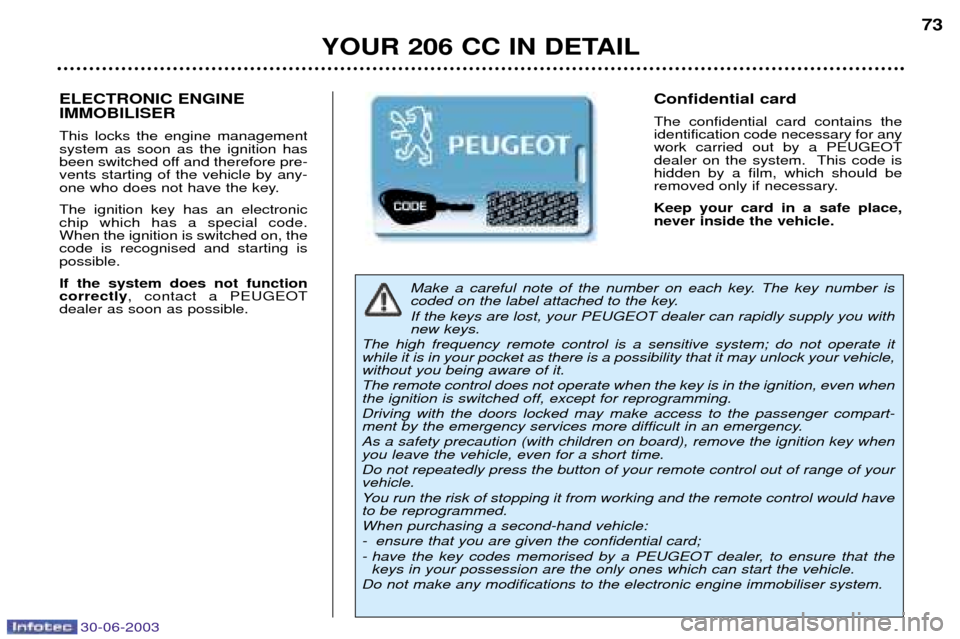
Confidential card The confidential card contains the identification code necessary for anywork carried out by a PEUGEOT
dealer on the system. This code ishidden by a film, which should be
removed only if necessary. Keep your card in a safe place, never inside the vehicle.ELECTRONIC ENGINE IMMOBILISER This locks the engine management system as soon as the ignition has
been switched off and therefore pre-vents starting of the vehicle by any-
one who does not have the key. The ignition key has an electronic chip which has a special code.When the ignition is switched on, thecode is recognised and starting ispossible. If the system does not function correctly , contact a PEUGEOT
dealer as soon as possible.
Page 73 of 135
30-06-2003
YOUR 206 CC IN DETAIL73
Make a careful note of the number on each key. The key number is
coded on the label attached to the key. If the keys are lost, your PEUGEOT dealer can rapidly supply you with new keys.
The high frequency remote control is a sensitive system; do not operate itwhile it is in your pocket as there is a possibility that it may unlock your vehicle,without you being aware of it. The remote control does not operate when the key is in the ignition, even when the ignition is switched off, except for reprogramming. Driving with the doors locked may make access to the passenger compart-
ment by the emergency services more difficult in an emergency. As a safety precaution (with children on board), remove the ignition key when you leave the vehicle, even for a short time. Do not repeatedly press the button of your remote control out of range of your vehicle.
You run the risk of stopping it from working and the remote control would have to be reprogrammed. When purchasing a second-hand vehicle:
- ensure that you are given the confidential card;
- have the key codes memorised by a PEUGEOT dealer, to ensure that the keys in your possession are the only ones which can start the vehicle.
Do not make any modifications to the electronic engine immobiliser system.
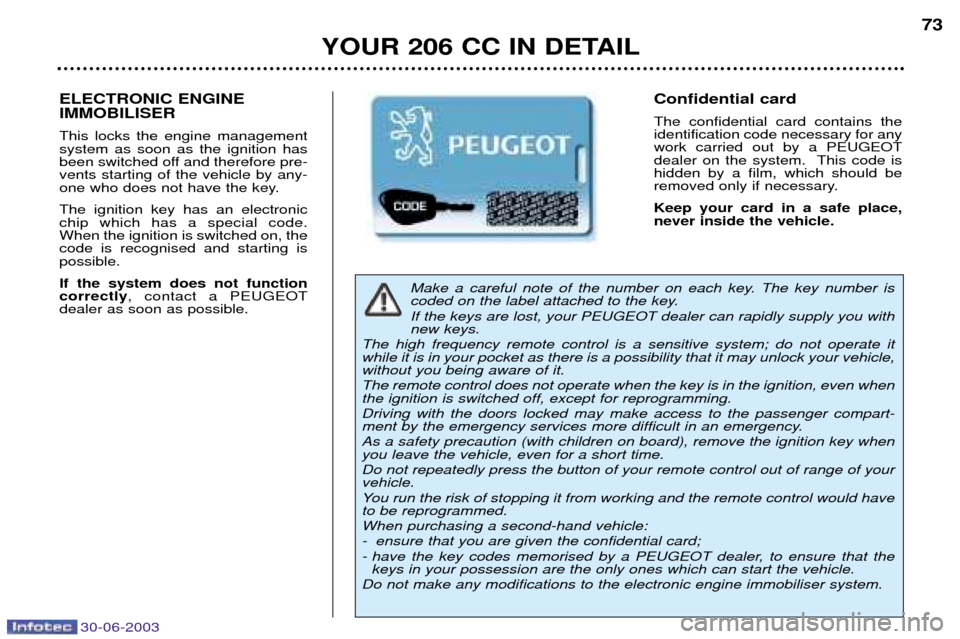
Confidential card The confidential card contains the identification code necessary for anywork carried out by a PEUGEOT
dealer on the system. This code ishidden by a film, which should be
removed only if necessary. Keep your card in a safe place, never inside the vehicle.ELECTRONIC ENGINE IMMOBILISER This locks the engine management system as soon as the ignition has
been switched off and therefore pre-vents starting of the vehicle by any-
one who does not have the key. The ignition key has an electronic chip which has a special code.When the ignition is switched on, thecode is recognised and starting ispossible. If the system does not function correctly , contact a PEUGEOT
dealer as soon as possible.
Page 106 of 135

30-06-2003
PRACTICAL INFORMATION99
CHECKS Battery
At the start of winter, have your bat-
tery checked by a PEUGEOT dea-
ler. Air filter and passenger compartment filter Have the filter elements replaced
regularly.
If you drive in dusty
conditions, change them twice asoften. Brake pads Brake pad wear depends on the style of driving, in particular forvehicles which are used in town,over short distances. It may be necessary to check the thickness of the pads, even betweenservices. Handbrake Where the handbrake travel is too great or there is a reduction in theperformance of the system, thehandbrake should be adjusted, evenbetween services. Have the system checked by a
PEUGEOT dealer. Manual gearbox This does not need an oil change. Check the level, according to themanufacturer's servicing schedule. Automatic gearbox This does not need an oil change. Have the level checked by a
PEUGEOT dealer, according to themanufacturer's servicing schedule. Oil filter
Change the filter regularly, in accor- dance with the servicing schedule.Only use products recommended by
PEUGEOT.
To ensure best performance fromcomponents as important as thepower steering and the brakingsystem, PEUGEOT selects andoffers quite specific products.