display PEUGEOT 207 2010 User Guide
[x] Cancel search | Manufacturer: PEUGEOT, Model Year: 2010, Model line: 207, Model: PEUGEOT 207 2010Pages: 218, PDF Size: 10.37 MB
Page 20 of 218
!
37
Defi ne the vehicle parameters
Once this menu has been selected, you can
activate or deactivate the following equipment:
- wiper linked with reverse gear (refer to the "Visibility" section),
- directional headlamps (refer to the "Visibility" section),
- "guide-me-home" lighting (refer to the "Visibility" section).
- rear parking sensors (see "Driving" section). Choice of language
Once this menu has been selected, you
can change the screen display language
(Deutsch, English, Espanol, Français,
Italiano, Nederlands, Portugues, Portugues-
Brasil, Türkçe * ).
"Telephone" menu
With the audio equipment switched on,
once this menu has been selected you
can confi gure your Bluetooth hands-
free system (pairing), consult the vari-
ous telephone directories (calls log,
services...) and manage your commu-
nications (pick up, hang up, call waiting,
secret mode...).
For further details concerning the "Tele-
phone" application, refer to the Peugeot
Connect Sound part of the "Audio and
Telematics" section.
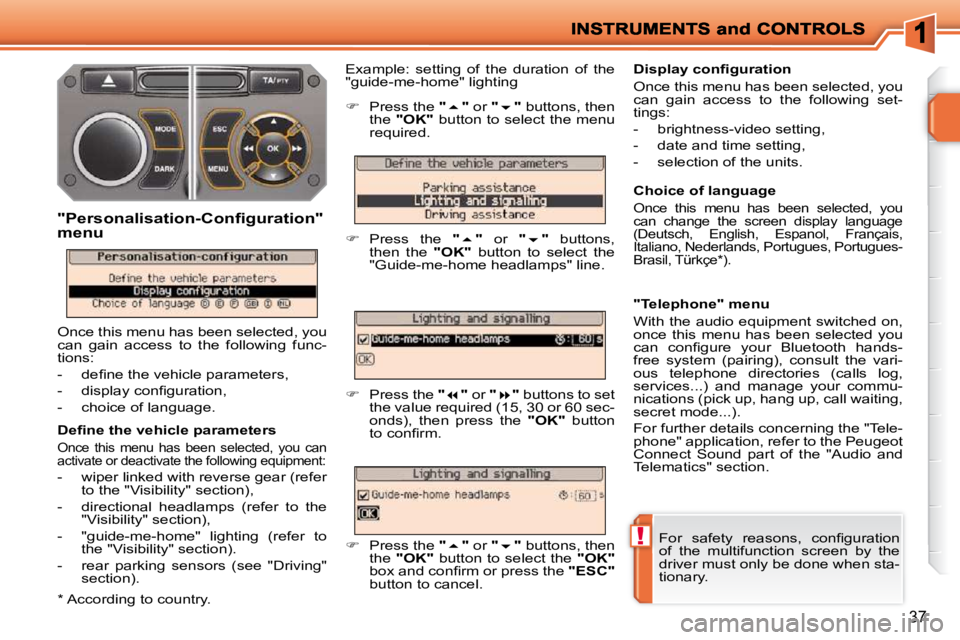
Example: setting of the duration of the
"guide-me-home" lighting
"Personalisation-Configuration"
menu
Once this menu has been selected, you
can gain access to the following func-
tions:
- defi ne the vehicle parameters,
- display confi guration,
- choice of language.
Press the " " or " " buttons, then
the "
OK
" button to select the menu
required.
Press the " " or " " buttons,
then the "
OK
" button to select the
"Guide-me-home headlamps" line.
Press the " " or " " buttons to set
the value required (15, 30 or 60 sec-
onds), then press the "
OK
" button
to confi rm.
Press the " " or " " buttons, then
the "
OK
" button to select the "
OK
"
box and confi rm or press the "
ESC
"
button to cancel.
Display confi guration
Once this menu has been selected, you
can gain access to the following set-
tings:
- brightness-video setting,
- date and time setting,
- selection of the units.
For safety reasons, confi guration
of the multifunction screen by the
driver must only be done when sta-
tionary.
* According to country.
Page 21 of 218

i
38
16/9 COLOUR SCREEN
(WITH PEUGEOT CONNECT NAVIGATION)
For more information on these ap-
plications, refer to the "Audio and
Telematics" section or to the spe-
cifi c user guide given to you with
the other owner's documents.
Displays on the screen
This displays the following information
automatically and directly:
- time,
- date,
- altitude,
- ambient temperature (the value dis- played fl ashes if there is a risk of ice),
- check on openings,
- warning and vehicle function status messages, displayed temporarily,
- audio functions,
- trip computer information,
- satellite navigation system information. Controls
From the Peugeot Connect Navigation
control panel, to select one of the ap-
plications:
press the dedicated "RADIO" , "MU-
SIC" , "NAV" , "TRAFFIC" , "SETUP"
or "PHONE" button for access to the
corresponding menu,
turn the navigator to move the se-
lection,
press the navigator to confi rm the
selection,
or
press the "ESC" button to abandon
the current operation and return to
the previous display.
Page 22 of 218
!
39
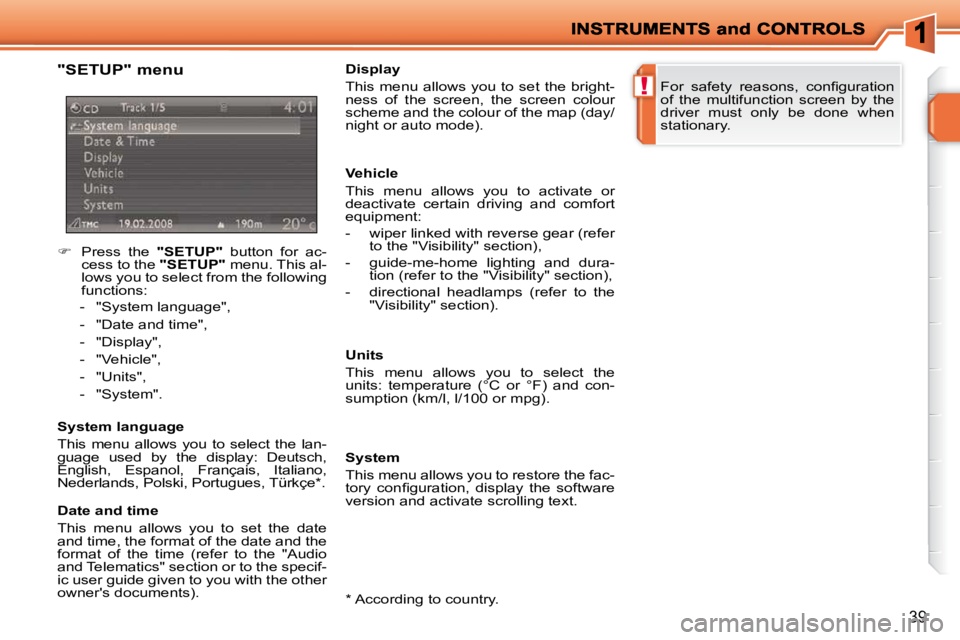
"SETUP" menu
Press the "SETUP" button for ac-
cess to the "SETUP" menu. This al-
lows you to select from the following
functions:
- "System language",
- "Date and time",
- "Display",
- "Vehicle",
- "Units",
- "System".
System language
This menu allows you to select the lan-
guage used by the display: Deutsch,
English, Espanol, Français, Italiano,
Nederlands, Polski, Portugues, Türkçe * .
* According to country.
Date and time
This menu allows you to set the date
and time, the format of the date and the
format of the time (refer to the "Audio
and Telematics" section or to the specif-
ic user guide given to you with the other
owner's documents). Display
This menu allows you to set the bright-
ness of the screen, the screen colour
scheme and the colour of the map (day/
night or auto mode).
Vehicle
This menu allows you to activate or
deactivate certain driving and comfort
equipment:
- wiper linked with reverse gear (refer
to the "Visibility" section),
- guide-me-home lighting and dura- tion (refer to the "Visibility" section),
- directional headlamps (refer to the "Visibility" section).
Units
This menu allows you to select the
units: temperature (°C or °F) and con-
sumption (km/l, l/100 or mpg).
System
This menu allows you to restore the fac-
tory confi guration, display the software
version and activate scrolling text. For safety reasons, confi guration
of the multifunction screen by the
driver must only be done when
stationary.
Page 23 of 218
40
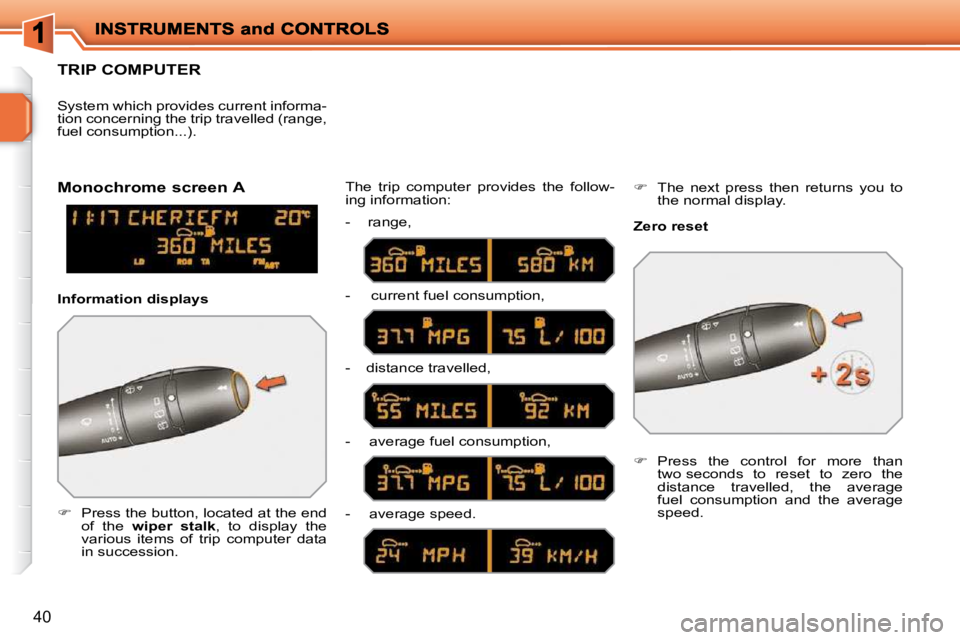
TRIP COMPUTER
Press the button, located at the end
of the wiper stalk , to display the
various items of trip computer data
in succession. The trip computer provides the follow-
ing information:
System which provides current informa-
tion concerning the trip travelled (range,
fuel consumption...).
Press the control for more than
two seconds to reset to zero the
distance travelled, the average
fuel consumption and the average
speed.
Monochrome screen A
Zero reset
Information displays - range,
- current fuel consumption,
- distance travelled,
- average fuel consumption,
- average speed.
The next press then returns you to
the normal display.
Page 24 of 218
!
i
i
42
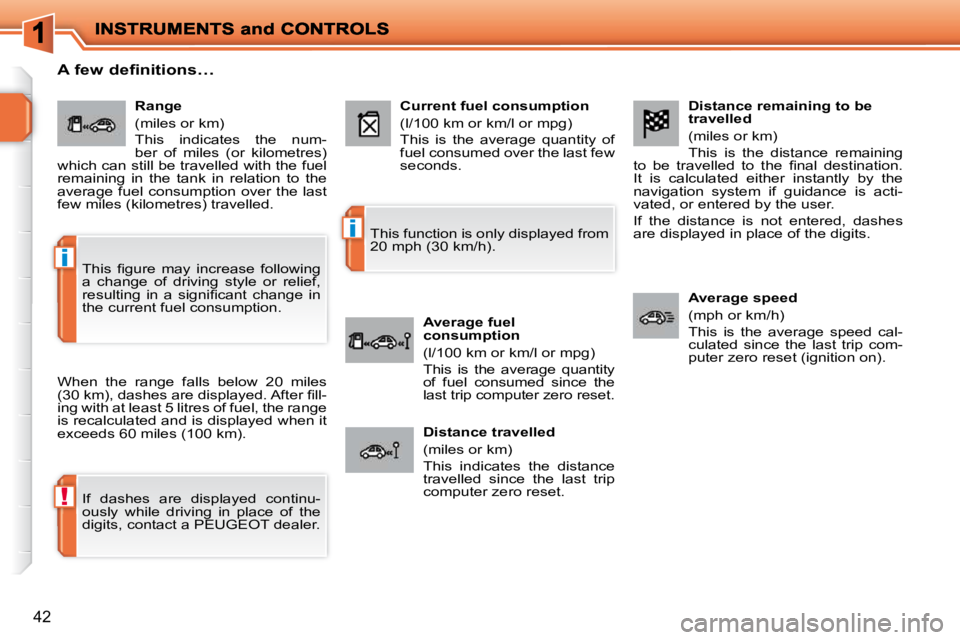
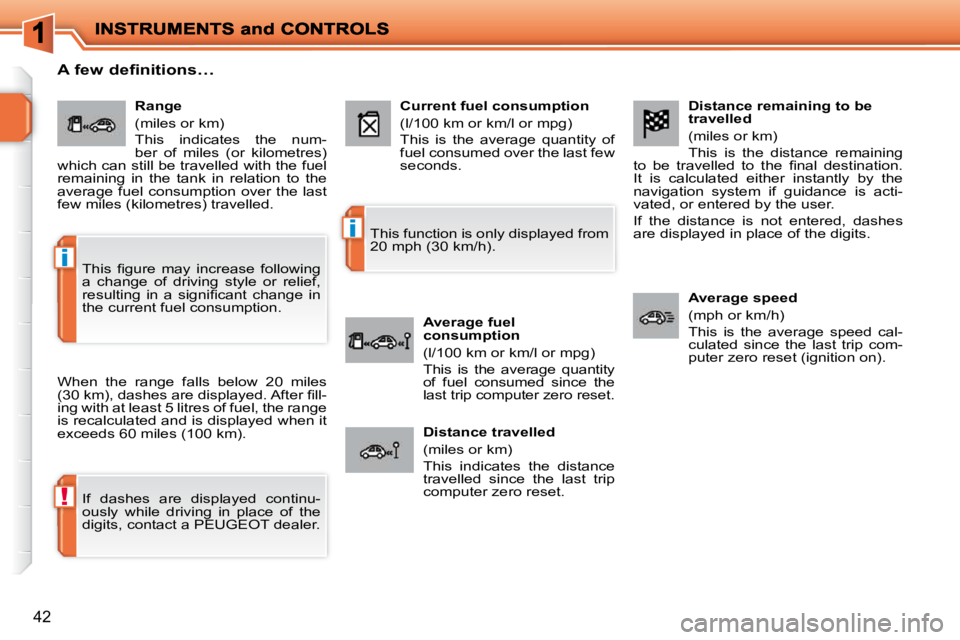
Distance remaining to be
travelled
(miles or km)
This is the distance remaining
to be travelled to the fi nal destination.
It is calculated either instantly by the
navigation system if guidance is acti-
vated, or entered by the user.
If the distance is not entered, dashes
are displayed in place of the digits.
Average speed
(mph or km/h)
This is the average speed cal-
culated since the last trip com-
puter zero reset (ignition on).
Range
(miles or km)
This indicates the num-
ber of miles (or kilometres)
which can still be travelled with the fuel
remaining in the tank in relation to the
average fuel consumption over the last
few miles (kilometres) travelled. Current fuel consumption
(l/100 km or km/l or mpg)
This is the average quantity of
fuel consumed over the last few
seconds.
Average fuel
consumption
(l/100 km or km/l or mpg)
This is the average quantity
of fuel consumed since the
last trip computer zero reset.
Distance travelled
(miles or km)
This indicates the distance
travelled since the last trip
computer zero reset.
A few definitions…
When the range falls below 20 miles
(30 km), dashes are displayed. After fi ll-
ing with at least 5 litres of fuel, the range
is recalculated and is displayed when it
exceeds 60 miles (100 km).
If dashes are displayed continu-
ously while driving in place of the
digits, contact a PEUGEOT dealer. This function is only displayed from
20 mph (30 km/h).
This fi gure may increase following
a change of driving style or relief,
resulting in a signifi cant change in
the current fuel consumption.
Page 26 of 218
!
i
i
42
Distance remaining to be
travelled
(miles or km)
This is the distance remaining
to be travelled to the fi nal destination.
It is calculated either instantly by the
navigation system if guidance is acti-
vated, or entered by the user.
If the distance is not entered, dashes
are displayed in place of the digits.
Average speed
(mph or km/h)
This is the average speed cal-
culated since the last trip com-
puter zero reset (ignition on).
Range
(miles or km)
This indicates the num-
ber of miles (or kilometres)
which can still be travelled with the fuel
remaining in the tank in relation to the
average fuel consumption over the last
few miles (kilometres) travelled. Current fuel consumption
(l/100 km or km/l or mpg)
This is the average quantity of
fuel consumed over the last few
seconds.
Average fuel
consumption
(l/100 km or km/l or mpg)
This is the average quantity
of fuel consumed since the
last trip computer zero reset.
Distance travelled
(miles or km)
This indicates the distance
travelled since the last trip
computer zero reset.
A few definitions…
When the range falls below 20 miles
(30 km), dashes are displayed. After fi ll-
ing with at least 5 litres of fuel, the range
is recalculated and is displayed when it
exceeds 60 miles (100 km).
If dashes are displayed continu-
ously while driving in place of the
digits, contact a PEUGEOT dealer. This function is only displayed from
20 mph (30 km/h).
This fi gure may increase following
a change of driving style or relief,
resulting in a signifi cant change in
the current fuel consumption.
Page 35 of 218
i
i
48
When the engine is cold, to prevent
too great a distribution of cold air,
the air fl ow will only reach its opti-
mum level gradually.
In cold weather, it favours the dis-
tribution of warm air to the wind-
screen, the side windows and the
footwells only. On entering the vehicle, if the in-
terior temperature is much colder
or warmer than the comfort value,
there is no need to alter the value
displayed in order to obtain the re-
quired level of comfort. The system
corrects the temperature differ-
ence automatically and as quickly
as possible.
The air conditioning can only operate
with the engine running.
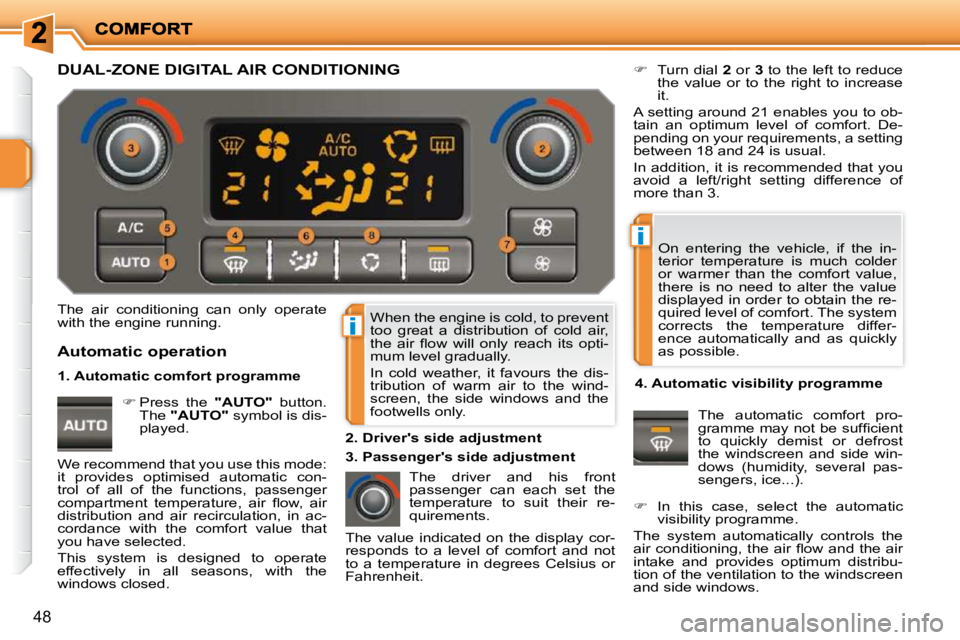
The driver and his front
passenger can each set the
temperature to suit their re-
quirements.
Turn dial 2 or 3 to the left to reduce
the value or to the right to increase
it.
A setting around 21 enables you to ob-
tain an optimum level of comfort. De-
pending on your requirements, a setting
between 18 and 24 is usual.
In addition, it is recommended that you
avoid a left/right setting difference of
more than 3.
4. Automatic visibility programme The automatic comfort pro-
gramme may not be suffi cient
to quickly demist or defrost
the windscreen and side win-
dows (humidity, several pas-
sengers, ice...).
In this case, select the automatic
visibility programme.
The system automatically controls the
air conditioning, the air fl ow and the air
intake and provides optimum distribu-
tion of the ventilation to the windscreen
and side windows.
Automatic operation
Press the "AUTO" button.
The "AUTO" symbol is dis-
played. 2. Driver's side adjustment
DUAL-ZONE DIGITAL AIR CONDITIONING
We recommend that you use this mode:
it provides optimised automatic con-
trol of all of the functions, passenger
compartment temperature, air fl ow, air
distribution and air recirculation, in ac-
cordance with the comfort value that
you have selected.
This system is designed to operate
effectively in all seasons, with the
windows closed. The value indicated on the display cor-
responds to a level of comfort and not
to a temperature in degrees Celsius or
Fahrenheit.
1. Automatic comfort programme
3. Passenger's side adjustment
Page 36 of 218
!
!
i
49
To exit this programme, press the
"visibility" button again or the "AUTO"
button, the indicator lamp on the button
switches off and "AUTO" is displayed.
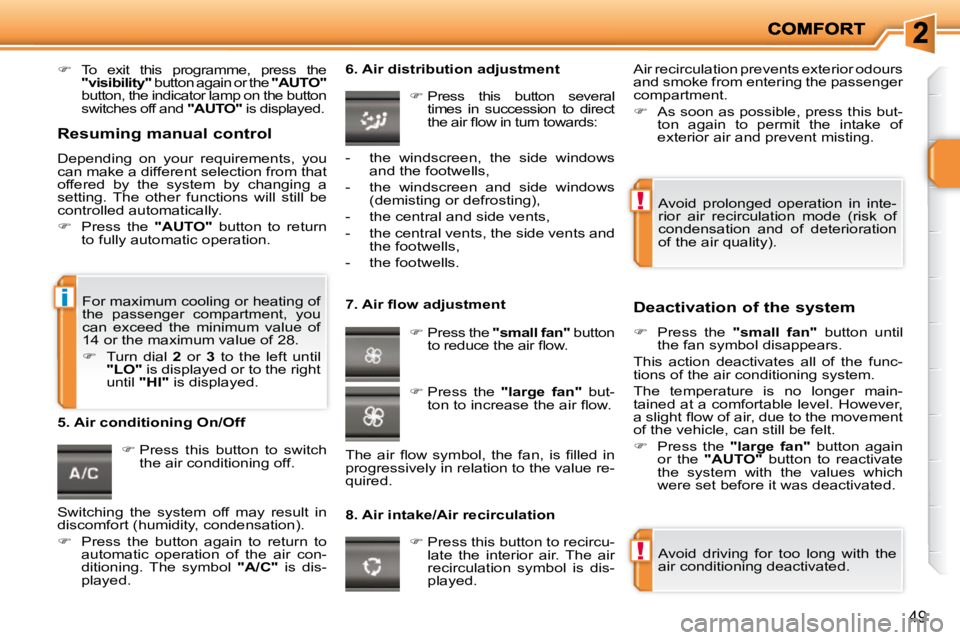
Press this button to switch
the air conditioning off. 6. Air distribution adjustment
Press this button several
times in succession to direct
the air fl ow in turn towards:
7. Air fl ow adjustment
Press the "small fan" button
to reduce the air fl ow.
8. Air intake/Air recirculation Deactivation of the system
Press the "small fan" button until
the fan symbol disappears.
This action deactivates all of the func-
tions of the air conditioning system.
The temperature is no longer main-
tained at a comfortable level. However,
a slight fl ow of air, due to the movement
of the vehicle, can still be felt.
Press the "large fan" button again
or the "AUTO" button to reactivate
the system with the values which
were set before it was deactivated.
Press this button to recircu-
late the interior air. The air
recirculation symbol is dis-
played.
5. Air conditioning On/Off
Avoid driving for too long with the
air conditioning deactivated.
Avoid prolonged operation in inte-
rior air recirculation mode (risk of
condensation and of deterioration
of the air quality).
- the windscreen, the side windows
and the footwells,
- the windscreen and side windows (demisting or defrosting),
- the central and side vents,
- the central vents, the side vents and the footwells,
- the footwells.
Press the "large fan" but-
ton to increase the air fl ow.
The air fl ow symbol, the fan, is fi lled in
progressively in relation to the value re-
quired. Air recirculation prevents exterior odours
and smoke from entering the passenger
compartment.
As soon as possible, press this but-
ton again to permit the intake of
exterior air and prevent misting.
For maximum cooling or heating of
the passenger compartment, you
can exceed the minimum value of
14 or the maximum value of 28.
Turn dial 2 or 3 to the left until
"LO" is displayed or to the right
until "HI" is displayed.
Resuming manual control
Depending on your requirements, you
can make a different selection from that
offered by the system by changing a
setting. The other functions will still be
controlled automatically.
Press the "AUTO" button to return
to fully automatic operation.
Switching the system off may result in
discomfort (humidity, condensation).
Press the button again to return to
automatic operation of the air con-
ditioning. The symbol " A/C " is dis-
played.
Page 47 of 218
!
!
58
To avoid any risk of jamming of the
pedals:
- only use mats which are suited to the fi xings already present in
the vehicle; it is imperative that
these are used,
- never fi t one mat on top of an- other.
MATS
Removable carpet protection. Refitting
To refi t the mat on the driver's side:
position the mat correctly,
refi t the fi xings by pressing,
check that the mat is secured cor-
rectly.
Fitting
When fi tting the mat for the fi rst time,
on the driver's side use only the fi xings
provided in the wallet attached.
The other mats are simply placed on
the carpet.
Removal
To remove the mat on the driver's side:
move the seat as far back as possible,
unclip the fi xings,
remove the mat.
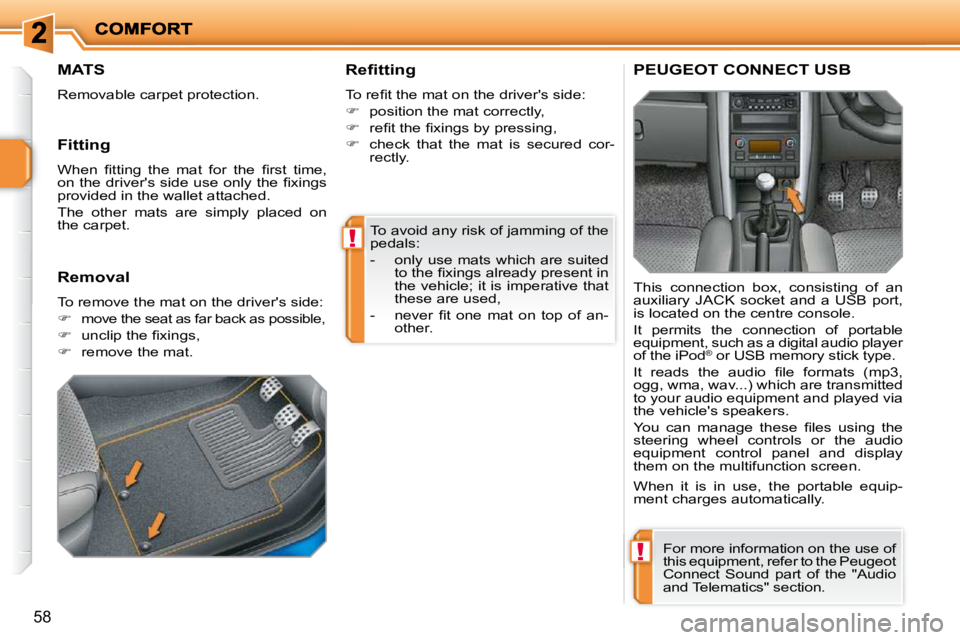
PEUGEOT CONNECT USB
This connection box, consisting of an
auxiliary JACK socket and a USB port,
is located on the centre console.
It permits the connection of portable
equipment, such as a digital audio player
of the iPod ®
or USB memory stick type.
It reads the audio fi le formats (mp3,
ogg, wma, wav...) which are transmitted
to your audio equipment and played via
the vehicle's speakers.
You can manage these fi les using the
steering wheel controls or the audio
equipment control panel and display
them on the multifunction screen.
When it is in use, the portable equip-
ment charges automatically.
For more information on the use of
this equipment, refer to the Peugeot
Connect Sound part of the "Audio
and Telematics" section.
Page 75 of 218
81
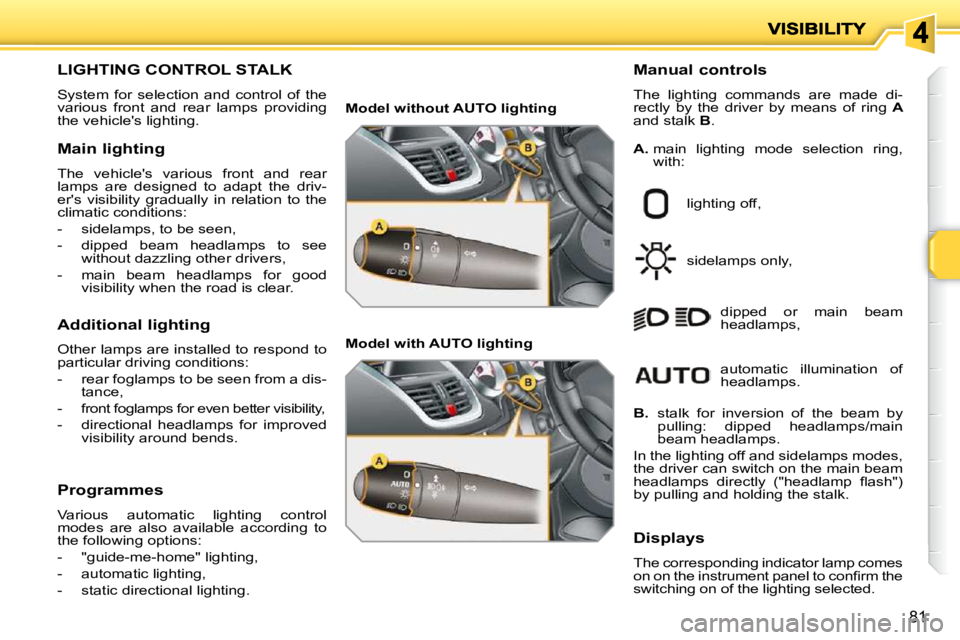
LIGHTING CONTROL STALK
System for selection and control of the
various front and rear lamps providing
the vehicle's lighting. Manual controls
The lighting commands are made di-
rectly by the driver by means of ring
A
and stalk B .
lighting off,
sidelamps only, dipped or main beam
headlamps,
B. stalk for inversion of the beam by
pulling: dipped headlamps/main
beam headlamps.
In the lighting off and sidelamps modes,
the driver can switch on the main beam
headlamps directly ("headlamp fl ash")
by pulling and holding the stalk.
Displays
The corresponding indicator lamp comes
on on the instrument panel to confi rm the
switching on of the lighting selected.
Main lighting
The vehicle's various front and rear
lamps are designed to adapt the driv-
er's visibility gradually in relation to the
climatic conditions:
- sidelamps, to be seen,
- dipped beam headlamps to see
without dazzling other drivers,
- main beam headlamps for good visibility when the road is clear.
Additional lighting
Other lamps are installed to respond to
particular driving conditions:
- rear foglamps to be seen from a dis- tance,
- front foglamps for even better visibility,
- directional headlamps for improved visibility around bends.
Programmes
Various automatic lighting control
modes are also available according to
the following options:
- "guide-me-home" lighting,
- automatic lighting,
- static directional lighting.
A. main lighting mode selection ring,
with:
Model without AUTO lighting
Model with AUTO lighting
automatic illumination of
headlamps.