warning PEUGEOT 207 2011 Owner's Manual
[x] Cancel search | Manufacturer: PEUGEOT, Model Year: 2011, Model line: 207, Model: PEUGEOT 207 2011Pages: 248, PDF Size: 8.61 MB
Page 40 of 248
1INSTRUMENTS and CONTROLS
38
"Trip computer" menu
Once this menu has been selected, you
can consult information concerning the
status of the vehicle (alert log, status of
the functions...).
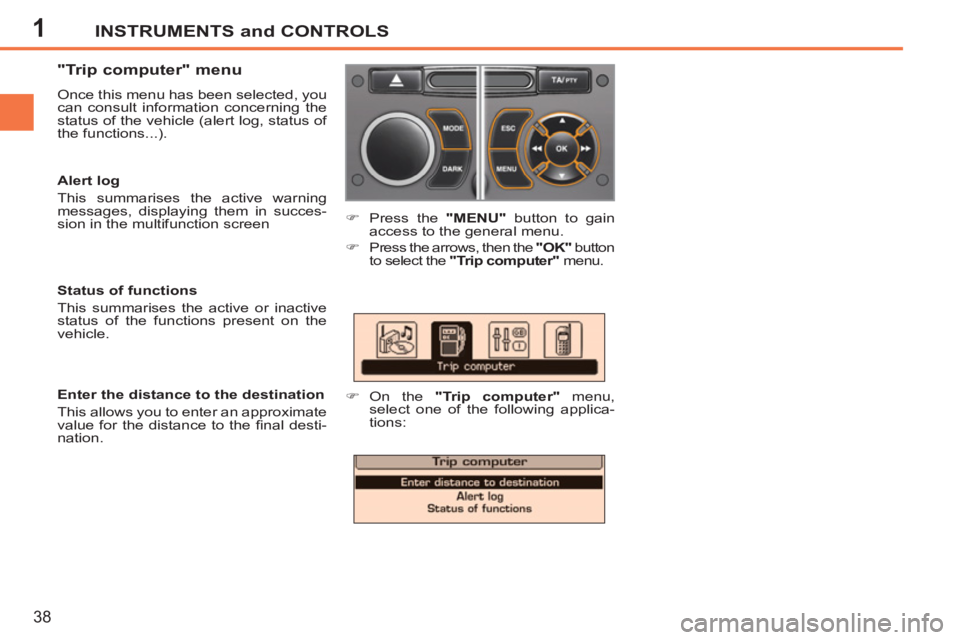
)
Press the "MENU"
button to gain
access to the general menu.
)
Press the arrows, then the "OK"
button
to select the "Trip computer"
menu.
)
On the "Trip computer"
menu,
select one of the following applica-
tions:
Enter the distance to the destination
This allows you to enter an approximate
value for the distance to the fi nal desti-
nation.
Status of functions
This summarises the active or inactive
status of the functions present on the
vehicle.
Alert log
This summarises the active warning
messages, displaying them in succes-
sion in the multifunction screen
Page 42 of 248
1
i
INSTRUMENTS and CONTROLS
40
16/9 COLOUR SCREEN (WITH
PEUGEOT CONNECT NAVIGATION)
For more information on these ap-
plications, refer to the "Audio and
Telematics" section or to the spe-
cifi c user guide given to you with
the other owner's documents.
Displays on the screen
This displays the following information
automatically and directly:
- time,
- date,
- altitude,
- ambient temperature (the value dis-
played fl ashes if there is a risk of
ice),
- check on openings,
- warning and vehicle function status
messages, displayed temporarily,
- audio functions,
- trip computer information,
- satellite navigation system information.
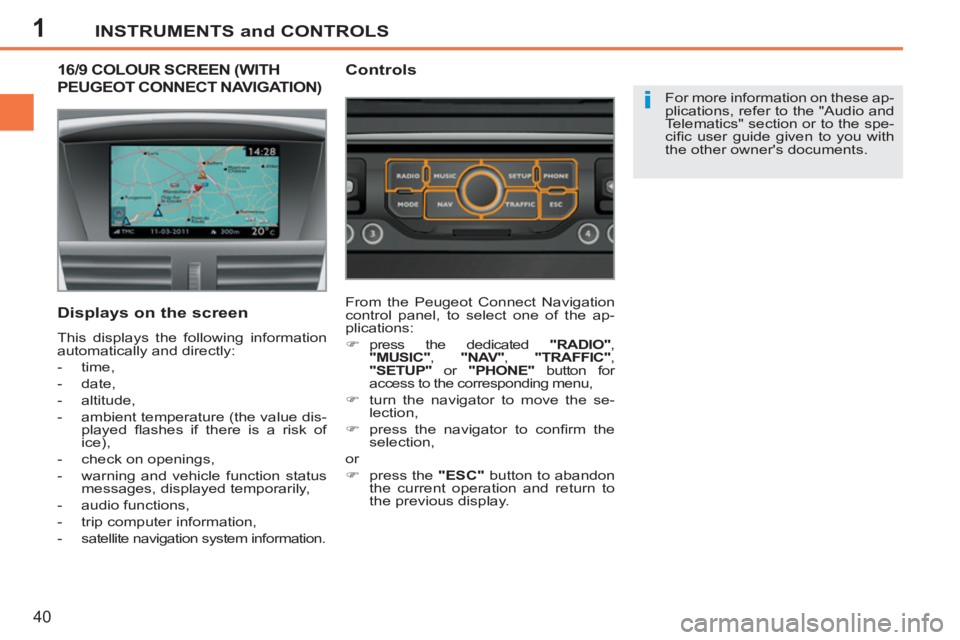
Controls
From the Peugeot Connect Navigation
control panel, to select one of the ap-
plications:
)
press the dedicated "RADIO"
,
"MUSIC"
, "NAV"
, "TRAFFIC"
,
"SETUP"
or "PHONE"
button for
access to the corresponding menu,
)
turn the navigator to move the se-
lection,
)
press the navigator to confi rm the
selection,
or
)
press the "ESC"
button to abandon
the current operation and return to
the previous display.
Page 71 of 248
3
i
ACCESS
69
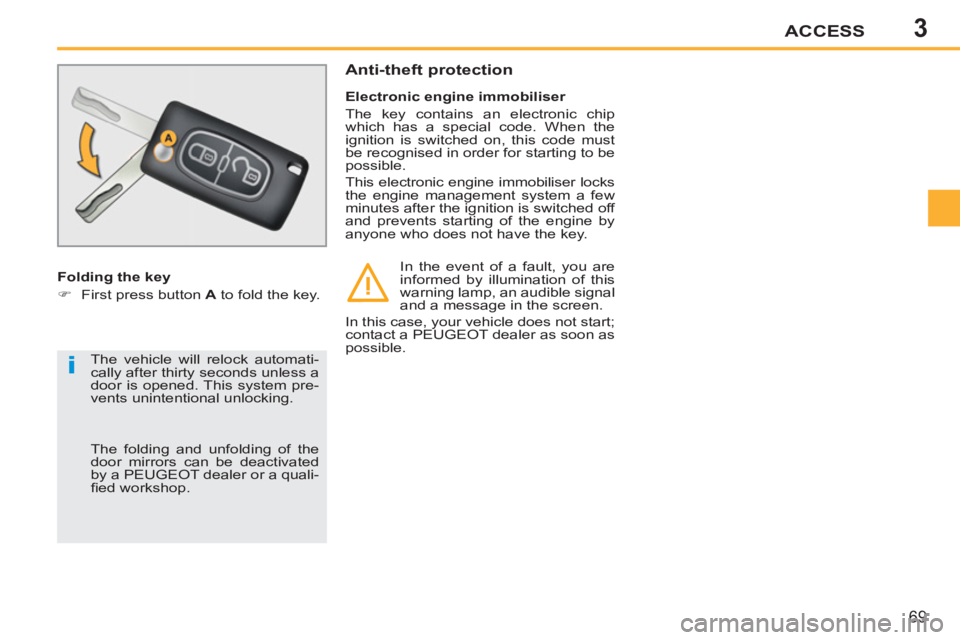
Folding the key
)
First press button A
to fold the key.
Electronic engine immobiliser
The key contains an electronic chip
which has a special code. When the
ignition is switched on, this code must
be recognised in order for starting to be
possible.
This electronic engine immobiliser locks
the engine management system a few
minutes after the ignition is switched off
and prevents starting of the engine by
anyone who does not have the key.
Anti-theft protection
In the event of a fault, you are
informed by illumination of this
warning lamp, an audible signal
and a message in the screen.
In this case, your vehicle does not start;
contact a PEUGEOT dealer as soon as
possible.
The vehicle will relock automati-
cally after thirty seconds unless a
door is opened. This system pre-
vents unintentional unlocking.
The folding and unfolding of the
door mirrors can be deactivated
by a PEUGEOT dealer or a quali-
fi ed workshop.
Page 72 of 248
3
i
ACCESS
70
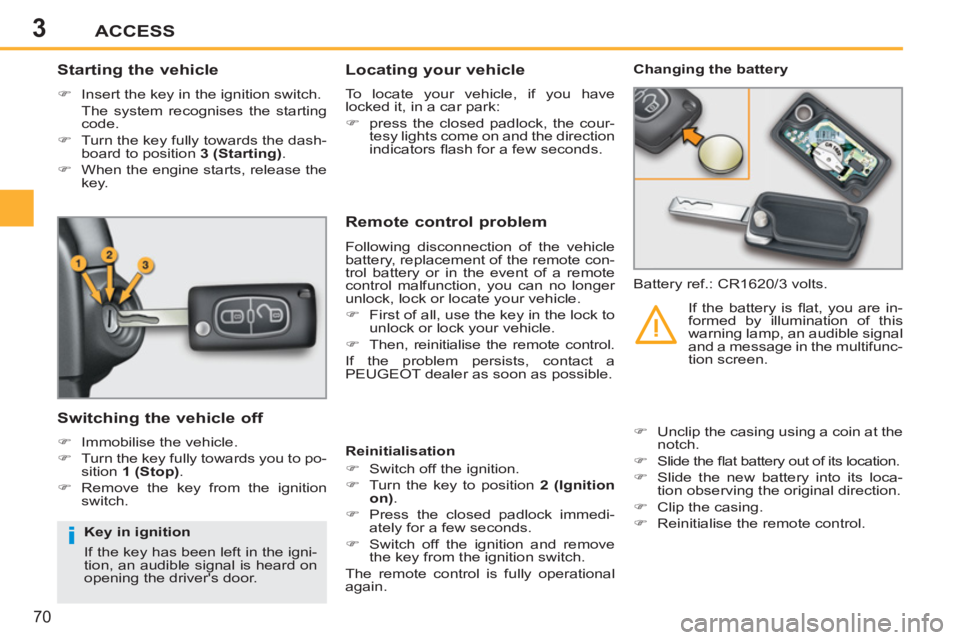
Starting the vehicle
)
Insert the key in the ignition switch.
The system recognises the starting
code.
)
Turn the key fully towards the dash-
board to position 3 (Starting)
.
)
When the engine starts, release the
key.
Switching the vehicle off
)
Immobilise the vehicle.
)
Turn the key fully towards you to po-
sition 1 (Stop)
.
)
Remove the key from the ignition
switch.
Remote control problem
Following disconnection of the vehicle
battery, replacement of the remote con-
trol battery or in the event of a remote
control malfunction, you can no longer
unlock, lock or locate your vehicle.
)
First of all, use the key in the lock to
unlock or lock your vehicle.
)
Then, reinitialise the remote control.
If the problem persists, contact a
PEUGEOT dealer as soon as possible.
Changing the battery
Battery ref.: CR1620/3 volts.
Reinitialisation
)
Switch off the ignition.
)
Turn the key to position 2 (Ignition
on)
.
)
Press the closed padlock immedi-
ately for a few seconds.
)
Switch off the ignition and remove
the key from the ignition switch.
The remote control is fully operational
again.
)
Unclip the casing using a coin at the
notch.
)
Slide the fl at battery out of its location.
)
Slide the new battery into its loca-
tion observing the original direction.
)
Clip the casing.
)
Reinitialise the remote control.
If the battery is fl at, you are in-
formed by illumination of this
warning lamp, an audible signal
and a message in the multifunc-
tion screen.
Locating your vehicle
To locate your vehicle, if you have
locked it, in a car park:
)
press the closed padlock, the cour-
tesy lights come on and the direction
indicators fl ash for a few seconds.
Key in ignition
If the key has been left in the igni-
tion, an audible signal is heard on
opening the driver's door.
Page 76 of 248
3ACCESS
74
DOORS
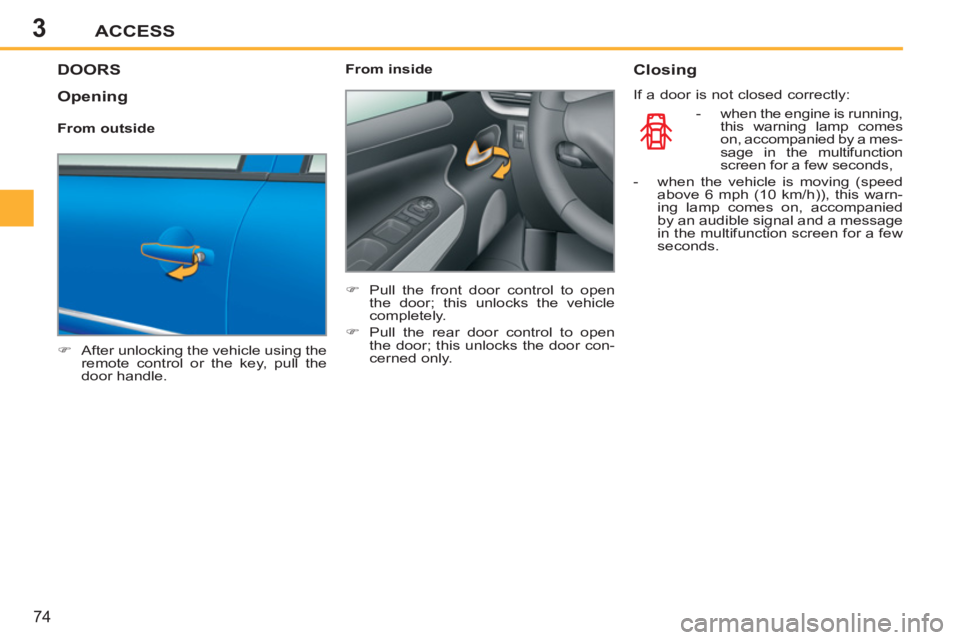
)
After unlocking the vehicle using the
remote control or the key, pull the
door handle.
From inside
)
Pull the front door control to open
the door; this unlocks the vehicle
completely.
)
Pull the rear door control to open
the door; this unlocks the door con-
cerned only.
Closing
If a door is not closed correctly:
- when the engine is running,
this warning lamp comes
on, accompanied by a mes-
sage in the multifunction
screen for a few seconds,
- when the vehicle is moving (speed
above 6 mph (10 km/h)), this warn-
ing lamp comes on, accompanied
by an audible signal and a message
in the multifunction screen for a few
seconds.
Opening
From outside
Page 78 of 248
3ACCESS
76
Emergency control
System which locks or unlocks the
doors mechanically in the event of a
malfunction of the central locking.
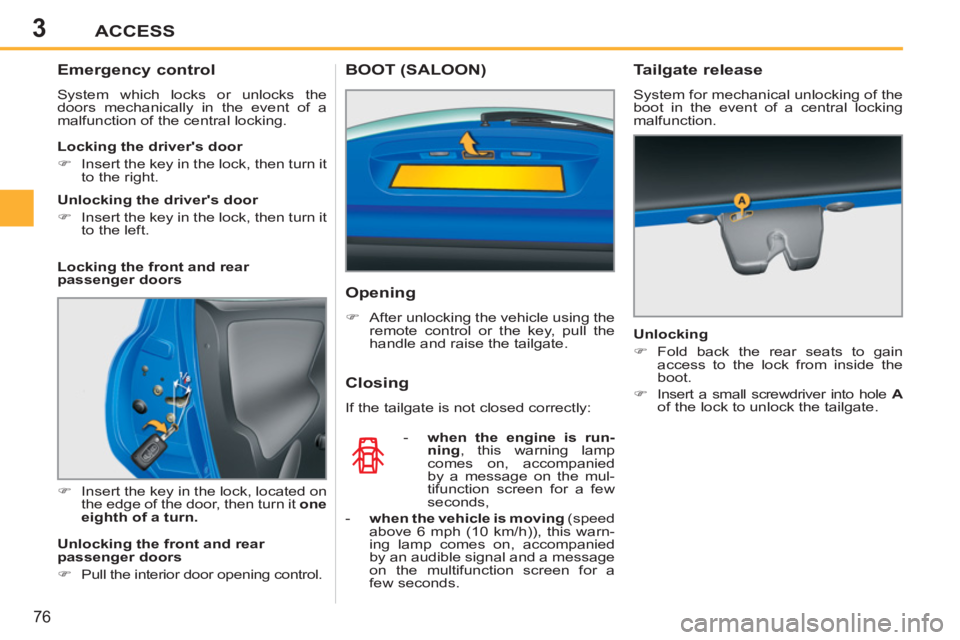
)
Insert the key in the lock, located on
the edge of the door, then turn it one
eighth of a turn.
Locking the driver's door
)
Insert the key in the lock, then turn it
to the right.
Unlocking the driver's door
)
Insert the key in the lock, then turn it
to the left.
Locking the front and rear
passenger doors
Unlocking the front and rear
passenger doors
)
Pull the interior door opening control.
- when the engine is run-
ning
, this warning lamp
comes on, accompanied
by a message on the mul-
tifunction screen for a few
seconds,
- when the vehicle is moving
(speed
above 6 mph (10 km/h)), this warn-
ing lamp comes on, accompanied
by an audible signal and a message
on the multifunction screen for a
few seconds.
Tailgate release
System for mechanical unlocking of the
boot in the event of a central locking
malfunction.
Unlocking
)
Fold back the rear seats to gain
access to the lock from inside the
boot.
)
Insert a small screwdriver into hole A
of the lock to unlock the tailgate.
Opening
)
After unlocking the vehicle using the
remote control or the key, pull the
handle and raise the tailgate.
BOOT (SALOON)
Closing
If the tailgate is not closed correctly:
Page 79 of 248
3ACCESS
77
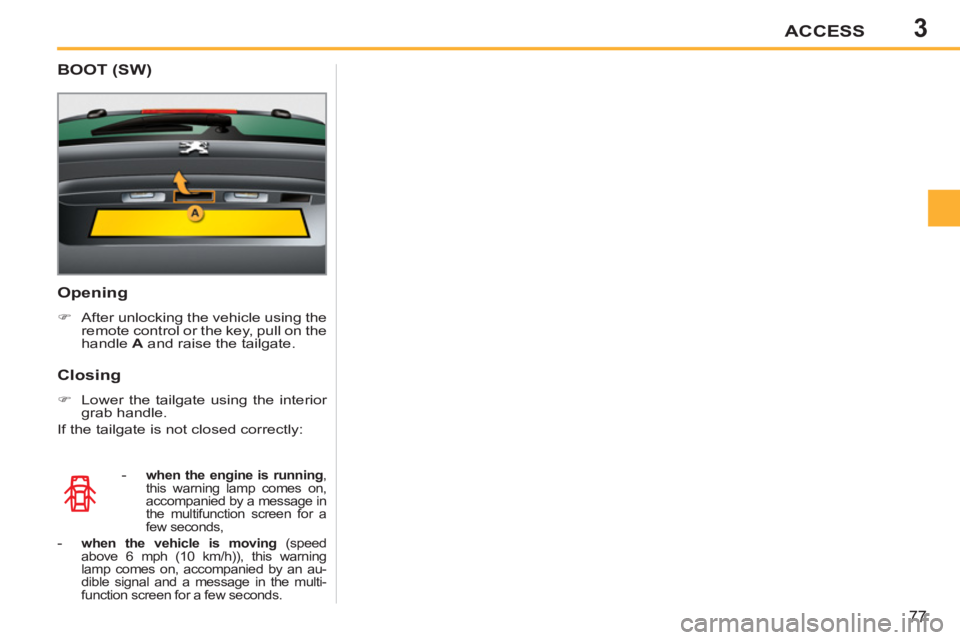
Opening
)
After unlocking the vehicle using the
remote control or the key, pull on the
handle A
and raise the tailgate.
-
when the engine is running
,
this warning lamp comes on,
accompanied by a message in
the multifunction screen for a
few seconds,
- when the vehicle is moving
(speed
above 6 mph (10 km/h)), this warning
lamp comes on, accompanied by an au-
dible signal and a message in the multi-
function screen for a few seconds.
Closing
)
Lower the tailgate using the interior
grab handle.
If the tailgate is not closed correctly:
BOOT (SW)
Page 81 of 248
3
i
ACCESS
79
The key cannot be removed from
the lock until the cap is refi tted. FUEL TANK
Fuel tank capacity: approximately
50 litres (petrol) or 48 litres (Diesel).
Opening the fi ller cap may create a
noise caused by an inrush of air. This
vacuum is entirely normal, resulting
from the sealing of the fuel system.
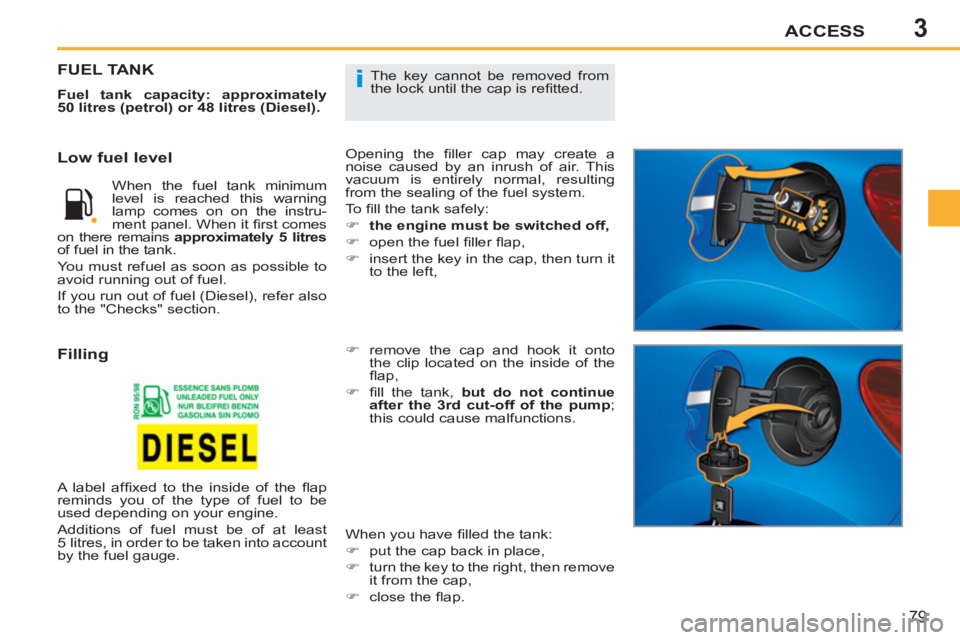
To fi ll the tank safely:
)
the engine must be switched off,
)
open the fuel fi ller fl ap,
)
insert the key in the cap, then turn it
to the left,
When you have fi lled the tank:
)
put the cap back in place,
)
turn the key to the right, then remove
it from the cap,
)
close the fl ap.
)
remove the cap and hook it onto
the clip located on the inside of the
fl ap,
)
fi ll the tank, but do not continue
after the 3rd cut-off of the pump
;
this could cause malfunctions.
Low fuel level
Filling
When the fuel tank minimum
level is reached this warning
lamp comes on on the instru-
ment panel. When it fi rst comes
on there remains approximately 5 litres
of fuel in the tank.
You must refuel as soon as possible to
avoid running out of fuel.
If you run out of fuel (Diesel), refer also
to the "Checks" section.
A label affi xed to the inside of the fl ap
reminds you of the type of fuel to be
used depending on your engine.
Additions of fuel must be of at least
5 litres, in order to be taken into account
by the fuel gauge.
Page 86 of 248
4
!
84
VISIBILITY
In fog or snow, the sunshine sen-
sor may detect suffi cient light.
Therefore, the lighting will not
come on automatically.
Do not cover the sunshine sen-
sor, coupled with the rain sensor
and located in the centre of the
windscreen behind the rear view
mirror; the associated functions
would no longer be controlled.
Coupling with the "Guide-me-home"
lighting
Association with the automatic illumination of
headlamps provides the "guide-me-home"
lighting with the following additional options:
- selection of the lighting duration to 15, 30
or 60 seconds in the vehicle parameters
in the multifunction screen confi guration
menu,
- automatic activation of "guide-me-home"
lighting when automatic illumination of
headlamps is in operation.
Automatic illumination
of headlamps
The sidelamps and dipped beam head-
lamps are switched on automatically,
without any action on the part of the
driver, when a low level of external light
is detected (sensor behind the rear view
mirror) or when the windscreen wipers
are switched on.
As soon as the brightness returns to a
suffi cient level or after the windscreen
wipers are switched off, the lighting is
switched off automatically.
"Guide-me-home" lighting
The dipped headlamps remain on tem-
porarily, after switching off the vehicle's
ignition, to make the driver's exit easier
in poor light.
Activation
)
With the ignition off, activate a
"headlamp fl ash" using stalk B
.
)
A second "headlamp fl ash" switches
the function off again.
Switching off
The "guide-me-home" lighting is switched
off automatically following the door lock-
ing command, after a given time.
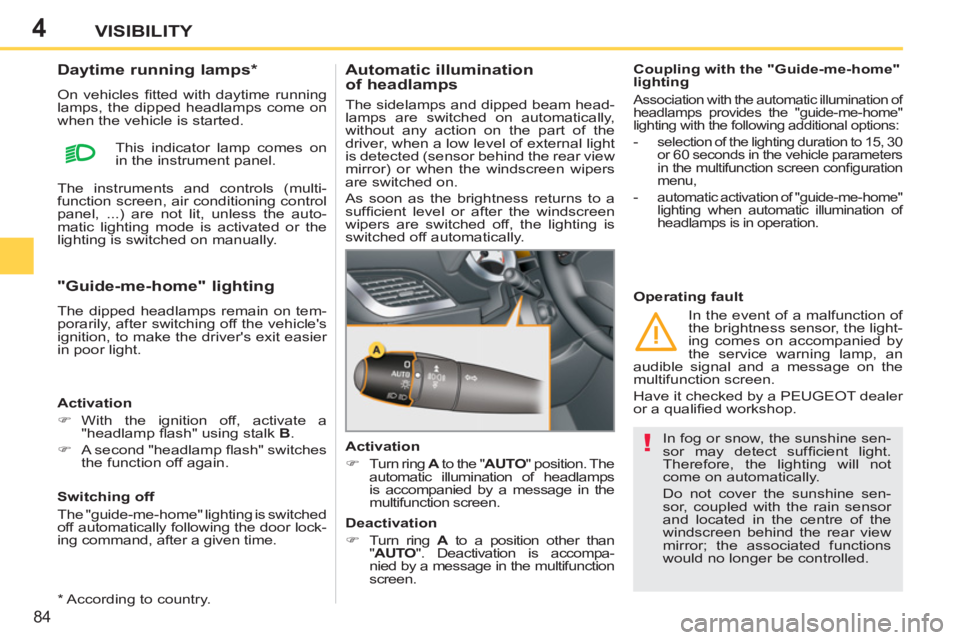
Activation
)
Turn ring A
to the " AUTO
" position. The
automatic illumination of headlamps
is accompanied by a message in the
multifunction screen.
Operating fault
In the event of a malfunction of
the brightness sensor, the light-
ing comes on accompanied by
the service warning lamp, an
audible signal and a message on the
multifunction screen.
Have it checked by a PEUGEOT dealer
or a qualifi ed workshop.
Daytime running lamps *
On vehicles fi tted with daytime running
lamps, the dipped headlamps come on
when the vehicle is started.
This indicator lamp comes on
in the instrument panel.
The instruments and controls (multi-
function screen, air conditioning control
panel, ...) are not lit, unless the auto-
matic lighting mode is activated or the
lighting is switched on manually.
Deactivation
)
Turn ring A
to a position other than
" AUTO
". Deactivation is accompa-
nied by a message in the multifunction
screen.
*
According to country.
Page 104 of 248
6
i
SAFETY
102
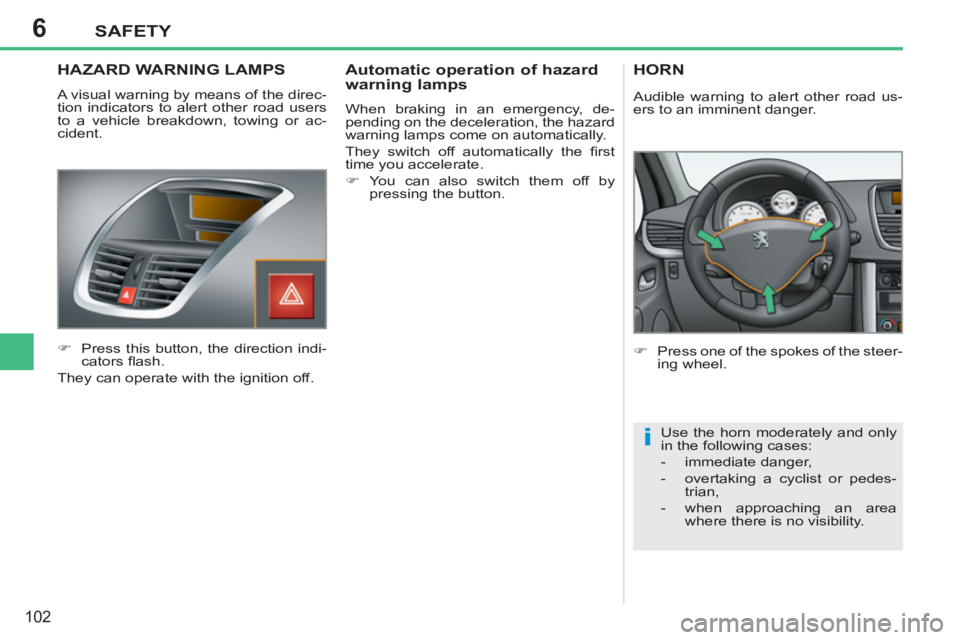
HAZARD WARNING LAMPS
A visual warning by means of the direc-
tion indicators to alert other road users
to a vehicle breakdown, towing or ac-
cident.
)
Press this button, the direction indi-
cators fl ash.
They can operate with the ignition off.
Automatic operation of hazard
warning lamps
When braking in an emergency, de-
pending on the deceleration, the hazard
warning lamps come on automatically.
They switch off automatically the fi rst
time you accelerate.
)
You can also switch them off by
pressing the button.
HORN
)
Press one of the spokes of the steer-
ing wheel.
Use the horn moderately and only
in the following cases:
- immediate danger,
- overtaking a cyclist or pedes-
trian,
- when approaching an area
where there is no visibility.
Audible warning to alert other road us-
ers to an imminent danger.