ad blue Peugeot 207 CC 2014 User Guide
[x] Cancel search | Manufacturer: PEUGEOT, Model Year: 2014, Model line: 207 CC, Model: Peugeot 207 CC 2014Pages: 232, PDF Size: 11.11 MB
Page 195 of 232
193
207CC_EN_CHAP11B_RNEG_ED01-2014
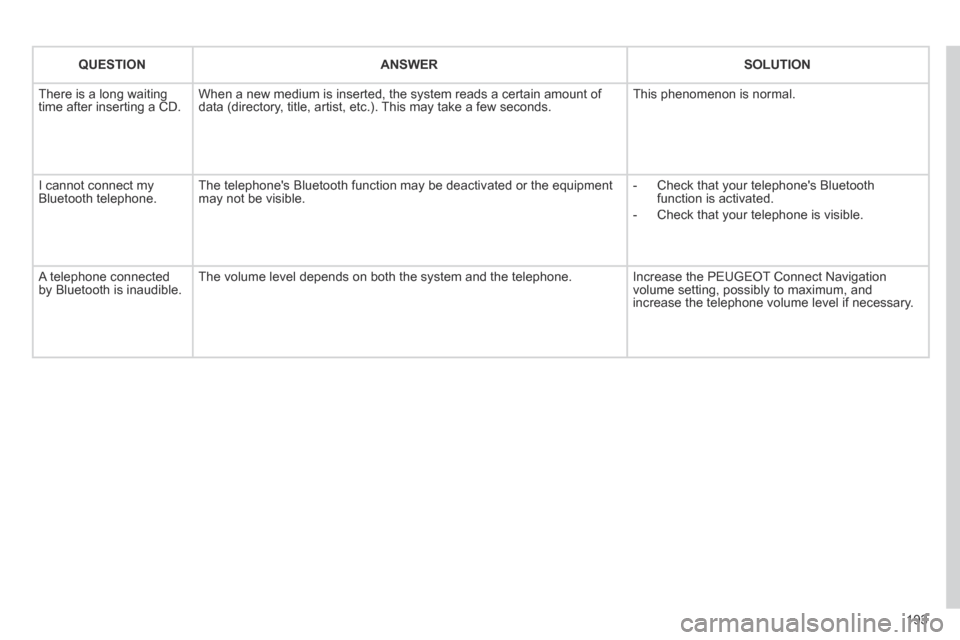
QUESTIONANSWERSOLUTION
There is a long waiting time after inserting a CD. When a new medium is inserted, the system reads a certain amount of data (directory, title, artist, etc.). This may take a few seconds. This phenomenon is normal.
I cannot connect my Bluetooth telephone. The telephone's Bluetooth function may be deactivated or the equipment may not be visible. - Check that your telephone's Bluetooth function is activated.
- Check that your telephone is visible.
A telephone connected by Bluetooth is inaudible. The volume level depends on both the system and the telephone. Increase the PEUGEOT Connect Navigation volume setting, possibly to maximum, and increase the telephone volume level if necessary.
Page 197 of 232
195
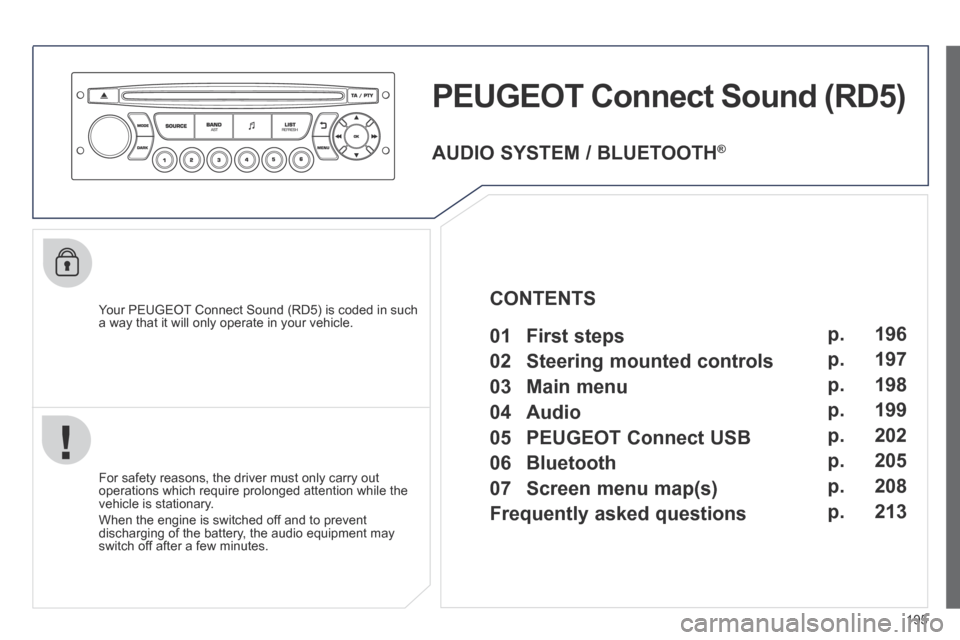
PEUGEOT Connect Sound (RD5)
Your PEUGEOT Connect Sound (RD5) is coded in such a way that it will only operate in your vehicle.
For safety reasons, the driver must only carry out operations which require prolonged attention while the vehicle is stationary.
When the engine is switched off and to prevent discharging of the battery, the audio equipment may switch off after a few minutes.
AUDIO SYSTEM / BLUETOOTH ®
01 First steps
02 Steering mounted controls
03 Main menu
04 Audio
05 PEUGEOT Connect USB
06 Bluetooth
07 Screen menu map(s)
Frequently asked questions p.
p.
p.
p.
p.
p.
p.
p.
196
197
198
199
202
205
208
213
CONTENTS
Page 200 of 232
198
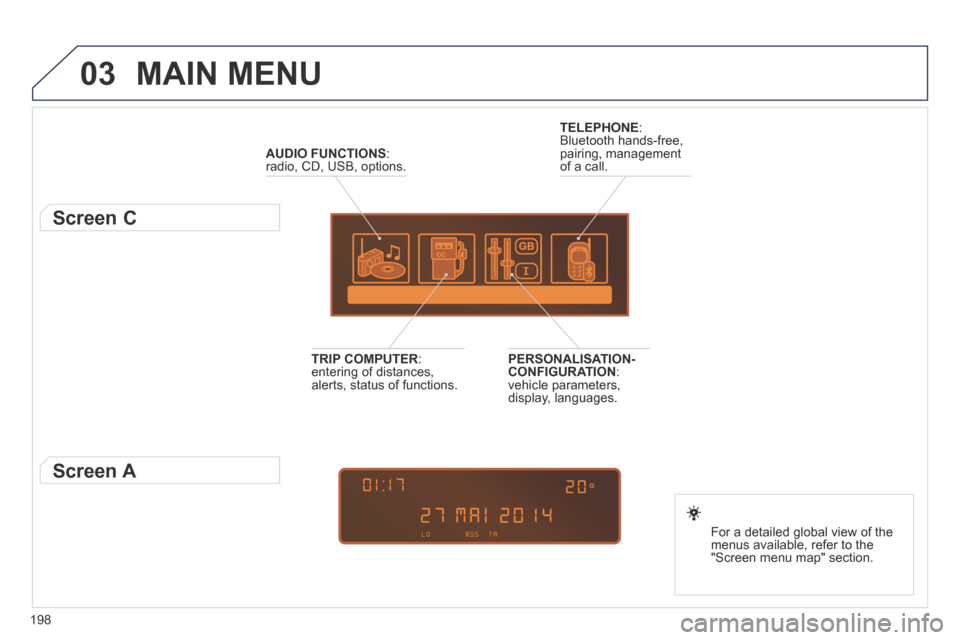
03 MAIN MENU
AUDIO FUNCTIONS : radio, CD, USB, options.
Screen C
For a detailed global view of the menus available, refer to the "Screen menu map" section.
TELEPHONE : Bluetooth hands-free, pairing, management of a call.
PERSONALISATION-CONFIGURATION : vehicle parameters, display, languages.
TRIP COMPUTER : entering of distances, alerts, status of functions.
Screen A
Page 207 of 232
205
06
1
2
3
4
5
6
7
8
9
MENU
OK
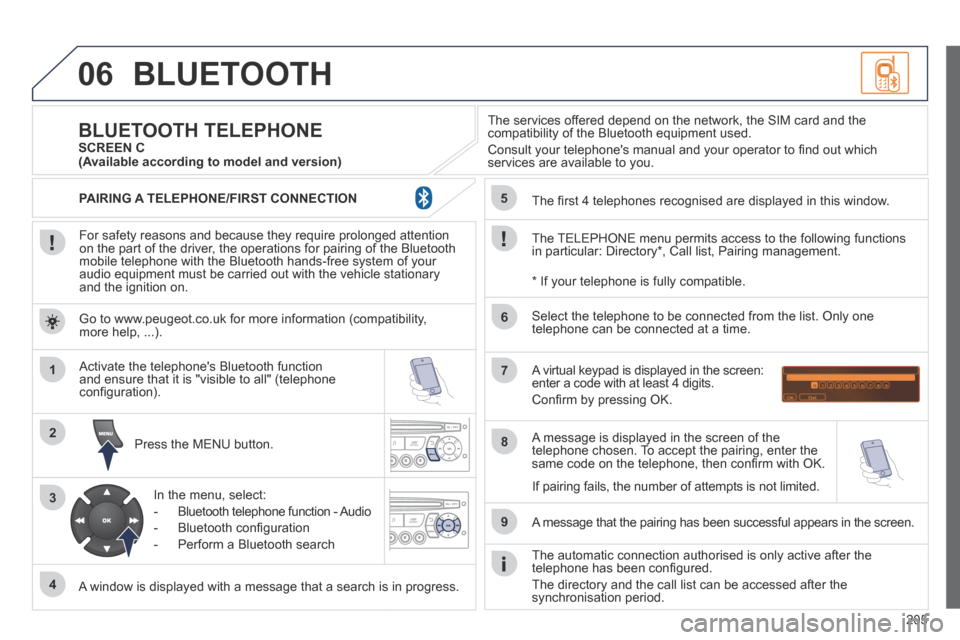
BLUETOOTH
For safety reasons and because they require prolonged attention on the part of the driver, the operations for pairing of the Bluetooth mobile telephone with the Bluetooth hands-free system of your audio equipment must be carried out with the vehicle stationary and the ignition on.
Press the MENU button.
A window is displayed with a message that a search is in progress.
Activate the telephone's Bluetooth function and ensure that it is "visible to all" (telephone confi guration).
In the menu, select:
- Bluetooth telephone function - Audio
- Bluetooth confi guration
- Perform a Bluetooth search
The services offered depend on the network, the SIM card and the compatibility of the Bluetooth equipment used.
Consult your telephone's manual and your operator to fi nd out which services are available to you.
BLUETOOTH TELEPHONE SCREEN C
The TELEPHONE menu permits access to the following functions in particular: Directory * , Call list, Pairing management.
The fi rst 4 telephones recognised are displayed in this window.
A virtual keypad is displayed in the screen: enter a code with at least 4 digits.
Confi rm by pressing OK.
A message that the pairing has been successful appears in the screen.
Select the telephone to be connected from the list. Only one telephone can be connected at a time.
A message is displayed in the screen of the telephone chosen. To accept the pairing, enter the same code on the telephone, then confi rm with OK.
The automatic connection authorised is only active after the telephone has been confi gured.
The directory and the call list can be accessed after the synchronisation period.
(Available according to model and version)
* If your telephone is fully compatible.
If pairing fails, the number of attempts is not limited.
Go to www.peugeot.co.uk for more information (compatibility, more help, ...).
PAIRING A TELEPHONE/FIRST CONNECTION
Page 208 of 232
206
06
1
2
1
2
1
OK
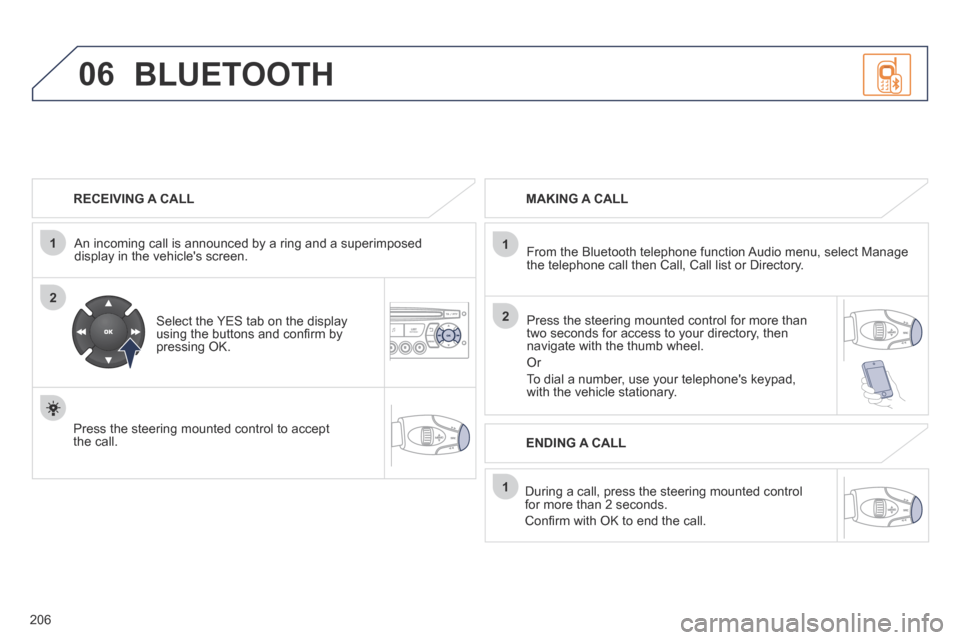
RECEIVING A CALL
An incoming call is announced by a ring and a superimposed display in the vehicle's screen.
Select the YES tab on the display using the buttons and confi rm by pressing OK.
Press the steering mounted control to accept the call.
MAKING A CALL
From the Bluetooth telephone function Audio menu, select Manage the telephone call then Call, Call list or Directory.
Press the steering mounted control for more than two seconds for access to your directory, then navigate with the thumb wheel.
Or
To dial a number, use your telephone's keypad, with the vehicle stationary.
During a call, press the steering mounted control for more than 2 seconds.
Confi rm with OK to end the call.
BLUETOOTH
ENDING A CALL
Page 209 of 232
207
1
2
3
SOURCE
06
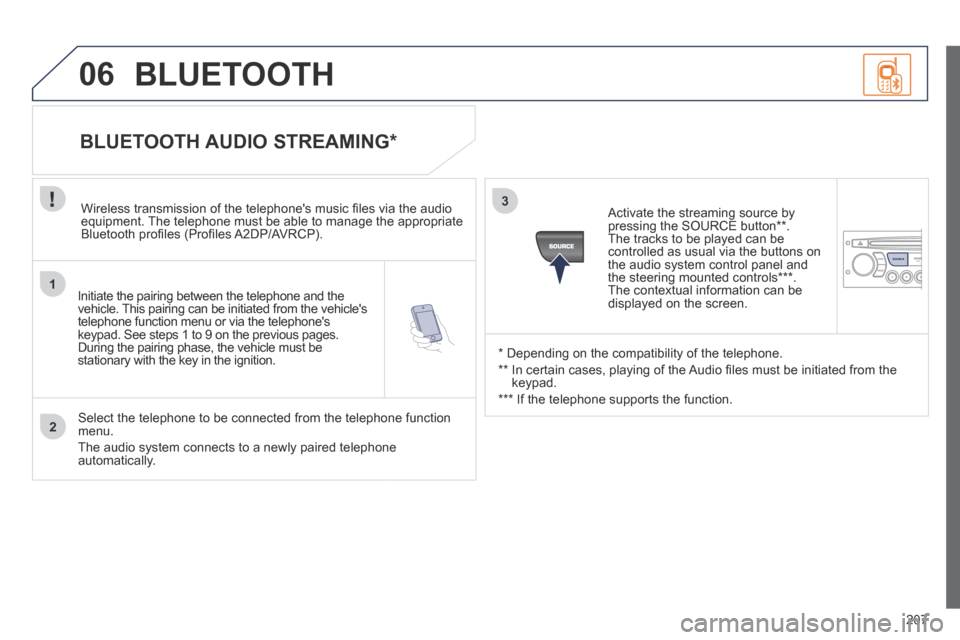
Initiate the pairing between the telephone and the vehicle. This pairing can be initiated from the vehicle's telephone function menu or via the telephone's keypad. See steps 1 to 9 on the previous pages. During the pairing phase, the vehicle must be stationary with the key in the ignition.
Select the telephone to be connected from the telephone function menu.
The audio system connects to a newly paired telephone automatically.
BLUETOOTH AUDIO STREAMING *
Wireless transmission of the telephone's music fi les via the audio equipment. The telephone must be able to manage the appropriate Bluetooth profi les (Profi les A2DP/AVRCP).
* Depending on the compatibility of the telephone.
** In certain cases, playing of the Audio fi les must be initiated from the keypad.
*** If the telephone supports the function.
Activate the streaming source by pressing the SOURCE button ** . The tracks to be played can be controlled as usual via the buttons on the audio system control panel and the steering mounted controls *** . The contextual information can be displayed on the screen.
BLUETOOTH
Page 214 of 232
212
07 SCREEN MENU MAP(S)
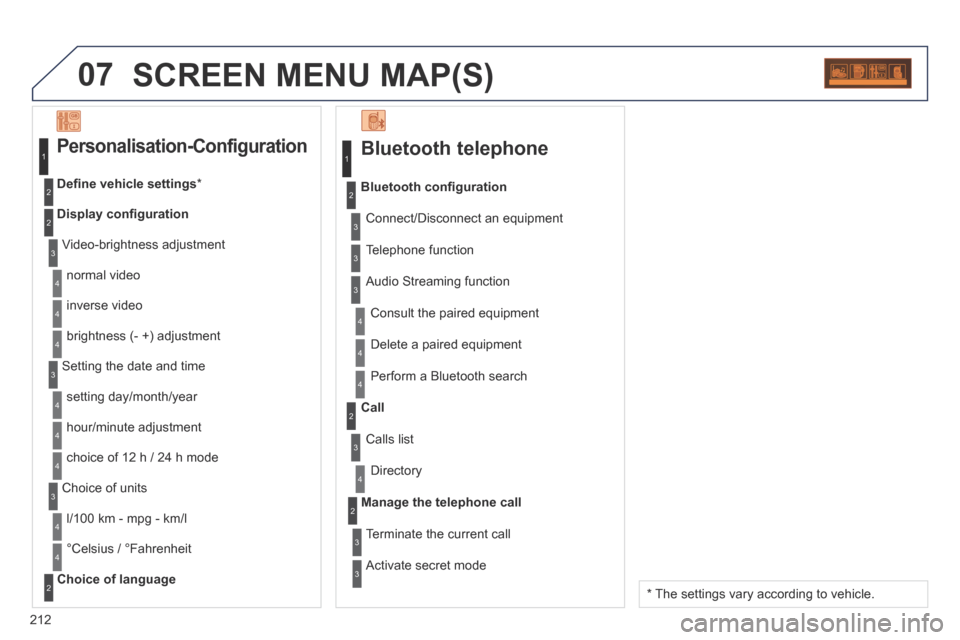
Bluetooth telephone
Connect/Disconnect an equipment
Consult the paired equipment
Bluetooth confi guration
Telephone function
Audio Streaming function
Delete a paired equipment
Perform a Bluetooth search
Calls list
Call
Directory
Terminate the current call
Manage the telephone call
Activate secret mode
1
2
3
3
3
4
4
4
2
3
4
2
3
3
Video-brightness adjustment
Display confi guration
Defi ne vehicle settings *
Personalisation-Configuration
normal video
inverse video
brightness (- +) adjustment
Setting the date and time
setting day/month/year
hour/minute adjustment
choice of 12 h / 24 h mode
Choice of units
l/100 km - mpg - km/l
°Celsius / °Fahrenheit
Choice of language
1
2
4
3
2
4
4
3
4
4
2
3
4
4
4
* The settings vary according to vehicle.
Page 215 of 232
213
FREQUENTLY ASKED QUESTIONS
QUESTIONANSWERSOLUTION
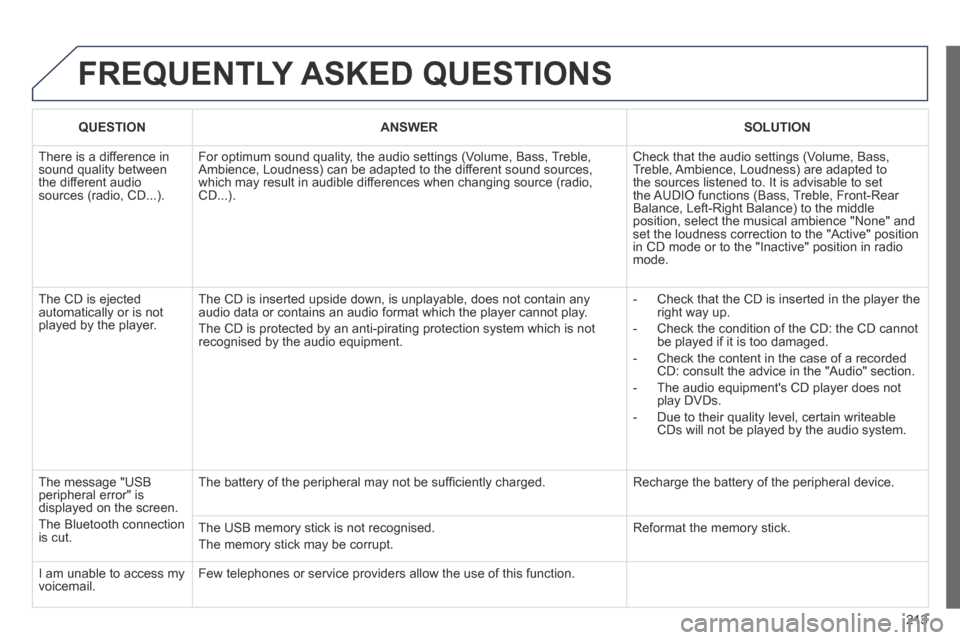
There is a difference in sound quality between the different audio sources (radio, CD...).
For optimum sound quality, the audio settings (Volume, Bass, Treble, Ambience, Loudness) can be adapted to the different sound sources, which may result in audible differences when changing source (radio, CD...).
Check that the audio settings (Volume, Bass, Treble, Ambience, Loudness) are adapted to the sources listened to. It is advisable to set the AUDIO functions (Bass, Treble, Front-Rear Balance, Left-Right Balance) to the middle position, select the musical ambience "None" and set the loudness correction to the "Active" position in CD mode or to the "Inactive" position in radio mode.
The CD is ejected automatically or is not played by the player.
The CD is inserted upside down, is unplayable, does not contain any audio data or contains an audio format which the player cannot play.
The CD is protected by an anti-pirating protection system which is not recognised by the audio equipment.
- Check that the CD is inserted in the player the right way up.
- Check the condition of the CD: the CD cannot be played if it is too damaged.
- Check the content in the case of a recorded CD: consult the advice in the "Audio" section.
- The audio equipment's CD player does not play DVDs.
- Due to their quality level, certain writeable CDs will not be played by the audio system.
The message "USB peripheral error" is displayed on the screen.
The Bluetooth connection is cut.
The battery of the peripheral may not be suffi ciently charged. Recharge the battery of the peripheral device.
The USB memory stick is not recognised.
The memory stick may be corrupt.
Reformat the memory stick.
I am unable to access my voicemail. Few telephones or service providers allow the use of this function.
Page 221 of 232
219
ALPHABETICAL INDEX
207CC_EN_CHAP13_INDEX ALPHA_ED01-2014
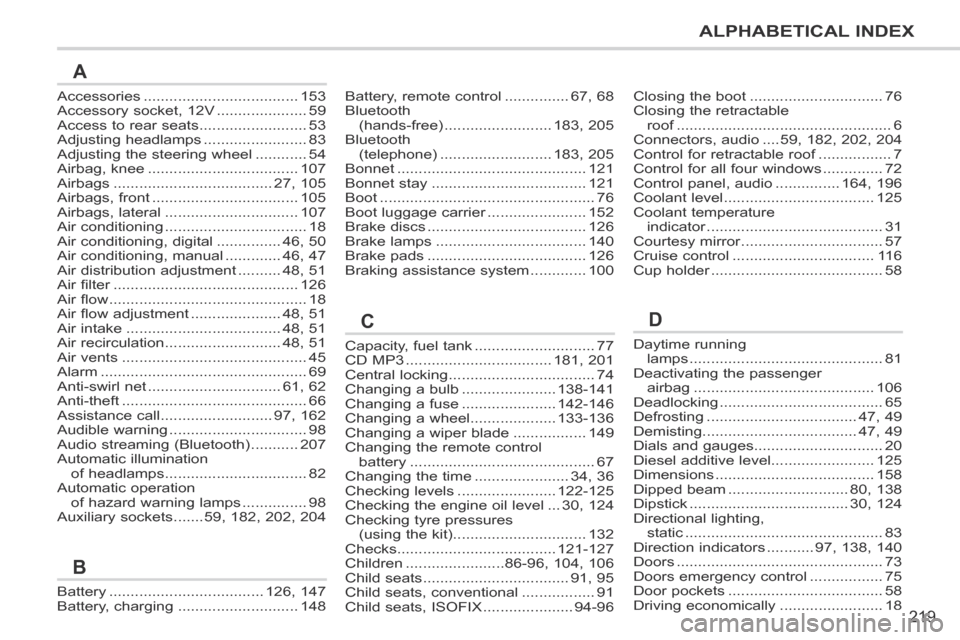
Accessories ....................................153Accessory socket, 12V .....................59Access to rear seats .........................53Adjusting headlamps ........................83Adjusting the steering wheel ............54Airbag, knee ...................................107Airbags .....................................27, 105Airbags, front ..................................105Airbags, lateral ...............................107Air conditioning .................................18Air conditioning, digital ...............46, 50Air conditioning, manual .............46, 47Air distribution adjustment ..........48, 51Air filter ...........................................Air filter ...........................................Air filter126Air flow ..............................................18Air flow adjustment .....................48, 51Air intake ....................................48, 51Air recirculation ...........................48, 51Air vents ...........................................45Alarm ................................................69Anti-swirl net ...............................61, 62Anti-theft ...........................................66Assistance call ..........................97, 162Audible warning ................................98Audio streaming (Bluetooth) ...........207Automatic illumination of headlamps .................................82Automatic operation of hazard warning lamps ...............98Auxiliary sockets .......59, 182, 202, 204
Capacity, fuel tank ............................77CD MP3 ..................................181, 201Central locking ..................................74Changing a bulb ......................138-141Changing a fuse ......................142-146Changing a wheel....................133-136Changing a wiper blade .................149Changing the remote control battery ...........................................67Changing the time ......................34, 36Checking levels .......................122-125Checking the engine oil level ...30, 124Checking tyre pressures (using the kit) ...............................132Checks.....................................121-127Children .......................86-96, 104, 106Child seats ..................................91, 95Child seats, conventional .................91 Child seats, ISOFIX .....................94-96
Daytime running lamps .............................................81Deactivating the passenger airbag ..........................................106Deadlocking ......................................65Defrosting ...................................47, 49Demisting....................................47, 49Dials and gauges..............................20Diesel additive level........................125Dimensions .....................................158Dipped beam ............................80, 138Dipstick .....................................30, 124Directional lighting, static ..............................................83Direction indicators ...........97, 138, 140Doors ................................................73Doors emergency control .................75Door pockets ....................................58 Driving economically ........................18
Closing the boot ...............................76Closing the retractable roof ..................................................roof ..................................................roof6Connectors, audio ....59, 182, 202, 204Control for retractable roof .................Control for retractable roof .................Control for retractable roof7Control for all four windows ..............72Control panel, audio ...............164, 196Coolant level ...................................125Coolant temperature indicator .........................................indicator .........................................indicator31Courtesy mirror .................................Courtesy mirror .................................Courtesy mirror57Cruise control .................................11 6Cup holder ........................................Cup holder ........................................Cup holder58
Battery, remote control ...............67, 68Bluetooth (hands-free) .........................183, 205Bluetooth (telephone) ..........................183, 205Bonnet ............................................121Bonnet stay ....................................121Boot ..................................................76Boot luggage carrier .......................Boot luggage carrier .......................Boot luggage carrier152Brake discs .....................................126Brake lamps ...................................140Brake pads .....................................126Braking assistance system .............100
Battery ....................................126, 147Battery, charging ............................148
A
B
CD