service Peugeot 207 CC 2014 Owner's Guide
[x] Cancel search | Manufacturer: PEUGEOT, Model Year: 2014, Model line: 207 CC, Model: Peugeot 207 CC 2014Pages: 232, PDF Size: 11.11 MB
Page 177 of 232
175
04
207CC_EN_CHAP11B_RNEG_ED01-2014
NAVIGATION - GUIDANCE
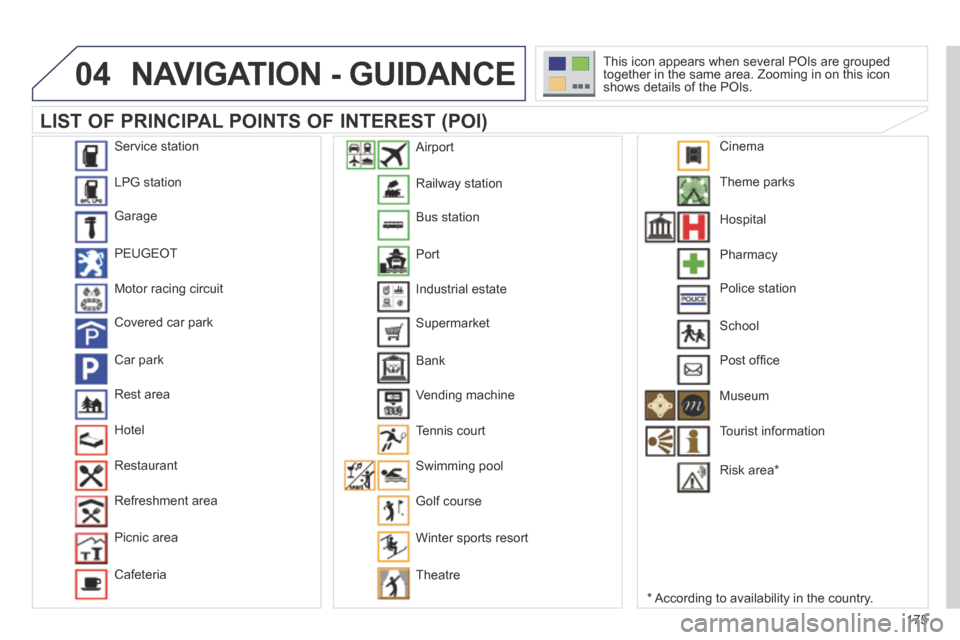
LIST OF PRINCIPAL POINTS OF INTEREST (POI)
* According to availability in the country.
This icon appears when several POIs are grouped together in the same area. Zooming in on this icon shows details of the POIs.
Service station
LPG station
Garage
PEUGEOT
Motor racing circuit
Covered car park
Car park
Rest area
Hotel
Restaurant
Refreshment area
Picnic area
Cafeteria
Railway station
Bus station
Port
Industrial estate
Supermarket
Bank
Vending machine
Tennis court
Swimming pool
Golf course
Winter sports resort
Theatre
Airport
Theme parks
Hospital
Pharmacy
Police station
School
Post offi ce
Museum
Tourist information
Risk area *
Cinema
Page 185 of 232
183
08
1
2
3
4
207CC_EN_CHAP11B_RNEG_ED01-2014
BLUETOOTH TELEPHONE
* The services available depend on the network, the SIM card and the compatibility of the Bluetooth telephone used. Check the telephone manual and with your network provider for details of the services available to you.
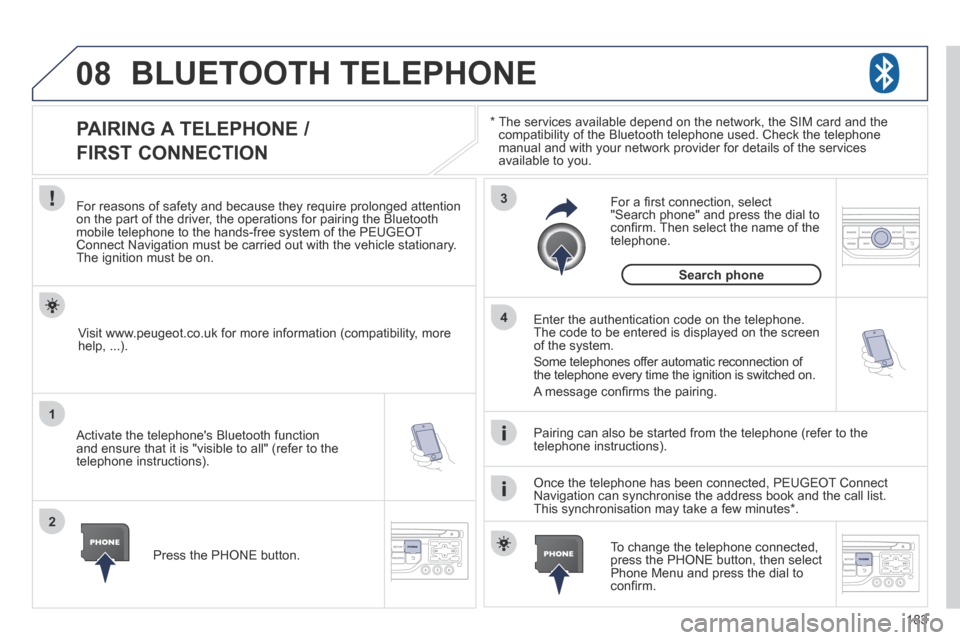
PAIRING A TELEPHONE /
FIRST CONNECTION
For reasons of safety and because they require prolonged attention on the part of the driver, the operations for pairing the Bluetooth mobile telephone to the hands-free system of the PEUGEOT Connect Navigation must be carried out with the vehicle stationary. The ignition must be on.
Activate the telephone's Bluetooth function and ensure that it is "visible to all" (refer to the telephone instructions).
Enter the authentication code on the telephone. The code to be entered is displayed on the screen of the system.
Some telephones offer automatic reconnection of the telephone every time the ignition is switched on.
A message confi rms the pairing.
To change the telephone connected, press the PHONE button, then select Phone Menu and press the dial to confi rm.
Once the telephone has been connected, PEUGEOT Connect Navigation can synchronise the address book and the call list. This synchronisation may take a few minutes * .
Pairing can also be started from the telephone (refer to the telephone instructions).
Visit www.peugeot.co.uk for more information (compatibility, more help, ...).
Press the PHONE button.
For a fi rst connection, select "Search phone" and press the dial to confi rm. Then select the name of the telephone.
Search phone
Page 186 of 232
184
08
1
2
2
1
207CC_EN_CHAP11B_RNEG_ED01-2014
* The services available depend on the network, the SIM card and the compatibility of the Bluetooth telephone used. Check the telephone manual and with your network provider for details of the services available to you.
BLUETOOTH TELEPHONE
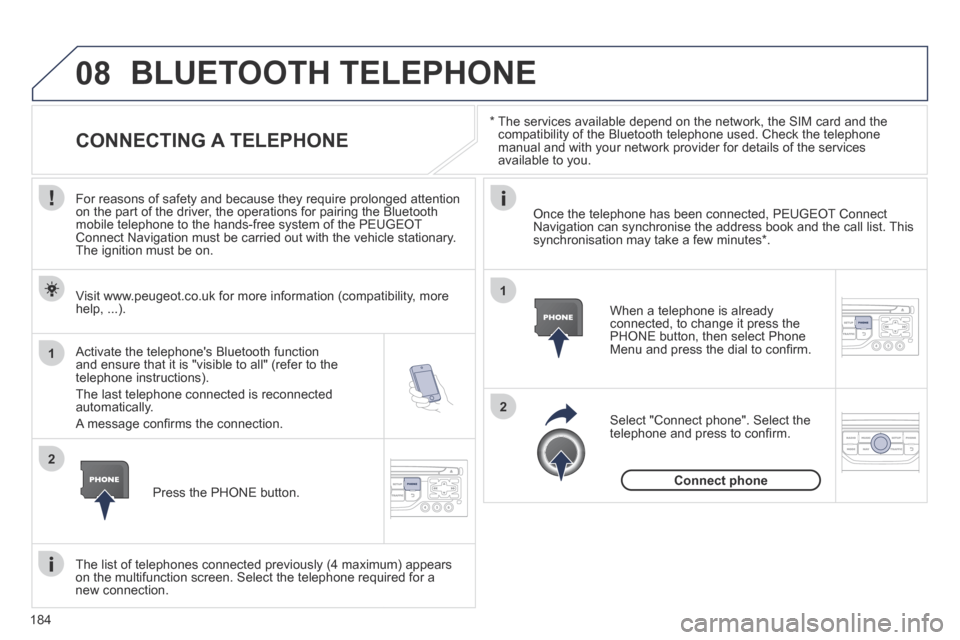
CONNECTING A TELEPHONE
For reasons of safety and because they require prolonged attention on the part of the driver, the operations for pairing the Bluetooth mobile telephone to the hands-free system of the PEUGEOT Connect Navigation must be carried out with the vehicle stationary. The ignition must be on.
Activate the telephone's Bluetooth function and ensure that it is "visible to all" (refer to the telephone instructions).
The last telephone connected is reconnected automatically.
A message confi rms the connection.
When a telephone is already connected, to change it press the PHONE button, then select Phone Menu and press the dial to confi rm.
Once the telephone has been connected, PEUGEOT Connect Navigation can synchronise the address book and the call list. This synchronisation may take a few minutes * .
The list of telephones connected previously (4 maximum) appears on the multifunction screen. Select the telephone required for a new connection.
Visit www.peugeot.co.uk for more information (compatibility, more help, ...).
Press the PHONE button.
Select "Connect phone". Select the telephone and press to confi rm.
Connect phone
Page 207 of 232
205
06
1
2
3
4
5
6
7
8
9
MENU
OK
BLUETOOTH
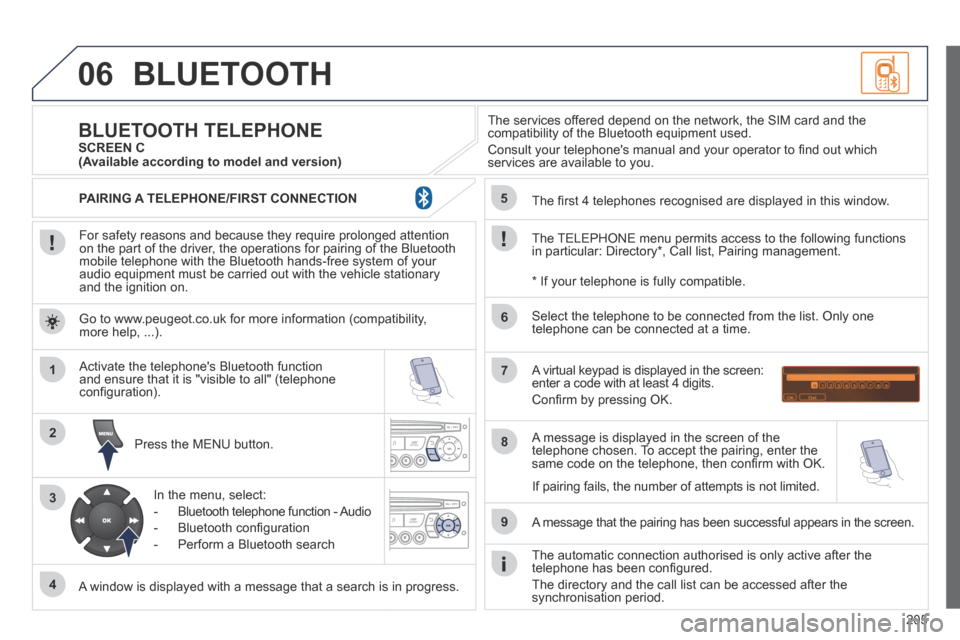
For safety reasons and because they require prolonged attention on the part of the driver, the operations for pairing of the Bluetooth mobile telephone with the Bluetooth hands-free system of your audio equipment must be carried out with the vehicle stationary and the ignition on.
Press the MENU button.
A window is displayed with a message that a search is in progress.
Activate the telephone's Bluetooth function and ensure that it is "visible to all" (telephone confi guration).
In the menu, select:
- Bluetooth telephone function - Audio
- Bluetooth confi guration
- Perform a Bluetooth search
The services offered depend on the network, the SIM card and the compatibility of the Bluetooth equipment used.
Consult your telephone's manual and your operator to fi nd out which services are available to you.
BLUETOOTH TELEPHONE SCREEN C
The TELEPHONE menu permits access to the following functions in particular: Directory * , Call list, Pairing management.
The fi rst 4 telephones recognised are displayed in this window.
A virtual keypad is displayed in the screen: enter a code with at least 4 digits.
Confi rm by pressing OK.
A message that the pairing has been successful appears in the screen.
Select the telephone to be connected from the list. Only one telephone can be connected at a time.
A message is displayed in the screen of the telephone chosen. To accept the pairing, enter the same code on the telephone, then confi rm with OK.
The automatic connection authorised is only active after the telephone has been confi gured.
The directory and the call list can be accessed after the synchronisation period.
(Available according to model and version)
* If your telephone is fully compatible.
If pairing fails, the number of attempts is not limited.
Go to www.peugeot.co.uk for more information (compatibility, more help, ...).
PAIRING A TELEPHONE/FIRST CONNECTION
Page 215 of 232
213
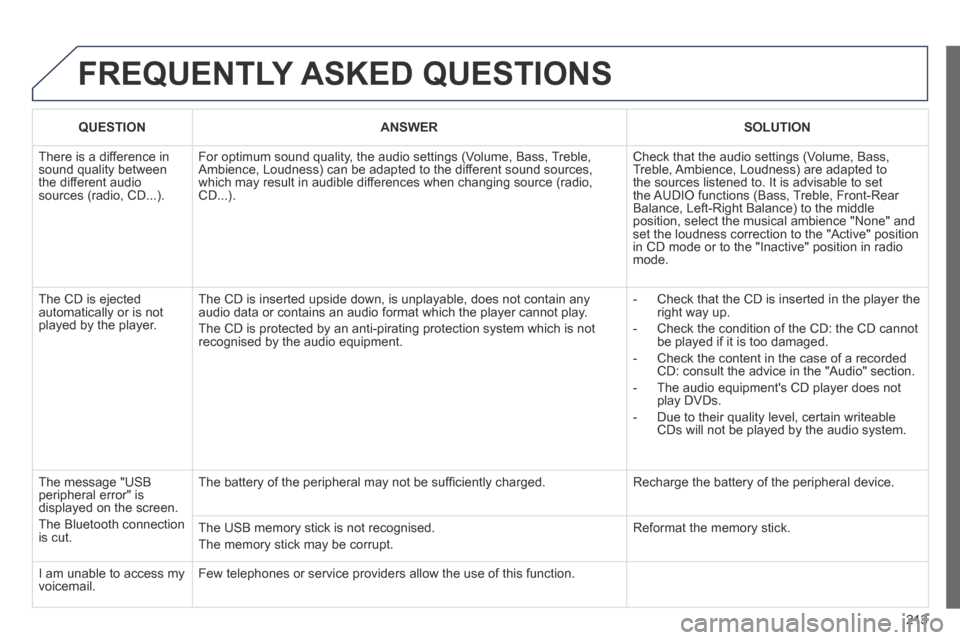
FREQUENTLY ASKED QUESTIONS
QUESTIONANSWERSOLUTION
There is a difference in sound quality between the different audio sources (radio, CD...).
For optimum sound quality, the audio settings (Volume, Bass, Treble, Ambience, Loudness) can be adapted to the different sound sources, which may result in audible differences when changing source (radio, CD...).
Check that the audio settings (Volume, Bass, Treble, Ambience, Loudness) are adapted to the sources listened to. It is advisable to set the AUDIO functions (Bass, Treble, Front-Rear Balance, Left-Right Balance) to the middle position, select the musical ambience "None" and set the loudness correction to the "Active" position in CD mode or to the "Inactive" position in radio mode.
The CD is ejected automatically or is not played by the player.
The CD is inserted upside down, is unplayable, does not contain any audio data or contains an audio format which the player cannot play.
The CD is protected by an anti-pirating protection system which is not recognised by the audio equipment.
- Check that the CD is inserted in the player the right way up.
- Check the condition of the CD: the CD cannot be played if it is too damaged.
- Check the content in the case of a recorded CD: consult the advice in the "Audio" section.
- The audio equipment's CD player does not play DVDs.
- Due to their quality level, certain writeable CDs will not be played by the audio system.
The message "USB peripheral error" is displayed on the screen.
The Bluetooth connection is cut.
The battery of the peripheral may not be suffi ciently charged. Recharge the battery of the peripheral device.
The USB memory stick is not recognised.
The memory stick may be corrupt.
Reformat the memory stick.
I am unable to access my voicemail. Few telephones or service providers allow the use of this function.
Page 223 of 232
221
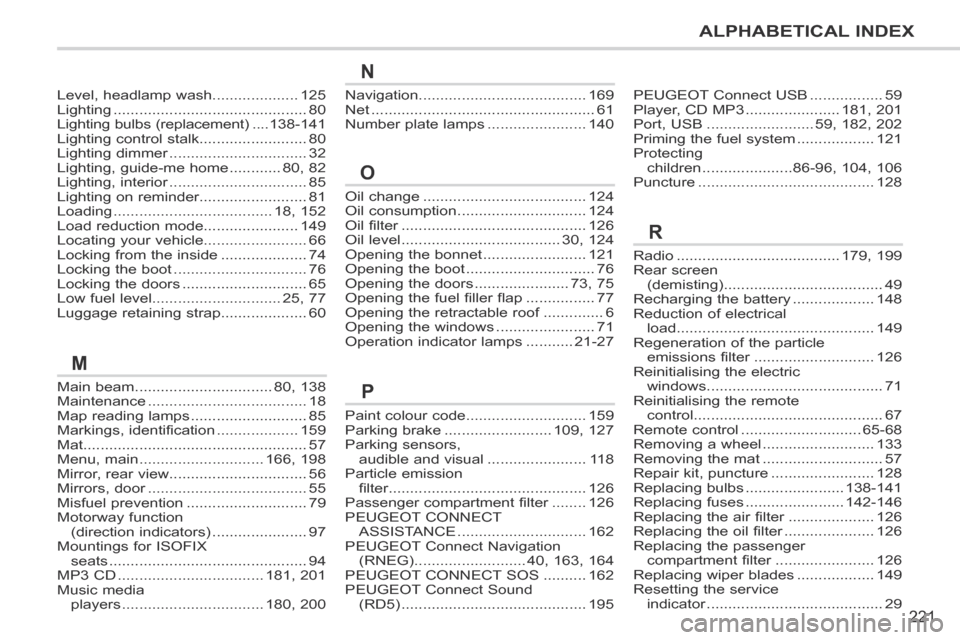
ALPHABETICAL INDEX
207CC_EN_CHAP13_INDEX ALPHA_ED01-2014
Main beam ................................80, 138Maintenance .....................................18Map reading lamps ...........................85Markings, identification ...................159Mat....................................................57Menu, main .............................166, 198Mirror, rear view ................................56Mirrors, door .....................................Mirrors, door .....................................Mirrors, door55Misfuel prevention ............................79Motorway function (direction indicators) ......................97Mountings for ISOFIX seats ..............................................94MP3 CD ..................................181, 201Music media players .................................180, 200
Oil change ......................................124Oil consumption ..............................124Oil filter ...........................................Oil filter ...........................................Oil filter126Oil level .....................................30, 124Opening the bonnet ........................121Opening the boot ..............................76Opening the doors ......................73, 75Opening the fuel filler flap ................77Opening the retractable roof ..............Opening the retractable roof ..............Opening the retractable roof6Opening the windows .......................71Operation indicator lamps ...........21-27
Paint colour code............................159Parking brake .........................109, 127Parking sensors, audible and visual .......................11 8Particle emission filter ..............................................filter ..............................................filter126Passenger compartment filter ........Passenger compartment filter ........Passenger compartment filter126PEUGEOT CONNECT ASSISTANCE ..............................162PEUGEOT Connect Navigation (RNEG) ..........................40, 163, 164PEUGEOT CONNECT SOS ..........162PEUGEOT Connect Sound (RD5) ...........................................195
M
O
P
N
Level, headlamp wash....................125Lighting .............................................80Lighting bulbs (replacement) ....138-141Lighting control stalk.........................80Lighting dimmer ................................Lighting dimmer ................................Lighting dimmer32Lighting, guide-me home ............80, 82Lighting, interior ................................Lighting, interior ................................Lighting, interior85Lighting on reminder.........................81Loading .....................................18, 152Load reduction mode......................149Locating your vehicle........................66Locking from the inside ....................74Locking the boot ...............................76Locking the doors .............................65Low fuel level..............................25, 77Luggage retaining strap....................60
Navigation.......................................169Net ....................................................61Number plate lamps .......................140
PEUGEOT Connect USB .................59Player, CD MP3 ......................181, 201Port, USB .........................59, 182, 202Priming the fuel system ..................121Protecting children .....................86-96, 104, 106Puncture .........................................128
Radio ......................................179, 199Rear screen (demisting) .....................................49Recharging the battery ...................148Reduction of electrical load ..............................................149Regeneration of the particle emissions filter ............................emissions filter ............................emissions filter126Reinitialising the electric windows .........................................71Reinitialising the remote control ............................................67Remote control ............................65-68Removing a wheel ..........................133Removing the mat ............................57Repair kit, puncture ........................128Replacing bulbs .......................138-141Replacing fuses .......................142-146Replacing the air filter ....................Replacing the air filter ....................Replacing the air filter126Replacing the oil filter .....................Replacing the oil filter .....................Replacing the oil filter126Replacing the passenger compartment filter .......................compartment filter .......................compartment filter126Replacing wiper blades ..................149Resetting the service indicator .........................................indicator .........................................indicator29
R
Page 224 of 232
222
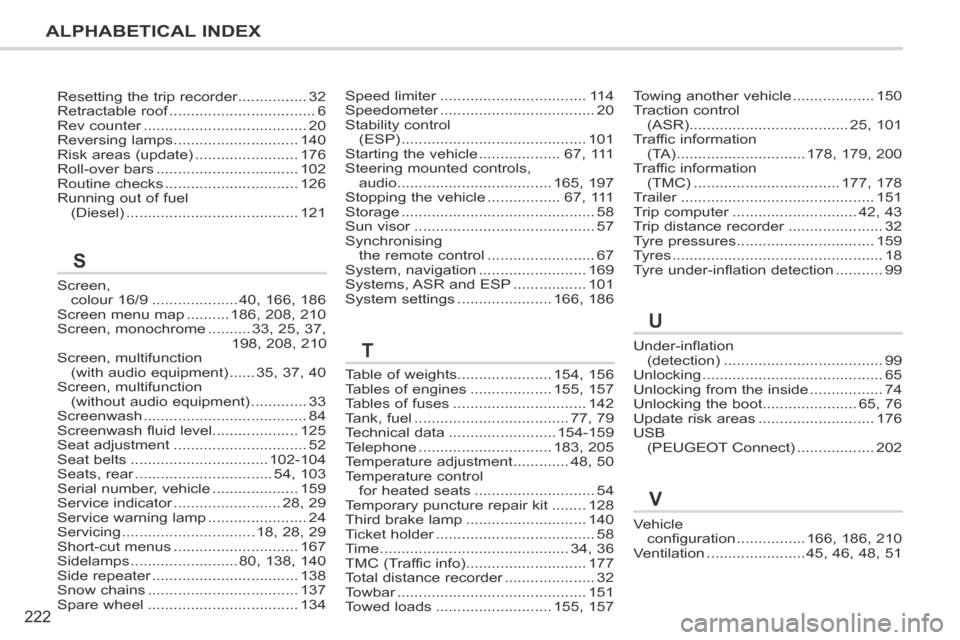
ALPHABETICAL INDEX
207CC_EN_CHAP13_INDEX ALPHA_ED01-2014
Speed limiter ..................................Speed limiter ..................................Speed limiter11 4Speedometer ....................................Speedometer ....................................Speedometer20Stability control (ESP) ...........................................101Starting the vehicle ...................67, 111Steering mounted controls, audio ....................................165, 197Stopping the vehicle .................67, 111Storage .............................................58Sun visor ..........................................Sun visor ..........................................Sun visor57Synchronising the remote control .........................67System, navigation .........................169Systems, ASR and ESP .................101System settings ......................166, 186
Under-inflation (detection) .....................................99Unlocking ..........................................65Unlocking from the inside .................74Unlocking the boot......................65, 76Update risk areas ...........................176USB (PEUGEOT Connect) ..................202
Vehicle configuration ................166, 186, 210Ventilation .......................45, 46, 48, 51
Towing another vehicle ...................150Traction control (ASR) .....................................25, 101Traffic information (TA) ..............................178, 179, 200Traffic information (TMC) ..................................177, 178Trailer .............................................Trailer .............................................Trailer151Trip computer .............................Trip computer .............................Trip computer42, 43Trip distance recorder ......................Trip distance recorder ......................Trip distance recorder32Tyre pressures ................................159Tyres .................................................18Tyre under-inflation detection ...........99
Table of weights......................154, 156Tables of engines ...................155, 157Tables of fuses ...............................142Tank, fuel ....................................77, 79Technical data .........................154-159Telephone ...............................183, 205Temperature adjustment .............48, 50Temperature control for heated seats ............................54Temporary puncture repair kit ........128Third brake lamp ............................140Ticket holder .....................................Ticket holder .....................................Ticket holder58Time ............................................34, 36TMC (Traffic info) ............................177Total distance recorder .....................Total distance recorder .....................Total distance recorder32Towbar ............................................Towbar ............................................Towbar151Towed loads ...........................155, 157
T
U
V
Screen, colour 16/9 ....................40, 166, 186Screen menu map ..........186, 208, 210Screen, monochrome ..........33, 25, 37,198, 208, 210Screen, multifunction (with audio equipment) ......35, 37, 40Screen, multifunction (without audio equipment) .............33Screenwash ......................................84Screenwash fluid level....................125Seat adjustment ...............................52Seat belts ................................102-104Seats, rear ................................Seats, rear ................................Seats, rear54, 103Serial number, vehicle ....................159Service indicator .........................Service indicator .........................Service indicator28, 29Service warning lamp .......................24Servicing ...............................18, 28, 29Short-cut menus .............................167Sidelamps .........................80, 138, 140Side repeater ..................................Side repeater ..................................Side repeater138Snow chains ...................................137Spare wheel ...................................134
S
Resetting the trip recorder ................Resetting the trip recorder ................Resetting the trip recorder32Retractable roof ..................................Retractable roof ..................................Retractable roof6Rev counter ......................................Rev counter ......................................Rev counter20Reversing lamps .............................140Risk areas (update) ........................176Roll-over bars .................................102Routine checks ...............................126Running out of fuel (Diesel) ........................................121